 Red Hat Summit
2.4. Templating
for loops and if statements in the kickstart files. This is achieved using the cheetah tool.
- Reusing a particular section of a kickstart, such as a disk partitioning section, between multiple kickstarts.
- Performing some
%postactions consistently across multiple kickstarts. - Defining a snippet across multiple server roles such as DNS server, proxy server, and web server. For example, a web server might have the following snippet defined:
httpd
mod_ssl
mod_python
httpd
mod_ssl
mod_python
Copy to Clipboard Copied! Toggle word wrap Toggle overflow To create a web server profile, include the web server snippet in the%packagesection of the kickstart file. For a profile to be both a web server and a proxy server, include both snippets in the package section. To add another package to the web server snippet,mod_perlfor example, update the snippet, and all profiles that are using that snippet are dynamically updated.
Templating allows the defining of a variable to be used throughout a kickstart file. Variables are subject to a form of inheritance that allows them to be set at one level and overridden at levels below them. So, if a variable is defined at the system level, it will override the same variable defined at the profile or kickstart tree levels. Likewise, if a variable is defined at the profile level, it will override the same variable defined at the kickstart tree level.
Note
Snippets reuse pieces of code between multiple kickstart templates. They can span many lines, and include variables. They can be included in a kickstart profile by using the text $SNIPPET('snippet_name'). A snippet can be made for a package list, for a %post script, or for any text that would normally be included in a kickstart file.
/var/lib/cobbler/snippets/. There is a template from a wizard-style kickstart located in /var/lib/rhn/kickstarts/wizard/, which explains the different default snippets and how they are used.
redhat_register snippet is a default snippet that is used to register machines to a RHN Satellite server as part of a kickstart. It uses a variable called redhat_management_key to register the machine. To use the snippet, set the redhat_management_key variable at either the system, profile, or distribution level and then add $SNIPPET('redhat_register') to a %post section of the kickstart. Any wizard-style kickstarts that are generated by the RHN Satellite server will already include this snippet in the %post section.
/var/lib/rhn/kickstarts/snippets/ directory. RHN Satellite stores snippets for different organizations in different directories, so custom snippets will be stored with a filename similar to the following, where 1 is the organization ID:
$SNIPPET('spacewalk/1/snippet_name')
$SNIPPET('spacewalk/1/snippet_name')
Note
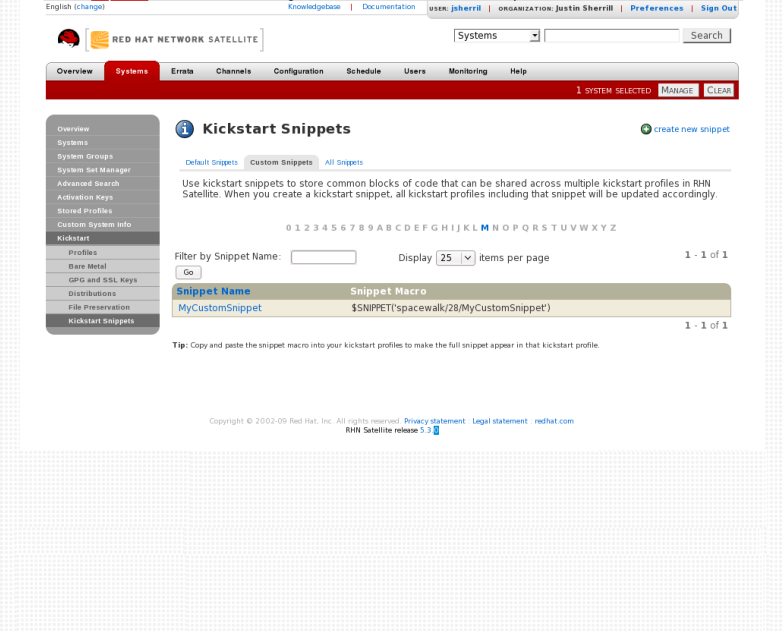
Figure 2.3. Kickstart Snippets
The $ and # characters are used during templating for specifying variables and control flow. If these characters are needed for any other purpose in a script, they will need to be escaped so that they are not recognized as a variable. This can be achieved in several ways:
- Placing a backslash character (
\) before every instance of$or#that needs to be ignored during templating. - Wrap the entire script in
#raw ... #end rawAll%preand%postscripts created using the wizard-style kickstarts are wrapped with#raw...#end rawby default. This can be toggled using the Template checkbox available when editing a%postor%prescript. - Include
#errorCatcher Echoin the first line of the snippet.
Example 2.1. Escaping Special Characters in templates
%post section:
%post
echo $foo > /tmp/foo.txt
%post
echo $foo > /tmp/foo.txt
$ being escaped, the templating engine will try to find a variable named $foo and would fail because foo does not exist as a variable.
$ is by using a backslash character (\):
%post
echo \$foo > /tmp/foo.txt
%post
echo \$foo > /tmp/foo.txt
\$foo to be rendered as $foo.
#raw ... #end raw, as follows
%post
#raw
echo $foo > /tmp/foo.txt
#end raw
%post
#raw
echo $foo > /tmp/foo.txt
#end raw
#errorCatcher Echo in the first line of the kickstart template. This instructs the templating engine to ignore any variables that do not exist and print out the text as is. This option is already included in the wizard-style kickstarts, and can be included in any raw kickstarts created manually.

'%20d='M201.5%20305.5c-13.8%200-24.9-11.1-24.9-24.6%200-13.8%2011.1-24.9%2024.9-24.9%2013.6%200%2024.6%2011.1%2024.6%2024.9%200%2013.6-11.1%2024.6-24.6%2024.6zM504%20256c0%20137-111%20248-248%20248S8%20393%208%20256%20119%208%20256%208s248%20111%20248%20248zm-132.3-41.2c-9.4%200-17.7%203.9-23.8%2010-22.4-15.5-52.6-25.5-86.1-26.6l17.4-78.3%2055.4%2012.5c0%2013.6%2011.1%2024.6%2024.6%2024.6%2013.8%200%2024.9-11.3%2024.9-24.9s-11.1-24.9-24.9-24.9c-9.7%200-18%205.8-22.1%2013.8l-61.2-13.6c-3-.8-6.1%201.4-6.9%204.4l-19.1%2086.4c-33.2%201.4-63.1%2011.3-85.5%2026.8-6.1-6.4-14.7-10.2-24.1-10.2-34.9%200-46.3%2046.9-14.4%2062.8-1.1%205-1.7%2010.2-1.7%2015.5%200%2052.6%2059.2%2095.2%20132%2095.2%2073.1%200%20132.3-42.6%20132.3-95.2%200-5.3-.6-10.8-1.9-15.8%2031.3-16%2019.8-62.5-14.9-62.5zM302.8%20331c-18.2%2018.2-76.1%2017.9-93.6%200-2.2-2.2-6.1-2.2-8.3%200-2.5%202.5-2.5%206.4%200%208.6%2022.8%2022.8%2087.3%2022.8%20110.2%200%202.5-2.2%202.5-6.1%200-8.6-2.2-2.2-6.1-2.2-8.3%200zm7.7-75c-13.6%200-24.6%2011.1-24.6%2024.9%200%2013.6%2011.1%2024.6%2024.6%2024.6%2013.8%200%2024.9-11.1%2024.9-24.6%200-13.8-11-24.9-24.9-24.9z'/%3e%3c/svg%3e)