 Red Hat Summit
Este contenido no está disponible en el idioma seleccionado.
Chapter 2. Governance
Enterprises must meet internal standards for software engineering, secure engineering, resiliency, security, and regulatory compliance for workloads hosted on private, multi and hybrid clouds. Red Hat Advanced Cluster Management for Kubernetes governance provides an extensible policy framework for enterprises to introduce their own security policies.
2.1. Governance architecture
Enhance the security for your cluster with the Red Hat Advanced Cluster Management for Kubernetes governance lifecycle. The product governance lifecycle is based on defined policies, processes, and procedures to manage security and compliance from a central interface page. View the following diagram of the governance architecture:
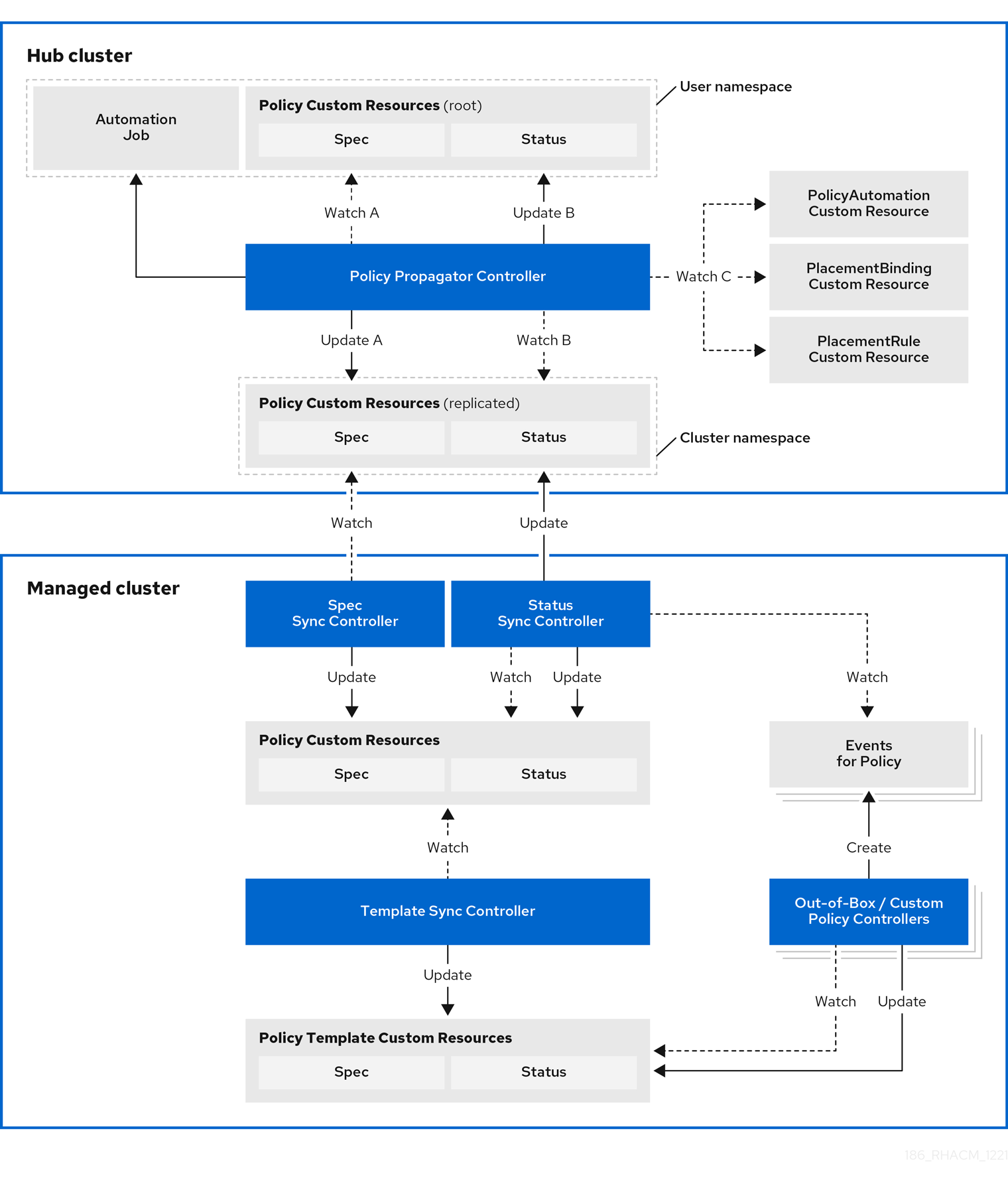
The governance architecture is composed of the following components:
Governance dashboard: Provides a summary of your cloud governance and risk details, which include policy and cluster violations.
Notes:
-
When a policy is propagated to a managed cluster, it is first replicated to the cluster namespace on the hub cluster, and is named and labeled using
namespaceName.policyName. When you create a policy, make sure that the length of thenamespaceName.policyNamedoes not exceed 63 characters due to the Kubernetes length limit for label values. -
When you search for a policy in the hub cluster, you might also receive the name of the replicated policy in the managed cluster namespace. For example, if you search for
policy-dhaz-certin thedefaultnamespace, the following policy name from the hub cluster might also appear in the managed cluster namespace:default.policy-dhaz-cert.
-
When a policy is propagated to a managed cluster, it is first replicated to the cluster namespace on the hub cluster, and is named and labeled using
Policy-based governance framework: Supports policy creation and deployment to various managed clusters based on attributes associated with clusters, such as a geographical region. See the
policy-collectionrepository to view examples of the predefined policies and instructions on deploying policies to your cluster. You can also contribute custom policies to the collection. In addition, when policies are violated automations can be configured to run and take any action that the user chooses. See Configuring Ansible Tower for governance for more information.Use the
policy_governance_infometric to view trends and analyze any policy failures. See Governance metric for more details.- Policy controller: Evaluates one or more policies on the managed cluster against your specified control and generates Kubernetes events for violations. Violations are propagated to the hub cluster. Policy controllers that are included in your installation are the following: Kubernetes configuration, Certificate, and IAM.
-
Open source community: Supports community contributions with a foundation of the Red Hat Advanced Cluster Management policy framework. Policy controllers and third-party policies are also a part of the
stolostron/policy-collectionrepository. Learn how to contribute and deploy policies using GitOps. For more information, see Deploy policies using GitOps. Learn how to integrate third-party policies with Red Hat Advanced Cluster Management for Kubernetes. For more information, see Integrate third-party policy controllers.
Learn about the structure of an Red Hat Advanced Cluster Management for Kubernetes policy framework, and how to use the Red Hat Advanced Cluster Management for Kubernetes Governance dashboard.
2.2. Policy overview
Use the Red Hat Advanced Cluster Management for Kubernetes security policy framework to create and manage policies. Kubernetes custom resource definition (CRD) instances are used to create policies.
Each Red Hat Advanced Cluster Management policy can have at least one or more templates. For more details about the policy elements, view the Policy YAML table section on this page.
The policy requires a PlacementRule or Placement that defines the clusters that the policy document is applied to, and a PlacementBinding that binds the Red Hat Advanced Cluster Management for Kubernetes policy to the placement rule. For more on how to define a PlacementRule, see Placement rules in the Application lifecycle documentation. For more on how to define a Placement see Placement overview in the Cluster lifecycle documentation.
Important:
You must create the
PlacementBindingto bind your policy with either aPlacementRuleor aPlacementin order to propagate the policy to the managed clusters.Best practice: Use the command line interface (CLI) to make updates to the policies when you use the
Placementresource.- You can create a policy in any namespace on the hub cluster except the cluster namespace. If you create a policy in the cluster namespace, it is deleted by Red Hat Advanced Cluster Management for Kubernetes.
- Each client and provider is responsible for ensuring that their managed cloud environment meets internal enterprise security standards for software engineering, secure engineering, resiliency, security, and regulatory compliance for workloads hosted on Kubernetes clusters. Use the governance and security capability to gain visibility and remediate configurations to meet standards.
Learn more details about the policy components in the following sections:
2.2.1. Policy YAML structure
When you create a policy, you must include required parameter fields and values. Depending on your policy controller, you might need to include other optional fields and values. View the following YAML structure for the explained parameter fields:
apiVersion: policy.open-cluster-management.io/v1
kind: Policy
metadata:
  name:
  annotations:
    policy.open-cluster-management.io/standards:
    policy.open-cluster-management.io/categories:
    policy.open-cluster-management.io/controls:
spec:
  policy-templates:
    - objectDefinition:
        apiVersion:
        kind:
        metadata:
          name:
        spec:
  remediationAction:
  disabled:
---
apiVersion: apps.open-cluster-management.io/v1
kind: PlacementBinding
metadata:
  name:
placementRef:
  name:
  kind:
  apiGroup:
subjects:
- name:
  kind:
  apiGroup:
---
apiVersion: apps.open-cluster-management.io/v1
kind: PlacementRule
metadata:
  name:
spec:
  clusterConditions:
  - type:
  clusterLabels:
    matchLabels:
      cloud:
2.2.2. Policy YAML table
| Field | Optional or required | Description |
|---|---|---|
|
| Required |
Set the value to |
|
| Required |
Set the value to |
|
| Required | The name for identifying the policy resource. |
|
| Optional | Used to specify a set of security details that describes the set of standards the policy is trying to validate. All annotations documented here are represented as a string that contains a comma-separated list. Note: You can view policy violations based on the standards and categories that you define for your policy on the Policies page, from the console. |
|
| Optional | The name or names of security standards the policy is related to. For example, National Institute of Standards and Technology (NIST) and Payment Card Industry (PCI). |
|
| Optional | A security control category represent specific requirements for one or more standards. For example, a System and Information Integrity category might indicate that your policy contains a data transfer protocol to protect personal information, as required by the HIPAA and PCI standards. |
|
| Optional | The name of the security control that is being checked. For example, Access Control or System and Information Integrity. |
|
| Required | Used to create one or more policies to apply to a managed cluster. |
|
| Required |
Set the value to |
|
| Optional. |
Specifies the remediation of your policy. The parameter values are Important: Some policy kinds might not support the enforce feature. |
2.2.3. Policy sample file
apiVersion: policy.open-cluster-management.io/v1
kind: Policy
metadata:
  name: policy-role
  annotations:
    policy.open-cluster-management.io/standards: NIST SP 800-53
    policy.open-cluster-management.io/categories: AC Access Control
    policy.open-cluster-management.io/controls: AC-3 Access Enforcement
spec:
  remediationAction: inform
  disabled: false
  policy-templates:
    - objectDefinition:
        apiVersion: policy.open-cluster-management.io/v1
        kind: ConfigurationPolicy
        metadata:
          name: policy-role-example
        spec:
          remediationAction: inform # the policy-template spec.remediationAction is overridden by the preceding parameter value for spec.remediationAction.
          severity: high
          namespaceSelector:
            include: ["default"]
          object-templates:
            - complianceType: mustonlyhave # role definition should exact match
              objectDefinition:
                apiVersion: rbac.authorization.k8s.io/v1
                kind: Role
                metadata:
                  name: sample-role
                rules:
                  - apiGroups: ["extensions", "apps"]
                    resources: ["deployments"]
                    verbs: ["get", "list", "watch", "delete","patch"]
---
apiVersion: policy.open-cluster-management.io/v1
kind: PlacementBinding
metadata:
  name: binding-policy-role
placementRef:
  name: placement-policy-role
  kind: PlacementRule
  apiGroup: apps.open-cluster-management.io
subjects:
- name: policy-role
  kind: Policy
  apiGroup: policy.open-cluster-management.io
---
apiVersion: apps.open-cluster-management.io/v1
kind: PlacementRule
metadata:
  name: placement-policy-role
spec:
  clusterConditions:
  - status: "True"
    type: ManagedClusterConditionAvailable
  clusterSelector:
    matchExpressions:
      - {key: environment, operator: In, values: ["dev"]}
2.2.4. Placement YAML sample file
The PlacementBinding and Placement resources can be combined with the previous policy example to deploy the policy using the cluster Placement API instead of the PlacementRule API.
---
apiVersion: policy.open-cluster-management.io/v1
kind: PlacementBinding
metadata:
  name: binding-policy-role
placementRef:
  name: placement-policy-role
  kind: Placement
  apiGroup: cluster.open-cluster-management.io
subjects:
- name: policy-role
  kind: Policy
  apiGroup: policy.open-cluster-management.io
---
//Depends on if governance would like to use v1beta1
apiVersion: cluster.open-cluster-management.io/v1beta1
kind: Placement
metadata:
  name: placement-policy-role
spec:
  predicates:
  - requiredClusterSelector:
      labelSelector:
        matchExpressions:
          - {key: environment, operator: In, values: ["dev"]}
See Managing security policies to create and update a policy. You can also enable and updateRed Hat Advanced Cluster Management policy controllers to validate the compliance of your policies. Refer to Policy controllers. To learn more policy topics, see Governance.
2.3. Policy controllers
Policy controllers monitor and report whether your cluster is compliant with a policy. Use the Red Hat Advanced Cluster Management for Kubernetes policy framework by using the out-of-the-box policy templates to apply policies managed by these controllers. The policy controllers manage Kubernetes custom resource definition (CRD) instances.
Policy controllers monitor for policy violations, and can make the cluster status compliant if the controller supports the enforcement feature.
View the following topics to learn more about the following Red Hat Advanced Cluster Management for Kubernetes policy controllers:
Important: Only the configuration policy controller policies support the enforce feature. You must manually remediate policies, where the policy controller does not support the enforce feature.
Refer to Governance for more topics about managing your policies.
2.3.1. Kubernetes configuration policy controller
The configuration policy controller can be used to configure any Kubernetes resource and apply security policies across your clusters. The configuration policy is provided in the policy-templates field of the policy on the hub cluster, and is propagated to the selected managed clusters by the governance framework. See the Policy overview for more details on the hub cluster policy.
A Kubernetes object is defined (in whole or in part) in the object-templates array in the configuration policy, indicating to the configuration policy controller of the fields to compare with objects on the managed cluster. The configuration policy controller communicates with the local Kubernetes API server to get the list of your configurations that are in your cluster.
The configuration policy controller is created on the managed cluster during installation. The configuration policy controller supports the enforce feature to remediate when the configuration policy is non-compliant. When the remediationAction for the configuration policy is set to enforce, the controller applies the specified configuration to the target managed cluster. Note: Configuration policies that specify an object without a name can only be inform.
You can also use templated values within the configuration policies. For more information, see Support for templates in configuration policies.
If you have existing Kubernetes manifests that you want to put in a policy, the policy generator is a useful tool to accomplish this.
Continue reading to learn more about the configuration policy controller:
2.3.1.1. Configuration policy sample
apiVersion: policy.open-cluster-management.io/v1
kind: ConfigurationPolicy
metadata:
  name: policy-config
spec:
  namespaceSelector:
    include: ["default"]
    exclude: []
    matchExpressions: []
    matchLabels: {}
  remediationAction: inform
  severity: low
  evaluationInterval:
    compliant:
    noncompliant:
  object-templates:
  - complianceType: musthave
    objectDefinition:
      apiVersion: v1
      kind: Pod
      metadata:
        name: pod
      spec:
        containers:
        - image: pod-image
          name: pod-name
          ports:
          - containerPort: 80
2.3.1.2. Configuration policy YAML table
| Field | Optional or required | Description |
|---|---|---|
|
| Required |
Set the value to |
|
| Required |
Set the value to |
|
| Required | The name of the policy. |
|
| Required for namespaced objects that do not have a namespace specified |
Determines namespaces in the managed cluster that the object is applied to. The |
|
| Required |
Specifies the action to take when the policy is non-compliant. Use the following parameter values: |
|
| Required |
Specifies the severity when the policy is non-compliant. Use the following parameter values: |
|
| Optional |
Used to define how often the policy is evaluated when it is in the compliant state. The values must be in the format of a duration which is a sequence of numbers with time unit suffixes. For example, |
|
| Optional |
Used to define how often the policy is evaluated when it is in the non-compliant state. Similar to the |
|
| Required | The array of Kubernetes objects (either fully defined or containing a subset of fields) for the controller to compare with objects on the managed cluster. |
|
| Required | Used to define the desired state of the Kubernetes object on the managed clusters. You must use one of the following verbs as the parameter value:
|
|
| Optional |
Overrides |
|
| Required | A Kubernetes object (either fully defined or containing a subset of fields) for the controller to compare with objects on the managed cluster. |
See the policy samples that use NIST Special Publication 800-53 (Rev. 4), and are supported by Red Hat Advanced Cluster Management from the CM-Configuration-Management folder. Learn about how policies are applied on your hub cluster, see Supported policies for more details.
Learn how to create and customize policies, see Manage security policies. Refer to Policy controllers for more details about controllers.
2.3.1.3. Configure the configuration policy controller
You can configure the concurrency of the configuration policy controller for each managed cluster to change how many configuration policies it can evaluate at the same time. To change the default value of 2, set the policy-evaluation-concurrency annotation with a non-zero integer within quotes. You can set the value on the ManagedClusterAddOn object called config-policy-controller in the managed cluster namespace of the hub cluster.
Note: Higher concurrency values increase CPU and memory utilization on the config-policy-controller pod, Kubernetes API server, and OpenShift API server.
In the following YAML example, concurrency is set to 5 on the managed cluster called cluster1:
apiVersion: addon.open-cluster-management.io/v1alpha1
kind: ManagedClusterAddOn
metadata:
  name: config-policy-controller
  namespace: cluster1
  annotations:
    policy-evaluation-concurrency: "5"
spec:
  installNamespace: open-cluster-management-agent-addon
Continue reading the following topics to learn more about how you can you use configuration policies:
2.3.2. Certificate policy controller
Certificate policy controller can be used to detect certificates that are close to expiring, time durations (hours) that are too long, or contain DNS names that fail to match specified patterns. The certificate policy is provided in the policy-templates field of the policy on the hub cluster and is propagated to the selected managed clusters by the governance framework. See the Policy overview documentation for more details on the hub cluster policy.
Configure and customize the certificate policy controller by updating the following parameters in your controller policy:
-
minimumDuration -
minimumCADuration -
maximumDuration -
maximumCADuration -
allowedSANPattern -
disallowedSANPattern
Your policy might become non-compliant due to either of the following scenarios:
- When a certificate expires in less than the minimum duration of time or exceeds the maximum time.
- When DNS names fail to match the specified pattern.
The certificate policy controller is created on your managed cluster. The controller communicates with the local Kubernetes API server to get the list of secrets that contain certificates and determine all non-compliant certificates.
Certificate policy controller does not support the enforce feature.
2.3.2.1. Certificate policy controller YAML structure
View the following example of a certificate policy and review the element in the YAML table:
apiVersion: policy.open-cluster-management.io/v1
kind: CertificatePolicy
metadata:
  name: certificate-policy-example
spec:
  namespaceSelector:
    include: ["default"]
    exclude: []
    matchExpressions: []
    matchLabels: {}
  remediationAction:
  severity:
  minimumDuration:
  minimumCADuration:
  maximumDuration:
  maximumCADuration:
  allowedSANPattern:
  disallowedSANPattern:
2.3.2.1.1. Certificate policy controller YAML table
| Field | Optional or required | Description |
|---|---|---|
|
| Required |
Set the value to |
|
| Required |
Set the value to |
|
| Required | The name to identify the policy. |
|
| Optional |
In a certificate policy, the |
|
| Required |
Determines namespaces in the managed cluster where secrets are monitored. The
Note: If the |
|
| Required |
Specifies the remediation of your policy. Set the parameter value to |
|
| Optional |
Informs the user of the severity when the policy is non-compliant. Use the following parameter values: |
|
| Required |
When a value is not specified, the default value is |
|
| Optional |
Set a value to identify signing certificates that might expire soon with a different value from other certificates. If the parameter value is not specified, the CA certificate expiration is the value used for the |
|
| Optional | Set a value to identify certificates that have been created with a duration that exceeds your desired limit. The parameter uses the time duration format from Golang. See Golang Parse Duration for more information. |
|
| Optional | Set a value to identify signing certificates that have been created with a duration that exceeds your defined limit. The parameter uses the time duration format from Golang. See Golang Parse Duration for more information. |
|
| Optional | A regular expression that must match every SAN entry that you have defined in your certificates. This parameter checks DNS names against patterns. See the Golang Regular Expression syntax for more information. |
|
| Optional | A regular expression that must not match any SAN entries you have defined in your certificates. This parameter checks DNS names against patterns.
Note: To detect wild-card certificate, use the following SAN pattern: See the Golang Regular Expression syntax for more information. |
2.3.2.2. Certificate policy sample
When your certificate policy controller is created on your hub cluster, a replicated policy is created on your managed cluster. See policy-certificate.yaml to view the certificate policy sample.
Learn how to manage a certificate policy, see Managing security policies for more details. Refer to Policy controllers for more topics.
2.3.3. IAM policy controller
The Identity and Access Management (IAM) policy controller can be used to receive notifications about IAM policies that are non-compliant. The compliance check is based on the parameters that you configure in the IAM policy. The IAM policy is provided in the policy-templates field of the policy on the hub cluster and is propagated to the selected managed clusters by the governance framework. See the Policy YAML structure documentation for more details on the hub cluster policy.
The IAM policy controller monitors for the desired maximum number of users with a particular cluster role (i.e. ClusterRole) in your cluster. The default cluster role to monitor is cluster-admin. The IAM policy controller communicates with the local Kubernetes API server.
The IAM policy controller runs on your managed cluster. View the following sections to learn more:
2.3.3.1. IAM policy YAML structure
View the following example of an IAM policy and review the parameters in the YAML table:
apiVersion: policy.open-cluster-management.io/v1
kind: IamPolicy
metadata:
  name:
spec:
  clusterRole:
  severity:
  remediationAction:
  maxClusterRoleBindingUsers:
  ignoreClusterRoleBindings:
2.3.3.2. IAM policy YAML table
View the following parameter table for descriptions:
| Field | Optional or required | Description |
|---|---|---|
|
| Required |
Set the value to |
|
| Required |
Set the value to |
|
| Required | The name for identifying the policy resource. |
|
| Optional |
The cluster role (i.e. |
|
| Optional |
Informs the user of the severity when the policy is non-compliant. Use the following parameter values: |
|
| Optional |
Specifies the remediation of your policy. Enter |
|
| Optional |
A list of regular expression (regex) values that indicate which cluster role binding names to ignore. These regular expression values must follow Go regexp syntax. By default, all cluster role bindings that have a name that starts with |
|
| Required | Maximum number of IAM role bindings that are available before a policy is considered non-compliant. |
2.3.3.3. IAM policy sample
See policy-limitclusteradmin.yaml to view the IAM policy sample. See Managing security policies for more information. Refer to Policy controllers for more topics.
2.3.4. Policy set controller
The policy set controller aggregates the policy status scoped to policies that are defined in the same namespace. Create a policy set (PolicySet) to group policies that in the same namespace. All policies in the PolicySet are placed together in a selected cluster by creating a PlacementBinding to bind the PolicySet and Placement. The policy set is deployed to the hub cluster.
Additionally, when a policy is a part of multiple policy sets, existing and new Placement resources remain in the policy. When a user removes a policy from the policy set, the policy is not applied to the cluster that is selected in the policy set, but the placements remain. The policy set controller only checks for violations in clusters that include the policy set placement.
Note: The Red Hat Advanced Cluster Management hardening sample policy set uses cluster placement. If you use cluster placement, bind the namespace containing the policy to the managed cluster set. See Deploying policies to your cluster for more details on using cluster placement.
Learn more details about the policy set structure in the following sections:
2.3.4.1. Policy set YAML structure
Your policy set might resemble the following YAML file:
apiVersion: policy.open-cluster-management.io/v1beta1
kind: PolicySet
metadata:
  name: demo-policyset
spec:
  policies:
  - policy-demo

---
apiVersion: policy.open-cluster-management.io/v1
kind: PlacementBinding
metadata:
  name: demo-policyset-pb
placementRef:
  apiGroup: apps.open-cluster-management.io
  kind: PlacementRule
  name: demo-policyset-pr
subjects:
- apiGroup: policy.open-cluster-management.io
  kind: PolicySet
  name: demo-policyset
---
apiVersion: apps.open-cluster-management.io
kind: PlacementRule
metadata:
  name: demo-policyset-pr
spec:
  clusterConditions:pagewidth:
  - status: "True"
    type: ManagedCLusterConditionAvailable
  clusterSelectors:
    matchExpressions:
      - key: name
        operator: In
        values:
          - local-cluster
2.3.4.2. Policy set table
View the following parameter table for descriptions:
| Field | Optional or required | Description |
|---|---|---|
|
| Required |
Set the value to |
|
| Required |
Set the value to |
|
| Required | The name for identifying the policy resource. |
|
| Required | Add configuration details for your policy. |
|
| Optional | The list of policies that you want to group together in the policy set. |
2.3.4.3. Policy set sample
apiVersion: policy.open-cluster-management.io/v1beta1
kind: PolicySet
metadata:
  name: pci
  namespace: default
spec:
  description: Policies for PCI compliance
  policies:
  - policy-pod
  - policy-namespace
status:
  compliant: NonCompliant
  placement:
  - placementBinding: binding1
    placementRule: placement1
    policySet: policyset-ps
See the Creating policy sets section in the Managing security policies topic. Also view the stable PolicySets, which require the policy generator for deployment, PolicySets-- Stable. See the Policy generator documentation.
2.4. Integrate third-party policy controllers
Integrate third-party policies to create custom annotations within the policy templates to specify one or more compliance standards, control categories, and controls.
You can also use the third-party party policies from the policy-collection/community.
Learn to integrate the following third-party policies:
2.4.1. Integrating gatekeeper constraints and constraint templates
Gatekeeper is a validating webhook that enforces custom resource definition (CRD) based policies that are run with the Open Policy Agent (OPA). You can install gatekeeper on your cluster by using the gatekeeper operator policy. Gatekeeper policy can be used to evaluate Kubernetes resource compliance. You can leverage a OPA as the policy engine, and use Rego as the policy language.
The gatekeeper policy is created as a Kubernetes configuration policy in Red Hat Advanced Cluster Management. Gatekeeper policies include constraint templates (ConstraintTemplates) and Constraints, audit templates, and admission templates. For more information, see the Gatekeeper upstream repository.
Red Hat Advanced Cluster Management supports version 3.3.0 for Gatekeeper and applies the following constraint templates in your Red Hat Advanced Cluster Management gatekeeper policy:
ConstraintTemplatesand constraints: Use thepolicy-gatekeeper-k8srequiredlabelspolicy to create a gatekeeper constraint template on the managed cluster.apiVersion: policy.open-cluster-management.io/v1 kind: ConfigurationPolicy metadata: name: policy-gatekeeper-k8srequiredlabels spec: remediationAction: enforce # will be overridden by remediationAction in parent policy severity: low object-templates: - complianceType: musthave objectDefinition: apiVersion: templates.gatekeeper.sh/v1beta1 kind: ConstraintTemplate metadata: name: k8srequiredlabels spec: crd: spec: names: kind: K8sRequiredLabels validation: # Schema for the `parameters` field openAPIV3Schema: properties: labels: type: array items: string targets: - target: admission.k8s.gatekeeper.sh rego: | package k8srequiredlabels violation[{"msg": msg, "details": {"missing_labels": missing}}] { provided := {label | input.review.object.metadata.labels[label]} required := {label | label := input.parameters.labels[_]} missing := required - provided count(missing) > 0 msg := sprintf("you must provide labels: %v", [missing]) } - complianceType: musthave objectDefinition: apiVersion: constraints.gatekeeper.sh/v1beta1 kind: K8sRequiredLabels metadata: name: ns-must-have-gk spec: match: kinds: - apiGroups: [""] kinds: ["Namespace"] namespaces: - e2etestsuccess - e2etestfail parameters: labels: ["gatekeeper"]audit template: Use the
policy-gatekeeper-auditto periodically check and evaluate existing resources against the gatekeeper policies that are enforced to detect existing misconfigurations.apiVersion: policy.open-cluster-management.io/v1 kind: ConfigurationPolicy metadata: name: policy-gatekeeper-audit spec: remediationAction: inform # will be overridden by remediationAction in parent policy severity: low object-templates: - complianceType: musthave objectDefinition: apiVersion: constraints.gatekeeper.sh/v1beta1 kind: K8sRequiredLabels metadata: name: ns-must-have-gk status: totalViolations: 0admission template: Use the
policy-gatekeeper-admissionto check for misconfigurations that are created by the gatekeeper admission webhook:apiVersion: policy.open-cluster-management.io/v1 kind: ConfigurationPolicy metadata: name: policy-gatekeeper-admission spec: remediationAction: inform # will be overridden by remediationAction in parent policy severity: low object-templates: - complianceType: mustnothave objectDefinition: apiVersion: v1 kind: Event metadata: namespace: openshift-gatekeeper-system # set it to the actual namespace where gatekeeper is running if different annotations: constraint_action: deny constraint_kind: K8sRequiredLabels constraint_name: ns-must-have-gk event_type: violation
See policy-gatekeeper-sample.yaml for more details.
See Managing configuration policies for more information about managing other policies. Refer to Governance for more topics on the security framework.
2.4.2. Policy generator
The policy generator is a part of the Red Hat Advanced Cluster Management for Kubernetes application lifecycle subscription GitOps workflow that generates Red Hat Advanced Cluster Management policies using Kustomize. The policy generator builds Red Hat Advanced Cluster Management policies from Kubernetes manifest YAML files, which are provided through a PolicyGenerator manifest YAML file that is used to configure it. The policy generator is implemented as a Kustomize generator plugin. For more information on Kustomize, see the Kustomize documentation.
The policy generator version bundled in this version of Red Hat Advanced Cluster Management is v1.9.0.
2.4.2.1. Policy generator capabilities
The policy generator and its integration with the Red Hat Advanced Cluster Management application lifecycle subscription GitOps workflow simplifies the distribution of Kubernetes resource objects to managed OpenShift clusters, and Kubernetes clusters through Red Hat Advanced Cluster Management policies. In particular, use the policy generator to complete the following actions:
- Convert any Kubernetes manifest files to Red Hat Advanced Cluster Management configuration policies, including manifests created from a Kustomize directory.
- Patch the input Kubernetes manifests before they are inserted into a generated Red Hat Advanced Cluster Management policy.
- Generate additional configuration policies to be able to report on Gatekeeper and policy violations through Red Hat Advanced Cluster Management for Kubernetes.
- Generate policy sets on the hub cluster. See Policy set controller for more details.
View the following topics to for more information:
2.4.2.2. Policy generator configuration structure
The policy generator is a Kustomize generator plugin that is configured with a manifest of the PolicyGenerator kind and policy.open-cluster-management.io/v1 API version.
To use the plugin, start by adding a generators section in a kustomization.yaml file. View the following example:
generators:
  - policy-generator-config.yaml
The policy-generator-config.yaml file referenced in the previous example is a YAML file with the instructions of the policies to generate. A simple policy generator configuration file might resemble the following example:
apiVersion: policy.open-cluster-management.io/v1
kind: PolicyGenerator
metadata:
  name: config-data-policies
policyDefaults:
  namespace: policies
  policySets: []
policies:
  - name: config-data
    manifests:
      - path: configmap.yaml
The configmap.yaml represents a Kubernetes manifest YAML file to be included in the policy. Alternatively, you can set the path to a Kustomize directory, or a directory with multiple Kubernetes manifest YAML files. View the following example:
apiVersion: v1
kind: ConfigMap
metadata:
  name: my-config
  namespace: default
data:
  key1: value1
  key2: value2
The generated Policy, along with the generated PlacementRule and PlacementBinding might resemble the following example:
apiVersion: apps.open-cluster-management.io/v1
kind: PlacementRule
metadata:
  name: placement-config-data
  namespace: policies
spec:
  clusterConditions:
  - status: "True"
    type: ManagedClusterConditionAvailable
  clusterSelector:
    matchExpressions: []
---
apiVersion: policy.open-cluster-management.io/v1
kind: PlacementBinding
metadata:
  name: binding-config-data
  namespace: policies
placementRef:
  apiGroup: apps.open-cluster-management.io
  kind: PlacementRule
  name: placement-config-data
subjects:
- apiGroup: policy.open-cluster-management.io
  kind: Policy
  name: config-data
---
apiVersion: policy.open-cluster-management.io/v1
kind: Policy
metadata:
  annotations:
    policy.open-cluster-management.io/categories: CM Configuration Management
    policy.open-cluster-management.io/controls: CM-2 Baseline Configuration
    policy.open-cluster-management.io/standards: NIST SP 800-53
  name: config-data
  namespace: policies
spec:
  disabled: false
  policy-templates:
  - objectDefinition:
      apiVersion: policy.open-cluster-management.io/v1
      kind: ConfigurationPolicy
      metadata:
        name: config-data
      spec:
        object-templates:
        - complianceType: musthave
          objectDefinition:
            apiVersion: v1
            data:
              key1: value1
              key2: value2
            kind: ConfigMap
            metadata:
              name: my-config
              namespace: default
        remediationAction: inform
        severity: low
See the policy-generator-plugin repository for more details.
2.4.2.3. Generating a policy to install an Operator
A common use of Red Hat Advanced Cluster Management policies is to install an Operator on one or more managed OpenShift clusters. View the following examples of the different installation modes and the required resources.
2.4.2.3.1. A policy to install OpenShift GitOps
This example shows how to generate a policy that installs OpenShift GitOps using the policy generator. The OpenShift GitOps operator offers the all namespaces installation mode. First, a Subscription manifest file called openshift-gitops-subscription.yaml needs to be created like the following example.
apiVersion: operators.coreos.com/v1alpha1
kind: Subscription
metadata:
  name: openshift-gitops-operator
  namespace: openshift-operators
spec:
  channel: stable
  name: openshift-gitops-operator
  source: redhat-operators
  sourceNamespace: openshift-marketplace
To pin to a specific version of the operator, you can add the following parameter and value: spec.startingCSV: openshift-gitops-operator.v<version>. Replace <version> with your preferred version.
Next, a policy generator configuration file called policy-generator-config.yaml is required. The following example shows a single policy that installs OpenShift GitOps on all OpenShift managed clusters:
apiVersion: policy.open-cluster-management.io/v1
kind: PolicyGenerator
metadata:
  name: install-openshift-gitops
policyDefaults:
  namespace: policies
  placement:
    clusterSelectors:
      vendor: "OpenShift"
  remediationAction: enforce
policies:
  - name: install-openshift-gitops
    manifests:
      - path: openshift-gitops-subscription.yaml
The last file that is required is the kustomization.yaml file. The kustomization.yaml file requires the following configuration:
generators:
  - policy-generator-config.yaml
The generated policy might resemble the following file:
apiVersion: apps.open-cluster-management.io/v1
kind: PlacementRule
metadata:
  name: placement-install-openshift-gitops
  namespace: policies
spec:
  clusterConditions:
    - status: "True"
      type: ManagedClusterConditionAvailable
  clusterSelector:
    matchExpressions:
      - key: vendor
        operator: In
        values:
          - OpenShift
---
apiVersion: policy.open-cluster-management.io/v1
kind: PlacementBinding
metadata:
  name: binding-install-openshift-gitops
  namespace: policies
placementRef:
  apiGroup: apps.open-cluster-management.io
  kind: PlacementRule
  name: placement-install-openshift-gitops
subjects:
  - apiGroup: policy.open-cluster-management.io
    kind: Policy
    name: install-openshift-gitops
---
apiVersion: policy.open-cluster-management.io/v1
kind: Policy
metadata:
  annotations:
    policy.open-cluster-management.io/categories: CM Configuration Management
    policy.open-cluster-management.io/controls: CM-2 Baseline Configuration
    policy.open-cluster-management.io/standards: NIST SP 800-53
  name: install-openshift-gitops
  namespace: policies
spec:
  disabled: false
  policy-templates:
    - objectDefinition:
        apiVersion: policy.open-cluster-management.io/v1
        kind: ConfigurationPolicy
        metadata:
          name: install-openshift-gitops
        spec:
          object-templates:
            - complianceType: musthave
              objectDefinition:
                apiVersion: operators.coreos.com/v1alpha1
                kind: Subscription
                metadata:
                  name: openshift-gitops-operator
                  namespace: openshift-operators
                spec:
                  channel: stable
                  name: openshift-gitops-operator
                  source: redhat-operators
                  sourceNamespace: openshift-marketplace
          remediationAction: enforce
          severity: low
All policies where the input is from the OpenShift Container Platform documentation and are generated by the policy generator are fully supported. View the following examples of YAML input that is supported in the OpenShift Container Platform documentation:
See Understanding OpenShift GitOps and the Operator documentation for more details.
2.4.2.3.2. A policy to install the Compliance Operator
For an operator that uses the namespaced installation mode, such as the Compliance Operator, an OperatorGroup manifest is also required. This example shows a generated policy to install the Compliance Operator.
First, a YAML file with a Namespace, a Subscription, and an OperatorGroup manifest called compliance-operator.yaml must be created. The following example installs these manifests in the compliance-operator namespace:
apiVersion: v1
kind: Namespace
metadata:
  name: openshift-compliance
---
apiVersion: operators.coreos.com/v1alpha1
kind: Subscription
metadata:
  name: compliance-operator
  namespace: openshift-compliance
spec:
  channel: release-0.1
  name: compliance-operator
  source: redhat-operators
  sourceNamespace: openshift-marketplace
---
apiVersion: operators.coreos.com/v1
kind: OperatorGroup
metadata:
  name: compliance-operator
  namespace: openshift-compliance
spec:
  targetNamespaces:
    - compliance-operator
Next, a policy generator configuration file called policy-generator-config.yaml is required. The following example shows a single policy that installs the Compliance Operator on all OpenShift managed clusters:
apiVersion: policy.open-cluster-management.io/v1
kind: PolicyGenerator
metadata:
  name: install-compliance-operator
policyDefaults:
  namespace: policies
  placement:
    clusterSelectors:
      vendor: "OpenShift"
  remediationAction: enforce
policies:
  - name: install-compliance-operator
    manifests:
      - path: compliance-operator.yaml
The last file that is required is the kustomization.yaml file. The following configuration is required in the kustomization.yaml file:
generators:
  - policy-generator-config.yaml
As a result, the generated policy resembles the following file:
apiVersion: apps.open-cluster-management.io/v1
kind: PlacementRule
metadata:
  name: placement-install-compliance-operator
  namespace: policies
spec:
  clusterConditions:
    - status: "True"
      type: ManagedClusterConditionAvailable
  clusterSelector:
    matchExpressions:
      - key: vendor
        operator: In
        values:
          - OpenShift
---
apiVersion: policy.open-cluster-management.io/v1
kind: PlacementBinding
metadata:
  name: binding-install-compliance-operator
  namespace: policies
placementRef:
  apiGroup: apps.open-cluster-management.io
  kind: PlacementRule
  name: placement-install-compliance-operator
subjects:
  - apiGroup: policy.open-cluster-management.io
    kind: Policy
    name: install-compliance-operator
---
apiVersion: policy.open-cluster-management.io/v1
kind: Policy
metadata:
  annotations:
    policy.open-cluster-management.io/categories: CM Configuration Management
    policy.open-cluster-management.io/controls: CM-2 Baseline Configuration
    policy.open-cluster-management.io/standards: NIST SP 800-53
  name: install-compliance-operator
  namespace: policies
spec:
  disabled: false
  policy-templates:
    - objectDefinition:
        apiVersion: policy.open-cluster-management.io/v1
        kind: ConfigurationPolicy
        metadata:
          name: install-compliance-operator
        spec:
          object-templates:
            - complianceType: musthave
              objectDefinition:
                apiVersion: v1
                kind: Namespace
                metadata:
                  name: openshift-compliance
            - complianceType: musthave
              objectDefinition:
                apiVersion: operators.coreos.com/v1alpha1
                kind: Subscription
                metadata:
                  name: compliance-operator
                  namespace: openshift-compliance
                spec:
                  channel: release-0.1
                  name: compliance-operator
                  source: redhat-operators
                  sourceNamespace: openshift-marketplace
            - complianceType: musthave
              objectDefinition:
                apiVersion: operators.coreos.com/v1
                kind: OperatorGroup
                metadata:
                  name: compliance-operator
                  namespace: openshift-compliance
                spec:
                  targetNamespaces:
                    - compliance-operator
          remediationAction: enforce
          severity: low
See the Compliance Operator documentation for more details.
2.4.2.4. Install the policy generator on OpenShift GitOps (ArgoCD)
OpenShift GitOps, based on ArgoCD, can also be used to generate policies using the policy generator through GitOps. Since the policy generator does not come preinstalled in the OpenShift GitOps container image, some customization must take place. In order to follow along, it is expected that you have the OpenShift GitOps Operator installed on the Red Hat Advanced Cluster Management hub cluster and be sure to log into the hub cluster.
In order for OpenShift GitOps to have access to the policy generator when you run Kustomize, an Init Container is required to copy the policy generator binary from the Red Hat Advanced Cluster Management Application Subscription container image to the OpenShift GitOps container, that runs Kustomize. For more details, see Using Init Containers to perform tasks before a pod is deployed. Additionally, OpenShift GitOps must be configured to provide the --enable-alpha-plugins flag when you run Kustomize. Start editing the OpenShift GitOps argocd object with the following command:
oc -n openshift-gitops edit argocd openshift-gitops
Then modify the OpenShift GitOps argocd object to contain the following additional YAML content. When a new major version of Red Hat Advanced Cluster Management is released and you want to update the policy generator to a newer version, you need to update the registry.redhat.io/rhacm2/multicluster-operators-subscription-rhel8 image used by the Init Container to a newer tag. View the following example and replace <version> with 2.6 or your desired Red Hat Advanced Cluster Management version:
apiVersion: argoproj.io/v1alpha1
kind: ArgoCD
metadata:
  name: openshift-gitops
  namespace: openshift-gitops
spec:
  kustomizeBuildOptions: --enable-alpha-plugins
  repo:
    env:
    - name: KUSTOMIZE_PLUGIN_HOME
      value: /etc/kustomize/plugin
    initContainers:
    - args:
      - -c
      - cp /etc/kustomize/plugin/policy.open-cluster-management.io/v1/policygenerator/PolicyGenerator
        /policy-generator/PolicyGenerator
      command:
      - /bin/bash
      image: registry.redhat.io/rhacm2/multicluster-operators-subscription-rhel8:v<version>
      name: policy-generator-install
      volumeMounts:
      - mountPath: /policy-generator
        name: policy-generator
    volumeMounts:
    - mountPath: /etc/kustomize/plugin/policy.open-cluster-management.io/v1/policygenerator
      name: policy-generator
    volumes:
    - emptyDir: {}
      name: policy-generator
Now that OpenShift GitOps can use the policy generator, OpenShift GitOps must be granted access to create policies on the Red Hat Advanced Cluster Management hub cluster. Create the following ClusterRole resource called openshift-gitops-policy-admin, with access to create, read, update, and delete policies and placements. Your ClusterRole might resemble the following example:
kind: ClusterRole
apiVersion: rbac.authorization.k8s.io/v1
metadata:
  name: openshift-gitops-policy-admin
rules:
  - verbs:
      - get
      - list
      - watch
      - create
      - update
      - patch
      - delete
    apiGroups:
      - policy.open-cluster-management.io
    resources:
      - policies
      - placementbindings
  - verbs:
      - get
      - list
      - watch
      - create
      - update
      - patch
      - delete
    apiGroups:
      - apps.open-cluster-management.io
    resources:
      - placementrules
  - verbs:
      - get
      - list
      - watch
      - create
      - update
      - patch
      - delete
    apiGroups:
      - cluster.open-cluster-management.io
    resources:
      - placements
      - placements/status
      - placementdecisions
      - placementdecisions/status
Additionally, create a ClusterRoleBinding object to grant the OpenShift GitOps service account access to the openshift-gitops-policy-admin ClusterRole. Your ClusterRoleBinding might resemble the following resource:
kind: ClusterRoleBinding
apiVersion: rbac.authorization.k8s.io/v1
metadata:
  name: openshift-gitops-policy-admin
subjects:
  - kind: ServiceAccount
    name: openshift-gitops-argocd-application-controller
    namespace: openshift-gitops
roleRef:
  apiGroup: rbac.authorization.k8s.io
  kind: ClusterRole
  name: openshift-gitops-policy-admin
2.4.2.5. Policy generator configuration reference table
Note that all the fields in the policyDefaults section except for namespace can be overridden per policy.
| Field | Optional or required | Description |
|---|---|---|
|
| Required |
Set the value to |
|
| Required |
Set the value to |
|
| Required | The name for identifying the policy resource. |
|
| Optional |
If multiple policies use the same placement, this name is used to generate a unique name for the resulting |
|
| Required |
Any default value listed here is overridden by an entry in the policies array except for |
|
| Required | The namespace of all the policies. |
|
| Optional |
Determines the policy controller behavior when comparing the manifest to objects on the cluster. The values that you can use are |
|
| Optional |
Overrides |
|
| Optional |
Array of categories to be used in the |
|
| Optional |
Array of controls to be used in the |
|
| Optional |
An array of standards to be used in the |
|
| Optional |
Annotations that the policy includes in the |
|
| Optional |
Key-value pairs of annotations to set on generated configuration policies. For example, you can disable policy templates by defining the following parameter: |
|
| Optional |
The severity of the policy violation. The default value is |
|
| Optional |
Whether the policy is disabled, meaning it is not propagated and no status as a result. The default value is |
|
| Optional |
The remediation mechanism of your policy. The parameter values are |
|
| Required for namespaced objects that do not have a namespace specified |
Determines namespaces in the managed cluster that the object is applied to. The |
|
| Optional |
Use the parameters |
|
| Optional |
This determines if a single configuration policy is generated for all the manifests being wrapped in the policy. If set to |
|
| Optional |
When the policy references a violated gatekeeper policy manifest, this determines if an additional configuration policy is generated in order to receive policy violations in Red Hat Advanced Cluster Management. The default value is |
|
| Optional |
Array of policy sets that the policy joins. Policy set details can be defined in the |
|
| Optional |
When a policy is part of a policy set, by default, the generator does not generate the placement for this policy since a placement is generated for the policy set. Set |
|
| Optional | The placement configuration for the policies. This defaults to a placement configuration that matches all clusters. |
|
| Optional | Specifying a name to consolidate placement rules that contain the same cluster selectors. |
|
| Optional |
Define this parameter to use a placement that already exists on the cluster. A |
|
| Optional |
To reuse an existing placement, specify the path here relative to the |
|
| Optional |
Specify a placement by defining a cluster selector in the following format, |
|
| Optional |
To use a placement rule that already exists on the cluster, specify its name here. A |
|
| Optional |
To reuse an existing placement rule, specify the path here relative to the |
|
| Optional |
Specify a placement rule by defining a cluster selector in the following format, |
|
| Required. |
The list of policies to create along with overrides to either the default values, or the values that are set in |
|
| Required | The name of the policy to create. |
|
| Required | The list of Kubernetes object manifests to include in the policy. |
|
| Required |
Path to a single file, a flat directory of files, or a Kustomize directory relative to the |
|
| Optional |
Determines the policy controller behavior when comparing the manifest to objects on the cluster. The parameter values are |
|
| Optional |
A Kustomize patch to apply to the manifest at the path. If there are multiple manifests, the patch requires the |
|
| Optional |
The list of policy sets to create. To include a policy in a policy set, use |
|
| Required | The name of the policy set to create. |
|
| Optional | The description of the policy set to create. |
|
| Optional |
The list of policies to be included in the policy set. If |
|
| Optional |
The placement configuration for the policy set. This defaults to a placement configuration that matches all clusters. See |
Return to the Integrate third-party policy controllers documentation, or refer to the Governance documentation for more topics.
2.5. Supported policies
View the supported policies to learn how to define rules, processes, and controls on the hub cluster when you create and manage policies in Red Hat Advanced Cluster Management for Kubernetes.
2.5.1. Table of sample configuration policies
View the following sample configuration policies:
| Policy sample | Description |
|---|---|
| Ensure consistent environment isolation and naming with Namespaces. See the Kubernetes Namespace documentation. | |
| Ensure cluster workload configuration. See the Kubernetes Pod documentation. | |
| Limit workload resource usage using Limit Ranges. See the Limit Range documentation. | |
| Pod security policy (Deprecated) | Ensure consistent workload security. See the Kubernetes Pod security policy documentation. |
| Manage role permissions and bindings using Roles and Role Bindings. See the Kubernetes RBAC documentation. | |
| Manage workload permissions with Security Context Constraints. See the Openshift Security Context Constraints documentation. | |
| Ensure data security with etcd encryption. See the Openshift etcd encryption documentation. | |
| Deploy the Compliance Operator to scan and enforce the compliance state of clusters leveraging OpenSCAP. See the Openshift Compliance Operator documentation. | |
| After applying the Compliance operator policy, deploy an Essential 8 (E8) scan to check for compliance with E8 security profiles. See the Openshift Compliance Operator documentation. | |
| After applying the Compliance operator policy, deploy a Center for Internet Security (CIS) scan to check for compliance with CIS security profiles. See the Openshift Compliance Operator documentation. | |
| Deploy the Container Security Operator and detect known image vulnerabilities in pods running on the cluster. See the Container Security Operator GitHub. | |
| Gatekeeper is an admission webhook that enforces custom resource definition (CRD)-based policies executed by the Open Policy Agent (OPA) policy engine. See the Gatekeeper documentation. | |
| After deploying Gatekeeper to the clusters, deploy this sample Gatekeeper policy that ensures namespaces that are created on the cluster are labeled as specified. |
2.5.2. Support matrix for out-of-box policies
| Policy | Red Hat OpenShift Container Platform 3.11 | Red Hat OpenShift Container Platform 4 |
|---|---|---|
| Memory usage policy | x | x |
| Namespace policy | x | x |
| Image vulnerability policy | x | x |
| Pod policy | x | x |
| Pod security policy (deprecated) | ||
| Role policy | x | x |
| Role binding policy | x | x |
| Security Context Constraints policy (SCC) | x | x |
| ETCD encryption policy | x | |
| Gatekeeper policy | x | |
| Compliance operator policy | x | |
| E8 scan policy | x | |
| OpenShift CIS scan policy | x | |
| Policy set | x |
View the following policy samples to view how specific policies are applied:
Refer to Governance for more topics.
2.5.3. Memory usage policy
The Kubernetes configuration policy controller monitors the status of the memory usage policy. Use the memory usage policy to limit or restrict your memory and compute usage. For more information, see Limit Ranges in the Kubernetes documentation.
Learn more details about the memory usage policy structure in the following sections:
2.5.3.1. Memory usage policy YAML structure
Your memory usage policy might resemble the following YAML file:
apiVersion: policy.open-cluster-management.io/v1
kind: Policy
metadata:
  name:
  namespace:
  annotations:
    policy.open-cluster-management.io/standards:
    policy.open-cluster-management.io/categories:
    policy.open-cluster-management.io/controls:
spec:
  remediationAction:
  disabled:
  policy-templates:
    - objectDefinition:
        apiVersion: policy.open-cluster-management.io/v1
        kind: ConfigurationPolicy
        metadata:
          name:
        spec:
          remediationAction:
          severity:
          namespaceSelector:
            exclude:
            include:
            matchLabels:
            matchExpressions:
          object-templates:
            - complianceType: mustonlyhave
              objectDefinition:
                apiVersion: v1
                kind: LimitRange
                metadata:
                  name:
                spec:
                  limits:
                  - default:
                      memory:
                    defaultRequest:
                      memory:
                    type:
        ...
2.5.3.2. Memory usage policy table
| Field | Optional or required | Description |
|---|---|---|
|
| Required |
Set the value to |
|
| Required |
Set the value to |
|
| Required | The name for identifying the policy resource. |
|
| Required | The namespace of the policy. |
|
| Optional |
Specifies the remediation of your policy. The parameter values are |
|
| Required |
Set the value to |
|
| Required | Used to list configuration policies containing Kubernetes objects that must be evaluated or applied to the managed clusters. |
2.5.3.3. Memory usage policy sample
See the policy-limitmemory.yaml to view a sample of the policy. See Managing security policies for more details. Refer to the Policy overview documentation, and to Kubernetes configuration policy controller to view other configuration policies that are monitored by the controller.
2.5.4. Namespace policy
The Kubernetes configuration policy controller monitors the status of your namespace policy. Apply the namespace policy to define specific rules for your namespace.
Learn more details about the namespace policy structure in the following sections:
2.5.4.1. Namespace policy YAML structure
apiVersion: policy.open-cluster-management.io/v1
kind: Policy
metadata:
  name:
  namespace:
  annotations:
    policy.open-cluster-management.io/standards:
    policy.open-cluster-management.io/categories:
    policy.open-cluster-management.io/controls:
spec:
  remediationAction:
  disabled:
  policy-templates:
    - objectDefinition:
        apiVersion: policy.open-cluster-management.io/v1
        kind: ConfigurationPolicy
        metadata:
          name:
        spec:
          remediationAction:
          severity:
          object-templates:
            - complianceType:
              objectDefinition:
                kind: Namespace
                apiVersion: v1
                metadata:
                  name:
                ...
2.5.4.2. Namespace policy YAML table
| Field | Optional or required | Description |
|---|---|---|
|
| Required |
Set the value to |
|
| Required |
Set the value to |
|
| Required | The name for identifying the policy resource. |
|
| Required | The namespace of the policy. |
|
| Optional |
Specifies the remediation of your policy. The parameter values are |
|
| Required |
Set the value to |
|
| Required | Used to list configuration policies containing Kubernetes objects that must be evaluated or applied to the managed clusters. |
2.5.4.3. Namespace policy sample
See policy-namespace.yaml to view the policy sample.
See Managing security policies for more details. Refer to Policy overview documentation, and to the Kubernetes configuration policy controller to learn about other configuration policies.
2.5.5. Image vulnerability policy
Apply the image vulnerability policy to detect if container images have vulnerabilities by leveraging the Container Security Operator. The policy installs the Container Security Operator on your managed cluster if it is not installed.
The image vulnerability policy is checked by the Kubernetes configuration policy controller. For more information about the Security Operator, see the Container Security Operator from the Quay repository.
Notes:
- Image vulnerability policy is not functional during a disconnected installation.
-
The Image vulnerability policy is not supported on the IBM Power and IBM Z architectures. It relies on the Quay Container Security Operator. There are no
ppc64leors390ximages in the container-security-operator registry.
View the following sections to learn more:
2.5.5.1. Image vulnerability policy YAML structure
When you create the container security operator policy, it involves the following policies:
A policy that creates the subscription (
container-security-operator) to reference the name and channel. This configuration policy must havespec.remediationActionset toenforceto create the resources. The subscription pulls the profile, as a container, that the subscription supports. View the following example:apiVersion: policy.open-cluster-management.io/v1 kind: ConfigurationPolicy metadata: name: policy-imagemanifestvuln-example-sub spec: remediationAction: enforce # will be overridden by remediationAction in parent policy severity: high object-templates: - complianceType: musthave objectDefinition: apiVersion: operators.coreos.com/v1alpha1 kind: Subscription metadata: name: container-security-operator namespace: openshift-operators spec: # channel: quay-v3.3 # specify a specific channel if desired installPlanApproval: Automatic name: container-security-operator source: redhat-operators sourceNamespace: openshift-marketplaceAn
informconfiguration policy to audit theClusterServiceVersionto ensure that the container security operator installation succeeded. View the following example:apiVersion: policy.open-cluster-management.io/v1 kind: ConfigurationPolicy metadata: name: policy-imagemanifestvuln-status spec: remediationAction: inform # will be overridden by remediationAction in parent policy severity: high object-templates: - complianceType: musthave objectDefinition: apiVersion: operators.coreos.com/v1alpha1 kind: ClusterServiceVersion metadata: namespace: openshift-operators spec: displayName: Red Hat Quay Container Security Operator status: phase: Succeeded # check the CSV status to determine if operator is running or notAn
informconfiguration policy to audit whether anyImageManifestVulnobjects were created by the image vulnerability scans. View the following example:apiVersion: policy.open-cluster-management.io/v1 kind: ConfigurationPolicy metadata: name: policy-imagemanifestvuln-example-imv spec: remediationAction: inform # will be overridden by remediationAction in parent policy severity: high namespaceSelector: exclude: ["kube-*"] include: ["*"] object-templates: - complianceType: mustnothave # mustnothave any ImageManifestVuln object objectDefinition: apiVersion: secscan.quay.redhat.com/v1alpha1 kind: ImageManifestVuln # checking for a Kind
2.5.5.2. Image vulnerability policy sample
See policy-imagemanifestvuln.yaml. See Managing security policies for more information. Refer to Kubernetes configuration policy controller to view other configuration policies that are monitored by the configuration controller.
2.5.6. Pod policy
The Kubernetes configuration policy controller monitors the status of your pod policies. Apply the pod policy to define the container rules for your pods. A pod must exist in your cluster to use this information.
Learn more details about the pod policy structure in the following sections:
2.5.6.1. Pod policy YAML structure
apiVersion: policy.open-cluster-management.io/v1
kind: Policy
metadata:
  name:
  namespace:
  annotations:
    policy.open-cluster-management.io/standards:
    policy.open-cluster-management.io/categories:
    policy.open-cluster-management.io/controls:
spec:
  remediationAction:
  disabled:
  policy-templates:
    - objectDefinition:
        apiVersion: policy.open-cluster-management.io/v1
        kind: ConfigurationPolicy
        metadata:
          name:
        spec:
          remediationAction:
          severity:
          namespaceSelector:
            exclude:
            include:
            matchLabels:
            matchExpressions:
          object-templates:
            - complianceType:
              objectDefinition:
                apiVersion: v1
                kind: Pod
                metadata:
                  name:
                spec:
                  containers:
                  - image:
                    name:
                ...
2.5.6.2. Pod policy table
| Field | Optional or required | Description |
|---|---|---|
|
| Required |
Set the value to |
|
| Required |
Set the value to |
|
| Required | The name for identifying the policy resource. |
|
| Required | The namespace of the policy. |
|
| Optional |
Specifies the remediation of your policy. The parameter values are |
|
| Required |
Set the value to |
|
| Required | Used to list configuration policies containing Kubernetes objects that must be evaluated or applied to the managed clusters. |
2.5.6.3. Pod policy sample
See policy-pod.yaml to view the policy sample.
Refer to Kubernetes configuration policy controller to view other configuration policies that are monitored by the configuration controller, and see the Policy overview documentation to see a full description of the policy YAML structure and additional fields. Return to Managing configuration policies documentation to manage other policies.
2.5.7. Pod security policy (Deprecated)
The Kubernetes configuration policy controller monitors the status of the pod security policy. Apply a pod security policy to secure pods and containers.
Learn more details about the pod security policy structure in the following sections:
2.5.7.1. Pod security policy YAML structure
apiVersion: policy.open-cluster-management.io/v1
kind: Policy
metadata:
  name:
  namespace:
  annotations:
    policy.open-cluster-management.io/standards:
    policy.open-cluster-management.io/categories:
    policy.open-cluster-management.io/controls:
spec:
  remediationAction:
  disabled:
  policy-templates:
    - objectDefinition:
        apiVersion: policy.open-cluster-management.io/v1
        kind: ConfigurationPolicy
        metadata:
          name:
        spec:
          remediationAction:
          severity:
          namespaceSelector:
            exclude:
            include:
            matchLabels:
            matchExpressions:
          object-templates:
            - complianceType:
              objectDefinition:
                apiVersion: policy/v1beta1
                kind: PodSecurityPolicy
                metadata:
                  name:
                  annotations:
                    seccomp.security.alpha.kubernetes.io/allowedProfileNames:
                spec:
                  privileged:
                  allowPrivilegeEscalation:
                  allowedCapabilities:
                  volumes:
                  hostNetwork:
                  hostPorts:
                  hostIPC:
                  hostPID:
                  runAsUser:
                  seLinux:
                  supplementalGroups:
                  fsGroup:
                ...
2.5.7.2. Pod security policy table
| Field | Optional or required | Description |
|---|---|---|
|
| Required |
Set the value to |
|
| Required |
Set the value to |
|
| Required | The name for identifying the policy resource. |
|
| Required | The namespace of the policy. |
|
| Optional |
Specifies the remediation of your policy. The parameter values are |
|
| Required |
Set the value to |
|
| Required | Used to list configuration policies containing Kubernetes objects that must be evaluated or applied to the managed clusters. |
2.5.7.3. Pod security policy sample
The support of pod security policies is removed from OpenShift Container Platform 4.12 and later, and from Kubernetes v1.25 and later. If you apply a PodSecurityPolicy resource, you might receive the following non-compliant message:
violation - couldn't find mapping resource with kind PodSecurityPolicy, please check if you have CRD deployed- For more information including the deprecation notice, see Pod Security Policies in the Kubernetes documentation.
-
See
policy-psp.yamlto view the sample policy. View Managing configuration policies for more information. - Refer to the Policy overview documentation for a full description of the policy YAML structure, and Kubernetes configuration policy controller to view other configuration policies that are monitored by the controller.
2.5.8. Role policy
The Kubernetes configuration policy controller monitors the status of role policies. Define roles in the object-template to set rules and permissions for specific roles in your cluster.
Learn more details about the role policy structure in the following sections:
2.5.8.1. Role policy YAML structure
apiVersion: policy.open-cluster-management.io/v1
kind: Policy
metadata:
  name:
  namespace:
  annotations:
    policy.open-cluster-management.io/standards:
    policy.open-cluster-management.io/categories:
    policy.open-cluster-management.io/controls:
spec:
  remediationAction:
  disabled:
  policy-templates:
    - objectDefinition:
        apiVersion: policy.open-cluster-management.io/v1
        kind: ConfigurationPolicy
        metadata:
          name:
        spec:
          remediationAction:
          severity:
          namespaceSelector:
            exclude:
            include:
            matchLabels:
            matchExpressions:
          object-templates:
            - complianceType:
              objectDefinition:
                apiVersion: rbac.authorization.k8s.io/v1
                kind: Role
                metadata:
                  name:
                rules:
                  - apiGroups:
                    resources:
                    verbs:
                ...
---
apiVersion: policy.open-cluster-management.io/v1
kind: PlacementBinding
metadata:
  name: binding-policy-role
  namespace:
placementRef:
  name: placement-policy-role
  kind: PlacementRule
  apiGroup: apps.open-cluster-management.io
subjects:
- name: policy-role
  kind: Policy
  apiGroup: policy.open-cluster-management.io
---
apiVersion: apps.open-cluster-management.io/v1
kind: PlacementRule
metadata:
  name: placement-policy-role
  namespace:
spec:
  clusterConditions:
    - type: ManagedClusterConditionAvailable
      status: "True"
  clusterSelector:
    matchExpressions:
      []

         ...
2.5.8.2. Role policy table
| Field | Optional or required | Description |
|---|---|---|
|
| Required |
Set the value to |
|
| Required |
Set the value to |
|
| Required | The name for identifying the policy resource. |
|
| Required | The namespace of the policy. |
|
| Optional |
Specifies the remediation of your policy. The parameter values are |
|
| Required |
Set the value to |
|
| Required | Used to list configuration policies containing Kubernetes objects that must be evaluated or applied to the managed clusters. |
2.5.8.3. Role policy sample
Apply a role policy to set rules and permissions for specific roles in your cluster. For more information on roles, see Role-based access control. View a sample of a role policy, see policy-role.yaml.
To learn how to manage role policies, refer to Managing configuration policies for more information. See the Kubernetes configuration policy controller to view other configuration policies that are monitored the controller.
2.5.9. Role binding policy
The Kubernetes configuration policy controller monitors the status of your role binding policy. Apply a role binding policy to bind a policy to a namespace in your managed cluster.
Learn more details about the namespace policy structure in the following sections:
2.5.9.1. Role binding policy YAML structure
apiVersion: policy.open-cluster-management.io/v1
kind: Policy
metadata:
  name:
  namespace:
  annotations:
    policy.open-cluster-management.io/standards:
    policy.open-cluster-management.io/categories:
    policy.open-cluster-management.io/controls:
spec:
  remediationAction:
  disabled:
  policy-templates:
    - objectDefinition:
        apiVersion: policy.open-cluster-management.io/v1
        kind: ConfigurationPolicy
        metadata:
          name:
        spec:
          remediationAction:
          severity:
          namespaceSelector:
            exclude:
            include:
            matchLabels:
            matchExpressions:
          object-templates:
            - complianceType:
              objectDefinition:
                kind: RoleBinding # role binding must exist
                apiVersion: rbac.authorization.k8s.io/v1
                metadata:
                  name:
                subjects:
                - kind:
                  name:
                  apiGroup:
                roleRef:
                  kind:
                  name:
                  apiGroup:
                ...
2.5.9.2. Role binding policy table
| Field | Optional or required | Description |
|---|---|---|
|
| Required |
Set the value to |
|
| Required |
Set the value to |
|
| Required | The name for identifying the policy resource. |
|
| Required | The namespace of the policy. |
|
| Optional |
Specifies the remediation of your policy. The parameter values are |
|
| Required |
Set the value to |
|
| Required | Used to list configuration policies containing Kubernetes objects that must be evaluated or applied to the managed clusters. |
2.5.9.3. Role binding policy sample
See policy-rolebinding.yaml to view the policy sample. For a full description of the policy YAML structure and additional fields, see the Policy overview documentation. Refer to Kubernetes configuration policy controller documentation to learn about other configuration policies.
2.5.10. Security Context Constraints policy
The Kubernetes configuration policy controller monitors the status of your Security Context Constraints (SCC) policy. Apply an Security Context Constraints (SCC) policy to control permissions for pods by defining conditions in the policy.
Learn more details about SCC policies in the following sections:
2.5.10.1. SCC policy YAML structure
apiVersion: policy.open-cluster-management.io/v1
kind: Policy
metadata:
  name:
  namespace:
  annotations:
    policy.open-cluster-management.io/standards:
    policy.open-cluster-management.io/categories:
    policy.open-cluster-management.io/controls:
spec:
  remediationAction:
  disabled:
  policy-templates:
    - objectDefinition:
        apiVersion: policy.open-cluster-management.io/v1
        kind: ConfigurationPolicy
        metadata:
          name:
        spec:
          remediationAction:
          severity:
          namespaceSelector:
            exclude:
            include:
            matchLabels:
            matchExpressions:
          object-templates:
            - complianceType:
              objectDefinition:
                apiVersion: security.openshift.io/v1
                kind: SecurityContextConstraints
                metadata:
                  name:
                allowHostDirVolumePlugin:
                allowHostIPC:
                allowHostNetwork:
                allowHostPID:
                allowHostPorts:
                allowPrivilegeEscalation:
                allowPrivilegedContainer:
                fsGroup:
                readOnlyRootFilesystem:
                requiredDropCapabilities:
                runAsUser:
                seLinuxContext:
                supplementalGroups:
                users:
                volumes:
                ...
2.5.10.2. SCC policy table
| Field | Optional or required | Description |
|---|---|---|
|
| Required |
Set the value to |
|
| Required |
Set the value to |
|
| Required | The name for identifying the policy resource. |
|
| Required | The namespace of the policy. |
|
| Optional |
Specifies the remediation of your policy. The parameter values are |
|
| Required |
Set the value to |
|
| Required | Used to list configuration policies containing Kubernetes objects that must be evaluated or applied to the managed clusters. |
For explanations on the contents of a SCC policy, see Managing Security Context Constraints from the OpenShift Container Platform documentation.
2.5.10.3. SCC policy sample
Apply a Security context constraints (SCC) policy to control permissions for pods by defining conditions in the policy. For more information see, Managing Security Context Constraints (SCC).
See policy-scc.yaml to view the policy sample. For a full description of the policy YAML structure and additional fields, see the Policy overview documentation. Refer to Kubernetes configuration policy controller documentation to learn about other configuration policies.
2.5.11. ETCD encryption policy
Apply the etcd-encryption policy to detect, or enable encryption of sensitive data in the ETCD data-store. The Kubernetes configuration policy controller monitors the status of the etcd-encryption policy. For more information, see Encrypting etcd data in the OpenShift Container Platform documentation. Note: The ETCD encryption policy only supports Red Hat OpenShift Container Platform 4 and later.
Learn more details about the etcd-encryption policy structure in the following sections:
2.5.11.1. ETCD encryption policy YAML structure
Your etcd-encryption policy might resemble the following YAML file:
apiVersion: policy.open-cluster-management.io/v1
kind: Policy
metadata:
  name:
  namespace:
  annotations:
    policy.open-cluster-management.io/standards:
    policy.open-cluster-management.io/categories:
    policy.open-cluster-management.io/controls:
spec:
  remediationAction:
  disabled:
  policy-templates:
    - objectDefinition:
        apiVersion: policy.open-cluster-management.io/v1
        kind: ConfigurationPolicy
        metadata:
          name:
        spec:
          remediationAction:
          severity:
          object-templates:
            - complianceType:
              objectDefinition:
                apiVersion: config.openshift.io/v1
                kind: APIServer
                metadata:
                  name:
                spec:
                  encryption:
                ...
2.5.11.2. ETCD encryption policy table
| Field | Optional or required | Description |
|---|---|---|
|
| Required |
Set the value to |
|
| Required |
Set the value to |
|
| Required | The name for identifying the policy resource. |
|
| Required | The namespace of the policy. |
|
| Optional |
Specifies the remediation of your policy. The parameter values are |
|
| Required |
Set the value to |
|
| Required | Used to list configuration policies containing Kubernetes objects that must be evaluated or applied to the managed clusters. |
2.5.11.3. ETCD encryption policy sample
See policy-etcdencryption.yaml for the policy sample. See the Policy overview documentation and the Kubernetes configuration policy controller to view additional details on policy and configuration policy fields.
2.5.12. Compliance operator policy
Compliance operator is an operator that runs OpenSCAP and allows you to keep your Red Hat OpenShift Container Platform cluster compliant with the security benchmark that you need. You can install the compliance operator on your managed cluster by using the compliance operator policy.
The compliance operator policy is created as a Kubernetes configuration policy in Red Hat Advanced Cluster Management. OpenShift Container Platform 4.7 and 4.6, support the compliance operator policy. For more information, see Understanding the Compliance Operator in the OpenShift Container Platform documentation for more details.
Note: The Compliance operator policy relies on the OpenShift Container Platform Compliance Operator, which is not supported on the IBM Power or IBM Z architectures. See Understanding the Compliance Operator in the OpenShift Container Platform documentation for more information about the Compliance Operator.
2.5.12.1. Compliance operator resources
When you create a compliance operator policy, the following resources are created:
-
A compliance operator namespace (
openshift-compliance) for the operator installation:
apiVersion: policy.open-cluster-management.io/v1
kind: ConfigurationPolicy
metadata:
  name: comp-operator-ns
spec:
  remediationAction: inform # will be overridden by remediationAction in parent policy
  severity: high
  object-templates:
    - complianceType: musthave
      objectDefinition:
        apiVersion: v1
        kind: Namespace
        metadata:
name: openshift-compliance-
An operator group (
compliance-operator) to specify the target namespace:
apiVersion: policy.open-cluster-management.io/v1
kind: ConfigurationPolicy
metadata:
  name: comp-operator-operator-group
spec:
  remediationAction: inform # will be overridden by remediationAction in parent policy
  severity: high
  object-templates:
    - complianceType: musthave
      objectDefinition:
        apiVersion: operators.coreos.com/v1
        kind: OperatorGroup
        metadata:
          name: compliance-operator
          namespace: openshift-compliance
        spec:
          targetNamespaces:
- openshift-compliance-
A subscription (
comp-operator-subscription) to reference the name and channel. The subscription pulls the profile, as a container, that it supports:
apiVersion: policy.open-cluster-management.io/v1
kind: ConfigurationPolicy
metadata:
  name: comp-operator-subscription
spec:
  remediationAction: inform  # will be overridden by remediationAction in parent policy
  severity: high
  object-templates:
    - complianceType: musthave
      objectDefinition:
        apiVersion: operators.coreos.com/v1alpha1
        kind: Subscription
        metadata:
          name: compliance-operator
          namespace: openshift-compliance
        spec:
          channel: "4.7"
          installPlanApproval: Automatic
          name: compliance-operator
          source: redhat-operators
          sourceNamespace: openshift-marketplace
After you install the compliance operator policy, the following pods are created: compliance-operator, ocp4, and rhcos4. See a sample of the policy-compliance-operator-install.yaml.
You can also create and apply the E8 scan policy and OpenShift CIS scan policy, after you have installed the compliance operator. For more information, see E8 scan policy and OpenShift CIS scan policy.
To learn about managing compliance operator policies, see Managing security policies for more details. Refer to Kubernetes configuration policy controller for more topics about configuration policies.
2.5.13. E8 scan policy
An Essential 8 (E8) scan policy deploys a scan that checks the master and worker nodes for compliance with the E8 security profiles. You must install the compliance operator to apply the E8 scan policy.
The E8 scan policy is created as a Kubernetes configuration policy in Red Hat Advanced Cluster Management. OpenShift Container Platform 4.7 and 4.6, support the E8 scan policy. For more information, see Understanding the Compliance Operator in the OpenShift Container Platform documentation for more details.
2.5.13.1. E8 scan policy resources
When you create an E8 scan policy the following resources are created:
A
ScanSettingBindingresource (e8) to identify which profiles to scan:apiVersion: policy.open-cluster-management.io/v1 kind: ConfigurationPolicy metadata: name: compliance-suite-e8 spec: remediationAction: inform severity: high object-templates: - complianceType: musthave # this template checks if scan has completed by checking the status field objectDefinition: apiVersion: compliance.openshift.io/v1alpha1 kind: ScanSettingBinding metadata: name: e8 namespace: openshift-compliance profiles: - apiGroup: compliance.openshift.io/v1alpha1 kind: Profile name: ocp4-e8 - apiGroup: compliance.openshift.io/v1alpha1 kind: Profile name: rhcos4-e8 settingsRef: apiGroup: compliance.openshift.io/v1alpha1 kind: ScanSetting name: defaultA
ComplianceSuiteresource (compliance-suite-e8) to verify if the scan is complete by checking thestatusfield:apiVersion: policy.open-cluster-management.io/v1 kind: ConfigurationPolicy metadata: name: compliance-suite-e8 spec: remediationAction: inform severity: high object-templates: - complianceType: musthave # this template checks if scan has completed by checking the status field objectDefinition: apiVersion: compliance.openshift.io/v1alpha1 kind: ComplianceSuite metadata: name: e8 namespace: openshift-compliance status: phase: DONEA
ComplianceCheckResultresource (compliance-suite-e8-results) which reports the results of the scan suite by checking theComplianceCheckResultcustom resources (CR):apiVersion: policy.open-cluster-management.io/v1 kind: ConfigurationPolicy metadata: name: compliance-suite-e8-results spec: remediationAction: inform severity: high object-templates: - complianceType: mustnothave # this template reports the results for scan suite: e8 by looking at ComplianceCheckResult CRs objectDefinition: apiVersion: compliance.openshift.io/v1alpha1 kind: ComplianceCheckResult metadata: namespace: openshift-compliance labels: compliance.openshift.io/check-status: FAIL compliance.openshift.io/suite: e8
Note: Automatic remediation is supported. Set the remediation action to enforce to create ScanSettingBinding resource.
See a sample of the policy-compliance-operator-e8-scan.yaml. See Managing security policies for more information. Note: After your E8 policy is deleted, it is removed from your target cluster or clusters.
2.5.14. OpenShift CIS scan policy
An OpenShift CIS scan policy deploys a scan that checks the master and worker nodes for compliance with the OpenShift CIS security benchmark. You must install the compliance operator to apply the OpenShift CIS policy.
The OpenShift CIS scan policy is created as a Kubernetes configuration policy in Red Hat Advanced Cluster Management. OpenShift Container Platform 4.9, 4.7, and 4.6, support the OpenShift CIS scan policy. For more information, see Understanding the Compliance Operator in the OpenShift Container Platform documentation for more details.
2.5.14.1. OpenShift CIS resources
When you create an OpenShift CIS scan policy the following resources are created:
A
ScanSettingBindingresource (cis) to identify which profiles to scan:apiVersion: policy.open-cluster-management.io/v1 kind: ConfigurationPolicy metadata: name: compliance-cis-scan spec: remediationAction: inform severity: high object-templates: - complianceType: musthave # this template creates ScanSettingBinding:cis objectDefinition: apiVersion: compliance.openshift.io/v1alpha1 kind: ScanSettingBinding metadata: name: cis namespace: openshift-compliance profiles: - apiGroup: compliance.openshift.io/v1alpha1 kind: Profile name: ocp4-cis - apiGroup: compliance.openshift.io/v1alpha1 kind: Profile name: ocp4-cis-node settingsRef: apiGroup: compliance.openshift.io/v1alpha1 kind: ScanSetting name: defaultA
ComplianceSuiteresource (compliance-suite-cis) to verify if the scan is complete by checking thestatusfield:apiVersion: policy.open-cluster-management.io/v1 kind: ConfigurationPolicy metadata: name: compliance-suite-cis spec: remediationAction: inform severity: high object-templates: - complianceType: musthave # this template checks if scan has completed by checking the status field objectDefinition: apiVersion: compliance.openshift.io/v1alpha1 kind: ComplianceSuite metadata: name: cis namespace: openshift-compliance status: phase: DONEA
ComplianceCheckResultresource (compliance-suite-cis-results) which reports the results of the scan suite by checking theComplianceCheckResultcustom resources (CR):apiVersion: policy.open-cluster-management.io/v1 kind: ConfigurationPolicy metadata: name: compliance-suite-cis-results spec: remediationAction: inform severity: high object-templates: - complianceType: mustnothave # this template reports the results for scan suite: cis by looking at ComplianceCheckResult CRs objectDefinition: apiVersion: compliance.openshift.io/v1alpha1 kind: ComplianceCheckResult metadata: namespace: openshift-compliance labels: compliance.openshift.io/check-status: FAIL compliance.openshift.io/suite: cis
See a sample of the policy-compliance-operator-cis-scan.yaml file. For more information on creating policies, see Managing security policies.

'%20d='M201.5%20305.5c-13.8%200-24.9-11.1-24.9-24.6%200-13.8%2011.1-24.9%2024.9-24.9%2013.6%200%2024.6%2011.1%2024.6%2024.9%200%2013.6-11.1%2024.6-24.6%2024.6zM504%20256c0%20137-111%20248-248%20248S8%20393%208%20256%20119%208%20256%208s248%20111%20248%20248zm-132.3-41.2c-9.4%200-17.7%203.9-23.8%2010-22.4-15.5-52.6-25.5-86.1-26.6l17.4-78.3%2055.4%2012.5c0%2013.6%2011.1%2024.6%2024.6%2024.6%2013.8%200%2024.9-11.3%2024.9-24.9s-11.1-24.9-24.9-24.9c-9.7%200-18%205.8-22.1%2013.8l-61.2-13.6c-3-.8-6.1%201.4-6.9%204.4l-19.1%2086.4c-33.2%201.4-63.1%2011.3-85.5%2026.8-6.1-6.4-14.7-10.2-24.1-10.2-34.9%200-46.3%2046.9-14.4%2062.8-1.1%205-1.7%2010.2-1.7%2015.5%200%2052.6%2059.2%2095.2%20132%2095.2%2073.1%200%20132.3-42.6%20132.3-95.2%200-5.3-.6-10.8-1.9-15.8%2031.3-16%2019.8-62.5-14.9-62.5zM302.8%20331c-18.2%2018.2-76.1%2017.9-93.6%200-2.2-2.2-6.1-2.2-8.3%200-2.5%202.5-2.5%206.4%200%208.6%2022.8%2022.8%2087.3%2022.8%20110.2%200%202.5-2.2%202.5-6.1%200-8.6-2.2-2.2-6.1-2.2-8.3%200zm7.7-75c-13.6%200-24.6%2011.1-24.6%2024.9%200%2013.6%2011.1%2024.6%2024.6%2024.6%2013.8%200%2024.9-11.1%2024.9-24.6%200-13.8-11-24.9-24.9-24.9z'/%3e%3c/svg%3e)