 Red Hat Summit
Este contenido no está disponible en el idioma seleccionado.
D.2. Model Explorer View
Teiid Designer allows you manage multiple projects containing multiple models and any corresponding or dependent resources. The Model Explorer provides a simple file-structured view of these resources.
The Model Explorer (shown below) is comprised of a toolbar and a tree view.

Figure D.2. Model Explorer View
The toolbar consists of nine common actions:
 Preview Data - Executes a simple preview query
 (SELECT * FROM ). Sort Model Contents - Sorts the contents of the models based on object type and alphabetizing.
 Refresh Markers - Refreshes error and warning markers for objects in tree.
 Up - Navigates up one folder/container location. (See Eclipse Help)
 Collapse All - Collapses all projects.
 Link with Editor - When object is selected in an open editor, this option auto-selects and reveals object in Model Explorer.
 Additional Actions
The additional actions are shown in the following figure:
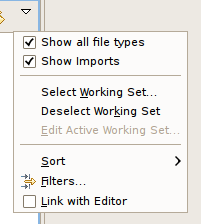
Figure D.3. Additional Actions
If the Show Imports checkbox is selected, the imports will be displayed directly under a model resource as shown below.

Figure D.4. Show Model Imports Action

'%20d='M201.5%20305.5c-13.8%200-24.9-11.1-24.9-24.6%200-13.8%2011.1-24.9%2024.9-24.9%2013.6%200%2024.6%2011.1%2024.6%2024.9%200%2013.6-11.1%2024.6-24.6%2024.6zM504%20256c0%20137-111%20248-248%20248S8%20393%208%20256%20119%208%20256%208s248%20111%20248%20248zm-132.3-41.2c-9.4%200-17.7%203.9-23.8%2010-22.4-15.5-52.6-25.5-86.1-26.6l17.4-78.3%2055.4%2012.5c0%2013.6%2011.1%2024.6%2024.6%2024.6%2013.8%200%2024.9-11.3%2024.9-24.9s-11.1-24.9-24.9-24.9c-9.7%200-18%205.8-22.1%2013.8l-61.2-13.6c-3-.8-6.1%201.4-6.9%204.4l-19.1%2086.4c-33.2%201.4-63.1%2011.3-85.5%2026.8-6.1-6.4-14.7-10.2-24.1-10.2-34.9%200-46.3%2046.9-14.4%2062.8-1.1%205-1.7%2010.2-1.7%2015.5%200%2052.6%2059.2%2095.2%20132%2095.2%2073.1%200%20132.3-42.6%20132.3-95.2%200-5.3-.6-10.8-1.9-15.8%2031.3-16%2019.8-62.5-14.9-62.5zM302.8%20331c-18.2%2018.2-76.1%2017.9-93.6%200-2.2-2.2-6.1-2.2-8.3%200-2.5%202.5-2.5%206.4%200%208.6%2022.8%2022.8%2087.3%2022.8%20110.2%200%202.5-2.2%202.5-6.1%200-8.6-2.2-2.2-6.1-2.2-8.3%200zm7.7-75c-13.6%200-24.6%2011.1-24.6%2024.9%200%2013.6%2011.1%2024.6%2024.6%2024.6%2013.8%200%2024.9-11.1%2024.9-24.6%200-13.8-11-24.9-24.9-24.9z'/%3e%3c/svg%3e)