 Red Hat Summit
Este contenido no está disponible en el idioma seleccionado.
14.7. Security and Data Access
You have some options on defining your data access security for your VDB via the VDB Editor.
The first level is provided by the model visibility check-box in the Models section (Spyglass column). If unchecked, that model and its contents will not be returned by the Teiid runtime with the standard JDBC metadata.
The next level of security is provided defining permissions for your data roles which can be managed via Data Roles tab in the VDB Editor. For a unique data role, each model and most objects within that model can have specific values of data access including the following:
- Security (Row-based condition and column masking)
- Create
- Read
- Update
- Delete
- Execute
- Alter
Double-clicking the Security box for a table will launch the Row Filter Definition dialog where you can define condition. Double-clicking the Security box for a column will launch the Column Masking Definition dialog where you can define condition and column masking. In order to edit or remove security, select the Row Filter or Column Masking tabs and use the or buttons.
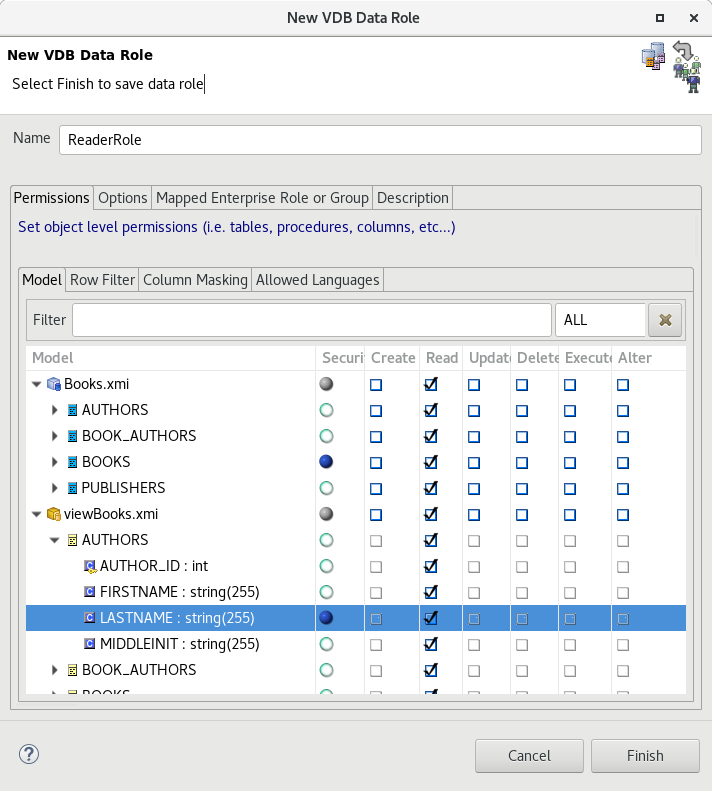
Figure 14.2. Data Role dialog

'%20d='M201.5%20305.5c-13.8%200-24.9-11.1-24.9-24.6%200-13.8%2011.1-24.9%2024.9-24.9%2013.6%200%2024.6%2011.1%2024.6%2024.9%200%2013.6-11.1%2024.6-24.6%2024.6zM504%20256c0%20137-111%20248-248%20248S8%20393%208%20256%20119%208%20256%208s248%20111%20248%20248zm-132.3-41.2c-9.4%200-17.7%203.9-23.8%2010-22.4-15.5-52.6-25.5-86.1-26.6l17.4-78.3%2055.4%2012.5c0%2013.6%2011.1%2024.6%2024.6%2024.6%2013.8%200%2024.9-11.3%2024.9-24.9s-11.1-24.9-24.9-24.9c-9.7%200-18%205.8-22.1%2013.8l-61.2-13.6c-3-.8-6.1%201.4-6.9%204.4l-19.1%2086.4c-33.2%201.4-63.1%2011.3-85.5%2026.8-6.1-6.4-14.7-10.2-24.1-10.2-34.9%200-46.3%2046.9-14.4%2062.8-1.1%205-1.7%2010.2-1.7%2015.5%200%2052.6%2059.2%2095.2%20132%2095.2%2073.1%200%20132.3-42.6%20132.3-95.2%200-5.3-.6-10.8-1.9-15.8%2031.3-16%2019.8-62.5-14.9-62.5zM302.8%20331c-18.2%2018.2-76.1%2017.9-93.6%200-2.2-2.2-6.1-2.2-8.3%200-2.5%202.5-2.5%206.4%200%208.6%2022.8%2022.8%2087.3%2022.8%20110.2%200%202.5-2.2%202.5-6.1%200-8.6-2.2-2.2-6.1-2.2-8.3%200zm7.7-75c-13.6%200-24.6%2011.1-24.6%2024.9%200%2013.6%2011.1%2024.6%2024.6%2024.6%2013.8%200%2024.9-11.1%2024.9-24.6%200-13.8-11-24.9-24.9-24.9z'/%3e%3c/svg%3e)