 Red Hat Summit
Ce contenu n'est pas disponible dans la langue sélectionnée.
Chapter 29. Migrating from an LDAP Directory to IdM
When an infrastructure has previously deployed an LDAP server for authentication and identity lookups, it is possible to migrate the user data, including passwords, to a new Identity Management instance, without losing user or password data.
Identity Management has migration tools to help move directory data and only requires minimal updates to clients. However, the migration process assumes a simple deployment scenario (one LDAP namespace to one IdM namespace). For more complex environments, such as ones with multiple namespaces or custom schema, contact Red Hat support services for assistance.
Identity Management has migration tools to help move directory data and only requires minimal updates to clients. However, the migration process assumes a very simple deployment scenario (one LDAP directory namespace to one IdM namespace).
29.1. An Overview of LDAP to IdM Migration
Copier lienLien copié sur presse-papiers!
The actual migration part of moving from an LDAP server to Identity Management — the process of moving the data from one server to the other — is fairly straightforward. The process is simple: move data, move passwords, and move clients.
The crucial part of migration is not data migration; it is deciding how clients are going to be configured to use Identity Management. For each client in the infrastructure, you need to decide what services (such as Kerberos and SSSD) are being used and what services can be used in the final, IdM deployment.
A secondary, but significant, consideration is planning how to migrate passwords. Identity Management requires Kerberos hashes for every user account in addition to passwords. Some of the considerations and migration paths for passwords are covered in Section 29.1.2, “Planning Password Migration”.
29.1.1. Planning the Client Configuration
Copier lienLien copié sur presse-papiers!
Identity Management can support a number of different client configurations, with varying degrees of functionality, flexibility, and security. Decide which configuration is best for each individual client based on its operating system, functional area (such as development machines, production servers, or user laptops), and your IT maintenance priorities.
Important
The different client configurations are not mutually exclusive. Most environments will have a mix of different ways that clients use to connect to the IdM domain. Administrators must decide which scenario is best for each individual client.
29.1.1.1. Initial Client Configuration (Pre-Migration)
Copier lienLien copié sur presse-papiers!
Before deciding where you want to go with the client configuration in Identity Management, first establish where you are before the migration.
The initial state for almost all LDAP deployments that will be migrated is that there is an LDAP service providing identity and authentication services.
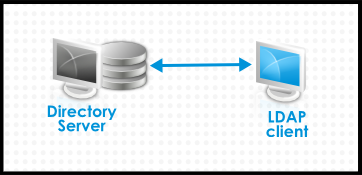
Figure 29.1. Basic LDAP Directory and Client Configuration
Linux and Unix clients use PAM_LDAP and NSS_LDAP libraries to connect directly to the LDAP services. These libraries allow clients to retrieve user information from the LDAP directory as if the data were stored in
/etc/passwd or /etc/shadow. (In real life, the infrastructure may be more complex if a client uses LDAP for identity lookups and Kerberos for authentication or other configurations.)
There are structural differences between an LDAP directory and an IdM server, particularly in schema support and the structure of the directory tree. (For more background on those differences, see Section 1.1, “IdM v. LDAP: A More Focused Type of Service”.) While those differences may impact data (especially with the directory tree, which affects entry names), they have little impact on the client configuration, so it really has little impact on migrating clients to Identity Management.
29.1.1.2. Recommended Configuration for Red Hat Enterprise Linux Clients
Copier lienLien copié sur presse-papiers!
Red Hat Enterprise Linux has a service called the System Security Services Daemon (SSSD). SSSD uses special PAM and NSS libraries (
pam_sss and nss_sss, respectively) which allow SSSD to be integrated very closely with Identity Management and leverage the full authentication and identity features in Identity Management. SSSD has a number of useful features, like caching identity information so that users can log in even if the connection is lost to the central server; these are described in the Red Hat Enterprise Linux Deployment Guide.
Unlike generic LDAP directory services (using
pam_ldap and nss_ldap), SSSD establishes relationships between identity and authentication information by defining domains. A domain in SSSD defines four backend functions: authentication, identity lookups, access, and password changes. The SSSD domain is then configured to use a provider to supply the information for any one (or all) of those four functions. An identity provider is always required in the domain configuration. The other three providers are optional; if an authentication, access, or password provider is not defined, then the identity provider is used for that function.
SSSD can use Identity Management for all of its backend functions. This is the ideal configuration because it provides the full range of Identity Management functionality, unlike generic LDAP identity providers or Kerberos authentication. For example, during daily operation, SSSD enforces host-based access control rules and security features in Identity Management.
Note
During the migration process from an LDAP directory to Identity Management, SSSD can seamlessly migrate user passwords without additional user interaction.

Figure 29.2. Clients and SSSD with an IdM Backend
The
ipa-client-install script automatically configured SSSD to use IdM for all four of its backend services, so Red Hat Enterprise Linux clients are set up with the recommended configuration by default.
Note
This client configuration is only supported for Red Hat Enterprise Linux 6.1 and later and Red Hat Enterprise Linux 5.7 later, which support the latest versions of SSSD and
ipa-client. Older versions of Red Hat Enterprise Linux can be configured as described in Section 29.1.1.3, “Alternative Supported Configuration”.
Note
This client configuration is only supported for Red Hat Enterprise Linux 15 and later, which supports the latest versions of SSSD and
ipa-client. Older versions of Red Hat Enterprise Linux can be configured as described in Section 29.1.1.3, “Alternative Supported Configuration”.
29.1.1.3. Alternative Supported Configuration
Copier lienLien copié sur presse-papiers!
Unix and Linux systems such as Mac, Solaris, HP-UX, AIX, and Scientific Linux support all of the services that IdM manages but do not use SSSD. Likewise, older Red Hat Enterprise Linux versions (6.1 and 5.6) support SSSD but have an older version, which does not support IdM as an identity provider.
Unix and Linux systems such as Mac, Solaris, HP-UX, AIX, and Scientific Linux support all of the services that IdM manages but do not use SSSD. Likewise, older Red Hat Enterprise Linux versions (15) support SSSD but have an older version, which does not support IdM as an identity provider.
When it is not possible to use a modern version of SSSD on a system, then clients can be configured to connect to the IdM server as if it were an LDAP directory service for identity lookups (using
nss_ldap) and to IdM as if it were a regular Kerberos KDC (using pam_krb5).
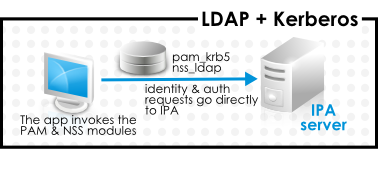
Figure 29.3. Clients and IdM with LDAP and Kerberos
If a Red Hat Enterprise Linux client is using an older version of SSSD, SSSD can still be configured to use the IdM server as its identity provider and its Kerberos authentication domain; this is described in the SSSD configuration section of the Red Hat Enterprise Linux Deployment Guide.
Any IdM domain client can be configured to use
nss_ldap and pam_krb5 to connect to the IdM server. For some maintenance situations and IT structures, a scenario that fits the lowest common denominator may be required, using LDAP for both identity and authentication (nss_ldap and pam_ldap). However, it is generally best practice to use the most secure configuration possible for a client (meaning SSSD and Kerberos or LDAP and Kerberos).
29.1.2. Planning Password Migration
Copier lienLien copié sur presse-papiers!
Probably the most visible issue that can impact LDAP-to-Identity Management migration is migrating user passwords.
Identity Management (by default) uses Kerberos for authentication and requires that each user has Kerberos hashes stored in the Identity Management Directory Server in addition to the standard user passwords. To generate these hashes, the user password needs to be available to the IdM server in cleartext. This is the case when the user is created in Identity Management. However, when the user is migrated from an LDAP directory, the associated user password is already hashed, so the corresponding Kerberos key cannot be generated.
Important
Users cannot authenticate to the IdM domain or access IdM resources until they have Kerberos hashes.
If a user does not have a Kerberos hash[10], that user cannot log into the IdM domain even if he has a user account. There are three options for migrating passwords: forcing a password change, using a web page, and using SSSD.
Migrating users from an existing system provides a smoother transition but also requires parallel management of LDAP directory and IdM during the migration and transition process. If you do not preserve passwords, the migration can be performed more quickly but it requires more manual work by administrators and users.
29.1.2.1. Method 1: Using Temporary Passwords and Requiring a Change
Copier lienLien copié sur presse-papiers!
When passwords are changed in Identity Management, they will be created with the appropriate Kerberos hashes. So one alternative for administrators is to force users to change their passwords by resetting all user passwords when user accounts are migrated. (This can also be done simply by re-creating the LDAP directory accounts in IdM, which automatically creates accounts with the appropriate keys.) The new users are assigned a temporary password which they change at the first login. No passwords are migrated.
29.1.2.2. Method 2: Using the Migration Web Page
Copier lienLien copié sur presse-papiers!
When it is running in migration mode, Identity Management has a special web page in its web UI that will capture a cleartext password and create the appropriate Kerberos hash.
https://ipaserver.example.com/ipa/migration
Administrators could tell users to authenticate once to this web page, which would properly update their user accounts with their password and corresponding Kerberos hash, without requiring password changes.
29.1.2.3. Method 3: Using SSSD (Recommended)
Copier lienLien copié sur presse-papiers!
SSSD can work with IdM to mitigate the user impact on migrating by generating the required user keys. For deployments with a lot of users or where users shouldn't be burdened with password changes, this is the best scenario.
- A user tries to log into a machine with SSSD.
- SSSD attempts to perform Kerberos authentication against the IdM server.
- Even though the user exists in the system, the authentication will fail with the error key type is not supported because the Kerberos hashes do not yet exist.
- SSSD then performs a plaintext LDAP bind over a secure connection.
- IdM intercepts this bind request. If the user has a Kerberos principal but no Kerberos hashes, then the IdM identity provider generates the hashes and stores them in the user entry.
- If authentication is successful, SSSD disconnects from IdM and tries Kerberos authentication again. This time, the request succeeds because the hash exists in the entry.
That entire process is entirely transparent to the user; as far as users known, they simply log into a client service and it works as normal.
29.1.2.4. Migrating Cleartext LDAP Passwords
Copier lienLien copié sur presse-papiers!
Although in most deployments LDAP passwords are stored encrypted, there may be some users or some environments that use cleartext passwords for user entries.
When users are migrated from the LDAP server to the IdM server, their cleartext passwords are not migrated over. Identity Management does not allow cleartext passwords. Instead, a Kerberos principle is created for the user, the keytab is set to true, and the password is set as expired. This means that Identity Management requires the user to reset the password at the next login.
Note
If passwords are hashed, the password is successfully migrated through SSSD and the migration web page, as in Section 29.1.2.3, “Method 3: Using SSSD (Recommended)”.
29.1.2.5. Automatically Resetting Passwords That Do Not Meet Requirements
Copier lienLien copié sur presse-papiers!
If user passwords in the original directory do not meet the password policies defined in Identity Management, then the passwords must be reset after migration.
Password resets are done automatically the first time the users attempts to
kinit into the IdM domain.
[jsmith@server ~]$ kinit
Password for jsmith@EXAMPLE.COM:
Password expired.  You must change it now.
Enter new password:
Enter it again:
29.1.3. Migration Considerations and Requirements
Copier lienLien copié sur presse-papiers!
As you are planning migrating from an LDAP server to Identity Management, make sure that your LDAP environment is able to work with the Identity Management migration script.
29.1.3.1. LDAP Servers Supported for Migration
Copier lienLien copié sur presse-papiers!
The migration process from an LDAP server to Identity Management uses a special script,
ipa migrate-ds, to perform the migration. This script has certain expectations about the structure of the LDAP directory and LDAP entries in order to work. Migration is supported only for LDAPv3-compliant directory services, which include several common directories:
- SunONE Directory Server
- Apache Directory Server
- OpenLDAP
Migration from an LDAP server to Identity Management has been tested with Red Hat Directory Server.
Note
Migration using the migration script is not supported for Microsoft Active Directory because it is not an LDAPv3-compliant directory. For assistance with migrating from Active Directory, contact Red Hat Professional Services.
Note
Migration using the migration script is not supported for Microsoft Active Directory because it is not an LDAPv3-compliant directory.
29.1.3.2. Migration Environment Requirements
Copier lienLien copié sur presse-papiers!
There are many different possible configuration scenarios for both Red Hat Directory Server and Identity Management, and any of those scenarios may affect the migration process. For the example migration procedures in this chapter, these are the assumptions about the environment:
- A single LDAP directory domain is being migrated to one IdM realm. No consolidation is involved.
- User passwords are stored as a hash in the LDAP directory that the IdM Directory Server can support.
- The LDAP directory instance is both the identity store and the authentication method. Client machines are configured to use
pam_ldapornss_ldapto connect to the LDAP server. - Entries use only standard LDAP schema. Custom attributes will not be migrated to Identity Management.
29.1.3.3. Migration Tools
Copier lienLien copié sur presse-papiers!
Identity Management uses a specific command,
ipa migrate-ds, to drive the migration process so that LDAP directory data are properly formatted and imported cleanly into the IdM server.
The Identity Management server must be configured to run in migration mode, and then the migration script can be used.
29.1.3.4. Migration Sequence
Copier lienLien copié sur presse-papiers!
There are four major steps when migrating to Identity Management, but the order varies slightly depending on whether you want to migrate the server first or the clients first.
With a client-based migration, SSSD is used to change the client configuration while an IdM server is configured:
- Deploy SSSD.
- Reconfigure clients to connect to the current LDAP server and then fail over to IdM.
- Install the IdM server.
- Migrate the user data using the IdM
ipa migrate-dsscript. This exports the data from the LDAP directory, formats for the IdM schema, and then imports it into IdM. - Take the LDAP server offline and allow clients to fail over to Identity Management transparently.
With a server migration, the LDAP to Identity Management migration comes first:
- Install the IdM server.
- Migrate the user data using the IdM
ipa migrate-dsscript. This exports the data from the LDAP directory, formats it for the IdM schema, and then imports it into IdM. - Optional. Deploy SSSD.
- Reconfigure clients to connect to IdM. It is not possible to simply replace the LDAP server. The IdM directory tree — and therefore user entry DNs — is different than the previous directory tree.While it is required that clients be reconfigured, clients do not need to be reconfigured immediately. Updated clients can point to the IdM server while other clients point to the old LDAP directory, allowing a reasonable testing and transition phase after the data are migrated.
Note
Do not run both an LDAP directory service and the IdM server for very long in parallel. This introduces the risk of user data being inconsistent between the two services.
Both processes provide a general migration procedure, but it may not work in every environment. Set up a test LDAP environment and test the migration process before attempting to migrate the real LDAP environment.
[10]
It is possible to use LDAP authentication in Identity Management instead of Kerberos authentication, which means that Kerberos hashes are not required for users. However, this limits the capabilities of Identity Management and is not recommended.

'%20d='M201.5%20305.5c-13.8%200-24.9-11.1-24.9-24.6%200-13.8%2011.1-24.9%2024.9-24.9%2013.6%200%2024.6%2011.1%2024.6%2024.9%200%2013.6-11.1%2024.6-24.6%2024.6zM504%20256c0%20137-111%20248-248%20248S8%20393%208%20256%20119%208%20256%208s248%20111%20248%20248zm-132.3-41.2c-9.4%200-17.7%203.9-23.8%2010-22.4-15.5-52.6-25.5-86.1-26.6l17.4-78.3%2055.4%2012.5c0%2013.6%2011.1%2024.6%2024.6%2024.6%2013.8%200%2024.9-11.3%2024.9-24.9s-11.1-24.9-24.9-24.9c-9.7%200-18%205.8-22.1%2013.8l-61.2-13.6c-3-.8-6.1%201.4-6.9%204.4l-19.1%2086.4c-33.2%201.4-63.1%2011.3-85.5%2026.8-6.1-6.4-14.7-10.2-24.1-10.2-34.9%200-46.3%2046.9-14.4%2062.8-1.1%205-1.7%2010.2-1.7%2015.5%200%2052.6%2059.2%2095.2%20132%2095.2%2073.1%200%20132.3-42.6%20132.3-95.2%200-5.3-.6-10.8-1.9-15.8%2031.3-16%2019.8-62.5-14.9-62.5zM302.8%20331c-18.2%2018.2-76.1%2017.9-93.6%200-2.2-2.2-6.1-2.2-8.3%200-2.5%202.5-2.5%206.4%200%208.6%2022.8%2022.8%2087.3%2022.8%20110.2%200%202.5-2.2%202.5-6.1%200-8.6-2.2-2.2-6.1-2.2-8.3%200zm7.7-75c-13.6%200-24.6%2011.1-24.6%2024.9%200%2013.6%2011.1%2024.6%2024.6%2024.6%2013.8%200%2024.9-11.1%2024.9-24.6%200-13.8-11-24.9-24.9-24.9z'/%3e%3c/svg%3e)