 Red Hat Summit
Ce contenu n'est pas disponible dans la langue sélectionnée.
10.8. Managing Model Object Extensions
10.8.1. Managing Model Object Extensions
Copier lienLien copié sur presse-papiers!
Extending a model adds extra properties to its model objects. One good use of these extension properties is for passing data to a customized Data Services translator. The Teiid Designer model extension framework consists of:
- Model Extension Definitions (MEDs)
- MED Registry - keeps track of all the MEDs that are registered in a workspace. Only registered MEDs can be used to extend a model.
- MED Editor
10.8.2. Create New MED
Copier lienLien copié sur presse-papiers!
To create a new MED select the File > New > Other... action to display the New wizard dialog. Select the Teiid Designer > Teiid Model Extension Defn option which displays the New Model Extension Definition dialog.
Note
If a project is already selected when wizard is launched, the location field will be pre-populated.

Figure 10.34. MED Editor Overview Tab
Browse and select existing project or project folder location for MED file and specify unique file name. Next you have two options click Finish to create MED or click Next and add more properties of MED which shows figure below.
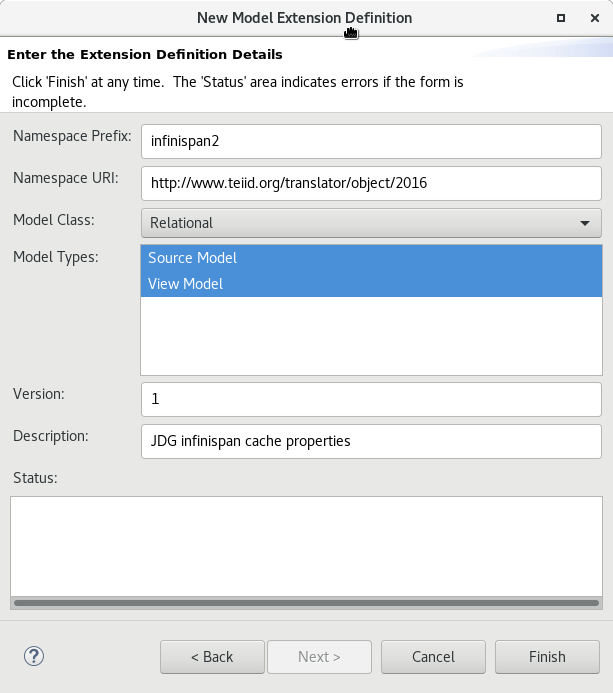
Figure 10.35. Extension Definition Details Tab
10.8.3. Edit MED
Copier lienLien copié sur presse-papiers!
To edit an MED file select an existing
.mxd file in your workspace and right-click select the Open action. The MED Editor will open to allow editing .
On the Overview tab, you can specify or change the Namespace Prefix, Namespace URI, the Model Class you wish to extend (Relational, Web Service, XML Document, and Function) and a description.
After entering the basic MED info, you can now switch to the Properties tab and begin creating your extended property definitions for specific model objects supported by selected model class.

Figure 10.36. MED Editor Properties Tab
Start by clicking the Add Extended Model Object toolbar button to display the Model Object Name selection dialog. Select an object and click OK.
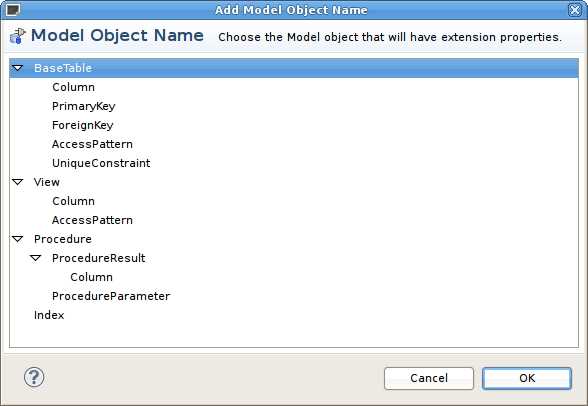
Figure 10.37. Select Model Object Name Dialog
Next, select the model object in the Extended Model Objects section and use the actions and properties table in the lower Extension Properties section to add/remove or edit your actual extended properties. Selecting the add or edit extension properties actions displays a dialog containing sections to edit general properties, value definition (required, masked, allowed values) as well as display name and description values which can be internationalized.

Figure 10.38. Edit Property Definition Dialog
10.8.4. Extending Models With MEDs
Copier lienLien copié sur presse-papiers!
MEDs must be applied to a model in order for their extension properties to be available to that model's model objects. To manage the applied MEDs for a specific model select the model and right-click select the Modeling > Manage Model Extension Definitions action. This will display a dialog listing the current applied MEDS and actions and buttons to add or remove MEDs from a model, extract a MED from a model and save a copy of it locally as a
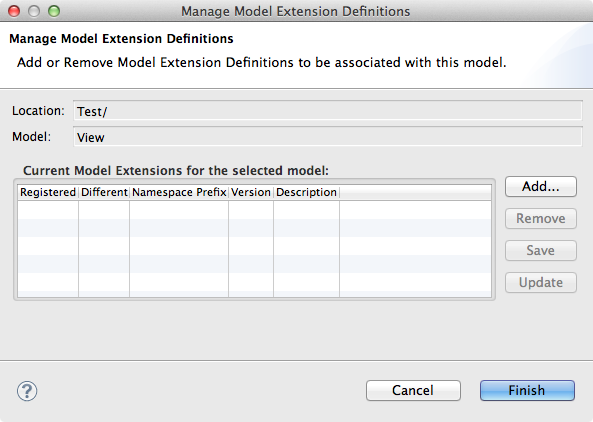
.mxd file and lastly, update the version of MED in a model if it differs from a version in your MED registry.
Figure 10.39. Manage Model Extension Definitions Dialog
Clicking the Add button displays a list of applicable MEDS based on model class.
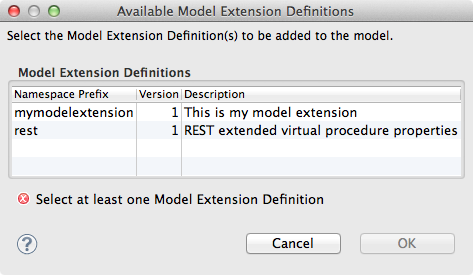
Figure 10.40. Add Model Extension Definitions Dialog
Note
After adding/removing MEDs from the model, click Finish to accept all of the changes. Canceling the dialog will discard all changes and revert to the original model state.
10.8.5. Setting Extended Property Values
Copier lienLien copié sur presse-papiers!
Extension properties are user defined properties available to any extended model object via the Properties View. All extension properties are available under the Extension category and are prefixed with a MED's namespace prefix. If there is an initial value for an extension property it will be set to the default value using the property definition found in the MED.
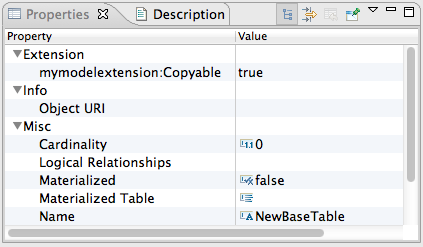
Figure 10.41. Properties View For Extended Model Object

'%20d='M201.5%20305.5c-13.8%200-24.9-11.1-24.9-24.6%200-13.8%2011.1-24.9%2024.9-24.9%2013.6%200%2024.6%2011.1%2024.6%2024.9%200%2013.6-11.1%2024.6-24.6%2024.6zM504%20256c0%20137-111%20248-248%20248S8%20393%208%20256%20119%208%20256%208s248%20111%20248%20248zm-132.3-41.2c-9.4%200-17.7%203.9-23.8%2010-22.4-15.5-52.6-25.5-86.1-26.6l17.4-78.3%2055.4%2012.5c0%2013.6%2011.1%2024.6%2024.6%2024.6%2013.8%200%2024.9-11.3%2024.9-24.9s-11.1-24.9-24.9-24.9c-9.7%200-18%205.8-22.1%2013.8l-61.2-13.6c-3-.8-6.1%201.4-6.9%204.4l-19.1%2086.4c-33.2%201.4-63.1%2011.3-85.5%2026.8-6.1-6.4-14.7-10.2-24.1-10.2-34.9%200-46.3%2046.9-14.4%2062.8-1.1%205-1.7%2010.2-1.7%2015.5%200%2052.6%2059.2%2095.2%20132%2095.2%2073.1%200%20132.3-42.6%20132.3-95.2%200-5.3-.6-10.8-1.9-15.8%2031.3-16%2019.8-62.5-14.9-62.5zM302.8%20331c-18.2%2018.2-76.1%2017.9-93.6%200-2.2-2.2-6.1-2.2-8.3%200-2.5%202.5-2.5%206.4%200%208.6%2022.8%2022.8%2087.3%2022.8%20110.2%200%202.5-2.2%202.5-6.1%200-8.6-2.2-2.2-6.1-2.2-8.3%200zm7.7-75c-13.6%200-24.6%2011.1-24.6%2024.9%200%2013.6%2011.1%2024.6%2024.6%2024.6%2013.8%200%2024.9-11.1%2024.9-24.6%200-13.8-11-24.9-24.9-24.9z'/%3e%3c/svg%3e)