 Red Hat Summit
Ce contenu n'est pas disponible dans la langue sélectionnée.
3.3. Life Cycle Environments
Application life cycles are divided into life cycle environments, which represent each stage of the application life cycle. Life cycle environments are linked to form an environment path. You can promote content along the environment path to the next life cycle environment when required. For example, if development ends on a particular version of an application, you can promote this version to the testing environment and start development on the next version.
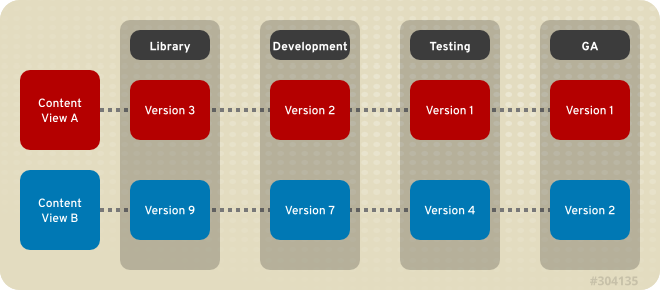
Figure 3.2. An Environment Path Containing Four Environments
3.3.1. Creating Life Cycle Environments
Copier lienLien copié sur presse-papiers!
This procedure describes how to create a life cycle environment in Red Hat Satellite.
Procedure 3.10. To Create a Life Cycle Environment:
- Select an organization from the menu in the top left hand corner.
- Click
and then click New Environment Path. - Insert a name and a label (automatically fills in the Name field input) for the life cycle environment. The Description field is optional.
- Click Save to create the environment.
3.3.2. Adding Life Cycle Environments to a Red Hat Satellite Capsule Server
Copier lienLien copié sur presse-papiers!
If a newly created Red Hat Satellite Capsule Server has content functionality enabled, the Capsule Server needs an environment added to enable it to synchronize content from the Satellite Server and provide content to host systems.
Important
The Satellite Capsule Server is configured through the Satellite Server's command line interface (CLI). Execute all
hammer commands on the Satellite Server.
Procedure 3.11. To Add Environments to the Satellite Capsule Server:
- Log in to the Satellite Server CLI as root.
- Choose the desired Red Hat Satellite Capsule Server from the list and take note of its
id:# hammer capsule listThe Satellite Capsule Server's details can be verified using the command:# hammer capsule info --id capsule_id_number - Verify the list of life cycle environments available for the Red Hat Capsule Server and note down the
environment id:# hammer capsule content available-lifecycle-environments --id capsule_id_numberWhere:available-lifecycle-environmentsare life cycle environments that are available to the Satellite Capsule but are currently not attached to the Satellite Capsule.
- Add the life cycle environment to the Satellite Capsule Server:
# hammer capsule content add-lifecycle-environment --id capsule_id_number --environment-id environment_id_numberWhere:- capsule_id_number stands for the Satellite Capsule Server's identification number.
- environment_id_number stands for the life cycle environment's identification number.
Repeat this step for every life cycle environment to be added to the Capsule Server. - Synchronize the content from the Satellite Server's environment to the Satellite Capsule Server:
# hammer capsule content synchronize --id capsule_id_numberWhen an external Satellite Capsule Server has various life cycle environments, and only one life cycle environment needs to be synchronized, it is possible to target a specific environment by specifying the environment identification number:# hammer capsule content synchronize --id external_capsule_id_number --environment-id environment_id_number
3.3.3. Promoting Content Views
Copier lienLien copié sur presse-papiers!
After you have created a Content View and an environment path consisting of two or more life cycle environments, you can promote the Content View from one environment to the next as required. This means that the most recent version of the Content View that exists in a specified environment will be promoted, or copied, to the next environment in the life cycle environment path.
You can promote a Content View to any environment where that version does not exist. The system automatically suggests the next environment in the life cycle environment path, but you can override this and promote to a different environment if required.
Procedure 3.12. To Promote a Content View:
- On the main menu, click
. - In the Name column, click the name of the Content View that you want to promote.
- On the Versions tab, identify the latest version, and click .
- Identify the promotion path where you want to promote the Content View, select the appropriate life cycle environment, and click .
- After the promotion has completed, the Versions tab updates to display the new status of your Content Views.
3.3.4. Removing Life Cycle Environments From Satellite Server
Copier lienLien copié sur presse-papiers!
This procedure describes how to remove a life cycle environment from Red Hat Satellite.
Procedure 3.13. To Remove a Life Cycle Environment:
- On the main menu, click
. - Click the name of the life cycle environment that you want to remove, and then click .
- In the confirmation dialog box, click to remove the environment.
Note
You can only delete the latest environment in an environment path. For example, if three environments exist in the order Library, Dev, and Prod, you need to delete Prod before you can delete . You cannot delete the Library environment.
3.3.5. Removing Life Cycle Environments from Capsule Server
Copier lienLien copié sur presse-papiers!
There are multiple reasons to remove life cycle environments from Capsule Server. For example:
- When life cycle environments are no longer relevant to the host systems
- When life cycle environments have been incorrectly added to Capsule Server
Procedure 3.14. To remove a life cycle environment from Capsule Server:
- Log in to the Satellite Server CLI as the root user.
- Choose the desired Capsule Server from the list and take note of its
id:# hammer capsule listThe Capsule Server's details can be verified using the command:# hammer capsule info --id capsule_id_number - Verify the list of life cycle environments currently attached to the Capsule Server and take note of the
environment id:# hammer capsule content lifecycle-environments --id capsule_id_number - Remove the life cycle environment from Capsule Server:
# hammer capsule content remove-lifecycle-environment --id capsule_id_number --environment-id environment_idWhere:- capsule_id_number is Capsule Server's identification number.
- environment_id is the life cycle environment's identification number.
Repeat this step for every life cycle environment to be removed from the Capsule Server. - Synchronize the content from the Satellite Server's environment to Capsule Server:
# hammer capsule content synchronize --id capsule_id_number

'%20d='M201.5%20305.5c-13.8%200-24.9-11.1-24.9-24.6%200-13.8%2011.1-24.9%2024.9-24.9%2013.6%200%2024.6%2011.1%2024.6%2024.9%200%2013.6-11.1%2024.6-24.6%2024.6zM504%20256c0%20137-111%20248-248%20248S8%20393%208%20256%20119%208%20256%208s248%20111%20248%20248zm-132.3-41.2c-9.4%200-17.7%203.9-23.8%2010-22.4-15.5-52.6-25.5-86.1-26.6l17.4-78.3%2055.4%2012.5c0%2013.6%2011.1%2024.6%2024.6%2024.6%2013.8%200%2024.9-11.3%2024.9-24.9s-11.1-24.9-24.9-24.9c-9.7%200-18%205.8-22.1%2013.8l-61.2-13.6c-3-.8-6.1%201.4-6.9%204.4l-19.1%2086.4c-33.2%201.4-63.1%2011.3-85.5%2026.8-6.1-6.4-14.7-10.2-24.1-10.2-34.9%200-46.3%2046.9-14.4%2062.8-1.1%205-1.7%2010.2-1.7%2015.5%200%2052.6%2059.2%2095.2%20132%2095.2%2073.1%200%20132.3-42.6%20132.3-95.2%200-5.3-.6-10.8-1.9-15.8%2031.3-16%2019.8-62.5-14.9-62.5zM302.8%20331c-18.2%2018.2-76.1%2017.9-93.6%200-2.2-2.2-6.1-2.2-8.3%200-2.5%202.5-2.5%206.4%200%208.6%2022.8%2022.8%2087.3%2022.8%20110.2%200%202.5-2.2%202.5-6.1%200-8.6-2.2-2.2-6.1-2.2-8.3%200zm7.7-75c-13.6%200-24.6%2011.1-24.6%2024.9%200%2013.6%2011.1%2024.6%2024.6%2024.6%2013.8%200%2024.9-11.1%2024.9-24.6%200-13.8-11-24.9-24.9-24.9z'/%3e%3c/svg%3e)