 Red Hat Summit
Questo contenuto non è disponibile nella lingua selezionata.
Chapter 3. Configuring IPoIB
By default, InfiniBand does not use the internet protocol (IP) for communication. However, IP over InfiniBand (IPoIB) provides an IP network emulation layer on top of InfiniBand remote direct memory access (RDMA) networks.
With IPoIB, existing unmodified applications can transmit data over InfiniBand networks, but the performance is lower than if the application would use RDMA natively.
The Mellanox devices, starting from ConnectX-4 and above, on RHEL 8 and later use Enhanced IPoIB mode by default (datagram only). Connected mode is not supported on these devices.
3.1. The IPoIB communication modes
An IPoIB device is configurable in either Datagram or Connected mode.
The difference is the type of queue pair the IPoIB layer attempts to open with the machine at the other end of the communication:
In the
Datagrammode, the system opens an unreliable, disconnected queue pair.This mode does not support packages larger than Maximum Transmission Unit (MTU) of the InfiniBand link layer. During transmission of data, the IPoIB layer adds a 4-byte IPoIB header on top of the IP packet. As a result, the IPoIB MTU is 4 bytes less than the InfiniBand link-layer MTU. As
2048is a common InfiniBand link-layer MTU, the common IPoIB device MTU inDatagrammode is2044.In the
Connectedmode, the system opens a reliable, connected queue pair.This mode allows messages larger than the InfiniBand link-layer MTU. The host adapter handles packet segmentation and reassembly. As a result, in the
Connectedmode, the messages sent from Infiniband adapters have no size limits. However, there are limited IP packets due to thedatafield and TCP/IPheaderfield. For this reason, the IPoIB MTU in theConnectedmode is65520bytes.The
Connectedmode has a higher performance but consumes more kernel memory.
Though a system is configured to use the Connected mode, a system still sends multicast traffic by using the Datagram mode because InfiniBand switches and fabric cannot pass multicast traffic in the Connected mode. Also, when the host is not configured to use the Connected mode, the system falls back to the Datagram mode.
While running an application that sends multicast data up to the MTU on the interface, configure the interface in Datagram mode or configure the application to cap the send size of a packet that will fit in datagram-sized packets.
3.2. Understanding IPoIB hardware addresses
InfiniBand hardware addresses, often referred to as Globally Unique Identifiers (GUIDs), are unique identifiers assigned to each InfiniBand device, such as Host Channel Adapters (HCAs). These addresses are essential for routing, device identification, and network management.
IPoIB devices have a 20 byte hardware address that consists of the following parts:
- The first 4 bytes are flags and queue pair numbers
The next 8 bytes are the subnet prefix
The default subnet prefix is
0xfe:80:00:00:00:00:00:00. After the device connects to the subnet manager, the device changes this prefix to match with the configured subnet manager.- The last 8 bytes are the Globally Unique Identifier (GUID) of the InfiniBand port that attaches to the IPoIB device
As the first 12 bytes can change, do not use them in the udev device manager rules.
3.3. Renaming IPoIB devices by using systemd link file
By default, the kernel names Internet Protocol over InfiniBand (IPoIB) devices, for example, ib0, ib1, and so on. To avoid conflicts, create a systemd link file to create persistent and meaningful names such as mlx4_ib0.
Prerequisites
- You have installed an InfiniBand device.
Procedure
Display the hardware address of the device
ib0:# ip addr show ib0 7: ib0: <BROADCAST,MULTICAST,UP,LOWER_UP> mtu 65520 qdisc fq_codel state UP group default qlen 256 link/infiniband 80:00:0a:28:fe:80:00:00:00:00:00:00:f4:52:14:03:00:7b:e1:b1 brd 00:ff:ff:ff:ff:12:40:1b:ff:ff:00:00:00:00:00:00:ff:ff:ff:ff altname ibp7s0 altname ibs2 inet 172.31.0.181/24 brd 172.31.0.255 scope global dynamic noprefixroute ib0 valid_lft 2899sec preferred_lft 2899sec inet6 fe80::f652:1403:7b:e1b1/64 scope link noprefixroute valid_lft forever preferred_lft foreverFor naming the interface with MAC address
80:00:0a:28:fe:80:00:00:00:00:00:00:f4:52:14:03:00:7b:e1:b1tomlx4_ib0, create the/etc/systemd/network/70-custom-ifnames.linkfile with following contents:[Match] MACAddress=80:00:0a:28:fe:80:00:00:00:00:00:00:f4:52:14:03:00:7b:e1:b1 [Link] Name=mlx4_ib0This link file matches a MAC address and renames the network interface to the name set in the
Nameparameter.
Verification
Reboot the host:
# rebootVerify that the device with the MAC address you specified in the link file has been assigned to
mlx4_ib0:# ip addr show mlx4_ib0 7: mlx4_ib0: <BROADCAST,MULTICAST,UP,LOWER_UP> mtu 65520 qdisc fq_codel state UP group default qlen 256 link/infiniband 80:00:0a:28:fe:80:00:00:00:00:00:00:f4:52:14:03:00:7b:e1:b1 brd 00:ff:ff:ff:ff:12:40:1b:ff:ff:00:00:00:00:00:00:ff:ff:ff:ff altname ibp7s0 altname ibs2 inet 172.31.0.181/24 brd 172.31.0.255 scope global dynamic noprefixroute mlx4_ib0 valid_lft 2899sec preferred_lft 2899sec inet6 fe80::f652:1403:7b:e1b1/64 scope link noprefixroute valid_lft forever preferred_lft forever
3.4. Configuring an IPoIB connection by using nmcli
You can use the nmcli utility to create an IP over InfiniBand connection on the command line.
Prerequisites
- An InfiniBand device is installed on the server
- The corresponding kernel module is loaded
Procedure
Create the InfiniBand connection to use the
mlx4_ib0interface in theConnectedtransport mode and the maximum MTU of65520bytes:# nmcli connection add type infiniband con-name mlx4_ib0 ifname mlx4_ib0 transport-mode Connected mtu 65520Set a
P_Key, for example:# nmcli connection modify mlx4_ib0 infiniband.p-key 0x8002Configure the IPv4 settings:
To use DHCP, enter:
# nmcli connection modify mlx4_ib0 ipv4.method autoSkip this step if
ipv4.methodis already set toauto(default).To set a static IPv4 address, network mask, default gateway, DNS servers, and search domain, enter:
# nmcli connection modify mlx4_ib0 ipv4.method manual ipv4.addresses 192.0.2.1/24 ipv4.gateway 192.0.2.254 ipv4.dns 192.0.2.200 ipv4.dns-search example.com
Configure the IPv6 settings:
To use stateless address autoconfiguration (SLAAC), enter:
# nmcli connection modify mlx4_ib0 ipv6.method autoSkip this step if
ipv6.methodis already set toauto(default).To set a static IPv6 address, network mask, default gateway, DNS servers, and search domain, enter:
# nmcli connection modify mlx4_ib0 ipv6.method manual ipv6.addresses 2001:db8:1::fffe/64 ipv6.gateway 2001:db8:1::fffe ipv6.dns 2001:db8:1::ffbb ipv6.dns-search example.com
To customize other settings in the profile, use the following command:
# nmcli connection modify mlx4_ib0 <setting> <value>Enclose values with spaces or semicolons in quotes.
Activate the profile:
# nmcli connection up mlx4_ib0
Verification
Use the
pingutility to send ICMP packets to the remote host’s InfiniBand adapter, for example:# ping -c5 192.0.2.2
3.5. Configuring an IPoIB connection by using the network RHEL system role
To configure IP over InfiniBand (IPoIB), create a NetworkManager connection profile. You can automate this process by using the network RHEL system role and remotely configure connection profiles on hosts defined in a playbook.
You can use the network RHEL system role to configure IPoIB and, if a connection profile for the InfiniBand’s parent device does not exist, the role can create it as well.
Prerequisites
- You have prepared the control node and the managed nodes.
-
The account you use to connect to the managed nodes has
sudopermissions for these nodes. -
An InfiniBand device named
mlx4_ib0is installed in the managed nodes. - The managed nodes use NetworkManager to configure the network.
Procedure
Create a playbook file, for example,
~/playbook.yml, with the following content:--- - name: Configure the network hosts: managed-node-01.example.com tasks: - name: IPoIB connection profile with static IP address settings ansible.builtin.include_role: name: redhat.rhel_system_roles.network vars: network_connections: # InfiniBand connection mlx4_ib0 - name: mlx4_ib0 interface_name: mlx4_ib0 type: infiniband # IPoIB device mlx4_ib0.8002 on top of mlx4_ib0 - name: mlx4_ib0.8002 type: infiniband autoconnect: yes infiniband: p_key: 0x8002 transport_mode: datagram parent: mlx4_ib0 ip: address: - 192.0.2.1/24 - 2001:db8:1::1/64 state: upThe settings specified in the example playbook include the following:
type: <profile_type>- Sets the type of the profile to create. The example playbook creates two connection profiles: One for the InfiniBand connection and one for the IPoIB device.
parent: <parent_device>- Sets the parent device of the IPoIB connection profile.
p_key: <value>-
Sets the InfiniBand partition key. If you set this variable, do not set
interface_nameon the IPoIB device. transport_mode: <mode>-
Sets the IPoIB connection operation mode. You can set this variable to
datagram(default) orconnected.
For details about all variables used in the playbook, see the
/usr/share/ansible/roles/rhel-system-roles.network/README.mdfile on the control node.Validate the playbook syntax:
$ ansible-playbook --syntax-check ~/playbook.ymlNote that this command only validates the syntax and does not protect against a wrong but valid configuration.
Run the playbook:
$ ansible-playbook ~/playbook.yml
Verification
Display the IP settings of the
mlx4_ib0.8002device:# ansible managed-node-01.example.com -m command -a 'ip address show mlx4_ib0.8002' managed-node-01.example.com | CHANGED | rc=0 >> ... inet 192.0.2.1/24 brd 192.0.2.255 scope global noprefixroute ib0.8002 valid_lft forever preferred_lft forever inet6 2001:db8:1::1/64 scope link tentative noprefixroute valid_lft forever preferred_lft foreverDisplay the partition key (P_Key) of the
mlx4_ib0.8002device:# ansible managed-node-01.example.com -m command -a 'cat /sys/class/net/mlx4_ib0.8002/pkey' managed-node-01.example.com | CHANGED | rc=0 >> 0x8002Display the mode of the
mlx4_ib0.8002device:# ansible managed-node-01.example.com -m command -a 'cat /sys/class/net/mlx4_ib0.8002/mode' managed-node-01.example.com | CHANGED | rc=0 >> datagram
3.6. Configuring an IPoIB connection by using nmstatectl
You can use the declarative Nmstate API to configure an IP over InfiniBand (IPoIB). Nmstate ensures that the result matches the configuration file or rolls back the changes.
Prerequisites
- An InfiniBand device is installed on the server.
- The kernel module for the InfiniBand device is loaded.
Procedure
Create a YAML file, for example
~/create-IPoIB-profile.yml, with the following content:interfaces: - name: mlx4_ib0.8002 type: infiniband state: up ipv4: enabled: true address: - ip: 192.0.2.1 prefix-length: 24 dhcp: false ipv6: enabled: true address: - ip: 2001:db8:1::1 prefix-length: 64 autoconf: false dhcp: false infiniband: base-iface: "mlx4_ib0" mode: datagram pkey: "0x8002" routes: config: - destination: 0.0.0.0/0 next-hop-address: 192.0.2.254 next-hop-interface: mlx4_ib0.8002 - destination: ::/0 next-hop-address: 2001:db8:1::fffe next-hop-interface: mlx4_ib0.8002An IPoIB connection has now the following settings:
-
IPOIB device name:
mlx4_ib0.8002 -
Base interface (parent):
mlx4_ib0 -
InfiniBand partition key:
0x8002 -
Transport mode:
datagram -
Static IPv4 address:
192.0.2.1with the/24subnet mask -
Static IPv6 address:
2001:db8:1::1with the/64subnet mask -
IPv4 default gateway:
192.0.2.254 -
IPv6 default gateway:
2001:db8:1::fffe
-
IPOIB device name:
Apply the settings to the system:
# nmstatectl apply ~/create-IPoIB-profile.yml
Verification
Display the IP settings of the
mlx4_ib0.8002device:# ip address show mlx4_ib0.8002 ... inet 192.0.2.1/24 brd 192.0.2.255 scope global noprefixroute ib0.8002 valid_lft forever preferred_lft forever inet6 2001:db8:1::1/64 scope link tentative noprefixroute valid_lft forever preferred_lft foreverDisplay the partition key (P_Key) of the
mlx4_ib0.8002device:# cat /sys/class/net/mlx4_ib0.8002/pkey 0x8002Display the mode of the
mlx4_ib0.8002device:# cat /sys/class/net/mlx4_ib0.8002/mode datagram
3.7. Configuring an IPoIB connection by using nm-connection-editor
The nmcli-connection-editor application configures and manages network connections stored by NetworkManager by using the management console.
Prerequisites
- An InfiniBand device is installed on the server.
- The corresponding kernel module is loaded.
-
The
nm-connection-editorpackage is installed.
Procedure
Enter the command:
$ nm-connection-editor- Click the + button to add a new connection.
-
Select the
InfiniBandconnection type and click . On the
InfiniBandtab:- Change the connection name if you want to.
- Select the transport mode.
- Select the device.
- Set an MTU if needed.
-
On the
IPv4 Settingstab, configure the IPv4 settings. For example, set a static IPv4 address, network mask, default gateway, and DNS server:
-
On the
IPv6 Settingstab, configure the IPv6 settings. For example, set a static IPv6 address, network mask, default gateway, and DNS server: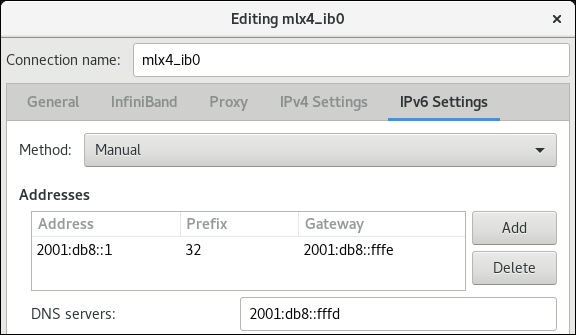
- Click to save the team connection.
-
Close
nm-connection-editor. You can set a
P_Keyinterface. As this setting is not available innm-connection-editor, you must set this parameter on the command line.For example, to set
0x8002asP_Keyinterface of themlx4_ib0connection:# nmcli connection modify mlx4_ib0 infiniband.p-key 0x8002
3.8. Testing an RDMA network by using iperf3 after IPoIB is configured
In the following example, the large buffer size is used to perform a 60 seconds test to measure maximum throughput and fully use the bandwidth and latency between two hosts by using the iperf3 utility.
Prerequisites
- You have configured IPoIB on both hosts.
Procedure
To run
iperf3as a server on a system, define a time interval to provide periodic bandwidth updates-ito listen as a server-sthat waits for the response of the client connection:# iperf3 -i 5 -sTo run
iperf3as a client on another system, define a time interval to provide periodic bandwidth updates-ito connect to the listening server-cof IP address192.168.2.2with-ttime in seconds:# iperf3 -i 5 -t 60 -c 192.168.2.2Use the following commands:
Display test results on the system that acts as a server:
# iperf3 -i 10 -s
-----------------------------------------------------------
Server listening on 5201
-----------------------------------------------------------
Accepted connection from 192.168.2.3, port 22216
[5] local 192.168.2.2 port 5201 connected to 192.168.2.3 port 22218
[ID] Interval           Transfer     Bandwidth
[5]   0.00-10.00  sec  17.5 GBytes  15.0 Gbits/sec
[5]  10.00-20.00  sec  17.6 GBytes  15.2 Gbits/sec
[5]  20.00-30.00  sec  18.4 GBytes  15.8 Gbits/sec
[5]  30.00-40.00  sec  18.0 GBytes  15.5 Gbits/sec
[5]  40.00-50.00  sec  17.5 GBytes  15.1 Gbits/sec
[5]  50.00-60.00  sec  18.1 GBytes  15.5 Gbits/sec
[5]  60.00-60.04  sec  82.2 MBytes  17.3 Gbits/sec
- - - - - - - - - - - - - - - - - - - - - - - - -
[ID] Interval           Transfer     Bandwidth
[5]   0.00-60.04  sec  0.00 Bytes    0.00 bits/sec  sender
[5]   0.00-60.04  sec   107 GBytes  15.3 Gbits/sec  receiver
Display test results on the system that acts as a client:
# iperf3 -i 1 -t 60 -c 192.168.2.2

Connecting to host 192.168.2.2, port 5201
[4] local 192.168.2.3 port 22218 connected to 192.168.2.2 port 5201
[ID] Interval           Transfer     Bandwidth       Retr  Cwnd
[4]   0.00-10.00  sec  17.6 GBytes  15.1 Gbits/sec    0   6.01 MBytes
[4]  10.00-20.00  sec  17.6 GBytes  15.1 Gbits/sec    0   6.01 MBytes
[4]  20.00-30.00  sec  18.4 GBytes  15.8 Gbits/sec    0   6.01 MBytes
[4]  30.00-40.00  sec  18.0 GBytes  15.5 Gbits/sec    0   6.01 MBytes
[4]  40.00-50.00  sec  17.5 GBytes  15.1 Gbits/sec    0   6.01 MBytes
[4]  50.00-60.00  sec  18.1 GBytes  15.5 Gbits/sec    0   6.01 MBytes
- - - - - - - - - - - - - - - - - - - - - - - - -
[ID] Interval           Transfer     Bandwidth       Retr
[4]   0.00-60.00  sec   107 GBytes  15.4 Gbits/sec    0   sender
[4]   0.00-60.00  sec   107 GBytes  15.4 Gbits/sec        receiver

'%20d='M201.5%20305.5c-13.8%200-24.9-11.1-24.9-24.6%200-13.8%2011.1-24.9%2024.9-24.9%2013.6%200%2024.6%2011.1%2024.6%2024.9%200%2013.6-11.1%2024.6-24.6%2024.6zM504%20256c0%20137-111%20248-248%20248S8%20393%208%20256%20119%208%20256%208s248%20111%20248%20248zm-132.3-41.2c-9.4%200-17.7%203.9-23.8%2010-22.4-15.5-52.6-25.5-86.1-26.6l17.4-78.3%2055.4%2012.5c0%2013.6%2011.1%2024.6%2024.6%2024.6%2013.8%200%2024.9-11.3%2024.9-24.9s-11.1-24.9-24.9-24.9c-9.7%200-18%205.8-22.1%2013.8l-61.2-13.6c-3-.8-6.1%201.4-6.9%204.4l-19.1%2086.4c-33.2%201.4-63.1%2011.3-85.5%2026.8-6.1-6.4-14.7-10.2-24.1-10.2-34.9%200-46.3%2046.9-14.4%2062.8-1.1%205-1.7%2010.2-1.7%2015.5%200%2052.6%2059.2%2095.2%20132%2095.2%2073.1%200%20132.3-42.6%20132.3-95.2%200-5.3-.6-10.8-1.9-15.8%2031.3-16%2019.8-62.5-14.9-62.5zM302.8%20331c-18.2%2018.2-76.1%2017.9-93.6%200-2.2-2.2-6.1-2.2-8.3%200-2.5%202.5-2.5%206.4%200%208.6%2022.8%2022.8%2087.3%2022.8%20110.2%200%202.5-2.2%202.5-6.1%200-8.6-2.2-2.2-6.1-2.2-8.3%200zm7.7-75c-13.6%200-24.6%2011.1-24.6%2024.9%200%2013.6%2011.1%2024.6%2024.6%2024.6%2013.8%200%2024.9-11.1%2024.9-24.6%200-13.8-11-24.9-24.9-24.9z'/%3e%3c/svg%3e)