 Red Hat Summit
Questo contenuto non è disponibile nella lingua selezionata.
Chapter 50. Managing Kerberos flags
Kerberos flags are crucial for specifying authentication mechanisms, authorization levels, and security protocols within a Kerberos-enabled network environment. With Kerberos flags, you can ensure secure access control, protect against unauthorized access, and improve interoperability between different Kerberos implementations.
50.1. Kerberos flags for services and hosts
You can use various Kerberos flags to define specific aspects of the Kerberos ticket behavior. You can add these flags to service and host Kerberos principals.
Principals in Identity Management (IdM) accept the following Kerberos flags:
OK_AS_DELEGATEUse this flag to specify Kerberos tickets trusted for delegation.
Active directory (AD) clients check the
OK_AS_DELEGATEflag on the Kerberos ticket to determine whether a user credentials can be forwarded or delegated to a specific server. AD forwards the ticket-granting ticket (TGT) only to services or hosts withOK_AS_DELEGATEconfigured. With this flag, system security services daemon (SSSD) can add the AD user TGT to the default Kerberos credentials cache on the IdM client machine.REQUIRES_PRE_AUTHUse this flag to specify that only pre-authenticated tickets are allowed to authenticate to a principal.
With the
REQUIRES_PRE_AUTHflag set, the key distribution center (KDC) requires additional authentication: the KDC issues the TGT for the principal withREQUIRES_PRE_AUTHonly if the TGT has been pre-authenticated.You can clear
REQUIRES_PRE_AUTHto disable pre-authentication for selected services or hosts. This lowers the load on the KDC, however slightly increases the possibility of a brute-force attack on a long-term key to succeed.OK_TO_AUTH_AS_DELEGATEUse the
OK_TO_AUTH_AS_DELEGATEflag to specify that the service is allowed to obtain a Kerberos ticket on behalf of a user. Note, that for obtaining other tickets on behalf of the user, the service needs theOK_AS_DELEGATEflag and a corresponding policy decision allowed on the key distribution center side.
50.2. Setting Kerberos flags from the Web UI
You can set a Kerberos flags by using the IdM Web UI. The following procedure sets the Kerberos flag to a principal.
Procedure
Select
in the menu. 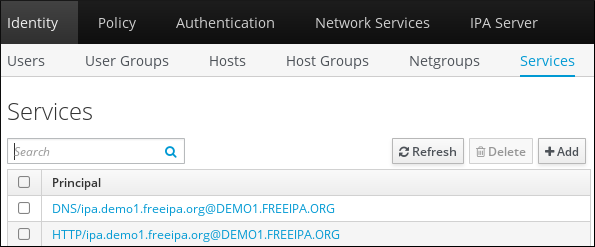
- Click on the service to which you want to add the flags.
Check the option that you want to set:
-
To set the
OK_AS_DELEGATEflag, check Trusted for delegation. -
To set the
REQUIRES_PRE_AUTHflag, check Requires pre-authentication. -
To set the
OK_TO_AUTH_AS_DELEGATEflag, check Trusted to authenticate as user.
-
To set the
50.3. Setting and removing Kerberos flags from the command line
You can add or remove a Kerberos flag by using the command line. The ipa service-mod command uses the following command options for the flags:
-
--ok-as-delegateforOK_AS_DELEGATE -
--requires-pre-authforREQUIRES_PRE_AUTH -
--ok-to-auth-as-delegateforOK_TO_AUTH_AS_DELEGATE
By setting an option value to 1, you enable a flag for a principle. By setting an option value to 0, you disable the flag.
The following procedure enables and disables the OK_AS_DELEGATE flag for the service/ipa.example.com@example.com principal.
Procedure
To add the
OK_AS_DELEGATEflag for theservice/ipa.example.com@example.comprinciple, run:$ ipa service-mod service/ipa.example.com@EXAMPLE.COM --ok-as-delegate=1To remove the
OK_AS_DELEGATEflag from theservice/ipa.example.com@example.comprinciple, run:$ ipa service-mod service/ipa.example.com@EXAMPLE.COM --ok-as-delegate=0
50.4. Displaying Kerberos flags from the command line
You can display Kerberos flag setting by using the command line. The following procedure displays the OK_AS_DELEGATE flag for the demo/ipa.example.com@EXAMPLE.COM principal.
Procedure
To find out if OK_AS_DELEGATE is set for a principal:
Run the
kvnoutility:$ kvno demo/ipa.example.com@EXAMPLE.COMTo display the flag setting, run the
klist -fcommand. The0character means that theOK_AS_DELEGATEflag is disabled:$ klist -f Ticket cache: KEYRING:persistent:0:0 Default principal: admin@EXAMPLE.COM Valid starting Expires Service principal 02/19/2024 09:59:02 02/20/2024 08:21:33 demo/ipa/example.com@EXAMPLE.COM Flags: FATO

'%20d='M201.5%20305.5c-13.8%200-24.9-11.1-24.9-24.6%200-13.8%2011.1-24.9%2024.9-24.9%2013.6%200%2024.6%2011.1%2024.6%2024.9%200%2013.6-11.1%2024.6-24.6%2024.6zM504%20256c0%20137-111%20248-248%20248S8%20393%208%20256%20119%208%20256%208s248%20111%20248%20248zm-132.3-41.2c-9.4%200-17.7%203.9-23.8%2010-22.4-15.5-52.6-25.5-86.1-26.6l17.4-78.3%2055.4%2012.5c0%2013.6%2011.1%2024.6%2024.6%2024.6%2013.8%200%2024.9-11.3%2024.9-24.9s-11.1-24.9-24.9-24.9c-9.7%200-18%205.8-22.1%2013.8l-61.2-13.6c-3-.8-6.1%201.4-6.9%204.4l-19.1%2086.4c-33.2%201.4-63.1%2011.3-85.5%2026.8-6.1-6.4-14.7-10.2-24.1-10.2-34.9%200-46.3%2046.9-14.4%2062.8-1.1%205-1.7%2010.2-1.7%2015.5%200%2052.6%2059.2%2095.2%20132%2095.2%2073.1%200%20132.3-42.6%20132.3-95.2%200-5.3-.6-10.8-1.9-15.8%2031.3-16%2019.8-62.5-14.9-62.5zM302.8%20331c-18.2%2018.2-76.1%2017.9-93.6%200-2.2-2.2-6.1-2.2-8.3%200-2.5%202.5-2.5%206.4%200%208.6%2022.8%2022.8%2087.3%2022.8%20110.2%200%202.5-2.2%202.5-6.1%200-8.6-2.2-2.2-6.1-2.2-8.3%200zm7.7-75c-13.6%200-24.6%2011.1-24.6%2024.9%200%2013.6%2011.1%2024.6%2024.6%2024.6%2013.8%200%2024.9-11.1%2024.9-24.6%200-13.8-11-24.9-24.9-24.9z'/%3e%3c/svg%3e)