 Red Hat Summit
このコンテンツは選択した言語では利用できません。
Chapter 2. To Run a Route
Abstract
This tutorial walks you through the process of running a route.
Goals
リンクのコピーリンクがクリップボードにコピーされました!
In this tutorial you will:
- run a route as a local Apache Camel context
- send messages through a route
- examine the messages received by the endpoints
Prerequisites
リンクのコピーリンクがクリップボードにコピーされました!
To complete this tutorial you will need the Apache Camel project created in Chapter 1, To Create a New Route.
Running the route
リンクのコピーリンクがクリップボードにコピーされました!
To run the route:
- Open the simple-route project you created in the section called “Creating the Fuse project”.
- In Project Explorer, select
simple-route/src/main/resources/META-INF/spring/camelContext.xml. - Right-click it to open the context menu, then select
. The Console panel opens to display messages that reflect the progress of the project's execution. A message similar to the following[INFO] Using org.apache.camel.spring.Main to initiate a CamelContext [pache.camel.spring.Main.main()] MainSupport INFO Apache Camel 2.12.0.redhat-610062 starting [pache.camel.spring.Main.main()] SpringCamelContext INFO Apache Camel 2.12.0.redhat-610062 (CamelContext: camel-1) is starting [pache.camel.spring.Main.main()] ManagedManagementStrategy INFO JMX is enabled [pache.camel.spring.Main.main()] DefaultTypeConverter INFO Loaded 176 type converters [pache.camel.spring.Main.main()] SpringCamelContext INFO StreamCaching is not in use. If using streams then its recommended to enable stream caching. See more details at http://camel.apache.org/stream-caching.html [pache.camel.spring.Main.main()] FileEndpoint INFO Endpoint is configured with noop=true so forcing endpoint to be idempotent as well [pache.camel.spring.Main.main()] FileEndpoint INFO Using default memory based idempotent repository with cache max size: 1000 [pache.camel.spring.Main.main()] SpringCamelContext INFO Route: route1 started and consuming from: Endpoint[file://src/data?noop=true] [pache.camel.spring.Main.main()] SpringCamelContext INFO Total 1 routes, of which 1 is started. [pache.camel.spring.Main.main()] SpringCamelContext INFO Apache Camel 2.12.0.redhat-610062 (CamelContext: camel-1) started in 0.354 secondsindicates the route executed successfully. - To shutdown the route, click the red square (
 ) located at the top, right of the Console panel.
Verifying the route
リンクのコピーリンクがクリップボードにコピーされました!
To verify that the route executed properly:
- In Project Explorer, select
simple-route. - Right-click it to open the context menu, then select .
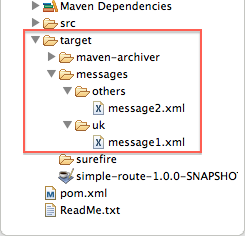
Figure 2.1. Target message destinations in Project Explorer tree
- Verify that the
target/messages/subfolders contain these files:uk/message1.xmlothers/message2.xml
- Double-click
message1.xmlto open it in the editor's Design view, then select the Source tab at the bottom, left of the canvas to see the xml code.It's contents should match that shown in Example 2.1.Example 2.1. Contents of message1.xml
<?xml version="1.0" encoding="UTF-8"?>

<person user="james">
  <firstName>James</firstName>
  <lastName>Strachan</lastName>
  <city>London</city>
</person>
Further reading
リンクのコピーリンクがクリップボードにコピーされました!
To learn more about:
- configuring runtime profiles, see Red Hat JBoss Fuse Tooling: JBoss Fuse Tooling User Guide at https://access.redhat.com/site/documentation/JBoss_Fuse/.
- deploying Apache Camel applications see Red Hat JBoss Fuse: Deploying into the Container that comes with Red Hat JBoss Fuse.

'%20d='M201.5%20305.5c-13.8%200-24.9-11.1-24.9-24.6%200-13.8%2011.1-24.9%2024.9-24.9%2013.6%200%2024.6%2011.1%2024.6%2024.9%200%2013.6-11.1%2024.6-24.6%2024.6zM504%20256c0%20137-111%20248-248%20248S8%20393%208%20256%20119%208%20256%208s248%20111%20248%20248zm-132.3-41.2c-9.4%200-17.7%203.9-23.8%2010-22.4-15.5-52.6-25.5-86.1-26.6l17.4-78.3%2055.4%2012.5c0%2013.6%2011.1%2024.6%2024.6%2024.6%2013.8%200%2024.9-11.3%2024.9-24.9s-11.1-24.9-24.9-24.9c-9.7%200-18%205.8-22.1%2013.8l-61.2-13.6c-3-.8-6.1%201.4-6.9%204.4l-19.1%2086.4c-33.2%201.4-63.1%2011.3-85.5%2026.8-6.1-6.4-14.7-10.2-24.1-10.2-34.9%200-46.3%2046.9-14.4%2062.8-1.1%205-1.7%2010.2-1.7%2015.5%200%2052.6%2059.2%2095.2%20132%2095.2%2073.1%200%20132.3-42.6%20132.3-95.2%200-5.3-.6-10.8-1.9-15.8%2031.3-16%2019.8-62.5-14.9-62.5zM302.8%20331c-18.2%2018.2-76.1%2017.9-93.6%200-2.2-2.2-6.1-2.2-8.3%200-2.5%202.5-2.5%206.4%200%208.6%2022.8%2022.8%2087.3%2022.8%20110.2%200%202.5-2.2%202.5-6.1%200-8.6-2.2-2.2-6.1-2.2-8.3%200zm7.7-75c-13.6%200-24.6%2011.1-24.6%2024.9%200%2013.6%2011.1%2024.6%2024.6%2024.6%2013.8%200%2024.9-11.1%2024.9-24.6%200-13.8-11-24.9-24.9-24.9z'/%3e%3c/svg%3e)