 Red Hat Summit
第4章 Unified Push Admin UI を使用したプッシュ通知の送信
Unified Push Admin UI を使用すると、プッシュ通知を送信できます。
前提条件
- Push Notifications サービスがプロビジョニングされていることを確認します。
- OpenShift でルートを選択します。
- OpenShift 認証情報でログインします。
注記
初回ログイン時に、ユーザーアカウントを読み取るために OpenShift OAuth サービスパーミッションを指定する必要があります。
- 管理 UI
- ブラウザーで Unified Push 管理 UI を開きます。
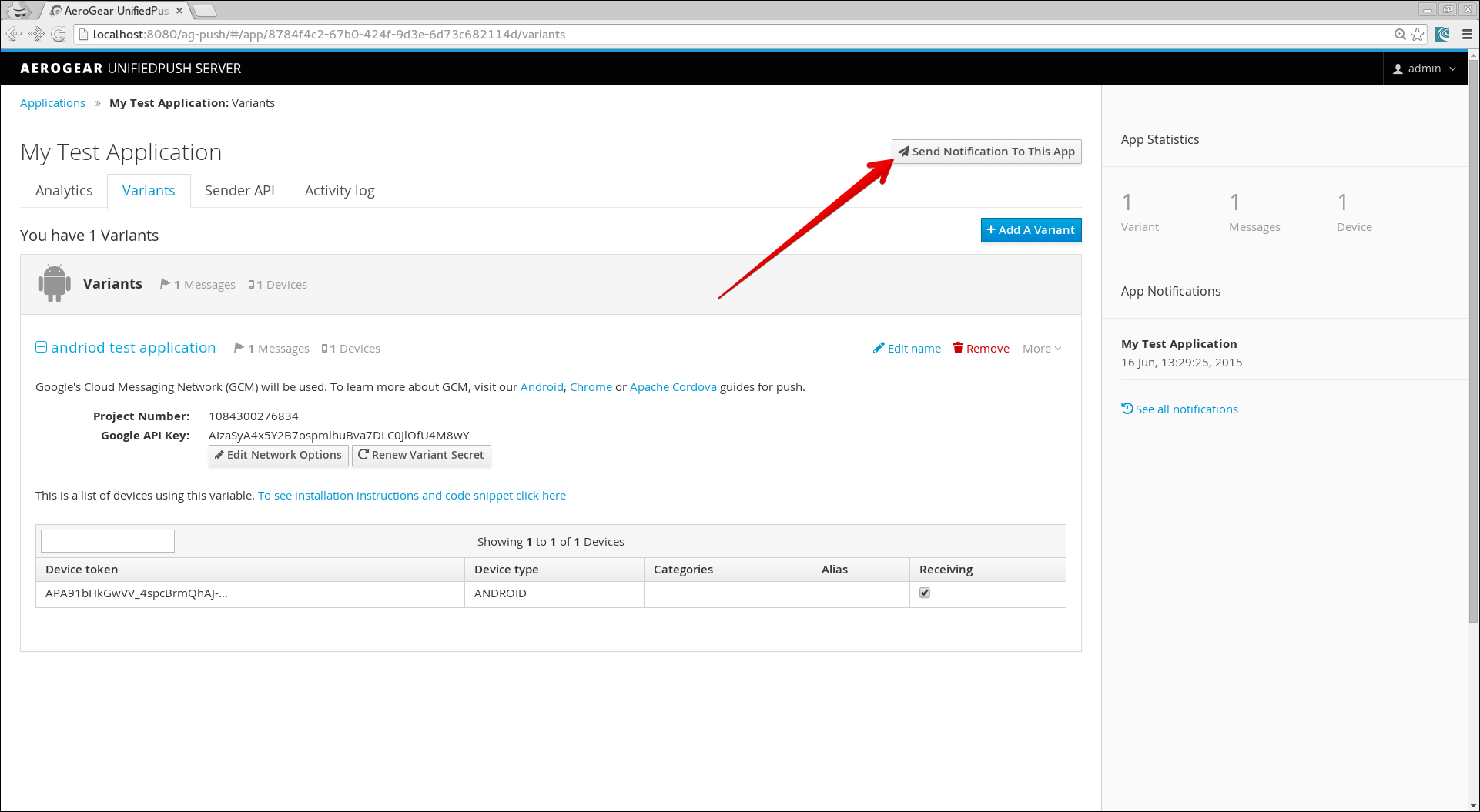
ホームページからターゲットアプリケーションを選択し、Send Notification To This App をクリックします。
Send Push ダイアログが表示されたら、Message フォームにテキストを入力します。
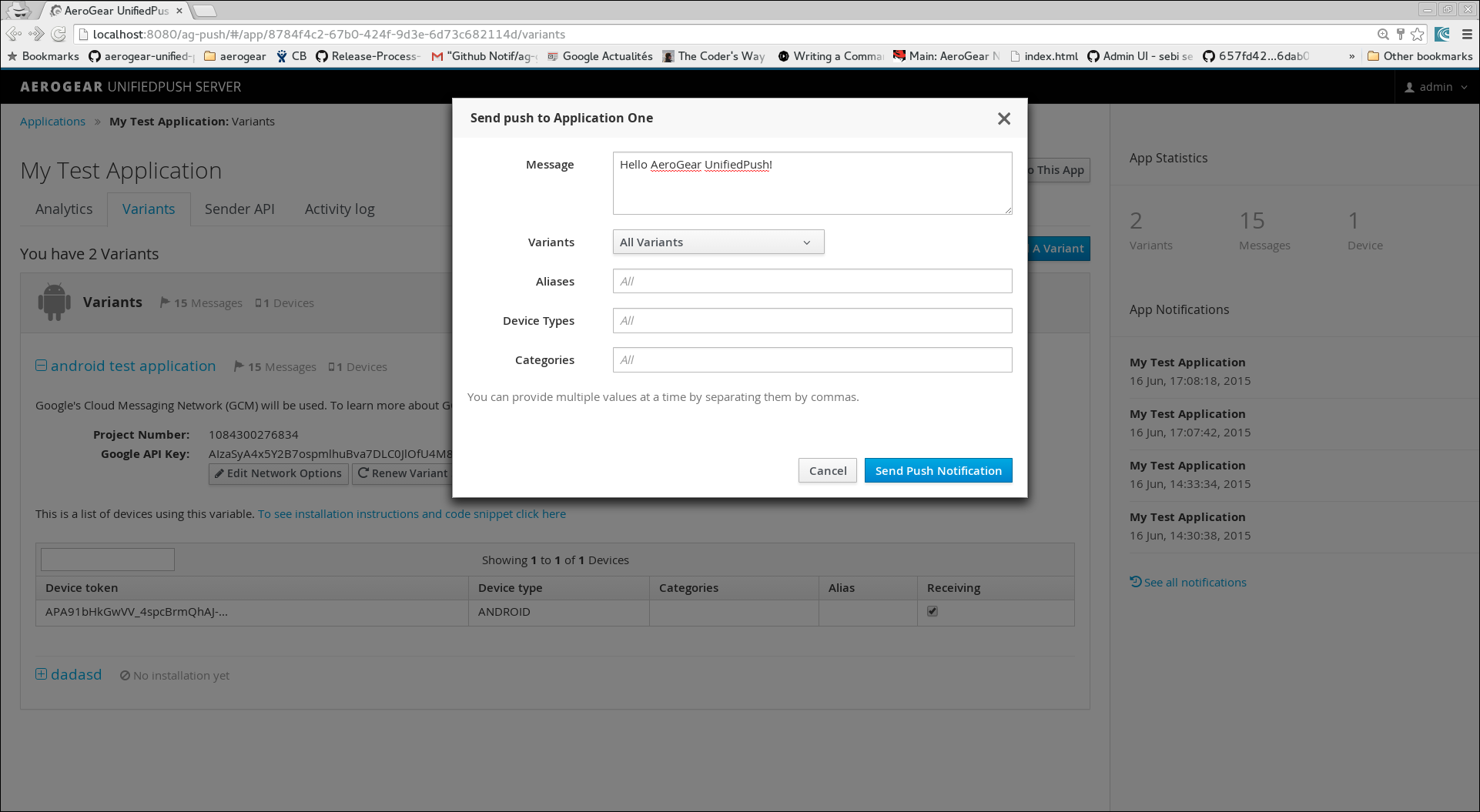
- Send Push Notification をクリックし、メッセージをターゲットアプリケーションに送信します。
- Java API
unifiedpush-java-client を依存関係としてプロジェクトに追加します。
<dependency>
  <groupId>org.jboss.aerogear</groupId>
  <artifactId>unifiedpush-java-client</artifactId>
  <version>[version]</version>
</dependency>
<dependency>
  <groupId>org.jboss.aerogear</groupId>
  <artifactId>unifiedpush-java-client</artifactId>
  <version>[version]</version>
</dependency>
Copy to Clipboard Copied! Toggle word wrap Toggle overflow メッセージをターゲットアプリケーションに送信します。
Copy to Clipboard Copied! Toggle word wrap Toggle overflow
- Node.js API
unifiedpush-node-sender を依存関係としてプロジェクトに追加します。
npm i unifiedpush-node-sender
npm i unifiedpush-node-senderCopy to Clipboard Copied! Toggle word wrap Toggle overflow メッセージをターゲットアプリケーションに送信します。
Copy to Clipboard Copied! Toggle word wrap Toggle overflow
- REST
メッセージをターゲットアプリケーションに送信します。
Copy to Clipboard Copied! Toggle word wrap Toggle overflow
注記
サードパーティーのプッシュネットワークは、ターゲットアプリケーションに Push 通知を配信します。

'%20d='M201.5%20305.5c-13.8%200-24.9-11.1-24.9-24.6%200-13.8%2011.1-24.9%2024.9-24.9%2013.6%200%2024.6%2011.1%2024.6%2024.9%200%2013.6-11.1%2024.6-24.6%2024.6zM504%20256c0%20137-111%20248-248%20248S8%20393%208%20256%20119%208%20256%208s248%20111%20248%20248zm-132.3-41.2c-9.4%200-17.7%203.9-23.8%2010-22.4-15.5-52.6-25.5-86.1-26.6l17.4-78.3%2055.4%2012.5c0%2013.6%2011.1%2024.6%2024.6%2024.6%2013.8%200%2024.9-11.3%2024.9-24.9s-11.1-24.9-24.9-24.9c-9.7%200-18%205.8-22.1%2013.8l-61.2-13.6c-3-.8-6.1%201.4-6.9%204.4l-19.1%2086.4c-33.2%201.4-63.1%2011.3-85.5%2026.8-6.1-6.4-14.7-10.2-24.1-10.2-34.9%200-46.3%2046.9-14.4%2062.8-1.1%205-1.7%2010.2-1.7%2015.5%200%2052.6%2059.2%2095.2%20132%2095.2%2073.1%200%20132.3-42.6%20132.3-95.2%200-5.3-.6-10.8-1.9-15.8%2031.3-16%2019.8-62.5-14.9-62.5zM302.8%20331c-18.2%2018.2-76.1%2017.9-93.6%200-2.2-2.2-6.1-2.2-8.3%200-2.5%202.5-2.5%206.4%200%208.6%2022.8%2022.8%2087.3%2022.8%20110.2%200%202.5-2.2%202.5-6.1%200-8.6-2.2-2.2-6.1-2.2-8.3%200zm7.7-75c-13.6%200-24.6%2011.1-24.6%2024.9%200%2013.6%2011.1%2024.6%2024.6%2024.6%2013.8%200%2024.9-11.1%2024.9-24.6%200-13.8-11-24.9-24.9-24.9z'/%3e%3c/svg%3e)