 Red Hat Summit
7.3. Enabling the one-time password in the Web UI
Identity Management (IdM) administrators can enable two-factor authentication (2FA) for IdM users either globally or individually. The user enters the one-time password (OTP) after their regular password on the command line or in the dedicated field in the Web UI login dialog, with no space between these passwords.
Enabling 2FA is not the same as enforcing it. If you use logins based on LDAP-binds, IdM users can still authenticate by entering a password only. However, if you use krb5-based logins, the 2FA is enforced.
Note that there is an option to enforce 2FA for LDAP-binds by enforcing OTP usage for all LDAP clients. For more information, see Enforcing OTP usage for all LDAP clients.
Complete this procedure to use the IdM Web UI to enable 2FA for the individual example.user IdM user.
Prerequisites
- Administrator privileges
Procedure
-
Log in to the IdM Web UI with IdM
adminprivileges. Open the Identity
Users Active users tab. 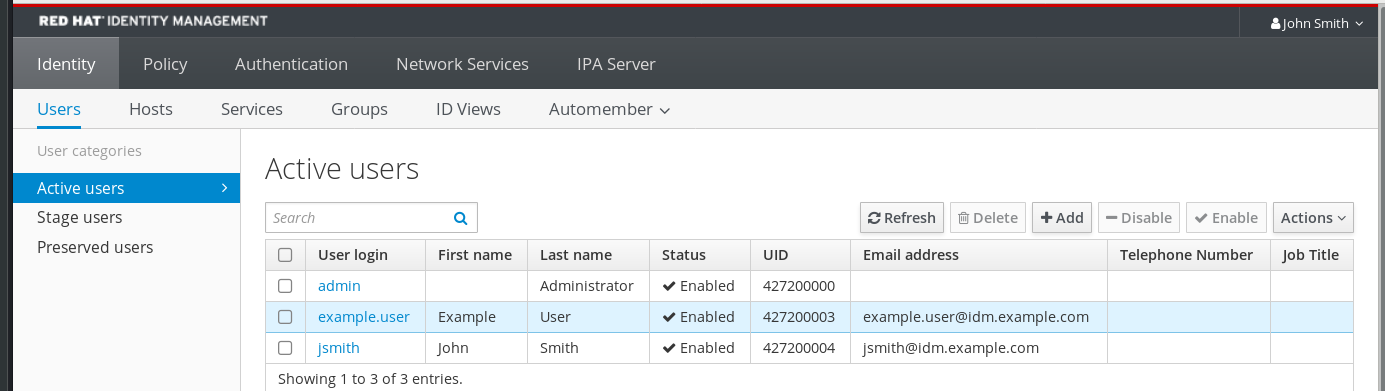
- Select example.user to open the user settings.
- In the User authentication types, select Two factor authentication (password + OTP).
Click Save.
At this point, the OTP authentication is enabled for the IdM user.
Now you or example.user must assign a new token ID to the example.user account.

'%20d='M201.5%20305.5c-13.8%200-24.9-11.1-24.9-24.6%200-13.8%2011.1-24.9%2024.9-24.9%2013.6%200%2024.6%2011.1%2024.6%2024.9%200%2013.6-11.1%2024.6-24.6%2024.6zM504%20256c0%20137-111%20248-248%20248S8%20393%208%20256%20119%208%20256%208s248%20111%20248%20248zm-132.3-41.2c-9.4%200-17.7%203.9-23.8%2010-22.4-15.5-52.6-25.5-86.1-26.6l17.4-78.3%2055.4%2012.5c0%2013.6%2011.1%2024.6%2024.6%2024.6%2013.8%200%2024.9-11.3%2024.9-24.9s-11.1-24.9-24.9-24.9c-9.7%200-18%205.8-22.1%2013.8l-61.2-13.6c-3-.8-6.1%201.4-6.9%204.4l-19.1%2086.4c-33.2%201.4-63.1%2011.3-85.5%2026.8-6.1-6.4-14.7-10.2-24.1-10.2-34.9%200-46.3%2046.9-14.4%2062.8-1.1%205-1.7%2010.2-1.7%2015.5%200%2052.6%2059.2%2095.2%20132%2095.2%2073.1%200%20132.3-42.6%20132.3-95.2%200-5.3-.6-10.8-1.9-15.8%2031.3-16%2019.8-62.5-14.9-62.5zM302.8%20331c-18.2%2018.2-76.1%2017.9-93.6%200-2.2-2.2-6.1-2.2-8.3%200-2.5%202.5-2.5%206.4%200%208.6%2022.8%2022.8%2087.3%2022.8%20110.2%200%202.5-2.2%202.5-6.1%200-8.6-2.2-2.2-6.1-2.2-8.3%200zm7.7-75c-13.6%200-24.6%2011.1-24.6%2024.9%200%2013.6%2011.1%2024.6%2024.6%2024.6%2013.8%200%2024.9-11.1%2024.9-24.6%200-13.8-11-24.9-24.9-24.9z'/%3e%3c/svg%3e)