 Red Hat Summit
이 콘텐츠는 선택한 언어로 제공되지 않습니다.
Chapter 3. Tasks
3.1. Register Repository on New Server
링크 복사링크가 클립보드에 복사되었습니다!
3.1.1. Register Repository on a New Server
링크 복사링크가 클립보드에 복사되었습니다!
You can register a repository on a new server through the ModeShape view.
Open ModeShape View
- To open the ModeShape view navigate to
- From the Show View dialog, select the ModeShape folder followed by the ModeShape view and click Open.
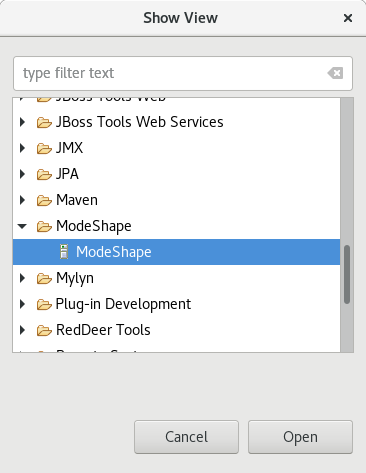
Figure 3.1. Selecting the ModeShape view
Add ModeShape Repository
- To add a ModeShape repository, click the Create a new server icon that appears in the ModeShape view. This view is located in the lower section of your interface, along with other views such as Servers and Console.
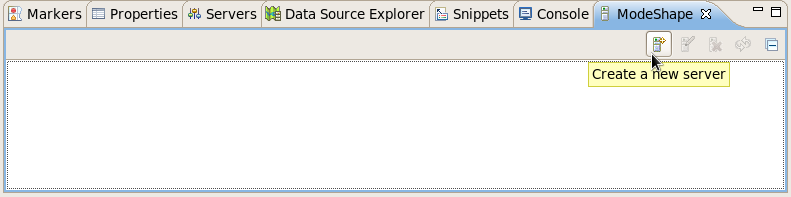
Figure 3.2. Adding a new server for ModeShape repositories
- The New Server dialog will appear. Enter the URL of the server to connect and your authentication information in the New Server dialog. You can test your connection to the server by clicking the Test button.
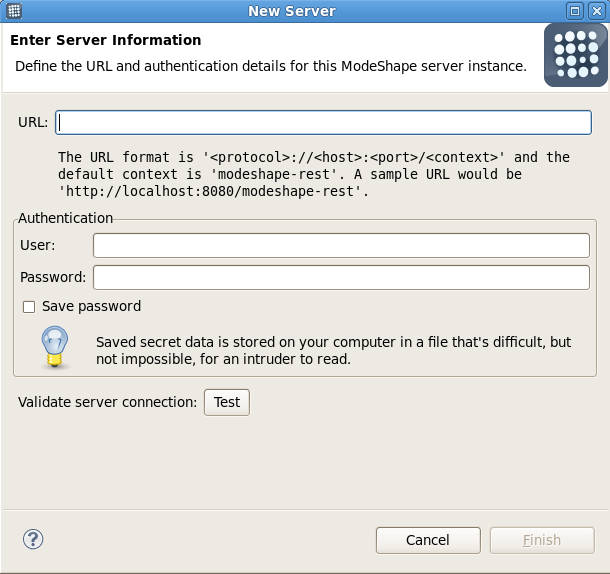
Figure 3.3. The New Server dialog
- Click the Finish button to add the server to the ModeShape view.
Note
Upon testing the connection, if a connection cannot be established, the ModeShape server can still be created. Use the Reconnect button on the ModeShape View's toolbar to try and connect again at a later time.
Result
Once the server with the ModeShape repository has been added three new options become available within the ModeShape view.
3.1.2. ModeShape Repository Options
링크 복사링크가 클립보드에 복사되었습니다!
After the repository is added to the new server as described in Section 3.1.1, “Register Repository on a New Server”, three new options appear within the ModeShape view. These options allow you to:
- edit server properties,
- delete a server from the server registry, and
- reconnect to the selected server.
To perform one of these actions either right-click on a server and select from the presented menu of actions, or use the buttons beside the Create a new server icon.
Note
It is possible for a ModeShape server instance to have numerous ModeShape repositories stored on it. Once you have registered a connection to the server you will have access to all ModeShape repositories on the server. You do not need to register a new connection for each repository on the same server.

'%20d='M201.5%20305.5c-13.8%200-24.9-11.1-24.9-24.6%200-13.8%2011.1-24.9%2024.9-24.9%2013.6%200%2024.6%2011.1%2024.6%2024.9%200%2013.6-11.1%2024.6-24.6%2024.6zM504%20256c0%20137-111%20248-248%20248S8%20393%208%20256%20119%208%20256%208s248%20111%20248%20248zm-132.3-41.2c-9.4%200-17.7%203.9-23.8%2010-22.4-15.5-52.6-25.5-86.1-26.6l17.4-78.3%2055.4%2012.5c0%2013.6%2011.1%2024.6%2024.6%2024.6%2013.8%200%2024.9-11.3%2024.9-24.9s-11.1-24.9-24.9-24.9c-9.7%200-18%205.8-22.1%2013.8l-61.2-13.6c-3-.8-6.1%201.4-6.9%204.4l-19.1%2086.4c-33.2%201.4-63.1%2011.3-85.5%2026.8-6.1-6.4-14.7-10.2-24.1-10.2-34.9%200-46.3%2046.9-14.4%2062.8-1.1%205-1.7%2010.2-1.7%2015.5%200%2052.6%2059.2%2095.2%20132%2095.2%2073.1%200%20132.3-42.6%20132.3-95.2%200-5.3-.6-10.8-1.9-15.8%2031.3-16%2019.8-62.5-14.9-62.5zM302.8%20331c-18.2%2018.2-76.1%2017.9-93.6%200-2.2-2.2-6.1-2.2-8.3%200-2.5%202.5-2.5%206.4%200%208.6%2022.8%2022.8%2087.3%2022.8%20110.2%200%202.5-2.2%202.5-6.1%200-8.6-2.2-2.2-6.1-2.2-8.3%200zm7.7-75c-13.6%200-24.6%2011.1-24.6%2024.9%200%2013.6%2011.1%2024.6%2024.6%2024.6%2013.8%200%2024.9-11.1%2024.9-24.6%200-13.8-11-24.9-24.9-24.9z'/%3e%3c/svg%3e)