 Red Hat Summit
이 콘텐츠는 선택한 언어로 제공되지 않습니다.
3.3. Setting Preferences
3.3.1. Setting Preferences
링크 복사링크가 클립보드에 복사되었습니다!
The ModeShape Preferences dialog allows for resource versioning to be set along with specific file types and folders that you never wish to have published to or unpublished from a ModeShape repository.
Procedure 3.3. Setting preferences
Open ModeShape Preferences dialog.
The ModeShape Preferences dialog is accessed by navigating to -> -> -> . This dialog allows you to set whether resource versioning will be used for your ModeShape repository or not.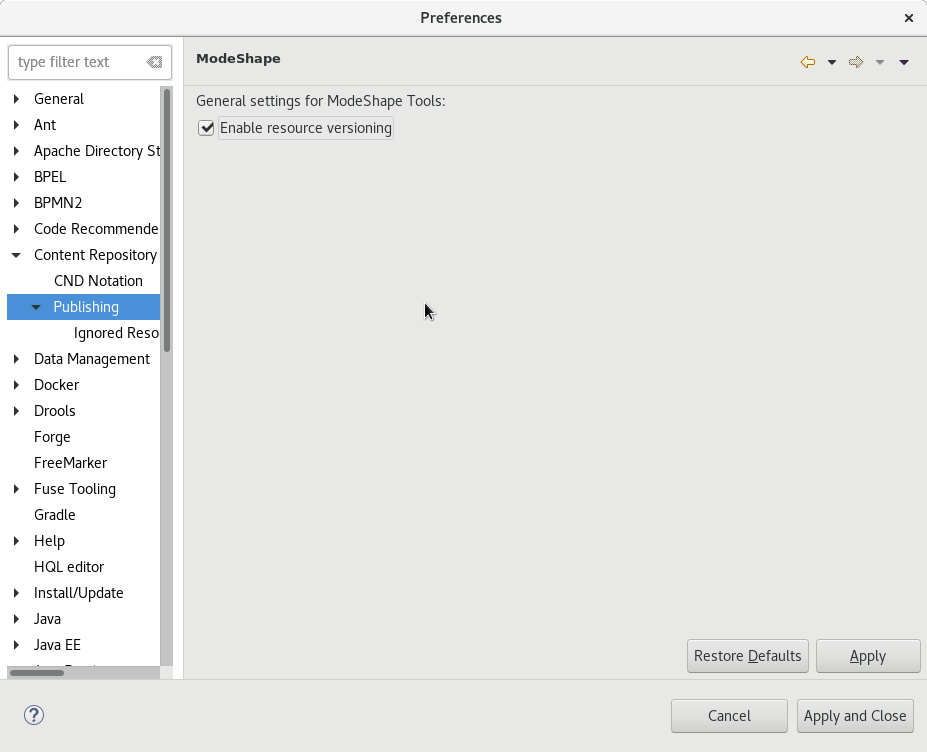
Figure 3.7. ModeShape Preferences dialog
Activate resource versioning.
Click the Enable resource versioning checkbox to activate resource versioning.
3.3.2. Ignored Resources
링크 복사링크가 클립보드에 복사되었습니다!
You can manage the resources to be published using the Ignored Resources menu.
Procedure 3.4. Manage Ignored Resources
Open Ignored Resources Preferences dialog.
To open the Ignored Resources dialog, click -> -> -> -> . On this screen you can manage the resources that will not be published to your ModeShape repository.The current excluded file types and folders are presented as the list of checkbox items that appear under the Ignored Resources heading.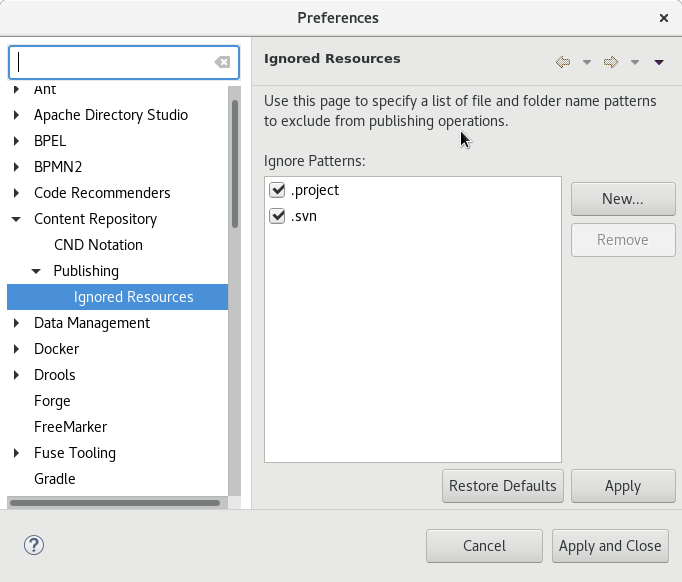
Figure 3.8. ModeShape: Ignored Resources Preferences dialog
Add a new resource to the Ignored Resources list.
To add a new file extension type or folder name to be filtered from publishing, click the New button, enter the details and click the Apply button so that your preference changes are saved.Remove a resource from the Ignored Resources list.
To remove an entry, select an entry from the list in the Preferences dialog and click the Remove button. Ensure that you click the Apply button so that your preference changes are saved.
Note
If you decide to ignore a resource that has been published in the past, ensure that all instances are unpublished before ignoring it, otherwise you will not be able to unpublish the resource either. That said, this can be an effective way of ensuring a resource cannot be unpublished by accident. Remember though that, since preference settings are only local to your working environment, in a multi-user ModeShape repository someone else could unpublish it.

'%20d='M201.5%20305.5c-13.8%200-24.9-11.1-24.9-24.6%200-13.8%2011.1-24.9%2024.9-24.9%2013.6%200%2024.6%2011.1%2024.6%2024.9%200%2013.6-11.1%2024.6-24.6%2024.6zM504%20256c0%20137-111%20248-248%20248S8%20393%208%20256%20119%208%20256%208s248%20111%20248%20248zm-132.3-41.2c-9.4%200-17.7%203.9-23.8%2010-22.4-15.5-52.6-25.5-86.1-26.6l17.4-78.3%2055.4%2012.5c0%2013.6%2011.1%2024.6%2024.6%2024.6%2013.8%200%2024.9-11.3%2024.9-24.9s-11.1-24.9-24.9-24.9c-9.7%200-18%205.8-22.1%2013.8l-61.2-13.6c-3-.8-6.1%201.4-6.9%204.4l-19.1%2086.4c-33.2%201.4-63.1%2011.3-85.5%2026.8-6.1-6.4-14.7-10.2-24.1-10.2-34.9%200-46.3%2046.9-14.4%2062.8-1.1%205-1.7%2010.2-1.7%2015.5%200%2052.6%2059.2%2095.2%20132%2095.2%2073.1%200%20132.3-42.6%20132.3-95.2%200-5.3-.6-10.8-1.9-15.8%2031.3-16%2019.8-62.5-14.9-62.5zM302.8%20331c-18.2%2018.2-76.1%2017.9-93.6%200-2.2-2.2-6.1-2.2-8.3%200-2.5%202.5-2.5%206.4%200%208.6%2022.8%2022.8%2087.3%2022.8%20110.2%200%202.5-2.2%202.5-6.1%200-8.6-2.2-2.2-6.1-2.2-8.3%200zm7.7-75c-13.6%200-24.6%2011.1-24.6%2024.9%200%2013.6%2011.1%2024.6%2024.6%2024.6%2013.8%200%2024.9-11.1%2024.9-24.6%200-13.8-11-24.9-24.9-24.9z'/%3e%3c/svg%3e)