 Red Hat Summit
5.3. Apache Kafka용 Knative 브로커 설치
Apache Kafka의 Knative 브로커 구현은 지원되는 버전의 Apache Kafka 메시지 스트리밍 플랫폼을 OpenShift Serverless와 함께 사용할 수 있는 통합 옵션을 제공합니다. Apache Kafka 기능에 대한 Knative 브로커는 KnativeKafka 사용자 정의 리소스를 설치한 경우 OpenShift Serverless 설치에서 사용할 수 있습니다.
사전 요구 사항
- OpenShift Serverless Operator 및 Knative Eventing을 클러스터에 설치했습니다.
- Red Hat AMQ Streams 클러스터에 액세스할 수 있습니다.
-
확인 단계를 사용하려면 OpenShift CLI(
oc)를 설치합니다. - OpenShift Container Platform에 대한 클러스터 관리자 권한이 있거나 AWS 또는 OpenShift Dedicated의 Red Hat OpenShift Service에 대한 클러스터 또는 전용 관리자 권한이 있습니다.
- OpenShift Container Platform 웹 콘솔에 로그인되어 있습니다.
프로세스
-
Operators
설치된 Operator로 이동합니다. - 페이지 상단에 있는 프로젝트 드롭다운이 Project: knative-eventing으로 설정되어 있는지 확인합니다.
- OpenShift Serverless Operator의 Provided APIs 목록에서 Knative Kafka를 검색하여 Create Instance를 클릭합니다.
Knative Kafka 생성 페이지에서 KnativeKafka 오브젝트를 구성합니다.
중요클러스터에서 Kafka 채널, 소스, 브로커 또는 싱크를 사용하려면 사용할 옵션에 대해 활성화된 스위치를 true 로 전환해야 합니다. 이러한 스위치는 기본적으로 false로 설정됩니다. 또한 Kafka 채널, 브로커 또는 싱크를 사용하려면 부트스트랩 서버를 지정해야 합니다.
- KnativeKafka 오브젝트 생성을 완전히 제어할 필요가 없는 간단한 구성은 이 양식을 사용합니다.
KnativeKafka 오브젝트 생성을 완전히 제어해야 하는 복잡한 구성을 위해 YAML을 편집합니다. Knative Kafka 생성 페이지에서 YAML 편집 링크를 클릭하여 YAML 에 액세스할 수 있습니다.
KnativeKafka사용자 정의 리소스의 예apiVersion: operator.serverless.openshift.io/v1alpha1 kind: KnativeKafka metadata: name: knative-kafka namespace: knative-eventing spec: channel: enabled: true1 bootstrapServers: <bootstrap_servers>2 source: enabled: true3 broker: enabled: true4 defaultConfig: bootstrapServers: <bootstrap_servers>5 numPartitions: <num_partitions>6 replicationFactor: <replication_factor>7 sink: enabled: true8 logging: level: INFO9 - 1
- 개발자가 클러스터에서
KafkaChannel채널 유형을 사용할 수 있습니다. - 2
- AMQ Streams 클러스터에 있는 쉼표로 구분된 부트스트랩 서버 목록입니다.
- 3
- 개발자가 클러스터에서
KafkaSource이벤트 소스 유형을 사용할 수 있습니다. - 4
- 개발자가 클러스터에서 Apache Kafka에 Knative 브로커 구현을 사용할 수 있습니다.
- 5
- Red Hat AMQ Streams 클러스터의 쉼표로 구분된 부트스트랩 서버 목록입니다.
- 6
Broker오브젝트에서 지원하는 Kafka 주제의 파티션 수를 정의합니다. 기본값은10입니다.- 7
Broker오브젝트에서 지원하는 Kafka 주제의 복제 요소를 정의합니다. 기본값은3입니다.replicationFactor값은 Red Hat AMQ Streams 클러스터의 노드 수보다 작거나 같아야 합니다.- 8
- 개발자가 클러스터에서 Kafka 싱크를 사용할 수 있습니다.
- 9
- Kafka 데이터 플레인의 로그 수준을 정의합니다. 허용되는 값은
TRACE,DEBUG,INFO,WARN및ERROR입니다. 기본값은INFO입니다.
주의DEBUG또는TRACE를 프로덕션 환경에서 로깅 수준으로 사용하지 마십시오. 이러한 로깅 수준의 출력은 상세하며 성능이 저하될 수 있습니다.
- Kafka에 대한 선택적 구성을 완료한 후 생성을 클릭합니다. 그러면 리소스 목록에 knative-kafka가 있는 Knative Kafka 탭으로 자동으로 이동합니다.
검증
- Knative Kafka 탭에서 knative-kafka 리소스를 클릭합니다. 그러면 자동으로 Knative Kafka 개요 페이지로 이동합니다.
리소스에 대한 조건 목록을 확인하고 상태가 True인지 확인합니다.
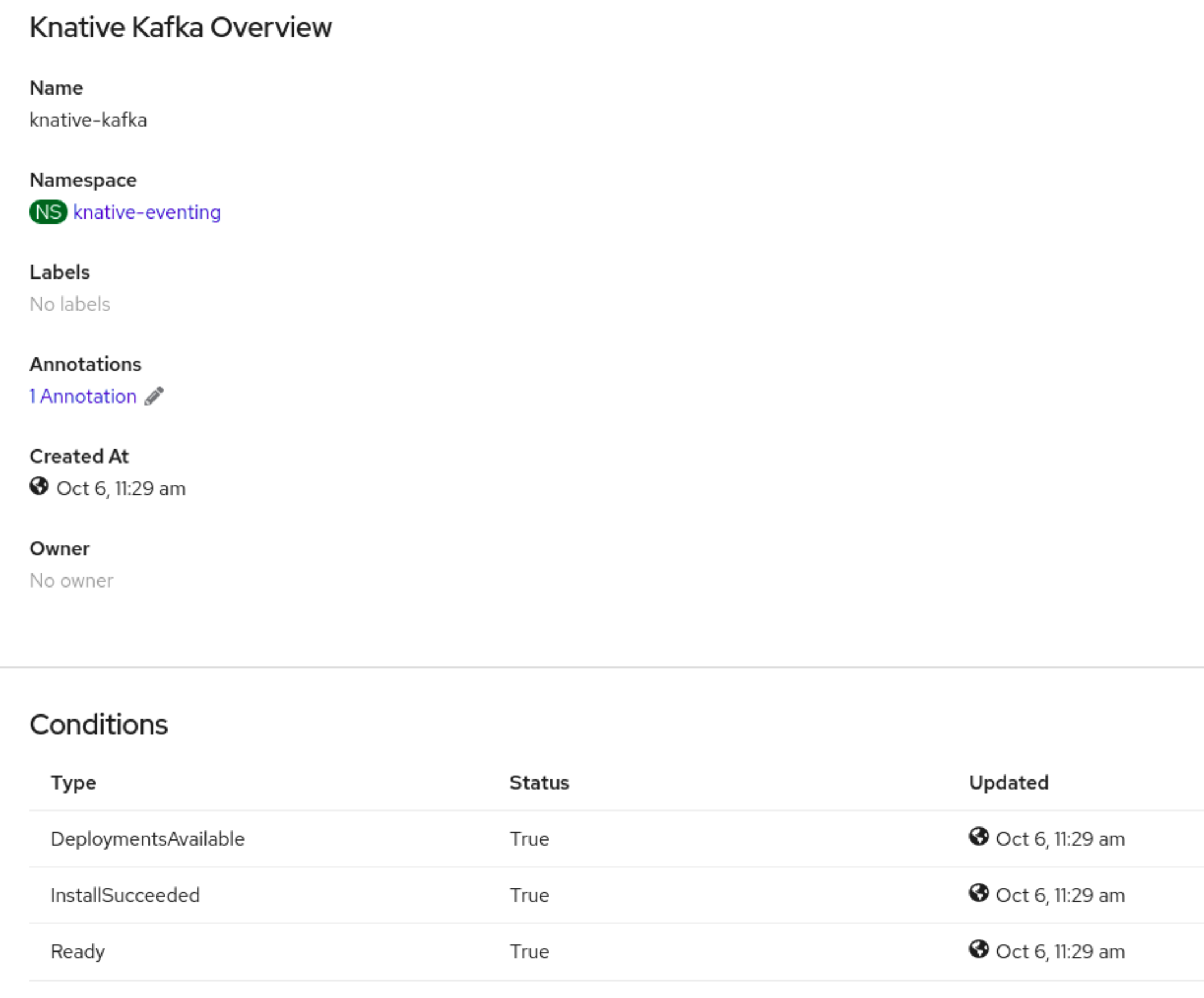
조건 상태가 알 수 없음 또는 False인 경우 몇 분 정도 기다린 후 페이지를 새로 고칩니다.
Apache Kafka 리소스의 Knative 브로커가 생성되었는지 확인합니다.
$ oc get pods -n knative-eventing출력 예
NAME                                        READY   STATUS    RESTARTS   AGE
kafka-broker-dispatcher-7769fbbcbb-xgffn    2/2     Running   0          44s
kafka-broker-receiver-5fb56f7656-fhq8d      2/2     Running   0          44s
kafka-channel-dispatcher-84fd6cb7f9-k2tjv   2/2     Running   0          44s
kafka-channel-receiver-9b7f795d5-c76xr      2/2     Running   0          44s
kafka-controller-6f95659bf6-trd6r           2/2     Running   0          44s
kafka-source-dispatcher-6bf98bdfff-8bcsn    2/2     Running   0          44s
kafka-webhook-eventing-68dc95d54b-825xs     2/2     Running   0          44s

'%20d='M201.5%20305.5c-13.8%200-24.9-11.1-24.9-24.6%200-13.8%2011.1-24.9%2024.9-24.9%2013.6%200%2024.6%2011.1%2024.6%2024.9%200%2013.6-11.1%2024.6-24.6%2024.6zM504%20256c0%20137-111%20248-248%20248S8%20393%208%20256%20119%208%20256%208s248%20111%20248%20248zm-132.3-41.2c-9.4%200-17.7%203.9-23.8%2010-22.4-15.5-52.6-25.5-86.1-26.6l17.4-78.3%2055.4%2012.5c0%2013.6%2011.1%2024.6%2024.6%2024.6%2013.8%200%2024.9-11.3%2024.9-24.9s-11.1-24.9-24.9-24.9c-9.7%200-18%205.8-22.1%2013.8l-61.2-13.6c-3-.8-6.1%201.4-6.9%204.4l-19.1%2086.4c-33.2%201.4-63.1%2011.3-85.5%2026.8-6.1-6.4-14.7-10.2-24.1-10.2-34.9%200-46.3%2046.9-14.4%2062.8-1.1%205-1.7%2010.2-1.7%2015.5%200%2052.6%2059.2%2095.2%20132%2095.2%2073.1%200%20132.3-42.6%20132.3-95.2%200-5.3-.6-10.8-1.9-15.8%2031.3-16%2019.8-62.5-14.9-62.5zM302.8%20331c-18.2%2018.2-76.1%2017.9-93.6%200-2.2-2.2-6.1-2.2-8.3%200-2.5%202.5-2.5%206.4%200%208.6%2022.8%2022.8%2087.3%2022.8%20110.2%200%202.5-2.2%202.5-6.1%200-8.6-2.2-2.2-6.1-2.2-8.3%200zm7.7-75c-13.6%200-24.6%2011.1-24.6%2024.9%200%2013.6%2011.1%2024.6%2024.6%2024.6%2013.8%200%2024.9-11.1%2024.9-24.6%200-13.8-11-24.9-24.9-24.9z'/%3e%3c/svg%3e)