 Red Hat Summit
Este conteúdo não está disponível no idioma selecionado.
D.8. Properties View
The Properties View provides editing capabilities for the currently selected object in Teiid Designer. The selection provided by whichever view or editor is currently in focus will determine the its contents.
To edit a property, click a cell in the Value column. As in the Table Editor, each cell provides a UI editor specific to the property type.
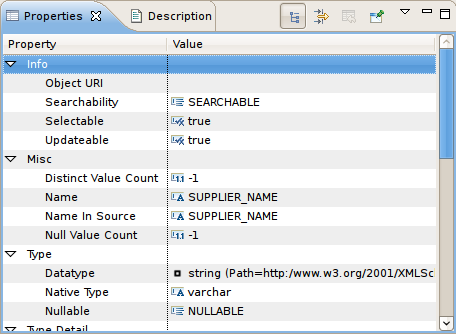
Figure D.15. Properties View
If the model for the object being edited is not open in an editor, a dialog may appear confirming the attempt to modify the model and asking the user to confirm or cancel. This dialog can be prevented by selecting the preference Always open editor without prompting. You can also select/clear this property via the Teiid Designer's main preference page.
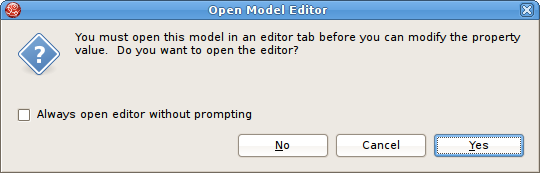
Figure D.16. Open Model Editor Dialog
Properties can also be edited via a right-click menu presented below.
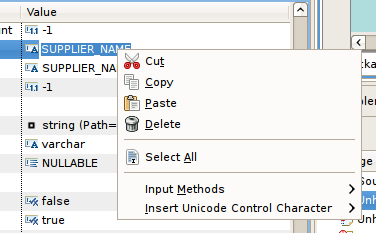
Figure D.17. Open Model Editor Dialog
The Properties toolbar contains the following actions:
 Show Categories - toggles between categorized properties and flat alphabetical properties list.
 Show Advanced Properties - shows/hide advanced properties (if available).
 Restore Default Value - for a selected property, this action will reset the current to a default value (if available).

'%20d='M201.5%20305.5c-13.8%200-24.9-11.1-24.9-24.6%200-13.8%2011.1-24.9%2024.9-24.9%2013.6%200%2024.6%2011.1%2024.6%2024.9%200%2013.6-11.1%2024.6-24.6%2024.6zM504%20256c0%20137-111%20248-248%20248S8%20393%208%20256%20119%208%20256%208s248%20111%20248%20248zm-132.3-41.2c-9.4%200-17.7%203.9-23.8%2010-22.4-15.5-52.6-25.5-86.1-26.6l17.4-78.3%2055.4%2012.5c0%2013.6%2011.1%2024.6%2024.6%2024.6%2013.8%200%2024.9-11.3%2024.9-24.9s-11.1-24.9-24.9-24.9c-9.7%200-18%205.8-22.1%2013.8l-61.2-13.6c-3-.8-6.1%201.4-6.9%204.4l-19.1%2086.4c-33.2%201.4-63.1%2011.3-85.5%2026.8-6.1-6.4-14.7-10.2-24.1-10.2-34.9%200-46.3%2046.9-14.4%2062.8-1.1%205-1.7%2010.2-1.7%2015.5%200%2052.6%2059.2%2095.2%20132%2095.2%2073.1%200%20132.3-42.6%20132.3-95.2%200-5.3-.6-10.8-1.9-15.8%2031.3-16%2019.8-62.5-14.9-62.5zM302.8%20331c-18.2%2018.2-76.1%2017.9-93.6%200-2.2-2.2-6.1-2.2-8.3%200-2.5%202.5-2.5%206.4%200%208.6%2022.8%2022.8%2087.3%2022.8%20110.2%200%202.5-2.2%202.5-6.1%200-8.6-2.2-2.2-6.1-2.2-8.3%200zm7.7-75c-13.6%200-24.6%2011.1-24.6%2024.9%200%2013.6%2011.1%2024.6%2024.6%2024.6%2013.8%200%2024.9-11.1%2024.9-24.6%200-13.8-11-24.9-24.9-24.9z'/%3e%3c/svg%3e)