 红帽全球峰会
此内容没有您所选择的语言版本。
10. Storing Monitoring Data
JBoss ON monitoring information reveals both current measurements and historical trends and averages. JBoss ON stores data in a kind of cascade, where raw data are aggregated and compressed on a schedule. This preserves the trends of data without inflating the size of the monitoring data. Data are handled like this:
- Raw metrics are collected every few minutes and are aggregated in a rolling average in one-hour windows to produce minimum, average, and maximum values.
- One-hour values are combined and averaged in six-hour periods.
- Six-hour periods are combined and aggregated into 24-hour (1 day) windows.
10.1. Changing Storage Lengths
复制链接链接已复制到粘贴板!
The raw measurements, six-hour periods, and 24-hour periods are preserved in the JBoss ON database for a configurable amount of time, ranging from one week for raw measurements to one year for 24-hour aggregates.
Note
The storage size of raw metrics can grow very quickly. Be careful when adjusting the storage time of raw metrics to account for the size of your database and the number and frequency of all metrics collected across your inventory.
If you need to store raw data for long periods, consider exporting the raw data from the database and archiving it separately.
To change the amount of time that monitoring data are stored:
- In the System Configuration menu, select the item.

- Scroll to the Data Manager Configuration Properties section.
- Change the storage times for the different types of monitoring data.
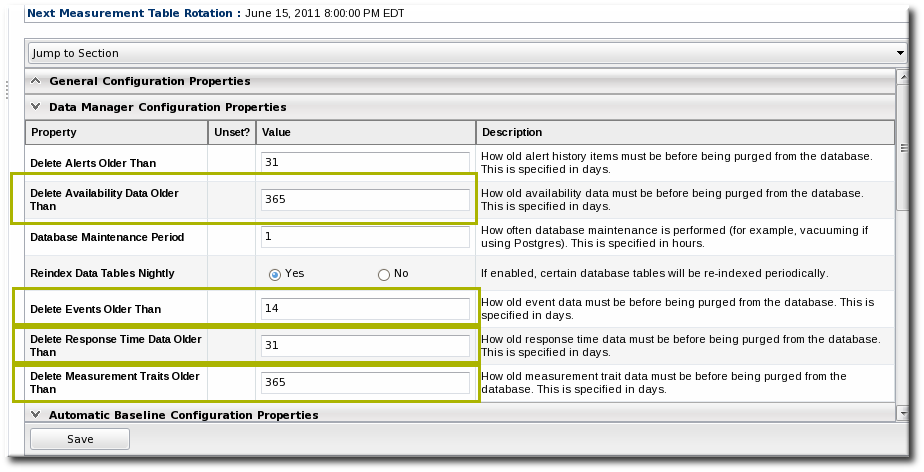 There are four settings that relate directly to storing monitoring data:
- Response time data for web servers and EJB resources. This is kept for one month (31 days) by default.
- Events information, meaning all of the log files generated by the agent for the resource. The default storage time for event logs is two weeks.
- All measurement data, both metrics and traits. The default time is one year (365 days).
- Availability information. The default time is one year (365 days).
10.2. Exporting Raw Data
复制链接链接已复制到粘贴板!
Raw monitoring data is, by default, purged from the database every week. To save the raw data, export it using the CLI.
The
MeasurementDataManager class has a method to find the metric values for a specific resource within a certain time range:
findDataForResource(resourceId,[metricId],startTime,endTime,numberOfRecords)
For example, for a resource with the ID 10003 and a metric ID of 10473:
exporter.file = '/export/metrics/metrics.csv'
exporter.format = 'csv'
var start = new Date() - 8* 3600 * 1000;
var end = new Date()
var data = MeasurementDataManager.findDataForResource(10003,[10473],start,end,60)
exporter.write(data.get(0))
'%20d='M201.5%20305.5c-13.8%200-24.9-11.1-24.9-24.6%200-13.8%2011.1-24.9%2024.9-24.9%2013.6%200%2024.6%2011.1%2024.6%2024.9%200%2013.6-11.1%2024.6-24.6%2024.6zM504%20256c0%20137-111%20248-248%20248S8%20393%208%20256%20119%208%20256%208s248%20111%20248%20248zm-132.3-41.2c-9.4%200-17.7%203.9-23.8%2010-22.4-15.5-52.6-25.5-86.1-26.6l17.4-78.3%2055.4%2012.5c0%2013.6%2011.1%2024.6%2024.6%2024.6%2013.8%200%2024.9-11.3%2024.9-24.9s-11.1-24.9-24.9-24.9c-9.7%200-18%205.8-22.1%2013.8l-61.2-13.6c-3-.8-6.1%201.4-6.9%204.4l-19.1%2086.4c-33.2%201.4-63.1%2011.3-85.5%2026.8-6.1-6.4-14.7-10.2-24.1-10.2-34.9%200-46.3%2046.9-14.4%2062.8-1.1%205-1.7%2010.2-1.7%2015.5%200%2052.6%2059.2%2095.2%20132%2095.2%2073.1%200%20132.3-42.6%20132.3-95.2%200-5.3-.6-10.8-1.9-15.8%2031.3-16%2019.8-62.5-14.9-62.5zM302.8%20331c-18.2%2018.2-76.1%2017.9-93.6%200-2.2-2.2-6.1-2.2-8.3%200-2.5%202.5-2.5%206.4%200%208.6%2022.8%2022.8%2087.3%2022.8%20110.2%200%202.5-2.2%202.5-6.1%200-8.6-2.2-2.2-6.1-2.2-8.3%200zm7.7-75c-13.6%200-24.6%2011.1-24.6%2024.9%200%2013.6%2011.1%2024.6%2024.6%2024.6%2013.8%200%2024.9-11.1%2024.9-24.6%200-13.8-11-24.9-24.9-24.9z'/%3e%3c/svg%3e)