 红帽全球峰会
此内容没有您所选择的语言版本。
Chapter 3. Mapping Rules
After defining your API creating methods and metrics, you can map your API endpoints or paths to the methods you have defined in the Definition page. To do so:
- Navigate to [Your_API_service] > Integration > Configuration > Edit APIcast configuration and find the Mapping rules section in the page.
- Choose the HTTP method, available on the specific endpoint path
- Select the equivalent method to map against. Different operations (GET, PUT, POST, DELETE, etc…) on the same endpoint can be tracked separately.
The workflow to define mapping rules is as follows:
Add new rules by clicking on Add Mapping Rule link. Then select an HTTP method, a pattern, a metric (or method), and its increment. When you’re done, click the Update & Test Staging Configuration button.
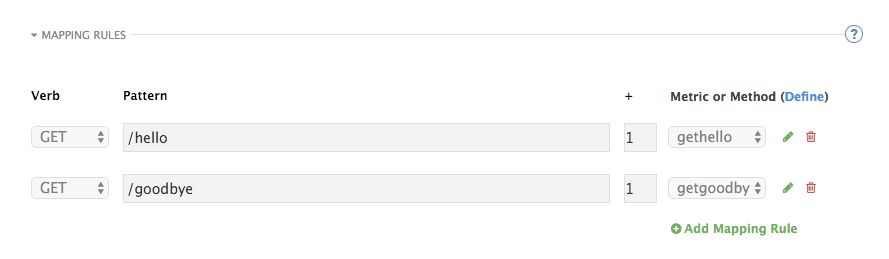
- Mapping rules will be grayed out on the next reload to prevent accidental modifications.
- To edit an existing mapping rule, you must first enable editing by clicking on the pencil icon on the right. To delete a rule, click on the red trash icon. Edits, modifications, and deletions will be saved when you hit the Update & Test Staging Configuration button.
Once the setup is done, you can test your integration with the Staging APIcast Cloud Gateway to ensure your setup will work in production.
If all the parameters and mapping rules are set correctly, you should see a green line showing a correct test integration between 3scale and your API Backend.


'%20d='M201.5%20305.5c-13.8%200-24.9-11.1-24.9-24.6%200-13.8%2011.1-24.9%2024.9-24.9%2013.6%200%2024.6%2011.1%2024.6%2024.9%200%2013.6-11.1%2024.6-24.6%2024.6zM504%20256c0%20137-111%20248-248%20248S8%20393%208%20256%20119%208%20256%208s248%20111%20248%20248zm-132.3-41.2c-9.4%200-17.7%203.9-23.8%2010-22.4-15.5-52.6-25.5-86.1-26.6l17.4-78.3%2055.4%2012.5c0%2013.6%2011.1%2024.6%2024.6%2024.6%2013.8%200%2024.9-11.3%2024.9-24.9s-11.1-24.9-24.9-24.9c-9.7%200-18%205.8-22.1%2013.8l-61.2-13.6c-3-.8-6.1%201.4-6.9%204.4l-19.1%2086.4c-33.2%201.4-63.1%2011.3-85.5%2026.8-6.1-6.4-14.7-10.2-24.1-10.2-34.9%200-46.3%2046.9-14.4%2062.8-1.1%205-1.7%2010.2-1.7%2015.5%200%2052.6%2059.2%2095.2%20132%2095.2%2073.1%200%20132.3-42.6%20132.3-95.2%200-5.3-.6-10.8-1.9-15.8%2031.3-16%2019.8-62.5-14.9-62.5zM302.8%20331c-18.2%2018.2-76.1%2017.9-93.6%200-2.2-2.2-6.1-2.2-8.3%200-2.5%202.5-2.5%206.4%200%208.6%2022.8%2022.8%2087.3%2022.8%20110.2%200%202.5-2.2%202.5-6.1%200-8.6-2.2-2.2-6.1-2.2-8.3%200zm7.7-75c-13.6%200-24.6%2011.1-24.6%2024.9%200%2013.6%2011.1%2024.6%2024.6%2024.6%2013.8%200%2024.9-11.1%2024.9-24.6%200-13.8-11-24.9-24.9-24.9z'/%3e%3c/svg%3e)