 红帽全球峰会
测试的部署模型
规划 Ansible Automation Platform 的部署
摘要
对红帽文档提供反馈
如果您对本文档有任何改进建议,或发现错误,请通过 https://access.redhat.com 联系技术支持来创建一个请求。
免责声明 :这些信息中包含的指向外部网站的链接仅用于方便用户。红帽没有审阅链接的内容,并不对其内容负责。包含任何指向外部网站的链接并不表示红帽认可该网站或其实体、产品或服务。您同意红帽对因您使用(或依赖)外部网站或内容而导致的任何损失或费用不承担任何责任。
第 1 章 测试的部署模型类型
红帽使用一组定义的拓扑测试 Ansible Automation Platform 2.5,为您提供建议的部署选项。部署 Ansible Automation Platform 的所有组件,以便所有功能和功能都可用,而无需进一步操作。
红帽使用一组定义的基础架构拓扑或参考架构测试 Ansible Automation Platform 2.5 的安装。企业组织可以将企业拓扑之一用于生产部署。这样可确保最高级别的正常运行时间、性能和持续可扩展性。资源约束的机构或部署可以使用增长拓扑。
您可以在不同的基础架构拓扑和环境配置上安装 Ansible Automation Platform。但是,红帽不会在公布的参考架构之外完全测试拓扑。红帽建议对所有新部署使用经过测试的拓扑,并为满足最低要求的部署提供合理的支持。
1.1. 安装和部署模型
Ansible Automation Platform 根据您的基础架构和机构需求提供多个安装和部署选项。每个安装类型引用包括支持的基础架构类型和测试拓扑的链接。
Ansible Automation Platform RPM 安装程序在 2.5 中已弃用,并将在 Ansible Automation Platform 2.7 中删除。在 Ansible Automation Platform 2.6 生命周期期间,RHEL 9 支持 RPM 安装程序,以支持迁移到现有的受支持拓扑。有关升级和迁移路径的更多信息,请参阅 升级场景的支持列表。
| 模式 | 基础架构 | 描述 | 测试的拓扑 |
|---|---|---|---|
| RPM | 虚拟机和裸机 | RPM 安装程序使用 RPM 在 Red Hat Enterprise Linux 上部署 Ansible Automation Platform,以在主机上安装平台。客户管理产品和基础架构生命周期。 | |
| 容器 | 虚拟机和裸机 | 容器化安装程序使用 Podman 在 Red Hat Enterprise Linux 上部署 Ansible Automation Platform,它在主机机器上在容器中运行平台。客户管理产品和基础架构生命周期。 | |
| Operator | Red Hat OpenShift | Operator 使用 Red Hat OpenShift Operator 在 Red Hat OpenShift 中部署 Ansible Automation Platform。客户管理产品和基础架构生命周期。 |
第 2 章 RPM 拓扑
Ansible Automation Platform 为基于 RPM 的 Ansible Automation Platform 提供经过测试的拓扑。选择最适合基于 RPM 的部署要求的拓扑。
2.1. RPM 增长拓扑
基于 RPM 的增长拓扑为开始使用 Ansible Automation Platform 的组织提供较小的占用空间部署,而无需冗余。包括经过测试的基础架构拓扑、系统要求、网络端口配置和示例清单文件,用于安装。
2.1.1. 基础架构拓扑
此部署模型的红帽测试的基础架构拓扑:
图 2.1. 基础架构拓扑图
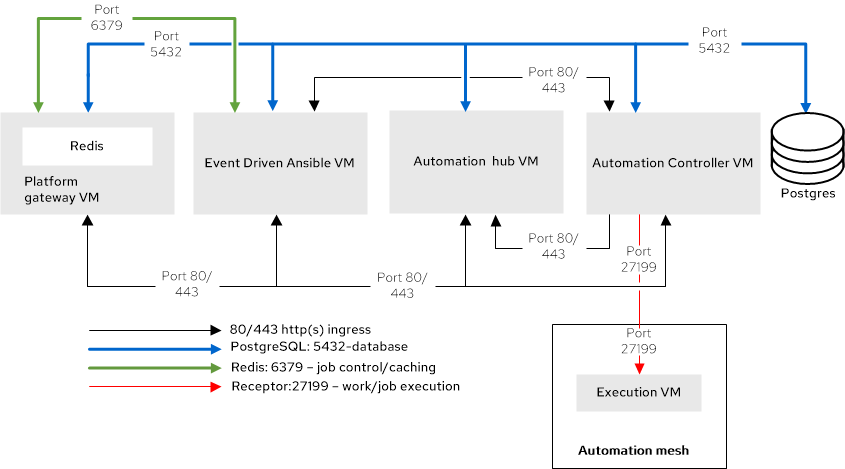
红帽根据以下要求测试每个虚拟机:
| 要求 | 最低要求 |
|---|---|
| RAM | 16 GB |
| CPU | 4 |
| 本地磁盘 | 60 GB |
| 磁盘 IOPS | 3000 |
| VM 数量 | 用途 | VM 组名称示例 |
|---|---|---|
| 1 | 带有 colocated Redis 的平台网关 |
|
| 1 | 自动化控制器 |
|
| 1 | 私有自动化中心 |
|
| 1 | Event-Driven Ansible |
|
| 1 | 自动化网格执行节点 |
|
| 1 | Ansible Automation Platform 管理的数据库 |
|
2.1.2. 测试的系统配置
红帽已测试了这些配置来安装和运行 Red Hat Ansible Automation Platform:
| 类型 | 描述 | |
|---|---|---|
| 订阅 | 有效的 Red Hat Ansible Automation Platform 订阅 | |
| 操作系统 |
| |
| CPU 架构 | x86_64, AArch64, s390x (IBM Z), ppc64le (IBM Power) | |
|
|
| Ansible Automation Platform 使用系统范围的 ansible-core 软件包来安装平台,但在其 control plane 和内置执行环境中使用 ansible-core 2.16。 |
| 浏览器 | 当前支持的 Mozilla Firefox 或 Google Chrome 版本 | |
| 数据库 | PostgreSQL 15 | 外部(客户支持)数据库需要 ICU 支持。 |
2.1.3. 网络端口
Red Hat Ansible Automation Platform 使用多个端口与其服务进行通信。这些端口必须处于打开状态,并可用于 Red Hat Ansible Automation Platform。确保这些端口可用,且防火墙不会阻止。
| 端口号 | 协议 | 服务 | Source | 目的地 |
|---|---|---|---|---|
| 80/443 | TCP | HTTP/HTTPS | Event-Driven Ansible | Automation hub |
| 80/443 | TCP | HTTP/HTTPS | Event-Driven Ansible | 自动化控制器 |
| 80/443 | TCP | HTTP/HTTPS | 自动化控制器 | Automation hub |
| 80/443 | TCP | HTTP/HTTPS | 平台网关 | 自动化控制器 |
| 80/443 | TCP | HTTP/HTTPS | 平台网关 | Automation hub |
| 80/443 | TCP | HTTP/HTTPS | 平台网关 | Event-Driven Ansible |
| 80/443 | TCP | HTTP/HTTPS | 执行节点 | 平台网关 |
| 5432 | TCP | PostgreSQL | Event-Driven Ansible | 数据库 |
| 5432 | TCP | PostgreSQL | 平台网关 | 数据库 |
| 5432 | TCP | PostgreSQL | Automation hub | 数据库 |
| 5432 | TCP | PostgreSQL | 自动化控制器 | 数据库 |
| 6379 | TCP | Redis | Event-Driven Ansible | Redis 节点 |
| 6379 | TCP | Redis | 平台网关 | Redis 节点 |
| 8443 | TCP | HTTPS | 平台网关 | 平台网关 |
| 27199 | TCP | Receptor | 自动化控制器 | 执行节点 |
如果使用清单变量更改任何端口值,请参阅 清单文件变量来查看所有 默认端口值,并确保没有端口冲突。
2.1.4. 清单文件示例
使用示例清单文件执行安装:
2.2. RPM 企业拓扑
基于 RPM 的企业拓扑为大量自动化提供冗余和更高的计算。包括经过测试的基础架构拓扑、系统要求、网络端口配置和示例清单文件,用于安装。
2.2.1. 基础架构拓扑
此部署模型的红帽测试的基础架构拓扑:
图 2.2. 基础架构拓扑图
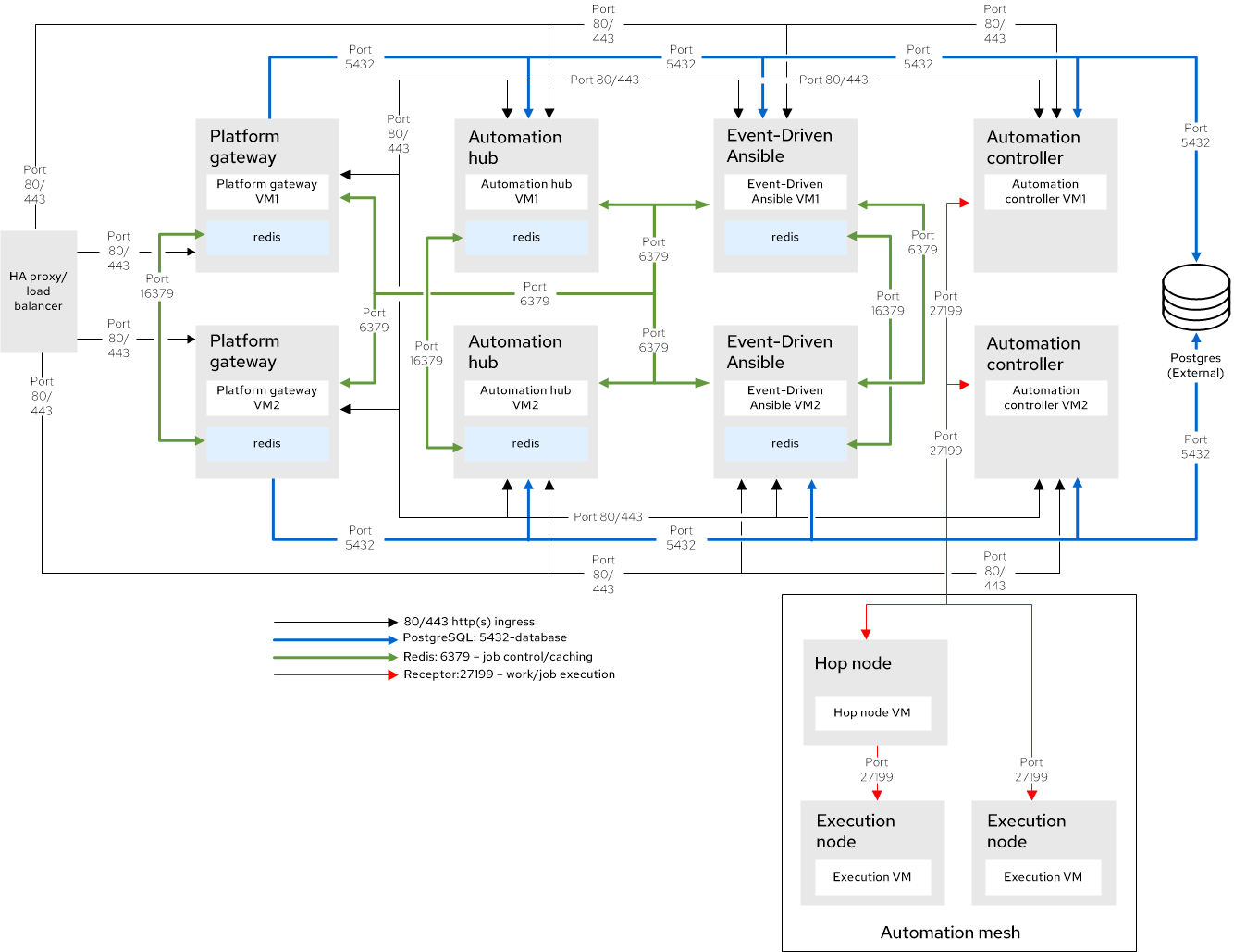
红帽根据以下要求测试每个虚拟机:
| 要求 | 最低要求 |
|---|---|
| RAM | 16 GB |
| CPU | 4 |
| 本地磁盘 | 60 GB |
| 磁盘 IOPS | 3000 |
| VM 数量 | 用途 | VM 组名称示例 |
|---|---|---|
| 2 | 带有 colocated Redis 的平台网关 |
|
| 2 | 自动化控制器 |
|
| 2 | 带有 colocated Redis 的私有自动化中心 |
|
| 2 | 带有 colocated Redis 的 event-Driven Ansible |
|
| 1 | 自动化网格跃点节点 |
|
| 2 | 自动化网格执行节点 |
|
| 1 | 外部管理的数据库服务 | N/A |
| 1 | 平台网关前面的 HAProxy 负载均衡器(外部管理) | N/A |
- Redis 高可用性(HA)部署需要 6 个虚拟机。您可以在每个 Ansible Automation Platform 组件虚拟机上并置 Redis,但自动化控制器、执行节点或 PostgreSQL 数据库除外。
- 基于 RPM 的 Ansible Automation Platform 部署不支持外部 Redis。
2.2.2. 测试的系统配置
红帽已测试了这些配置来安装和运行 Red Hat Ansible Automation Platform:
| 类型 | 描述 | |
|---|---|---|
| 订阅 | 有效的 Red Hat Ansible Automation Platform 订阅 | |
| 操作系统 |
| |
| CPU 架构 | x86_64, AArch64, s390x (IBM Z), ppc64le (IBM Power) | |
|
|
| Ansible Automation Platform 使用系统范围的 ansible-core 软件包来安装平台,但在其 control plane 和内置执行环境中使用 ansible-core 2.16。 |
| 浏览器 | 当前支持的 Mozilla Firefox 或 Google Chrome 版本 | |
| 数据库 | PostgreSQL 15 | 外部(客户支持)数据库需要 ICU 支持。 |
2.2.3. 网络端口
Red Hat Ansible Automation Platform 使用多个端口与其服务进行通信。这些端口必须处于打开状态,并可用于 Red Hat Ansible Automation Platform。确保这些端口可用,且防火墙不会阻止。
| 端口号 | 协议 | 服务 | Source | 目的地 |
|---|---|---|---|---|
| 80/443 | TCP | HTTP/HTTPS | Event-Driven Ansible | Automation hub |
| 80/443 | TCP | HTTP/HTTPS | Event-Driven Ansible | 自动化控制器 |
| 80/443 | TCP | HTTP/HTTPS | 自动化控制器 | Automation hub |
| 80/443 | TCP | HTTP/HTTPS | HAProxy 负载均衡器 | 平台网关 |
| 80/443 | TCP | HTTP/HTTPS | 平台网关 | 自动化控制器 |
| 80/443 | TCP | HTTP/HTTPS | 平台网关 | Automation hub |
| 80/443 | TCP | HTTP/HTTPS | 平台网关 | Event-Driven Ansible |
| 80/443 | TCP | HTTP/HTTPS | 执行节点 | 平台网关 |
| 5432 | TCP | PostgreSQL | Event-Driven Ansible | 外部数据库 |
| 5432 | TCP | PostgreSQL | 平台网关 | 外部数据库 |
| 5432 | TCP | PostgreSQL | Automation hub | 外部数据库 |
| 5432 | TCP | PostgreSQL | 自动化控制器 | 外部数据库 |
| 6379 | TCP | Redis | Event-Driven Ansible | Redis 节点 |
| 6379 | TCP | Redis | 平台网关 | Redis 节点 |
| 8443 | TCP | HTTPS | 平台网关 | 平台网关 |
| 16379 | TCP | Redis | Redis 节点 | Redis 节点 |
| 27199 | TCP | Receptor | 自动化控制器 | hop 节点和执行节点 |
| 27199 | TCP | Receptor | hop 节点 | 执行节点 |
如果使用清单变量更改任何端口值,请参阅 清单文件变量来查看所有 默认端口值,并确保没有端口冲突。
2.2.4. 清单文件示例
使用示例清单文件执行安装:
第 3 章 容器名称
Ansible Automation Platform 为容器化 Ansible Automation Platform 提供经过测试的拓扑。选择最适合您基于容器的部署要求的拓扑。
3.1. 容器增长拓扑
基于容器的增长拓扑为开始使用 Ansible Automation Platform 的机构提供较小的占用空间部署,而无需冗余。包括经过测试的基础架构拓扑、系统要求、网络端口配置和示例清单文件,用于安装。
3.1.1. 基础架构拓扑
此部署模型的红帽测试的基础架构拓扑:
图 3.1. 基础架构拓扑图
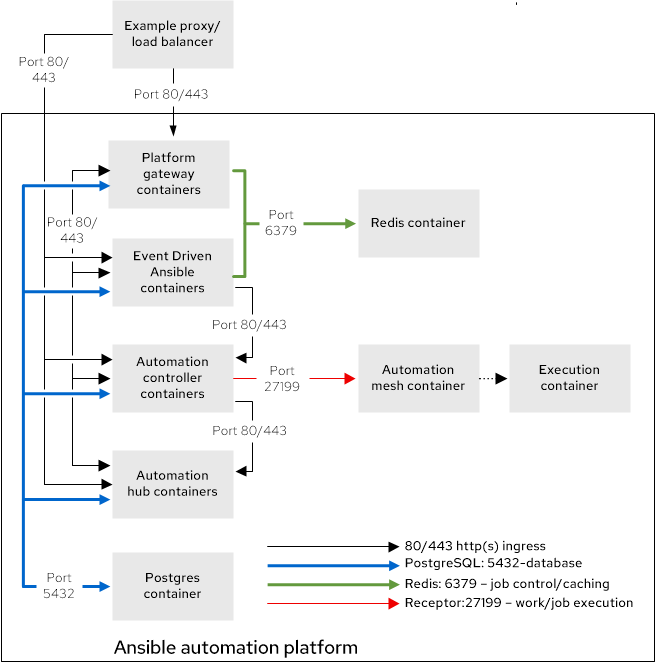
红帽根据以下要求测试单个虚拟机:
| 要求 | 最低要求 |
|---|---|
| RAM | 16 GB |
| CPU | 4 |
| 本地磁盘 |
|
| 磁盘 IOPS | 3000 |
如果使用 hub_seed_collections=true 执行捆绑的增长拓扑安装,则建议使用 32 GB RAM。使用这个配置,安装时间将增加。请参阅集合可能需要 45 分钟或更长时间。
| 用途 | 组名称示例 |
|---|---|
| 所有 Ansible Automation Platform 组件 |
|
3.1.2. 测试的系统配置
红帽已测试了这些配置来安装和运行 Red Hat Ansible Automation Platform:
| 类型 | 描述 | 注 |
|---|---|---|
| 订阅 |
| |
| 操作系统 |
| |
| CPU 架构 | x86_64, AArch64, s390x (IBM Z), ppc64le (IBM Power) | |
|
|
|
|
| 浏览器 | 当前支持的 Mozilla Firefox 或 Google Chrome 版本。 | |
| 数据库 | PostgreSQL 15 | 外部(客户支持)数据库需要 Unicode (ICU)支持国际组件。 |
3.1.3. 网络端口
Red Hat Ansible Automation Platform 使用多个端口与其服务进行通信。这些端口必须处于打开状态,并可用于 Red Hat Ansible Automation Platform。确保这些端口可用,且防火墙不会阻止。
| 端口号 | 协议 | 服务 | Source | 目的地 | 描述 |
|---|---|---|---|---|---|
| 80/443 | TCP | HTTP/HTTPS | Event-Driven Ansible | Automation hub | 拉取容器决策环境 |
| 80/443 | TCP | HTTP/HTTPS | Event-Driven Ansible | 自动化控制器 | 启动自动化控制器作业 |
| 80/443 | TCP | HTTP/HTTPS | 自动化控制器 | Automation hub | 拉取集合和执行环境镜像 |
| 80/443 | TCP | HTTP/HTTPS | 平台网关 | 自动化控制器 | 自动化控制器通信的平台网关 |
| 80/443 | TCP | HTTP/HTTPS | 平台网关 | Automation hub | 到自动化 hub 通信的平台网关 |
| 80/443 | TCP | HTTP/HTTPS | 平台网关 | Event-Driven Ansible | 到 Event-Driven Ansible 通信的平台网关 |
| 5432 | TCP | PostgreSQL | Event-Driven Ansible | 数据库 | 事件驱动 Ansible 数据库访问 |
| 5432 | TCP | PostgreSQL | 平台网关 | 数据库 | 平台网关数据库访问 |
| 5432 | TCP | PostgreSQL | Automation hub | 数据库 | Automation hub 数据库访问 |
| 5432 | TCP | PostgreSQL | 自动化控制器 | 数据库 | 自动化控制器数据库访问 |
| 6379 | TCP | Redis | Event-Driven Ansible | Redis 容器 | 用于 Event-Driven Ansible 的作业启动和数据存储 |
| 6379 | TCP | Redis | 平台网关 | Redis 容器 | 平台网关服务的数据存储和检索 |
| 8443 | TCP | HTTPS | 平台网关 | 平台网关 | 内部网关 NGINX 通信 |
| 27199 | TCP | Receptor | 自动化控制器 | 执行容器 | Mesh 节点直接连接到控制器。允许作业分发的双向通信。 |
| 8080/8443 | TCP | HTTP/HTTPS | 平台网关 | 自动化控制器 |
自动化控制器 NGINX 端口。您可以使用以下清单变量配置这些端口: |
| 8081/8444 | TCP | HTTP/HTTPS | 平台网关 | Automation hub |
自动化中心 NGINX 端口。您可以使用以下清单变量配置这些端口: |
| 8082/8445 | TCP | HTTP/HTTPS | 平台网关 | Event-Driven Ansible |
event-Driven Ansible NGINX 端口。您可以使用以下清单变量配置这些端口: |
| 8083/8446 | TCP | HTTP/HTTPS | 平台网关 | 平台网关 |
平台网关 NGINX 端口。您可以使用以下清单变量配置这些端口: |
如果使用清单变量更改任何端口值,请参阅 清单文件变量来查看所有 默认端口值,并确保没有端口冲突。
3.1.4. 清单文件示例
使用示例清单文件执行安装:
只有在远程主机上安装时,才需要 SSH 密钥。如果进行一个基于本地虚拟机的安装,您可以使用 ansible_connection=local。
3.2. 容器企业拓扑
基于容器的企业拓扑为大量自动化提供冗余和更高的计算。包括经过测试的基础架构拓扑、系统要求、网络端口配置和示例清单文件,用于安装。
3.2.1. 基础架构拓扑
此部署模型的红帽测试的基础架构拓扑:
图 3.2. 基础架构拓扑图

红帽根据以下要求测试每个虚拟机:
| 要求 | 最低要求 |
|---|---|
| RAM | 16 GB |
| CPU | 4 |
| 本地磁盘 |
|
| 磁盘 IOPS | 3000 |
| VM 数量 | 用途 | VM 组名称示例 |
|---|---|---|
| 2 | 带有 colocated Redis 的平台网关 |
|
| 2 | 自动化控制器 |
|
| 2 | 带有 colocated Redis 的私有自动化中心 |
|
| 2 | 带有 colocated Redis 的 event-Driven Ansible |
|
| 1 | 自动化网格跃点节点 |
|
| 2 | 自动化网格执行节点 |
|
| 1 | 外部管理的数据库服务 | N/A |
| 1 | 平台网关前面的 HAProxy 负载均衡器(外部管理) | N/A |
- 兼容 Redis 高可用性(HA)部署需要 6 个虚拟机。当使用容器化安装程序安装 Ansible Automation Platform 时,Red Hat Redis 可以在您选择的任何 Ansible Automation Platform 组件虚拟机上并置,但执行节点或 PostgreSQL 数据库除外。它们也可能被分配专门用于 Redis 使用的虚拟机。
- 容器化 Ansible Automation Platform 不支持外部 Redis。
3.2.2. 测试的系统配置
红帽已测试了这些配置来安装和运行 Red Hat Ansible Automation Platform:
| 类型 | 描述 | 注 |
|---|---|---|
| 订阅 |
| |
| 操作系统 |
| |
| CPU 架构 | x86_64, AArch64, s390x (IBM Z), ppc64le (IBM Power) | |
|
|
|
|
| 浏览器 | 当前支持的 Mozilla Firefox 或 Google Chrome 版本。 | |
| 数据库 | PostgreSQL 15 | 外部(客户支持)数据库需要 Unicode (ICU)支持国际组件。 |
3.2.3. 网络端口
Red Hat Ansible Automation Platform 使用多个端口与其服务进行通信。这些端口必须处于打开状态,并可用于 Red Hat Ansible Automation Platform。确保这些端口可用,且防火墙不会阻止。
| 端口号 | 协议 | 服务 | Source | 目的地 | 描述 |
|---|---|---|---|---|---|
| 80/443 | TCP | HTTP/HTTPS | Event-Driven Ansible | Automation hub | 拉取容器决策环境 |
| 80/443 | TCP | HTTP/HTTPS | Event-Driven Ansible | 自动化控制器 | 启动自动化控制器作业 |
| 80/443 | TCP | HTTP/HTTPS | 自动化控制器 | Automation hub | 拉取集合和执行环境镜像 |
| 80/443 | TCP | HTTP/HTTPS | HAProxy 负载均衡器 | 平台网关 | 外部负载均衡器访问 |
| 80/443 | TCP | HTTP/HTTPS | 平台网关 | 自动化控制器 | 自动化控制器通信的平台网关 |
| 80/443 | TCP | HTTP/HTTPS | 平台网关 | Automation hub | 到自动化 hub 通信的平台网关 |
| 80/443 | TCP | HTTP/HTTPS | 平台网关 | Event-Driven Ansible | 到 Event-Driven Ansible 通信的平台网关 |
| 5432 | TCP | PostgreSQL | Event-Driven Ansible | 外部数据库 | 事件驱动 Ansible 数据库访问 |
| 5432 | TCP | PostgreSQL | 平台网关 | 外部数据库 | 平台网关数据库访问 |
| 5432 | TCP | PostgreSQL | Automation hub | 外部数据库 | Automation hub 数据库访问 |
| 5432 | TCP | PostgreSQL | 自动化控制器 | 外部数据库 | 自动化控制器数据库访问 |
| 6379 | TCP | Redis | Event-Driven Ansible | Redis 节点 | 用于 Event-Driven Ansible 的作业启动和数据存储 |
| 6379 | TCP | Redis | 平台网关 | Redis 节点 | 平台网关服务的数据存储和检索 |
| 16379 | TCP | Redis | Redis 节点 | Redis 节点 | Redis 集群总线通信 |
| 27199 | TCP | Receptor | 自动化控制器 | hop 节点和执行节点 | Mesh 节点直接连接到控制器。允许作业分发的双向通信。 |
| 27199 | TCP | Receptor | hop 节点 | 执行节点 | Mesh 节点通过跃点节点连接。允许以任一方向进行双向通信。 |
| 8080/8443 | TCP | HTTP/HTTPS | 平台网关 | 自动化控制器 |
自动化控制器 NGINX 端口。您可以使用以下清单变量配置这些端口: |
| 8081/8444 | TCP | HTTP/HTTPS | 平台网关 | Automation hub |
自动化中心 NGINX 端口。您可以使用以下清单变量配置这些端口: |
| 8082/8445 | TCP | HTTP/HTTPS | 平台网关 | Event-Driven Ansible |
event-Driven Ansible NGINX 端口。您可以使用以下清单变量配置这些端口: |
| 8083/8446 | TCP | HTTP/HTTPS | 平台网关 | 平台网关 |
平台网关 NGINX 端口。您可以使用以下清单变量配置这些端口: |
如果使用清单变量更改任何端口值,请参阅 清单文件变量来查看所有 默认端口值,并确保没有端口冲突。
3.2.4. 清单文件示例
使用示例清单文件执行安装:
第 4 章 Operator 拓扑
Ansible Automation Platform 为 OpenShift Container Platform 上的 Ansible Automation Platform 提供经过测试的拓扑。选择最适合基于 Operator 的部署要求的拓扑。
您只能将 Ansible Automation Platform Operator 的单一实例安装到单个命名空间中。在同一命名空间中安装多个实例可能会导致两个 Operator 实例都不正确的操作。
4.1. Operator 增长拓扑
基于 Operator 的增长拓扑为在 Red Hat OpenShift Container Platform 上使用 Ansible Automation Platform 的组织提供较小的占用空间部署。包括经过测试的基础架构拓扑、系统要求、网络端口配置和示例自定义资源文件,用于安装。
4.1.1. 基础架构拓扑
此部署模型的红帽测试的基础架构拓扑:
图 4.1. 基础架构拓扑图
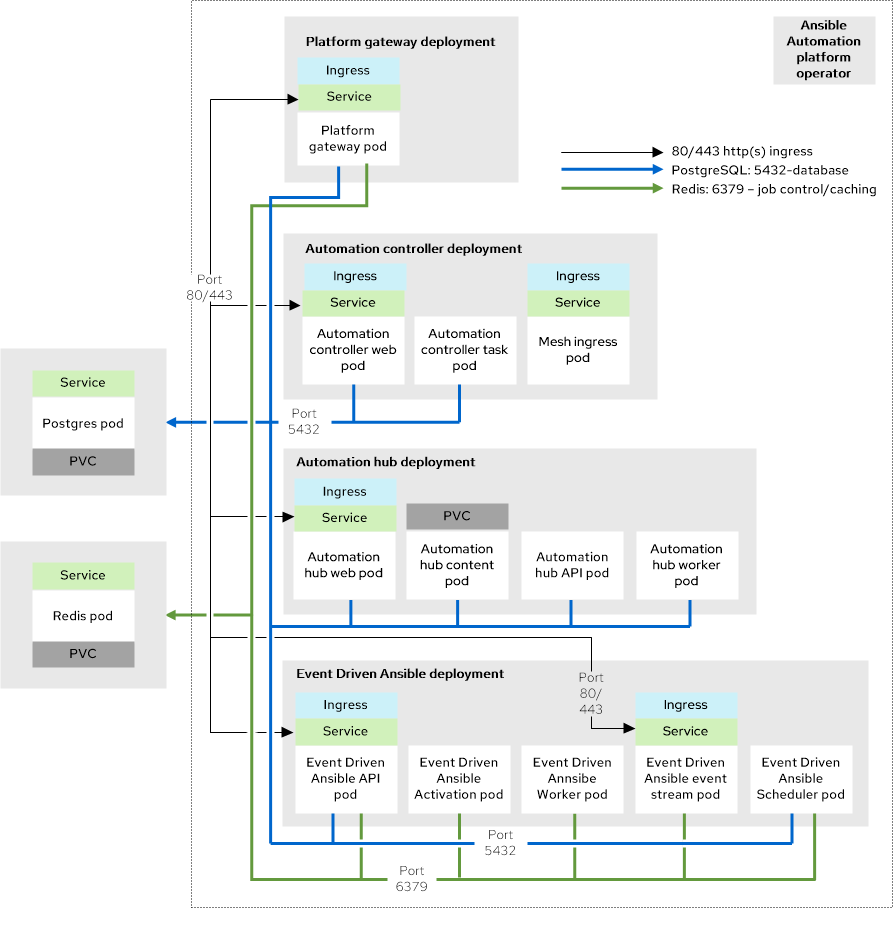
虽然 Redis 和 PostgreSQL 可以作为基于 Operator 的安装过程的一部分安装,但拓扑图代表了红帽支持的拓扑,其中 Redis 和 PostgreSQL 都是 Ansible Automation Platform 外部的。
红帽会按照以下要求测试单一节点 OpenShift (SNO)集群:32 GB RAM、16 个 CPU、128 GB 本地磁盘和 3000 IOPS。
| 数量 | 组件 |
|---|---|
| 1 | 自动化控制器 Web pod |
| 1 | 自动化控制器任务 pod |
| 1 | Automation hub web pod |
| 1 | Automation hub API pod |
| 2 | Automation hub 内容 pod |
| 2 | Automation hub worker pod |
| 1 | Automation hub Redis pod |
| 1 | event-Driven Ansible API pod |
| 1 | event-Driven Ansible 激活 worker pod |
| 1 | event-Driven Ansible 默认 worker pod |
| 1 | event-Driven Ansible 事件流 pod |
| 1 | event-Driven Ansible 调度程序 pod |
| 1 | 平台网关 pod |
| 1 | 数据库 pod |
| 1 | Redis pod |
您可以将多个 Ansible Automation Platform 实例部署到同一 Red Hat OpenShift Container Platform 集群中。为此,请使用命名空间范围的部署模型(命名空间中的隔离)。
这种方法允许您将同一集群用于多个部署。
4.1.2. 测试的系统配置
红帽已测试了这些配置来安装和运行 Red Hat Ansible Automation Platform:
| 类型 | 描述 |
|---|---|
| 订阅 | 有效的 Red Hat Ansible Automation Platform 订阅 |
| Red Hat OpenShift |
|
| ansible-core | ansible-core 版本 2.16 或更高版本 |
| 浏览器 | 当前支持的 Mozilla Firefox 或 Google Chrome 版本。 |
| 数据库 | PostgreSQL 15 |
4.1.3. 自定义资源文件示例
使用此示例自定义资源(CR)将 Ansible Automation Platform 实例添加到项目中:
4.1.4. 非功能要求
Ansible Automation Platform 的性能特性和容量取决于其资源分配和配置。使用 OpenShift 时,每个 Ansible Automation Platform 组件都会部署为 pod。您可以为每个 pod 指定资源请求和限值。
使用 Ansible Automation Platform 自定义资源(CR)为 OpenShift 安装配置资源分配。每个可配置的项目都有默认设置。这些设置是安装的最低要求,但可能无法满足您的生产工作负载需求。
默认情况下,每个组件的部署都使用最小资源请求,但没有资源限值。OpenShift 仅调度具有可用资源请求的容器集,但容器集可以消耗无限的 RAM 或 CPU,只要 OpenShift 工作程序节点本身不在节点压力下。
在 Operator 增长拓扑中,Ansible Automation Platform 在具有 32 GB RAM、16 个 CPU、128 GB 本地磁盘和 3000 IOPS 的单个节点 OpenShift (SNO)上运行。这并不是一个共享的环境,因此 Ansible Automation Platform pod 对 OpenShift SNO 的所有计算资源具有完全访问权限。在这种情况下,自动化控制器任务 pod 的容量计算来自运行 pod 的底层 OpenShift Container Platform 节点。它无法访问整个节点。此容量计算会影响自动化控制器可以运行的并发作业数量。
OpenShift 管理与虚拟机不同的存储。这会影响自动化中心存储其工件的方式。在 Operator 增长拓扑中,拓扑使用 S3 存储,因为自动化中心需要 ReadWriteMany 类型存储,这不是 OpenShift 中的默认存储类型。
4.1.5. 网络端口
Red Hat Ansible Automation Platform 使用多个端口与其服务进行通信。这些端口必须处于打开状态,并可用于 Red Hat Ansible Automation Platform。确保这些端口可用,且防火墙不会阻止。
| 端口号 | 协议 | 服务 | Source | 目的地 |
|---|---|---|---|---|
| 80/443 | HTTP/HTTPS | Receptor | 执行节点 | OpenShift Container Platform ingress |
| 80/443 | HTTP/HTTPS | Receptor | hop 节点 | OpenShift Container Platform ingress |
| 80/443 | HTTP/HTTPS | 平台 | 客户客户端 | OpenShift Container Platform ingress |
| 27199 | TCP | Receptor | OpenShift Container Platform 集群 | 执行节点 |
| 27199 | TCP | Receptor | OpenShift Container Platform 集群 | hop 节点 |
4.2. Operator 企业拓扑
基于 Operator 的企业拓扑为 Red Hat OpenShift Container Platform 上的大量自动化提供冗余和更高的计算功能。AWS 上的 Ansible Automation Platform Service 是一个基于 OpenShift Operator 的企业拓扑的示例。包括经过测试的基础架构拓扑、系统要求、网络端口配置和示例自定义资源文件,用于安装。
4.2.1. 基础架构拓扑
此部署模型的红帽测试的基础架构拓扑:
图 4.2. 基础架构拓扑图
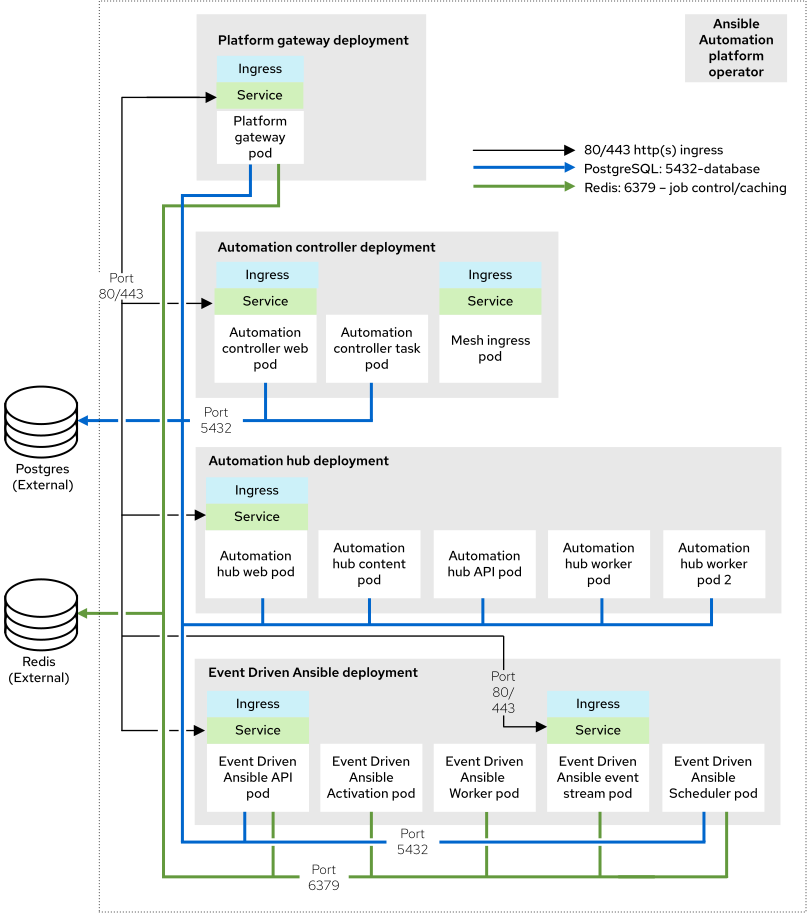
虽然 Redis 和 PostgreSQL 可以作为基于 Operator 的安装过程的一部分安装,但拓扑图代表了红帽支持的拓扑,其中 Redis 和 PostgreSQL 都是 Ansible Automation Platform 外部的。
此基础架构拓扑描述了具有 3 个主节点和 2 个 worker 节点的 OpenShift 集群。
红帽测试每个具有以下要求的 OpenShift Worker 节点:16 GB RAM、4 个 CPU、128 GB 本地磁盘和 3000 IOPS。
| 数量 | 组件 |
|---|---|
| 1 | 自动化控制器 Web pod |
| 1 | 自动化控制器任务 pod |
| 1 | Automation hub web pod |
| 1 | Automation hub API pod |
| 2 | Automation hub 内容 pod |
| 2 | Automation hub worker pod |
| 1 | Automation hub Redis pod |
| 1 | event-Driven Ansible API pod |
| 2 | event-Driven Ansible 激活 worker pod |
| 2 | event-Driven Ansible 默认 worker pod |
| 2 | event-Driven Ansible 事件流 pod |
| 1 | event-Driven Ansible 调度程序 pod |
| 1 | 平台网关 pod |
| 2 | Mesh ingress pod |
| N/A | 外部管理的数据库服务 |
| N/A | 外部管理的 Redis |
| N/A | 外部管理的对象存储服务(用于自动化中心) |
4.2.2. 测试的系统配置
红帽已测试了这些配置来安装和运行 Red Hat Ansible Automation Platform:
| 类型 | 描述 |
|---|---|
| 订阅 | 有效的 Red Hat Ansible Automation Platform 订阅 |
| Red Hat OpenShift |
|
| ansible-core | ansible-core 版本 2.16 或更高版本 |
| 浏览器 | 当前支持的 Mozilla Firefox 或 Google Chrome 版本。 |
| AWS RDS PostgreSQL 服务 |
|
| AWS Memcached Service |
|
| s3 存储 | HTTPS 只能通过使用 AWS Pod Identity 在运行时分配给自动化中心 SA 的 AWS 角色访问 |
4.2.3. 自定义资源文件示例
例如,请参阅 test-topologies GitHub 存储库中的 ocp-b.env-a 目录。
4.2.4. 非功能要求
Ansible Automation Platform 的性能特性和容量取决于其资源分配和配置。使用 OpenShift 时,每个 Ansible Automation Platform 组件都会部署为 pod。您可以为每个 pod 指定资源请求和限值。
使用 Ansible Automation Platform 自定义资源为 OpenShift 安装配置资源分配。每个可配置的项目都有默认设置。这些设置是此参考架构中使用的准确配置。此配置假定企业 IT 组织部署和管理用于生产目的。
默认情况下,每个组件的部署都使用最小资源请求,但没有资源限值。OpenShift 仅调度带有可用资源请求的 pod。但是,只要 OpenShift worker 节点没有节点压力,pod 就会消耗无限的 RAM 或 CPU。
在 Operator 企业拓扑中,Ansible Automation Platform 在 AWS (ROSA) Hosted Control Plane (HCP)集群上的 Red Hat OpenShift 上运行。集群有 2 t3.xlarge worker 节点,分布到单个区域中的 2 个 AWS 可用区。这并不是一个共享的环境,因此 Ansible Automation Platform pod 可以完全访问 ROSA HCP 集群的所有计算资源。
自动化控制器任务 pod 的容量计算来自运行 pod 的底层 HCP worker 节点。它无法访问整个节点的 CPU 或内存资源。此容量计算会影响自动化控制器可以运行的并发作业数量。
OpenShift 管理与虚拟机不同的存储。这会影响自动化中心存储其工件的方式。在 Operator 企业拓扑中,自动化中心使用 S3 存储。自动化中心需要 ReadWriteMany 类型存储,这不是 OpenShift 中的默认存储类型。
此拓扑为自动化中心指定外部提供的 Redis、PostgreSQL 和对象存储。这为 Ansible Automation Platform 部署提供了额外的可扩展性和可靠性功能。这些功能包括特殊的备份、恢复和复制服务,以及可扩展的存储。
4.2.5. 网络端口
Red Hat Ansible Automation Platform 使用多个端口与其服务进行通信。这些端口必须处于打开状态,并可用于 Red Hat Ansible Automation Platform。确保这些端口可用,且防火墙不会阻止。
| 端口号 | 协议 | 服务 | Source | 目的地 |
|---|---|---|---|---|
| 80/443 | HTTP/HTTPS | 对象存储 | OpenShift Container Platform 集群 | 外部对象存储服务 |
| 80/443 | HTTP/HTTPS | Receptor | 执行节点 | OpenShift Container Platform ingress |
| 80/443 | HTTP/HTTPS | Receptor | hop 节点 | OpenShift Container Platform ingress |
| 5432 | TCP | PostgreSQL | OpenShift Container Platform 集群 | 外部数据库服务 |
| 6379 | TCP | Redis | OpenShift Container Platform 集群 | 外部 Redis 服务 |
| 27199 | TCP | Receptor | OpenShift Container Platform 集群 | 执行节点 |
| 27199 | TCP | Receptor | OpenShift Container Platform 集群 | hop 节点 |
第 5 章 自动化网格节点
自动化网格是一个覆盖网络,它通过对等节点连接在大型和分布式 worker 集合中分发自动化工作。包括网格节点的经过测试系统配置和网络端口要求。
5.1. 测试的系统配置
每个自动化网格虚拟机都有以下要求: 16 GB RAM、4 个 CPU、60 GB 本地磁盘和 3000 IOPS。
5.2. 网络端口
自动化网格使用多个端口与其服务进行通信。这些端口必须处于打开状态,并可用于 Red Hat Ansible Automation Platform。确保这些端口可用,且防火墙不会阻止。
| 端口号 | 协议 | 服务 | Source | 目的地 |
|---|---|---|---|---|
| 80/443 | HTTP/HTTPS | Receptor | 执行节点 | OpenShift Container Platform mesh ingress |
| 80/443 | HTTP/HTTPS | Receptor | hop 节点 | OpenShift Container Platform mesh ingress |
| 27199 | TCP | Receptor | OpenShift Container Platform 集群 | 执行节点 |
| 27199 | TCP | Receptor | OpenShift Container Platform 集群 | hop 节点 |
附录 A. 测试部署模型的其他资源
其他资源提供对经过测试的部署模型中测试的部署模型的信息和支持。
- 有关每个经过测试的拓扑的更多信息,请参阅 test-topologies GitHub repo。
- 有关 IBM 云特定配置或问题的问题,请参阅 IBM 支持。

'%20d='M201.5%20305.5c-13.8%200-24.9-11.1-24.9-24.6%200-13.8%2011.1-24.9%2024.9-24.9%2013.6%200%2024.6%2011.1%2024.6%2024.9%200%2013.6-11.1%2024.6-24.6%2024.6zM504%20256c0%20137-111%20248-248%20248S8%20393%208%20256%20119%208%20256%208s248%20111%20248%20248zm-132.3-41.2c-9.4%200-17.7%203.9-23.8%2010-22.4-15.5-52.6-25.5-86.1-26.6l17.4-78.3%2055.4%2012.5c0%2013.6%2011.1%2024.6%2024.6%2024.6%2013.8%200%2024.9-11.3%2024.9-24.9s-11.1-24.9-24.9-24.9c-9.7%200-18%205.8-22.1%2013.8l-61.2-13.6c-3-.8-6.1%201.4-6.9%204.4l-19.1%2086.4c-33.2%201.4-63.1%2011.3-85.5%2026.8-6.1-6.4-14.7-10.2-24.1-10.2-34.9%200-46.3%2046.9-14.4%2062.8-1.1%205-1.7%2010.2-1.7%2015.5%200%2052.6%2059.2%2095.2%20132%2095.2%2073.1%200%20132.3-42.6%20132.3-95.2%200-5.3-.6-10.8-1.9-15.8%2031.3-16%2019.8-62.5-14.9-62.5zM302.8%20331c-18.2%2018.2-76.1%2017.9-93.6%200-2.2-2.2-6.1-2.2-8.3%200-2.5%202.5-2.5%206.4%200%208.6%2022.8%2022.8%2087.3%2022.8%20110.2%200%202.5-2.2%202.5-6.1%200-8.6-2.2-2.2-6.1-2.2-8.3%200zm7.7-75c-13.6%200-24.6%2011.1-24.6%2024.9%200%2013.6%2011.1%2024.6%2024.6%2024.6%2013.8%200%2024.9-11.1%2024.9-24.6%200-13.8-11-24.9-24.9-24.9z'/%3e%3c/svg%3e)