 红帽全球峰会
第 3 章 容器名称
Ansible Automation Platform 为容器化 Ansible Automation Platform 提供经过测试的拓扑。选择最适合您基于容器的部署要求的拓扑。
3.1. 容器增长拓扑
基于容器的增长拓扑为开始使用 Ansible Automation Platform 的机构提供较小的占用空间部署,而无需冗余。包括经过测试的基础架构拓扑、系统要求、网络端口配置和示例清单文件,用于安装。
3.1.1. 基础架构拓扑
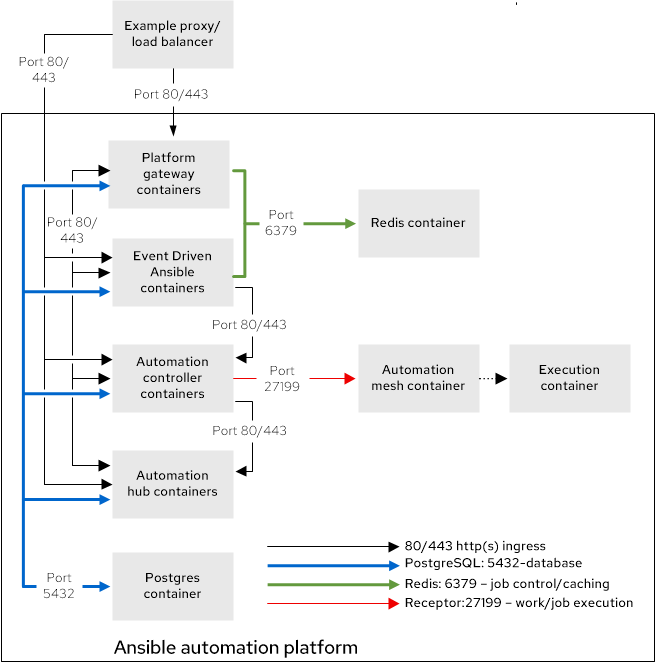
此部署模型的红帽测试的基础架构拓扑:
图 3.1. 基础架构拓扑图
红帽根据以下要求测试单个虚拟机:
| 要求 | 最低要求 |
|---|---|
| RAM | 16 GB |
| CPU | 4 |
| 本地磁盘 |
|
| 磁盘 IOPS | 3000 |
如果使用 hub_seed_collections=true 执行捆绑的增长拓扑安装,则建议使用 32 GB RAM。使用这个配置,安装时间将增加。请参阅集合可能需要 45 分钟或更长时间。
| 用途 | 组名称示例 |
|---|---|
| 所有 Ansible Automation Platform 组件 |
|
3.1.2. 测试的系统配置
红帽已测试了这些配置来安装和运行 Red Hat Ansible Automation Platform:
| 类型 | 描述 | 注 |
|---|---|---|
| 订阅 |
| |
| 操作系统 |
| |
| CPU 架构 | x86_64, AArch64, s390x (IBM Z), ppc64le (IBM Power) | |
|
|
|
|
| 浏览器 | 当前支持的 Mozilla Firefox 或 Google Chrome 版本。 | |
| 数据库 | PostgreSQL 15 | 外部(客户支持)数据库需要 Unicode (ICU)支持国际组件。 |
3.1.3. 网络端口
Red Hat Ansible Automation Platform 使用多个端口与其服务进行通信。这些端口必须处于打开状态,并可用于 Red Hat Ansible Automation Platform。确保这些端口可用,且防火墙不会阻止。
| 端口号 | 协议 | 服务 | Source | 目的地 | 描述 |
|---|---|---|---|---|---|
| 80/443 | TCP | HTTP/HTTPS | Event-Driven Ansible | Automation hub | 拉取容器决策环境 |
| 80/443 | TCP | HTTP/HTTPS | Event-Driven Ansible | 自动化控制器 | 启动自动化控制器作业 |
| 80/443 | TCP | HTTP/HTTPS | 自动化控制器 | Automation hub | 拉取集合和执行环境镜像 |
| 80/443 | TCP | HTTP/HTTPS | 平台网关 | 自动化控制器 | 自动化控制器通信的平台网关 |
| 80/443 | TCP | HTTP/HTTPS | 平台网关 | Automation hub | 到自动化 hub 通信的平台网关 |
| 80/443 | TCP | HTTP/HTTPS | 平台网关 | Event-Driven Ansible | 到 Event-Driven Ansible 通信的平台网关 |
| 5432 | TCP | PostgreSQL | Event-Driven Ansible | 数据库 | 事件驱动 Ansible 数据库访问 |
| 5432 | TCP | PostgreSQL | 平台网关 | 数据库 | 平台网关数据库访问 |
| 5432 | TCP | PostgreSQL | Automation hub | 数据库 | Automation hub 数据库访问 |
| 5432 | TCP | PostgreSQL | 自动化控制器 | 数据库 | 自动化控制器数据库访问 |
| 6379 | TCP | Redis | Event-Driven Ansible | Redis 容器 | 用于 Event-Driven Ansible 的作业启动和数据存储 |
| 6379 | TCP | Redis | 平台网关 | Redis 容器 | 平台网关服务的数据存储和检索 |
| 8443 | TCP | HTTPS | 平台网关 | 平台网关 | 内部网关 NGINX 通信 |
| 27199 | TCP | Receptor | 自动化控制器 | 执行容器 | Mesh 节点直接连接到控制器。允许作业分发的双向通信。 |
| 8080/8443 | TCP | HTTP/HTTPS | 平台网关 | 自动化控制器 |
自动化控制器 NGINX 端口。您可以使用以下清单变量配置这些端口: |
| 8081/8444 | TCP | HTTP/HTTPS | 平台网关 | Automation hub |
自动化中心 NGINX 端口。您可以使用以下清单变量配置这些端口: |
| 8082/8445 | TCP | HTTP/HTTPS | 平台网关 | Event-Driven Ansible |
event-Driven Ansible NGINX 端口。您可以使用以下清单变量配置这些端口: |
| 8083/8446 | TCP | HTTP/HTTPS | 平台网关 | 平台网关 |
平台网关 NGINX 端口。您可以使用以下清单变量配置这些端口: |
如果使用清单变量更改任何端口值,请参阅 清单文件变量来查看所有 默认端口值,并确保没有端口冲突。
3.1.4. 清单文件示例
使用示例清单文件执行安装:
# This is the Ansible Automation Platform installer inventory file intended for the container growth deployment topology.
# This inventory file expects to be run from the host where Ansible Automation Platform will be installed.
# Consult the Ansible Automation Platform product documentation about this topology's tested hardware configuration.
# https://docs.redhat.com/en/documentation/red_hat_ansible_automation_platform/2.5/html/tested_deployment_models/container-topologies
#
# Consult the docs if you are unsure what to add
# For all optional variables consult the included README.md
# or the Ansible Automation Platform documentation:
# https://docs.redhat.com/en/documentation/red_hat_ansible_automation_platform/2.5/html/containerized_installation

# This section is for your platform gateway hosts
# -----------------------------------------------------
[automationgateway]
aap.example.org

# This section is for your automation controller hosts
# -----------------------------------------------------
[automationcontroller]
aap.example.org

# This section is for your automation hub hosts
# -----------------------------------------------------
[automationhub]
aap.example.org

# This section is for your Event-Driven Ansible controller hosts
# -----------------------------------------------------
[automationeda]
aap.example.org

# This section is for the Ansible Automation Platform database
# -----------------------------------------------------
[database]
aap.example.org

[all:vars]
# Ansible
ansible_connection=local

# Common variables
# https://docs.redhat.com/en/documentation/red_hat_ansible_automation_platform/2.5/html/containerized_installation/appendix-inventory-files-vars#general-variables
# -----------------------------------------------------
postgresql_admin_username=postgres
postgresql_admin_password=<set your own>

registry_username=<your RHN username>
registry_password=<your RHN password>

redis_mode=standalone

# Platform gateway
# https://docs.redhat.com/en/documentation/red_hat_ansible_automation_platform/2.5/html/containerized_installation/appendix-inventory-files-vars#platform-gateway-variables
# -----------------------------------------------------
gateway_admin_password=<set your own>
gateway_pg_host=aap.example.org
gateway_pg_password=<set your own>

# Automation controller
# https://docs.redhat.com/en/documentation/red_hat_ansible_automation_platform/2.5/html/containerized_installation/appendix-inventory-files-vars#controller-variables
# -----------------------------------------------------
controller_admin_password=<set your own>
controller_pg_host=aap.example.org
controller_pg_password=<set your own>
controller_percent_memory_capacity=0.5

# Automation hub
# https://docs.redhat.com/en/documentation/red_hat_ansible_automation_platform/2.5/html/containerized_installation/appendix-inventory-files-vars#hub-variables
# -----------------------------------------------------
hub_admin_password=<set your own>
hub_pg_host=aap.example.org
hub_pg_password=<set your own>
hub_seed_collections=false

# Event-Driven Ansible controller
# https://docs.redhat.com/en/documentation/red_hat_ansible_automation_platform/2.5/html/containerized_installation/appendix-inventory-files-vars#event-driven-ansible-variables
# -----------------------------------------------------
eda_admin_password=<set your own>
eda_pg_host=aap.example.org
eda_pg_password=<set your own>
只有在远程主机上安装时,才需要 SSH 密钥。如果进行一个基于本地虚拟机的安装,您可以使用 ansible_connection=local。

'%20d='M201.5%20305.5c-13.8%200-24.9-11.1-24.9-24.6%200-13.8%2011.1-24.9%2024.9-24.9%2013.6%200%2024.6%2011.1%2024.6%2024.9%200%2013.6-11.1%2024.6-24.6%2024.6zM504%20256c0%20137-111%20248-248%20248S8%20393%208%20256%20119%208%20256%208s248%20111%20248%20248zm-132.3-41.2c-9.4%200-17.7%203.9-23.8%2010-22.4-15.5-52.6-25.5-86.1-26.6l17.4-78.3%2055.4%2012.5c0%2013.6%2011.1%2024.6%2024.6%2024.6%2013.8%200%2024.9-11.3%2024.9-24.9s-11.1-24.9-24.9-24.9c-9.7%200-18%205.8-22.1%2013.8l-61.2-13.6c-3-.8-6.1%201.4-6.9%204.4l-19.1%2086.4c-33.2%201.4-63.1%2011.3-85.5%2026.8-6.1-6.4-14.7-10.2-24.1-10.2-34.9%200-46.3%2046.9-14.4%2062.8-1.1%205-1.7%2010.2-1.7%2015.5%200%2052.6%2059.2%2095.2%20132%2095.2%2073.1%200%20132.3-42.6%20132.3-95.2%200-5.3-.6-10.8-1.9-15.8%2031.3-16%2019.8-62.5-14.9-62.5zM302.8%20331c-18.2%2018.2-76.1%2017.9-93.6%200-2.2-2.2-6.1-2.2-8.3%200-2.5%202.5-2.5%206.4%200%208.6%2022.8%2022.8%2087.3%2022.8%20110.2%200%202.5-2.2%202.5-6.1%200-8.6-2.2-2.2-6.1-2.2-8.3%200zm7.7-75c-13.6%200-24.6%2011.1-24.6%2024.9%200%2013.6%2011.1%2024.6%2024.6%2024.6%2013.8%200%2024.9-11.1%2024.9-24.6%200-13.8-11-24.9-24.9-24.9z'/%3e%3c/svg%3e)