 红帽全球峰会
第 28 章 Restricting an application to trust only a subset of certificates
If your Identity Management (IdM) installation is configured with the integrated Certificate System (CS) certificate authority (CA), you are able to create lightweight sub-CAs. All sub-CAs you create are subordinated to the primary CA of the certificate system, the ipa CA.
A lightweight sub-CA in this context means a sub-CA issuing certificates for a specific purpose. For example, a lightweight sub-CA enables you to configure a service, such as a virtual private network (VPN) gateway and a web browser, to accept only certificates issued by sub-CA A. By configuring other services to accept certificates only issued by sub-CA B, you prevent them from accepting certificates issued by sub-CA A, the primary CA, that is the ipa CA, and any intermediate sub-CA between the two.
If you revoke the intermediate certificate of a sub-CA, all certificates issued by this sub-CA are automatically considered invalid by correctly configured clients. All the other certificates issued directly by the root CA, ipa, or another sub-CA, remain valid.
This section uses the example of the Apache web server to illustrate how to restrict an application to trust only a subset of certificates. Complete this section to restrict the web server running on your IdM client to use a certificate issued by the webserver-ca IdM sub-CA, and to require the users to authenticate to the web server using user certificates issued by the webclient-ca IdM sub-CA.
The steps you need to take are:
- Create an IdM sub-CA
- Download the sub-CA certificate from IdM WebUI
- Create a CA ACL specifying the correct combination of users, services and CAs, and the certificate profile used
- Request a certificate for the web service running on an IdM client from the IdM sub-CA
- Set up a single-instance Apache HTTP Server
- Add TLS encryption to the Apache HTTP Server
- Set the supported TLS protocol versions on an Apache HTTP Server
- Set the supported ciphers on the Apache HTTP Server
- Configure TLS client certificate authentication on the web server
- Request a certificate for the user from the IdM sub-CA and export it to the client
- Import the user certificate into the browser and configure the browser to trust the sub-CA certificate
28.1. Managing lightweight sub-CAs
This section describes how to manage lightweight subordinate certificate authorities (sub-CAs). All sub-CAs you create are subordinated to the primary CA of the certificate system, the ipa CA. You can also disable and delete sub-CAs.
-
If you delete a sub-CA, revocation checking for that sub-CA will no longer work. Only delete a sub-CA when there are no more certificates that were issued by that sub-CA whose
notAfterexpiration time is in the future. - You should only disable sub-CAs while there are still non-expired certificates that were issued by that sub-CA. If all certificates that were issued by a sub-CA have expired, you can delete that sub-CA.
- You cannot disable or delete the IdM CA.
28.1.1. Creating a sub-CA from the IdM WebUI
Follow this procedure to use the IdM WebUI to create new sub-CAs named webserver-ca and webclient-ca.
Prerequisites
- You are logged in as the administrator.
Procedure
- In the Authentication menu, click Certificates.
- Select Certificate Authorities and click Add.
- Enter the name of the webserver-ca sub-CA. Enter the Subject DN, for example CN=WEBSERVER,O=IDM.EXAMPLE.COM, in the Subject DN field. Note that the Subject DN must be unique in the IdM CA infrastructure.
- Enter the name of the webclient-ca sub-CA. Enter the Subject DN CN=WEBCLIENT,O=IDM.EXAMPLE.COM in the Subject DN field.
On the command line, run the
ipa-certupdatecommand to create a certmonger tracking request for the webserver-ca and webclient-ca sub-CA certificates:[root@ipaserver ~]# ipa-certupdate重要Forgetting to run the
ipa-certupdatecommand after creating a sub-CA means that if the sub-CA certificate expires, end-entity certificates issued by the sub-CA are considered invalid even if the end-entity certificate has not expired.
Verification
Verify that the signing certificate of the new sub-CA has been added to the IdM database:
[root@ipaserver ~]# certutil -d /etc/pki/pki-tomcat/alias/ -L Certificate Nickname Trust Attributes SSL,S/MIME,JAR/XPI caSigningCert cert-pki-ca CTu,Cu,Cu Server-Cert cert-pki-ca u,u,u auditSigningCert cert-pki-ca u,u,Pu caSigningCert cert-pki-ca ba83f324-5e50-4114-b109-acca05d6f1dc u,u,u ocspSigningCert cert-pki-ca u,u,u subsystemCert cert-pki-ca u,u,u注意The new sub-CA certificate is automatically transferred to all the replicas that have a certificate system instance installed.
28.1.2. Deleting a sub-CA from the IdM WebUI
Follow this procedure to delete lightweight sub-CAs in the IdM WebUI.
-
If you delete a sub-CA, revocation checking for that sub-CA will no longer work. Only delete a sub-CA when there are no more certificates that were issued by that sub-CA whose
notAfterexpiration time is in the future. - You should only disable sub-CAs while there are still non-expired certificates that were issued by that sub-CA. If all certificates that were issued by a sub-CA have expired, you can delete that sub-CA.
- You cannot disable or delete the IdM CA.
Prerequisites
- You are logged in as the administrator.
- You have disabled the sub-CA in the IdM CLI. See Disabling a sub-CA from the IdM CLI
Procedure
-
In the IdM WebUI, open the
Authenticationtab, and select theCertificatessubtab. -
Select
Certificate Authorities. Select the sub-CA to remove and click
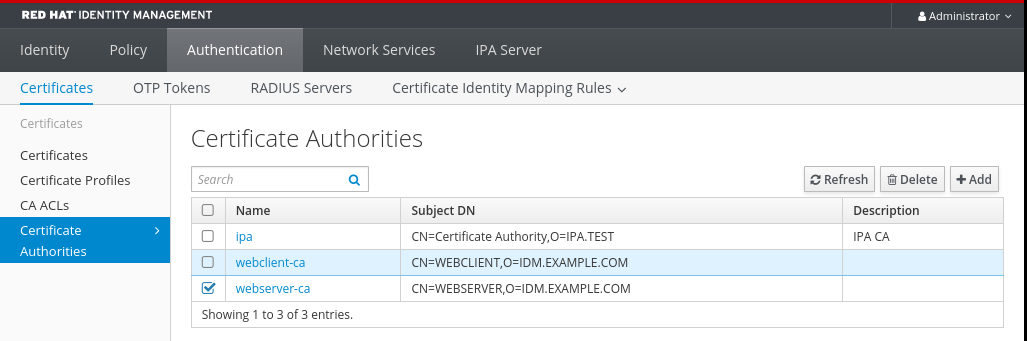
Delete.图 28.1. Deleting a sub-CA in the IdM Web UI
-
Click
Deleteto confirm.
28.1.3. Creating a sub-CA from the IdM CLI
Follow this procedure to use the IdM CLI to create new sub-CAs named webserver-ca and webclient-ca.
Prerequisites
- You are logged in as the administrator to an IdM server that is a CA server.
Procedure
Enter the
ipa ca-addcommand, and specify the name of the webserver-ca sub-CA and its Subject Distinguished Name (DN):[root@ipaserver ~]# ipa ca-add webserver-ca --subject="CN=WEBSERVER,O=IDM.EXAMPLE.COM" ------------------- Created CA "webserver-ca" ------------------- Name: webserver-ca Authority ID: ba83f324-5e50-4114-b109-acca05d6f1dc Subject DN: CN=WEBSERVER,O=IDM.EXAMPLE.COM Issuer DN: CN=Certificate Authority,O=IDM.EXAMPLE.COM- Name
- Name of the CA.
- Authority ID
- Automatically created, individual ID for the CA.
- Subject DN
- Subject Distinguished Name (DN). The Subject DN must be unique in the IdM CA infrastructure.
- Issuer DN
- Parent CA that issued the sub-CA certificate. All sub-CAs are created as a child of the IdM root CA.
Create the webclient-ca sub-CA for issuing certificates to web clients:
[root@ipaserver ~]# ipa ca-add webclient-ca --subject="CN=WEBCLIENT,O=IDM.EXAMPLE.COM"
-------------------
Created CA "webclient-ca"
-------------------
  Name: webclient-ca
  Authority ID: 8a479f3a-0454-4a4d-8ade-fd3b5a54ab2e
  Subject DN: CN=WEBCLIENT,O=IDM.EXAMPLE.COM
  Issuer DN: CN=Certificate Authority,O=IDM.EXAMPLE.COM
Run the ipa-certupdate command to create a certmonger tracking request for the webserver-ca and webclient-ca sub-CAs certificates:
[root@ipaserver ~]# ipa-certupdate重要If you forget to run the ipa-certupdate command after creating a sub-CA and the sub-CA certificate expires, end-entity certificates issued by that sub-CA are considered invalid even though the end-entity certificate has not expired.
Verification
Verify that the signing certificate of the new sub-CA has been added to the IdM database:
[root@ipaserver ~]# certutil -d /etc/pki/pki-tomcat/alias/ -L Certificate Nickname Trust Attributes SSL,S/MIME,JAR/XPI caSigningCert cert-pki-ca CTu,Cu,Cu Server-Cert cert-pki-ca u,u,u auditSigningCert cert-pki-ca u,u,Pu caSigningCert cert-pki-ca ba83f324-5e50-4114-b109-acca05d6f1dc u,u,u ocspSigningCert cert-pki-ca u,u,u subsystemCert cert-pki-ca u,u,u注意The new sub-CA certificate is automatically transferred to all the replicas that have a certificate system instance installed.
28.1.4. Disabling a sub-CA from the IdM CLI
Follow this procedure to disable a sub-CA from the IdM CLI. If there are still non-expired certificates that were issued by a sub-CA, you should not delete it but you can disable it. If you delete the sub-CA, revocation checking for that sub-CA will no longer work.
Prerequisites
- You are logged in as the administrator.
Procedure
Run the
ipa ca-findcommand to determine the name of the sub-CA you are deleting:[root@ipaserver ~]# ipa ca-find ------------- 3 CAs matched ------------- Name: ipa Description: IPA CA Authority ID: 5195deaf-3b61-4aab-b608-317aff38497c Subject DN: CN=Certificate Authority,O=IPA.TEST Issuer DN: CN=Certificate Authority,O=IPA.TEST Name: webclient-ca Authority ID: 605a472c-9c6e-425e-b959-f1955209b092 Subject DN: CN=WEBCLIENT,O=IDM.EXAMPLE.COM Issuer DN: CN=Certificate Authority,O=IPA.TEST Name: webserver-ca Authority ID: 02d537f9-c178-4433-98ea-53aa92126fc3 Subject DN: CN=WEBSERVER,O=IDM.EXAMPLE.COM Issuer DN: CN=Certificate Authority,O=IPA.TEST ---------------------------- Number of entries returned 3 ----------------------------Run the
ipa ca-disablecommand to disable your sub-CA, in this example, thewebserver-ca:ipa ca-disable webserver-ca -------------------------- Disabled CA "webserver-ca" --------------------------
28.1.5. Deleting a sub-CA from the IdM CLI
Follow this procedure to delete lightweight sub-CAs from the IdM CLI.
-
If you delete a sub-CA, revocation checking for that sub-CA will no longer work. Only delete a sub-CA when there are no more certificates that were issued by that sub-CA whose
notAfterexpiration time is in the future. - You should only disable sub-CAs while there are still non-expired certificates that were issued by that sub-CA. If all certificates that were issued by a sub-CA have expired, you can delete that sub-CA.
- You cannot disable or delete the IdM CA.
Prerequisites
- You are logged in as the administrator.
Procedure
To display a list of sub-CAs and CAs, run the
ipa ca-findcommand:# ipa ca-find ------------- 3 CAs matched ------------- Name: ipa Description: IPA CA Authority ID: 5195deaf-3b61-4aab-b608-317aff38497c Subject DN: CN=Certificate Authority,O=IPA.TEST Issuer DN: CN=Certificate Authority,O=IPA.TEST Name: webclient-ca Authority ID: 605a472c-9c6e-425e-b959-f1955209b092 Subject DN: CN=WEBCLIENT,O=IDM.EXAMPLE.COM Issuer DN: CN=Certificate Authority,O=IPA.TEST Name: webserver-ca Authority ID: 02d537f9-c178-4433-98ea-53aa92126fc3 Subject DN: CN=WEBSERVER,O=IDM.EXAMPLE.COM Issuer DN: CN=Certificate Authority,O=IPA.TEST ---------------------------- Number of entries returned 3 ----------------------------Run the
ipa ca-disablecommand to disable your sub-CA, in this example, thewebserver-ca:# ipa ca-disable webserver-ca -------------------------- Disabled CA "webserver-ca" --------------------------Delete the sub-CA, in this example, the
webserver-ca:# ipa ca-del webserver-ca ------------------------- Deleted CA "webserver-ca" -------------------------
Verification
Run
ipa ca-findto display the list of CAs and sub-CAs. Thewebserver-cais no longer on the list.# ipa ca-find ------------- 2 CAs matched ------------- Name: ipa Description: IPA CA Authority ID: 5195deaf-3b61-4aab-b608-317aff38497c Subject DN: CN=Certificate Authority,O=IPA.TEST Issuer DN: CN=Certificate Authority,O=IPA.TEST Name: webclient-ca Authority ID: 605a472c-9c6e-425e-b959-f1955209b092 Subject DN: CN=WEBCLIENT,O=IDM.EXAMPLE.COM Issuer DN: CN=Certificate Authority,O=IPA.TEST ---------------------------- Number of entries returned 2 ----------------------------

'%20d='M201.5%20305.5c-13.8%200-24.9-11.1-24.9-24.6%200-13.8%2011.1-24.9%2024.9-24.9%2013.6%200%2024.6%2011.1%2024.6%2024.9%200%2013.6-11.1%2024.6-24.6%2024.6zM504%20256c0%20137-111%20248-248%20248S8%20393%208%20256%20119%208%20256%208s248%20111%20248%20248zm-132.3-41.2c-9.4%200-17.7%203.9-23.8%2010-22.4-15.5-52.6-25.5-86.1-26.6l17.4-78.3%2055.4%2012.5c0%2013.6%2011.1%2024.6%2024.6%2024.6%2013.8%200%2024.9-11.3%2024.9-24.9s-11.1-24.9-24.9-24.9c-9.7%200-18%205.8-22.1%2013.8l-61.2-13.6c-3-.8-6.1%201.4-6.9%204.4l-19.1%2086.4c-33.2%201.4-63.1%2011.3-85.5%2026.8-6.1-6.4-14.7-10.2-24.1-10.2-34.9%200-46.3%2046.9-14.4%2062.8-1.1%205-1.7%2010.2-1.7%2015.5%200%2052.6%2059.2%2095.2%20132%2095.2%2073.1%200%20132.3-42.6%20132.3-95.2%200-5.3-.6-10.8-1.9-15.8%2031.3-16%2019.8-62.5-14.9-62.5zM302.8%20331c-18.2%2018.2-76.1%2017.9-93.6%200-2.2-2.2-6.1-2.2-8.3%200-2.5%202.5-2.5%206.4%200%208.6%2022.8%2022.8%2087.3%2022.8%20110.2%200%202.5-2.2%202.5-6.1%200-8.6-2.2-2.2-6.1-2.2-8.3%200zm7.7-75c-13.6%200-24.6%2011.1-24.6%2024.9%200%2013.6%2011.1%2024.6%2024.6%2024.6%2013.8%200%2024.9-11.1%2024.9-24.6%200-13.8-11-24.9-24.9-24.9z'/%3e%3c/svg%3e)