 红帽全球峰会
此内容没有您所选择的语言版本。
7.3. Creating a Red Hat Enterprise Linux 6 Guest with PXE
Procedure 7.3. Creating a Red Hat Enterprise Linux 6 guest with virt-manager
Optional: Preparation
Prepare the storage environment for the virtual machine. For more information on preparing storage, refer to the Red Hat Enterprise Linux 6 Virtualization Administration Guide.Important
Various storage types may be used for storing guest virtual machines. However, for a virtual machine to be able to use migration features the virtual machine must be created on networked storage.Red Hat Enterprise Linux 6 requires at least 1GB of storage space. However, Red Hat recommends at least 5GB of storage space for a Red Hat Enterprise Linux 6 installation and for the procedures in this guide.Open virt-manager and start the wizard
Open virt-manager by executing thevirt-managercommand as root or opening ApplicationsSystem Tools Virtual Machine Manager. 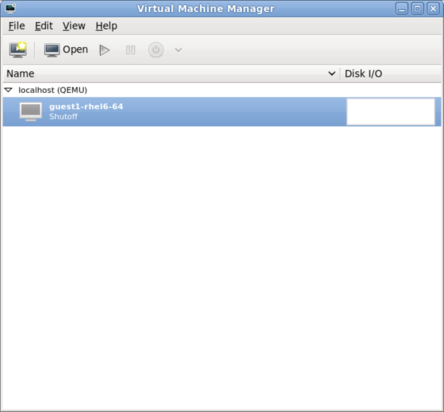
Figure 7.15. The main virt-manager window
Click on the button to start the new virtualized guest wizard.
Figure 7.16. The create new virtualized guest button
The New VM window opens.Name the virtual machine
Virtual machine names can contain letters, numbers and the following characters: '_', '.' and '-'. Virtual machine names must be unique for migration and cannot consist only of numbers.Choose the installation method from the list of radio buttons.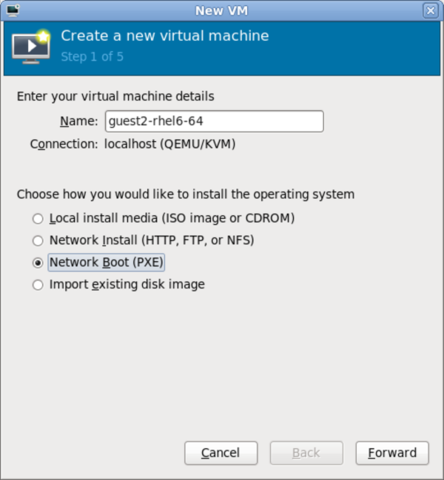
Figure 7.17. The New VM window - Step 1
Click to continue.- The remaining steps are the same as the ISO installation procedure. Continue from Step 5 of the ISO installation procedure. From this point, the only difference in this PXE procedure is on the final New VM screen, which shows the Install: PXE Install field.
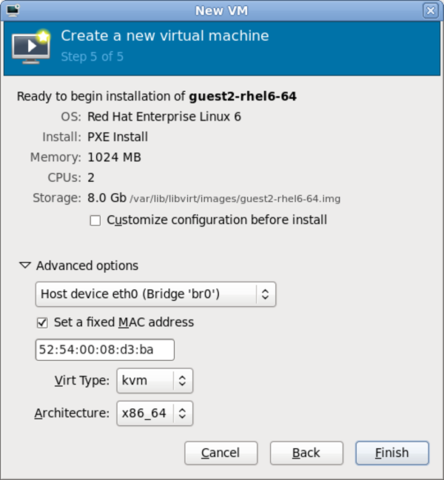
Figure 7.18. The New VM window - Step 5 - PXE Install

'%20d='M201.5%20305.5c-13.8%200-24.9-11.1-24.9-24.6%200-13.8%2011.1-24.9%2024.9-24.9%2013.6%200%2024.6%2011.1%2024.6%2024.9%200%2013.6-11.1%2024.6-24.6%2024.6zM504%20256c0%20137-111%20248-248%20248S8%20393%208%20256%20119%208%20256%208s248%20111%20248%20248zm-132.3-41.2c-9.4%200-17.7%203.9-23.8%2010-22.4-15.5-52.6-25.5-86.1-26.6l17.4-78.3%2055.4%2012.5c0%2013.6%2011.1%2024.6%2024.6%2024.6%2013.8%200%2024.9-11.3%2024.9-24.9s-11.1-24.9-24.9-24.9c-9.7%200-18%205.8-22.1%2013.8l-61.2-13.6c-3-.8-6.1%201.4-6.9%204.4l-19.1%2086.4c-33.2%201.4-63.1%2011.3-85.5%2026.8-6.1-6.4-14.7-10.2-24.1-10.2-34.9%200-46.3%2046.9-14.4%2062.8-1.1%205-1.7%2010.2-1.7%2015.5%200%2052.6%2059.2%2095.2%20132%2095.2%2073.1%200%20132.3-42.6%20132.3-95.2%200-5.3-.6-10.8-1.9-15.8%2031.3-16%2019.8-62.5-14.9-62.5zM302.8%20331c-18.2%2018.2-76.1%2017.9-93.6%200-2.2-2.2-6.1-2.2-8.3%200-2.5%202.5-2.5%206.4%200%208.6%2022.8%2022.8%2087.3%2022.8%20110.2%200%202.5-2.2%202.5-6.1%200-8.6-2.2-2.2-6.1-2.2-8.3%200zm7.7-75c-13.6%200-24.6%2011.1-24.6%2024.9%200%2013.6%2011.1%2024.6%2024.6%2024.6%2013.8%200%2024.9-11.1%2024.9-24.6%200-13.8-11-24.9-24.9-24.9z'/%3e%3c/svg%3e)