8.4. Splitter
概述
拆分器 是一种路由器类型,可将传入的消息分成一系列传出消息。每个传出消息都包含一组原始消息。在 Apache Camel 中,在 图 8.4 “Splitter Pattern” 中显示的分割模式由 split () Java DSL 命令实现。
图 8.4. Splitter Pattern
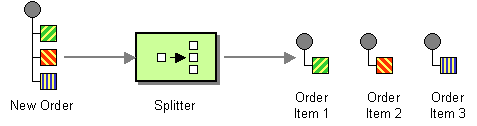
Apache Camel 分割器实际支持两种模式,如下所示:
- 简单的 splitter mvapich-wagon 实现分割模式自行实施。
- 使用聚合器模式 Splitter/aggregator criu-wagoncombines splitter 模式,以便在处理后对消息进行重新组合。
在将原始消息划分为多个部分之前,它会做原始消息的副本。在 shouldow copy 中,原始消息的标头和有效负载仅复制为参考。虽然 splitter 本身不会将生成的消息部分路由到不同的端点,但分割消息的部分内容可能会进行二级路由。
由于消息部分为 shouldow 副本,所以它们仍然与原始消息相关联。因此,无法独立修改它们。如果要将自定义逻辑应用到消息部分的不同副本,并将其路由到一组端点,则必须使用 splitter 子句中的 onPrepareRef DSL 选项生成原始消息的深度副本。有关使用选项的详情,请参考 “选项”一节。
Java DSL 示例
以下示例定义了从 seda:a 到 seda:b 的路由,该路由通过将传入消息的每一行转换为一个单独的传出消息来分割信息:
RouteBuilder builder = new RouteBuilder() {
    public void configure() {
        from("seda:a")
          .split(bodyAs(String.class).tokenize("\n"))
          .to("seda:b");
    }
};
分割器可以使用任何表达式语言,因此您可以使用任何受支持的脚本语言(如 XPath、XQuery 或 SQL)分割信息(请参阅 第 II 部分 “路由表达式和 predicates 语言”)。以下示例从传入的信息中提取 bar 元素,并将其插入到单独的传出消息中:
from("activemq:my.queue")
  .split(xpath("//foo/bar"))
  .to("file://some/directory")
XML 配置示例
以下示例演示了如何使用 XPath 脚本语言在 XML 中配置分割路由:
<camelContext id="buildSplitter" xmlns="http://camel.apache.org/schema/spring">
    <route>
      <from uri="seda:a"/>
      <split>
        <xpath>//foo/bar</xpath>
        <to uri="seda:b"/>
      </split>
    </route>
</camelContext>
您可以使用 XML DSL 中的令牌表达式来利用令牌分割正文或标头,其中使用 tokenize 元素定义令牌化表达式。在以下示例中,消息正文使用 \n 分隔符字符进行令牌化。要使用正则表达式模式,请在 tokenize 元素中设置 regex=true。
<camelContext xmlns="http://camel.apache.org/schema/spring">
    <route>
        <from uri="direct:start"/>
        <split>
            <tokenize token="\n"/>
            <to uri="mock:result"/>
        </split>
    </route>
    </camelContext>
拆分为行组
要将大型文件分成 1000 行的块,您可以在 Java DSL 中定义分割路由:
from("file:inbox")
    .split().tokenize("\n", 1000).streaming()
       .to("activemq:queue:order");
要令牌化的第二个参数指定应分组到单个块中的行数。streaming () 子句指示 splitter 不会一次读取整个文件(如果文件较大,则达到更好的性能)。
相同的路由可以在 XML DSL 中定义,如下所示:
<route>
  <from uri="file:inbox"/>
  <split streaming="true">
    <tokenize token="\n" group="1000"/>
    <to uri="activemq:queue:order"/>
  </split>
</route>
使用 group 选项时的输出始终为 java.lang.String 类型。
跳过第一个项目
要跳过消息中的第一个项目,您可以使用 skipFirst 选项。
在 Java DSL 中,在 tokenize 参数 true 中进行第三个选项:
from("direct:start")
 // split by new line and group by 3, and skip the very first element
      .split().tokenize("\n", 3, true).streaming()
         .to("mock:group");
相同的路由可以在 XML DSL 中定义,如下所示:
<route>
  <from uri="file:inbox"/>
    <split streaming="true">
    <tokenize token="\n" group="1000" skipFirst="true" />
    <to uri="activemq:queue:order"/>
  </split>
</route>
Splitter reply
如果进入 splitter 的交换具有 InOut message-exchange 模式(即回复是预期的),则拆分器会返回原始输入消息的副本作为 Out 消息插槽中的回复消息。您可以通过实施自己的 聚合策略来覆盖此默认行为。
并行执行
如果要并行执行生成的消息,您可以启用并行处理选项,该选项实例化一个线程池来处理消息片段。例如:
XPathBuilder xPathBuilder = new XPathBuilder("//foo/bar");
from("activemq:my.queue").split(xPathBuilder).parallelProcessing().to("activemq:my.parts");
您可以自定义并行分割器中使用的底层 ThreadPoolExecutor。例如,您可以在 Java DSL 中指定自定义 executor,如下所示:
XPathBuilder xPathBuilder = new XPathBuilder("//foo/bar");
ThreadPoolExecutor threadPoolExecutor = new ThreadPoolExecutor(8, 16, 0L, TimeUnit.MILLISECONDS, new LinkedBlockingQueue());
from("activemq:my.queue")
  .split(xPathBuilder)
  .parallelProcessing()
  .executorService(threadPoolExecutor)
  .to("activemq:my.parts");
您可以在 XML DSL 中指定自定义 executor,如下所示:
<camelContext xmlns="http://camel.apache.org/schema/spring">
  <route>
    <from uri="direct:parallel-custom-pool"/>
    <split executorServiceRef="threadPoolExecutor">
      <xpath>/invoice/lineItems</xpath>
      <to uri="mock:result"/>
    </split>
  </route>
</camelContext>

<bean id="threadPoolExecutor" class="java.util.concurrent.ThreadPoolExecutor">
  <constructor-arg index="0" value="8"/>
  <constructor-arg index="1" value="16"/>
  <constructor-arg index="2" value="0"/>
  <constructor-arg index="3" value="MILLISECONDS"/>
  <constructor-arg index="4"><bean class="java.util.concurrent.LinkedBlockingQueue"/></constructor-arg>
</bean>
使用 bean 执行分割
由于分割器 可以使用任何 表达式进行分割,因此您可以通过调用 method () 表达式来使用 bean 执行分割。bean 应返回可迭代的值,如 java.util.Collection、java.util.Iterator 或数组。
以下路由定义了一个 method () 表达式,它调用 mySplitterBean bean 实例的方法:
from("direct:body")
        // here we use a POJO bean mySplitterBean to do the split of the payload
        .split()
        .method("mySplitterBean", "splitBody")
        .to("mock:result");
from("direct:message")
        // here we use a POJO bean mySplitterBean to do the split of the message
        // with a certain header value
        .split()
        .method("mySplitterBean", "splitMessage")
        .to("mock:result");
其中 mySplitterBean 是 MySplitterBean 类的实例,它定义如下:
public class MySplitterBean {

    /**
     * The split body method returns something that is iteratable such as a java.util.List.
     *
     * @param body the payload of the incoming message
     * @return a list containing each part split
     */
    public List<String> splitBody(String body) {
        // since this is based on an unit test you can of couse
        // use different logic for splitting as {router} have out
        // of the box support for splitting a String based on comma
        // but this is for show and tell, since this is java code
        // you have the full power how you like to split your messages
        List<String> answer = new ArrayList<String>();
        String[] parts = body.split(",");
        for (String part : parts) {
            answer.add(part);
        }
        return answer;
    }

    /**
     * The split message method returns something that is iteratable such as a java.util.List.
     *
     * @param header the header of the incoming message with the name user
     * @param body the payload of the incoming message
     * @return a list containing each part split
     */
    public List<Message> splitMessage(@Header(value = "user") String header, @Body String body) {
        // we can leverage the Parameter Binding Annotations
        // http://camel.apache.org/parameter-binding-annotations.html
        // to access the message header and body at same time,
        // then create the message that we want, splitter will
        // take care rest of them.
        // *NOTE* this feature requires {router} version >= 1.6.1
        List<Message> answer = new ArrayList<Message>();
        String[] parts = header.split(",");
        for (String part : parts) {
            DefaultMessage message = new DefaultMessage();
            message.setHeader("user", part);
            message.setBody(body);
            answer.add(message);
        }
        return answer;
    }
}
您可以使用带有 Splitter EIP 的BeanIOSplitter 对象来分割大型有效负载,通过使用流模式以避免将整个内容读取在内存中。以下示例演示了如何使用映射文件(从 classpath 加载)来设置 BeanIOSplitter 对象:
BeanIOSplitter 类在 Camel 2.18 中是新的。它在 Camel 2.17 中不可用。
BeanIOSplitter splitter = new BeanIOSplitter();
   splitter.setMapping("org/apache/camel/dataformat/beanio/mappings.xml");
   splitter.setStreamName("employeeFile");

    // Following is a route that uses the beanio data format to format CSV data
    // in Java objects:
    from("direct:unmarshal")
        // Here the message body is split to obtain a message for each row:
         .split(splitter).streaming()
         .to("log:line")
         .to("mock:beanio-unmarshal");
以下示例添加了一个错误处理器:
BeanIOSplitter splitter = new BeanIOSplitter();
   splitter.setMapping("org/apache/camel/dataformat/beanio/mappings.xml");
   splitter.setStreamName("employeeFile");
   splitter.setBeanReaderErrorHandlerType(MyErrorHandler.class);
   from("direct:unmarshal")
      .split(splitter).streaming()
      .to("log:line")
      .to("mock:beanio-unmarshal");
Exchange 属性
在每个分割交换中设置以下属性:
| header | type | description |
|---|---|---|
|
|
| Apache Camel 2.0:被分割的每个交换的分割计数器。计数器从 0 开始。 |
|
|
| Apache Camel 2.0:被分割的交换总数。这个标头不适用于基于流的分割。 |
|
|
| Apache Camel 2.4:此交换是否是最后一个。 |
Splitter/aggregator 模式
在处理各个部分后,消息部分会被聚合到单个交换中是一种常见模式。要支持此模式,split () DSL 命令允许您提供一个 AggregationStrategy 对象作为第二个参数。
Java DSL 示例
以下示例演示了如何在处理所有消息片段后使用自定义聚合策略来重新组合分割消息:
from("direct:start")
    .split(body().tokenize("@"), new MyOrderStrategy())
        // each split message is then send to this bean where we can process it
        .to("bean:MyOrderService?method=handleOrder")
        // this is important to end the splitter route as we do not want to do more routing
        // on each split message
    .end()
    // after we have split and handled each message we want to send a single combined
    // response back to the original caller, so we let this bean build it for us
    // this bean will receive the result of the aggregate strategy: MyOrderStrategy
    .to("bean:MyOrderService?method=buildCombinedResponse")
AggregationStrategy 实现
上述路由中使用的自定义聚合策略 MyOrderStrategy 的实现如下:
/**
 * This is our own order aggregation strategy where we can control
 * how each split message should be combined. As we do not want to
 * lose any message, we copy from the new to the old to preserve the
 * order lines as long we process them
 */
public static class MyOrderStrategy implements AggregationStrategy {

    public Exchange aggregate(Exchange oldExchange, Exchange newExchange) {
        // put order together in old exchange by adding the order from new exchange

        if (oldExchange == null) {
            // the first time we aggregate we only have the new exchange,
            // so we just return it
            return newExchange;
        }

        String orders = oldExchange.getIn().getBody(String.class);
        String newLine = newExchange.getIn().getBody(String.class);

        LOG.debug("Aggregate old orders: " + orders);
        LOG.debug("Aggregate new order: " + newLine);

        // put orders together separating by semi colon
        orders = orders + ";" + newLine;
        // put combined order back on old to preserve it
        oldExchange.getIn().setBody(orders);

        // return old as this is the one that has all the orders gathered until now
        return oldExchange;
    }
}
基于流的处理
启用并行处理后,理论上可以让后续消息准备好在较早之前进行聚合。换句话说,消息片段可能会达到聚合器没有顺序。默认情况下,这不会发生,因为分割器实施在将消息段重新安排到聚合器之前将其重新安排为原始顺序。
如果您希望在消息就绪后马上聚合消息部分(并可能没有顺序),您可以启用 streaming 选项,如下所示:
from("direct:streaming")
  .split(body().tokenize(","), new MyOrderStrategy())
    .parallelProcessing()
    .streaming()
    .to("activemq:my.parts")
  .end()
  .to("activemq:all.parts");
您还可以提供用于流的自定义迭代器,如下所示:
// Java
import static org.apache.camel.builder.ExpressionBuilder.beanExpression;
...
from("direct:streaming")
     .split(beanExpression(new MyCustomIteratorFactory(),  "iterator"))
.streaming().to("activemq:my.parts")您不能将 streaming 模式与 XPath 结合使用。XPath 需要内存中的完整 DOM XML 文档。
使用 XML 进行基于流的处理
如果传入的消息是一个非常大的 XML 文件,您可以在流传输模式中使用令牌ize XML 子命令最高效地处理消息。
例如,如果一个包含 顺序 元素序列的大型 XML 文件,您可以使用类似如下的路由将文件分成 顺序 元素:
from("file:inbox")
  .split().tokenizeXML("order").streaming()
  .to("activemq:queue:order");
您可以通过定义类似如下的路由在 XML 中执行同样的操作:
<route>
  <from uri="file:inbox"/>
  <split streaming="true">
    <tokenize token="order" xml="true"/>
    <to uri="activemq:queue:order"/>
  </split>
</route>
通常,您需要访问在令牌元素的一个界(ancestor)元素中定义的命名空间。您可以将命名空间定义从 ancestor 元素之一复制到 token 元素中,方法是将您要从哪个元素继承命名空间定义。
在 Java DSL 中,您将 ancestor 元素指定为 tokenizeXML 的第二个参数。例如,从 enclosing orders 元素继承命名空间定义:
from("file:inbox")
  .split().tokenizeXML("order", "orders").streaming()
  .to("activemq:queue:order");
在 XML DSL 中,您可以使用 inheritNamespaceTagName 属性指定 ancestor 元素。例如:
<route>
  <from uri="file:inbox"/>
  <split streaming="true">
    <tokenize token="order"
              xml="true"
              inheritNamespaceTagName="orders"/>
    <to uri="activemq:queue:order"/>
  </split>
</route>
选项
split DSL 命令支持以下选项:
| Name | 默认值 | 描述 |
|
| 指的是 AggregationStrategy,用于将来自子消息的回复汇编为来自 第 8.4 节 “Splitter” 的单个传出消息。有关默认使用的内容 ,请参阅标题为 splitter 返回的内容。 | |
|
|
这个选项可用于在将 POJO 用作 | |
|
|
|
当使用 POJO 作为 |
|
|
| 如果启用,则同时处理子消息。请注意,调用器线程仍然会等待所有子消息已被完全处理,然后再继续。 |
|
|
|
如果启用,则 |
|
| 指的是用于并行处理的自定义线程池。请注意,如果您设定了这个选项,则并行处理会被自动指示,您不必启用该选项。 | |
|
|
| Camel 2.2: 发生异常时是否立即停止处理。如果禁用,则 Camel 继续分割并处理子消息,无论其中之一是否失败。您可以在 AggregationStrategy 类中处理异常,您可以完全控制如何处理这种情况。 |
|
|
| 如果启用,Camel 将以流的方式分割,这意味着它将以块的形式分割输入信息。这可减少内存开销。例如,如果您分割大消息,建议启用流。如果启用了流,则子消息回复将被聚合到顺序,例如按返回的顺序。如果禁用,Camel 将以与分割相同的顺序处理子消息回复。 |
|
|
Camel 2.5: 设置在 millis 中指定的总超时。如果 第 8.3 节 “接收者列表” 无法分割并处理给定时间段内的所有回复,则超时触发器和 第 8.4 节 “Splitter” 中断并继续。请注意,如果您提供 TimeoutAwareAggregationStrategy,则在中断前会调用 | |
|
| Camel 2.8: 在处理前,请参阅自定义处理器来准备交换的子消息。这可让您执行任何自定义逻辑,如 deep-cloning the message payload (如果需要的话)。 | |
|
|
| Camel 2.8: 是否应共享工作单元。详情请查看以下内容。 |

