 红帽全球峰会
此内容没有您所选择的语言版本。
6.8. Creating Striped Replicated Volumes
Important
Striped Replicated volume is a technology preview feature. Technology Preview features are not fully supported under Red Hat subscription level agreements (SLAs), may not be functionally complete, and are not intended for production use. However, these features provide early access to upcoming product innovations, enabling customers to test functionality and provide feedback during the development process.
Note
The number of bricks must be a multiple of the replicate count and stripe count for a striped replicated volume.
This type of volume stripes data across replicated bricks in the trusted storage pool. For best results, you must use striped replicated volumes in highly concurrent environments where there is parallel access of very large files and performance is critical.
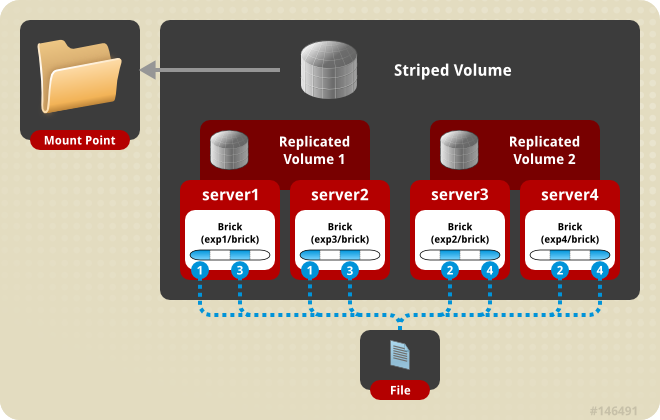
Figure 6.8. Illustration of a Striped Replicated Volume
Create a Striped Replicated Volume
Use
gluster volume create to create a striped replicated volume, and gluster volume info to verify successful volume creation.
Pre-requisites
- A trusted storage pool has been created, as described in Section 5.1, “Adding Servers to the Trusted Storage Pool”.
- Understand how to start and stop volumes, as described in Section 6.10, “Starting Volumes”.
- Run the
gluster volume createcommand to create the striped replicated volume.The syntax is# gluster volume create NEW-VOLNAME [stripe COUNT] [replica COUNT] [transport tcp | rdma | tcp,rdma] NEW-BRICK...The default value for transport istcp. Other options can be passed such asauth.alloworauth.reject. See Section 8.1, “Configuring Volume Options” for a full list of parameters.Example 6.10. Striped Replicated Volume Across Four Servers
The order in which bricks are specified determines how bricks are mirrored with each other. For example, first n bricks, where n is the replica count. In this scenario, the first two bricks specified mirror each other. If more bricks were specified, the next two bricks in sequence would mirror each other. .# gluster volume create test-volume stripe 2 replica 2 transport tcp server1:/exp1/brick server2:/exp3/brick server3:/exp2/brick server4:/exp4/brick Creation of test-volume has been successful Please start the volume to access data.Example 6.11. Striped Replicated Volume Across Six Servers
The order in which bricks are specified determines how bricks are mirrored with each other. For example, first n bricks, where n is the replica count. In this scenario, the first two bricks specified mirror each other. If more bricks were specified, the next two bricks in sequence would mirror each other.# gluster volume create test-volume stripe 3 replica 2 transport tcp server1:/exp1/brick server2:/exp2/brick server3:/exp3/brick server4:/exp4/brick server5:/exp5/brick server6:/exp6/brick Creation of test-volume has been successful Please start the volume to access data. - Run
# gluster volume start VOLNAMEto start the volume.# gluster volume start test-volume Starting test-volume has been successful - Run
gluster volume infocommand to optionally display the volume information.

'%20d='M201.5%20305.5c-13.8%200-24.9-11.1-24.9-24.6%200-13.8%2011.1-24.9%2024.9-24.9%2013.6%200%2024.6%2011.1%2024.6%2024.9%200%2013.6-11.1%2024.6-24.6%2024.6zM504%20256c0%20137-111%20248-248%20248S8%20393%208%20256%20119%208%20256%208s248%20111%20248%20248zm-132.3-41.2c-9.4%200-17.7%203.9-23.8%2010-22.4-15.5-52.6-25.5-86.1-26.6l17.4-78.3%2055.4%2012.5c0%2013.6%2011.1%2024.6%2024.6%2024.6%2013.8%200%2024.9-11.3%2024.9-24.9s-11.1-24.9-24.9-24.9c-9.7%200-18%205.8-22.1%2013.8l-61.2-13.6c-3-.8-6.1%201.4-6.9%204.4l-19.1%2086.4c-33.2%201.4-63.1%2011.3-85.5%2026.8-6.1-6.4-14.7-10.2-24.1-10.2-34.9%200-46.3%2046.9-14.4%2062.8-1.1%205-1.7%2010.2-1.7%2015.5%200%2052.6%2059.2%2095.2%20132%2095.2%2073.1%200%20132.3-42.6%20132.3-95.2%200-5.3-.6-10.8-1.9-15.8%2031.3-16%2019.8-62.5-14.9-62.5zM302.8%20331c-18.2%2018.2-76.1%2017.9-93.6%200-2.2-2.2-6.1-2.2-8.3%200-2.5%202.5-2.5%206.4%200%208.6%2022.8%2022.8%2087.3%2022.8%20110.2%200%202.5-2.2%202.5-6.1%200-8.6-2.2-2.2-6.1-2.2-8.3%200zm7.7-75c-13.6%200-24.6%2011.1-24.6%2024.9%200%2013.6%2011.1%2024.6%2024.6%2024.6%2013.8%200%2024.9-11.1%2024.9-24.6%200-13.8-11-24.9-24.9-24.9z'/%3e%3c/svg%3e)