 红帽全球峰会
此内容没有您所选择的语言版本。
Chapter 42. Milestones
Milestones are a special service task that can be configured in the case definition designer by adding the milestone node to the process designer palette. When creating a new case definition, a milestone configured as AdHoc Autostart is included on the design palette by default. Newly created milestones are not set to AdHoc Autostart by default.
Case management milestones generally occur at the end of a stage, but they can also be the result of achieving other milestones. A milestone always requires a condition to be defined in order to track progress. Milestones react to case file data when data is added to a case. A milestone represents a single point of achievement within the case instance. It can be used to flag certain events, which can be useful for Key Performance Indicator (KPI) tracking or identifying the tasks that are still to be completed.
Milestones can be in any of the following states during case execution:
-
Active: The condition has been defined on the milestone but it has not been met. -
Completed: The milestone condition has been met, the milestone has been achieved, and the case can proceed to the next task. -
Terminated: The milestone is no longer a part of the case process and is no longer required.
While a milestone is available or completed it can be triggered manually by a signal or automatically if AdHoc Autostart is configured when a case instance starts. Milestones can be triggered as many times as required, however, it is directly achieved when the condition is met.
42.1. Configuring and triggering milestones
Case milestones can be configured to start automatically when a case instance starts or they can triggered using a signal, which is configured manually during the case design.
Prerequisites
- A case project has been created in Business Central.
- A case definition has been created.
Procedure
From the predefined node panel located on the left side of the diagram editor, drag and drop a
Milestoneobject onto the palette.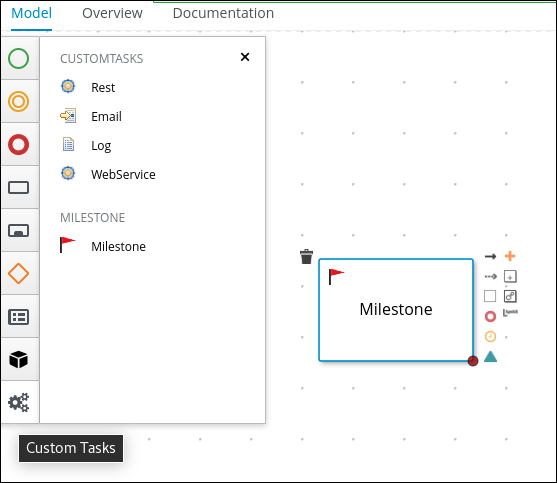
-
With the milestone selected, click
 to open the Properties panel on the right side of the designer.
-
Expand Data Assignments to add a completion condition. Milestones include a
Conditionparameter by default. -
To define the completion condition for the milestone, select
Constantfrom the Source list. The condition must be provided using the Drools syntax. Expand Implementation/Execution to configure the
AdHoc Autostartproperty.-
Click the check box to set this property to
truefor milestones that are required to start automatically when a case instance starts. -
Leave the check box empty to set this property to
falsefor milestones that are to be triggered by a signal event.
-
Click the check box to set this property to
Optional: Configure a signal event to trigger a milestone once a case goal has been reached.
- With the signal event selected in the case design palette, open the Properties panel on the right.
-
Set the
Signal Scopeproperty toProcess Instance. Open the
SignalRefexpression editor and type the name of the milestone to be triggered.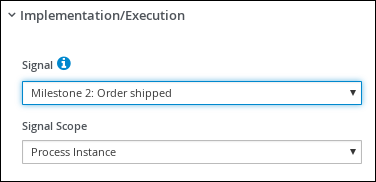
- Click Save.

'%20d='M201.5%20305.5c-13.8%200-24.9-11.1-24.9-24.6%200-13.8%2011.1-24.9%2024.9-24.9%2013.6%200%2024.6%2011.1%2024.6%2024.9%200%2013.6-11.1%2024.6-24.6%2024.6zM504%20256c0%20137-111%20248-248%20248S8%20393%208%20256%20119%208%20256%208s248%20111%20248%20248zm-132.3-41.2c-9.4%200-17.7%203.9-23.8%2010-22.4-15.5-52.6-25.5-86.1-26.6l17.4-78.3%2055.4%2012.5c0%2013.6%2011.1%2024.6%2024.6%2024.6%2013.8%200%2024.9-11.3%2024.9-24.9s-11.1-24.9-24.9-24.9c-9.7%200-18%205.8-22.1%2013.8l-61.2-13.6c-3-.8-6.1%201.4-6.9%204.4l-19.1%2086.4c-33.2%201.4-63.1%2011.3-85.5%2026.8-6.1-6.4-14.7-10.2-24.1-10.2-34.9%200-46.3%2046.9-14.4%2062.8-1.1%205-1.7%2010.2-1.7%2015.5%200%2052.6%2059.2%2095.2%20132%2095.2%2073.1%200%20132.3-42.6%20132.3-95.2%200-5.3-.6-10.8-1.9-15.8%2031.3-16%2019.8-62.5-14.9-62.5zM302.8%20331c-18.2%2018.2-76.1%2017.9-93.6%200-2.2-2.2-6.1-2.2-8.3%200-2.5%202.5-2.5%206.4%200%208.6%2022.8%2022.8%2087.3%2022.8%20110.2%200%202.5-2.2%202.5-6.1%200-8.6-2.2-2.2-6.1-2.2-8.3%200zm7.7-75c-13.6%200-24.6%2011.1-24.6%2024.9%200%2013.6%2011.1%2024.6%2024.6%2024.6%2013.8%200%2024.9-11.1%2024.9-24.6%200-13.8-11-24.9-24.9-24.9z'/%3e%3c/svg%3e)