 红帽全球峰会
此内容没有您所选择的语言版本。
Chapter 55. Starting an IT Orders case in the Showcase application
You can start a new case instance for the IT Orders sample case management project in the Showcase application.
The IT Orders sample case management project includes the following roles:
-
owner: The employee who is making the hardware order request. There can be only one of these roles. -
manager: The employee’s manager; the person who will approve or deny the requested hardware. There is only one manager in the IT Orders project. -
supplier: The available suppliers of IT hardware in the system. There is usually more than one supplier.
These roles are configured at the case definition level:
Figure 55.1. ITOrders Case Roles
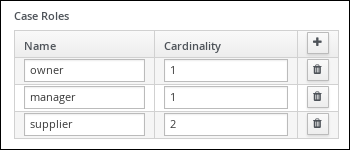
Assign users or groups to these roles when starting a new case file instance.
Prerequisites
- You have imported and deployed the IT Orders sample project in Business Central.
- You have installed and logged in to the Showcase application as instructed in Chapter 52, Installing and logging in to the Showcase application.
Procedure
- In the Showcase application, start a new case instance by clicking the Start Case button.
Select the
Order for IT hardwarecase name from the list and complete the role information as shown: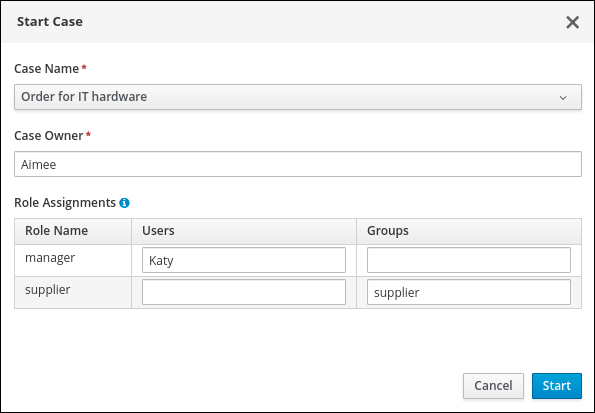
In this example, Aimee is the case
owner, Katy is themanager, and the supplier group issupplier.- Click Start to start the case instance.
Select the case from the Case List. The Overview page opens.
From the Overview page, you can monitor the case progress, add comments, start new dynamic tasks and processes, and complete and close cases.
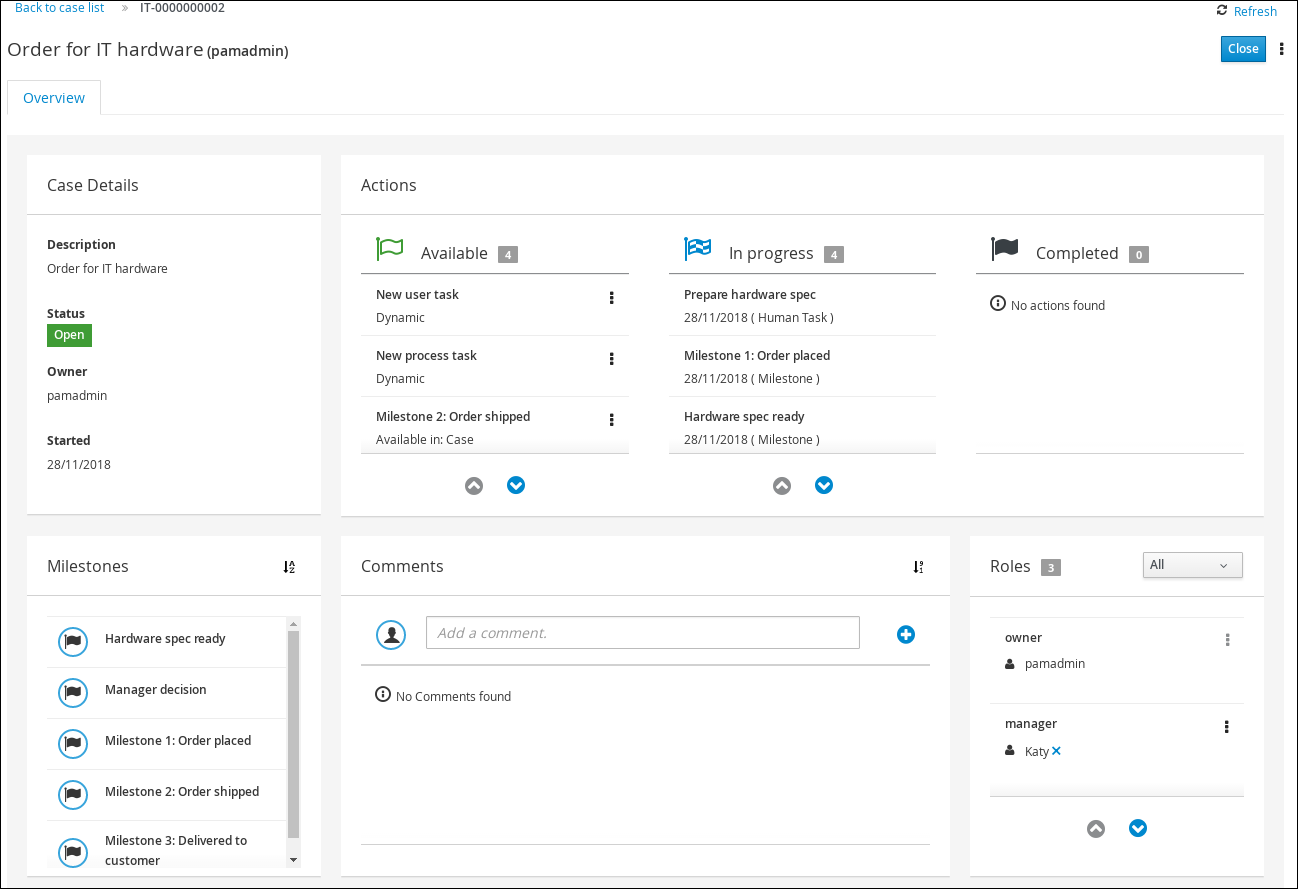
Cases can be started and closed using the Showcase application, but they cannot be reopened using this application. You can only reopen a case using a JMS or REST API call.

'%20d='M201.5%20305.5c-13.8%200-24.9-11.1-24.9-24.6%200-13.8%2011.1-24.9%2024.9-24.9%2013.6%200%2024.6%2011.1%2024.6%2024.9%200%2013.6-11.1%2024.6-24.6%2024.6zM504%20256c0%20137-111%20248-248%20248S8%20393%208%20256%20119%208%20256%208s248%20111%20248%20248zm-132.3-41.2c-9.4%200-17.7%203.9-23.8%2010-22.4-15.5-52.6-25.5-86.1-26.6l17.4-78.3%2055.4%2012.5c0%2013.6%2011.1%2024.6%2024.6%2024.6%2013.8%200%2024.9-11.3%2024.9-24.9s-11.1-24.9-24.9-24.9c-9.7%200-18%205.8-22.1%2013.8l-61.2-13.6c-3-.8-6.1%201.4-6.9%204.4l-19.1%2086.4c-33.2%201.4-63.1%2011.3-85.5%2026.8-6.1-6.4-14.7-10.2-24.1-10.2-34.9%200-46.3%2046.9-14.4%2062.8-1.1%205-1.7%2010.2-1.7%2015.5%200%2052.6%2059.2%2095.2%20132%2095.2%2073.1%200%20132.3-42.6%20132.3-95.2%200-5.3-.6-10.8-1.9-15.8%2031.3-16%2019.8-62.5-14.9-62.5zM302.8%20331c-18.2%2018.2-76.1%2017.9-93.6%200-2.2-2.2-6.1-2.2-8.3%200-2.5%202.5-2.5%206.4%200%208.6%2022.8%2022.8%2087.3%2022.8%20110.2%200%202.5-2.2%202.5-6.1%200-8.6-2.2-2.2-6.1-2.2-8.3%200zm7.7-75c-13.6%200-24.6%2011.1-24.6%2024.9%200%2013.6%2011.1%2024.6%2024.6%2024.6%2013.8%200%2024.9-11.1%2024.9-24.6%200-13.8-11-24.9-24.9-24.9z'/%3e%3c/svg%3e)