 Red Hat Summit
スケーラビリティーおよびパフォーマンス
実稼働環境における OpenShift Container Platform クラスターのスケーリングおよびパフォーマンスチューニング
概要
第1章 OpenShift Container Platform スケーラビリティーおよびパフォーマンスの概要
OpenShift Container Platform は、クラスターのパフォーマンスとスケーリングを最適化するのに役立つベストプラクティスとツールを提供します。次のドキュメントでは、推奨されるパフォーマンスとスケーラビリティーのプラクティス、リファレンス設計仕様、最適化、低レイテンシーのチューニングに関する情報を提供します。
Red Hat サポートへの問い合わせは、サポート を参照してください。
一部のパフォーマンス Operator およびスケーラビリティー Operator には、OpenShift Container Platform のリリースサイクルとは独立したリリースサイクルがあります。詳細は、OpenShift Operators を参照してください。
1.1. パフォーマンスとスケーラビリティの推奨プラクティス
1.2. 通信事業者向けリファレンス設計仕様
1.3. 計画、最適化、測定
IBM Z および IBM LinuxONE の推奨プラクティス
CPU マネージャーおよび Topology Manager の使用
ストレージ、ルーティング、ネットワーク、CPU 使用率の最適化
huge page の機能およびそれらがアプリケーションによって消費される仕組み
クラスターの安定性とパーティションワークロードを改善するための低レイテンシーチューニング
第2章 パフォーマンスとスケーラビリティの推奨プラクティス
2.1. コントロールプレーンの推奨プラクティス
このトピックでは、OpenShift Container Platform のコントロールプレーンに関するパフォーマンスとスケーラビリティーの推奨プラクティスを説明します。
2.1.1. クラスターのスケーリングに関する推奨プラクティス
このセクションのガイダンスは、クラウドプロバイダーの統合によるインストールにのみ関連します。
以下のベストプラクティスを適用して、OpenShift Container Platform クラスター内のワーカーマシンの数をスケーリングします。ワーカーのマシンセットで定義されるレプリカ数を増やしたり、減らしたりしてワーカーマシンをスケーリングします。
クラスターをノード数のより高い値にスケールアップする場合:
- 高可用性を確保するために、ノードを利用可能なすべてのゾーンに分散します。
- 一度に 25 台から 50 台までの範囲でマシンをスケールアップします。
- 定期的なプロバイダーの容量関連の制約を軽減するために、同様のサイズの別のインスタンスタイプを使用して、利用可能なゾーンごとに新規のコンピュートマシンセットを作成することを検討してください。たとえば、AWS で、m5.large および m5d.large を使用します。
クラウドプロバイダーは API サービスのクォータを実装する可能性があります。そのため、クラスターは段階的にスケーリングします。
コンピュートマシンセット内のレプリカがすべて一度に高い数値に設定されると、コントローラーがマシンを作成できない可能性があります。このプロセスには、OpenShift Container Platform がデプロイされているクラウドプラットフォームが処理できる要求の数が影響します。コントローラーは、該当するステータスのマシンの作成、確認、および更新を試行する間に、追加のクエリーを開始します。OpenShift Container Platform がデプロイされるクラウドプラットフォームには API 要求の制限があり、過剰なクエリーが生じると、クラウドプラットフォームの制限によりマシンの作成が失敗する場合があります。
大規模なノード数にスケーリングする際にマシンヘルスチェックを有効にします。障害が発生する場合、ヘルスチェックは状態を監視し、正常でないマシンを自動的に修復します。
大規模で高密度なクラスターをスケールダウンしてノード数を減らす場合、長い時間がかかることがあります。このプロセスでは、終了するノードで実行されているオブジェクトを並行して drain または退避させる必要があるためです。また、退避させるオブジェクトが多すぎる場合、クライアントがリクエストのスロットリングを開始する可能性があります。デフォルトの 1 秒あたりのクライアントクエリー数 (QPS) とバーストレートは、現在それぞれ 50 と 100 に設定されています。これらの値は、OpenShift Container Platform では変更できません。
2.1.2. コントロールプレーンノードのサイジング
コントロールプレーンノードのリソース要件は、クラスター内のノードとオブジェクトの数とタイプによって異なります。次のコントロールプレーンノードサイズの推奨事項は、コントロールプレーン密度に焦点を当てたテストまたは クラスター密度 の結果に基づいています。このテストでは、指定された数の namespace にわたって次のオブジェクトを作成します。
- 1 イメージストリーム
- 1 ビルド
-
5 つのデプロイメント、
sleep状態の 2 つの Pod レプリカ、4 つのシークレット、4 つの config map、およびそれぞれ 1 つの下位 API ボリュームのマウント - 5 つのサービス。それぞれが以前のデプロイメントの 1 つの TCP/8080 および TCP/8443 ポートを指します。
- 以前のサービスの最初を指す 1 つのルート
- 2048 個のランダムな文字列文字を含む 10 個のシークレット
- 2048 個のランダムな文字列文字を含む 10 個の config map
| ワーカーノードの数 | クラスター密度 (namespace) | CPU コア数 | メモリー (GB) |
|---|---|---|---|
| 24 | 500 | 4 | 16 |
| 120 | 1000 | 8 | 32 |
| 252 | 4000 | 16、ただし OVN-Kubernetes ネットワークプラグインを使用する場合は 24 | 64、ただし OVN-Kubernetes ネットワークプラグインを使用する場合は 128 |
| 501、ただし OVN-Kubernetes ネットワークプラグインではテストされていません | 4000 | 16 | 96 |
上の表のデータは、r5.4xlarge インスタンスをコントロールプレーンノードとして使用し、m5.2xlarge インスタンスをワーカーノードとして使用する、AWS 上で実行される OpenShift Container Platform をベースとしています。
3 つのコントロールプレーンノードを持つ大規模で高密度なクラスターでは、いずれかのノードが停止、再起動、または障害が発生すると、CPU とメモリーの使用量が急増します。障害は、電源、ネットワーク、または基礎となるインフラストラクチャーの予期しない問題、またはコストを節約するためにシャットダウンした後にクラスターが再起動する意図的なケースが原因である可能性があります。残りの 2 つのコントロールプレーンノードは、高可用性を維持するために負荷を処理する必要があります。これにより、リソースの使用量が増えます。この動作はアップグレード時にも予想されます。オペレーティングシステムの更新とコントロールプレーン Operator の更新を適用するために、コントロールプレーンノードに cordon (スケジューリング対象からの除外) と drain (Pod の退避) が実行され、ノードが順次再起動されるためです。障害が繰り返し発生しないようにするには、コントロールプレーンノードでの全体的な CPU およびメモリーリソース使用状況を、利用可能な容量の最大 60% に維持し、使用量の急増に対応できるようにします。リソース不足による潜在的なダウンタイムを回避するために、コントロールプレーンノードの CPU およびメモリーを適宜増やします。
ノードのサイジングは、クラスター内のノードおよびオブジェクトの数によって異なります。また、オブジェクトがそのクラスター上でアクティブに作成されるかどうかによっても異なります。オブジェクトの作成時に、コントロールプレーンは、オブジェクトが running フェーズにある場合と比較し、リソースの使用状況においてよりアクティブな状態になります。
Operator Lifecycle Manager (OLM) はコントロールプレーンノードで実行され、OLM のメモリーフットプリントは OLM がクラスター上で管理する必要のある namespace およびユーザーによってインストールされる Operator の数によって異なります。OOM による強制終了を防ぐには、コントロールプレーンノードのサイズを適切に設定する必要があります。以下のデータポイントは、クラスター最大のテストの結果に基づいています。
| namespace 数 | アイドル状態の OLM メモリー (GB) | ユーザー Operator が 5 つインストールされている OLM メモリー (GB) |
|---|---|---|
| 500 | 0.823 | 1.7 |
| 1000 | 1.2 | 2.5 |
| 1500 | 1.7 | 3.2 |
| 2000 | 2 | 4.4 |
| 3000 | 2.7 | 5.6 |
| 4000 | 3.8 | 7.6 |
| 5000 | 4.2 | 9.02 |
| 6000 | 5.8 | 11.3 |
| 7000 | 6.6 | 12.9 |
| 8000 | 6.9 | 14.8 |
| 9000 | 8 | 17.7 |
| 10,000 | 9.9 | 21.6 |
以下の設定でのみ、実行中の OpenShift Container Platform 4.15 クラスターでコントロールプレーンのノードサイズを変更できます。
- ユーザーがプロビジョニングしたインストール方法でインストールされたクラスター。
- installer-provisioned infrastructure インストール方法でインストールされた AWS クラスター。
- コントロールプレーンマシンセットを使用してコントロールプレーンマシンを管理するクラスター。
他のすべての設定では、合計ノード数を見積もり、インストール時に推奨されるコントロールプレーンノードサイズを使用する必要があります。
この推奨事項は、ネットワークプラグインとして OpenShift SDN を使用して OpenShift Container Platform クラスターでキャプチャーされたデータポイントに基づいています。
OpenShift Container Platform 3.11 以前のバージョンと比較すると、OpenShift Container Platform 4.15 ではデフォルトで CPU コア (500 ミリコア) の半分がシステムによって予約されるようになりました。サイズはこれを考慮に入れて決定されます。
2.1.2.1. コントロールプレーンマシン用により大きな Amazon Web Services インスタンスタイプを選択する
Amazon Web Services (AWS) クラスター内のコントロールプレーンマシンがより多くのリソースを必要とする場合は、コントロールプレーンマシンが使用するより大きな AWS インスタンスタイプを選択できます。
コントロールプレーンマシンセットを使用するクラスターの手順は、コントロールプレーンマシンセットを使用しないクラスターの手順とは異なります。
クラスター内の ControlPlaneMachineSet CR の状態が不明な場合は、CR のステータスを確認 できます。
2.1.2.1.1. コントロールプレーンマシンセットを使用して Amazon Web Services インスタンスタイプを変更する
コントロールプレーンマシンセットのカスタムリソース (CR) の仕様を更新することで、コントロールプレーンマシンが使用する Amazon Web Services (AWS) インスタンスタイプを変更できます。
前提条件
- AWS クラスターは、コントロールプレーンマシンセットを使用します。
手順
次のコマンドを実行して、コントロールプレーンマシンセットの CR を編集します。
$ oc --namespace openshift-machine-api edit controlplanemachineset.machine.openshift.io clusterproviderSpecフィールドの下で以下の行を編集します。providerSpec: value: ... instanceType: <compatible_aws_instance_type>1 - 1
- 前の選択と同じベースで、より大きな AWS インスタンスタイプを指定します。たとえば、
m6i.xlargeをm6i.2xlargeまたはm6i.4xlargeに変更できます。
変更を保存します。
-
デフォルトの
RollingUpdate更新戦略を使用するクラスターの場合、Operator は自動的に変更をコントロールプレーン設定に伝達します。 -
OnDelete更新戦略を使用するように設定されているクラスターの場合、コントロールプレーンマシンを手動で置き換える必要があります。
-
デフォルトの
2.1.2.1.2. AWS コンソールを使用して Amazon Web Services インスタンスタイプを変更する
AWS コンソールでインスタンスタイプを更新することにより、コントロールプレーンマシンが使用するアマゾンウェブサービス (AWS) インスタンスタイプを変更できます。
前提条件
- クラスターの EC2 インスタンスを変更するために必要なアクセス許可を持つ AWS コンソールにアクセスできます。
-
cluster-adminロールを持つユーザーとして OpenShift Container Platform クラスターにアクセスできます。
手順
- AWS コンソールを開き、コントロールプレーンマシンのインスタンスを取得します。
コントロールプレーンマシンインスタンスを 1 つ選択します。
- 選択したコントロールプレーンマシンについて、etcd スナップショットを作成して etcd データをバックアップします。詳細は、「etcd のバックアップ」を参照してください。
- AWS コンソールで、コントロールプレーンマシンインスタンスを停止します。
- 停止したインスタンスを選択し、Actions → Instance Settings → Change instance type をクリックします。
-
インスタンスをより大きなタイプに変更し、タイプが前の選択と同じベースであることを確認して、変更を適用します。たとえば、
m6i.xlargeをm6i.2xlargeまたはm6i.4xlargeに変更できます。 - インスタンスを起動します。
-
OpenShift Container Platform クラスターにインスタンスに対応する
Machineオブジェクトがある場合、AWS コンソールで設定されたインスタンスタイプと一致するようにオブジェクトのインスタンスタイプを更新します。
- コントロールプレーンマシンごとにこのプロセスを繰り返します。
2.2. インフラストラクチャーの推奨プラクティス
このトピックでは、OpenShift Container Platform のインフラストラクチャーに関するパフォーマンスとスケーラビリティーの推奨プラクティスを説明します。
2.2.1. インフラストラクチャーノードのサイジング
インフラストラクチャーノード は、OpenShift Container Platform 環境の各部分を実行するようにラベル付けされたノードです。インフラストラクチャーノードのリソース要件は、クラスターの稼働時間、ノード、およびクラスター内のオブジェクトによって異なります。これらの要因により、Prometheus のメトリクスまたは時系列の数が増える可能性があるためです。次のインフラストラクチャーノードサイズの推奨事項は、コントロールプレーンノードのサイジング セクションで詳しく説明されているクラスター密度テストで観察された結果に基づいています。モニタリングスタックとデフォルトの Ingress コントローラーは、これらのノードに移動されています。
| ワーカーノードの数 | クラスター密度または namespace の数 | CPU コア数 | メモリー (GB) |
|---|---|---|---|
| 27 | 500 | 4 | 24 |
| 120 | 1000 | 8 | 48 |
| 252 | 4000 | 16 | 128 |
| 501 | 4000 | 32 | 128 |
通常、3 つのインフラストラクチャーノードはクラスターごとに推奨されます。
これらのサイジングの推奨事項は、ガイドラインとして使用する必要があります。Prometheus はメモリー集約型のアプリケーションであり、リソースの使用率はノード数、オブジェクト数、Prometheus メトリクスの収集間隔、メトリクスまたは時系列、クラスターの使用年数などのさまざまな要素によって異なります。さらに、ルーターのリソース使用量は、ルートの数とインバウンド要求の量/タイプによっても影響を受ける可能性があります。
これらの推奨事項は、クラスターの作成時にインストールされたモニタリング、イングレス、およびレジストリーインフラストラクチャーコンポーネントをホストするインフラストラクチャーノードにのみ適用されます。
OpenShift Container Platform 3.11 以前のバージョンと比較すると、OpenShift Container Platform 4.15 ではデフォルトで CPU コア (500 ミリコア) の半分がシステムによって予約されるようになりました。これは、上記のサイジングの推奨内容に影響します。
2.2.2. Cluster Monitoring Operator のスケーリング
OpenShift Container Platform は、Cluster Monitoring Operator (CMO) が収集し、Prometheus ベースのモニタリングスタックに保存するメトリクスを公開します。管理者は、Observe → Dashboards に移動して、OpenShift Container Platform Web コンソールでシステムリソース、コンテナー、およびコンポーネントメトリックスのダッシュボードを表示できます。
2.2.3. Prometheus データベースのストレージ要件
Red Hat は、スケールサイズに応じて各種のテストを実行しました。
- 次の Prometheus ストレージ要件は規定されていないため、参考として使用してください。ワークロードのアクティビティーおよびリソースの密度に応じて、クラスターでより多くのリソース消費が観察される可能性があります。これには、Pod、コンテナー、ルート、Prometheus により収集されるメトリクスを公開する他のリソースの数が含まれます。
- ストレージ要件に合わせて、サイズベースのデータ保持ポリシーを設定できます。
| ノード数 | Pod 数 (Pod あたり 2 コンテナー) | 1 日あたりの Prometheus ストレージの増加量 | 15 日ごとの Prometheus ストレージの増加量 | ネットワーク (tsdb チャンクに基づく) |
|---|---|---|---|---|
| 50 | 1800 | 6.3 GB | 94 GB | 16 MB |
| 100 | 3600 | 13 GB | 195 GB | 26 MB |
| 150 | 5400 | 19 GB | 283 GB | 36 MB |
| 200 | 7200 | 25 GB | 375 GB | 46 MB |
ストレージ要件が計算値を超過しないようにするために、オーバーヘッドとして予期されたサイズのおよそ 20% が追加されています。
上記の計算は、デフォルトの OpenShift Container Platform Cluster Monitoring Operator に関する計算です。
CPU の使用率による影響は大きくありません。比率は、およそ 50 ノードおよび 1800 Pod ごとに 40 分の 1 コアです。
OpenShift Container Platform に関する推奨事項
- 少なくとも 2 つのインフラストラクチャー (infra) ノードを使用してください。
- Non-Volatile Memory Express (SSD または NVMe) ドライブを備えた少なくとも 3 つの openshift-container-storage ノードを使用します。
2.2.4. クラスターモニタリングの設定
クラスターモニタリングスタック内の Prometheus コンポーネントのストレージ容量を増やすことができます。
手順
Prometheus のストレージ容量を拡張するには、以下を実行します。
YAML 設定ファイル
cluster-monitoring-config.yamlを作成します。以下に例を示します。apiVersion: v1 kind: ConfigMap data: config.yaml: | prometheusK8s: retention: {{PROMETHEUS_RETENTION_PERIOD}}1 nodeSelector: node-role.kubernetes.io/infra: "" volumeClaimTemplate: spec: storageClassName: {{STORAGE_CLASS}}2 resources: requests: storage: {{PROMETHEUS_STORAGE_SIZE}}3 alertmanagerMain: nodeSelector: node-role.kubernetes.io/infra: "" volumeClaimTemplate: spec: storageClassName: {{STORAGE_CLASS}}4 resources: requests: storage: {{ALERTMANAGER_STORAGE_SIZE}}5 metadata: name: cluster-monitoring-config namespace: openshift-monitoring- 1
- Prometheus の保持のデフォルト値は
PROMETHEUS_RETENTION_PERIOD=15dです。時間は、接尾辞 s、m、h、d のいずれかを使用する単位で測定されます。 - 2 4
- クラスターのストレージクラス。
- 3
- 標準の値は
PROMETHEUS_STORAGE_SIZE=2000Giです。ストレージの値には、接尾辞 E、P、T、G、M、K のいずれかを使用した単純な整数または固定小数点整数を使用できます。また、2 のべき乗の値 (Ei、Pi、Ti、Gi、Mi、Ki) を使用することもできます。 - 5
- 標準の値は
ALERTMANAGER_STORAGE_SIZE=20Giです。ストレージの値には、接尾辞 E、P、T、G、M、K のいずれかを使用した単純な整数または固定小数点整数を使用できます。また、2 のべき乗の値 (Ei、Pi、Ti、Gi、Mi、Ki) を使用することもできます。
- 保存期間、ストレージクラス、およびストレージサイズの値を追加します。
- ファイルを保存します。
以下を実行して変更を適用します。
$ oc create -f cluster-monitoring-config.yaml
2.3. etcd に関する推奨されるプラクティス
このトピックでは、OpenShift Container Platform の etcd に関するパフォーマンスとスケーラビリティーの推奨プラクティスを説明します。
2.3.1. etcd に関する推奨されるプラクティス
etcd はデータをディスクに書き込み、プロポーザルをディスクに保持するため、そのパフォーマンスはディスクのパフォーマンスに依存します。etcd は特に I/O を集中的に使用するわけではありませんが、最適なパフォーマンスと安定性を得るには、低レイテンシーのブロックデバイスが必要です。etcd のコンセンサスプロトコルは、メタデータをログ (WAL) に永続的に保存することに依存しているため、etcd はディスク書き込みの遅延に敏感です。遅いディスクと他のプロセスからのディスクアクティビティーは、長い fsync 待ち時間を引き起こす可能性があります。
これらの待ち時間により、etcd はハートビートを見逃し、新しいプロポーザルを時間どおりにディスクにコミットせず、最終的にリクエストのタイムアウトと一時的なリーダーの喪失を経験する可能性があります。書き込みレイテンシーが高いと、OpenShift API の速度も低下し、クラスターのパフォーマンスに影響します。これらの理由により、I/O を区別する、または集約型であり、同一基盤として I/O インフラストラクチャーを共有する他のワークロードをコントロールプレーンノードに併置することは避けてください。
レイテンシーに関しては、8000 バイト長の 50 IOPS 以上を連続して書き込むことができるブロックデバイス上で etcd を実行します。つまり、レイテンシーが 10 ミリ秒の場合、fdatasync を使用して WAL の各書き込みを同期することに注意してください。負荷の高いクラスターの場合、8000 バイト (2 ミリ秒) の連続 500 IOPS が推奨されます。これらの数値を測定するには、fio などのベンチマークツールを使用できます。
このようなパフォーマンスを実現するには、低レイテンシーで高スループットの SSD または NVMe ディスクに支えられたマシンで etcd を実行します。シングルレベルセル (SLC) ソリッドステートドライブ (SSD) を検討してください。これは、メモリーセルごとに 1 ビットを提供し、耐久性と信頼性が高く、書き込みの多いワークロードに最適です。
etcd の負荷は、ノードや Pod の数などの静的要因と、Pod の自動スケーリング、Pod の再起動、ジョブの実行、その他のワークロード関連イベントが原因となるエンドポイントの変更などの動的要因から生じます。etcd セットアップのサイズを正確に設定するには、ワークロードの具体的な要件を分析する必要があります。etcd の負荷に影響を与えるノード、Pod、およびその他の関連要素の数を考慮してください。
最適な etcd パフォーマンスを得るには、ハードドライブで以下を適用します。
- 専用の etcd ドライブを使用します。iSCSI などのネットワーク経由で通信するドライブは回避します。etcd ドライブにログファイルやその他の重いワークロードを配置しないでください。
- 読み取りおよび書き込みを高速化するために、低レイテンシードライブを優先的に使用します。
- 圧縮と最適化を高速化するために、高帯域幅の書き込みを優先的に使用します。
- 障害からの回復を高速化するために、高帯域幅の読み取りを優先的に使用します。
- 最小の選択肢としてソリッドステートドライブを使用します。実稼働環境には NVMe ドライブの使用が推奨されます。
- 高い信頼性を確保するためには、サーバーグレードのハードウェアを使用します。
NAS または SAN のセットアップ、および回転するドライブは避けてください。Ceph Rados Block Device (RBD) およびその他のタイプのネットワーク接続ストレージでは、予測できないネットワークレイテンシーが発生する可能性があります。etcd ノードに大規模な高速ストレージを提供するには、PCI パススルーを使用して NVM デバイスをノードに直接渡します。
fio などのユーティリティーを使用して、常にベンチマークを行ってください。このようなユーティリティーを使用すると、クラスターのパフォーマンスが向上するにつれて、そのパフォーマンスを継続的に監視できます。
ネットワークファイルシステム (NFS) プロトコルまたはその他のネットワークベースのファイルシステムの使用は避けてください。
デプロイされた OpenShift Container Platform クラスターでモニターする主要なメトリクスの一部は、etcd ディスクの write ahead log 期間の p99 と etcd リーダーの変更数です。Prometheus を使用してこれらのメトリクスを追跡します。
etcd メンバーデータベースのサイズは、通常の運用時にクラスター内で異なる場合があります。この違いは、リーダーのサイズが他のメンバーと異なっていても、クラスターのアップグレードには影響しません。
OpenShift Container Platform クラスターの作成前または作成後に etcd のハードウェアを検証するには、fio を使用できます。
前提条件
- Podman や Docker などのコンテナーランタイムは、テストしているマシンにインストールされます。
-
データは
/var/lib/etcdパスに書き込まれます。
手順
fio を実行し、結果を分析します。
Podman を使用する場合は、次のコマンドを実行します。
$ sudo podman run --volume /var/lib/etcd:/var/lib/etcd:Z quay.io/cloud-bulldozer/etcd-perfDocker を使用する場合は、次のコマンドを実行します。
$ sudo docker run --volume /var/lib/etcd:/var/lib/etcd:Z quay.io/cloud-bulldozer/etcd-perf
この出力では、実行からキャプチャーされた fsync メトリクスの 99 パーセンタイルの比較でディスクが 10 ms 未満かどうかを確認して、ディスクの速度が etcd をホストするのに十分であるかどうかを報告します。I/O パフォーマンスの影響を受ける可能性のある最も重要な etcd メトリックのいくつかを以下に示します。
-
etcd_disk_wal_fsync_duration_seconds_bucketメトリックは、etcd の WAL fsync 期間を報告します。 -
etcd_disk_backend_commit_duration_seconds_bucketメトリクスは、etcd バックエンドコミットの待機時間を報告します。 -
etcd_server_leader_changes_seen_totalメトリクスは、リーダーの変更を報告します。
etcd はすべてのメンバー間で要求を複製するため、そのパフォーマンスはネットワーク入出力 (I/O) のレイテンシーによって大きく変わります。ネットワークのレイテンシーが高くなると、etcd のハートビートの時間は選択のタイムアウトよりも長くなり、その結果、クラスターに中断をもたらすリーダーの選択が発生します。デプロイされた OpenShift Container Platform クラスターでのモニターの主要なメトリクスは、各 etcd クラスターメンバーの etcd ネットワークピアレイテンシーの 99 番目のパーセンタイルになります。Prometheus を使用してメトリクスを追跡します。
histogram_quantile(0.99, rate(etcd_network_peer_round_trip_time_seconds_bucket[2m])) メトリクスは、etcd がメンバー間におけるクライアント要求のレプリケートを完了するまでの往復時間を報告します。50 ミリ秒未満であることを確認してください。
2.3.2. etcd を別のディスクに移動する
etcd を共有ディスクから別のディスクに移動して、パフォーマンスの問題を防止または解決できます。
Machine Config Operator (MCO) は、OpenShift Container Platform 4.15 コンテナーストレージのセカンダリーディスクをマウントします。
このエンコードされたスクリプトは、次のデバイスタイプのデバイス名のみをサポートします。
- SCSI または SATA
-
/dev/sd* - 仮想デバイス
-
/dev/vd* - NVMe
-
/dev/nvme*[0-9]*n*
制限事項
-
新しいディスクがクラスターに接続されると、etcd データベースがルートマウントの一部になります。プライマリーノードが再作成されるとき、ルートマウントはセカンダリーディスクまたは目的のディスクの一部ではありません。そのため、プライマリーノードは個別の
/var/lib/etcdマウントを作成しません。
前提条件
- クラスターの etcd データのバックアップを作成している。
-
OpenShift CLI (
oc) がインストールされている。 -
cluster-admin権限でクラスターにアクセスできる。 - マシン設定をアップロードする前に、追加のディスクを追加する。
-
MachineConfigPoolはmetadata.labels[machineconfiguration.openshift.io/role]と一致する必要があります。これは、コントローラー、ワーカー、またはカスタムプールに適用されます。
この手順では、/var/ などのルートファイルシステムの一部を、インストール済みノードの別のディスクまたはパーティションに移動しません。
コントロールプレーンマシンセットを使用する場合は、この手順がサポートされません。
手順
新しいディスクをクラスターに接続し、デバッグシェルで
lsblkコマンドを実行して、ディスクがノード内で検出されることを確認します。$ oc debug node/<node_name># lsblklsblkコマンドで報告された新しいディスクのデバイス名をメモします。次のスクリプトを作成し、名前を
etcd-find-secondary-device.shにします。#!/bin/bash set -uo pipefail for device in <device_type_glob>; do1 /usr/sbin/blkid "${device}" &> /dev/null if [ $? == 2 ]; then echo "secondary device found ${device}" echo "creating filesystem for etcd mount" mkfs.xfs -L var-lib-etcd -f "${device}" &> /dev/null udevadm settle touch /etc/var-lib-etcd-mount exit fi done echo "Couldn't find secondary block device!" >&2 exit 77- 1
<device_type_glob>は、ブロックデバイスタイプのシェル glob に置き換えます。SCSI または SATA ドライブの場合は/dev/sd*を使用し、仮想ドライブの場合は/dev/vd*を使用し、NVMe ドライブの場合は/dev/nvme*[0-9]*n*を使用します。
etcd-find-secondary-device.shスクリプトから base64 でエンコードされた文字列を作成し、その内容をメモします。$ base64 -w0 etcd-find-secondary-device.sh次のような内容を含む
etcd-mc.ymlという名前のMachineConfigYAML ファイルを作成します。apiVersion: machineconfiguration.openshift.io/v1 kind: MachineConfig metadata: labels: machineconfiguration.openshift.io/role: master name: 98-var-lib-etcd spec: config: ignition: version: 3.4.0 storage: files: - path: /etc/find-secondary-device mode: 0755 contents: source: data:text/plain;charset=utf-8;base64,<encoded_etcd_find_secondary_device_script>1 systemd: units: - name: find-secondary-device.service enabled: true contents: | [Unit] Description=Find secondary device DefaultDependencies=false After=systemd-udev-settle.service Before=local-fs-pre.target ConditionPathExists=!/etc/var-lib-etcd-mount [Service] RemainAfterExit=yes ExecStart=/etc/find-secondary-device RestartForceExitStatus=77 [Install] WantedBy=multi-user.target - name: var-lib-etcd.mount enabled: true contents: | [Unit] Before=local-fs.target [Mount] What=/dev/disk/by-label/var-lib-etcd Where=/var/lib/etcd Type=xfs TimeoutSec=120s [Install] RequiredBy=local-fs.target - name: sync-var-lib-etcd-to-etcd.service enabled: true contents: | [Unit] Description=Sync etcd data if new mount is empty DefaultDependencies=no After=var-lib-etcd.mount var.mount Before=crio.service [Service] Type=oneshot RemainAfterExit=yes ExecCondition=/usr/bin/test ! -d /var/lib/etcd/member ExecStart=/usr/sbin/setsebool -P rsync_full_access 1 ExecStart=/bin/rsync -ar /sysroot/ostree/deploy/rhcos/var/lib/etcd/ /var/lib/etcd/ ExecStart=/usr/sbin/semanage fcontext -a -t container_var_lib_t '/var/lib/etcd(/.*)?' ExecStart=/usr/sbin/setsebool -P rsync_full_access 0 TimeoutSec=0 [Install] WantedBy=multi-user.target graphical.target - name: restorecon-var-lib-etcd.service enabled: true contents: | [Unit] Description=Restore recursive SELinux security contexts DefaultDependencies=no After=var-lib-etcd.mount Before=crio.service [Service] Type=oneshot RemainAfterExit=yes ExecStart=/sbin/restorecon -R /var/lib/etcd/ TimeoutSec=0 [Install] WantedBy=multi-user.target graphical.target- 1
<encoded_etcd_find_secondary_device_script>を、メモしておいたエンコードされたスクリプトの内容に置き換えます。
検証手順
ノードのデバッグシェルで
grep /var/lib/etcd /proc/mountsコマンドを実行して、ディスクがマウントされていることを確認します。$ oc debug node/<node_name># grep -w "/var/lib/etcd" /proc/mounts出力例
/dev/sdb /var/lib/etcd xfs rw,seclabel,relatime,attr2,inode64,logbufs=8,logbsize=32k,noquota 0 0
2.3.3. etcd データのデフラグ
大規模で密度の高いクラスターの場合、キースペースが大きくなりすぎてスペースのクォータを超えると、etcd のパフォーマンスが低下する可能性があります。定期的に etcd をメンテナンスしてデフラグし、データストアの領域を解放してください。Prometheus で etcd メトリクスを監視し、必要に応じてデフラグしてください。そうしないと、etcd がクラスター全体のアラームを発し、クラスターがキーの読み取りと削除しか受け付けないメンテナンスモードになる可能性があります。
以下の主要なメトリクスを監視してください。
-
etcd_server_quota_backend_bytes。これは現在のクォータ制限です。 -
etcd_mvcc_db_total_size_in_use_in_bytes。履歴圧縮後の実際のデータベース使用量を示します。 -
etcd_mvcc_db_total_size_in_bytes。デフラグ待ちの空き領域を含むデータベースのサイズを示します。
etcd データをデフラグし、etcd 履歴の圧縮などのディスクの断片化を引き起こすイベント後にディスク領域を回収します。
履歴の圧縮は 5 分ごとに自動的に行われ、これによりバックエンドデータベースにギャップが生じます。この断片化された領域は etcd が使用できますが、ホストファイルシステムでは利用できません。ホストファイルシステムでこの領域を使用できるようにするには、etcd をデフラグする必要があります。
デフラグは自動的に行われますが、手動でトリガーすることもできます。
etcd Operator はクラスター情報を使用してユーザーの最も効率的な操作を決定するため、ほとんどの場合、自動デフラグが適しています。
2.3.3.1. 自動デフラグ
etcd Operator はディスクを自動的にデフラグします。手動による介入は必要ありません。
以下のログのいずれかを表示して、デフラグプロセスが成功したことを確認します。
- etcd ログ
- cluster-etcd-operator Pod
- Operator ステータスのエラーログ
自動デフラグにより、Kubernetes コントローラーマネージャーなどのさまざまな OpenShift コアコンポーネントでリーダー選出の失敗が発生し、失敗したコンポーネントの再起動がトリガーされる可能性があります。再起動は無害であり、次に実行中のインスタンスへのフェイルオーバーをトリガーするか、再起動後にコンポーネントが再び作業を再開します。
デフラグ成功時のログ出力例
etcd member has been defragmented: <member_name>, memberID: <member_id>デフラグ失敗時のログ出力例
failed defrag on member: <member_name>, memberID: <member_id>: <error_message>2.3.3.2. 手動デフラグ
Prometheus アラートは、手動でのデフラグを使用する必要がある場合を示します。アラートは次の 2 つの場合に表示されます。
- etcd が使用可能なスペースの 50% 以上を 10 分を超過して使用する場合
- etcd が合計データベースサイズの 50% 未満を 10 分を超過してアクティブに使用している場合
また、デフラグによって解放される etcd データベースのサイズ (MB 単位) を確認することで、デフラグが必要かどうかを判断することもできます。これは (etcd_mvcc_db_total_size_in_bytes - etcd_mvcc_db_total_size_in_use_in_bytes)/1024/1024 という PromQL 式を使用して確認できます。
etcd のデフラグはプロセスを阻止するアクションです。etcd メンバーはデフラグが完了するまで応答しません。このため、各 Pod のデフラグアクションごとに少なくとも 1 分間待機し、クラスターが回復できるようにします。
以下の手順に従って、各 etcd メンバーで etcd データをデフラグします。
前提条件
-
cluster-adminロールを持つユーザーとしてクラスターにアクセスできる。
手順
リーダーを最後にデフラグする必要があるため、どの etcd メンバーがリーダーであるかを判別します。
etcd Pod のリストを取得します。
$ oc -n openshift-etcd get pods -l k8s-app=etcd -o wide出力例
etcd-ip-10-0-159-225.example.redhat.com 3/3 Running 0 175m 10.0.159.225 ip-10-0-159-225.example.redhat.com <none> <none> etcd-ip-10-0-191-37.example.redhat.com 3/3 Running 0 173m 10.0.191.37 ip-10-0-191-37.example.redhat.com <none> <none> etcd-ip-10-0-199-170.example.redhat.com 3/3 Running 0 176m 10.0.199.170 ip-10-0-199-170.example.redhat.com <none> <none>Pod を選択し、以下のコマンドを実行して、どの etcd メンバーがリーダーであるかを判別します。
$ oc rsh -n openshift-etcd etcd-ip-10-0-159-225.example.redhat.com etcdctl endpoint status --cluster -w table出力例
Defaulting container name to etcdctl. Use 'oc describe pod/etcd-ip-10-0-159-225.example.redhat.com -n openshift-etcd' to see all of the containers in this pod. +---------------------------+------------------+---------+---------+-----------+------------+-----------+------------+--------------------+--------+ | ENDPOINT | ID | VERSION | DB SIZE | IS LEADER | IS LEARNER | RAFT TERM | RAFT INDEX | RAFT APPLIED INDEX | ERRORS | +---------------------------+------------------+---------+---------+-----------+------------+-----------+------------+--------------------+--------+ | https://10.0.191.37:2379 | 251cd44483d811c3 | 3.5.9 | 104 MB | false | false | 7 | 91624 | 91624 | | | https://10.0.159.225:2379 | 264c7c58ecbdabee | 3.5.9 | 104 MB | false | false | 7 | 91624 | 91624 | | | https://10.0.199.170:2379 | 9ac311f93915cc79 | 3.5.9 | 104 MB | true | false | 7 | 91624 | 91624 | | +---------------------------+------------------+---------+---------+-----------+------------+-----------+------------+--------------------+--------+この出力の
IS LEADER列に基づいて、https://10.0.199.170:2379エンドポイントがリーダーになります。このエンドポイントを直前の手順の出力に一致させると、リーダーの Pod 名はetcd-ip-10-0-199-170.example.redhat.comになります。
etcd メンバーのデフラグ。
実行中の etcd コンテナーに接続し、リーダーでは ない Pod の名前を渡します。
$ oc rsh -n openshift-etcd etcd-ip-10-0-159-225.example.redhat.comETCDCTL_ENDPOINTS環境変数の設定を解除します。sh-4.4# unset ETCDCTL_ENDPOINTSetcd メンバーのデフラグを実行します。
sh-4.4# etcdctl --command-timeout=30s --endpoints=https://localhost:2379 defrag出力例
Finished defragmenting etcd member[https://localhost:2379]タイムアウトエラーが発生した場合は、コマンドが正常に実行されるまで
--command-timeoutの値を増やします。データベースサイズが縮小されていることを確認します。
sh-4.4# etcdctl endpoint status -w table --cluster出力例
+---------------------------+------------------+---------+---------+-----------+------------+-----------+------------+--------------------+--------+ | ENDPOINT | ID | VERSION | DB SIZE | IS LEADER | IS LEARNER | RAFT TERM | RAFT INDEX | RAFT APPLIED INDEX | ERRORS | +---------------------------+------------------+---------+---------+-----------+------------+-----------+------------+--------------------+--------+ | https://10.0.191.37:2379 | 251cd44483d811c3 | 3.5.9 | 104 MB | false | false | 7 | 91624 | 91624 | | | https://10.0.159.225:2379 | 264c7c58ecbdabee | 3.5.9 | 41 MB | false | false | 7 | 91624 | 91624 | |1 | https://10.0.199.170:2379 | 9ac311f93915cc79 | 3.5.9 | 104 MB | true | false | 7 | 91624 | 91624 | | +---------------------------+------------------+---------+---------+-----------+------------+-----------+------------+--------------------+--------+この例では、この etcd メンバーのデータベースサイズは、開始時のサイズの 104 MB ではなく 41 MB です。
これらの手順を繰り返して他の etcd メンバーのそれぞれに接続し、デフラグします。常に最後にリーダーをデフラグします。
etcd Pod が回復するように、デフラグアクションごとに 1 分以上待機します。etcd Pod が回復するまで、etcd メンバーは応答しません。
領域のクォータの超過により
NOSPACEアラームがトリガーされる場合、それらをクリアします。NOSPACEアラームがあるかどうかを確認します。sh-4.4# etcdctl alarm list出力例
memberID:12345678912345678912 alarm:NOSPACEアラームをクリアします。
sh-4.4# etcdctl alarm disarm
2.3.4. etcd のチューニングパラメーターの設定
コントロールプレーンのハードウェア速度を "Standard"、"Slower"、またはデフォルトの "" に設定できます。
デフォルト設定では、使用する速度をシステムが決定できます。システムは以前のバージョンから値を選択できるため、この値により、この機能が存在しないバージョンからのアップグレードが可能になります。
他の値のいずれかを選択すると、デフォルトがオーバーライドされます。タイムアウトまたはハートビートの欠落が原因でリーダーの選出が多数発生し、システムが "" または "Standard" に設定されている場合は、ハードウェア速度を "Slower" に設定して、遅延の増加に対するシステムの耐性を高めます。
etcd レイテンシー許容値の調整はテクノロジープレビューのみの機能です。テクノロジープレビュー機能は、Red Hat 製品サポートのサービスレベルアグリーメント (SLA) の対象外であり、機能的に完全ではない場合があります。Red Hat は、実稼働環境でこれらを使用することを推奨していません。テクノロジープレビュー機能は、最新の製品機能をいち早く提供して、開発段階で機能のテストを行い、フィードバックを提供していただくことを目的としています。
Red Hat のテクノロジープレビュー機能のサポート範囲に関する詳細は、テクノロジープレビュー機能のサポート範囲 を参照してください。
2.3.4.1. ハードウェア速度許容値の変更
etcd のハードウェア速度許容値を変更するには、次の手順を実行します。
前提条件
-
TechPreviewNoUpgrade機能を有効にするためにクラスターインスタンスを編集しました。詳細は、関連情報 のフィーチャーゲートについてを参照してください。
手順
次のコマンドを入力して、現在の値を確認します。
$ oc describe etcd/cluster | grep "Control Plane Hardware Speed"出力例
Control Plane Hardware Speed: <VALUE>注記出力が空の場合、フィールドは設定されていないため、デフォルト ("") として考慮される必要があります。
次のコマンドを入力して値を変更します。
<value>を有効な値のいずれかに置き換えます (""、"Standard"、または"Slower")。$ oc patch etcd/cluster --type=merge -p '{"spec": {"controlPlaneHardwareSpeed": "<value>"}}'次の表は、各プロファイルのハートビート間隔とリーダー選出タイムアウトを示しています。これらの値は変更になる可能性があります。
Expand プロファイル
ETCD_HEARTBEAT_INTERVAL
ETCD_LEADER_ELECTION_TIMEOUT
""プラットフォームによって異なる
プラットフォームによって異なる
Standard100
1000
Slower500
2500
出力を確認します。
出力例
etcd.operator.openshift.io/cluster patched有効な値以外の値を入力すると、エラー出力が表示されます。たとえば、
"Faster"値を入力すると、出力は次のようになります。出力例
The Etcd "cluster" is invalid: spec.controlPlaneHardwareSpeed: Unsupported value: "Faster": supported values: "", "Standard", "Slower"次のコマンドを入力して、値が変更したことを確認します。
$ oc describe etcd/cluster | grep "Control Plane Hardware Speed"出力例
Control Plane Hardware Speed: ""etcd Pod がロールアウトされるまで待ちます。
$ oc get pods -n openshift-etcd -w次の出力は、master-0 の予期されるエントリーを示しています。続行する前に、すべてのマスターのステータスが
4/4 Runningになるまで待ちます。出力例
installer-9-ci-ln-qkgs94t-72292-9clnd-master-0 0/1 Pending 0 0s installer-9-ci-ln-qkgs94t-72292-9clnd-master-0 0/1 Pending 0 0s installer-9-ci-ln-qkgs94t-72292-9clnd-master-0 0/1 ContainerCreating 0 0s installer-9-ci-ln-qkgs94t-72292-9clnd-master-0 0/1 ContainerCreating 0 1s installer-9-ci-ln-qkgs94t-72292-9clnd-master-0 1/1 Running 0 2s installer-9-ci-ln-qkgs94t-72292-9clnd-master-0 0/1 Completed 0 34s installer-9-ci-ln-qkgs94t-72292-9clnd-master-0 0/1 Completed 0 36s installer-9-ci-ln-qkgs94t-72292-9clnd-master-0 0/1 Completed 0 36s etcd-guard-ci-ln-qkgs94t-72292-9clnd-master-0 0/1 Running 0 26m etcd-ci-ln-qkgs94t-72292-9clnd-master-0 4/4 Terminating 0 11m etcd-ci-ln-qkgs94t-72292-9clnd-master-0 4/4 Terminating 0 11m etcd-ci-ln-qkgs94t-72292-9clnd-master-0 0/4 Pending 0 0s etcd-ci-ln-qkgs94t-72292-9clnd-master-0 0/4 Init:1/3 0 1s etcd-ci-ln-qkgs94t-72292-9clnd-master-0 0/4 Init:2/3 0 2s etcd-ci-ln-qkgs94t-72292-9clnd-master-0 0/4 PodInitializing 0 3s etcd-ci-ln-qkgs94t-72292-9clnd-master-0 3/4 Running 0 4s etcd-guard-ci-ln-qkgs94t-72292-9clnd-master-0 1/1 Running 0 26m etcd-ci-ln-qkgs94t-72292-9clnd-master-0 3/4 Running 0 20s etcd-ci-ln-qkgs94t-72292-9clnd-master-0 4/4 Running 0 20s次のコマンドを入力して値を確認します。
$ oc describe -n openshift-etcd pod/<ETCD_PODNAME> | grep -e HEARTBEAT_INTERVAL -e ELECTION_TIMEOUT注記これらの値はデフォルトから変更されていない可能性があります。
第3章 リファレンス設計仕様
3.1. 通信事業者向けコアおよび RAN DU リファレンス設計仕様
通信事業者向けコアリファレンス設計仕様 (RDS) では、コントロールプレーンや一部の集中型データプレーン機能を含む大規模な通信アプリケーションをサポートできるコモディティーハードウェア上で実行する OpenShift Container Platform 4.18 クラスターを説明します。
通信事業者の RAN RDS は、無線アクセスネットワーク (RAN) で 5G ワークロードをホストするために、コモディティーハードウェア上で実行するクラスターの設定を説明します。
3.1.1. 通信事業者向け 5G デプロイメントのリファレンス設計仕様
Red Hat と認定パートナーは、OpenShift Container Platform 4.20 クラスターで通信事業者アプリケーションを運用するのに必要なネットワークおよび運用機能に関する深い技術的専門知識とサポートを提供します。
Red Hat の通信パートナーは、エンタープライズ 5G ソリューション向けに大規模に複製できる、十分に統合され、十分にテストされた安定した環境を必要としています。通信事業者コアおよび RAN DU リファレンス設計仕様 (RDS) では、OpenShift Container Platform の特定のバージョンに基づいて推奨されるソリューションアーキテクチャーの概要が示されています。各 RDS は、通信事業者コアおよび RAN DU 使用モデル向けにテストおよび検証されたプラットフォーム設定を表したものです。RDS は、通信事業者の 5G コアと RAN DU の重要な KPI セットを定義することで、アプリケーションを実行する際の最適なエクスペリエンスを保証します。RDS に従うことで、重大度の高いエスカレーションが最小限に抑えられ、アプリケーションの安定性が向上します。
5G のユースケースは進化しており、ワークロードは継続的に変化しています。Red Hat は、顧客とパートナーからのフィードバックに基づいて進化する要件をサポートするために、通信事業者向けコアと RAN DU RDS を継続的に改善することに取り組んでいます。
3.1.2. リファレンス設計の範囲
通信事業者コアおよび通信事業者 RAN リファレンス設計仕様 (RDS) は、通信事業者コアおよび通信事業者 RAN プロファイルを実行するクラスターで信頼性が高く再現性のあるパフォーマンスを実現するために推奨され、テストされ、サポートされている設定をキャプチャーします。
各 RDS には、クラスターが個々のプロファイルを実行するために設計および検証された、リリースされた機能とサポートされている設定が含まれています。設定により、機能と KPI ターゲットを満たすベースラインの OpenShift Container Platform インストールが提供されます。各 RDS では、個々の設定ごとに予想される変動も説明します。各 RDS の検証には、長期間にわたる大規模なテストが多数含まれます。
検証済みのリファレンス設定は、OpenShift Container Platform のメジャー Y-stream リリースごとに更新されます。Z-stream パッチリリースは、リファレンス設定に照らして定期的に再テストされます。
3.1.3. リファレンス設計からの逸脱
検証済みの通信事業者コアおよび通信事業者 RAN DU リファレンス設計仕様 (RDS) から逸脱すると、変更した特定のコンポーネントや機能を超えた大きな影響が生じる可能性があります。逸脱には、完全なソリューションのコンテキストでの分析とエンジニアリングが必要です。
RDS からのすべての逸脱は、明確なアクション追跡情報とともに分析され、文書化される必要があります。パートナーには、逸脱をリファレンス設計に合わせる方法を理解するためのデューデリジェンスが求められます。これには、パートナーが Red Hat と連携して、プラットフォームでユースケースがクラス最高の結果を達成できるようにするための関連情報を提供することが必要になる場合があります。これは、ソリューションのサポート可能性と、Red Hat 全体およびパートナーとの整合性を確保するために重要です。
RDS からの逸脱は、次の結果の一部またはすべてを引き起こす可能性があります。
- 問題の解決にはさらに時間がかかる場合があります。
- プロジェクトのサービスレベル契約 (SLA)、プロジェクトの期限、エンドプロバイダーのパフォーマンス要件などが満たされないリスクがあります。
承認されていない逸脱には、経営幹部レベルでのエスカレーションが必要になる場合があります。
注記Red Hat は、パートナーのエンゲージメントの優先順位に基づいて、逸脱のリクエストへの対応を優先します。
3.2. 通信事業者向け RAN DU リファレンス設計仕様
3.2.1. 通信事業者向け RAN DU 4.18 参照デザインの概要
Telco RAN 分散ユニット (DU) 4.18 リファレンス設計は、コモディティーハードウェア上で実行している OpenShift Container Platform 4.18 クラスターを設定して、通信事業者向け RAN DU ワークロードをホストします。テスト済みでサポート対象の推奨設定を記録したものであり、通信事業者 RAN DU プロファイルを実行するクラスターで、信頼性が高く再現性のあるパフォーマンスを実現します。
3.2.1.1. telco RAN DU 用の OpenShift Container Platform 4.15 機能
telco RAN DU リファレンス設計仕様(RDS)の 4.15 バージョンには、telco RAN DU RDS の 4.14 バージョンと同じ機能セットがあります。
詳細は、OpenShift Container Platform 4.14 telco RAN DU features を参照してください。
3.2.1.2. デプロイメントアーキテクチャーの概要
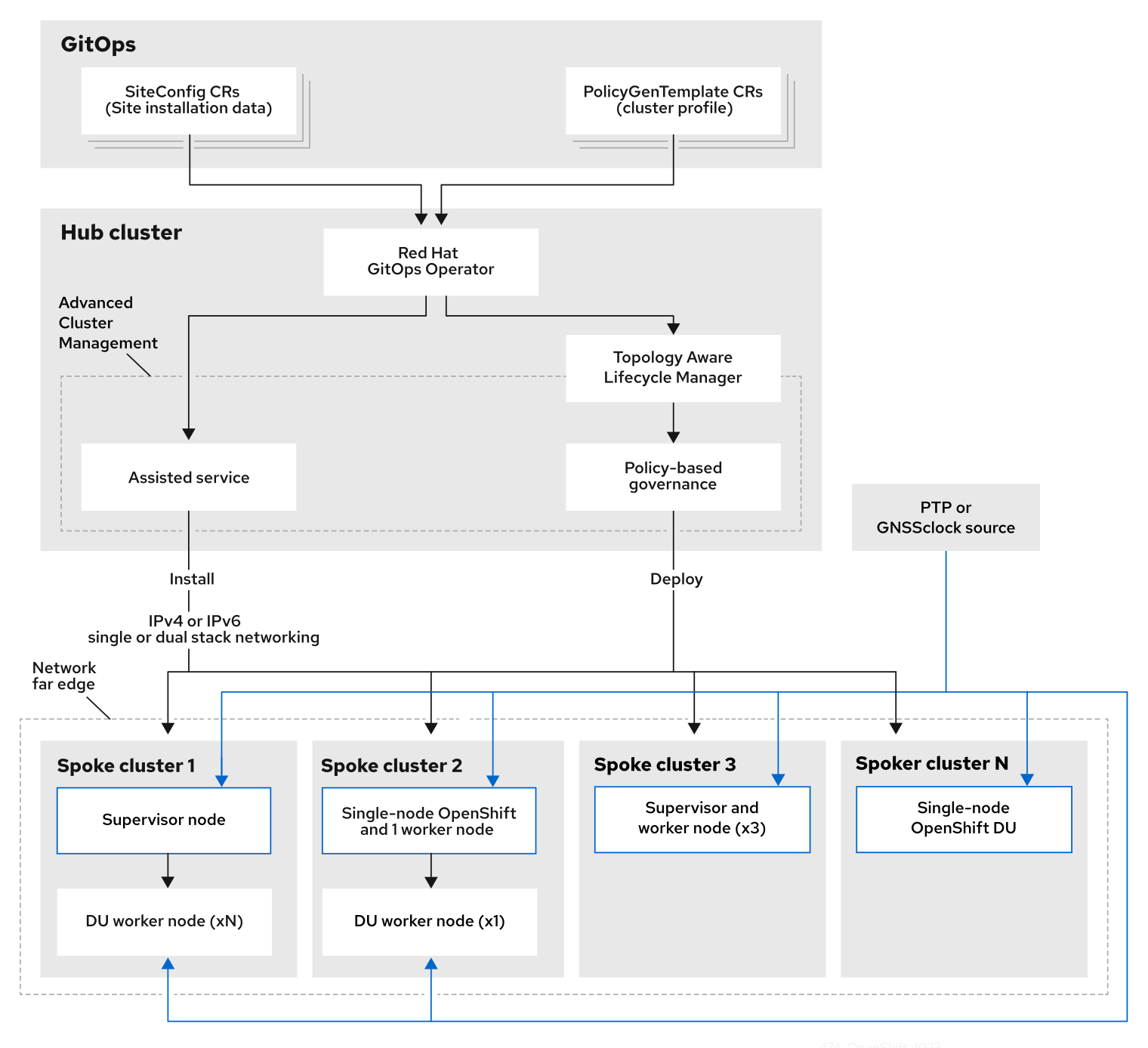
集中管理された RHACM ハブクラスターから、管理対象クラスターに通信事業者向け RAN DU 4.18 参照設定を展開します。リファレンス設計仕様 (RDS) には、管理対象クラスターとハブクラスターコンポーネントの設定が含まれます。
図3.1 通信事業者向け RAN DU デプロイメントアーキテクチャーの概要
3.2.2. 通信事業者向け RAN DU 使用モデルの概要
次の情報を使用して、ハブクラスターと管理対象シングルノード OpenShift クラスターの通信事業者向け RAN DU ワークロード、クラスターリソース、およびハードウェア仕様を計画します。
3.2.2.1. 通信事業者 RAN DU アプリケーションワークロード
DU ワーカーノードには、最大のパフォーマンスが得られるようにファームウェアが調整された、第 3 世代 Xeon (Ice Lake) 2.20 GHz 以上の CPU が必要です。
5G RAN DU ユーザーアプリケーションとワークロードは、次のベストプラクティスとアプリケーション制限に準拠する必要があります。
- CNF ベストプラクティスガイド の最新バージョンに準拠したクラウドネイティブネットワーク機能 (CNF) を開発します。
- 高性能ネットワークには SR-IOV を使用します。
exec プローブは控えめに使用し、他の適切なオプションが利用できない場合にのみ使用してください。
-
CNF が CPU ピンニングを使用する場合は、exec プローブを使用しないでください。
httpGetやtcpSocketなどの他のプローブ実装を使用します。 - exec プローブを使用する必要がある場合は、exec プローブの頻度と量を制限します。exec プローブの最大数は 10 未満に維持し、頻度は 10 秒以上にする必要があります。
-
CNF が CPU ピンニングを使用する場合は、exec プローブを使用しないでください。
起動プローブは、定常状態の動作中に最小限のリソースしか必要としません。exec プローブの制限は、主に liveness および readiness プローブに適用されます。
3.2.2.2. 通信事業者向け RAN DU の代表的な参照アプリケーションワークロード特性
代表的な参照アプリケーションワークロードには、次の特性があります。
- 管理および制御機能を含む vRAN アプリケーション用に最大 15 個の Pod と 30 個のコンテナーを備えています。
-
Pod ごとに最大 2 つの
ConfigMapと 4 つのSecretCR を使用します。 - 10 秒以上の頻度で最大 10 個の exec プローブを使用します。
kube-apiserverの増分アプリケーション負荷は、クラスタープラットフォーム使用量の 10% 未満です。注記プラットフォームメトリクスから CPU 負荷を抽出できます。以下に例を示します。
query=avg_over_time(pod:container_cpu_usage:sum{namespace="openshift-kube-apiserver"}[30m])- アプリケーションログはプラットフォームログコレクターにより収集されません
- プライマリー CNI 上の総トラフィックは 1 MBps 未満です
3.2.2.3. 通信事業者向け RAN DU ワーカーノードクラスターリソース使用率
システム内で実行している Pod の最大数 (アプリケーションワークロードと OpenShift Container Platform Pod を含む) は 120 です。
- リソース利用
OpenShift Container Platform のリソース使用率は、次のようなアプリケーションのワークロード特性を含む多くの要因によって異なります。
- Pod 数
- プローブの種類と頻度
- カーネルネットワークを使用したプライマリー CNI またはセカンダリー CNI 上のメッセージングレート
- API アクセス率
- ロギングレート
- ストレージ IOPS
クラスターリソース要件は、次の条件で適用されます。
- クラスターは、説明した代表的なアプリケーションワークロードを実行しています。
- クラスターは、「通信事業者向け RAN DU ワーカーノードクラスターリソース使用率」で説明されている制約に従って管理されます。
- RAN DU 使用モデル設定でオプションとして記載されているコンポーネントは適用されません。
通信事業者向け RAN DU 参照デザインの範囲外の設定は、リソース使用率への影響と KPI 目標達成能力を判断するために、追加の分析を行う必要があります。要件に応じて、クラスターに関連情報を割り当てることが求められる場合があります。
3.2.2.4. ハブクラスター管理の特性
推奨されるクラスター管理ソリューションは、Red Hat Advanced Cluster Management (RHACM) です。ハブクラスターで次の制限を設定します。
- 準拠した評価間隔が少なくとも 10 分である最大 5 つの RHACM ポリシーを設定します。
- ポリシーでは最大 10 個のマネージドクラスターテンプレートを使用します。可能な場合は、ハブ側のテンプレートを使用します。
policy-controllerおよびobservability-controllerアドオンを除くすべての RHACM アドオンを無効にします。Observabilityをデフォルト設定に設定します。重要オプションのコンポーネントを設定したり、追加機能を有効にしたりすると、追加のリソースが使用され、システム全体のパフォーマンスが低下する可能性があります。
詳細は、参照設計のデプロイメントコンポーネント を参照してください。
| メトリクス | Limit | 注記 |
|---|---|---|
| CPU の使用率 | 4000 mc 未満 - 2 コア (4 ハイパースレッド) | プラットフォーム CPU は、各予約済みコアの両方のハイパースレッドを含む予約済みコアに固定されます。このシステムは、定期的なシステムタスクとスパイクに対応できるように、定常状態で 3 つの CPU (3000mc) を使用するように設計されています。 |
| 使用されているメモリー | 16G 未満 |
3.2.2.5. 通信事業者向け RAN DU RDS コンポーネント
以下のセクションでは、通信事業者向け RAN DU ワークロードを実行するためにクラスターを設定およびデプロイするのに使用するさまざまな OpenShift Container Platform コンポーネントと設定を説明します。
図3.2 通信事業者向け RAN DU 参照設計コンポーネント

通信事業者向け RAN DU プロファイルに含まれていないコンポーネントが、ワークロードアプリケーションに割り当てられた CPU リソースに影響を与えないことを確認します。
ツリー外のドライバーはサポートされていません。
3.2.3. 通信事業者向け RAN DU 4.18 参照デザインコンポーネント
以下のセクションでは、RAN DU ワークロードを実行するためにクラスターを設定およびデプロイするのに使用するさまざまな OpenShift Container Platform コンポーネントと設定を説明します。
3.2.3.1. ホストファームウェアのチューニング
- このリリースの変更点
- このリリースではリファレンス設計の更新はありません。
- 説明
システムレベルのパフォーマンスを設定します。推奨設定は、低遅延と高パフォーマンスを実現するホストファームウェアの設定 を参照してください。
Ironic 検査が有効になっていると、ファームウェア設定値はハブクラスター上のクラスターごとの
BareMetalHostCR から入手できます。クラスターのインストールに使用するSiteConfigCR のspec.clusters.nodesフィールドのラベルを使用して、Ironic 検査を有効にします。以下に例を示します。nodes: - hostName: "example-node1.example.com" ironicInspect: "enabled"注記通信事業者向け RAN DU 参照
SiteConfigでは、ironicInspectフィールドはデフォルトで有効になりません。- 制限と要件
- ハイパースレッディングを有効にする必要がある
- エンジニアリングに関する考慮事項
パフォーマンスを最大限に高めるためにすべての設定を調整する
注記必要に応じて、パフォーマンスを犠牲にして電力を節約するためにファームウェアの選択を調整できます。
3.2.3.2. Node Tuning Operator
- このリリースの新機能
- このリリースではリファレンス設計の更新はありません。
- 説明
パフォーマンスプロファイルを作成して、クラスターのパフォーマンスをチューニングします。パフォーマンスプロファイルで設定する設定には次のものが含まれます。
- リアルタイムカーネルまたは非リアルタイムカーネルを選択します。
-
予約済みまたは分離された
cpusetにコアを割り当てます。管理ワークロードパーティションに割り当てられた OpenShift Container Platform プロセスは、予約セットに固定されます。 - kubelet 機能 (CPU マネージャー、トポロジーマネージャー、メモリーマネージャー) を有効にします。
- Huge Page の設定
- 追加のカーネル引数を設定します。
- コアごとの電力調整と最大 CPU 周波数を設定します。
- 制限と要件
Node Tuning Operator は、
PerformanceProfileCR を使用してクラスターを設定します。RAN DU プロファイルPerformanceProfileCR で次の設定を設定する必要があります。- 予約済みおよび分離されたコアを選択し、最大のパフォーマンスが得られるようにファームウェアが調整された Intel 第 3 世代 Xeon (Ice Lake) 2.20 GHz CPU 以上に少なくとも 4 つのハイパースレッド (2 つのコアに相当) を割り当てるようにします。
-
予約済みの
cpusetを設定して、含まれる各コアの両方のハイパースレッドシブリングを含めます。予約されていないコアは、ワークロードのスケジュールに割り当て可能な CPU として使用できます。ハイパースレッドシブリングが予約済みコアと分離コアに分割されていないことを確認します。 - 予約済みおよび分離された CPU として設定した内容に基づいて、すべてのコアのすべてのスレッドを含めるように予約済みおよび分離された CPU を設定します。
- 各 NUMA ノードのコア 0 を予約済み CPU セットに含めるように設定します。
- huge page のサイズを 1G に設定します。
管理パーティションにワークロードをさらに追加しないでください。OpenShift 管理プラットフォームの一部である Pod のみを管理パーティションにアノテーション付けする必要があります。
- エンジニアリングに関する考慮事項
パフォーマンス要件を満たすには、RT カーネルを使用する必要があります。
注記必要に応じて、非 RT カーネルを使用できます。
- 設定する huge page の数は、アプリケーションのワークロード要件によって異なります。このパラメーターの変動は予想され、許容されます。
- 選択されたハードウェアとシステムで使用されている追加コンポーネントに基づいて、予約済みおよび分離された CPU セットの設定に変化が生じることが予想されます。変動は指定された制限を満たす必要があります。
- IRQ アフィニティーをサポートしていないハードウェアは、分離された CPU に影響します。CPU 全体の QoS が保証された Pod が割り当てられた CPU を最大限に活用できるようにするには、サーバー内のすべてのハードウェアが IRQ アフィニティーをサポートする必要があります。詳細は、IRQ アフィニティー設定のサポートについて を参照してください。
OpenShift Container Platform 4.15 では、クラスターに設定されている PerformanceProfile CR により、Node Tuning Operator はすべてのクラスターノードを cgroup v1 を使用するように自動的に設定します。
cgroups の詳細は、Linux cgroup の設定を 参照してください。
3.2.3.3. PTP Operator
- このリリースの変更点
- このリリースではリファレンス設計の更新はありません。
- 説明
クラスターノードでの PTP のサポートと設定の詳細は、PTP タイミング を参照してください。DU ノードは次のモードで実行できます。
- グランドマスタークロックまたは境界クロック (T-BC) に同期された通常のクロック (OC) として
- シングルまたはデュアルカード E810 Westport Channel NIC をサポートする、GPS から同期されるグランドマスタークロックとして
E810 Westport Channel NIC をサポートするデュアル境界クロック (NIC ごとに 1 つ)
注記高可用性境界クロックはサポートされていません。
- オプション: 無線ユニット (RU) の境界クロックとして
グランドマスタークロックのイベントとメトリクスは、4.14 通信事業者向け RAN DU RDS で追加されたテクニカルプレビュー機能です。詳細は、PTP ハードウェア高速イベント通知フレームワークの使用 を参照してください。
DU アプリケーションが実行しているノードで発生する PTP イベントにアプリケーションをサブスクライブできます。
- 制限と要件
- デュアル NIC 設定では高可用性はサポートされません。
- デジタル位相ロックループ (DPLL) クロック同期は、E810 Westport ChannelNIC ではサポートされていません。
- GPS オフセットは報告されません。5 以下のデフォルトのオフセットを使用します。
- DPLL オフセットは報告されません。5 以下のデフォルトのオフセットを使用します。
- エンジニアリングに関する考慮事項
- 通常のクロック、境界クロック、グランドマスタークロック、または PTP-HA の設定が提供されます。
-
PTP 高速イベント通知は
ConfigMapCR を使用して PTP イベントサブスクリプションを保存します。 - GPS タイミングを備えた PTP グランドマスタークロックには、Intel E810-XXV-4T Westport Channel NIC を使用します (最小ファームウェアバージョン 4.40)。
3.2.3.4. SR-IOV Operator
- このリリースの変更点
- このリリースではリファレンス設計の更新はありません。
- 説明
-
SR-IOV Operator は、SR-IOV CNI およびデバイスプラグインをプロビジョニングおよび設定します。
netdevice(カーネル VF) とvfio(DPDK) デバイスの両方がサポートされています。 - エンジニアリングに関する考慮事項
-
SriovNetworkおよびSriovNetworkNodePolicyカスタムリソース (CR) の設定と数は、顧客によって異なることが予想されます。 -
IOMMU カーネルのコマンドライン設定は、インストール時に
MachineConfigCR で適用されます。これにより、SriovOperatorCR がノードを追加するときにノードの再起動が発生しなくなります。
-
3.2.3.5. ロギング
- このリリースの変更点
- このリリースではリファレンス設計の更新はありません。
- 説明
- ロギングを使用して、リモート分析のためにファーエッジのノードからログを収集します。推奨されるログコレクターは Vector です。
- エンジニアリングに関する考慮事項
- たとえば、インフラストラクチャー以外のログや、アプリケーションワークロードからの監査ログを処理するには、ロギングレートの増加に応じて CPU とネットワーク帯域幅の追加が必要になります。
OpenShift Container Platform 4.14 以降では、Vector が参照ログコレクターになります。
注記RAN 使用モデルでの fluentd の使用は非推奨です。
3.2.3.6. SRIOV-FEC Operator
- このリリースの変更点
- このリリースではリファレンス設計の更新はありません。
- 説明
- SRIOV-FEC Operator は、FEC アクセラレーターハードウェアをサポートするオプションのサードパーティー認定 Operator です。
- 制限と要件
FEC Operator v2.7.0 以降:
-
SecureBootがサポートされている -
PFのvfioドライバーでは、Pod に挿入されるvfio-tokenを使用する必要があります。VFトークンは、EAL パラメーター--vfio-vf-tokenを使用して DPDK に渡すことができます。
-
- エンジニアリングに関する考慮事項
-
SRIOV-FEC Operator は、
isolatedCPU セットの CPU コアを使用します。 - たとえば、検証ポリシーを拡張することによって、アプリケーションデプロイメントの事前チェックの一部として FEC の準備を検証できます。
-
SRIOV-FEC Operator は、
3.2.3.7. Local Storage Operator
- このリリースの変更点
- このリリースではリファレンス設計の更新はありません。
- 説明
-
Local Storage Operator を使用して、アプリケーションで
PVCリソースとして使用できる永続ボリュームを作成できます。作成するPVリソースの数とタイプは、要件によって異なります。 - エンジニアリングに関する考慮事項
-
PVを作成する前に、PVCR のバッキングストレージを作成します。これは、パーティション、ローカルボリューム、LVM ボリューム、または完全なディスクにすることができます。 ディスクとパーティションの正しい割り当てを確認するには、各デバイスへのアクセスに使用されるハードウェアパス別に
LocalVolumeCR 内のデバイスリストを参照してください。論理名 (例:/dev/sda) は、ノードの再起動後も一貫性が保たれるとは限りません。詳細は、デバイス識別子に関する RHEL 9 のドキュメント を参照してください。
-
3.2.3.8. LVMS Operator
- このリリースの新機能
- このリリースではリファレンス設計の更新はありません。
- このリリースの変更点
-
簡素化された LVMS
デバイスセレクターロジック -
ext4とPVリソースを備えた LVM ストレージ
-
簡素化された LVMS
LVMS Operator はオプションのコンポーネントです。
- 説明
LVMS Operator は、ブロックおよびファイルストレージの動的なプロビジョニングを提供します。LVMS Operator は、アプリケーションが
PVCリソースとして使用できるローカルデバイスから論理ボリュームを作成します。ボリューム拡張やスナップショットも可能です。次の設定例では、インストールディスクを除くノード上の使用可能なすべてのディスクを活用する
vg1ボリュームグループを作成します。StorageLVMCluster.yaml
apiVersion: lvm.topolvm.io/v1alpha1 kind: LVMCluster metadata: name: storage-lvmcluster namespace: openshift-storage annotations: ran.openshift.io/ztp-deploy-wave: "10" spec: storage: deviceClasses: - name: vg1 thinPoolConfig: name: thin-pool-1 sizePercent: 90 overprovisionRatio: 10- 制限と要件
- Ceph は、3 ノード未満のクラスタートポロジーで使用される場合は除外されます。たとえば、シングルノードの OpenShift クラスターまたは単一のワーカーノードを持つシングルノードの OpenShift クラスターでは、Ceph は除外されます。
- シングルノードの OpenShift クラスターでは、永続ストレージは LVMS またはローカルストレージのいずれかによって提供される必要があり、両方によって提供される必要はありません。
- エンジニアリングに関する考慮事項
- LVMS Operator は、DU ユースケースの参照ストレージソリューションではありません。アプリケーションワークロードに LVMS Operator が必要な場合、リソースの使用はアプリケーションコアに対して計算されます。
- ストレージ要件を満たす十分なディスクまたはパーティションが利用可能であることを確認します。
3.2.3.9. ワークロードパーティショニング
- このリリースの変更点
- このリリースではリファレンス設計の更新はありません。
- 説明
ワークロードパーティショニングは、DU プロファイルの一部である OpenShift プラットフォームと Day 2 Operator Pod を予約済み
cpusetに固定し、予約済み CPU をノードアカウンティングから削除します。これにより、予約されていないすべての CPU コアがユーザーのワークロードに使用できるようになります。OpenShift Container Platform 4.14 では、ワークロードパーティショニングを有効にして設定する方法が変更されました。
- 4.14 以降
インストールパラメーターを設定してパーティションを設定します。
cpuPartitioningMode: AllNodes-
PerformanceProfileCR で予約された CPU セットを使用して管理パーティションコアを設定する
- 4.13 以前
-
インストール時に追加の
MachineConfigurationCR を適用してパーティションを設定する
-
インストール時に追加の
- 制限と要件
-
Pod を管理パーティションに適用できるようにするには、
NamespaceとPodCR にアノテーションを付ける必要がある - CPU 制限のある Pod をパーティションに割り当てることはできません。これは、ミューテーションによって Pod の QoS が変わる可能性があるためです。
- 管理パーティションに割り当てることができる CPU の最小数の詳細は、ノードチューニング Operator を参照してください。
-
Pod を管理パーティションに適用できるようにするには、
- エンジニアリングに関する考慮事項
- ワークロードパーティショニングでは、すべての管理 Pod を予約済みコアにピン固定します。オペレーティングシステム、管理 Pod、およびワークロードの開始、ノードの再起動、またはその他のシステムイベントの発生時に発生する CPU 使用率の予想される急増を考慮して、予約セットに十分な数のコアを割り当てる必要があります。
3.2.3.10. クラスターのチューニング
- このリリースの変更点
- このリリースではリファレンス設計の更新はありません。
- 説明
クラスター機能には
MachineAPIコンポーネントが含まれており、これを除外すると、クラスター内の次の Operator とそのリソースが無効になります。-
openshift/cluster-autoscaler-operator -
openshift/cluster-control-plane-machine-set-operator -
openshift/machine-api-operator
-
クラスター機能を使用して、Image Registry Operator を削除します。
- 制限と要件
- インストーラーによるプロビジョニングのインストール方法では、クラスター機能は使用できません。
すべてのプラットフォームチューニング設定を適用する必要があります。次の表に、必要なプラットフォームチューニング設定を示します。
Expand 表3.2 クラスター機能の設定 機能 説明 オプションのクラスター機能を削除する
シングルノードの OpenShift クラスターでのみオプションのクラスター Operator を無効にすることで、OpenShift Container Platform のフットプリントを削減します。
- Marketplace および Node Tuning Operator を除くすべてのオプションの Operator を削除します。
クラスター監視を設定する
次の手順を実行して、フットプリントを削減するようにモニタリングスタックを設定します。
-
ローカルの
alertmanagerコンポーネントおよびtelemeterコンポーネントを無効にします。 -
RHACM の可観測性を使用する際、アラートをハブクラスターに転送するには、適切な
additionalAlertManagerConfigsCR で CR を拡張する必要があります。 Prometheusの保持期間を 24 時間に短縮します。注記RHACM ハブクラスターは、マネージドクラスターメトリクスを集約します。
ネットワーク診断を無効にする
シングルノード OpenShift のネットワーク診断は必要ないため無効にします。
単一の OperatorHub カタログソースを設定する
RAN DU デプロイメントに必要な Operator のみを含む単一のカタログソースを使用するようにクラスターを設定します。各カタログソースにより、クラスター上の CPU 使用率が増加します。単一の
CatalogSourceを使用すると、プラットフォームの CPU 予算内に収まります。
3.2.3.11. マシン設定
- このリリースの変更点
- このリリースではリファレンス設計の更新はありません。
- 制限と要件
CRI-O ワイプ無効化
MachineConfigは、定義されたメンテナンスウィンドウ内のスケジュールされたメンテナンス時以外は、ディスク上のイメージが静的であると想定します。イメージが静的であることを保証するには、Pod のimagePullPolicyフィールドをAlwaysに設定しないでください。Expand 表3.3 マシン設定オプション 機能 説明 コンテナーランタイム
すべてのノードロールのコンテナーランタイムを
crunに設定します。kubelet の設定とコンテナーマウントの非表示
kubelet ハウスキーピングとエビクションモニタリングの頻度を減らして、CPU 使用量を削減します。システムマウントスキャンのリソース使用量を削減するために、kubelet と CRI-O に表示されるコンテナーマウント namespace を作成します。
SCTP
オプション設定 (デフォルトで有効): SCTP を有効にします。SCTP は RAN アプリケーションで必要ですが、RHCOS ではデフォルトで無効になっています。
kdump
オプション設定 (デフォルトで有効): カーネルパニックが発生したときに kdump がデバッグ情報をキャプチャーできるようにします。
CRI-O ワイプ無効化
不正なシャットダウン後の CRI-O イメージキャッシュの自動消去を無効にします。
SR-IOV 関連のカーネル引数
カーネルコマンドラインに SR-IOV 関連の追加引数を含めます。
RCU 通常の systemd サービス
システムが完全に起動した後に
rcu_normalを設定します。ワンショット時間同期
コントロールプレーンまたはワーカーノードに対して、1 回限りのシステム時間同期ジョブを実行します。
3.2.3.12. 参照設計のデプロイメントコンポーネント
次のセクションでは、Red Hat Advanced Cluster Management (RHACM) を使用してハブクラスターを設定するために使用するさまざまな OpenShift Container Platform コンポーネントと設定を説明します。
3.2.3.12.1. Red Hat Advanced Cluster Management (RHACM)
- このリリースの変更点
- このリリースではリファレンス設計の更新はありません。
- 説明
RHACM は、デプロイされたクラスターに対して、Multi Cluster Engine (MCE) のインストールと継続的なライフサイクル管理機能を提供します。
PolicyCR を使用して設定とアップグレードを宣言的に指定し、Topology Aware Lifecycle Manager が管理する RHACM ポリシーコントローラーを使用してクラスターにポリシーを適用します。- GitOps Zero Touch Provisioning (ZTP) は、RHACM の MCE 機能を使用します
- 設定、アップグレード、クラスターステータスは RHACM ポリシーコントローラーで管理されます。
インストール中に、RHACM は
SiteConfigカスタムリソース (CR) で設定されたとおりに個々のノードにラベルを適用できます。- 制限と要件
-
単一のハブクラスターは、各クラスターに 5 つの
PolicyCR がバインドされた、最大 3500 個のデプロイされたシングルノード OpenShift クラスターをサポートします。
-
単一のハブクラスターは、各クラスターに 5 つの
- エンジニアリングに関する考慮事項
- RHACM ポリシーハブ側テンプレートを使用して、クラスター設定をより適切にスケーリングします。グループおよびクラスターごとの値がテンプレートに置き換えられる単一のグループポリシーまたは少数の一般的なグループポリシーを使用することで、ポリシーの数を大幅に削減できます。
-
クラスター固有の設定: マネージドクラスターには通常、個々のクラスターに固有の設定値がいくつかあります。これらの設定は、クラスター名に基づいて
ConfigMapCR から取得された値を使用して、RHACM ポリシーハブ側テンプレートを使用して管理する必要があります。 - マネージドクラスターの CPU リソースを節約するには、クラスターの GitOps ZTP インストール後に、静的設定を適用するポリシーをマネージドクラスターからアンバインドする必要があります。詳細は、永続ボリュームの解放を 参照してください。
3.2.3.12.2. Topology Aware Lifecycle Manager (TALM)
- このリリースの新機能
- このリリースではリファレンス設計の更新はありません。
- 説明
- 管理された更新
TALM は、ハブクラスター上でのみ実行し、変更 (クラスターおよび Operator のアップグレード、設定などを含む) がネットワークに展開される方法を管理するための Operator です。TALM は次のことを行います。
-
PolicyCR を使用して、ユーザーが設定可能なバッチでクラスターのフリートに更新を段階的に適用します。 -
クラスターごとに
ztp-doneラベルまたはその他のユーザー設定可能なラベルを追加します。
-
- シングルノード OpenShift クラスターの事前キャッシュ
TALM は、アップグレードを開始する前に、OpenShift Container Platform、OLM Operator、および追加のユーザーイメージをシングルノードの OpenShift クラスターに事前キャッシュするオプションをサポートします。
オプションの事前キャッシュ設定を指定するために、
PreCachingConfigカスタムリソースを使用できます。以下に例を示します。apiVersion: ran.openshift.io/v1alpha1 kind: PreCachingConfig metadata: name: example-config namespace: example-ns spec: additionalImages: - quay.io/foobar/application1@sha256:3d5800990dee7cd4727d3fe238a97e2d2976d3808fc925ada29c559a47e2e - quay.io/foobar/application2@sha256:3d5800123dee7cd4727d3fe238a97e2d2976d3808fc925ada29c559a47adf - quay.io/foobar/applicationN@sha256:4fe1334adfafadsf987123adfffdaf1243340adfafdedga0991234afdadfs spaceRequired: 45 GiB1 overrides: preCacheImage: quay.io/test_images/pre-cache:latest platformImage: quay.io/openshift-release-dev/ocp-release@sha256:3d5800990dee7cd4727d3fe238a97e2d2976d3808fc925ada29c559a47e2e operatorsIndexes: - registry.example.com:5000/custom-redhat-operators:1.0.0 operatorsPackagesAndChannels: - local-storage-operator: stable - ptp-operator: stable - sriov-network-operator: stable excludePrecachePatterns:2 - aws - vsphere
- シングルノード OpenShift のバックアップと復元
- TALM は、クラスターのオペレーティングシステムと設定のスナップショットをローカルディスク上の専用パーティションに取得することをサポートしています。クラスターをバックアップされた状態に戻す復元スクリプトが提供されます。
- 制限と要件
- TALM は 400 のバッチでの同時クラスターデプロイメントをサポートします
- 事前キャッシュおよびバックアップ機能は、シングルノードの OpenShift クラスターのみを対象としています。
- エンジニアリングに関する考慮事項
-
PreCachingConfigCR はオプションであり、プラットフォーム関連 (OpenShift および OLM Operator) イメージを事前キャッシュするだけの場合は作成する必要はありません。ClusterGroupUpgradeCR で参照する前に、PreCachingConfigCR を適用する必要があります。 - TALM バックアップおよび復元機能を使用する場合は、インストール中に回復パーティションを作成します。
-
3.2.3.12.3. GitOps および GitOps ZTP プラグイン
- このリリースの新機能
- このリリースではリファレンス設計の更新はありません。
- 説明
GitOps および GitOps ZTP プラグインは、クラスターのデプロイメントと設定を管理するための GitOps ベースのインフラストラクチャーを提供します。クラスターの定義と設定は、Git で宣言的な状態として維持されます。ZTP プラグインは、
SiteConfigCR からインストール CR を生成することと、PolicyGenTemplateCR に基づいてポリシーに設定 CR を自動的にラップすることをサポートします。ベースライン参照設定 CR を使用して、マネージドクラスターに OpenShift Container Platform の複数のバージョンをデプロイおよび管理できます。ベースライン CR と並行してカスタム CR を使用することもできます。
- 制限
-
ArgoCD アプリケーションごとに 300 個の
SiteConfigCR。複数のアプリケーションを使用することで、単一のハブクラスターでサポートされるクラスターの最大数を実現できます。 -
Git の
/source-crsフォルダー内のコンテンツは、GitOps ZTP プラグインコンテナーで提供されるコンテンツを上書きします。検索パスでは Git が優先されます。 kustomization.yamlファイルと同じディレクトリーに/source-crsフォルダーを追加します。このフォルダーには、ジェネレーターとしてPolicyGenTemplateが含まれています。注記このコンテキストでは、
/source-crsディレクトリーの代替の場所はサポートされていません。
-
ArgoCD アプリケーションごとに 300 個の
- エンジニアリングに関する考慮事項
-
コンテンツを更新するときに混乱や意図しないファイルの上書きを避けるため、
/source-crsフォルダー内のユーザー指定の CR と Git 内の追加マニフェストには、一意で区別できる名前を使用します。 -
SiteConfigCR では、複数の追加マニフェストパスが許可されます。複数のディレクトリーパスで同じ名前のファイルが見つかった場合は、最後に見つかったファイルが優先されます。これにより、バージョン固有の Day 0 マニフェスト (追加マニフェスト) の完全なセットを Git に配置し、SiteConfigCR から参照できるようになります。この機能を使用すると、複数の OpenShift Container Platform バージョンをマネージドクラスターに同時にデプロイできます。 -
SiteConfigCR のextraManifestPathフィールドは、OpenShift Container Platform 4.15 以降では非推奨です。代わりに新しいextraManifests.searchPathsフィールドを使用してください。
-
コンテンツを更新するときに混乱や意図しないファイルの上書きを避けるため、
3.2.3.12.4. Agent-based Installer
- このリリースの変更点
- このリリースではリファレンス設計の更新はありません。
- 説明
Agent-based Installer (ABI) は、集中型インフラストラクチャーなしでインストール機能を提供します。インストールプログラムは、サーバーにマウントする ISO イメージを作成します。サーバーが起動すると、OpenShift Container Platform と提供された追加のマニフェストがインストールされます。
注記ABI を使用して、ハブクラスターなしで OpenShift Container Platform クラスターをインストールすることもできます。このように ABI を使用する場合でも、イメージレジストリーは必要です。
Agent-based Installer (ABI) はオプションのコンポーネントです。
- 制限と要件
- インストール時に、追加のマニフェストの限定されたセットを提供できます。
-
RAN DU ユースケースに必要な
MachineConfigurationCR を含める必要があります。
- エンジニアリングに関する考慮事項
- ABI は、ベースラインの OpenShift Container Platform インストールを提供します。
- インストール後に、Day 2 Operator と残りの RAN DU ユースケース設定をインストールします。
3.2.3.13. その他のコンポーネント
3.2.3.13.1. Bare Metal Event Relay
Bare Metal Event Relay は、管理対象スポーククラスターでのみ実行されるオプションの Operator です。Redfish ハードウェアイベントをクラスターアプリケーションに中継します。
Bare Metal Event Relay は RAN DU 使用モデル参照設定には含まれておらず、オプション機能です。Bare Metal Event Relay を使用する場合は、アプリケーションの CPU 予算から追加の CPU リソースを割り当てます。
3.2.4. 通信事業者向け RAN 分散ユニット (DU) 参照設定 CR
次のカスタムリソース (CR) を使用して、通信事業者向け RAN DU プロファイルを使用して OpenShift Container Platform クラスターを設定およびデプロイします。一部の CR は、要件に応じてオプションになります。変更できる CR フィールドは、CR 内で YAML コメントによってアノテーションが付けられます。
ztp-site-generate コンテナーイメージから RAN DU CR の完全なセットを抽出できます。詳細は、GitOps ZTP サイト設定リポジトリーの準備 を参照してください。
3.2.4.1. Day 2 Operator 参照 CR
| コンポーネント | 参照 CR | 任意 | このリリースの新機能 |
|---|---|---|---|
| クラスターロギング | いいえ | いいえ | |
| クラスターロギング | いいえ | いいえ | |
| クラスターロギング | いいえ | いいえ | |
| クラスターロギング | いいえ | いいえ | |
| クラスターロギング | いいえ | いいえ | |
| Local Storage Operator | はい | いいえ | |
| Local Storage Operator | はい | いいえ | |
| Local Storage Operator | はい | いいえ | |
| Local Storage Operator | はい | いいえ | |
| Local Storage Operator | はい | いいえ | |
| Node Tuning Operator | いいえ | いいえ | |
| Node Tuning Operator | いいえ | いいえ | |
| PTP 高速イベント通知 | はい | いいえ | |
| PTP Operator | いいえ | いいえ | |
| PTP Operator | いいえ | いいえ | |
| PTP Operator | いいえ | いいえ | |
| PTP Operator | いいえ | いいえ | |
| PTP Operator | いいえ | いいえ | |
| PTP Operator | いいえ | いいえ | |
| PTP Operator | いいえ | いいえ | |
| SR-IOV FEC Operator | はい | いいえ | |
| SR-IOV FEC Operator | はい | いいえ | |
| SR-IOV FEC Operator | はい | いいえ | |
| SR-IOV FEC Operator | はい | いいえ | |
| SR-IOV Operator | いいえ | いいえ | |
| SR-IOV Operator | いいえ | いいえ | |
| SR-IOV Operator | いいえ | いいえ | |
| SR-IOV Operator | いいえ | いいえ | |
| SR-IOV Operator | いいえ | いいえ | |
| SR-IOV Operator | いいえ | いいえ |
3.2.4.2. クラスターチューニング参照 CR
| コンポーネント | 参照 CR | 任意 | このリリースの新機能 |
|---|---|---|---|
| クラスター機能 | いいえ | いいえ | |
| ネットワーク診断を無効にする | いいえ | いいえ | |
| 非接続レジストリー | いいえ | はい | |
| モニタリング設定 | いいえ | いいえ | |
| OperatorHub | いいえ | いいえ | |
| OperatorHub | いいえ | いいえ | |
| OperatorHub | いいえ | いいえ | |
| OperatorHub | はい | いいえ |
3.2.4.3. マシン設定のリファレンス CR
| コンポーネント | 参照 CR | 任意 | このリリースの新機能 |
|---|---|---|---|
| コンテナーランタイム (crun) | いいえ | いいえ | |
| コンテナーランタイム (crun) | いいえ | いいえ | |
| CRI-O ワイプを無効にする | いいえ | いいえ | |
| CRI-O ワイプを無効にする | いいえ | いいえ | |
| cgroup v1 の有効化 | いいえ | いいえ | |
| kdump の有効化 | いいえ | いいえ | |
| kdump の有効化 | いいえ | いいえ | |
| kdump の有効化 | いいえ | いいえ | |
| kdump の有効化 | いいえ | いいえ | |
| Kubelet の設定とコンテナーマウントの非表示 | いいえ | いいえ | |
| Kubelet の設定とコンテナーマウントの非表示 | いいえ | いいえ | |
| ワンショット時間同期 | いいえ | いいえ | |
| ワンショット時間同期 | いいえ | いいえ | |
| SCTP | いいえ | いいえ | |
| SCTP | いいえ | いいえ | |
| RCU を通常に設定 | いいえ | いいえ | |
| RCU を通常に設定 | いいえ | いいえ | |
| SR-IOV 関連のカーネル引数 | いいえ | いいえ | |
| SR-IOV 関連のカーネル引数 | いいえ | いいえ |
3.2.4.4. YAML リファレンス
以下は、通信事業者向け RAN DU 4.18 参照設定を構成するすべてのカスタムリソース (CR) の完全な参照です。
3.2.4.4.1. Day 2 Operator 参照 YAML
ClusterLogForwarder.yaml
apiVersion: "logging.openshift.io/v1"
kind: ClusterLogForwarder
metadata:
name: instance
namespace: openshift-logging
annotations: {}
spec:
outputs: $outputs
pipelines: $pipelinesClusterLogging.yaml
apiVersion: logging.openshift.io/v1
kind: ClusterLogging
metadata:
name: instance
namespace: openshift-logging
annotations: {}
spec:
managementState: "Managed"
collection:
logs:
type: "vector"ClusterLogNS.yaml
---
apiVersion: v1
kind: Namespace
metadata:
name: openshift-logging
annotations:
workload.openshift.io/allowed: managementClusterLogOperGroup.yaml
---
apiVersion: operators.coreos.com/v1
kind: OperatorGroup
metadata:
name: cluster-logging
namespace: openshift-logging
annotations: {}
spec:
targetNamespaces:
- openshift-loggingClusterLogSubscription.yaml
apiVersion: operators.coreos.com/v1alpha1
kind: Subscription
metadata:
name: cluster-logging
namespace: openshift-logging
annotations: {}
spec:
channel: "stable"
name: cluster-logging
source: redhat-operators-disconnected
sourceNamespace: openshift-marketplace
installPlanApproval: Manual
status:
state: AtLatestKnownStorageClass.yaml
apiVersion: storage.k8s.io/v1
kind: StorageClass
metadata:
annotations: {}
name: example-storage-class
provisioner: kubernetes.io/no-provisioner
reclaimPolicy: DeleteStorageLV.yaml
apiVersion: "local.storage.openshift.io/v1"
kind: "LocalVolume"
metadata:
name: "local-disks"
namespace: "openshift-local-storage"
annotations: {}
spec:
logLevel: Normal
managementState: Managed
storageClassDevices:
# The list of storage classes and associated devicePaths need to be specified like this example:
- storageClassName: "example-storage-class"
volumeMode: Filesystem
fsType: xfs
# The below must be adjusted to the hardware.
# For stability and reliability, it's recommended to use persistent
# naming conventions for devicePaths, such as /dev/disk/by-path.
devicePaths:
- /dev/disk/by-path/pci-0000:05:00.0-nvme-1
#---
## How to verify
## 1. Create a PVC
# apiVersion: v1
# kind: PersistentVolumeClaim
# metadata:
# name: local-pvc-name
# spec:
# accessModes:
# - ReadWriteOnce
# volumeMode: Filesystem
# resources:
# requests:
# storage: 100Gi
# storageClassName: example-storage-class
#---
## 2. Create a pod that mounts it
# apiVersion: v1
# kind: Pod
# metadata:
# labels:
# run: busybox
# name: busybox
# spec:
# containers:
# - image: quay.io/quay/busybox:latest
# name: busybox
# resources: {}
# command: ["/bin/sh", "-c", "sleep infinity"]
# volumeMounts:
# - name: local-pvc
# mountPath: /data
# volumes:
# - name: local-pvc
# persistentVolumeClaim:
# claimName: local-pvc-name
# dnsPolicy: ClusterFirst
# restartPolicy: Always
## 3. Run the pod on the cluster and verify the size and access of the `/data` mountStorageNS.yaml
apiVersion: v1
kind: Namespace
metadata:
name: openshift-local-storage
annotations:
workload.openshift.io/allowed: managementStorageOperGroup.yaml
apiVersion: operators.coreos.com/v1
kind: OperatorGroup
metadata:
name: openshift-local-storage
namespace: openshift-local-storage
annotations: {}
spec:
targetNamespaces:
- openshift-local-storageStorageSubscription.yaml
apiVersion: operators.coreos.com/v1alpha1
kind: Subscription
metadata:
name: local-storage-operator
namespace: openshift-local-storage
annotations: {}
spec:
channel: "stable"
name: local-storage-operator
source: redhat-operators-disconnected
sourceNamespace: openshift-marketplace
installPlanApproval: Manual
status:
state: AtLatestKnownPerformanceProfile.yaml
apiVersion: performance.openshift.io/v2
kind: PerformanceProfile
metadata:
# if you change this name make sure the 'include' line in TunedPerformancePatch.yaml
# matches this name: include=openshift-node-performance-${PerformanceProfile.metadata.name}
# Also in file 'validatorCRs/informDuValidator.yaml':
# name: 50-performance-${PerformanceProfile.metadata.name}
name: openshift-node-performance-profile
annotations:
ran.openshift.io/reference-configuration: "ran-du.redhat.com"
spec:
additionalKernelArgs:
- "rcupdate.rcu_normal_after_boot=0"
- "efi=runtime"
- "vfio_pci.enable_sriov=1"
- "vfio_pci.disable_idle_d3=1"
- "module_blacklist=irdma"
cpu:
isolated: $isolated
reserved: $reserved
hugepages:
defaultHugepagesSize: $defaultHugepagesSize
pages:
- size: $size
count: $count
node: $node
machineConfigPoolSelector:
pools.operator.machineconfiguration.openshift.io/$mcp: ""
nodeSelector:
node-role.kubernetes.io/$mcp: ''
numa:
topologyPolicy: "restricted"
# To use the standard (non-realtime) kernel, set enabled to false
realTimeKernel:
enabled: true
workloadHints:
# WorkloadHints defines the set of upper level flags for different type of workloads.
# See https://github.com/openshift/cluster-node-tuning-operator/blob/master/docs/performanceprofile/performance_profile.md#workloadhints
# for detailed descriptions of each item.
# The configuration below is set for a low latency, performance mode.
realTime: true
highPowerConsumption: false
perPodPowerManagement: falseTunedPerformancePatch.yaml
apiVersion: tuned.openshift.io/v1
kind: Tuned
metadata:
name: performance-patch
namespace: openshift-cluster-node-tuning-operator
annotations: {}
spec:
profile:
- name: performance-patch
# Please note:
# - The 'include' line must match the associated PerformanceProfile name, following below pattern
# include=openshift-node-performance-${PerformanceProfile.metadata.name}
# - When using the standard (non-realtime) kernel, remove the kernel.timer_migration override from
# the [sysctl] section and remove the entire section if it is empty.
data: |
[main]
summary=Configuration changes profile inherited from performance created tuned
include=openshift-node-performance-openshift-node-performance-profile
[sysctl]
kernel.timer_migration=1
[scheduler]
group.ice-ptp=0:f:10:*:ice-ptp.*
group.ice-gnss=0:f:10:*:ice-gnss.*
[service]
service.stalld=start,enable
service.chronyd=stop,disable
recommend:
- machineConfigLabels:
machineconfiguration.openshift.io/role: "$mcp"
priority: 19
profile: performance-patchPtpOperatorConfigForEvent.yaml
apiVersion: ptp.openshift.io/v1
kind: PtpOperatorConfig
metadata:
name: default
namespace: openshift-ptp
annotations: {}
spec:
daemonNodeSelector:
node-role.kubernetes.io/$mcp: ""
ptpEventConfig:
enableEventPublisher: true
transportHost: "http://ptp-event-publisher-service-NODE_NAME.openshift-ptp.svc.cluster.local:9043"PtpConfigBoundary.yaml
apiVersion: ptp.openshift.io/v1
kind: PtpConfig
metadata:
name: boundary
namespace: openshift-ptp
annotations: {}
spec:
profile:
- name: "boundary"
ptp4lOpts: "-2"
phc2sysOpts: "-a -r -n 24"
ptpSchedulingPolicy: SCHED_FIFO
ptpSchedulingPriority: 10
ptpSettings:
logReduce: "true"
ptp4lConf: |
# The interface name is hardware-specific
[$iface_slave]
masterOnly 0
[$iface_master_1]
masterOnly 1
[$iface_master_2]
masterOnly 1
[$iface_master_3]
masterOnly 1
[global]
#
# Default Data Set
#
twoStepFlag 1
slaveOnly 0
priority1 128
priority2 128
domainNumber 24
#utc_offset 37
clockClass 248
clockAccuracy 0xFE
offsetScaledLogVariance 0xFFFF
free_running 0
freq_est_interval 1
dscp_event 0
dscp_general 0
dataset_comparison G.8275.x
G.8275.defaultDS.localPriority 128
#
# Port Data Set
#
logAnnounceInterval -3
logSyncInterval -4
logMinDelayReqInterval -4
logMinPdelayReqInterval -4
announceReceiptTimeout 3
syncReceiptTimeout 0
delayAsymmetry 0
fault_reset_interval -4
neighborPropDelayThresh 20000000
masterOnly 0
G.8275.portDS.localPriority 128
#
# Run time options
#
assume_two_step 0
logging_level 6
path_trace_enabled 0
follow_up_info 0
hybrid_e2e 0
inhibit_multicast_service 0
net_sync_monitor 0
tc_spanning_tree 0
tx_timestamp_timeout 50
unicast_listen 0
unicast_master_table 0
unicast_req_duration 3600
use_syslog 1
verbose 0
summary_interval 0
kernel_leap 1
check_fup_sync 0
clock_class_threshold 135
#
# Servo Options
#
pi_proportional_const 0.0
pi_integral_const 0.0
pi_proportional_scale 0.0
pi_proportional_exponent -0.3
pi_proportional_norm_max 0.7
pi_integral_scale 0.0
pi_integral_exponent 0.4
pi_integral_norm_max 0.3
step_threshold 2.0
first_step_threshold 0.00002
max_frequency 900000000
clock_servo pi
sanity_freq_limit 200000000
ntpshm_segment 0
#
# Transport options
#
transportSpecific 0x0
ptp_dst_mac 01:1B:19:00:00:00
p2p_dst_mac 01:80:C2:00:00:0E
udp_ttl 1
udp6_scope 0x0E
uds_address /var/run/ptp4l
#
# Default interface options
#
clock_type BC
network_transport L2
delay_mechanism E2E
time_stamping hardware
tsproc_mode filter
delay_filter moving_median
delay_filter_length 10
egressLatency 0
ingressLatency 0
boundary_clock_jbod 0
#
# Clock description
#
productDescription ;;
revisionData ;;
manufacturerIdentity 00:00:00
userDescription ;
timeSource 0xA0
recommend:
- profile: "boundary"
priority: 4
match:
- nodeLabel: "node-role.kubernetes.io/$mcp"PtpConfigDualCardGmWpc.yaml
# In this example 2 cards $iface_master and $iface_master_1 are connected via SMA1 ports by a cable
# and $iface_master_1 receives 1PPS signals from $iface_master
apiVersion: ptp.openshift.io/v1
kind: PtpConfig
metadata:
name: grandmaster
namespace: openshift-ptp
annotations:
ran.openshift.io/ztp-deploy-wave: "10"
spec:
profile:
- name: "grandmaster"
ptp4lOpts: "-2 --summary_interval -4"
phc2sysOpts: -r -u 0 -m -w -N 8 -R 16 -s $iface_master -n 24
ptpSchedulingPolicy: SCHED_FIFO
ptpSchedulingPriority: 10
ptpSettings:
logReduce: "true"
plugins:
e810:
enableDefaultConfig: false
settings:
LocalMaxHoldoverOffSet: 1500
LocalHoldoverTimeout: 14400
MaxInSpecOffset: 1500
pins: $e810_pins
# "$iface_master":
# "U.FL2": "0 2"
# "U.FL1": "0 1"
# "SMA2": "0 2"
# "SMA1": "2 1"
# "$iface_master_1":
# "U.FL2": "0 2"
# "U.FL1": "0 1"
# "SMA2": "0 2"
# "SMA1": "1 1"
ublxCmds:
- args: #ubxtool -P 29.20 -z CFG-HW-ANT_CFG_VOLTCTRL,1
- "-P"
- "29.20"
- "-z"
- "CFG-HW-ANT_CFG_VOLTCTRL,1"
reportOutput: false
- args: #ubxtool -P 29.20 -e GPS
- "-P"
- "29.20"
- "-e"
- "GPS"
reportOutput: false
- args: #ubxtool -P 29.20 -d Galileo
- "-P"
- "29.20"
- "-d"
- "Galileo"
reportOutput: false
- args: #ubxtool -P 29.20 -d GLONASS
- "-P"
- "29.20"
- "-d"
- "GLONASS"
reportOutput: false
- args: #ubxtool -P 29.20 -d BeiDou
- "-P"
- "29.20"
- "-d"
- "BeiDou"
reportOutput: false
- args: #ubxtool -P 29.20 -d SBAS
- "-P"
- "29.20"
- "-d"
- "SBAS"
reportOutput: false
- args: #ubxtool -P 29.20 -t -w 5 -v 1 -e SURVEYIN,600,50000
- "-P"
- "29.20"
- "-t"
- "-w"
- "5"
- "-v"
- "1"
- "-e"
- "SURVEYIN,600,50000"
reportOutput: true
- args: #ubxtool -P 29.20 -p MON-HW
- "-P"
- "29.20"
- "-p"
- "MON-HW"
reportOutput: true
- args: #ubxtool -P 29.20 -p CFG-MSG,1,38,248
- "-P"
- "29.20"
- "-p"
- "CFG-MSG,1,38,248"
reportOutput: true
ts2phcOpts: " "
ts2phcConf: |
[nmea]
ts2phc.master 1
[global]
use_syslog 0
verbose 1
logging_level 7
ts2phc.pulsewidth 100000000
#cat /dev/GNSS to find available serial port
#example value of gnss_serialport is /dev/ttyGNSS_1700_0
ts2phc.nmea_serialport $gnss_serialport
leapfile /usr/share/zoneinfo/leap-seconds.list
[$iface_master]
ts2phc.extts_polarity rising
ts2phc.extts_correction 0
[$iface_master_1]
ts2phc.extts_polarity rising
#this is a measured value in nanoseconds to compensate for SMA cable delay
ts2phc.extts_correction -10
ptp4lConf: |
[$iface_master]
masterOnly 1
[$iface_master_1]
masterOnly 1
[$iface_master_1_1]
masterOnly 1
[$iface_master_1_2]
masterOnly 1
[global]
#
# Default Data Set
#
twoStepFlag 1
priority1 128
priority2 128
domainNumber 24
#utc_offset 37
clockClass 6
clockAccuracy 0x27
offsetScaledLogVariance 0xFFFF
free_running 0
freq_est_interval 1
dscp_event 0
dscp_general 0
dataset_comparison G.8275.x
G.8275.defaultDS.localPriority 128
#
# Port Data Set
#
logAnnounceInterval -3
logSyncInterval -4
logMinDelayReqInterval -4
logMinPdelayReqInterval 0
announceReceiptTimeout 3
syncReceiptTimeout 0
delayAsymmetry 0
fault_reset_interval -4
neighborPropDelayThresh 20000000
masterOnly 0
G.8275.portDS.localPriority 128
#
# Run time options
#
assume_two_step 0
logging_level 6
path_trace_enabled 0
follow_up_info 0
hybrid_e2e 0
inhibit_multicast_service 0
net_sync_monitor 0
tc_spanning_tree 0
tx_timestamp_timeout 50
unicast_listen 0
unicast_master_table 0
unicast_req_duration 3600
use_syslog 1
verbose 0
summary_interval -4
kernel_leap 1
check_fup_sync 0
clock_class_threshold 7
#
# Servo Options
#
pi_proportional_const 0.0
pi_integral_const 0.0
pi_proportional_scale 0.0
pi_proportional_exponent -0.3
pi_proportional_norm_max 0.7
pi_integral_scale 0.0
pi_integral_exponent 0.4
pi_integral_norm_max 0.3
step_threshold 2.0
first_step_threshold 0.00002
clock_servo pi
sanity_freq_limit 200000000
ntpshm_segment 0
#
# Transport options
#
transportSpecific 0x0
ptp_dst_mac 01:1B:19:00:00:00
p2p_dst_mac 01:80:C2:00:00:0E
udp_ttl 1
udp6_scope 0x0E
uds_address /var/run/ptp4l
#
# Default interface options
#
clock_type BC
network_transport L2
delay_mechanism E2E
time_stamping hardware
tsproc_mode filter
delay_filter moving_median
delay_filter_length 10
egressLatency 0
ingressLatency 0
boundary_clock_jbod 1
#
# Clock description
#
productDescription ;;
revisionData ;;
manufacturerIdentity 00:00:00
userDescription ;
timeSource 0x20
recommend:
- profile: "grandmaster"
priority: 4
match:
- nodeLabel: "node-role.kubernetes.io/$mcp"PtpConfigGmWpc.yaml
# The grandmaster profile is provided for testing only
# It is not installed on production clusters
apiVersion: ptp.openshift.io/v1
kind: PtpConfig
metadata:
name: grandmaster
namespace: openshift-ptp
annotations: {}
spec:
profile:
- name: "grandmaster"
ptp4lOpts: "-2 --summary_interval -4"
phc2sysOpts: -r -u 0 -m -O -37 -N 8 -R 16 -s $iface_master -n 24
ptpSchedulingPolicy: SCHED_FIFO
ptpSchedulingPriority: 10
ptpSettings:
logReduce: "true"
plugins:
e810:
enableDefaultConfig: false
settings:
LocalMaxHoldoverOffSet: 1500
LocalHoldoverTimeout: 14400
MaxInSpecOffset: 1500
pins: $e810_pins
# "$iface_master":
# "U.FL2": "0 2"
# "U.FL1": "0 1"
# "SMA2": "0 2"
# "SMA1": "0 1"
ublxCmds:
- args: #ubxtool -P 29.20 -z CFG-HW-ANT_CFG_VOLTCTRL,1
- "-P"
- "29.20"
- "-z"
- "CFG-HW-ANT_CFG_VOLTCTRL,1"
reportOutput: false
- args: #ubxtool -P 29.20 -e GPS
- "-P"
- "29.20"
- "-e"
- "GPS"
reportOutput: false
- args: #ubxtool -P 29.20 -d Galileo
- "-P"
- "29.20"
- "-d"
- "Galileo"
reportOutput: false
- args: #ubxtool -P 29.20 -d GLONASS
- "-P"
- "29.20"
- "-d"
- "GLONASS"
reportOutput: false
- args: #ubxtool -P 29.20 -d BeiDou
- "-P"
- "29.20"
- "-d"
- "BeiDou"
reportOutput: false
- args: #ubxtool -P 29.20 -d SBAS
- "-P"
- "29.20"
- "-d"
- "SBAS"
reportOutput: false
- args: #ubxtool -P 29.20 -t -w 5 -v 1 -e SURVEYIN,600,50000
- "-P"
- "29.20"
- "-t"
- "-w"
- "5"
- "-v"
- "1"
- "-e"
- "SURVEYIN,600,50000"
reportOutput: true
- args: #ubxtool -P 29.20 -p MON-HW
- "-P"
- "29.20"
- "-p"
- "MON-HW"
reportOutput: true
- args: #ubxtool -P 29.20 -p CFG-MSG,1,38,300
- "-P"
- "29.20"
- "-p"
- "CFG-MSG,1,38,300"
reportOutput: true
ts2phcOpts: " "
ts2phcConf: |
[nmea]
ts2phc.master 1
[global]
use_syslog 0
verbose 1
logging_level 7
ts2phc.pulsewidth 100000000
#cat /dev/GNSS to find available serial port
#example value of gnss_serialport is /dev/ttyGNSS_1700_0
ts2phc.nmea_serialport $gnss_serialport
leapfile /usr/share/zoneinfo/leap-seconds.list
[$iface_master]
ts2phc.extts_polarity rising
ts2phc.extts_correction 0
ptp4lConf: |
[$iface_master]
masterOnly 1
[$iface_master_1]
masterOnly 1
[$iface_master_2]
masterOnly 1
[$iface_master_3]
masterOnly 1
[global]
#
# Default Data Set
#
twoStepFlag 1
priority1 128
priority2 128
domainNumber 24
#utc_offset 37
clockClass 6
clockAccuracy 0x27
offsetScaledLogVariance 0xFFFF
free_running 0
freq_est_interval 1
dscp_event 0
dscp_general 0
dataset_comparison G.8275.x
G.8275.defaultDS.localPriority 128
#
# Port Data Set
#
logAnnounceInterval -3
logSyncInterval -4
logMinDelayReqInterval -4
logMinPdelayReqInterval 0
announceReceiptTimeout 3
syncReceiptTimeout 0
delayAsymmetry 0
fault_reset_interval -4
neighborPropDelayThresh 20000000
masterOnly 0
G.8275.portDS.localPriority 128
#
# Run time options
#
assume_two_step 0
logging_level 6
path_trace_enabled 0
follow_up_info 0
hybrid_e2e 0
inhibit_multicast_service 0
net_sync_monitor 0
tc_spanning_tree 0
tx_timestamp_timeout 50
unicast_listen 0
unicast_master_table 0
unicast_req_duration 3600
use_syslog 1
verbose 0
summary_interval -4
kernel_leap 1
check_fup_sync 0
clock_class_threshold 7
#
# Servo Options
#
pi_proportional_const 0.0
pi_integral_const 0.0
pi_proportional_scale 0.0
pi_proportional_exponent -0.3
pi_proportional_norm_max 0.7
pi_integral_scale 0.0
pi_integral_exponent 0.4
pi_integral_norm_max 0.3
step_threshold 2.0
first_step_threshold 0.00002
clock_servo pi
sanity_freq_limit 200000000
ntpshm_segment 0
#
# Transport options
#
transportSpecific 0x0
ptp_dst_mac 01:1B:19:00:00:00
p2p_dst_mac 01:80:C2:00:00:0E
udp_ttl 1
udp6_scope 0x0E
uds_address /var/run/ptp4l
#
# Default interface options
#
clock_type BC
network_transport L2
delay_mechanism E2E
time_stamping hardware
tsproc_mode filter
delay_filter moving_median
delay_filter_length 10
egressLatency 0
ingressLatency 0
boundary_clock_jbod 0
#
# Clock description
#
productDescription ;;
revisionData ;;
manufacturerIdentity 00:00:00
userDescription ;
timeSource 0x20
recommend:
- profile: "grandmaster"
priority: 4
match:
- nodeLabel: "node-role.kubernetes.io/$mcp"PtpConfigSlave.yaml
apiVersion: ptp.openshift.io/v1
kind: PtpConfig
metadata:
name: ordinary
namespace: openshift-ptp
annotations: {}
spec:
profile:
- name: "ordinary"
# The interface name is hardware-specific
interface: $interface
ptp4lOpts: "-2 -s"
phc2sysOpts: "-a -r -n 24"
ptpSchedulingPolicy: SCHED_FIFO
ptpSchedulingPriority: 10
ptpSettings:
logReduce: "true"
ptp4lConf: |
[global]
#
# Default Data Set
#
twoStepFlag 1
slaveOnly 1
priority1 128
priority2 128
domainNumber 24
#utc_offset 37
clockClass 255
clockAccuracy 0xFE
offsetScaledLogVariance 0xFFFF
free_running 0
freq_est_interval 1
dscp_event 0
dscp_general 0
dataset_comparison G.8275.x
G.8275.defaultDS.localPriority 128
#
# Port Data Set
#
logAnnounceInterval -3
logSyncInterval -4
logMinDelayReqInterval -4
logMinPdelayReqInterval -4
announceReceiptTimeout 3
syncReceiptTimeout 0
delayAsymmetry 0
fault_reset_interval -4
neighborPropDelayThresh 20000000
masterOnly 0
G.8275.portDS.localPriority 128
#
# Run time options
#
assume_two_step 0
logging_level 6
path_trace_enabled 0
follow_up_info 0
hybrid_e2e 0
inhibit_multicast_service 0
net_sync_monitor 0
tc_spanning_tree 0
tx_timestamp_timeout 50
unicast_listen 0
unicast_master_table 0
unicast_req_duration 3600
use_syslog 1
verbose 0
summary_interval 0
kernel_leap 1
check_fup_sync 0
clock_class_threshold 7
#
# Servo Options
#
pi_proportional_const 0.0
pi_integral_const 0.0
pi_proportional_scale 0.0
pi_proportional_exponent -0.3
pi_proportional_norm_max 0.7
pi_integral_scale 0.0
pi_integral_exponent 0.4
pi_integral_norm_max 0.3
step_threshold 2.0
first_step_threshold 0.00002
max_frequency 900000000
clock_servo pi
sanity_freq_limit 200000000
ntpshm_segment 0
#
# Transport options
#
transportSpecific 0x0
ptp_dst_mac 01:1B:19:00:00:00
p2p_dst_mac 01:80:C2:00:00:0E
udp_ttl 1
udp6_scope 0x0E
uds_address /var/run/ptp4l
#
# Default interface options
#
clock_type OC
network_transport L2
delay_mechanism E2E
time_stamping hardware
tsproc_mode filter
delay_filter moving_median
delay_filter_length 10
egressLatency 0
ingressLatency 0
boundary_clock_jbod 0
#
# Clock description
#
productDescription ;;
revisionData ;;
manufacturerIdentity 00:00:00
userDescription ;
timeSource 0xA0
recommend:
- profile: "ordinary"
priority: 4
match:
- nodeLabel: "node-role.kubernetes.io/$mcp"PtpSubscription.yaml
---
apiVersion: operators.coreos.com/v1alpha1
kind: Subscription
metadata:
name: ptp-operator-subscription
namespace: openshift-ptp
annotations: {}
spec:
channel: "stable"
name: ptp-operator
source: redhat-operators-disconnected
sourceNamespace: openshift-marketplace
installPlanApproval: Manual
status:
state: AtLatestKnownPtpSubscriptionNS.yaml
---
apiVersion: v1
kind: Namespace
metadata:
name: openshift-ptp
annotations:
workload.openshift.io/allowed: management
labels:
openshift.io/cluster-monitoring: "true"PtpSubscriptionOperGroup.yaml
apiVersion: operators.coreos.com/v1
kind: OperatorGroup
metadata:
name: ptp-operators
namespace: openshift-ptp
annotations: {}
spec:
targetNamespaces:
- openshift-ptpAcceleratorsNS.yaml
apiVersion: v1
kind: Namespace
metadata:
name: vran-acceleration-operators
annotations: {}AcceleratorsOperGroup.yaml
apiVersion: operators.coreos.com/v1
kind: OperatorGroup
metadata:
name: vran-operators
namespace: vran-acceleration-operators
annotations: {}
spec:
targetNamespaces:
- vran-acceleration-operatorsAcceleratorsSubscription.yaml
apiVersion: operators.coreos.com/v1alpha1
kind: Subscription
metadata:
name: sriov-fec-subscription
namespace: vran-acceleration-operators
annotations: {}
spec:
channel: stable
name: sriov-fec
source: certified-operators
sourceNamespace: openshift-marketplace
installPlanApproval: Manual
status:
state: AtLatestKnownSriovFecClusterConfig.yaml
apiVersion: sriovfec.intel.com/v2
kind: SriovFecClusterConfig
metadata:
name: config
namespace: vran-acceleration-operators
annotations: {}
spec:
drainSkip: $drainSkip # true if SNO, false by default
priority: 1
nodeSelector:
node-role.kubernetes.io/master: ""
acceleratorSelector:
pciAddress: $pciAddress
physicalFunction:
pfDriver: "vfio-pci"
vfDriver: "vfio-pci"
vfAmount: 16
bbDevConfig: $bbDevConfig
#Recommended configuration for Intel ACC100 (Mount Bryce) FPGA here: https://github.com/smart-edge-open/openshift-operator/blob/main/spec/openshift-sriov-fec-operator.md#sample-cr-for-wireless-fec-acc100
#Recommended configuration for Intel N3000 FPGA here: https://github.com/smart-edge-open/openshift-operator/blob/main/spec/openshift-sriov-fec-operator.md#sample-cr-for-wireless-fec-n3000SriovNetwork.yaml
apiVersion: sriovnetwork.openshift.io/v1
kind: SriovNetwork
metadata:
name: ""
namespace: openshift-sriov-network-operator
annotations: {}
spec:
# resourceName: ""
networkNamespace: openshift-sriov-network-operator
# vlan: ""
# spoofChk: ""
# ipam: ""
# linkState: ""
# maxTxRate: ""
# minTxRate: ""
# vlanQoS: ""
# trust: ""
# capabilities: ""SriovNetworkNodePolicy.yaml
apiVersion: sriovnetwork.openshift.io/v1
kind: SriovNetworkNodePolicy
metadata:
name: $name
namespace: openshift-sriov-network-operator
annotations: {}
spec:
# The attributes for Mellanox/Intel based NICs as below.
# deviceType: netdevice/vfio-pci
# isRdma: true/false
deviceType: $deviceType
isRdma: $isRdma
nicSelector:
# The exact physical function name must match the hardware used
pfNames: [$pfNames]
nodeSelector:
node-role.kubernetes.io/$mcp: ""
numVfs: $numVfs
priority: $priority
resourceName: $resourceNameSriovOperatorConfig.yaml
apiVersion: sriovnetwork.openshift.io/v1
kind: SriovOperatorConfig
metadata:
name: default
namespace: openshift-sriov-network-operator
annotations: {}
spec:
configDaemonNodeSelector:
"node-role.kubernetes.io/$mcp": ""
# Injector and OperatorWebhook pods can be disabled (set to "false") below
# to reduce the number of management pods. It is recommended to start with the
# webhook and injector pods enabled, and only disable them after verifying the
# correctness of user manifests.
# If the injector is disabled, containers using sr-iov resources must explicitly assign
# them in the "requests"/"limits" section of the container spec, for example:
# containers:
# - name: my-sriov-workload-container
# resources:
# limits:
# openshift.io/<resource_name>: "1"
# requests:
# openshift.io/<resource_name>: "1"
enableInjector: true
enableOperatorWebhook: true
logLevel: 0SriovSubscription.yaml
apiVersion: operators.coreos.com/v1alpha1
kind: Subscription
metadata:
name: sriov-network-operator-subscription
namespace: openshift-sriov-network-operator
annotations: {}
spec:
channel: "stable"
name: sriov-network-operator
source: redhat-operators-disconnected
sourceNamespace: openshift-marketplace
installPlanApproval: Manual
status:
state: AtLatestKnownSriovSubscriptionNS.yaml
apiVersion: v1
kind: Namespace
metadata:
name: openshift-sriov-network-operator
annotations:
workload.openshift.io/allowed: managementSriovSubscriptionOperGroup.yaml
apiVersion: operators.coreos.com/v1
kind: OperatorGroup
metadata:
name: sriov-network-operators
namespace: openshift-sriov-network-operator
annotations: {}
spec:
targetNamespaces:
- openshift-sriov-network-operator3.2.4.4.2. クラスターチューニング参照 YAML
example-sno.yaml
# example-node1-bmh-secret & assisted-deployment-pull-secret need to be created under same namespace example-sno
---
apiVersion: ran.openshift.io/v1
kind: SiteConfig
metadata:
name: "example-sno"
namespace: "example-sno"
spec:
baseDomain: "example.com"
pullSecretRef:
name: "assisted-deployment-pull-secret"
clusterImageSetNameRef: "openshift-4.10"
sshPublicKey: "ssh-rsa AAAA..."
clusters:
- clusterName: "example-sno"
networkType: "OVNKubernetes"
# installConfigOverrides is a generic way of passing install-config
# parameters through the siteConfig. The 'capabilities' field configures
# the composable openshift feature. In this 'capabilities' setting, we
# remove all but the marketplace component from the optional set of
# components.
# Notes:
# - OperatorLifecycleManager is needed for 4.15 and later
# - NodeTuning is needed for 4.13 and later, not for 4.12 and earlier
installConfigOverrides: |
{
"capabilities": {
"baselineCapabilitySet": "None",
"additionalEnabledCapabilities": [
"NodeTuning",
"OperatorLifecycleManager"
]
}
}
# It is strongly recommended to include crun manifests as part of the additional install-time manifests for 4.13+.
# The crun manifests can be obtained from source-crs/optional-extra-manifest/ and added to the git repo ie.sno-extra-manifest.
# extraManifestPath: sno-extra-manifest
clusterLabels:
# These example cluster labels correspond to the bindingRules in the PolicyGenTemplate examples
du-profile: "latest"
# These example cluster labels correspond to the bindingRules in the PolicyGenTemplate examples in ../policygentemplates:
# ../policygentemplates/common-ranGen.yaml will apply to all clusters with 'common: true'
common: true
# ../policygentemplates/group-du-sno-ranGen.yaml will apply to all clusters with 'group-du-sno: ""'
group-du-sno: ""
# ../policygentemplates/example-sno-site.yaml will apply to all clusters with 'sites: "example-sno"'
# Normally this should match or contain the cluster name so it only applies to a single cluster
sites : "example-sno"
clusterNetwork:
- cidr: 1001:1::/48
hostPrefix: 64
machineNetwork:
- cidr: 1111:2222:3333:4444::/64
serviceNetwork:
- 1001:2::/112
additionalNTPSources:
- 1111:2222:3333:4444::2
# Initiates the cluster for workload partitioning. Setting specific reserved/isolated CPUSets is done via PolicyTemplate
# please see Workload Partitioning Feature for a complete guide.
cpuPartitioningMode: AllNodes
# Optionally; This can be used to override the KlusterletAddonConfig that is created for this cluster:
#crTemplates:
# KlusterletAddonConfig: "KlusterletAddonConfigOverride.yaml"
nodes:
- hostName: "example-node1.example.com"
role: "master"
# Optionally; This can be used to configure desired BIOS setting on a host:
#biosConfigRef:
# filePath: "example-hw.profile"
bmcAddress: "idrac-virtualmedia+https://[1111:2222:3333:4444::bbbb:1]/redfish/v1/Systems/System.Embedded.1"
bmcCredentialsName:
name: "example-node1-bmh-secret"
bootMACAddress: "AA:BB:CC:DD:EE:11"
# Use UEFISecureBoot to enable secure boot
bootMode: "UEFI"
rootDeviceHints:
deviceName: "/dev/disk/by-path/pci-0000:01:00.0-scsi-0:2:0:0"
# disk partition at `/var/lib/containers` with ignitionConfigOverride. Some values must be updated. See DiskPartitionContainer.md for more details
ignitionConfigOverride: |
{
"ignition": {
"version": "3.2.0"
},
"storage": {
"disks": [
{
"device": "/dev/disk/by-path/pci-0000:01:00.0-scsi-0:2:0:0",
"partitions": [
{
"label": "var-lib-containers",
"sizeMiB": 0,
"startMiB": 250000
}
],
"wipeTable": false
}
],
"filesystems": [
{
"device": "/dev/disk/by-partlabel/var-lib-containers",
"format": "xfs",
"mountOptions": [
"defaults",
"prjquota"
],
"path": "/var/lib/containers",
"wipeFilesystem": true
}
]
},
"systemd": {
"units": [
{
"contents": "# Generated by Butane\n[Unit]\nRequires=systemd-fsck@dev-disk-by\\x2dpartlabel-var\\x2dlib\\x2dcontainers.service\nAfter=systemd-fsck@dev-disk-by\\x2dpartlabel-var\\x2dlib\\x2dcontainers.service\n\n[Mount]\nWhere=/var/lib/containers\nWhat=/dev/disk/by-partlabel/var-lib-containers\nType=xfs\nOptions=defaults,prjquota\n\n[Install]\nRequiredBy=local-fs.target",
"enabled": true,
"name": "var-lib-containers.mount"
}
]
}
}
nodeNetwork:
interfaces:
- name: eno1
macAddress: "AA:BB:CC:DD:EE:11"
config:
interfaces:
- name: eno1
type: ethernet
state: up
ipv4:
enabled: false
ipv6:
enabled: true
address:
# For SNO sites with static IP addresses, the node-specific,
# API and Ingress IPs should all be the same and configured on
# the interface
- ip: 1111:2222:3333:4444::aaaa:1
prefix-length: 64
dns-resolver:
config:
search:
- example.com
server:
- 1111:2222:3333:4444::2
routes:
config:
- destination: ::/0
next-hop-interface: eno1
next-hop-address: 1111:2222:3333:4444::1
table-id: 254DisableSnoNetworkDiag.yaml
apiVersion: operator.openshift.io/v1
kind: Network
metadata:
name: cluster
annotations: {}
spec:
disableNetworkDiagnostics: true09-openshift-marketplace-ns.yaml
apiVersion: v1
kind: Namespace
metadata:
annotations:
openshift.io/node-selector: ""
workload.openshift.io/allowed: "management"
labels:
openshift.io/cluster-monitoring: "true"
pod-security.kubernetes.io/enforce: baseline
pod-security.kubernetes.io/enforce-version: v1.25
pod-security.kubernetes.io/audit: baseline
pod-security.kubernetes.io/audit-version: v1.25
pod-security.kubernetes.io/warn: baseline
pod-security.kubernetes.io/warn-version: v1.25
name: "openshift-marketplace"ReduceMonitoringFootprint.yaml
apiVersion: v1
kind: ConfigMap
metadata:
name: cluster-monitoring-config
namespace: openshift-monitoring
annotations: {}
data:
config.yaml: |
alertmanagerMain:
enabled: false
telemeterClient:
enabled: false
prometheusK8s:
retention: 24hDefaultCatsrc.yaml
apiVersion: operators.coreos.com/v1alpha1
kind: CatalogSource
metadata:
name: default-cat-source
namespace: openshift-marketplace
annotations:
target.workload.openshift.io/management: '{"effect": "PreferredDuringScheduling"}'
spec:
displayName: default-cat-source
image: $imageUrl
publisher: Red Hat
sourceType: grpc
updateStrategy:
registryPoll:
interval: 1h
status:
connectionState:
lastObservedState: READYDisableOLMPprof.yaml
apiVersion: v1
kind: ConfigMap
metadata:
name: collect-profiles-config
namespace: openshift-operator-lifecycle-manager
annotations: {}
data:
pprof-config.yaml: |
disabled: TrueDisconnectedICSP.yaml
apiVersion: operator.openshift.io/v1alpha1
kind: ImageContentSourcePolicy
metadata:
name: disconnected-internal-icsp
annotations: {}
spec:
repositoryDigestMirrors:
- $mirrorsOperatorHub.yaml
apiVersion: config.openshift.io/v1
kind: OperatorHub
metadata:
name: cluster
annotations: {}
spec:
disableAllDefaultSources: true3.2.4.4.3. マシン設定参照 YAML
enable-crun-master.yaml
apiVersion: machineconfiguration.openshift.io/v1
kind: ContainerRuntimeConfig
metadata:
name: enable-crun-master
spec:
machineConfigPoolSelector:
matchLabels:
pools.operator.machineconfiguration.openshift.io/master: ""
containerRuntimeConfig:
defaultRuntime: crunenable-crun-worker.yaml
apiVersion: machineconfiguration.openshift.io/v1
kind: ContainerRuntimeConfig
metadata:
name: enable-crun-worker
spec:
machineConfigPoolSelector:
matchLabels:
pools.operator.machineconfiguration.openshift.io/worker: ""
containerRuntimeConfig:
defaultRuntime: crun99-crio-disable-wipe-master.yaml
apiVersion: machineconfiguration.openshift.io/v1
kind: MachineConfig
metadata:
labels:
machineconfiguration.openshift.io/role: master
name: 99-crio-disable-wipe-master
spec:
config:
ignition:
version: 3.2.0
storage:
files:
- contents:
source: data:text/plain;charset=utf-8;base64,W2NyaW9dCmNsZWFuX3NodXRkb3duX2ZpbGUgPSAiIgo=
mode: 420
path: /etc/crio/crio.conf.d/99-crio-disable-wipe.toml99-crio-disable-wipe-worker.yaml
apiVersion: machineconfiguration.openshift.io/v1
kind: MachineConfig
metadata:
labels:
machineconfiguration.openshift.io/role: worker
name: 99-crio-disable-wipe-worker
spec:
config:
ignition:
version: 3.2.0
storage:
files:
- contents:
source: data:text/plain;charset=utf-8;base64,W2NyaW9dCmNsZWFuX3NodXRkb3duX2ZpbGUgPSAiIgo=
mode: 420
path: /etc/crio/crio.conf.d/99-crio-disable-wipe.tomlenable-cgroups-v1.yaml
apiVersion: config.openshift.io/v1
kind: Node
metadata:
name: cluster
spec:
cgroupMode: "v1"05-kdump-config-master.yaml
apiVersion: machineconfiguration.openshift.io/v1
kind: MachineConfig
metadata:
labels:
machineconfiguration.openshift.io/role: master
name: 05-kdump-config-master
spec:
config:
ignition:
version: 3.2.0
systemd:
units:
- enabled: true
name: kdump-remove-ice-module.service
contents: |
[Unit]
Description=Remove ice module when doing kdump
Before=kdump.service
[Service]
Type=oneshot
RemainAfterExit=true
ExecStart=/usr/local/bin/kdump-remove-ice-module.sh
[Install]
WantedBy=multi-user.target
storage:
files:
- contents:
source: data:text/plain;charset=utf-8;base64,IyEvdXNyL2Jpbi9lbnYgYmFzaAoKIyBUaGlzIHNjcmlwdCByZW1vdmVzIHRoZSBpY2UgbW9kdWxlIGZyb20ga2R1bXAgdG8gcHJldmVudCBrZHVtcCBmYWlsdXJlcyBvbiBjZXJ0YWluIHNlcnZlcnMuCiMgVGhpcyBpcyBhIHRlbXBvcmFyeSB3b3JrYXJvdW5kIGZvciBSSEVMUExBTi0xMzgyMzYgYW5kIGNhbiBiZSByZW1vdmVkIHdoZW4gdGhhdCBpc3N1ZSBpcwojIGZpeGVkLgoKc2V0IC14CgpTRUQ9Ii91c3IvYmluL3NlZCIKR1JFUD0iL3Vzci9iaW4vZ3JlcCIKCiMgb3ZlcnJpZGUgZm9yIHRlc3RpbmcgcHVycG9zZXMKS0RVTVBfQ09ORj0iJHsxOi0vZXRjL3N5c2NvbmZpZy9rZHVtcH0iClJFTU9WRV9JQ0VfU1RSPSJtb2R1bGVfYmxhY2tsaXN0PWljZSIKCiMgZXhpdCBpZiBmaWxlIGRvZXNuJ3QgZXhpc3QKWyAhIC1mICR7S0RVTVBfQ09ORn0gXSAmJiBleGl0IDAKCiMgZXhpdCBpZiBmaWxlIGFscmVhZHkgdXBkYXRlZAoke0dSRVB9IC1GcSAke1JFTU9WRV9JQ0VfU1RSfSAke0tEVU1QX0NPTkZ9ICYmIGV4aXQgMAoKIyBUYXJnZXQgbGluZSBsb29rcyBzb21ldGhpbmcgbGlrZSB0aGlzOgojIEtEVU1QX0NPTU1BTkRMSU5FX0FQUEVORD0iaXJxcG9sbCBucl9jcHVzPTEgLi4uIGhlc3RfZGlzYWJsZSIKIyBVc2Ugc2VkIHRvIG1hdGNoIGV2ZXJ5dGhpbmcgYmV0d2VlbiB0aGUgcXVvdGVzIGFuZCBhcHBlbmQgdGhlIFJFTU9WRV9JQ0VfU1RSIHRvIGl0CiR7U0VEfSAtaSAncy9eS0RVTVBfQ09NTUFORExJTkVfQVBQRU5EPSJbXiJdKi8mICcke1JFTU9WRV9JQ0VfU1RSfScvJyAke0tEVU1QX0NPTkZ9IHx8IGV4aXQgMAo=
mode: 448
path: /usr/local/bin/kdump-remove-ice-module.sh05-kdump-config-worker.yaml
apiVersion: machineconfiguration.openshift.io/v1
kind: MachineConfig
metadata:
labels:
machineconfiguration.openshift.io/role: worker
name: 05-kdump-config-worker
spec:
config:
ignition:
version: 3.2.0
systemd:
units:
- enabled: true
name: kdump-remove-ice-module.service
contents: |
[Unit]
Description=Remove ice module when doing kdump
Before=kdump.service
[Service]
Type=oneshot
RemainAfterExit=true
ExecStart=/usr/local/bin/kdump-remove-ice-module.sh
[Install]
WantedBy=multi-user.target
storage:
files:
- contents:
source: data:text/plain;charset=utf-8;base64,IyEvdXNyL2Jpbi9lbnYgYmFzaAoKIyBUaGlzIHNjcmlwdCByZW1vdmVzIHRoZSBpY2UgbW9kdWxlIGZyb20ga2R1bXAgdG8gcHJldmVudCBrZHVtcCBmYWlsdXJlcyBvbiBjZXJ0YWluIHNlcnZlcnMuCiMgVGhpcyBpcyBhIHRlbXBvcmFyeSB3b3JrYXJvdW5kIGZvciBSSEVMUExBTi0xMzgyMzYgYW5kIGNhbiBiZSByZW1vdmVkIHdoZW4gdGhhdCBpc3N1ZSBpcwojIGZpeGVkLgoKc2V0IC14CgpTRUQ9Ii91c3IvYmluL3NlZCIKR1JFUD0iL3Vzci9iaW4vZ3JlcCIKCiMgb3ZlcnJpZGUgZm9yIHRlc3RpbmcgcHVycG9zZXMKS0RVTVBfQ09ORj0iJHsxOi0vZXRjL3N5c2NvbmZpZy9rZHVtcH0iClJFTU9WRV9JQ0VfU1RSPSJtb2R1bGVfYmxhY2tsaXN0PWljZSIKCiMgZXhpdCBpZiBmaWxlIGRvZXNuJ3QgZXhpc3QKWyAhIC1mICR7S0RVTVBfQ09ORn0gXSAmJiBleGl0IDAKCiMgZXhpdCBpZiBmaWxlIGFscmVhZHkgdXBkYXRlZAoke0dSRVB9IC1GcSAke1JFTU9WRV9JQ0VfU1RSfSAke0tEVU1QX0NPTkZ9ICYmIGV4aXQgMAoKIyBUYXJnZXQgbGluZSBsb29rcyBzb21ldGhpbmcgbGlrZSB0aGlzOgojIEtEVU1QX0NPTU1BTkRMSU5FX0FQUEVORD0iaXJxcG9sbCBucl9jcHVzPTEgLi4uIGhlc3RfZGlzYWJsZSIKIyBVc2Ugc2VkIHRvIG1hdGNoIGV2ZXJ5dGhpbmcgYmV0d2VlbiB0aGUgcXVvdGVzIGFuZCBhcHBlbmQgdGhlIFJFTU9WRV9JQ0VfU1RSIHRvIGl0CiR7U0VEfSAtaSAncy9eS0RVTVBfQ09NTUFORExJTkVfQVBQRU5EPSJbXiJdKi8mICcke1JFTU9WRV9JQ0VfU1RSfScvJyAke0tEVU1QX0NPTkZ9IHx8IGV4aXQgMAo=
mode: 448
path: /usr/local/bin/kdump-remove-ice-module.sh06-kdump-master.yaml
apiVersion: machineconfiguration.openshift.io/v1
kind: MachineConfig
metadata:
labels:
machineconfiguration.openshift.io/role: master
name: 06-kdump-enable-master
spec:
config:
ignition:
version: 3.2.0
systemd:
units:
- enabled: true
name: kdump.service
kernelArguments:
- crashkernel=512M06-kdump-worker.yaml
apiVersion: machineconfiguration.openshift.io/v1
kind: MachineConfig
metadata:
labels:
machineconfiguration.openshift.io/role: worker
name: 06-kdump-enable-worker
spec:
config:
ignition:
version: 3.2.0
systemd:
units:
- enabled: true
name: kdump.service
kernelArguments:
- crashkernel=512M01-container-mount-ns-and-kubelet-conf-master.yaml
apiVersion: machineconfiguration.openshift.io/v1
kind: MachineConfig
metadata:
labels:
machineconfiguration.openshift.io/role: master
name: container-mount-namespace-and-kubelet-conf-master
spec:
config:
ignition:
version: 3.2.0
storage:
files:
- contents:
source: data:text/plain;charset=utf-8;base64,IyEvYmluL2Jhc2gKCmRlYnVnKCkgewogIGVjaG8gJEAgPiYyCn0KCnVzYWdlKCkgewogIGVjaG8gVXNhZ2U6ICQoYmFzZW5hbWUgJDApIFVOSVQgW2VudmZpbGUgW3Zhcm5hbWVdXQogIGVjaG8KICBlY2hvIEV4dHJhY3QgdGhlIGNvbnRlbnRzIG9mIHRoZSBmaXJzdCBFeGVjU3RhcnQgc3RhbnphIGZyb20gdGhlIGdpdmVuIHN5c3RlbWQgdW5pdCBhbmQgcmV0dXJuIGl0IHRvIHN0ZG91dAogIGVjaG8KICBlY2hvICJJZiAnZW52ZmlsZScgaXMgcHJvdmlkZWQsIHB1dCBpdCBpbiB0aGVyZSBpbnN0ZWFkLCBhcyBhbiBlbnZpcm9ubWVudCB2YXJpYWJsZSBuYW1lZCAndmFybmFtZSciCiAgZWNobyAiRGVmYXVsdCAndmFybmFtZScgaXMgRVhFQ1NUQVJUIGlmIG5vdCBzcGVjaWZpZWQiCiAgZXhpdCAxCn0KClVOSVQ9JDEKRU5WRklMRT0kMgpWQVJOQU1FPSQzCmlmIFtbIC16ICRVTklUIHx8ICRVTklUID09ICItLWhlbHAiIHx8ICRVTklUID09ICItaCIgXV07IHRoZW4KICB1c2FnZQpmaQpkZWJ1ZyAiRXh0cmFjdGluZyBFeGVjU3RhcnQgZnJvbSAkVU5JVCIKRklMRT0kKHN5c3RlbWN0bCBjYXQgJFVOSVQgfCBoZWFkIC1uIDEpCkZJTEU9JHtGSUxFI1wjIH0KaWYgW1sgISAtZiAkRklMRSBdXTsgdGhlbgogIGRlYnVnICJGYWlsZWQgdG8gZmluZCByb290IGZpbGUgZm9yIHVuaXQgJFVOSVQgKCRGSUxFKSIKICBleGl0CmZpCmRlYnVnICJTZXJ2aWNlIGRlZmluaXRpb24gaXMgaW4gJEZJTEUiCkVYRUNTVEFSVD0kKHNlZCAtbiAtZSAnL15FeGVjU3RhcnQ9LipcXCQvLC9bXlxcXSQvIHsgcy9eRXhlY1N0YXJ0PS8vOyBwIH0nIC1lICcvXkV4ZWNTdGFydD0uKlteXFxdJC8geyBzL15FeGVjU3RhcnQ9Ly87IHAgfScgJEZJTEUpCgppZiBbWyAkRU5WRklMRSBdXTsgdGhlbgogIFZBUk5BTUU9JHtWQVJOQU1FOi1FWEVDU1RBUlR9CiAgZWNobyAiJHtWQVJOQU1FfT0ke0VYRUNTVEFSVH0iID4gJEVOVkZJTEUKZWxzZQogIGVjaG8gJEVYRUNTVEFSVApmaQo=
mode: 493
path: /usr/local/bin/extractExecStart
- contents:
source: data:text/plain;charset=utf-8;base64,IyEvYmluL2Jhc2gKbnNlbnRlciAtLW1vdW50PS9ydW4vY29udGFpbmVyLW1vdW50LW5hbWVzcGFjZS9tbnQgIiRAIgo=
mode: 493
path: /usr/local/bin/nsenterCmns
systemd:
units:
- contents: |
[Unit]
Description=Manages a mount namespace that both kubelet and crio can use to share their container-specific mounts
[Service]
Type=oneshot
RemainAfterExit=yes
RuntimeDirectory=container-mount-namespace
Environment=RUNTIME_DIRECTORY=%t/container-mount-namespace
Environment=BIND_POINT=%t/container-mount-namespace/mnt
ExecStartPre=bash -c "findmnt ${RUNTIME_DIRECTORY} || mount --make-unbindable --bind ${RUNTIME_DIRECTORY} ${RUNTIME_DIRECTORY}"
ExecStartPre=touch ${BIND_POINT}
ExecStart=unshare --mount=${BIND_POINT} --propagation slave mount --make-rshared /
ExecStop=umount -R ${RUNTIME_DIRECTORY}
name: container-mount-namespace.service
- dropins:
- contents: |
[Unit]
Wants=container-mount-namespace.service
After=container-mount-namespace.service
[Service]
ExecStartPre=/usr/local/bin/extractExecStart %n /%t/%N-execstart.env ORIG_EXECSTART
EnvironmentFile=-/%t/%N-execstart.env
ExecStart=
ExecStart=bash -c "nsenter --mount=%t/container-mount-namespace/mnt \
${ORIG_EXECSTART}"
name: 90-container-mount-namespace.conf
name: crio.service
- dropins:
- contents: |
[Unit]
Wants=container-mount-namespace.service
After=container-mount-namespace.service
[Service]
ExecStartPre=/usr/local/bin/extractExecStart %n /%t/%N-execstart.env ORIG_EXECSTART
EnvironmentFile=-/%t/%N-execstart.env
ExecStart=
ExecStart=bash -c "nsenter --mount=%t/container-mount-namespace/mnt \
${ORIG_EXECSTART} --housekeeping-interval=30s"
name: 90-container-mount-namespace.conf
- contents: |
[Service]
Environment="OPENSHIFT_MAX_HOUSEKEEPING_INTERVAL_DURATION=60s"
Environment="OPENSHIFT_EVICTION_MONITORING_PERIOD_DURATION=30s"
name: 30-kubelet-interval-tuning.conf
name: kubelet.service01-container-mount-ns-and-kubelet-conf-worker.yaml
apiVersion: machineconfiguration.openshift.io/v1
kind: MachineConfig
metadata:
labels:
machineconfiguration.openshift.io/role: worker
name: container-mount-namespace-and-kubelet-conf-worker
spec:
config:
ignition:
version: 3.2.0
storage:
files:
- contents:
source: data:text/plain;charset=utf-8;base64,IyEvYmluL2Jhc2gKCmRlYnVnKCkgewogIGVjaG8gJEAgPiYyCn0KCnVzYWdlKCkgewogIGVjaG8gVXNhZ2U6ICQoYmFzZW5hbWUgJDApIFVOSVQgW2VudmZpbGUgW3Zhcm5hbWVdXQogIGVjaG8KICBlY2hvIEV4dHJhY3QgdGhlIGNvbnRlbnRzIG9mIHRoZSBmaXJzdCBFeGVjU3RhcnQgc3RhbnphIGZyb20gdGhlIGdpdmVuIHN5c3RlbWQgdW5pdCBhbmQgcmV0dXJuIGl0IHRvIHN0ZG91dAogIGVjaG8KICBlY2hvICJJZiAnZW52ZmlsZScgaXMgcHJvdmlkZWQsIHB1dCBpdCBpbiB0aGVyZSBpbnN0ZWFkLCBhcyBhbiBlbnZpcm9ubWVudCB2YXJpYWJsZSBuYW1lZCAndmFybmFtZSciCiAgZWNobyAiRGVmYXVsdCAndmFybmFtZScgaXMgRVhFQ1NUQVJUIGlmIG5vdCBzcGVjaWZpZWQiCiAgZXhpdCAxCn0KClVOSVQ9JDEKRU5WRklMRT0kMgpWQVJOQU1FPSQzCmlmIFtbIC16ICRVTklUIHx8ICRVTklUID09ICItLWhlbHAiIHx8ICRVTklUID09ICItaCIgXV07IHRoZW4KICB1c2FnZQpmaQpkZWJ1ZyAiRXh0cmFjdGluZyBFeGVjU3RhcnQgZnJvbSAkVU5JVCIKRklMRT0kKHN5c3RlbWN0bCBjYXQgJFVOSVQgfCBoZWFkIC1uIDEpCkZJTEU9JHtGSUxFI1wjIH0KaWYgW1sgISAtZiAkRklMRSBdXTsgdGhlbgogIGRlYnVnICJGYWlsZWQgdG8gZmluZCByb290IGZpbGUgZm9yIHVuaXQgJFVOSVQgKCRGSUxFKSIKICBleGl0CmZpCmRlYnVnICJTZXJ2aWNlIGRlZmluaXRpb24gaXMgaW4gJEZJTEUiCkVYRUNTVEFSVD0kKHNlZCAtbiAtZSAnL15FeGVjU3RhcnQ9LipcXCQvLC9bXlxcXSQvIHsgcy9eRXhlY1N0YXJ0PS8vOyBwIH0nIC1lICcvXkV4ZWNTdGFydD0uKlteXFxdJC8geyBzL15FeGVjU3RhcnQ9Ly87IHAgfScgJEZJTEUpCgppZiBbWyAkRU5WRklMRSBdXTsgdGhlbgogIFZBUk5BTUU9JHtWQVJOQU1FOi1FWEVDU1RBUlR9CiAgZWNobyAiJHtWQVJOQU1FfT0ke0VYRUNTVEFSVH0iID4gJEVOVkZJTEUKZWxzZQogIGVjaG8gJEVYRUNTVEFSVApmaQo=
mode: 493
path: /usr/local/bin/extractExecStart
- contents:
source: data:text/plain;charset=utf-8;base64,IyEvYmluL2Jhc2gKbnNlbnRlciAtLW1vdW50PS9ydW4vY29udGFpbmVyLW1vdW50LW5hbWVzcGFjZS9tbnQgIiRAIgo=
mode: 493
path: /usr/local/bin/nsenterCmns
systemd:
units:
- contents: |
[Unit]
Description=Manages a mount namespace that both kubelet and crio can use to share their container-specific mounts
[Service]
Type=oneshot
RemainAfterExit=yes
RuntimeDirectory=container-mount-namespace
Environment=RUNTIME_DIRECTORY=%t/container-mount-namespace
Environment=BIND_POINT=%t/container-mount-namespace/mnt
ExecStartPre=bash -c "findmnt ${RUNTIME_DIRECTORY} || mount --make-unbindable --bind ${RUNTIME_DIRECTORY} ${RUNTIME_DIRECTORY}"
ExecStartPre=touch ${BIND_POINT}
ExecStart=unshare --mount=${BIND_POINT} --propagation slave mount --make-rshared /
ExecStop=umount -R ${RUNTIME_DIRECTORY}
name: container-mount-namespace.service
- dropins:
- contents: |
[Unit]
Wants=container-mount-namespace.service
After=container-mount-namespace.service
[Service]
ExecStartPre=/usr/local/bin/extractExecStart %n /%t/%N-execstart.env ORIG_EXECSTART
EnvironmentFile=-/%t/%N-execstart.env
ExecStart=
ExecStart=bash -c "nsenter --mount=%t/container-mount-namespace/mnt \
${ORIG_EXECSTART}"
name: 90-container-mount-namespace.conf
name: crio.service
- dropins:
- contents: |
[Unit]
Wants=container-mount-namespace.service
After=container-mount-namespace.service
[Service]
ExecStartPre=/usr/local/bin/extractExecStart %n /%t/%N-execstart.env ORIG_EXECSTART
EnvironmentFile=-/%t/%N-execstart.env
ExecStart=
ExecStart=bash -c "nsenter --mount=%t/container-mount-namespace/mnt \
${ORIG_EXECSTART} --housekeeping-interval=30s"
name: 90-container-mount-namespace.conf
- contents: |
[Service]
Environment="OPENSHIFT_MAX_HOUSEKEEPING_INTERVAL_DURATION=60s"
Environment="OPENSHIFT_EVICTION_MONITORING_PERIOD_DURATION=30s"
name: 30-kubelet-interval-tuning.conf
name: kubelet.service99-sync-time-once-master.yaml
apiVersion: machineconfiguration.openshift.io/v1
kind: MachineConfig
metadata:
labels:
machineconfiguration.openshift.io/role: master
name: 99-sync-time-once-master
spec:
config:
ignition:
version: 3.2.0
systemd:
units:
- contents: |
[Unit]
Description=Sync time once
After=network.service
[Service]
Type=oneshot
TimeoutStartSec=300
ExecCondition=/bin/bash -c 'systemctl is-enabled chronyd.service --quiet && exit 1 || exit 0'
ExecStart=/usr/sbin/chronyd -n -f /etc/chrony.conf -q
RemainAfterExit=yes
[Install]
WantedBy=multi-user.target
enabled: true
name: sync-time-once.service99-sync-time-once-worker.yaml
apiVersion: machineconfiguration.openshift.io/v1
kind: MachineConfig
metadata:
labels:
machineconfiguration.openshift.io/role: worker
name: 99-sync-time-once-worker
spec:
config:
ignition:
version: 3.2.0
systemd:
units:
- contents: |
[Unit]
Description=Sync time once
After=network.service
[Service]
Type=oneshot
TimeoutStartSec=300
ExecCondition=/bin/bash -c 'systemctl is-enabled chronyd.service --quiet && exit 1 || exit 0'
ExecStart=/usr/sbin/chronyd -n -f /etc/chrony.conf -q
RemainAfterExit=yes
[Install]
WantedBy=multi-user.target
enabled: true
name: sync-time-once.service03-sctp-machine-config-master.yaml
apiVersion: machineconfiguration.openshift.io/v1
kind: MachineConfig
metadata:
labels:
machineconfiguration.openshift.io/role: master
name: load-sctp-module-master
spec:
config:
ignition:
version: 2.2.0
storage:
files:
- contents:
source: data:,
verification: {}
filesystem: root
mode: 420
path: /etc/modprobe.d/sctp-blacklist.conf
- contents:
source: data:text/plain;charset=utf-8,sctp
filesystem: root
mode: 420
path: /etc/modules-load.d/sctp-load.conf03-sctp-machine-config-worker.yaml
apiVersion: machineconfiguration.openshift.io/v1
kind: MachineConfig
metadata:
labels:
machineconfiguration.openshift.io/role: worker
name: load-sctp-module-worker
spec:
config:
ignition:
version: 2.2.0
storage:
files:
- contents:
source: data:,
verification: {}
filesystem: root
mode: 420
path: /etc/modprobe.d/sctp-blacklist.conf
- contents:
source: data:text/plain;charset=utf-8,sctp
filesystem: root
mode: 420
path: /etc/modules-load.d/sctp-load.conf08-set-rcu-normal-master.yaml
apiVersion: machineconfiguration.openshift.io/v1
kind: MachineConfig
metadata:
labels:
machineconfiguration.openshift.io/role: master
name: 08-set-rcu-normal-master
spec:
config:
ignition:
version: 3.2.0
storage:
files:
- contents:
source: data:text/plain;charset=utf-8;base64,IyEvYmluL2Jhc2gKIwojIERpc2FibGUgcmN1X2V4cGVkaXRlZCBhZnRlciBub2RlIGhhcyBmaW5pc2hlZCBib290aW5nCiMKIyBUaGUgZGVmYXVsdHMgYmVsb3cgY2FuIGJlIG92ZXJyaWRkZW4gdmlhIGVudmlyb25tZW50IHZhcmlhYmxlcwojCgojIERlZmF1bHQgd2FpdCB0aW1lIGlzIDYwMHMgPSAxMG06Ck1BWElNVU1fV0FJVF9USU1FPSR7TUFYSU1VTV9XQUlUX1RJTUU6LTYwMH0KCiMgRGVmYXVsdCBzdGVhZHktc3RhdGUgdGhyZXNob2xkID0gMiUKIyBBbGxvd2VkIHZhbHVlczoKIyAgNCAgLSBhYnNvbHV0ZSBwb2QgY291bnQgKCsvLSkKIyAgNCUgLSBwZXJjZW50IGNoYW5nZSAoKy8tKQojICAtMSAtIGRpc2FibGUgdGhlIHN0ZWFkeS1zdGF0ZSBjaGVjawpTVEVBRFlfU1RBVEVfVEhSRVNIT0xEPSR7U1RFQURZX1NUQVRFX1RIUkVTSE9MRDotMiV9CgojIERlZmF1bHQgc3RlYWR5LXN0YXRlIHdpbmRvdyA9IDYwcwojIElmIHRoZSBydW5uaW5nIHBvZCBjb3VudCBzdGF5cyB3aXRoaW4gdGhlIGdpdmVuIHRocmVzaG9sZCBmb3IgdGhpcyB0aW1lCiMgcGVyaW9kLCByZXR1cm4gQ1BVIHV0aWxpemF0aW9uIHRvIG5vcm1hbCBiZWZvcmUgdGhlIG1heGltdW0gd2FpdCB0aW1lIGhhcwojIGV4cGlyZXMKU1RFQURZX1NUQVRFX1dJTkRPVz0ke1NURUFEWV9TVEFURV9XSU5ET1c6LTYwfQoKIyBEZWZhdWx0IHN0ZWFkeS1zdGF0ZSBhbGxvd3MgYW55IHBvZCBjb3VudCB0byBiZSAic3RlYWR5IHN0YXRlIgojIEluY3JlYXNpbmcgdGhpcyB3aWxsIHNraXAgYW55IHN0ZWFkeS1zdGF0ZSBjaGVja3MgdW50aWwgdGhlIGNvdW50IHJpc2VzIGFib3ZlCiMgdGhpcyBudW1iZXIgdG8gYXZvaWQgZmFsc2UgcG9zaXRpdmVzIGlmIHRoZXJlIGFyZSBzb21lIHBlcmlvZHMgd2hlcmUgdGhlCiMgY291bnQgZG9lc24ndCBpbmNyZWFzZSBidXQgd2Uga25vdyB3ZSBjYW4ndCBiZSBhdCBzdGVhZHktc3RhdGUgeWV0LgpTVEVBRFlfU1RBVEVfTUlOSU1VTT0ke1NURUFEWV9TVEFURV9NSU5JTVVNOi0wfQoKIyMjIyMjIyMjIyMjIyMjIyMjIyMjIyMjIyMjIyMjIyMjIyMjIyMjIyMjIyMjIyMjIyMjIyMjIwoKd2l0aGluKCkgewogIGxvY2FsIGxhc3Q9JDEgY3VycmVudD0kMiB0aHJlc2hvbGQ9JDMKICBsb2NhbCBkZWx0YT0wIHBjaGFuZ2UKICBkZWx0YT0kKCggY3VycmVudCAtIGxhc3QgKSkKICBpZiBbWyAkY3VycmVudCAtZXEgJGxhc3QgXV07IHRoZW4KICAgIHBjaGFuZ2U9MAogIGVsaWYgW1sgJGxhc3QgLWVxIDAgXV07IHRoZW4KICAgIHBjaGFuZ2U9MTAwMDAwMAogIGVsc2UKICAgIHBjaGFuZ2U9JCgoICggIiRkZWx0YSIgKiAxMDApIC8gbGFzdCApKQogIGZpCiAgZWNobyAtbiAibGFzdDokbGFzdCBjdXJyZW50OiRjdXJyZW50IGRlbHRhOiRkZWx0YSBwY2hhbmdlOiR7cGNoYW5nZX0lOiAiCiAgbG9jYWwgYWJzb2x1dGUgbGltaXQKICBjYXNlICR0aHJlc2hvbGQgaW4KICAgIColKQogICAgICBhYnNvbHV0ZT0ke3BjaGFuZ2UjIy19ICMgYWJzb2x1dGUgdmFsdWUKICAgICAgbGltaXQ9JHt0aHJlc2hvbGQlJSV9CiAgICAgIDs7CiAgICAqKQogICAgICBhYnNvbHV0ZT0ke2RlbHRhIyMtfSAjIGFic29sdXRlIHZhbHVlCiAgICAgIGxpbWl0PSR0aHJlc2hvbGQKICAgICAgOzsKICBlc2FjCiAgaWYgW1sgJGFic29sdXRlIC1sZSAkbGltaXQgXV07IHRoZW4KICAgIGVjaG8gIndpdGhpbiAoKy8tKSR0aHJlc2hvbGQiCiAgICByZXR1cm4gMAogIGVsc2UKICAgIGVjaG8gIm91dHNpZGUgKCsvLSkkdGhyZXNob2xkIgogICAgcmV0dXJuIDEKICBmaQp9CgpzdGVhZHlzdGF0ZSgpIHsKICBsb2NhbCBsYXN0PSQxIGN1cnJlbnQ9JDIKICBpZiBbWyAkbGFzdCAtbHQgJFNURUFEWV9TVEFURV9NSU5JTVVNIF1dOyB0aGVuCiAgICBlY2hvICJsYXN0OiRsYXN0IGN1cnJlbnQ6JGN1cnJlbnQgV2FpdGluZyB0byByZWFjaCAkU1RFQURZX1NUQVRFX01JTklNVU0gYmVmb3JlIGNoZWNraW5nIGZvciBzdGVhZHktc3RhdGUiCiAgICByZXR1cm4gMQogIGZpCiAgd2l0aGluICIkbGFzdCIgIiRjdXJyZW50IiAiJFNURUFEWV9TVEFURV9USFJFU0hPTEQiCn0KCndhaXRGb3JSZWFkeSgpIHsKICBsb2dnZXIgIlJlY292ZXJ5OiBXYWl0aW5nICR7TUFYSU1VTV9XQUlUX1RJTUV9cyBmb3IgdGhlIGluaXRpYWxpemF0aW9uIHRvIGNvbXBsZXRlIgogIGxvY2FsIHQ9MCBzPTEwCiAgbG9jYWwgbGFzdENjb3VudD0wIGNjb3VudD0wIHN0ZWFkeVN0YXRlVGltZT0wCiAgd2hpbGUgW1sgJHQgLWx0ICRNQVhJTVVNX1dBSVRfVElNRSBdXTsgZG8KICAgIHNsZWVwICRzCiAgICAoKHQgKz0gcykpCiAgICAjIERldGVjdCBzdGVhZHktc3RhdGUgcG9kIGNvdW50CiAgICBjY291bnQ9JChjcmljdGwgcHMgMj4vZGV2L251bGwgfCB3YyAtbCkKICAgIGlmIFtbICRjY291bnQgLWd0IDAgXV0gJiYgc3RlYWR5c3RhdGUgIiRsYXN0Q2NvdW50IiAiJGNjb3VudCI7IHRoZW4KICAgICAgKChzdGVhZHlTdGF0ZVRpbWUgKz0gcykpCiAgICAgIGVjaG8gIlN0ZWFkeS1zdGF0ZSBmb3IgJHtzdGVhZHlTdGF0ZVRpbWV9cy8ke1NURUFEWV9TVEFURV9XSU5ET1d9cyIKICAgICAgaWYgW1sgJHN0ZWFkeVN0YXRlVGltZSAtZ2UgJFNURUFEWV9TVEFURV9XSU5ET1cgXV07IHRoZW4KICAgICAgICBsb2dnZXIgIlJlY292ZXJ5OiBTdGVhZHktc3RhdGUgKCsvLSAkU1RFQURZX1NUQVRFX1RIUkVTSE9MRCkgZm9yICR7U1RFQURZX1NUQVRFX1dJTkRPV31zOiBEb25lIgogICAgICAgIHJldHVybiAwCiAgICAgIGZpCiAgICBlbHNlCiAgICAgIGlmIFtbICRzdGVhZHlTdGF0ZVRpbWUgLWd0IDAgXV07IHRoZW4KICAgICAgICBlY2hvICJSZXNldHRpbmcgc3RlYWR5LXN0YXRlIHRpbWVyIgogICAgICAgIHN0ZWFkeVN0YXRlVGltZT0wCiAgICAgIGZpCiAgICBmaQogICAgbGFzdENjb3VudD0kY2NvdW50CiAgZG9uZQogIGxvZ2dlciAiUmVjb3Zlcnk6IFJlY292ZXJ5IENvbXBsZXRlIFRpbWVvdXQiCn0KCnNldFJjdU5vcm1hbCgpIHsKICBlY2hvICJTZXR0aW5nIHJjdV9ub3JtYWwgdG8gMSIKICBlY2hvIDEgPiAvc3lzL2tlcm5lbC9yY3Vfbm9ybWFsCn0KCm1haW4oKSB7CiAgd2FpdEZvclJlYWR5CiAgZWNobyAiV2FpdGluZyBmb3Igc3RlYWR5IHN0YXRlIHRvb2s6ICQoYXdrICd7cHJpbnQgaW50KCQxLzM2MDApImgiLCBpbnQoKCQxJTM2MDApLzYwKSJtIiwgaW50KCQxJTYwKSJzIn0nIC9wcm9jL3VwdGltZSkiCiAgc2V0UmN1Tm9ybWFsCn0KCmlmIFtbICIke0JBU0hfU09VUkNFWzBdfSIgPSAiJHswfSIgXV07IHRoZW4KICBtYWluICIke0B9IgogIGV4aXQgJD8KZmkK
mode: 493
path: /usr/local/bin/set-rcu-normal.sh
systemd:
units:
- contents: |
[Unit]
Description=Disable rcu_expedited after node has finished booting by setting rcu_normal to 1
[Service]
Type=simple
ExecStart=/usr/local/bin/set-rcu-normal.sh
# Maximum wait time is 600s = 10m:
Environment=MAXIMUM_WAIT_TIME=600
# Steady-state threshold = 2%
# Allowed values:
# 4 - absolute pod count (+/-)
# 4% - percent change (+/-)
# -1 - disable the steady-state check
# Note: '%' must be escaped as '%%' in systemd unit files
Environment=STEADY_STATE_THRESHOLD=2%%
# Steady-state window = 120s
# If the running pod count stays within the given threshold for this time
# period, return CPU utilization to normal before the maximum wait time has
# expires
Environment=STEADY_STATE_WINDOW=120
# Steady-state minimum = 40
# Increasing this will skip any steady-state checks until the count rises above
# this number to avoid false positives if there are some periods where the
# count doesn't increase but we know we can't be at steady-state yet.
Environment=STEADY_STATE_MINIMUM=40
[Install]
WantedBy=multi-user.target
enabled: true
name: set-rcu-normal.service08-set-rcu-normal-worker.yaml
apiVersion: machineconfiguration.openshift.io/v1
kind: MachineConfig
metadata:
labels:
machineconfiguration.openshift.io/role: worker
name: 08-set-rcu-normal-worker
spec:
config:
ignition:
version: 3.2.0
storage:
files:
- contents:
source: data:text/plain;charset=utf-8;base64,IyEvYmluL2Jhc2gKIwojIERpc2FibGUgcmN1X2V4cGVkaXRlZCBhZnRlciBub2RlIGhhcyBmaW5pc2hlZCBib290aW5nCiMKIyBUaGUgZGVmYXVsdHMgYmVsb3cgY2FuIGJlIG92ZXJyaWRkZW4gdmlhIGVudmlyb25tZW50IHZhcmlhYmxlcwojCgojIERlZmF1bHQgd2FpdCB0aW1lIGlzIDYwMHMgPSAxMG06Ck1BWElNVU1fV0FJVF9USU1FPSR7TUFYSU1VTV9XQUlUX1RJTUU6LTYwMH0KCiMgRGVmYXVsdCBzdGVhZHktc3RhdGUgdGhyZXNob2xkID0gMiUKIyBBbGxvd2VkIHZhbHVlczoKIyAgNCAgLSBhYnNvbHV0ZSBwb2QgY291bnQgKCsvLSkKIyAgNCUgLSBwZXJjZW50IGNoYW5nZSAoKy8tKQojICAtMSAtIGRpc2FibGUgdGhlIHN0ZWFkeS1zdGF0ZSBjaGVjawpTVEVBRFlfU1RBVEVfVEhSRVNIT0xEPSR7U1RFQURZX1NUQVRFX1RIUkVTSE9MRDotMiV9CgojIERlZmF1bHQgc3RlYWR5LXN0YXRlIHdpbmRvdyA9IDYwcwojIElmIHRoZSBydW5uaW5nIHBvZCBjb3VudCBzdGF5cyB3aXRoaW4gdGhlIGdpdmVuIHRocmVzaG9sZCBmb3IgdGhpcyB0aW1lCiMgcGVyaW9kLCByZXR1cm4gQ1BVIHV0aWxpemF0aW9uIHRvIG5vcm1hbCBiZWZvcmUgdGhlIG1heGltdW0gd2FpdCB0aW1lIGhhcwojIGV4cGlyZXMKU1RFQURZX1NUQVRFX1dJTkRPVz0ke1NURUFEWV9TVEFURV9XSU5ET1c6LTYwfQoKIyBEZWZhdWx0IHN0ZWFkeS1zdGF0ZSBhbGxvd3MgYW55IHBvZCBjb3VudCB0byBiZSAic3RlYWR5IHN0YXRlIgojIEluY3JlYXNpbmcgdGhpcyB3aWxsIHNraXAgYW55IHN0ZWFkeS1zdGF0ZSBjaGVja3MgdW50aWwgdGhlIGNvdW50IHJpc2VzIGFib3ZlCiMgdGhpcyBudW1iZXIgdG8gYXZvaWQgZmFsc2UgcG9zaXRpdmVzIGlmIHRoZXJlIGFyZSBzb21lIHBlcmlvZHMgd2hlcmUgdGhlCiMgY291bnQgZG9lc24ndCBpbmNyZWFzZSBidXQgd2Uga25vdyB3ZSBjYW4ndCBiZSBhdCBzdGVhZHktc3RhdGUgeWV0LgpTVEVBRFlfU1RBVEVfTUlOSU1VTT0ke1NURUFEWV9TVEFURV9NSU5JTVVNOi0wfQoKIyMjIyMjIyMjIyMjIyMjIyMjIyMjIyMjIyMjIyMjIyMjIyMjIyMjIyMjIyMjIyMjIyMjIyMjIwoKd2l0aGluKCkgewogIGxvY2FsIGxhc3Q9JDEgY3VycmVudD0kMiB0aHJlc2hvbGQ9JDMKICBsb2NhbCBkZWx0YT0wIHBjaGFuZ2UKICBkZWx0YT0kKCggY3VycmVudCAtIGxhc3QgKSkKICBpZiBbWyAkY3VycmVudCAtZXEgJGxhc3QgXV07IHRoZW4KICAgIHBjaGFuZ2U9MAogIGVsaWYgW1sgJGxhc3QgLWVxIDAgXV07IHRoZW4KICAgIHBjaGFuZ2U9MTAwMDAwMAogIGVsc2UKICAgIHBjaGFuZ2U9JCgoICggIiRkZWx0YSIgKiAxMDApIC8gbGFzdCApKQogIGZpCiAgZWNobyAtbiAibGFzdDokbGFzdCBjdXJyZW50OiRjdXJyZW50IGRlbHRhOiRkZWx0YSBwY2hhbmdlOiR7cGNoYW5nZX0lOiAiCiAgbG9jYWwgYWJzb2x1dGUgbGltaXQKICBjYXNlICR0aHJlc2hvbGQgaW4KICAgIColKQogICAgICBhYnNvbHV0ZT0ke3BjaGFuZ2UjIy19ICMgYWJzb2x1dGUgdmFsdWUKICAgICAgbGltaXQ9JHt0aHJlc2hvbGQlJSV9CiAgICAgIDs7CiAgICAqKQogICAgICBhYnNvbHV0ZT0ke2RlbHRhIyMtfSAjIGFic29sdXRlIHZhbHVlCiAgICAgIGxpbWl0PSR0aHJlc2hvbGQKICAgICAgOzsKICBlc2FjCiAgaWYgW1sgJGFic29sdXRlIC1sZSAkbGltaXQgXV07IHRoZW4KICAgIGVjaG8gIndpdGhpbiAoKy8tKSR0aHJlc2hvbGQiCiAgICByZXR1cm4gMAogIGVsc2UKICAgIGVjaG8gIm91dHNpZGUgKCsvLSkkdGhyZXNob2xkIgogICAgcmV0dXJuIDEKICBmaQp9CgpzdGVhZHlzdGF0ZSgpIHsKICBsb2NhbCBsYXN0PSQxIGN1cnJlbnQ9JDIKICBpZiBbWyAkbGFzdCAtbHQgJFNURUFEWV9TVEFURV9NSU5JTVVNIF1dOyB0aGVuCiAgICBlY2hvICJsYXN0OiRsYXN0IGN1cnJlbnQ6JGN1cnJlbnQgV2FpdGluZyB0byByZWFjaCAkU1RFQURZX1NUQVRFX01JTklNVU0gYmVmb3JlIGNoZWNraW5nIGZvciBzdGVhZHktc3RhdGUiCiAgICByZXR1cm4gMQogIGZpCiAgd2l0aGluICIkbGFzdCIgIiRjdXJyZW50IiAiJFNURUFEWV9TVEFURV9USFJFU0hPTEQiCn0KCndhaXRGb3JSZWFkeSgpIHsKICBsb2dnZXIgIlJlY292ZXJ5OiBXYWl0aW5nICR7TUFYSU1VTV9XQUlUX1RJTUV9cyBmb3IgdGhlIGluaXRpYWxpemF0aW9uIHRvIGNvbXBsZXRlIgogIGxvY2FsIHQ9MCBzPTEwCiAgbG9jYWwgbGFzdENjb3VudD0wIGNjb3VudD0wIHN0ZWFkeVN0YXRlVGltZT0wCiAgd2hpbGUgW1sgJHQgLWx0ICRNQVhJTVVNX1dBSVRfVElNRSBdXTsgZG8KICAgIHNsZWVwICRzCiAgICAoKHQgKz0gcykpCiAgICAjIERldGVjdCBzdGVhZHktc3RhdGUgcG9kIGNvdW50CiAgICBjY291bnQ9JChjcmljdGwgcHMgMj4vZGV2L251bGwgfCB3YyAtbCkKICAgIGlmIFtbICRjY291bnQgLWd0IDAgXV0gJiYgc3RlYWR5c3RhdGUgIiRsYXN0Q2NvdW50IiAiJGNjb3VudCI7IHRoZW4KICAgICAgKChzdGVhZHlTdGF0ZVRpbWUgKz0gcykpCiAgICAgIGVjaG8gIlN0ZWFkeS1zdGF0ZSBmb3IgJHtzdGVhZHlTdGF0ZVRpbWV9cy8ke1NURUFEWV9TVEFURV9XSU5ET1d9cyIKICAgICAgaWYgW1sgJHN0ZWFkeVN0YXRlVGltZSAtZ2UgJFNURUFEWV9TVEFURV9XSU5ET1cgXV07IHRoZW4KICAgICAgICBsb2dnZXIgIlJlY292ZXJ5OiBTdGVhZHktc3RhdGUgKCsvLSAkU1RFQURZX1NUQVRFX1RIUkVTSE9MRCkgZm9yICR7U1RFQURZX1NUQVRFX1dJTkRPV31zOiBEb25lIgogICAgICAgIHJldHVybiAwCiAgICAgIGZpCiAgICBlbHNlCiAgICAgIGlmIFtbICRzdGVhZHlTdGF0ZVRpbWUgLWd0IDAgXV07IHRoZW4KICAgICAgICBlY2hvICJSZXNldHRpbmcgc3RlYWR5LXN0YXRlIHRpbWVyIgogICAgICAgIHN0ZWFkeVN0YXRlVGltZT0wCiAgICAgIGZpCiAgICBmaQogICAgbGFzdENjb3VudD0kY2NvdW50CiAgZG9uZQogIGxvZ2dlciAiUmVjb3Zlcnk6IFJlY292ZXJ5IENvbXBsZXRlIFRpbWVvdXQiCn0KCnNldFJjdU5vcm1hbCgpIHsKICBlY2hvICJTZXR0aW5nIHJjdV9ub3JtYWwgdG8gMSIKICBlY2hvIDEgPiAvc3lzL2tlcm5lbC9yY3Vfbm9ybWFsCn0KCm1haW4oKSB7CiAgd2FpdEZvclJlYWR5CiAgZWNobyAiV2FpdGluZyBmb3Igc3RlYWR5IHN0YXRlIHRvb2s6ICQoYXdrICd7cHJpbnQgaW50KCQxLzM2MDApImgiLCBpbnQoKCQxJTM2MDApLzYwKSJtIiwgaW50KCQxJTYwKSJzIn0nIC9wcm9jL3VwdGltZSkiCiAgc2V0UmN1Tm9ybWFsCn0KCmlmIFtbICIke0JBU0hfU09VUkNFWzBdfSIgPSAiJHswfSIgXV07IHRoZW4KICBtYWluICIke0B9IgogIGV4aXQgJD8KZmkK
mode: 493
path: /usr/local/bin/set-rcu-normal.sh
systemd:
units:
- contents: |
[Unit]
Description=Disable rcu_expedited after node has finished booting by setting rcu_normal to 1
[Service]
Type=simple
ExecStart=/usr/local/bin/set-rcu-normal.sh
# Maximum wait time is 600s = 10m:
Environment=MAXIMUM_WAIT_TIME=600
# Steady-state threshold = 2%
# Allowed values:
# 4 - absolute pod count (+/-)
# 4% - percent change (+/-)
# -1 - disable the steady-state check
# Note: '%' must be escaped as '%%' in systemd unit files
Environment=STEADY_STATE_THRESHOLD=2%%
# Steady-state window = 120s
# If the running pod count stays within the given threshold for this time
# period, return CPU utilization to normal before the maximum wait time has
# expires
Environment=STEADY_STATE_WINDOW=120
# Steady-state minimum = 40
# Increasing this will skip any steady-state checks until the count rises above
# this number to avoid false positives if there are some periods where the
# count doesn't increase but we know we can't be at steady-state yet.
Environment=STEADY_STATE_MINIMUM=40
[Install]
WantedBy=multi-user.target
enabled: true
name: set-rcu-normal.service3.2.5. 通信事業者向け RAN DU 参照設定ソフトウェア仕様
以下の情報は、通信事業者向け RAN DU リファレンス設計仕様 (RDS) 検証済みソフトウェアバージョンを説明しています。
3.2.5.1. Telco RAN DU 4.15 の検証済みソフトウェアコンポーネント
Red Hat Telco RAN DU 4.15 ソリューションは、次に示す OpenShift Container Platform のマネージドクラスターおよびハブクラスター用の Red Hat ソフトウェア製品を使用して検証されています。
| コンポーネント | ソフトウェアバージョン |
|---|---|
| マネージドクラスターのバージョン | 4.15 |
| Cluster Logging Operator | 5.8 |
| Local Storage Operator | 4.15 |
| PTP Operator | 4.15 |
| SRIOV Operator | 4.15 |
| Node Tuning Operator | 4.15 |
| Logging Operator | 4.15 |
| SRIOV-FEC Operator | 2.8 |
| コンポーネント | ソフトウェアバージョン |
|---|---|
| ハブクラスターのバージョン | 4.15 |
| GitOps ZTP プラグイン | 4.15 |
| Red Hat Advanced Cluster Management (RHACM) | 2.9、2.10 |
| Red Hat OpenShift GitOps | 1.16 |
| Topology Aware Lifecycle Manager (TALM) | 4.15 |
3.3. 通信事業者コアリファレンス設計仕様
3.3.1. Telco core 4.18 リファレンス設計の概要
通信事業者向けコア参照デザイン仕様 (RDS) は、通信事業者向けコアワークロードをホストするために、コモディティーハードウェア上で実行する OpenShift Container Platform クラスターを設定します。
3.3.1.1. OpenShift Container Platform 4.15 の Telco Core 向け機能
OpenShift Container Platform 4.15 に含まれ、Telco Core リファレンスデザイン仕様 (RDS) で活用される次の機能が追加または更新されました。
| 機能 | 説明 |
|---|---|
| IPv6 ネットワークのマルチネットワークポリシーのサポート | IPv6 ネットワーク用のマルチネットワークポリシーを作成できるようになりました。詳細は、IPv6 ネットワークでの multi-network ポリシーのサポート を参照してください。 |
3.3.2. 通信事業者向けコア 4.18 使用モデルの概要
通信事業者コアリファレンス設計仕様 (RDS) は、シグナリングやアグリゲーションなどのコントロールプレーン機能を含む大規模な通信事業者アプリケーションを支えるプラットフォームを表したものです。また、ユーザープレーン機能 (UPF) などの集中型データプレーン機能もいくつか含まれています。これらの機能には通常、スケーラビリティー、複雑なネットワークサポート、耐障害性の高いソフトウェア定義ストレージ、および RAN などの遠端デプロイメントよりも厳格で制約の少ないパフォーマンス要件のサポートが必要です。
通信事業者向けコア使用モデルアーキテクチャー

通信事業者向けコア機能のネットワークの前提条件は多岐にわたり、さまざまなネットワーク属性とパフォーマンスベンチマークが含まれます。IPv6 は必須であり、デュアルスタック設定が普及しています。特定の機能では、最大のスループットとトランザクションレートが要求されるため、DPDK などのユーザープレーンネットワークサポートが必要になります。その他の機能は従来のクラウドネイティブパターンに準拠しており、OVN-K、カーネルネットワーキング、負荷分散などのソリューションを使用できます。
Telco コアクラスターは、標準の 3 つのコントロールプレーンクラスターとして設定され、ワーカーノードは標準の非リアルタイム (RT) カーネルで設定します。さまざまなネットワークとパフォーマンスの要件を持つワークロードをサポートするために、ワーカーノードは MachineConfigPool CR を使用してセグメント化されます。たとえば、これは非ユーザーデータプレーンノードを高スループットノードから分離するために行われます。必要な通信事業者向け運用機能をサポートするために、クラスターには Operator Lifecycle Manager (OLM) Day 2 Operator の標準セットがインストールされています。
3.3.2.1. 共通ベースラインモデル
以下の設定と使用モデルの説明は、すべての通信事業者向けコア使用事例に適用できます。
- クラスター
クラスターは次の要件に準拠しています。
- 高可用性 (3 つ以上のスーパーバイザノード) コントロールプレーン
- スケジュールできないスーパーバイザーノード
- ストレージ
- コアユースケースでは、外部の OpenShift Data Foundation によって提供される永続ストレージが必要です。詳細は、「参照コア設計コンポーネント」の「ストレージ」を参照してください。
- ネットワーク
通信事業者向けコアクラスターネットワークは次の要件に準拠します。
- デュアルスタック IPv4/IPv6
- 完全に切断されています。クラスターは、ライフサイクルのどの時点でもパブリックネットワークにアクセスできません。
- 複数のネットワーク: セグメント化されたネットワークにより、OAM、シグナリング、およびストレージトラフィックが分離されます。
- クラスターネットワークタイプ: IPv6 のサポートには OVN-Kubernetes が必要です。
コアクラスターには、基盤となる RHCOS、SR-IOV Operator、ロードバランサー、および次の「ネットワーク」セクションで詳述するその他のコンポーネントによってサポートされる複数のネットワークレイヤーがあります。大まかに言えば、これらのレイヤーには次のものが含まれます。
クラスターネットワーク: クラスターネットワーク設定は、インストール設定を通じて定義および適用されます。設定の更新は、NMState Operator を通じて 2 日目に実行できます。初期設定では次のことを確立できます。
- ホストインターフェイスの設定
- A/A ボンディング (リンクアグリゲーション制御プロトコル (LACP))
セカンダリーまたは追加のネットワーク: OpenShift CNI は、Network
additionalNetworksまたは NetworkAttachmentDefinition CR を通じて設定されます。- MACVLAN
- アプリケーションワークロード: ユーザープレーンネットワークは、Cloud-native Network Functions (CNF) で実行しています。
- Service Mesh
- 通信事業者向け CNF による Service Mesh の使用は非常に一般的です。すべてのコアクラスターに Service Mesh 実装が含まれることが予想されます。Service Mesh の実装と設定は、この仕様の範囲外です。
3.3.2.1.1. エンジニアリングの考慮事項共通使用モデル
共通使用モデルには、次のエンジニアリング上の考慮事項が関連します。
- ワーカーノード
- ワーカーノードは、Intel 第 3 世代 Xeon (IceLake) プロセッサー以降で実行します。あるいは、Skylake またはそれ以前のプロセッサーを使用している場合は、Spectre などのシリコンセキュリティー脆弱性の緩和策を無効にする必要があります。無効にしないと、トランザクションパフォーマンスが 40% も大幅に低下する可能性があります。
-
ワーカーノードで IRQ バランシングが有効になっています。
PerformanceProfileは、globallyDisableIrqLoadBalancing: falseを設定します。保証された QoS Pod には、「参照コア設計コンポーネント」セクションの「CPU パーティショニングとパフォーマンスチューニング」サブセクションで説明されているように、分離を保証するためのアノテーションが付けられます。
- 全ノード
- ハイパースレッディングがすべてのノードで有効になっている
-
CPU アーキテクチャーは
x86_64のみ - ノードは標準 (非 RT) カーネルを実行している
- ノードはワークロード分割用に設定されていない
電源管理と最大パフォーマンスの間のノード設定のバランスは、クラスター内の MachineConfigPools によって異なります。この設定は、MachineConfigPool 内のすべてのノードに対して一貫しています。
- CPU パーティション設定
-
CPU パーティショニングは PerformanceProfile を使用して設定され、
MachineConfigPoolごとに適用されます。「参照コア設計コンポーネント」の「CPU パーティショニングとパフォーマンスチューニング」サブセクションを参照してください。
3.3.2.1.2. アプリケーションワークロード
コアクラスターで実行しているアプリケーションワークロードには、高性能ネットワーク CNF と従来のベストエフォート型またはバースト可能な Pod ワークロードが混在している場合があります。
保証された QoS スケジューリングは、パフォーマンスまたはセキュリティーの要件により CPU を排他的または専用に使用する必要がある Pod で利用できます。通常、DPDK を使用したユーザープレーンネットワークを利用する、高性能で低レイテンシーに敏感なクラウドネイティブ関数 (CNF) をホストする Pod では、CPU 全体を排他的に使用する必要があります。これは、ノードのチューニングと保証されたサービス品質 (QoS) スケジューリングを通じて実現されます。CPU の排他的使用を必要とする Pod の場合は、ハイパースレッドシステムの潜在的な影響に注意し、コア全体 (2 つのハイパースレッド) を Pod に割り当てる必要がある場合は 2 の倍数の CPU を要求するように設定します。
高スループットと低レイテンシーのネットワークを必要としないネットワーク機能を実行する Pod は、通常、ベストエフォートまたはバースト可能な QoS でスケジュールされ、専用または分離された CPU コアを必要としません。
- 制限の説明
- CNF アプリケーションは、Red Hat Best Practices for Kubernetes ガイドの最新バージョンに準拠する必要があります。
ベストエフォート型とバースト型 QoS Pod の組み合わせ用。
-
保証された QoS Pod が使用される可能性がありますが、
PerformanceProfileで予約済みおよび分離された CPU を正しく設定する必要があります。 - 保証された QoS Pod には、CPU を完全に分離するためのアノテーションを含める必要があります。
- ベストエフォートおよびバースト可能な Pod では、CPU の排他的使用は保証されません。ワークロードは、他のワークロード、オペレーティングシステムデーモン、またはカーネルタスクによってプリエンプトされる可能性があります。
-
保証された QoS Pod が使用される可能性がありますが、
実行可能な代替手段がない限り、exec プローブは回避する必要があります。
- CNF が CPU ピンニングを使用している場合は、exec プローブを使用しないでください。
-
httpGet/tcpSocketなどの他のプローブ実装を使用する必要があります。
注記起動プローブは、定常状態の動作中に最小限のリソースしか必要としません。exec プローブの制限は、主に liveness および readiness プローブに適用されます。
- シグナリング作業負荷
- シグナリングワークロードでは通常、SCTP、REST、gRPC、または同様の TCP プロトコルまたは UDP プロトコルが使用されます。
- MACVLAN または SR-IOV として設定されたセカンダリー CNI (multus) を使用すると、1 秒あたりのトランザクション数 (TPS) は数十万単位になります。
- シグナリングワークロードは、保証された QoS またはバースト可能な QoS のいずれかを備えた Pod で実行されます。
3.3.3. 通信事業者向けコア参照設計コンポーネント
以下のセクションでは、通信事業者向けコアワークロードを実行するためにクラスターを設定およびデプロイするために使用するさまざまな OpenShift Container Platform コンポーネントと設定を説明します。
3.3.3.1. CPU パーティショニングとパフォーマンスチューニング
- このリリースの変更点
- このリリースではリファレンス設計の更新はありません。
- 説明
-
CPU パーティショニングにより、機密性の高いワークロードを一般的な目的、補助プロセス、割り込み、およびドライバー作業キューから分離して、パフォーマンスとレイテンシーを向上させることができます。これらの補助プロセスに割り当てられた CPU は、次のセクションでは
reservedと呼ばれます。ハイパースレッドシステムでは、CPU は 1 つのハイパースレッドです。 - 制限と要件
オペレーティングシステムでは、カーネルネットワークを含むすべてのサポートタスクを実行するために、一定量の CPU が必要です。
- ユーザープレーンネットワーキングアプリケーション (DPDK) のみを備えたシステムでは、オペレーティングシステムとインフラストラクチャーコンポーネント用に少なくとも 1 つのコア (有効な場合は 2 つのハイパースレッド) が予約されている必要があります。
- ハイパースレッディングが有効になっているシステムでは、常にすべてのコアシブリングスレッドを同じ CPU プールに配置する必要があります。
- 予約済みコアと分離されたコアのセットには、すべての CPU コアが含まれている必要があります。
- 各 NUMA ノードのコア 0 は、予約済み CPU セットに含める必要があります。
分離されたコアは割り込みによって影響を受ける可能性があります。保証された QoS Pod で CPU をフルに使用する必要がある場合は、次のアノテーションを Pod に添付する必要があります。
cpu-load-balancing.crio.io: "disable" cpu-quota.crio.io: "disable" irq-load-balancing.crio.io: "disable"PerformanceProfile.workloadHints.perPodPowerManagementを使用して Pod ごとの電源管理を有効にすると、保証された QoS Pod で CPU をフルに使用する必要がある場合は、次のアノテーションも Pod に添付する必要があります。cpu-c-states.crio.io: "disable" cpu-freq-governor.crio.io: "performance"
- エンジニアリングに関する考慮事項
-
必要な最小予約容量 (
systemReserved) は、"Which amount of CPU and memory are recommended to reserve for the system in OpenShift 4 nodes?" のガイダンスに従ってください。 - 実際に必要な予約済み CPU 容量は、クラスターの設定とワークロードの属性によって異なります。
- この予約済み CPU 値は、フルコア (2 ハイパースレッド) の配置に切り上げられる必要があります。
- CPU パーティショニングを変更すると、MCP 内のノードがドレインされ、再起動されます。
- 予約された CPU は OpenShift ノードの割り当て可能な容量から削除されるため、Pod 密度が低下します。
- ワークロードがリアルタイム対応である場合は、リアルタイムワークロードヒントを有効にする必要があります。
- Interrupt Request (IRQ) アフィニティーをサポートしていないハードウェアは、分離された CPU に影響を与えます。CPU QoS が保証された Pod が割り当てられた CPU を最大限に活用できるようにするには、サーバー内のすべてのハードウェアが IRQ アフィニティーをサポートする必要があります。
-
OVS は、ネットワークトラフィックのニーズに合わせて
cpuset設定を動的に管理します。プライマリー CNI で高いネットワークスループットを処理するために追加の CPU を予約する必要はありません。
-
必要な最小予約容量 (
3.3.3.2. Service Mesh
- 説明
- 通常、通信事業者向けコア CNF にはサービスメッシュの実装が必要です。必要な特定の機能とパフォーマンスはアプリケーションによって異なります。Service Mesh の実装と設定の選択は、このドキュメントの範囲外です。Pod ネットワーキングに導入される追加のレイテンシーなど、Service Mesh がクラスターリソースの使用率とパフォーマンスに与える影響は、全体的なソリューションエンジニアリングで考慮する必要があります。
3.3.3.3. ネットワーク
OpenShift Container Platform のネットワーキングは、1 つまたは複数のハイブリッドクラスターのネットワークトラフィックを管理するためにクラスターが必要とする高度なネットワーク関連機能で Kubernetes ネットワーキングを拡張する機能、プラグイン、高度なネットワーク機能のエコシステムです。
3.3.3.3.1. Cluster Network Operator (CNO)
- このリリースの新機能
- このリリースではリファレンス設計の更新はありません。
- 説明
CNO は、OpenShift Container Platform クラスターのインストール中に、デフォルトの OVN-Kubernetes ネットワークプラグインを含むクラスターネットワークコンポーネントをデプロイおよび管理します。これにより、プライマリーインターフェイスの MTU 設定、Pod の Egress にノードルーティングテーブルを使用するための OVN ゲートウェイモード、および MACVLAN などの追加のセカンダリーネットワークを設定できます。
ネットワークトラフィックの分離をサポートするために、CNO を通じて複数のネットワークインターフェイスが設定されます。これらのインターフェイスへのトラフィックステアリングは、NMState Operator を使用して適用される静的ルートを通じて設定されます。Pod トラフィックが適切にルーティングされるように、OVN-K は
routingViaHostオプションを有効にして設定されます。この設定では、Pod の Egress トラフィックに OVN ではなくカーネルルーティングテーブルと適用された静的ルートを使用します。Whereabouts CNI プラグインは、DHCP サーバーを使用せずに、追加の Pod ネットワークインターフェイスに動的な IPv4 および IPv6 アドレス指定を提供するために使用されます。
- 制限と要件
- IPv6 サポートには OVN-Kubernetes が必要です。
- 大規模 MTU クラスターをサポートするには、接続されたネットワーク機器を同じ値またはそれ以上の値に設定する必要があります。
- エンジニアリングに関する考慮事項
-
Pod の Egress トラフィックは、
routingViaHostオプションを使用してカーネルルーティングテーブルによって処理されます。ホストに適切な静的ルートを設定する必要があります。
-
Pod の Egress トラフィックは、
3.3.3.3.2. ロードバランサー
- このリリースの新機能
- このリリースではリファレンス設計の更新はありません。
- 説明
MetalLB は、標準ルーティングプロトコルを使用するベアメタル Kubernetes クラスターのロードバランサー実装です。これにより、Kubernetes サービスは外部 IP アドレスを取得できるようになり、その IP アドレスはクラスターのホストネットワークにも追加されます。
一部のユースケースでは、ステートフルロードバランシングなど、MetalLB では利用できない機能が必要になる場合があります。必要に応じて、外部のサードパーティーロードバランサーを使用できます。外部ロードバランサーの選択と設定は、この仕様の範囲外です。外部のサードパーティーロードバランサーを使用する場合、統合作業には、すべてのパフォーマンスとリソース使用率の要件が満たされていることを確認するための十分な分析を含める必要があります。
- 制限と要件
- ステートフルロードバランシングは MetalLB ではサポートされていません。これがワークロード CNF の要件である場合は、代替ロードバランサー実装を使用する必要があります。
- ネットワークインフラストラクチャーでは、外部 IP アドレスがクライアントからクラスターのホストネットワークにルーティング可能であることを保証する必要があります。
- エンジニアリングに関する考慮事項
- MetalLB は、コアユースケースモデルの BGP モードでのみ使用されます。
-
コア使用モデルの場合、MetalLB は、ローカルゲートウェイモードで使用される OVN-Kubernetes ネットワークプロバイダーでのみサポートされます。「Cluster Network Operator」セクションの
routingViaHostを参照してください。 - MetalLB での BGP 設定は、ネットワークとピアの要件によって異なります。
- アドレスプールは必要に応じて設定でき、アドレス、集約長、自動割り当て、その他の関連パラメーターを変更できます。
- 双方向転送検出 (BFD) プロファイルのパラメーターの値は、デフォルトに近い値に維持する必要があります。値が短いと、誤検出が発生し、パフォーマンスに影響する可能性があります。
3.3.3.3.3. SR-IOV
- このリリースの変更点
-
MultiNetworkPolicyリソースを SR-IOV ネットワークに適用して、ネットワーク到達可能性ポリシーを適用できるようになりました。
-
- QinQ が SR-IOV Network Operator でサポートされるようになりました。これはテクニカルプレビュー機能です。
SR-IOV VF は、CNI を調整するときに、'allmulti' フラグを介してすべてのマルチキャストトラフィックを受信できるようになりました。これにより、Pod の Security Context Constraints (SCC) に
NET_ADMIN機能を追加する必要がなくなり、Pod の潜在的な脆弱性を最小限に抑えてセキュリティーが強化されます。- 説明
- SR-IOV を使用すると、物理ネットワークインターフェイス (PF) を複数の Virtual Function (VF) に分割できます。その後、VF を複数の Pod に割り当てることで、Pod を分離したまま、より高いスループットパフォーマンスを実現できます。SR-IOV Network Operator は、SR-IOV CNI、ネットワークデバイスプラグイン、および SR-IOV スタックのその他のコンポーネントをプロビジョニングおよび管理します。
- 制限と要件
- サポートされているネットワークインターフェイスコントローラーは、サポートされているデバイス に記載されています。
- BIOS での SR-IOV および IOMMU の有効化: SR-IOV Network Operator は、カーネルコマンドラインで IOMMU を自動的に有効にします。
- SR-IOV VF は PF からリンク状態の更新を受信しません。リンクダウンの検出が必要な場合は、プロトコルレベルで実行する必要があります。
MultiNetworkPolicyCR は、netdeviceネットワークにのみ適用できます。これは、実装ではvfioインターフェイスを管理できないiptablesツールが使用されるためです。- エンジニアリングに関する考慮事項
-
vfioモードの SR-IOV インターフェイスは通常、高スループットまたは低レイテンシーを必要とするアプリケーション用に追加のセカンダリーネットワークを有効にするために使用されます。
3.3.3.3.4. NMState Operator
- このリリースの変更点
- このリリースではリファレンス設計の更新はありません。
- 説明
- NMState Operator は、クラスターのノード全体でネットワーク設定を実行するための Kubernetes API を提供します。これにより、ネットワークインターフェイス設定、静的 IP と DNS、VLAN、トランク、ボンディング、静的ルート、MTU、およびセカンダリーインターフェイスでの無差別モードの有効化が可能になります。クラスターノードは、各ノードのネットワークインターフェイスの状態を API サーバーに定期的に報告します。
- 制限と要件
- 該当なし
- エンジニアリングに関する考慮事項
-
初期ネットワーク設定は、インストール CR の
NMStateConfigコンテンツを使用して適用されます。NMState Operator は、ネットワーク更新に必要な場合にのみ使用されます。 -
SR-IOV Virtual Function がホストネットワークに使用される場合は、
NodeNetworkConfigurationPolicyを使用する NMState Operator を使用して、VLAN や MTU などの VF インターフェイスが設定されます。
-
初期ネットワーク設定は、インストール CR の
3.3.3.4. ロギング
- このリリースの変更点
- このリリースではリファレンス設計の更新はありません。
- 説明
- Cluster Logging Operator を使用すると、リモートアーカイブと分析のために、ノードからログを収集して送信できます。参照設定では、Kafka を使用して監査ログとインフラストラクチャーログをリモートアーカイブに送信します。
- 制限と要件
- 該当なし
- エンジニアリングに関する考慮事項
- クラスターの CPU 使用率の影響は、生成されるログの数またはサイズと、設定されたログフィルタリングの量によって決まります。
- 参照設定には、アプリケーションログの送信は含まれません。設定にアプリケーションログを含めるには、アプリケーションのログ記録レートを評価し、予約セットに十分な追加の CPU リソースを割り当てる必要があります。
3.3.3.5. 電源管理
- このリリースの変更点
- このリリースではリファレンス設計の更新はありません。
- 説明
パフォーマンスプロファイル を使用して、クラスターを高電力モード、低電力モード、または混合モードで設定できます。電源モードの選択は、クラスター上で実行しているワークロードの特性、特にレイテンシーに対する敏感さによって異なります。Pod ごとの電源管理 C ステート機能を使用して、低レイテンシー Pod の最大遅延を設定します。
詳細は、ノードの省電力設定 を参照してください。
- 制限と要件
- 電源設定は、C ステートや P ステートの有効化など、適切な BIOS 設定に依存します。設定はハードウェアベンダーによって異なります。
- エンジニアリングに関する考慮事項
-
レイテンシー: レイテンシーの影響を受けやすいワークロードが要件を満たすようにするには、高電力設定または Pod ごとの電源管理設定のいずれかが必要になります。Pod ごとの電源管理は、専用の固定 CPU を備えた
GuaranteedQoS Pod でのみ使用できます。
-
レイテンシー: レイテンシーの影響を受けやすいワークロードが要件を満たすようにするには、高電力設定または Pod ごとの電源管理設定のいずれかが必要になります。Pod ごとの電源管理は、専用の固定 CPU を備えた
3.3.3.6. ストレージ
- 概要
クラウドネイティブストレージサービスは、Red Hat またはサードパーティーの OpenShift Data Foundation を含む複数のソリューションによって提供できます。
OpenShift Data Foundation は、コンテナー向けの Ceph ベースのソフトウェア定義ストレージソリューションです。ブロックストレージ、ファイルシステムストレージ、オンプレミスオブジェクトストレージを提供し、永続的および非永続的なデータ要件の両方に合わせて動的にプロビジョニングできます。通信事業者向けコアアプリケーションには永続的なストレージが必要です。
注記すべてのストレージデータが転送中に暗号化されるとは限りません。リスクを軽減するには、ストレージネットワークを他のクラスターネットワークから分離します。ストレージネットワークは、他のクラスターネットワークからアクセス可能またはルーティング可能であってはなりません。ストレージネットワークに直接接続されているノードのみがストレージネットワークにアクセスできるようにする必要があります。
3.3.3.6.1. OpenShift Data Foundation
- このリリースの新機能
- このリリースではリファレンス設計の更新はありません。
- 説明
- Red Hat OpenShift Data Foundation は、コンテナー向けのソフトウェア定義ストレージサービスです。通信事業者向けコアクラスターの場合、ストレージサポートは、アプリケーションワークロードクラスターの外部で実行する OpenShift Data Foundation ストレージサービスによって提供されます。OpenShift Data Foundation は、セカンダリー CNI ネットワークを使用したストレージトラフィックの分離をサポートします。
- 制限と要件
- IPv4/IPv6 デュアルスタックネットワーク環境では、OpenShift Data Foundation は IPv4 アドレスを使用します。詳細は、IPv4 を使用した OpenShift Data Foundation による OpenShift デュアルスタックのサポート を参照してください。
- エンジニアリングに関する考慮事項
- OpenShift Data Foundation ネットワークトラフィックは、VLAN 分離などを使用して、専用ネットワーク上の他のトラフィックから分離する必要があります。
3.3.3.6.2. その他のストレージ
他のストレージソリューションを使用して、コアクラスターに永続的なストレージを提供することもできます。これらのソリューションの設定と統合は、通信事業者向けコア RDS の範囲外です。ストレージソリューションをコアクラスターに統合する場合は、ストレージが全体的なパフォーマンスとリソース使用率の要件を満たしていることを確認するために、適切なサイズ設定とパフォーマンス分析を行う必要があります。
3.3.3.7. モニタリング
- このリリースの変更点
- このリリースではリファレンス設計の更新はありません。
- 説明
Cluster Monitoring Operator (CMO) は、すべての OpenShift クラスターにデフォルトで含まれており、プラットフォームコンポーネントとオプションでユーザープロジェクトのモニタリング (メトリクス、ダッシュボード、アラート) を提供します。
モニタリング Operator の設定では、次のようなカスタマイズが可能です。
- デフォルトの保存期間
- カスタムアラートルール
Pod の CPU とメモリーのメトリクスのデフォルトの処理は、アップストリームの Kubernetes
cAdvisorに基づいており、メトリクスの精度よりも古いデータの処理を優先するトレードオフが行われます。これにより、データが急激に変化し、ユーザーが指定したしきい値を超えると、誤ってアラートがトリガーされることになります。OpenShift は、スパイク動作の影響を受けない Pod CPU およびメモリーメトリクスの追加セットを作成する、オプトインの専用サービスモニター機能をサポートしています。詳細は、このソリューションガイド を参照してください。デフォルト設定に加えて、Telco コアクラスターには次のメトリクスが設定されていることが想定されます。
- ユーザーワークロードの Pod CPU とメモリーのメトリクスとアラート
- 制限と要件
- モニタリング設定では、Pod メトリクスを正確に表現するために専用のサービスモニター機能を有効にする必要があります。
- エンジニアリングに関する考慮事項
- Prometheus の保持期間はユーザーによって指定されます。使用される値は、クラスター上の履歴データを維持するための運用要件と、CPU およびストレージリソースとの間のトレードオフです。保持期間が長くなると、ストレージの必要性が高まり、データのインデックス管理に追加の CPU が必要になります。
3.3.3.8. スケジューリング
- このリリースの変更点
- このリリースではリファレンス設計の更新はありません。
- 説明
- スケジューラーは、特定のワークロードに対して適切なノードを選択するロールを担う、クラスター全体のコンポーネントです。これはプラットフォームの中核部分であり、一般的なデプロイメントシナリオでは特別な設定は必要ありません。ただし、次のセクションで説明する具体的な使用例はほとんどありません。NUMA 対応スケジューリングは、NUMA リソース Operator を通じて有効にできます。詳細は、「NUMA 対応ワークロードのスケジューリング」を参照してください。
- 制限と要件
デフォルトのスケジューラーはワークロードの NUMA 局所性を理解しません。ワーカーノード上のすべての空きリソースの合計のみを認識します。これにより、Topology Manager ポリシー が
single-numa-nodeまたはrestrictedに設定されているノードにスケジュールされた場合にワークロードが拒否される可能性があります。- たとえば、6 個の CPU を要求し、NUMA ノードごとに 4 個の CPU を持つ空のノードにスケジュールされている Pod を考えてみましょう。ノードの割り当て可能な合計容量は 8 CPU であり、スケジューラーはそこに Pod を配置します。ただし、各 NUMA ノードで使用できる CPU は 4 つしかないため、ノードのローカルアドミッションは失敗します。
-
複数の NUMA ノードを持つすべてのクラスターでは、NUMA Resources Operator を使用する必要があります。NUMA リソース Operator の
machineConfigPoolSelectorは、NUMA 調整スケジューリングが必要なすべてのノードを選択する必要があります。
- すべてのマシン設定プールは、一貫したハードウェア設定を持つ必要があります。たとえば、すべてのノードは同じ NUMA ゾーン数を持つことが期待されます。
- エンジニアリングに関する考慮事項
- Pod では、正しいスケジュールと分離のためにアノテーションが必要になる場合があります。アノテーションの詳細は、CPU パーティショニングとパフォーマンスチューニング を参照してください。
-
SriovNetworkNodePolicyCR のexcludeTopologyフィールドを使用して、スケジューリング中に SR-IOV Virtual Function NUMA アフィニティーを無視するように設定できます。
3.3.3.9. インストール
- このリリースの変更点, 説明
通信事業者向けコアクラスターは、Agent Based Installer (ABI) を使用してインストールできます。この方法により、ユーザーはインストールを管理するための追加のサーバーや仮想マシンを必要とせずに、ベアメタルサーバーに OpenShift Container Platform をインストールできます。ABI インストーラーは、ラップトップなどの任意のシステムで実行して、ISO インストールイメージを生成できます。この ISO は、クラスタースーパーバイザーノードのインストールメディアとして使用されます。進行状況は、スーパーバイザーノードの API インターフェイスにネットワーク接続できる任意のシステムから ABI ツールを使用して監視できます。
- 宣言型 CR からのインストール
- インストールをサポートするために追加のサーバーは必要ありません
- 非接続環境でのインストールをサポート
- 制限と要件
- 切断されたインストールには、必要なすべてのコンテンツがミラーリングされたアクセス可能なレジストリーが必要です。
- エンジニアリングに関する考慮事項
- ネットワーク設定は、NMState Operator を使用した Day-2 設定よりも優先して、インストール中に NMState 設定として適用する必要があります。
3.3.3.10. セキュリティー
- このリリースの新機能
- このリリースではリファレンス設計の更新はありません。
- 説明
通信事業者向け Operator はセキュリティーを重視しており、複数の攻撃ベクトルに対してクラスターを強化する必要があります。OpenShift Container Platform 内には、クラスターのセキュリティー保護を担当する単一のコンポーネントや機能はありません。このセクションでは、この仕様でカバーされている使用モデルのセキュリティー指向の機能と設定の詳細を説明します。
- SecurityContextConstraints: すべてのワークロード Pod は、restricted-v2 または制限付き SCC を使用して実行する必要があります。
-
Seccomp: すべての Pod は、
RuntimeDefault(またはより強力な) seccomp プロファイルを使用して実行する必要があります。 - ルートレス DPDK Pod: 多くのユーザープレーンネットワーキング (DPDK) CNF では、Pod をルート権限で実行する必要があります。この機能を使用すると、ルート権限がなくても、準拠した DPDK Pod を実行できます。ルートレス DPDK Pod は、ルートレス Pod 内にタップデバイスを作成し、DPDK アプリケーションからカーネルにトラフィックを挿入します。
- ストレージ: ストレージネットワークは分離されており、他のクラスターネットワークにルーティングできないようにする必要があります。詳細は、「ストレージ」セクションを参照してください。
- 制限と要件
ルートレス DPDK Pod には、次の追加の設定手順が必要です。
-
container_tSELinux コンテキストを使用して TAP プラグインを設定します。 -
ホスト上で
container_use_devicesSELinux ブール値を有効にします。
-
- エンジニアリングに関する考慮事項
-
ルートレス DPDK Pod のサポートの場合、TAP デバイスを作成するには、ホスト上で SELinux ブール値
container_use_devicesを有効にする必要があります。これにより、短期から中期の使用では許容できるセキュリティーリスクが発生します。他の解決策も検討されます。
-
ルートレス DPDK Pod のサポートの場合、TAP デバイスを作成するには、ホスト上で SELinux ブール値
3.3.3.11. スケーラビリティー
- このリリースの変更点
- このリリースではリファレンス設計の更新はありません。
- 説明
クラスターは、制限と要件のセクションに記載されているサイズに合わせてスケーリングされます。
ワークロードのスケーリングについては、使用モデルのセクションで説明します。
- 制限と要件
- クラスターは少なくとも 120 ノードまで拡張可能
- エンジニアリングに関する考慮事項
- 該当なし
3.3.3.12. 追加の設定
3.3.3.12.1. 非接続環境
- 説明
通信事業者向けコアクラスターは、インターネットに直接アクセスできないネットワークにインストールされることが想定されています。クラスターのインストール、設定、および Operator に必要なすべてのコンテナーイメージは、切断されたレジストリーで利用できる必要があります。これには、OpenShift Container Platform イメージ、Day 2 Operator Lifecycle Manager (OLM) Operator イメージ、およびアプリケーションワークロードイメージが含まれます。非接続環境を使用すると、次のような複数の利点が得られます。
- セキュリティーのためにクラスターへのアクセスを制限する
- キュレーションされたコンテンツ: レジストリーは、クラスターのキュレーションされ承認された更新に基づいて作成されます。
- 制限と要件
- すべてのカスタム CatalogSources には一意の名前が必要です。デフォルトのカタログ名を再利用しないでください。
- 有効なタイムソースは、クラスターのインストールの一部として設定する必要があります。
- エンジニアリングに関する考慮事項
- 該当なし
3.3.3.12.2. カーネル
- このリリースの新機能
- このリリースではリファレンス設計の更新はありません。
- 説明
ユーザーは、
MachineConfigを使用して次のカーネルモジュールをインストールし、CNF に拡張カーネル機能を提供できます。- sctp
- ip_gre
- ip6_tables
- ip6t_REJECT
- ip6table_filter
- ip6table_mangle
- iptable_filter
- iptable_mangle
- iptable_nat
- xt_multiport
- xt_owner
- xt_REDIRECT
- xt_statistic
- xt_TCPMSS
- 制限と要件
- これらのカーネルモジュールを通じて利用可能な機能の使用は、CPU 負荷、システムパフォーマンス、および KPI を維持する能力への影響を判断するためにユーザーが分析する必要があります。
注記ツリー外のドライバーはサポートされていません。
- エンジニアリングに関する考慮事項
- 該当なし
3.3.4. 通信事業者向けコア 4.18 参照設定 CR
以下のカスタムリソース (CR) を使用して、通信事業者コアプロファイルを使用して OpenShift Container Platform クラスターを設定およびデプロイします。特に指定がない限り、CR を使用して、すべての特定の使用モデルで使用される共通のベースラインを形成します。
3.3.4.1. リソース調整参照 CR
| コンポーネント | 参照 CR | 任意 | このリリースの新機能 |
|---|---|---|---|
| システム予約容量 | はい | いいえ | |
| システム予約容量 | はい | いいえ |
3.3.4.2. ストレージのリファレンス CR
| コンポーネント | 参照 CR | 任意 | このリリースの新機能 |
|---|---|---|---|
| 外部 ODF 設定 | いいえ | はい | |
| 外部 ODF 設定 | いいえ | いいえ | |
| 外部 ODF 設定 | いいえ | いいえ | |
| 外部 ODF 設定 | いいえ | いいえ |
3.3.4.3. ネットワークのリファレンス CR
| コンポーネント | 参照 CR | 任意 | このリリースの新機能 |
|---|---|---|---|
| Baseline | いいえ | いいえ | |
| ベースライン | はい | はい | |
| ロードバランサー | いいえ | いいえ | |
| ロードバランサー | いいえ | いいえ | |
| ロードバランサー | いいえ | いいえ | |
| ロードバランサー | いいえ | いいえ | |
| ロードバランサー | いいえ | いいえ | |
| ロードバランサー | はい | いいえ | |
| ロードバランサー | はい | いいえ | |
| ロードバランサー | いいえ | いいえ | |
| Multus - ルートレス DPDK Pod 用の CNI をタップ | いいえ | いいえ | |
| NMState Operator | はい | はい | |
| NMState Operator | はい | はい | |
| NMState Operator | はい | はい | |
| NMState Operator | はい | はい | |
| SR-IOV Network Operator | はい | いいえ | |
| SR-IOV Network Operator | いいえ | はい | |
| SR-IOV Network Operator | いいえ | はい | |
| SR-IOV Network Operator | いいえ | いいえ | |
| SR-IOV Network Operator | いいえ | いいえ | |
| SR-IOV Network Operator | いいえ | いいえ |
3.3.4.4. スケジューリングのリファレンス CR
| コンポーネント | 参照 CR | 任意 | このリリースの新機能 |
|---|---|---|---|
| NUMA 対応スケジューラー | いいえ | いいえ | |
| NUMA 対応スケジューラー | いいえ | いいえ |
3.3.4.5. その他の参照 CR
| コンポーネント | 参照 CR | 任意 | このリリースの新機能 |
|---|---|---|---|
| 追加のカーネルモジュール | はい | いいえ | |
| 追加のカーネルモジュール | はい | いいえ | |
| 追加のカーネルモジュール | はい | いいえ | |
| クラスターロギング | いいえ | いいえ | |
| クラスターロギング | いいえ | いいえ | |
| クラスターロギング | いいえ | いいえ | |
| クラスターロギング | いいえ | いいえ | |
| クラスターロギング | いいえ | はい | |
| 非接続設定 | いいえ | いいえ | |
| 切断設定 | いいえ | いいえ | |
| 非接続設定 | いいえ | いいえ | |
| 監視および可観測性 | はい | いいえ | |
| 電源管理 | いいえ | いいえ |
3.3.4.6. YAML リファレンス
3.3.4.6.1. リソースチューニング参照 YAML
control-plane-system-reserved.yaml
# optional
# count: 1
apiVersion: machineconfiguration.openshift.io/v1
kind: KubeletConfig
metadata:
name: autosizing-master
spec:
autoSizingReserved: true
machineConfigPoolSelector:
matchLabels:
pools.operator.machineconfiguration.openshift.io/master: ""pid-limits-cr.yaml
# optional
# count: 1
apiVersion: machineconfiguration.openshift.io/v1
kind: ContainerRuntimeConfig
metadata:
name: 99-change-pidslimit-custom
spec:
machineConfigPoolSelector:
matchLabels:
# Set to appropriate MCP
pools.operator.machineconfiguration.openshift.io/master: ""
containerRuntimeConfig:
pidsLimit: $pidsLimit
# Example:
#pidsLimit: 40963.3.4.6.2. ストレージ参照 YAML
01-rook-ceph-external-cluster-details.secret.yaml
# required
# count: 1
---
apiVersion: v1
kind: Secret
metadata:
name: rook-ceph-external-cluster-details
namespace: openshift-storage
type: Opaque
data:
# encoded content has been made generic
external_cluster_details: eyJuYW1lIjoicm9vay1jZXBoLW1vbi1lbmRwb2ludHMiLCJraW5kIjoiQ29uZmlnTWFwIiwiZGF0YSI6eyJkYXRhIjoiY2VwaHVzYTE9MS4yLjMuNDo2Nzg5IiwibWF4TW9uSWQiOiIwIiwibWFwcGluZyI6Int9In19LHsibmFtZSI6InJvb2stY2VwaC1tb24iLCJraW5kIjoiU2VjcmV0IiwiZGF0YSI6eyJhZG1pbi1zZWNyZXQiOiJhZG1pbi1zZWNyZXQiLCJmc2lkIjoiMTExMTExMTEtMTExMS0xMTExLTExMTEtMTExMTExMTExMTExIiwibW9uLXNlY3JldCI6Im1vbi1zZWNyZXQifX0seyJuYW1lIjoicm9vay1jZXBoLW9wZXJhdG9yLWNyZWRzIiwia2luZCI6IlNlY3JldCIsImRhdGEiOnsidXNlcklEIjoiY2xpZW50LmhlYWx0aGNoZWNrZXIiLCJ1c2VyS2V5IjoiYzJWamNtVjAifX0seyJuYW1lIjoibW9uaXRvcmluZy1lbmRwb2ludCIsImtpbmQiOiJDZXBoQ2x1c3RlciIsImRhdGEiOnsiTW9uaXRvcmluZ0VuZHBvaW50IjoiMS4yLjMuNCwxLjIuMy4zLDEuMi4zLjIiLCJNb25pdG9yaW5nUG9ydCI6IjkyODMifX0seyJuYW1lIjoiY2VwaC1yYmQiLCJraW5kIjoiU3RvcmFnZUNsYXNzIiwiZGF0YSI6eyJwb29sIjoib2RmX3Bvb2wifX0seyJuYW1lIjoicm9vay1jc2ktcmJkLW5vZGUiLCJraW5kIjoiU2VjcmV0IiwiZGF0YSI6eyJ1c2VySUQiOiJjc2ktcmJkLW5vZGUiLCJ1c2VyS2V5IjoiIn19LHsibmFtZSI6InJvb2stY3NpLXJiZC1wcm92aXNpb25lciIsImtpbmQiOiJTZWNyZXQiLCJkYXRhIjp7InVzZXJJRCI6ImNzaS1yYmQtcHJvdmlzaW9uZXIiLCJ1c2VyS2V5IjoiYzJWamNtVjAifX0seyJuYW1lIjoicm9vay1jc2ktY2VwaGZzLXByb3Zpc2lvbmVyIiwia2luZCI6IlNlY3JldCIsImRhdGEiOnsiYWRtaW5JRCI6ImNzaS1jZXBoZnMtcHJvdmlzaW9uZXIiLCJhZG1pbktleSI6IiJ9fSx7Im5hbWUiOiJyb29rLWNzaS1jZXBoZnMtbm9kZSIsImtpbmQiOiJTZWNyZXQiLCJkYXRhIjp7ImFkbWluSUQiOiJjc2ktY2VwaGZzLW5vZGUiLCJhZG1pbktleSI6ImMyVmpjbVYwIn19LHsibmFtZSI6ImNlcGhmcyIsImtpbmQiOiJTdG9yYWdlQ2xhc3MiLCJkYXRhIjp7ImZzTmFtZSI6ImNlcGhmcyIsInBvb2wiOiJtYW5pbGFfZGF0YSJ9fQ==02-ocs-external-storagecluster.yaml
# required
# count: 1
---
apiVersion: ocs.openshift.io/v1
kind: StorageCluster
metadata:
name: ocs-external-storagecluster
namespace: openshift-storage
spec:
externalStorage:
enable: true
labelSelector: {}odfNS.yaml
# required: yes
# count: 1
---
apiVersion: v1
kind: Namespace
metadata:
name: openshift-storage
annotations:
workload.openshift.io/allowed: management
labels:
openshift.io/cluster-monitoring: "true"odfOperGroup.yaml
# required: yes
# count: 1
---
apiVersion: operators.coreos.com/v1
kind: OperatorGroup
metadata:
name: openshift-storage-operatorgroup
namespace: openshift-storage
spec:
targetNamespaces:
- openshift-storage3.3.4.6.3. ネットワーク参照 YAML
Network.yaml
# required
# count: 1
apiVersion: operator.openshift.io/v1
kind: Network
metadata:
name: cluster
spec:
defaultNetwork:
ovnKubernetesConfig:
gatewayConfig:
routingViaHost: true
# additional networks are optional and may alternatively be specified using NetworkAttachmentDefinition CRs
additionalNetworks: [$additionalNetworks]
# eg
#- name: add-net-1
# namespace: app-ns-1
# rawCNIConfig: '{ "cniVersion": "0.3.1", "name": "add-net-1", "plugins": [{"type": "macvlan", "master": "bond1", "ipam": {}}] }'
# type: Raw
#- name: add-net-2
# namespace: app-ns-1
# rawCNIConfig: '{ "cniVersion": "0.4.0", "name": "add-net-2", "plugins": [ {"type": "macvlan", "master": "bond1", "mode": "private" },{ "type": "tuning", "name": "tuning-arp" }] }'
# type: Raw
# Enable to use MultiNetworkPolicy CRs
useMultiNetworkPolicy: truenetworkAttachmentDefinition.yaml
# optional
# copies: 0-N
apiVersion: "k8s.cni.cncf.io/v1"
kind: NetworkAttachmentDefinition
metadata:
name: $name
namespace: $ns
spec:
nodeSelector:
kubernetes.io/hostname: $nodeName
config: $config
#eg
#config: '{
# "cniVersion": "0.3.1",
# "name": "external-169",
# "type": "vlan",
# "master": "ens8f0",
# "mode": "bridge",
# "vlanid": 169,
# "ipam": {
# "type": "static",
# }
#}'addr-pool.yaml
# required
# count: 1-N
apiVersion: metallb.io/v1beta1
kind: IPAddressPool
metadata:
name: $name # eg addresspool3
namespace: metallb-system
annotations:
metallb.universe.tf/address-pool: $name # eg addresspool3
spec:
##############
# Expected variation in this configuration
addresses: [$pools]
#- 3.3.3.0/24
autoAssign: true
##############bfd-profile.yaml
# required
# count: 1-N
apiVersion: metallb.io/v1beta1
kind: BFDProfile
metadata:
name: bfdprofile
namespace: metallb-system
spec:
################
# These values may vary. Recommended values are included as default
receiveInterval: 150 # default 300ms
transmitInterval: 150 # default 300ms
#echoInterval: 300 # default 50ms
detectMultiplier: 10 # default 3
echoMode: true
passiveMode: true
minimumTtl: 5 # default 254
#
################bgp-advr.yaml
# required
# count: 1-N
apiVersion: metallb.io/v1beta1
kind: BGPAdvertisement
metadata:
name: $name # eg bgpadvertisement-1
namespace: metallb-system
spec:
ipAddressPools: [$pool]
# eg:
# - addresspool3
peers: [$peers]
# eg:
# - peer-one
communities: [$communities]
# Note correlation with address pool.
# eg:
# - 65535:65282
aggregationLength: 32
aggregationLengthV6: 128
localPref: 100bgp-peer.yaml
# required
# count: 1-N
apiVersion: metallb.io/v1beta1
kind: BGPPeer
metadata:
name: $name
namespace: metallb-system
spec:
peerAddress: $ip # eg 192.168.1.2
peerASN: $peerasn # eg 64501
myASN: $myasn # eg 64500
routerID: $id # eg 10.10.10.10
bfdProfile: bfdprofilemetallb.yaml
# required
# count: 1
apiVersion: metallb.io/v1beta1
kind: MetalLB
metadata:
name: metallb
namespace: metallb-system
spec:
nodeSelector:
node-role.kubernetes.io/worker: ""metallbNS.yaml
# required: yes
# count: 1
---
apiVersion: v1
kind: Namespace
metadata:
name: metallb-system
annotations:
workload.openshift.io/allowed: management
labels:
openshift.io/cluster-monitoring: "true"metallbOperGroup.yaml
# required: yes
# count: 1
---
apiVersion: operators.coreos.com/v1
kind: OperatorGroup
metadata:
name: metallb-operator
namespace: metallb-systemmetallbSubscription.yaml
# required: yes
# count: 1
---
apiVersion: operators.coreos.com/v1alpha1
kind: Subscription
metadata:
name: metallb-operator-sub
namespace: metallb-system
spec:
channel: stable
name: metallb-operator
source: redhat-operators-disconnected
sourceNamespace: openshift-marketplace
installPlanApproval: Automaticmc_rootless_pods_selinux.yaml
apiVersion: machineconfiguration.openshift.io/v1
kind: MachineConfig
metadata:
labels:
machineconfiguration.openshift.io/role: worker
name: 99-worker-setsebool
spec:
config:
ignition:
version: 3.2.0
systemd:
units:
- contents: |
[Unit]
Description=Set SELinux boolean for tap cni plugin
Before=kubelet.service
[Service]
Type=oneshot
ExecStart=/sbin/setsebool container_use_devices=on
RemainAfterExit=true
[Install]
WantedBy=multi-user.target graphical.target
enabled: true
name: setsebool.serviceNMState.yaml
apiVersion: nmstate.io/v1
kind: NMState
metadata:
name: nmstate
spec: {}NMStateNS.yaml
apiVersion: v1
kind: Namespace
metadata:
name: openshift-nmstate
annotations:
workload.openshift.io/allowed: managementNMStateOperGroup.yaml
apiVersion: operators.coreos.com/v1
kind: OperatorGroup
metadata:
name: openshift-nmstate
namespace: openshift-nmstate
spec:
targetNamespaces:
- openshift-nmstateNMStateSubscription.yaml
apiVersion: operators.coreos.com/v1alpha1
kind: Subscription
metadata:
name: kubernetes-nmstate-operator
namespace: openshift-nmstate
spec:
channel: "stable"
name: kubernetes-nmstate-operator
source: redhat-operators-disconnected
sourceNamespace: openshift-marketplace
installPlanApproval: Automatic
status:
state: AtLatestKnownsriovNetwork.yaml
# optional (though expected for all)
# count: 0-N
apiVersion: sriovnetwork.openshift.io/v1
kind: SriovNetwork
metadata:
name: $name # eg sriov-network-abcd
namespace: openshift-sriov-network-operator
spec:
capabilities: "$capabilities" # eg '{"mac": true, "ips": true}'
ipam: "$ipam" # eg '{ "type": "host-local", "subnet": "10.3.38.0/24" }'
networkNamespace: $nns # eg cni-test
resourceName: $resource # eg resourceTestsriovNetworkNodePolicy.yaml
# optional (though expected in all deployments)
# count: 0-N
apiVersion: sriovnetwork.openshift.io/v1
kind: SriovNetworkNodePolicy
metadata:
name: $name
namespace: openshift-sriov-network-operator
spec: {} # $spec
# eg
#deviceType: netdevice
#nicSelector:
# deviceID: "1593"
# pfNames:
# - ens8f0np0#0-9
# rootDevices:
# - 0000:d8:00.0
# vendor: "8086"
#nodeSelector:
# kubernetes.io/hostname: host.sample.lab
#numVfs: 20
#priority: 99
#excludeTopology: true
#resourceName: resourceNameABCDSriovOperatorConfig.yaml
# required
# count: 1
---
apiVersion: sriovnetwork.openshift.io/v1
kind: SriovOperatorConfig
metadata:
name: default
namespace: openshift-sriov-network-operator
spec:
configDaemonNodeSelector:
node-role.kubernetes.io/worker: ""
enableInjector: true
enableOperatorWebhook: trueSriovSubscription.yaml
# required: yes
# count: 1
apiVersion: operators.coreos.com/v1alpha1
kind: Subscription
metadata:
name: sriov-network-operator-subscription
namespace: openshift-sriov-network-operator
spec:
channel: "stable"
name: sriov-network-operator
source: redhat-operators-disconnected
sourceNamespace: openshift-marketplace
installPlanApproval: AutomaticSriovSubscriptionNS.yaml
# required: yes
# count: 1
apiVersion: v1
kind: Namespace
metadata:
name: openshift-sriov-network-operator
annotations:
workload.openshift.io/allowed: managementSriovSubscriptionOperGroup.yaml
# required: yes
# count: 1
apiVersion: operators.coreos.com/v1
kind: OperatorGroup
metadata:
name: sriov-network-operators
namespace: openshift-sriov-network-operator
spec:
targetNamespaces:
- openshift-sriov-network-operator3.3.4.6.4. スケジュール参照 YAML
nrop.yaml
# Optional
# count: 1
apiVersion: nodetopology.openshift.io/v1
kind: NUMAResourcesOperator
metadata:
name: numaresourcesoperator
spec:
nodeGroups:
- config:
# Periodic is the default setting
infoRefreshMode: Periodic
machineConfigPoolSelector:
matchLabels:
# This label must match the pool(s) you want to run NUMA-aligned workloads
pools.operator.machineconfiguration.openshift.io/worker: ""sched.yaml
# Optional
# count: 1
apiVersion: nodetopology.openshift.io/v1
kind: NUMAResourcesScheduler
metadata:
name: numaresourcesscheduler
spec:
#cacheResyncPeriod: "0"
# Image spec should be the latest for the release
imageSpec: "registry.redhat.io/openshift4/noderesourcetopology-scheduler-rhel9:v4.14.0"
#logLevel: "Trace"
schedulerName: topo-aware-scheduler3.3.4.6.5. その他の参照 YAML
control-plane-load-kernel-modules.yaml
# optional
# count: 1
apiVersion: machineconfiguration.openshift.io/v1
kind: MachineConfig
metadata:
labels:
machineconfiguration.openshift.io/role: master
name: 40-load-kernel-modules-control-plane
spec:
config:
# Release info found in https://github.com/coreos/butane/releases
ignition:
version: 3.2.0
storage:
files:
- contents:
source: data:,
mode: 420
overwrite: true
path: /etc/modprobe.d/kernel-blacklist.conf
- contents:
source: data:text/plain;charset=utf-8;base64,aXBfZ3JlCmlwNl90YWJsZXMKaXA2dF9SRUpFQ1QKaXA2dGFibGVfZmlsdGVyCmlwNnRhYmxlX21hbmdsZQppcHRhYmxlX2ZpbHRlcgppcHRhYmxlX21hbmdsZQppcHRhYmxlX25hdAp4dF9tdWx0aXBvcnQKeHRfb3duZXIKeHRfUkVESVJFQ1QKeHRfc3RhdGlzdGljCnh0X1RDUE1TUwp4dF91MzI=
mode: 420
overwrite: true
path: /etc/modules-load.d/kernel-load.confsctp_module_mc.yaml
# optional
# count: 1
apiVersion: machineconfiguration.openshift.io/v1
kind: MachineConfig
metadata:
labels:
machineconfiguration.openshift.io/role: worker
name: load-sctp-module
spec:
config:
ignition:
version: 2.2.0
storage:
files:
- contents:
source: data:,
verification: {}
filesystem: root
mode: 420
path: /etc/modprobe.d/sctp-blacklist.conf
- contents:
source: data:text/plain;charset=utf-8;base64,c2N0cA==
filesystem: root
mode: 420
path: /etc/modules-load.d/sctp-load.confworker-load-kernel-modules.yaml
# optional
# count: 1
apiVersion: machineconfiguration.openshift.io/v1
kind: MachineConfig
metadata:
labels:
machineconfiguration.openshift.io/role: worker
name: 40-load-kernel-modules-worker
spec:
config:
# Release info found in https://github.com/coreos/butane/releases
ignition:
version: 3.2.0
storage:
files:
- contents:
source: data:,
mode: 420
overwrite: true
path: /etc/modprobe.d/kernel-blacklist.conf
- contents:
source: data:text/plain;charset=utf-8;base64,aXBfZ3JlCmlwNl90YWJsZXMKaXA2dF9SRUpFQ1QKaXA2dGFibGVfZmlsdGVyCmlwNnRhYmxlX21hbmdsZQppcHRhYmxlX2ZpbHRlcgppcHRhYmxlX21hbmdsZQppcHRhYmxlX25hdAp4dF9tdWx0aXBvcnQKeHRfb3duZXIKeHRfUkVESVJFQ1QKeHRfc3RhdGlzdGljCnh0X1RDUE1TUwp4dF91MzI=
mode: 420
overwrite: true
path: /etc/modules-load.d/kernel-load.confClusterLogForwarder.yaml
# required
# count: 1
apiVersion: logging.openshift.io/v1
kind: ClusterLogForwarder
metadata:
name: instance
namespace: openshift-logging
spec:
outputs:
- type: "kafka"
name: kafka-open
url: tcp://10.11.12.13:9092/test
pipelines:
- inputRefs:
- infrastructure
#- application
- audit
labels:
label1: test1
label2: test2
label3: test3
label4: test4
label5: test5
name: all-to-default
outputRefs:
- kafka-openClusterLogging.yaml
# required
# count: 1
apiVersion: logging.openshift.io/v1
kind: ClusterLogging
metadata:
name: instance
namespace: openshift-logging
spec:
collection:
type: vector
managementState: ManagedClusterLogNS.yaml
---
apiVersion: v1
kind: Namespace
metadata:
name: openshift-logging
annotations:
workload.openshift.io/allowed: managementClusterLogOperGroup.yaml
---
apiVersion: operators.coreos.com/v1
kind: OperatorGroup
metadata:
name: cluster-logging
namespace: openshift-logging
spec:
targetNamespaces:
- openshift-loggingClusterLogSubscription.yaml
apiVersion: operators.coreos.com/v1alpha1
kind: Subscription
metadata:
name: cluster-logging
namespace: openshift-logging
spec:
channel: "stable"
name: cluster-logging
source: redhat-operators-disconnected
sourceNamespace: openshift-marketplace
installPlanApproval: Automaticcatalog-source.yaml
# required
# count: 1..N
apiVersion: operators.coreos.com/v1alpha1
kind: CatalogSource
metadata:
name: redhat-operators-disconnected
namespace: openshift-marketplace
spec:
displayName: Red Hat Disconnected Operators Catalog
image: $imageUrl
publisher: Red Hat
sourceType: grpc
# updateStrategy:
# registryPoll:
# interval: 1h
#status:
# connectionState:
# lastObservedState: READYicsp.yaml
# required
# count: 1
apiVersion: operator.openshift.io/v1alpha1
kind: ImageContentSourcePolicy
metadata:
name: disconnected-internal-icsp
spec:
repositoryDigestMirrors: []
# - $mirrorsoperator-hub.yaml
# required
# count: 1
apiVersion: config.openshift.io/v1
kind: OperatorHub
metadata:
name: cluster
spec:
disableAllDefaultSources: truemonitoring-config-cm.yaml
# optional
# count: 1
---
apiVersion: v1
kind: ConfigMap
metadata:
name: cluster-monitoring-config
namespace: openshift-monitoring
data:
config.yaml: |
k8sPrometheusAdapter:
dedicatedServiceMonitors:
enabled: true
prometheusK8s:
retention: 15d
volumeClaimTemplate:
spec:
storageClassName: ocs-external-storagecluster-ceph-rbd
resources:
requests:
storage: 100Gi
alertmanagerMain:
volumeClaimTemplate:
spec:
storageClassName: ocs-external-storagecluster-ceph-rbd
resources:
requests:
storage: 20GiPerformanceProfile.yaml
# required
# count: 1
apiVersion: performance.openshift.io/v2
kind: PerformanceProfile
metadata:
name: $name
annotations:
# Some pods want the kernel stack to ignore IPv6 router Advertisement.
kubeletconfig.experimental: |
{"allowedUnsafeSysctls":["net.ipv6.conf.all.accept_ra"]}
spec:
cpu:
# node0 CPUs: 0-17,36-53
# node1 CPUs: 18-34,54-71
# siblings: (0,36), (1,37)...
# we want to reserve the first Core of each NUMA socket
#
# no CPU left behind! all-cpus == isolated + reserved
isolated: $isolated # eg 1-17,19-35,37-53,55-71
reserved: $reserved # eg 0,18,36,54
# Guaranteed QoS pods will disable IRQ balancing for cores allocated to the pod.
# default value of globallyDisableIrqLoadBalancing is false
globallyDisableIrqLoadBalancing: false
hugepages:
defaultHugepagesSize: 1G
pages:
# 32GB per numa node
- count: $count # eg 64
size: 1G
machineConfigPoolSelector:
# For SNO: machineconfiguration.openshift.io/role: 'master'
pools.operator.machineconfiguration.openshift.io/worker: ''
nodeSelector:
# For SNO: node-role.kubernetes.io/master: ""
node-role.kubernetes.io/worker: ""
workloadHints:
realTime: false
highPowerConsumption: false
perPodPowerManagement: true
realTimeKernel:
enabled: false
numa:
# All guaranteed QoS containers get resources from a single NUMA node
topologyPolicy: "single-numa-node"
net:
userLevelNetworking: false第4章 オブジェクトの最大値に合わせた環境計画
OpenShift Container Platform クラスターの計画時に以下のテスト済みのオブジェクトの最大値を考慮します。
これらのガイドラインは、最大規模のクラスターに基づいています。小規模なクラスターの場合、最大値はこれより低くなります。指定のしきい値に影響を与える要因には、etcd バージョンやストレージデータ形式などの多数の要因があります。
ほとんど場合、これらの制限値を超えると、パフォーマンスが全体的に低下します。ただし、これによって必ずしもクラスターに障害が発生する訳ではありません。
Pod の起動および停止が多数あるクラスターなど、急速な変更が生じるクラスターは、実質的な最大サイズが記録よりも小さくなることがあります。
4.1. メジャーリリースに関する OpenShift Container Platform のテスト済みクラスターの最大値
Red Hat は、OpenShift Container Platform クラスターのサイズ設定に関する直接的なガイダンスを提供していません。これは、クラスターが OpenShift Container Platform のサポート範囲内にあるかどうかを判断するには、クラスターのスケールを制限するすべての多次元な要因を慎重に検討する必要があるためです。
OpenShift Container Platform は、クラスターの絶対最大値ではなく、テスト済みのクラスター最大値をサポートします。OpenShift Container Platform のバージョン、コントロールプレーンのワークロード、およびネットワークプラグインのすべての組み合わせがテストされているわけではないため、以下の表は、すべてのデプロイメントの規模の絶対的な期待値を表すものではありません。すべてのディメンションを同時に最大にスケーリングすることはできない場合があります。この表には、特定のワークロードとデプロイメント設定に対してテストされた最大値が含まれており、同様のデプロイメントで何が期待できるかに関するスケールガイドとして機能します。
| 最大値のタイプ | 4.x テスト済みの最大値 |
|---|---|
| ノード数 | 2,000 [1] |
| Pod の数 [2] | 150,000 |
| ノードあたりの Pod 数 | 2,500[3][4] |
| namespace の数[5] | 10,000 |
| ビルド数 | 10,000(デフォルト Pod RAM 512 Mi)- Source-to-Image (S2I) ビルドストラテジー |
| namespace ごとの Pod の数[6] | 25,000 |
| Ingress Controller ごとのルートとバックエンドの数 | ルーターあたり 2,000 |
| シークレットの数 | 80,000 |
| config map の数 | 90,000 |
| サービスの数[7] | 10,000 |
| namespace ごとのサービス数 | 5,000 |
| サービスごとのバックエンド数 | 5,000 |
| namespace ごとのデプロイメントの数[6] | 2,000 |
| ビルド設定の数 | 12,000 |
| カスタムリソース定義 (CRD) の数 | 1,024 [8] |
- 一時停止 Pod は、2000 ノードスケールで OpenShift Container Platform のコントロールプレーンコンポーネントにストレスをかけるためにデプロイされました。同様の数値にスケーリングできるかどうかは、特定のデプロイメントとワークロードのパラメーターによって異なります。
- ここで表示される Pod 数はテスト用の Pod 数です。実際の Pod 数は、アプリケーションのメモリー、CPU、およびストレージ要件により異なります。
-
これは、31 台のサーバー (3 つのコントロールプレーン、2 つのインフラストラクチャーノード、および 26 のワーカーノード) を備えたクラスターでテストされました。2,500 のユーザー Pod が必要な場合は、各ノードが 2000 超の Pod を内包できる規模のネットワークを割り当てるために
hostPrefixを20に設定し、カスタム kubelet 設定でmaxPodsを2500に設定する必要があります。詳細は、OCP 4.13 でノードごとに 2500 Pod を実行する を参照してください。 -
OVNKubernetesネットワークプラグインを使用するクラスターの場合、ノードごとにテストされる最大 Pod 数は 2,500 です。OpenShiftSDNネットワークプラグインのノードごとにテストされる最大 Pod 数は 500 Pod です。 - 有効なプロジェクトが多数ある場合、キースペースが過剰に拡大し、スペースのクォータを超過すると、etcd はパフォーマンスの低下による影響を受ける可能性があります。etcd ストレージを解放するために、デフラグを含む etcd の定期的なメンテナンスを行うことを強く推奨します。
- システムには、状態遷移への対応として、指定された namespace 内のすべてのオブジェクトに対して反復処理する必要がある制御ループがいくつかあります。単一の namespace に特定タイプのオブジェクトの数が多くなると、ループのコストが上昇し、特定の状態変更を処理する速度が低下します。この制限は、アプリケーションの各種要件を満たすのに十分な CPU、メモリー、およびディスクがシステムにあることが前提となっています。
-
各サービスポートと各サービスのバックエンドには、
iptablesに対応するエントリーがあります。特定のサービスのバックエンドの数は、Endpointsオブジェクトのサイズに影響を与え、システム全体に送信されるデータのサイズに影響を与えます。 -
29 台のサーバーでテストされたクラスター: 3 つのコントロールプレーン、2 つのインフラストラクチャーノード、および 24 ワーカーノード。クラスターには 500 の namespace がありました。OpenShift Container Platform では、OpenShift Container Platform によってインストールされるカスタムリソース定義 (CRD)、OpenShift Container Platform と統合される製品、およびユーザーが作成した CRD を含むカスタムリソース定義 (CRD) の合計数が 1,024 に制限されます。作成された CRD の数が 1,024 を超える場合、
ocコマンドリクエストのスロットリングが適用される可能性があります。
4.1.1. シナリオ例
例として、OpenShift Container Platform 4.15、OVN-Kubernetes ネットワークプラグイン、および以下のワークロードオブジェクトを使用して、500 個のワーカーノード (m5.2xl) がテストされ、サポートされています。
- デフォルトに加えて、200 個の namespace
- ノードあたり 60 Pod。30 台のサーバーと 30 台のクライアント Pod (合計 30k)
- 57 イメージストリーム/ns (合計 11.4k)
- サーバー Pod によってサポートされる 15 サービス/ns (合計 3k)
- 以前のサービスに裏打ちされた 15 ルート/ns (合計 3k)
- 20 シークレット/ns (合計 4k)
- 10 設定マップ/ns (合計 2k)
- 6 つのネットワークポリシー/ns (すべて拒否、イングレスから許可、ネームスペース内ルールを含む)
- 57 ビルド/ns
次の要因は、クラスターのワークロードのスケーリングにプラスまたはマイナスの影響を与えることがわかっており、デプロイメントを計画するときにスケールの数値に考慮する必要があります。追加情報とガイダンスは、営業担当者または Red Hat サポート にお問い合わせください。
- ノードあたりの Pod 数
- Pod あたりのコンテナー数
- 使用されるプローブのタイプ (liveness/readiness、exec/http など)
- ネットワークポリシーの数
- プロジェクトまたは namespace の数
- プロジェクトあたりのイメージストリーム数
- プロジェクトあたりのビルド数
- サービス/エンドポイントの数とタイプ
- ルート数
- シャード数
- シークレットの数
- config map の数
API 呼び出しのレート、またはクラスターの “チャーン“。これは、クラスター設定内で物事が変化する速さの推定値です。
-
5 分間のウィンドウでの 1 秒あたりの Pod 作成リクエストの Prometheus クエリー:
sum(irate(apiserver_request_count{resource="pods",verb="POST"}[5m])) -
5 分間のウィンドウで 1 秒あたりのすべての API リクエストに対する Prometheus クエリー:
sum(irate(apiserver_request_count{}[5m]))
-
5 分間のウィンドウでの 1 秒あたりの Pod 作成リクエストの Prometheus クエリー:
- CPU のクラスターノードリソース消費量
- メモリーのクラスターノードリソース消費量
4.2. クラスターの最大値がテスト済みの OpenShift Container Platform 環境および設定
4.2.1. AWS クラウドプラットフォーム:
| ノード | フレーバー | vCPU | RAM(GiB) | ディスクタイプ | ディスクサイズ (GiB)/IOS | カウント | リージョン |
|---|---|---|---|---|---|---|---|
| コントロールプレーン/etcd [1] | r5.4xlarge | 16 | 128 | gp3 | 220 | 3 | us-west-2 |
| インフラ [2] | m5.12xlarge | 48 | 192 | gp3 | 100 | 3 | us-west-2 |
| ワークロード [3] | m5.4xlarge | 16 | 64 | gp3 | 500 [4] | 1 | us-west-2 |
| コンピュート | m5.2xlarge | 8 | 32 | gp3 | 100 | 3/25/250/500 [5] | us-west-2 |
- etcd は遅延の影響を受けやすいため、ベースラインパフォーマンスが 3000 IOPS で毎秒 125 MiB の gp3 ディスクがコントロールプレーン/etcd ノードに使用されます。gp3 ボリュームはバーストパフォーマンスを使用しません。
- インフラストラクチャーノードは、モニタリング、Ingress およびレジストリーコンポーネントをホストするために使用され、これにより、それらが大規模に実行する場合に必要とするリソースを十分に確保することができます。
- ワークロードノードは、パフォーマンスとスケーラビリティーのワークロードジェネレーターを実行するための専用ノードです。
- パフォーマンスおよびスケーラビリティーのテストの実行中に収集される大容量のデータを保存するのに十分な領域を確保できるように、大きなディスクサイズが使用されます。
- クラスターは反復的にスケーリングされ、パフォーマンスおよびスケーラビリティーテストは指定されたノード数で実行されます。
4.2.2. IBM Power プラットフォーム
| ノード | vCPU | RAM(GiB) | ディスクタイプ | ディスクサイズ (GiB)/IOS | カウント |
|---|---|---|---|---|---|
| コントロールプレーン/etcd [1] | 16 | 32 | io1 | GiB あたり 120/10 IOPS | 3 |
| インフラ [2] | 16 | 64 | gp2 | 120 | 2 |
| ワークロード [3] | 16 | 256 | gp2 | 120 [4] | 1 |
| コンピュート | 16 | 64 | gp2 | 120 | 2 から 100 [5] |
- etcd は I/O 負荷が高く、レイテンシーの影響を受けやすいため、コントロールプレーン/etcd ノードには、GiB あたり 120/10 IOPS の io1 ディスクが使用されます。
- インフラストラクチャーノードは、モニタリング、Ingress およびレジストリーコンポーネントをホストするために使用され、これにより、それらが大規模に実行する場合に必要とするリソースを十分に確保することができます。
- ワークロードノードは、パフォーマンスとスケーラビリティーのワークロードジェネレーターを実行するための専用ノードです。
- パフォーマンスおよびスケーラビリティーのテストの実行中に収集される大容量のデータを保存するのに十分な領域を確保できるように、大きなディスクサイズが使用されます。
- クラスターは反復でスケーリングされます。
4.2.3. IBM Z プラットフォーム
| ノード | vCPU [4] | RAM(GiB)[5] | ディスクタイプ | ディスクサイズ (GiB)/IOS | カウント |
|---|---|---|---|---|---|
| コントロールプレーン/etcd [1,2] | 8 | 32 | ds8k | 300 / LCU 1 | 3 |
| コンピュート [1,3] | 8 | 32 | ds8k | 150 / LCU 2 | 4 ノード (ノードあたり 100/250/500 Pod にスケーリング) |
- ノードは 2 つの論理制御ユニット (LCU) 間で分散され、コントロールプレーン/etcd ノードのディスク I/O 負荷を最適化します。etcd の I/O 需要が他のワークロードに干渉してはなりません。
- 100/250/500 Pod で同時に複数の反復を実行するテストには、4 つのコンピュートノードが使用されます。まず、Pod をインスタンス化できるかどうかを評価するために、アイドリング Pod が使用されました。次に、ネットワークと CPU を必要とするクライアント/サーバーのワークロードを使用して、ストレス下でのシステムの安定性を評価しました。クライアント Pod とサーバー Pod はペアで展開され、各ペアは 2 つのコンピュートノードに分散されました。
- 個別のワークロードノードは使用されませんでした。ワークロードは、2 つのコンピュートノード間のマイクロサービスワークロードをシミュレートします。
- 使用されるプロセッサーの物理的な数は、6 つの Integrated Facilities for Linux (IFL) です。
- 使用される物理メモリーの合計は 512 GiB です。
4.3. テスト済みのクラスターの最大値に基づく環境計画
ノード上で物理リソースを過剰にサブスクライブすると、Kubernetes スケジューラーが Pod の配置時に行うリソースの保証に影響が及びます。メモリースワップを防ぐために実行できる処置を確認してください。
一部のテスト済みの最大値は、単一のディメンションが作成するオブジェクトでのみ変更されます。これらの制限はクラスター上で数多くのオブジェクトが実行されている場合には異なります。
このドキュメントに記載されている数は、Red Hat のテスト方法、セットアップ、設定、およびチューニングに基づいています。これらの数は、独自のセットアップおよび環境に応じて異なります。
環境の計画時に、ノードに配置できる Pod 数を判別します。
required pods per cluster / pods per node = total number of nodes neededノードあたりの Pod のデフォルトの最大数は 250 です。ただし、ノードに適合する Pod 数はアプリケーション自体によって異なります。「アプリケーション要件に合わせて環境計画を立てる方法」で説明されているように、アプリケーションのメモリー、CPU およびストレージの要件を検討してください。
シナリオ例
クラスターごとに 2200 の Pod のあるクラスターのスコープを設定する場合、ノードごとに最大 500 の Pod があることを前提として、最低でも 5 つのノードが必要になります。
2200 / 500 = 4.4ノード数を 20 に増やす場合は、Pod 配分がノードごとに 110 の Pod に変わります。
2200 / 20 = 110ここでは、以下のようになります。
required pods per cluster / total number of nodes = expected pods per nodeOpenShift Container Platform には、SDN、DNS、Operator など、デフォルトですべてのワーカーノードで実行される複数のシステム Pod が付属しています。したがって、上記の式の結果は異なる場合があります。
4.4. アプリケーション要件に合わせて環境計画を立てる方法
アプリケーション環境の例を考えてみましょう。
| Pod タイプ | Pod 数 | 最大メモリー | CPU コア数 | 永続ストレージ |
|---|---|---|---|---|
| apache | 100 | 500 MB | 0.5 | 1 GB |
| node.js | 200 | 1 GB | 1 | 1 GB |
| postgresql | 100 | 1 GB | 2 | 10 GB |
| JBoss EAP | 100 | 1 GB | 1 | 1 GB |
推定要件: CPU コア 550 個、メモリー 450GB およびストレージ 1.4TB
ノードのインスタンスサイズは、希望に応じて増減を調整できます。ノードのリソースはオーバーコミットされることが多く、デプロイメントシナリオでは、小さいノードで数を増やしたり、大きいノードで数を減らしたりして、同じリソース量を提供することもできます。このデプロイメントシナリオでは、小さいノードで数を増やしたり、大きいノードで数を減らしたりして、同じリソース量を提供することもできます。運用上の敏捷性やインスタンスあたりのコストなどの要因を考慮する必要があります。
| ノードのタイプ | 数量 | CPU | RAM (GB) |
|---|---|---|---|
| ノード (オプション 1) | 100 | 4 | 16 |
| ノード (オプション 2) | 50 | 8 | 32 |
| ノード (オプション 3) | 25 | 16 | 64 |
アプリケーションによってはオーバーコミットの環境に適しているものもあれば、そうでないものもあります。たとえば、Java アプリケーションや Huge Page を使用するアプリケーションの多くは、オーバーコミットに対応できません。対象のメモリーは、他のアプリケーションに使用できません。上記の例では、環境は一般的な比率として約 30 % オーバーコミットされています。
アプリケーション Pod は環境変数または DNS のいずれかを使用してサービスにアクセスできます。環境変数を使用する場合、それぞれのアクティブなサービスについて、変数が Pod がノードで実行される際に kubelet によって挿入されます。クラスター対応の DNS サーバーは、Kubernetes API で新規サービスの有無を監視し、それぞれに DNS レコードのセットを作成します。DNS がクラスター全体で有効にされている場合、すべての Pod は DNS 名でサービスを自動的に解決できるはずです。DNS を使用したサービス検出は、5000 サービスを超える使用できる場合があります。サービス検出に環境変数を使用する場合、引数のリストは namespace で 5000 サービスを超える場合の許可される長さを超えると、Pod およびデプロイメントは失敗します。デプロイメントのサービス仕様ファイルのサービスリンクを無効にして、以下を解消します。
---
apiVersion: template.openshift.io/v1
kind: Template
metadata:
name: deployment-config-template
creationTimestamp:
annotations:
description: This template will create a deploymentConfig with 1 replica, 4 env vars and a service.
tags: ''
objects:
- apiVersion: apps.openshift.io/v1
kind: DeploymentConfig
metadata:
name: deploymentconfig${IDENTIFIER}
spec:
template:
metadata:
labels:
name: replicationcontroller${IDENTIFIER}
spec:
enableServiceLinks: false
containers:
- name: pause${IDENTIFIER}
image: "${IMAGE}"
ports:
- containerPort: 8080
protocol: TCP
env:
- name: ENVVAR1_${IDENTIFIER}
value: "${ENV_VALUE}"
- name: ENVVAR2_${IDENTIFIER}
value: "${ENV_VALUE}"
- name: ENVVAR3_${IDENTIFIER}
value: "${ENV_VALUE}"
- name: ENVVAR4_${IDENTIFIER}
value: "${ENV_VALUE}"
resources: {}
imagePullPolicy: IfNotPresent
capabilities: {}
securityContext:
capabilities: {}
privileged: false
restartPolicy: Always
serviceAccount: ''
replicas: 1
selector:
name: replicationcontroller${IDENTIFIER}
triggers:
- type: ConfigChange
strategy:
type: Rolling
- apiVersion: v1
kind: Service
metadata:
name: service${IDENTIFIER}
spec:
selector:
name: replicationcontroller${IDENTIFIER}
ports:
- name: serviceport${IDENTIFIER}
protocol: TCP
port: 80
targetPort: 8080
clusterIP: ''
type: ClusterIP
sessionAffinity: None
status:
loadBalancer: {}
parameters:
- name: IDENTIFIER
description: Number to append to the name of resources
value: '1'
required: true
- name: IMAGE
description: Image to use for deploymentConfig
value: gcr.io/google-containers/pause-amd64:3.0
required: false
- name: ENV_VALUE
description: Value to use for environment variables
generate: expression
from: "[A-Za-z0-9]{255}"
required: false
labels:
template: deployment-config-template
namespace で実行できるアプリケーション Pod の数は、環境変数がサービス検出に使用される場合にサービスの数およびサービス名の長さによって異なります。システムの ARG_MAX は、新規プロセスの引数の最大の長さを定義し、デフォルトで 2097152 バイト (2 MiB) に設定されます。Kubelet は、以下を含む namespace で実行するようにスケジュールされる各 Pod に環境変数を挿入します。
-
<SERVICE_NAME>_SERVICE_HOST=<IP> -
<SERVICE_NAME>_SERVICE_PORT=<PORT> -
<SERVICE_NAME>_PORT=tcp://<IP>:<PORT> -
<SERVICE_NAME>_PORT_<PORT>_TCP=tcp://<IP>:<PORT> -
<SERVICE_NAME>_PORT_<PORT>_TCP_PROTO=tcp -
<SERVICE_NAME>_PORT_<PORT>_TCP_PORT=<PORT> -
<SERVICE_NAME>_PORT_<PORT>_TCP_ADDR=<ADDR>
引数の長さが許可される値を超え、サービス名の文字数がこれに影響する場合、namespace の Pod は起動に失敗し始めます。たとえば、5000 サービスを含む namespace では、サービス名の制限は 33 文字であり、これにより namespace で 5000 Pod を実行できます。
第5章 クォータと制限範囲の使用
ResourceQuota オブジェクトで定義されるリソースクォータは、プロジェクトごとにリソース消費量の総計を制限する制約を指定します。これは、タイプ別にプロジェクトで作成できるオブジェクトの数量を制限すると共に、そのプロジェクトのリソースが消費できるコンピュートリソースおよびストレージの合計量を制限することができます。
クラスター管理者は、クォータと制限範囲を使用して制約を設定し、プロジェクトで使用されるオブジェクトの数やコンピュートリソースの量を制限できます。これは、管理者がすべてのプロジェクトでリソースの効果的な管理および割り当てを実行し、いずれのプロジェクトでの使用量がクラスターサイズに対して適切な量を超えることのないようにするのに役立ちます。
クォータはクラスター管理者によって設定され、所定プロジェクトにスコープが設定されます。OpenShift Container Platform プロジェクトの所有者は、プロジェクトのクォータを変更できますが、範囲を制限することはできません。OpenShift Container Platform ユーザーは、クォータや制限範囲を変更できません。
以下のセクションは、クォータおよび制限範囲の設定を確認し、それらの制約対象や、独自の Pod およびコンテナーでコンピュートリソースを要求し、制限する方法を理解するのに役立ちます。
5.1. クォータで管理されるリソース
ResourceQuota オブジェクトで定義されるリソースクォータは、プロジェクトごとにリソース消費量の総計を制限する制約を指定します。これは、タイプ別にプロジェクトで作成できるオブジェクトの数量を制限すると共に、そのプロジェクトのリソースが消費できるコンピュートリソースおよびストレージの合計量を制限することができます。
以下では、クォータで管理できる一連のコンピュートリソースとオブジェクトタイプを説明します。
status.phase が Failed または Succeeded の場合、Pod は終了状態になります。
| リソース名 | 説明 |
|---|---|
|
|
非終了状態のすべての Pod での CPU 要求の合計はこの値を超えることができません。 |
|
|
非終了状態のすべての Pod でのメモリー要求の合計はこの値を超えることができません。 |
|
|
非終了状態のすべての Pod におけるローカルの一時ストレージ要求の合計は、この値を超えることができません。 |
|
|
非終了状態のすべての Pod での CPU 要求の合計はこの値を超えることができません。 |
|
|
非終了状態のすべての Pod でのメモリー要求の合計はこの値を超えることができません。 |
|
|
非終了状態のすべての Pod における一時ストレージ要求の合計は、この値を超えることができません。 |
|
| 非終了状態のすべての Pod での CPU 制限の合計はこの値を超えることができません。 |
|
| 非終了状態のすべての Pod でのメモリー制限の合計はこの値を超えることができません。 |
|
| 非終了状態のすべての Pod における一時ストレージ制限の合計は、この値を超えることができません。このリソースは、一時ストレージのテクノロジープレビュー機能が有効にされている場合にのみ利用できます。この機能はデフォルトでは無効にされています。 |
| リソース名 | 説明 |
|---|---|
|
| 任意の状態のすべての永続ボリューム要求でのストレージ要求の合計は、この値を超えることができません。 |
|
| プロジェクトに存在できる永続ボリューム要求の合計数です。 |
|
| 一致するストレージクラスを持つ、任意の状態のすべての永続ボリューム要求でのストレージ要求の合計はこの値を超えることができません。 |
|
| プロジェクトに存在できる、一致するストレージクラスを持つ永続ボリューム要求の合計数です。 |
| リソース名 | 説明 |
|---|---|
|
| プロジェクトに存在できる非終了状態の Pod の合計数です。 |
|
| プロジェクトに存在できるレプリケーションコントローラーの合計数です。 |
|
| プロジェクトに存在できるリソースクォータの合計数です。 |
|
| プロジェクトに存在できるサービスの合計数です。 |
|
| プロジェクトに存在できるシークレットの合計数です。 |
|
|
プロジェクトに存在できる |
|
| プロジェクトに存在できる永続ボリューム要求の合計数です。 |
|
| プロジェクトに存在できるイメージストリームの合計数です。 |
count/<resource>.<group> 構文を使用して、これらの標準の namespace リソースタイプに対してオブジェクトカウントクォータを設定できます。
$ oc create quota <name> --hard=count/<resource>.<group>=<quota> - 1
<resource>はリソースの名前であり、<group>は API グループです (該当する場合)。リソースおよびそれらの関連付けられた API グループのリストにkubectl api-resourcesコマンドを使用します。
5.1.1. 拡張リソースのリソースクォータの設定
リソースのオーバーコミットは拡張リソースには許可されません。そのため、クォータで同じ拡張リソースの requests および limits を指定する必要があります。現時点で、接頭辞 requests. のあるクォータ項目のみが拡張リソースに許可されます。以下は、GPU リソース nvidia.com/gpu のリソースクォータを設定する方法のシナリオ例です。
手順
クラスター内のノードで使用可能な GPU の数を確認するには、次のコマンドを使用します。
$ oc describe node ip-172-31-27-209.us-west-2.compute.internal | egrep 'Capacity|Allocatable|gpu'出力例
openshift.com/gpu-accelerator=true Capacity: nvidia.com/gpu: 2 Allocatable: nvidia.com/gpu: 2 nvidia.com/gpu: 0 0この例では、2 つの GPU が利用可能です。
このコマンドを使用して、namespace
nvidiaにクォータを設定します。この例では、クォータは1です。$ cat gpu-quota.yaml出力例
apiVersion: v1 kind: ResourceQuota metadata: name: gpu-quota namespace: nvidia spec: hard: requests.nvidia.com/gpu: 1次のコマンドでクォータを作成します。
$ oc create -f gpu-quota.yaml出力例
resourcequota/gpu-quota created次のコマンドを使用して、namespace に正しいクォータが設定されていることを確認します。
$ oc describe quota gpu-quota -n nvidia出力例
Name: gpu-quota Namespace: nvidia Resource Used Hard -------- ---- ---- requests.nvidia.com/gpu 0 1次のコマンドを使用して、単一の GPU を要求する Pod を実行します。
$ oc create pod gpu-pod.yaml出力例
apiVersion: v1 kind: Pod metadata: generateName: gpu-pod-s46h7 namespace: nvidia spec: restartPolicy: OnFailure containers: - name: rhel7-gpu-pod image: rhel7 env: - name: NVIDIA_VISIBLE_DEVICES value: all - name: NVIDIA_DRIVER_CAPABILITIES value: "compute,utility" - name: NVIDIA_REQUIRE_CUDA value: "cuda>=5.0" command: ["sleep"] args: ["infinity"] resources: limits: nvidia.com/gpu: 1次のコマンドを使用して、Pod が実行されていることを確認します。
$ oc get pods出力例
NAME READY STATUS RESTARTS AGE gpu-pod-s46h7 1/1 Running 0 1m次のコマンドを実行して、クォータ
Usedカウンターが正しいことを確認します。$ oc describe quota gpu-quota -n nvidia出力例
Name: gpu-quota Namespace: nvidia Resource Used Hard -------- ---- ---- requests.nvidia.com/gpu 1 1次のコマンドを使用して、
nvidianamespace に 2 番目の GPU Pod を作成してみます。2 つの GPU があるので、これをノード上で実行することは可能です。$ oc create -f gpu-pod.yaml出力例
Error from server (Forbidden): error when creating "gpu-pod.yaml": pods "gpu-pod-f7z2w" is forbidden: exceeded quota: gpu-quota, requested: requests.nvidia.com/gpu=1, used: requests.nvidia.com/gpu=1, limited: requests.nvidia.com/gpu=1この
Forbiddenエラーメッセージは、クォータが 1 GPU であり、この Pod がクォータを超える 2 番目の GPU を割り当てようとしたために発生します。
5.1.2. クォータのスコープ
各クォータには スコープ のセットが関連付けられます。クォータは、列挙されたスコープの交差部分に一致する場合にのみリソースの使用状況を測定します。
スコープをクォータに追加すると、クォータが適用されるリソースのセットを制限できます。許可されるセット以外のリソースを設定すると、検証エラーが発生します。
| スコープ | 説明 |
|---|---|
|
|
|
|
|
|
|
|
|
|
|
|
BestEffort スコープは、以下のリソースに制限するようにクォータを制限します。
-
pods
Terminating、NotTerminating、および NotBestEffort スコープは、以下のリソースを追跡するようにクォータを制限します。
-
pods -
memory -
requests.memory -
limits.memory -
cpu -
requests.cpu -
limits.cpu -
ephemeral-storage -
requests.ephemeral-storage -
limits.ephemeral-storage
一時ストレージ要求と制限は、テクノロジープレビューとして提供されている一時ストレージを有効にした場合にのみ適用されます。この機能はデフォルトでは無効にされています。
関連情報
コンピュートリソースの詳細は、クォータで管理されるリソース を参照してください。
コンピュートリソースのコミットの詳細は、Quality of Service クラス を参照してください。
5.2. 管理者のクォータ使用量
5.2.1. クォータの実施
プロジェクトのリソースクォータが最初に作成されると、プロジェクトは、更新された使用状況の統計情報が計算されるまでクォータ制約の違反を引き起こす可能性のある新規リソースの作成機能を制限します。
クォータが作成され、使用状況の統計が更新されると、プロジェクトは新規コンテンツの作成を許可します。リソースを作成または変更する場合、クォータの使用量はリソースの作成または変更要求があるとすぐに増分します。
リソースを削除する場合、クォータの使用量は、プロジェクトのクォータ統計の次回の完全な再計算時に減分されます。
設定可能な時間を指定して、クォータ使用量の統計値を現在確認されるシステム値まで下げるのに必要な時間を決定します。
プロジェクト変更がクォータ使用制限を超える場合、サーバーはそのアクションを拒否し、クォータ制約を違反していること、およびシステムで現在確認される使用量の統計値を示す適切なエラーメッセージがユーザーに返されます。
5.2.2. リクエストと制限の比較
コンピュートリソースをクォータによって割り当てる場合、各コンテナーは CPU、メモリー、および一時ストレージのそれぞれに対して要求値と制限値を指定できます。クォータはこれらの値のいずれも制限できます。
クォータに requests.cpu または requests.memory の値が指定されている場合、すべての着信コンテナーがそれらのリソースを明示的に要求することが求められます。クォータに limits.cpu または limits.memory の値が指定されている場合、すべての着信コンテナーがそれらのリソースの明示的な制限を指定することが求められます。
5.2.3. リソースクォータ定義の例
core-object-counts.yaml の例
apiVersion: v1
kind: ResourceQuota
metadata:
name: core-object-counts
spec:
hard:
configmaps: "10"
persistentvolumeclaims: "4"
replicationcontrollers: "20"
secrets: "10"
services: "10" openshift-object-counts.yaml の例
apiVersion: v1
kind: ResourceQuota
metadata:
name: openshift-object-counts
spec:
hard:
openshift.io/imagestreams: "10" - 1
- プロジェクトに存在できるイメージストリームの合計数です。
compute-resources.yaml の例
apiVersion: v1
kind: ResourceQuota
metadata:
name: compute-resources
spec:
hard:
pods: "4"
requests.cpu: "1"
requests.memory: 1Gi
requests.ephemeral-storage: 2Gi
limits.cpu: "2"
limits.memory: 2Gi
limits.ephemeral-storage: 4Gi - 1
- プロジェクトに存在できる非終了状態の Pod の合計数です。
- 2
- 非終了状態のすべての Pod において、CPU 要求の合計は 1 コアを超えることができません。
- 3
- 非終了状態のすべての Pod において、メモリー要求の合計は 1 Gi を超えることができません。
- 4
- 非終了状態のすべての Pod において、一時ストレージ要求の合計は 2 Gi を超えることができません。
- 5
- 非終了状態のすべての Pod において、CPU 制限の合計は 2 コアを超えることができません。
- 6
- 非終了状態のすべての Pod において、メモリー制限の合計は 2 Gi を超えることができません。
- 7
- 非終了状態のすべての Pod において、一時ストレージ制限の合計は 4 Gi を超えることができません。
besteffort.yaml の例
apiVersion: v1
kind: ResourceQuota
metadata:
name: besteffort
spec:
hard:
pods: "1"
scopes:
- BestEffort compute-resources-long-running.yaml の例
apiVersion: v1
kind: ResourceQuota
metadata:
name: compute-resources-long-running
spec:
hard:
pods: "4"
limits.cpu: "4"
limits.memory: "2Gi"
limits.ephemeral-storage: "4Gi"
scopes:
- NotTerminating compute-resources-time-bound.yaml の例
apiVersion: v1
kind: ResourceQuota
metadata:
name: compute-resources-time-bound
spec:
hard:
pods: "2"
limits.cpu: "1"
limits.memory: "1Gi"
limits.ephemeral-storage: "1Gi"
scopes:
- Terminating - 1
- 非終了状態の Pod の合計数です。
- 2
- 非終了状態のすべての Pod において、CPU 制限の合計はこの値を超えることができません。
- 3
- 非終了状態のすべての Pod において、メモリー制限の合計はこの値を超えることができません。
- 4
- 非終了状態のすべての Pod において、一時ストレージ制限の合計はこの値を超えることができません。
- 5
- クォータを
spec.activeDeadlineSeconds >=0に設定されている一致する Pod のみに制限します。たとえば、このクォータではビルド Pod に対して課金されますが、Web サーバーやデータベースなどの長時間実行される Pod に対しては課金されません。
storage-consumption.yaml の例
apiVersion: v1
kind: ResourceQuota
metadata:
name: storage-consumption
spec:
hard:
persistentvolumeclaims: "10"
requests.storage: "50Gi"
gold.storageclass.storage.k8s.io/requests.storage: "10Gi"
silver.storageclass.storage.k8s.io/requests.storage: "20Gi"
silver.storageclass.storage.k8s.io/persistentvolumeclaims: "5"
bronze.storageclass.storage.k8s.io/requests.storage: "0"
bronze.storageclass.storage.k8s.io/persistentvolumeclaims: "0" - 1
- プロジェクト内の永続ボリューム要求の合計数です。
- 2
- プロジェクトのすべての永続ボリューム要求において、要求されるストレージの合計はこの値を超えることができません。
- 3
- プロジェクトのすべての永続ボリューム要求において、gold ストレージクラスで要求されるストレージの合計はこの値を超えることができません。
- 4
- プロジェクトのすべての永続ボリューム要求において、silver ストレージクラスで要求されるストレージの合計はこの値を超えることができません。
- 5
- プロジェクトのすべての永続ボリューム要求において、silver ストレージクラスの要求の合計数はこの値を超えることができません。
- 6
- プロジェクトのすべての永続ボリューム要求において、bronze ストレージクラスで要求されるストレージの合計はこの値を超えることができません。これが
0に設定される場合、bronze ストレージクラスはストレージを要求できないことを意味します。 - 7
- プロジェクトのすべての永続ボリューム要求において、bronze ストレージクラスで要求されるストレージの合計はこの値を超えることができません。これが
0に設定される場合は、bronze ストレージクラスでは要求を作成できないことを意味します。
5.2.4. クォータの作成
クォータを作成するには、まずファイルでクォータを定義します。次に、そのファイルを使用してプロジェクトに適用します。これを説明するリンクは、関連情報セクションを参照してください。
$ oc create -f <resource_quota_definition> [-n <project_name>]
以下は、core-object-counts.yaml リソースクォータ定義と demoproject プロジェクト名を使用した例です。
$ oc create -f core-object-counts.yaml -n demoproject5.2.5. オブジェクトカウントクォータの作成
BuildConfig および DeploymentConfig などの、OpenShift Container Platform の標準的な namespace を使用しているリソースタイプのすべてにオブジェクトカウントクォータを作成できます。オブジェクトクォータカウントは、定義されたクォータをすべての標準的な namespace を使用しているリソースタイプに設定します。
リソースクォータの使用時に、オブジェクトがサーバーストレージにある場合、そのオブジェクトはクォータに基づいてチャージされます。以下のクォータのタイプはストレージリソースが使い切られることから保護するのに役立ちます。
リソースのオブジェクトカウントクォータを設定するには、以下のコマンドを実行します。
$ oc create quota <name> --hard=count/<resource>.<group>=<quota>,count/<resource>.<group>=<quota>オブジェクトカウントクォータの表示例:
$ oc create quota test --hard=count/deployments.extensions=2,count/replicasets.extensions=4,count/pods=3,count/secrets=4
resourcequota "test" created$ oc describe quota test出力例
Name: test
Namespace: quota
Resource Used Hard
-------- ---- ----
count/deployments.extensions 0 2
count/pods 0 3
count/replicasets.extensions 0 4
count/secrets 0 4この例では、リスト表示されたリソースをクラスター内の各プロジェクトのハード制限に制限します。
5.2.6. クォータの表示
Web コンソールでプロジェクトの Quota ページに移動し、プロジェクトのクォータで定義されるハード制限に関連する使用状況の統計情報を表示できます。
CLI を使用してクォータの詳細を表示することもできます。
最初に、プロジェクトで定義されたクォータのリストを取得します。たとえば、
demoprojectというプロジェクトの場合、以下を実行します。$ oc get quota -n demoproject出力例
NAME AGE besteffort 11m compute-resources 2m core-object-counts 29m関連するクォータを記述します。たとえば、
core-object-countsクォータの場合、以下を実行します。$ oc describe quota core-object-counts -n demoproject出力例
Name: core-object-counts Namespace: demoproject Resource Used Hard -------- ---- ---- configmaps 3 10 persistentvolumeclaims 0 4 replicationcontrollers 3 20 secrets 9 10 services 2 10
5.2.7. クォータの同期期間の設定
リソースのセットが削除される際に、リソースの同期期間が /etc/origin/master/master-config.yaml ファイルの resource-quota-sync-period 設定によって決定されます。
クォータの使用状況が復元される前に、ユーザーがリソースの再使用を試行すると問題が発生する場合があります。resource-quota-sync-period 設定を変更して、リソースセットの再生成が所定の期間 (秒単位) に実行され、リソースを再度利用可能にすることができます。
resource-quota-sync-period 設定例
kubernetesMasterConfig:
apiLevels:
- v1beta3
- v1
apiServerArguments: null
controllerArguments:
resource-quota-sync-period:
- "10s"変更を加えたら、コントローラーサービスを再起動して変更を適用します。
$ master-restart api$ master-restart controllers再生成時間の調整は、リソースの作成および自動化が使用される場合のリソース使用状況の判別に役立ちます。
resource-quota-sync-period 設定により、システムパフォーマンスのバランスが保たれます。同期期間を短縮すると、コントローラーに大きな負荷がかかる可能性があります。
5.2.8. リソースを消費するための明示的なクォータ
リソースがクォータで管理されていない場合、ユーザーには消費できるリソース量の制限がありません。たとえば、gold ストレージクラスに関連するストレージのクォータがない場合、プロジェクトが作成できる gold ストレージの容量はバインドされません。
高コストのコンピュートまたはストレージリソースの場合、管理者はリソースを消費するために明示的なクォータを付与することを要求できます。たとえば、プロジェクトに gold ストレージクラスに関連するストレージのクォータが明示的に付与されていない場合、そのプロジェクトのユーザーはこのタイプのストレージを作成することができません。
特定リソースの消費における明示的なクォータが必要となるようにするには、以下のスタンザを master-config.yaml に追加する必要があります。
admissionConfig:
pluginConfig:
ResourceQuota:
configuration:
apiVersion: resourcequota.admission.k8s.io/v1alpha1
kind: Configuration
limitedResources:
- resource: persistentvolumeclaims
matchContains:
- gold.storageclass.storage.k8s.io/requests.storage
上記の例では、クォータシステムは PersistentVolumeClaim を作成するか、または更新するすべての操作をインターセプトします。クォータによって制御されるリソースの消費を確認します。プロジェクト内にそれらのリソースをカバーするクォータがない場合、リクエストは拒否されます。この例では、ユーザーがゴールドストレージクラスに関連付けられたストレージを使用する PersistentVolumeClaim を作成し、プロジェクト内に一致するクォータがない場合、リクエストは拒否されます。
関連情報
クォータを設定するために必要なファイルを作成する方法の例は、クォータで管理されるリソース を参照してください。
クォータによって管理されるコンピュートリソース を割り当てる方法の説明。
プロジェクトリソースの制限とクォータの管理は、プロジェクトの使用 を参照してください。
プロジェクトにクォータが定義されている場合は、デプロイメントについて でクラスター設定の考慮事項を参照してください。
5.3. 制限範囲の設定
LimitRange オブジェクトによって定義される制限範囲は、Pod、コンテナー、イメージ、イメージストリーム、および永続ボリューム要求レベルでのコンピュートリソース制約を定義します。制限範囲は、Pod、コンテナー、イメージ、イメージストリーム、または永続ボリューム要求が消費できるリソースの量を指定します。
すべてのリソース作成および変更要求は、プロジェクトのそれぞれの LimitRange オブジェクトに対して評価されます。リソースが列挙される制約のいずれかに違反する場合、そのリソースは拒否されます。リソースが明示的な値を指定しない場合で、制約がデフォルト値をサポートする場合は、デフォルト値がリソースに適用されます。
CPU とメモリーの制限について、最大値を指定しても最小値を指定しない場合、リソースは最大値よりも多くの CPU とメモリーリソースを消費する可能性があります。
コア制限範囲オブジェクトの定義
apiVersion: "v1"
kind: "LimitRange"
metadata:
name: "core-resource-limits"
spec:
limits:
- type: "Pod"
max:
cpu: "2"
memory: "1Gi"
min:
cpu: "200m"
memory: "6Mi"
- type: "Container"
max:
cpu: "2"
memory: "1Gi"
min:
cpu: "100m"
memory: "4Mi"
default:
cpu: "300m"
memory: "200Mi"
defaultRequest:
cpu: "200m"
memory: "100Mi"
maxLimitRequestRatio:
cpu: "10" - 1
- 制限範囲オブジェクトの名前です。
- 2
- すべてのコンテナーにおいて Pod がノードで要求できる CPU の最大量です。
- 3
- すべてのコンテナーにおいて Pod がノードで要求できるメモリーの最大量です。
- 4
- すべてのコンテナーにおいて Pod がノードで要求できる CPU の最小量です。
min値を設定しない場合や、minを0に設定すると、結果は制限されず、Pod はmaxCPU 値を超える量を消費することができます。 - 5
- すべてのコンテナーにおいて Pod がノードで要求できるメモリーの最小量です。
min値を設定しない場合や、minを0に設定すると、結果は制限されず、Pod はmaxメモリー値を超える量を消費することができます。 - 6
- Pod の単一コンテナーが要求できる CPU の最大量です。
- 7
- Pod の単一コンテナーが要求できるメモリーの最大量です。
- 8
- Pod の単一コンテナーが要求できる CPU の最小量です。
min値を設定しない場合や、minを0に設定すると、結果は制限されず、Pod はmaxCPU 値を超える量を消費することができます。 - 9
- Pod の単一コンテナーが要求できるメモリーの最小量です。
min値を設定しない場合や、minを0に設定すると、結果は制限されず、Pod はmaxメモリー値を超える量を消費することができます。 - 10
- Pod 仕様で制限を指定しない場合の、コンテナーのデフォルトの CPU 制限。
- 11
- Pod 仕様で制限を指定しない場合の、コンテナーのデフォルトのメモリー制限。
- 12
- Pod 仕様で要求を指定しない場合の、コンテナーのデフォルトの CPU 要求。
- 13
- Pod 仕様で要求を指定しない場合の、コンテナーのデフォルトのメモリー要求。
- 14
- コンテナーの要求に対する制限の最大比率。
OpenShift Container Platform の制限範囲オブジェクトの定義
apiVersion: "v1"
kind: "LimitRange"
metadata:
name: "openshift-resource-limits"
spec:
limits:
- type: openshift.io/Image
max:
storage: 1Gi
- type: openshift.io/ImageStream
max:
openshift.io/image-tags: 20
openshift.io/images: 30
- type: "Pod"
max:
cpu: "2"
memory: "1Gi"
ephemeral-storage: "1Gi"
min:
cpu: "1"
memory: "1Gi" - 1
- 内部レジストリーにプッシュできるイメージの最大サイズ。
- 2
- イメージストリームの仕様で定義される一意のイメージタグの最大数。
- 3
- イメージストリームのステータスについて仕様で定義される一意のイメージ参照の最大数。
- 4
- すべてのコンテナーにおいて Pod がノードで要求できる CPU の最大量です。
- 5
- すべてのコンテナーにおいて Pod がノードで要求できるメモリーの最大量です。
- 6
- すべてのコンテナーにわたって、Pod がノード上で要求できる一時ストレージの最大量。
- 7
- すべてのコンテナーにおいて Pod がノードで要求できる CPU の最小量です。重要な情報は、「サポートされる制約」の表を参照してください。
- 8
- すべてのコンテナーにおいて Pod がノードで要求できるメモリーの最小量です。
min値を設定しない場合や、minを0に設定すると、結果の制限がなく、Pod はmaxメモリー値を超える量を消費することができます。
コアおよび OpenShift Container Platform リソースの両方を 1 つの制限範囲オブジェクトで指定できます。
5.3.1. コンテナーの制限
サポートされるリソース:
- CPU
- メモリー
サポートされる制約
コンテナーごとに設定されます。指定される場合、以下を満たしている必要があります。
コンテナー
| 制約 | 動作 |
|---|---|
|
|
設定で |
|
|
設定で |
|
|
制限範囲で
たとえば、コンテナーの |
サポートされるデフォルト:
Default[<resource>]-
指定がない場合は
container.resources.limit[<resource>]を所定の値にデフォルト設定します。 Default Requests[<resource>]-
指定がない場合は、
container.resources.requests[<resource>]を所定の値にデフォルト設定します。
5.3.2. Pod の制限
サポートされるリソース:
- CPU
- メモリー
サポートされる制約:
Pod のすべてのコンテナーにおいて、以下を満たしている必要があります。
| 制約 | 実施される動作 |
|---|---|
|
|
|
|
|
|
|
|
|
5.3.3. イメージの制限
サポートされるリソース:
- ストレージ
リソースタイプ名:
-
openshift.io/Image
イメージごとに設定されます。指定される場合は、以下が一致している必要があります。
| 制約 | 動作 |
|---|---|
|
|
|
制限を超える Blob がレジストリーにアップロードされないようにするために、クォータを実施するようレジストリーを設定する必要があります。REGISTRY_MIDDLEWARE_REPOSITORY_OPENSHIFT_ENFORCEQUOTA 環境変数を true に設定する必要があります。デフォルトでは、新規デプロイメントでは、環境変数は true に設定されます。
5.3.4. イメージストリームの制限
サポートされるリソース:
-
openshift.io/image-tags -
openshift.io/images
リソースタイプ名:
-
openshift.io/ImageStream
イメージストリームごとに設定されます。指定される場合は、以下が一致している必要があります。
| 制約 | 動作 |
|---|---|
|
|
|
|
|
|
5.3.5. イメージ参照のカウント
openshift.io/image-tags リソースは、一意のストリーム制限を表します。使用可能な参照は、ImageStreamTag、ImageStreamImage、または DockerImage になります。タグは、oc tag コマンドと oc import-image コマンドを使用するか、イメージストリームを使用して作成できます。内部参照か外部参照であるかの区別はありません。ただし、イメージストリームの仕様でタグ付けされる一意の参照は、それぞれ 1 回のみカウントされます。内部コンテナーイメージレジストリーへのプッシュを制限しませんが、タグの制限に役立ちます。
openshift.io/images リソースは、イメージストリームのステータスに記録される一意のイメージ名を表します。内部レジストリーにプッシュできる複数のイメージを制限するのに役立ちます。内部参照か外部参照であるかの区別はありません。
5.3.6. PersistentVolumeClaim の制限
サポートされるリソース:
- ストレージ
サポートされる制約:
プロジェクトのすべての永続ボリューム要求において、以下が一致している必要があります。
| 制約 | 実施される動作 |
|---|---|
|
| Min[<resource>] <= claim.spec.resources.requests[<resource>] (必須) |
|
| claim.spec.resources.requests[<resource>] (必須) <= Max[<resource>] |
Limit Range オブジェクトの定義
{
"apiVersion": "v1",
"kind": "LimitRange",
"metadata": {
"name": "pvcs"
},
"spec": {
"limits": [{
"type": "PersistentVolumeClaim",
"min": {
"storage": "2Gi"
},
"max": {
"storage": "50Gi"
}
}
]
}
}関連情報
ストリームの制限の詳細は、イメージストリームの管理 を参照してください。
詳細は、ストリームの制限 を参照してください。
詳細は、コンピュートリソースの制約 を参照してください。
CPU とメモリーの測定方法の詳細は、推奨されるコントロールプレーンのプラクティス を参照してください。
一時ストレージの制限とリクエストを指定できます。この機能の詳細は、一時ストレージについて を参照してください。
5.4. 範囲制限操作
5.4.1. 制限範囲の作成
ここでは、制限範囲を作成するための手順の例を示します。
手順
オブジェクトを作成します。
$ oc create -f <limit_range_file> -n <project>
5.4.2. 制限を表示する
Web コンソールでプロジェクトの Quota ページに移動し、プロジェクトで定義される制限範囲を表示できます。以下の手順を実行して、CLI を使用して制限範囲の詳細を表示することもできます。
手順
プロジェクトで定義される制限範囲オブジェクトのリストを取得します。たとえば、
demoprojectというプロジェクトの場合:$ oc get limits -n demoproject出力例
NAME AGE resource-limits 6d制限範囲を記述します。たとえば、
resource-limitsという制限範囲の場合:$ oc describe limits resource-limits -n demoproject出力例
Name: resource-limits Namespace: demoproject Type Resource Min Max Default Request Default Limit Max Limit/Request Ratio ---- -------- --- --- --------------- ------------- ----------------------- Pod cpu 200m 2 - - - Pod memory 6Mi 1Gi - - - Container cpu 100m 2 200m 300m 10 Container memory 4Mi 1Gi 100Mi 200Mi - openshift.io/Image storage - 1Gi - - - openshift.io/ImageStream openshift.io/image - 12 - - - openshift.io/ImageStream openshift.io/image-tags - 10 - - -
5.4.3. 制限範囲の削除
制限範囲を削除するには、次のコマンドを実行します。
$ oc delete limits <limit_name>関連情報
ユーザーが作成できるプロジェクト数に対するさまざまな制限の適用、制限の管理、プロジェクトリソースのクォータに関する詳細は、プロジェクトごとのリソースクォータ を参照してください。
第6章 IBM Z & IBM LinuxONE 環境で推奨されるホストの実践方法
このトピックでは、IBM Z® および IBM® LinuxONE での OpenShift Container Platform のホストに関する推奨プラクティスを説明します。
s390x アーキテクチャーは、多くの側面に固有のものです。したがって、ここで説明する推奨事項によっては、他のプラットフォームには適用されない可能性があります。
特に指定がない限り、これらのプラクティスは IBM Z® および IBM® LinuxONE での z/VM および Red Hat Enterprise Linux (RHEL) KVM インストールの両方に適用されます。
6.1. CPU のオーバーコミットの管理
高度に仮想化された IBM Z® 環境では、インフラストラクチャーのセットアップとサイズ設定を慎重に計画する必要があります。仮想化の最も重要な機能の 1 つは、リソースのオーバーコミットを実行する機能であり、ハイパーバイザーレベルで実際に利用可能なリソースよりも多くのリソースを仮想マシンに割り当てます。これはワークロードに大きく依存し、すべてのセットアップに適用できる黄金律はありません。
設定によっては、CPU のオーバーコミットに関する以下のベストプラクティスを考慮してください。
- LPAR レベル (PR/SM ハイパーバイザー) で、利用可能な物理コア (IFL) を各 LPAR に割り当てないようにします。たとえば、4 つの物理 IFL が利用可能な場合は、それぞれ 4 つの論理 IFL を持つ 3 つの LPAR を定義しないでください。
- LPAR 共有および重みを確認します。
- 仮想 CPU の数が多すぎると、パフォーマンスに悪影響を与える可能性があります。論理プロセッサーが LPAR に定義されているよりも多くの仮想プロセッサーをゲストに定義しないでください。
- ピーク時の負荷に対して、ゲストごとの仮想プロセッサー数を設定し、それ以上は設定しません。
- 小規模から始めて、ワークロードを監視します。必要に応じて、vCPU の数値を段階的に増やします。
- すべてのワークロードが、高いオーバーコミットメント率に適しているわけではありません。ワークロードが CPU 集約型である場合、パフォーマンスの問題なしに高い比率を実現できない可能性が高くなります。より多くの I/O 集約値であるワークロードは、オーバーコミットの使用率が高い場合でも、パフォーマンスの一貫性を保つことができます。
6.2. Transparent Huge Page (THP) の無効
Transparent Huge Page (THP) は、Huge Page を作成し、管理し、使用するためのほとんどの要素を自動化しようとします。THP は Huge Page を自動的に管理するため、すべてのタイプのワークロードに対して常に最適に処理される訳ではありません。THP は、多くのアプリケーションが独自の Huge Page を処理するため、パフォーマンス低下につながる可能性があります。したがって、THP を無効にすることを検討してください。
6.3. Receive Flow Steering を使用したネットワークパフォーマンスの強化
Receive Flow Steering (RFS) は、ネットワークレイテンシーをさらに短縮して Receive Packet Steering (RPS) を拡張します。RFS は技術的には RPS をベースとしており、CPU キャッシュのヒットレートを増やして、パケット処理の効率を向上させます。RFS はこれを実現すると共に、計算に最も便利な CPU を決定することによってキューの長さを考慮し、キャッシュヒットが CPU 内で発生する可能性が高くなります。そのため、CPU キャッシュは無効化され、キャッシュを再構築するサイクルが少なくて済みます。これにより、パケット処理の実行時間を減らすのに役立ちます。
6.3.1. Machine Config Operator (MCO) を使用した RFS のアクティブ化
手順
以下の MCO サンプルプロファイルを YAML ファイルにコピーします。たとえば、
enable-rfs.yamlのようになります。apiVersion: machineconfiguration.openshift.io/v1 kind: MachineConfig metadata: labels: machineconfiguration.openshift.io/role: worker name: 50-enable-rfs spec: config: ignition: version: 2.2.0 storage: files: - contents: source: data:text/plain;charset=US-ASCII,%23%20turn%20on%20Receive%20Flow%20Steering%20%28RFS%29%20for%20all%20network%20interfaces%0ASUBSYSTEM%3D%3D%22net%22%2C%20ACTION%3D%3D%22add%22%2C%20RUN%7Bprogram%7D%2B%3D%22/bin/bash%20-c%20%27for%20x%20in%20/sys/%24DEVPATH/queues/rx-%2A%3B%20do%20echo%208192%20%3E%20%24x/rps_flow_cnt%3B%20%20done%27%22%0A filesystem: root mode: 0644 path: /etc/udev/rules.d/70-persistent-net.rules - contents: source: data:text/plain;charset=US-ASCII,%23%20define%20sock%20flow%20enbtried%20for%20%20Receive%20Flow%20Steering%20%28RFS%29%0Anet.core.rps_sock_flow_entries%3D8192%0A filesystem: root mode: 0644 path: /etc/sysctl.d/95-enable-rps.confMCO プロファイルを作成します。
$ oc create -f enable-rfs.yaml50-enable-rfsという名前のエントリーが表示されていることを確認します。$ oc get mc非アクティブにするには、次のコマンドを実行します。
$ oc delete mc 50-enable-rfs
6.4. ネットワーク設定の選択
ネットワークスタックは、OpenShift Container Platform などの Kubernetes ベースの製品の最も重要なコンポーネントの 1 つです。IBM Z® セットアップでは、ネットワーク設定は選択したハイパーバイザーによって異なります。ワークロードとアプリケーションに応じて、最適なものは通常、ユースケースとトラフィックパターンによって異なります。
設定によっては、以下のベストプラクティスを考慮してください。
- トラフィックパターンを最適化するためにネットワークデバイスに関するすべてのオプションを検討してください。OSA-Express、RoCE Express、HiperSockets、z/VM VSwitch、Linux Bridge (KVM) の利点を調べて、セットアップに最大のメリットをもたらすオプションを決定します。
- 常に利用可能な最新の NIC バージョンを使用してください。たとえば、OSA Express 7S 10 GbE は、OSA Express 6S 10 GbE とトランザクションワークロードタイプと比べ、10 GbE アダプターよりも優れた改善を示しています。
- 各仮想スイッチは、追加のレイテンシーのレイヤーを追加します。
- ロードバランサーは、クラスター外のネットワーク通信に重要なロールを果たします。お使いのアプリケーションに重要な場合は、実稼働環境グレードのハードウェアロードバランサーの使用を検討してください。
- OpenShift Container Platform SDN では、ネットワークパフォーマンスに影響を与えるフローおよびルールが導入されました。コミュニケーションが重要なサービスの局所性から利益を得るには、Pod の親和性と配置を必ず検討してください。
- パフォーマンスと機能間のトレードオフのバランスを取ります。
6.5. z/VM の HyperPAV でディスクのパフォーマンスが高いことを確認します。
DASD デバイスおよび ECKD デバイスは、IBM Z® 環境で一般的に使用されているディスクタイプです。z/VM 環境で通常の OpenShift Container Platform 設定では、DASD ディスクがノードのローカルストレージをサポートするのに一般的に使用されます。HyperPAV エイリアスデバイスを設定して、z/VM ゲストをサポートする DASD ディスクに対してスループットおよび全体的な I/O パフォーマンスを向上できます。
ローカルストレージデバイスに HyperPAV を使用すると、パフォーマンスが大幅に向上します。ただし、スループットと CPU コストのトレードオフがあることに注意してください。
6.5.1. z/VM フルパックミニディスクを使用してノードで HyperPAV エイリアスをアクティブにするために Machine Config Operator (MCO) を使用します。
フルパックミニディスクを使用する z/VM ベースの OpenShift Container Platform セットアップの場合、すべてのノードで HyperPAV エイリアスをアクティベートして MCO プロファイルを利用できます。コントロールプレーンノードおよびコンピュートノードの YAML 設定を追加する必要があります。
手順
以下の MCO サンプルプロファイルをコントロールプレーンノードの YAML ファイルにコピーします。たとえば、
05-master-kernelarg-hpav.yamlです。$ cat 05-master-kernelarg-hpav.yaml apiVersion: machineconfiguration.openshift.io/v1 kind: MachineConfig metadata: labels: machineconfiguration.openshift.io/role: master name: 05-master-kernelarg-hpav spec: config: ignition: version: 3.1.0 kernelArguments: - rd.dasd=800-805以下の MCO サンプルプロファイルをコンピュートノードの YAML ファイルにコピーします。たとえば、
05-worker-kernelarg-hpav.yamlです。$ cat 05-worker-kernelarg-hpav.yaml apiVersion: machineconfiguration.openshift.io/v1 kind: MachineConfig metadata: labels: machineconfiguration.openshift.io/role: worker name: 05-worker-kernelarg-hpav spec: config: ignition: version: 3.1.0 kernelArguments: - rd.dasd=800-805注記デバイス ID に合わせて
rd.dasd引数を変更する必要があります。MCO プロファイルを作成します。
$ oc create -f 05-master-kernelarg-hpav.yaml$ oc create -f 05-worker-kernelarg-hpav.yaml非アクティブにするには、次のコマンドを実行します。
$ oc delete -f 05-master-kernelarg-hpav.yaml$ oc delete -f 05-worker-kernelarg-hpav.yaml
6.6. IBM Z ホストの RHEL KVM の推奨事項
KVM 仮想サーバーの環境を最適化すると、仮想サーバーと利用可能なリソースの可用性が大きく変わります。ある環境のパフォーマンスを向上させる同じアクションは、別の環境で悪影響を与える可能性があります。特定の設定に最適なバランスを見つけることは困難な場合があり、多くの場合は実験が必要です。
以下のセクションでは、IBM Z® および IBM® LinuxONE 環境で RHEL KVM とともに OpenShift Container Platform を使用する場合のベストプラクティスを説明します。
6.6.1. 仮想ブロックデバイスの I/O スレッドの使用
I/O スレッドを使用するように仮想ブロックデバイスを設定するには、仮想サーバー用に 1 つ以上の I/O スレッドを設定し、各仮想ブロックデバイスがこれらの I/O スレッドの 1 つを使用するように設定する必要があります。
以下の例は、<iothreads>3</iothreads> を指定し、3 つの I/O スレッドを連続して 1、2、および 3 に設定します。iothread="2" パラメーターは、ID 2 で I/O スレッドを使用するディスクデバイスのドライバー要素を指定します。
I/O スレッド仕様のサンプル
...
<domain>
<iothreads>3</iothreads>
...
<devices>
...
<disk type="block" device="disk">
<driver ... iothread="2"/>
</disk>
...
</devices>
...
</domain>スレッドは、ディスクデバイスの I/O 操作のパフォーマンスを向上させることができますが、メモリーおよび CPU リソースも使用します。同じスレッドを使用するように複数のデバイスを設定できます。スレッドからデバイスへの最適なマッピングは、利用可能なリソースとワークロードによって異なります。
少数の I/O スレッドから始めます。多くの場合は、すべてのディスクデバイスの単一の I/O スレッドで十分です。仮想 CPU の数を超えてスレッドを設定しないでください。アイドル状態のスレッドを設定しません。
virsh iothreadadd コマンドを使用して、特定のスレッド ID の I/O スレッドを稼働中の仮想サーバーに追加できます。
6.6.2. 仮想 SCSI デバイスの回避
SCSI 固有のインターフェイスを介してデバイスに対応する必要がある場合にのみ、仮想 SCSI デバイスを設定します。ホスト上でバッキングされるかどうかにかかわらず、仮想 SCSI デバイスではなく、ディスク領域を仮想ブロックデバイスとして設定します。
ただし、以下には、SCSI 固有のインターフェイスが必要になる場合があります。
- ホスト上で SCSI 接続のテープドライブ用の LUN。
- 仮想 DVD ドライブにマウントされるホストファイルシステムの DVD ISO ファイル。
6.6.3. ディスクに関するゲストキャッシュの設定
ホストではなく、ゲストでキャッシュするようにディスクデバイスを設定します。
ディスクデバイスのドライバー要素に cache="none" パラメーターおよび io="native" パラメーターが含まれていることを確認します。
<disk type="block" device="disk">
<driver name="qemu" type="raw" cache="none" io="native" iothread="1"/>
...
</disk>6.6.4. メモリーバルーンデバイスを除外します。
動的メモリーサイズが必要ない場合は、メモリーバルーンデバイスを定義せず、libvirt が管理者用に作成しないようにする必要があります。memballoon パラメーターを、ドメイン設定 XML ファイルの devices 要素の子として含めます。
アクティブなプロファイルのリストを確認します。
<memballoon model="none"/>
6.6.5. ホストスケジューラーの CPU 移行アルゴリズムの調整
影響を把握する専門家がない限り、スケジューラーの設定は変更しないでください。テストせずに実稼働システムに変更を適用せず、目的の効果を確認しないでください。
kernel.sched_migration_cost_ns パラメーターは、ナノ秒の間隔を指定します。タスクの最後の実行後、CPU キャッシュは、この間隔が期限切れになるまで有用なコンテンツを持つと見なされます。この間隔を大きくすると、タスクの移行が少なくなります。デフォルト値は 500000 ns です。
実行可能なプロセスがあるときに CPU アイドル時間が予想よりも長い場合は、この間隔を短くしてみてください。タスクが CPU またはノード間で頻繁にバウンスする場合は、それを増やしてみてください。
間隔を 60000 ns に動的に設定するには、以下のコマンドを入力します。
# sysctl kernel.sched_migration_cost_ns=60000
値を 60000 ns に永続的に変更するには、次のエントリーを /etc/sysctl.conf に追加します。
kernel.sched_migration_cost_ns=600006.6.6. cpuset cgroup コントローラーの無効化
この設定は、cgroups バージョン 1 の KVM ホストにのみ適用されます。ホストで CPU ホットプラグを有効にするには、cgroup コントローラーを無効にします。
手順
-
任意のエディターで
/etc/libvirt/qemu.confを開きます。 -
cgroup_controllers行に移動します。 - 行全体を複製し、コピーから先頭の番号記号 (#) を削除します。
cpusetエントリーを以下のように削除します。cgroup_controllers = [ "cpu", "devices", "memory", "blkio", "cpuacct" ]新しい設定を有効にするには、libvirtd デーモンを再起動する必要があります。
- すべての仮想マシンを停止します。
以下のコマンドを実行します。
# systemctl restart libvirtd- 仮想マシンを再起動します。
この設定は、ホストの再起動後も維持されます。
6.6.7. アイドル状態の仮想 CPU のポーリング期間の調整
仮想 CPU がアイドル状態になると、KVM は仮想 CPU のウェイクアップ条件をポーリングしてからホストリソースを割り当てます。ポーリングが sysfs の /sys/module/kvm/parameters/halt_poll_ns に配置される時間間隔を指定できます。指定された時間中、ポーリングにより、リソースの使用量を犠牲にして、仮想 CPU のウェイクアップレイテンシーが短縮されます。ワークロードに応じて、ポーリングの時間を長くしたり短くしたりすることが有益な場合があります。間隔はナノ秒で指定します。デフォルトは 50000 ns です。
CPU の使用率が低い場合を最適化するには、小さい値または書き込み 0 を入力してポーリングを無効にします。
# echo 0 > /sys/module/kvm/parameters/halt_poll_nsトランザクションワークロードなどの低レイテンシーを最適化するには、大きな値を入力します。
# echo 80000 > /sys/module/kvm/parameters/halt_poll_ns
第7章 Node Tuning Operator の使用
Node Tuning Operator を説明し、この Operator を使用し、Tuned デーモンのオーケストレーションを実行してノードレベルのチューニングを管理する方法を説明します。
7.1. Node Tuning Operator について
Node Tuning Operator は、TuneD デーモンを調整することでノードレベルのチューニングを管理し、Performance Profile コントローラーを使用して低レイテンシーのパフォーマンスを実現するのに役立ちます。ほとんどの高パフォーマンスアプリケーションでは、一定レベルのカーネルのチューニングが必要です。Node Tuning Operator は、ノードレベルの sysctl の統一された管理インターフェイスをユーザーに提供し、ユーザーが指定するカスタムチューニングを追加できるよう柔軟性を提供します。
Operator は、コンテナー化された OpenShift Container Platform の TuneD デーモンを Kubernetes デーモンセットとして管理します。これにより、カスタムチューニング仕様が、デーモンが認識する形式でクラスターで実行されるすべてのコンテナー化された TuneD デーモンに渡されます。デーモンは、ノードごとに 1 つずつ、クラスターのすべてのノードで実行されます。
コンテナー化された TuneD デーモンによって適用されるノードレベルの設定は、プロファイルの変更をトリガーするイベントで、または終了シグナルの受信および処理によってコンテナー化された TuneD デーモンが正常に終了する際にロールバックされます。
Node Tuning Operator は、パフォーマンスプロファイルコントローラーを使用して自動チューニングを実装し、OpenShift Container Platform アプリケーションの低レイテンシーパフォーマンスを実現します。
クラスター管理者は、以下のようなノードレベルの設定を定義するパフォーマンスプロファイルを設定します。
- カーネルを kernel-rt に更新します。
- ハウスキーピング用の CPU を選択します。
- 実行中のワークロード用の CPU を選択します。
現在、CPU 負荷分散の無効化は cgroup v2 ではサポートされていません。その結果、cgroup v2 が有効になっている場合は、パフォーマンスプロファイルから望ましい動作が得られない可能性があります。パフォーマンスプロファイルを使用している場合は、cgroup v2 を有効にすることは推奨されません。
Node Tuning Operator は、バージョン 4.1 以降における標準的な OpenShift Container Platform インストールの一部となっています。
OpenShift Container Platform の以前のバージョンでは、Performance Addon Operator を使用して自動チューニングを実装し、OpenShift アプリケーションの低レイテンシーパフォーマンスを実現していました。OpenShift Container Platform 4.11 以降では、この機能は Node Tuning Operator の一部です。
7.2. Node Tuning Operator 仕様サンプルへのアクセス
このプロセスを使用して Node Tuning Operator 仕様サンプルにアクセスします。
手順
次のコマンドを実行して、Node Tuning Operator 仕様の例にアクセスします。
oc get tuned.tuned.openshift.io/default -o yaml -n openshift-cluster-node-tuning-operator
デフォルトの CR は、OpenShift Container Platform プラットフォームの標準的なノードレベルのチューニングを提供することを目的としており、Operator 管理の状態を設定するためにのみ変更できます。デフォルト CR へのその他のカスタム変更は、Operator によって上書きされます。カスタムチューニングの場合は、独自のチューニングされた CR を作成します。新規に作成された CR は、ノード/Pod ラベルおよびプロファイルの優先順位に基づいて OpenShift Container Platform ノードに適用されるデフォルトの CR およびカスタムチューニングと組み合わされます。
特定の状況で Pod ラベルのサポートは必要なチューニングを自動的に配信する便利な方法ですが、この方法は推奨されず、とくに大規模なクラスターにおいて注意が必要です。デフォルトの調整された CR は Pod ラベル一致のない状態で提供されます。カスタムプロファイルが Pod ラベル一致のある状態で作成される場合、この機能はその時点で有効になります。Pod ラベル機能は、Node Tuning Operator の将来のバージョンで非推奨になる予定です。
7.3. クラスターに設定されるデフォルトのプロファイル
以下は、クラスターに設定されるデフォルトのプロファイルです。
apiVersion: tuned.openshift.io/v1
kind: Tuned
metadata:
name: default
namespace: openshift-cluster-node-tuning-operator
spec:
profile:
- data: |
[main]
summary=Optimize systems running OpenShift (provider specific parent profile)
include=-provider-${f:exec:cat:/var/lib/tuned/provider},openshift
name: openshift
recommend:
- profile: openshift-control-plane
priority: 30
match:
- label: node-role.kubernetes.io/master
- label: node-role.kubernetes.io/infra
- profile: openshift-node
priority: 40
OpenShift Container Platform 4.9 以降では、すべての OpenShift TuneD プロファイルが TuneD パッケージに含まれています。oc exec コマンドを使用して、これらのプロファイルの内容を表示できます。
$ oc exec $tuned_pod -n openshift-cluster-node-tuning-operator -- find /usr/lib/tuned/openshift{,-control-plane,-node} -name tuned.conf -exec grep -H ^ {} \;7.4. TuneD プロファイルが適用されていることの確認
クラスターノードに適用されている TuneD プロファイルを確認します。
$ oc get profile.tuned.openshift.io -n openshift-cluster-node-tuning-operator出力例
NAME TUNED APPLIED DEGRADED AGE
master-0 openshift-control-plane True False 6h33m
master-1 openshift-control-plane True False 6h33m
master-2 openshift-control-plane True False 6h33m
worker-a openshift-node True False 6h28m
worker-b openshift-node True False 6h28m-
NAME: Profile オブジェクトの名前。ノードごとに Profile オブジェクトが 1 つあり、それぞれの名前が一致します。 -
TUNED: 適用する任意の TuneD プロファイルの名前。 -
APPLIED: TuneD デーモンが任意のプロファイルを適用する場合はTrue。(True/False/Unknown)。 -
DEGRADED: TuneD プロファイルの適用中にエラーが報告された場合はTrue(True/False/Unknown)。 -
AGE: Profile オブジェクトの作成からの経過時間。
ClusterOperator/node-tuning オブジェクトには、Operator とそのノードエージェントの状態に関する有用な情報も含まれています。たとえば、Operator の設定ミスは、ClusterOperator/node-tuning ステータスメッセージによって報告されます。
ClusterOperator/node-tuning オブジェクトに関するステータス情報を取得するには、次のコマンドを実行します。
$ oc get co/node-tuning -n openshift-cluster-node-tuning-operator出力例
NAME VERSION AVAILABLE PROGRESSING DEGRADED SINCE MESSAGE
node-tuning 4.15.1 True False True 60m 1/5 Profiles with bootcmdline conflict
ClusterOperator/node-tuning またはプロファイルオブジェクトのステータスが DEGRADED の場合、追加情報が Operator またはオペランドログに提供されます。
7.5. カスタムチューニング仕様
Operator のカスタムリソース (CR) には 2 つの重要なセクションがあります。1 つ目のセクションの profile: は TuneD プロファイルおよびそれらの名前のリストです。2 つ目の recommend: は、プロファイル選択ロジックを定義します。
複数のカスタムチューニング仕様は、Operator の namespace に複数の CR として共存できます。新規 CR の存在または古い CR の削除は Operator によって検出されます。既存のカスタムチューニング仕様はすべてマージされ、コンテナー化された TuneD デーモンの適切なオブジェクトは更新されます。
管理状態
Operator 管理の状態は、デフォルトの Tuned CR を調整して設定されます。デフォルトで、Operator は Managed 状態であり、spec.managementState フィールドはデフォルトの Tuned CR に表示されません。Operator Management 状態の有効な値は以下のとおりです。
- Managed: Operator は設定リソースが更新されるとそのオペランドを更新します。
- Unmanaged: Operator は設定リソースへの変更を無視します。
- Removed: Operator は Operator がプロビジョニングしたオペランドおよびリソースを削除します。
プロファイルデータ
profile: セクションは、TuneD プロファイルおよびそれらの名前をリスト表示します。
profile:
- name: tuned_profile_1
data: |
# TuneD profile specification
[main]
summary=Description of tuned_profile_1 profile
[sysctl]
net.ipv4.ip_forward=1
# ... other sysctl's or other TuneD daemon plugins supported by the containerized TuneD
# ...
- name: tuned_profile_n
data: |
# TuneD profile specification
[main]
summary=Description of tuned_profile_n profile
# tuned_profile_n profile settings推奨プロファイル
profile: 選択ロジックは、CR の recommend: セクションによって定義されます。recommend: セクションは、選択基準に基づくプロファイルの推奨項目のリストです。
recommend:
<recommend-item-1>
# ...
<recommend-item-n>リストの個別項目:
- machineConfigLabels:
<mcLabels>
match:
<match>
priority: <priority>
profile: <tuned_profile_name>
operand:
debug: <bool>
tunedConfig:
reapply_sysctl: <bool> - 1
- オプション。
- 2
- キー/値の
MachineConfigラベルのディクショナリー。キーは一意である必要があります。 - 3
- 省略する場合は、優先度の高いプロファイルが最初に一致するか、
machineConfigLabelsが設定されていない限り、プロファイルの一致が想定されます。 - 4
- オプションのリスト。
- 5
- プロファイルの順序付けの優先度。数値が小さいほど優先度が高くなります (
0が最も高い優先度になります)。 - 6
- 一致に適用する TuneD プロファイル。例:
tuned_profile_1 - 7
- オプションのオペランド設定。
- 8
- TuneD デーモンのデバッグオンまたはオフを有効にします。オプションは、オンの場合は
true、オフの場合はfalseです。デフォルトはfalseです。 - 9
- TuneD デーモンの
reapply_sysctl機能をオンまたはオフにします。オプションは on でtrue、オフの場合はfalseです。
<match> は、以下のように再帰的に定義されるオプションの一覧です。
- label: <label_name>
value: <label_value>
type: <label_type>
<match>
<match> が省略されない場合、ネストされたすべての <match> セクションが true に評価される必要もあります。そうでない場合には false が想定され、それぞれの <match> セクションのあるプロファイルは適用されず、推奨されません。そのため、ネスト化 (子の <match> セクション) は論理 AND 演算子として機能します。これとは逆に、<match> 一覧のいずれかの項目が一致する場合は、<match> の一覧全体が true に評価されます。そのため、リストは論理 OR 演算子として機能します。
machineConfigLabels が定義されている場合は、マシン設定プールベースのマッチングが指定の recommend: 一覧の項目に対してオンになります。<mcLabels> はマシン設定のラベルを指定します。マシン設定は、プロファイル <tuned_profile_name> にカーネル起動パラメーターなどのホスト設定を適用するために自動的に作成されます。この場合は、マシン設定セレクターが <mcLabels> に一致するすべてのマシン設定プールを検索し、プロファイル <tuned_profile_name> を確認されるマシン設定プールが割り当てられるすべてのノードに設定する必要があります。マスターロールとワーカーのロールの両方を持つノードをターゲットにするには、マスターロールを使用する必要があります。
リスト項目の match および machineConfigLabels は論理 OR 演算子によって接続されます。match 項目は、最初にショートサーキット方式で評価されます。そのため、true と評価される場合、machineConfigLabels 項目は考慮されません。
マシン設定プールベースのマッチングを使用する場合は、同じハードウェア設定を持つノードを同じマシン設定プールにグループ化することが推奨されます。この方法に従わない場合は、TuneD オペランドが同じマシン設定プールを共有する 2 つ以上のノードの競合するカーネルパラメーターを計算する可能性があります。
例: ノードまたは Pod のラベルベースのマッチング
- match:
- label: tuned.openshift.io/elasticsearch
match:
- label: node-role.kubernetes.io/master
- label: node-role.kubernetes.io/infra
type: pod
priority: 10
profile: openshift-control-plane-es
- match:
- label: node-role.kubernetes.io/master
- label: node-role.kubernetes.io/infra
priority: 20
profile: openshift-control-plane
- priority: 30
profile: openshift-node
上記のコンテナー化された TuneD デーモンの CR は、プロファイルの優先順位に基づいてその recommend.conf ファイルに変換されます。最も高い優先順位 (10) を持つプロファイルは openshift-control-plane-es であるため、これが最初に考慮されます。指定されたノードで実行されるコンテナー化された TuneD デーモンは、同じノードに tuned.openshift.io/elasticsearch ラベルが設定された Pod が実行されているかどうかを確認します。これがない場合は、<match> セクション全体が false として評価されます。このラベルを持つこのような Pod がある場合に、<match> セクションが true に評価されるようにするには、ノードラベルを node-role.kubernetes.io/master または node-role.kubernetes.io/infra にする必要もあります。
優先順位が 10 のプロファイルのラベルが一致した場合は、openshift-control-plane-es プロファイルが適用され、その他のプロファイルは考慮されません。ノード/Pod ラベルの組み合わせが一致しない場合は、2 番目に高い優先順位プロファイル (openshift-control-plane) が考慮されます。このプロファイルは、コンテナー化された TuneD Pod が node-role.kubernetes.io/master または node-role.kubernetes.io/infra ラベルを持つノードで実行される場合に適用されます。
最後に、プロファイル openshift-node には最低の優先順位である 30 が設定されます。これには <match> セクションがないため、常に一致します。これは、より高い優先順位の他のプロファイルが指定されたノードで一致しない場合に openshift-node プロファイルを設定するために、最低の優先順位のノードが適用される汎用的な (catch-all) プロファイルとして機能します。
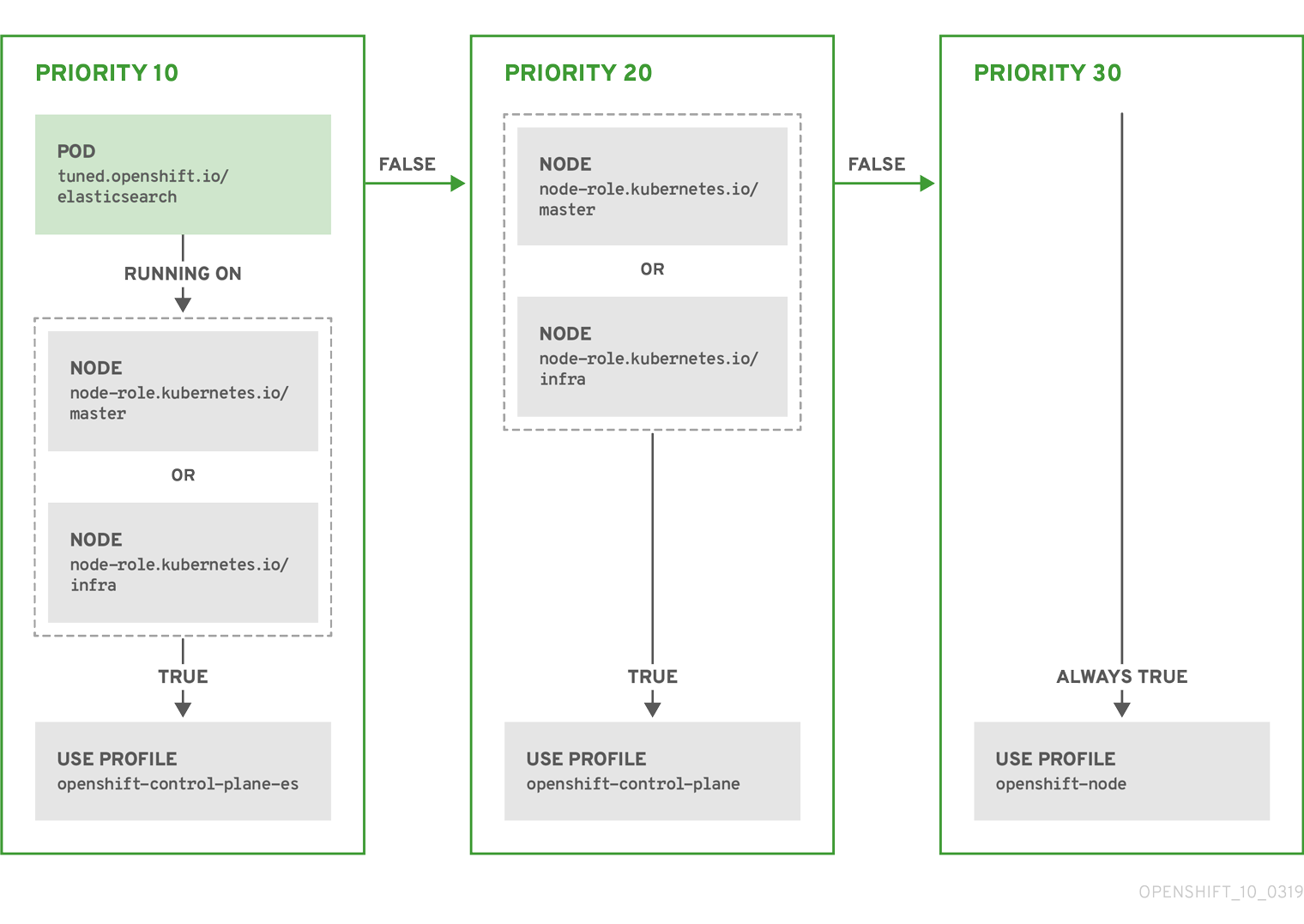
例: マシン設定プールベースのマッチング
apiVersion: tuned.openshift.io/v1
kind: Tuned
metadata:
name: openshift-node-custom
namespace: openshift-cluster-node-tuning-operator
spec:
profile:
- data: |
[main]
summary=Custom OpenShift node profile with an additional kernel parameter
include=openshift-node
[bootloader]
cmdline_openshift_node_custom=+skew_tick=1
name: openshift-node-custom
recommend:
- machineConfigLabels:
machineconfiguration.openshift.io/role: "worker-custom"
priority: 20
profile: openshift-node-customノードの再起動を最小限にするには、ターゲットノードにマシン設定プールのノードセレクターが一致するラベルを使用してラベルを付け、上記の Tuned CR を作成してから、最後にカスタムのマシン設定プール自体を作成します。
クラウドプロバイダー固有の TuneD プロファイル
この機能により、すべてのクラウドプロバイダー固有のノードに、OpenShift Container Platform クラスター上の特定のクラウドプロバイダーに合わせて特別に調整された TuneD プロファイルを簡単に割り当てることができます。これは、追加のノードラベルを追加したり、ノードをマシン設定プールにグループ化したりせずに実行できます。
この機能は、<cloud-provider>://<cloud-provider-specific-id> の形式で spec.providerID ノードオブジェクト値を利用して、NTO オペランドコンテナーの <cloud-provider> の値で /var/lib/tuned/provider ファイルを書き込みます。その後、このファイルのコンテンツは TuneD により、プロバイダー provider-<cloud-provider> プロファイル (存在する場合) を読み込むために使用されます。
openshift-control-plane および openshift-node プロファイルの両方の設定を継承する openshift プロファイルは、条件付きプロファイルの読み込みを使用してこの機能を使用するよう更新されるようになりました。現時点で、NTO や TuneD にクラウドプロバイダー固有のプロファイルは含まれていません。ただし、すべてのクラウドプロバイダー固有のクラスターノードに適用されるカスタムプロファイル provider-<cloud-provider> を作成できます。
GCE クラウドプロバイダープロファイルの例
apiVersion: tuned.openshift.io/v1
kind: Tuned
metadata:
name: provider-gce
namespace: openshift-cluster-node-tuning-operator
spec:
profile:
- data: |
[main]
summary=GCE Cloud provider-specific profile
# Your tuning for GCE Cloud provider goes here.
name: provider-gce
プロファイルの継承により、provider-<cloud-provider> プロファイルで指定された設定は、openshift プロファイルとその子プロファイルによって上書きされます。
7.6. カスタムチューニングの例
デフォルト CR からの TuneD プロファイルの使用
以下の CR は、ラベル tuned.openshift.io/ingress-node-label を任意の値に設定した状態で OpenShift Container Platform ノードのカスタムノードレベルのチューニングを適用します。
例: openshift-control-plane TuneD プロファイルを使用したカスタムチューニング
apiVersion: tuned.openshift.io/v1
kind: Tuned
metadata:
name: ingress
namespace: openshift-cluster-node-tuning-operator
spec:
profile:
- data: |
[main]
summary=A custom OpenShift ingress profile
include=openshift-control-plane
[sysctl]
net.ipv4.ip_local_port_range="1024 65535"
net.ipv4.tcp_tw_reuse=1
name: openshift-ingress
recommend:
- match:
- label: tuned.openshift.io/ingress-node-label
priority: 10
profile: openshift-ingress
カスタムプロファイル作成者は、デフォルトの TuneD CR に含まれるデフォルトの調整されたデーモンプロファイルを組み込むことが強く推奨されます。上記の例では、デフォルトの openshift-control-plane プロファイルを使用してこれを実行します。
ビルトイン TuneD プロファイルの使用
NTO が管理するデーモンセットのロールアウトに成功すると、TuneD オペランドはすべて同じバージョンの TuneD デーモンを管理します。デーモンがサポートするビルトイン TuneD プロファイルをリスト表示するには、以下の方法で TuneD Pod をクエリーします。
$ oc exec $tuned_pod -n openshift-cluster-node-tuning-operator -- find /usr/lib/tuned/ -name tuned.conf -printf '%h\n' | sed 's|^.*/||'このコマンドで取得したプロファイル名をカスタムのチューニング仕様で使用できます。
例: built-in hpc-compute TuneD プロファイルの使用
apiVersion: tuned.openshift.io/v1
kind: Tuned
metadata:
name: openshift-node-hpc-compute
namespace: openshift-cluster-node-tuning-operator
spec:
profile:
- data: |
[main]
summary=Custom OpenShift node profile for HPC compute workloads
include=openshift-node,hpc-compute
name: openshift-node-hpc-compute
recommend:
- match:
- label: tuned.openshift.io/openshift-node-hpc-compute
priority: 20
profile: openshift-node-hpc-compute
ビルトインの hpc-compute プロファイルに加えて、上記の例には、デフォルトの Tuned CR に同梱される openshift-node TuneD デーモンプロファイルが含まれており、コンピュートノードに OpenShift 固有のチューニングを使用します。
ホストレベルの sysctl のオーバーライド
/run/sysctl.d/、/etc/sysctl.d/、および /etc/sysctl.conf ホスト設定ファイルを使用して、実行時にさまざまなカーネルパラメーターを変更できます。OpenShift Container Platform は、実行時にカーネルパラメーターを設定するホスト設定ファイルをいくつか追加します。たとえば、net.ipv[4-6].、fs.inotify.、vm.max_map_count などです。これらのランタイムパラメーターは、kubelet および Operator の開始前に、システムの基本的な機能調整を提供します。
reapply_sysctl オプションが false に設定されていない限り、Operator はこれらの設定をオーバーライドしません。このオプションを false に設定すると、TuneD はカスタムプロファイルを適用した後、ホスト設定ファイルからの設定を適用しません。
例: ホストレベルの sysctl のオーバーライド
apiVersion: tuned.openshift.io/v1
kind: Tuned
metadata:
name: openshift-no-reapply-sysctl
namespace: openshift-cluster-node-tuning-operator
spec:
profile:
- data: |
[main]
summary=Custom OpenShift profile
include=openshift-node
[sysctl]
vm.max_map_count=>524288
name: openshift-no-reapply-sysctl
recommend:
- match:
- label: tuned.openshift.io/openshift-no-reapply-sysctl
priority: 15
profile: openshift-no-reapply-sysctl
operand:
tunedConfig:
reapply_sysctl: false7.7. サポートされている TuneD デーモンプラグイン
[main] セクションを除き、以下の TuneD プラグインは、Tuned CR の profile: セクションで定義されたカスタムプロファイルを使用する場合にサポートされます。
- audio
- cpu
- disk
- eeepc_she
- modules
- mounts
- net
- scheduler
- scsi_host
- selinux
- sysctl
- sysfs
- usb
- video
- vm
- bootloader
これらのプラグインの一部によって提供される動的チューニング機能の中に、サポートされていない機能があります。以下の TuneD プラグインは現時点でサポートされていません。
- script
- systemd
TuneD ブートローダープラグインは、Red Hat Enterprise Linux CoreOS (RHCOS) ワーカーノードのみサポートします。
7.8. ホステッドクラスターにおけるノードのチューニング設定
ホステッドクラスター内のノードでノードレベルのチューニングを設定するには、Node Tuning Operator を使用できます。ホストされたコントロールプレーンでは、Tuned オブジェクトを含む config map を作成し、ノードプールでそれらの config map を参照することで、ノードのチューニングを設定できます。
手順
チューニングされた有効なマニフェストを含む config map を作成し、ノードプールでマニフェストを参照します。次の例で
Tunedマニフェストは、任意の値を持つtuned-1-node-labelノードラベルを含むノード上でvm.dirty_ratioを 55 に設定するプロファイルを定義します。次のConfigMapマニフェストをtuned-1.yamlという名前のファイルに保存します。apiVersion: v1 kind: ConfigMap metadata: name: tuned-1 namespace: clusters data: tuning: | apiVersion: tuned.openshift.io/v1 kind: Tuned metadata: name: tuned-1 namespace: openshift-cluster-node-tuning-operator spec: profile: - data: | [main] summary=Custom OpenShift profile include=openshift-node [sysctl] vm.dirty_ratio="55" name: tuned-1-profile recommend: - priority: 20 profile: tuned-1-profile注記Tuned 仕様の
spec.recommendセクションのエントリーにラベルを追加しない場合は、ノードプールベースのマッチングが想定されるため、spec.recommendセクションの最も優先度の高いプロファイルがプール内のノードに適用されます。Tuned.spec.recommend.matchセクションでラベル値を設定することにより、よりきめ細かいノードラベルベースのマッチングを実現できますが、ノードプールの.spec.management.upgradeType値をInPlaceに設定しない限り、ノードラベルはアップグレード中に保持されません。管理クラスターに
ConfigMapオブジェクトを作成します。$ oc --kubeconfig="$MGMT_KUBECONFIG" create -f tuned-1.yamlノードプールを編集するか作成して、ノードプールの
spec.tuningConfigフィールドでConfigMapオブジェクトを参照します。この例では、2 つのノードを含むnodepool-1という名前のNodePoolが 1 つだけあることを前提としています。apiVersion: hypershift.openshift.io/v1alpha1 kind: NodePool metadata: ... name: nodepool-1 namespace: clusters ... spec: ... tuningConfig: - name: tuned-1 status: ...注記複数のノードプールで同じ config map を参照できます。Hosted Control Plane では、Node Tuning Operator が Tuned CR の名前にノードプール名と namespace のハッシュを追加して、それらを区別します。この場合を除き、同じホステッドクラスターの異なる Tuned CR に、同じ名前の複数の TuneD プロファイルを作成しないでください。
検証
Tuned マニフェストを含む ConfigMap オブジェクトを作成し、それを NodePool で参照したことで、Node Tuning Operator により Tuned オブジェクトがホステッドクラスターに同期されます。どの Tuned オブジェクトが定義されているか、どの TuneD プロファイルが各ノードに適用されているかを確認できます。
ホステッドクラスター内の
Tunedオブジェクトをリスト表示します。$ oc --kubeconfig="$HC_KUBECONFIG" get tuned.tuned.openshift.io -n openshift-cluster-node-tuning-operator出力例
NAME AGE default 7m36s rendered 7m36s tuned-1 65sホステッドクラスター内の
Profileオブジェクトをリスト表示します。$ oc --kubeconfig="$HC_KUBECONFIG" get profile.tuned.openshift.io -n openshift-cluster-node-tuning-operator出力例
NAME TUNED APPLIED DEGRADED AGE nodepool-1-worker-1 tuned-1-profile True False 7m43s nodepool-1-worker-2 tuned-1-profile True False 7m14s注記カスタムプロファイルが作成されていない場合は、
openshift-nodeプロファイルがデフォルトで適用されます。チューニングが正しく適用されたことを確認するには、ノードでデバッグシェルを開始し、sysctl 値を確認します。
$ oc --kubeconfig="$HC_KUBECONFIG" debug node/nodepool-1-worker-1 -- chroot /host sysctl vm.dirty_ratio出力例
vm.dirty_ratio = 55
7.9. カーネルブートパラメーターを設定することによる、ホステッドクラスターの高度なノードチューニング
カーネルブートパラメーターの設定が必要な、ホストされたコントロールプレーンでのより高度なチューニングは、Node Tuning Operator を使用することもできます。次の例は、Huge Page が予約されたノードプールを作成する方法を示しています。
手順
サイズが 2 MB の 10 個の Huge Page を作成するための
Tunedオブジェクトマニフェストを含むConfigMapオブジェクトを作成します。このConfigMapマニフェストをtuned-hugepages.yamlという名前のファイルに保存します。apiVersion: v1 kind: ConfigMap metadata: name: tuned-hugepages namespace: clusters data: tuning: | apiVersion: tuned.openshift.io/v1 kind: Tuned metadata: name: hugepages namespace: openshift-cluster-node-tuning-operator spec: profile: - data: | [main] summary=Boot time configuration for hugepages include=openshift-node [bootloader] cmdline_openshift_node_hugepages=hugepagesz=2M hugepages=50 name: openshift-node-hugepages recommend: - priority: 20 profile: openshift-node-hugepages注記.spec.recommend.matchフィールドは意図的に空白のままにしています。この場合、このTunedオブジェクトは、このConfigMapオブジェクトが参照されているノードプール内のすべてのノードに適用されます。同じハードウェア設定を持つノードを同じノードプールにグループ化します。そうしないと、TuneD オペランドは、同じノードプールを共有する 2 つ以上のノードに対して競合するカーネルパラメーターを計算する可能性があります。管理クラスターに
ConfigMapオブジェクトを作成します。$ oc --kubeconfig="<management_cluster_kubeconfig>" create -f tuned-hugepages.yaml1 - 1
<management_cluster_kubeconfig>を管理クラスターのkubeconfigファイルの名前に置き換えます。
NodePoolマニフェスト YAML ファイルを作成し、NodePoolのアップグレードタイプをカスタマイズして、spec.tuningConfigセクションで作成したConfigMapオブジェクトを参照します。NodePoolマニフェストを作成し、hcpCLI を使用してhugepages-nodepool.yamlという名前のファイルに保存します。$ hcp create nodepool aws \ --cluster-name <hosted_cluster_name> \1 --name <nodepool_name> \2 --node-count <nodepool_replicas> \3 --instance-type <instance_type> \4 --render > hugepages-nodepool.yaml注記hcp createコマンドの--renderフラグはシークレットをレンダリングしません。シークレットをレンダリングするには、hcp createコマンドで--renderフラグと--render-sensitiveフラグの両方を使用する必要があります。hugepages-nodepool.yamlファイルで、.spec.management.upgradeTypeをInPlaceに設定し、作成したtuned-hugepagesConfigMapオブジェクトを参照するように.spec.tuningConfigを設定します。apiVersion: hypershift.openshift.io/v1alpha1 kind: NodePool metadata: name: hugepages-nodepool namespace: clusters ... spec: management: ... upgradeType: InPlace ... tuningConfig: - name: tuned-hugepages注記新しい
MachineConfigオブジェクトを適用するときに不要なノードの再作成を回避するには、.spec.management.upgradeTypeをInPlaceに設定します。Replaceアップグレードタイプを使用する場合、ノードは完全に削除され、TuneD オペランドが計算した新しいカーネルブートパラメーターを適用すると、新しいノードでノードを置き換えることができます。管理クラスターに
NodePoolを作成します。$ oc --kubeconfig="<management_cluster_kubeconfig>" create -f hugepages-nodepool.yaml
検証
ノードが使用可能になると、コンテナー化された TuneD デーモンが、適用された TuneD プロファイルに基づいて、必要なカーネルブートパラメーターを計算します。ノードの準備が整い、一度再起動して生成された MachineConfig オブジェクトを適用したら、TuneD プロファイルが適用され、カーネルブートパラメーターが設定されていることを確認できます。
ホステッドクラスター内の
Tunedオブジェクトをリスト表示します。$ oc --kubeconfig="<hosted_cluster_kubeconfig>" get tuned.tuned.openshift.io -n openshift-cluster-node-tuning-operator出力例
NAME AGE default 123m hugepages-8dfb1fed 1m23s rendered 123mホステッドクラスター内の
Profileオブジェクトをリスト表示します。$ oc --kubeconfig="<hosted_cluster_kubeconfig>" get profile.tuned.openshift.io -n openshift-cluster-node-tuning-operator出力例
NAME TUNED APPLIED DEGRADED AGE nodepool-1-worker-1 openshift-node True False 132m nodepool-1-worker-2 openshift-node True False 131m hugepages-nodepool-worker-1 openshift-node-hugepages True False 4m8s hugepages-nodepool-worker-2 openshift-node-hugepages True False 3m57s新しい
NodePoolの両方のワーカーノードには、openshift-node-hugepagesプロファイルが適用されています。チューニングが正しく適用されたことを確認するには、ノードでデバッグシェルを起動し、
/proc/cmdlineを確認します。$ oc --kubeconfig="<hosted_cluster_kubeconfig>" debug node/nodepool-1-worker-1 -- chroot /host cat /proc/cmdline出力例
BOOT_IMAGE=(hd0,gpt3)/ostree/rhcos-... hugepagesz=2M hugepages=50
第8章 CPU Manager および Topology Manager の使用
CPU マネージャーは、CPU グループを管理して、ワークロードを特定の CPU に制限します。
CPU マネージャーは、以下のような属性が含まれるワークロードに有用です。
- できるだけ長い CPU 時間が必要な場合
- プロセッサーのキャッシュミスの影響を受ける場合
- レイテンシーが低いネットワークアプリケーションの場合
- 他のプロセスと連携し、単一のプロセッサーキャッシュを共有することに利点がある場合
Topology Manager は、CPU マネージャー、デバイスマネージャー、およびその他の Hint Provider からヒントを収集し、同じ Non-Uniform Memory Access (NUMA) ノード上のすべての QoS (Quality of Service) クラスについて CPU、SR-IOV VF、その他デバイスリソースなどの Pod リソースを調整します。
Topology Manager は、収集したヒントのトポロジー情報を使用し、設定される Topology Manager ポリシーおよび要求される Pod リソースに基づいて、pod がノードから許可されるか、拒否されるかどうかを判別します。
Topology Manager は、ハードウェアアクセラレーターを使用して低遅延 (latency-critical) の実行と高スループットの並列計算をサポートするワークロードの場合に役立ちます。
Topology Manager を使用するには、static ポリシーで CPU マネージャーを設定する必要があります。
8.1. CPU マネージャーの設定
CPU マネージャーを設定するには、KubeletConfig カスタムリソース (CR) を作成し、それを目的のノードセットに適用します。
手順
次のコマンドを実行してノードにラベルを付けます。
# oc label node perf-node.example.com cpumanager=trueすべてのコンピュートノードに対して CPU マネージャーを有効にするには、次のコマンドを実行して CR を編集します。
# oc edit machineconfigpool workercustom-kubelet: cpumanager-enabledラベルをmetadata.labelsセクションに追加します。metadata: creationTimestamp: 2020-xx-xxx generation: 3 labels: custom-kubelet: cpumanager-enabledKubeletConfig、cpumanager-kubeletconfig.yaml、カスタムリソース (CR) を作成します。直前の手順で作成したラベルを参照し、適切なノードを新規の kubelet 設定で更新します。machineConfigPoolSelectorセクションを参照してください。apiVersion: machineconfiguration.openshift.io/v1 kind: KubeletConfig metadata: name: cpumanager-enabled spec: machineConfigPoolSelector: matchLabels: custom-kubelet: cpumanager-enabled kubeletConfig: cpuManagerPolicy: static1 cpuManagerReconcilePeriod: 5s2 次のコマンドを実行して、動的 kubelet 設定を作成します。
# oc create -f cpumanager-kubeletconfig.yamlこれにより、CPU マネージャー機能が kubelet 設定に追加され、必要な場合には Machine Config Operator (MCO) がノードを再起動します。CPU マネージャーを有効にするために再起動する必要はありません。
次のコマンドを実行して、マージされた kubelet 設定を確認します。
# oc get machineconfig 99-worker-XXXXXX-XXXXX-XXXX-XXXXX-kubelet -o json | grep ownerReference -A7出力例
"ownerReferences": [ { "apiVersion": "machineconfiguration.openshift.io/v1", "kind": "KubeletConfig", "name": "cpumanager-enabled", "uid": "7ed5616d-6b72-11e9-aae1-021e1ce18878" } ]次のコマンドを実行して、更新された
kubelet.confファイルをコンピュートノードで確認します。# oc debug node/perf-node.example.com sh-4.2# cat /host/etc/kubernetes/kubelet.conf | grep cpuManager出力例
cpuManagerPolicy: static1 cpuManagerReconcilePeriod: 5s2 次のコマンドを実行してプロジェクトを作成します。
$ oc new-project <project_name>コア 1 つまたは複数を要求する Pod を作成します。制限および要求の CPU の値は整数にする必要があります。これは、対象の Pod 専用のコア数です。
# cat cpumanager-pod.yaml出力例
apiVersion: v1 kind: Pod metadata: generateName: cpumanager- spec: securityContext: runAsNonRoot: true seccompProfile: type: RuntimeDefault containers: - name: cpumanager image: gcr.io/google_containers/pause:3.2 resources: requests: cpu: 1 memory: "1G" limits: cpu: 1 memory: "1G" securityContext: allowPrivilegeEscalation: false capabilities: drop: [ALL] nodeSelector: cpumanager: "true"Pod を作成します。
# oc create -f cpumanager-pod.yaml
検証
次のコマンドを実行して、ラベルを付けたノードに Pod がスケジュールされていることを確認します。
# oc describe pod cpumanager出力例
Name: cpumanager-6cqz7 Namespace: default Priority: 0 PriorityClassName: <none> Node: perf-node.example.com/xxx.xx.xx.xxx ... Limits: cpu: 1 memory: 1G Requests: cpu: 1 memory: 1G ... QoS Class: Guaranteed Node-Selectors: cpumanager=true次のコマンドを実行して、CPU が Pod 専用として割り当てられていることを確認します。
# oc describe node --selector='cpumanager=true' | grep -i cpumanager- -B2出力例
NAMESPACE NAME CPU Requests CPU Limits Memory Requests Memory Limits Age cpuman cpumanager-mlrrz 1 (28%) 1 (28%) 1G (13%) 1G (13%) 27mcgroupsが正しく設定されていることを確認します。次のコマンドを実行して、pauseプロセスのプロセス ID (PID) を取得します。# oc debug node/perf-node.example.comsh-4.2# systemctl status | grep -B5 pause注記出力で複数の pause プロセスエントリーが返される場合は、正しい一時停止プロセスを特定する必要があります。
出力例
# ├─init.scope │ └─1 /usr/lib/systemd/systemd --switched-root --system --deserialize 17 └─kubepods.slice ├─kubepods-pod69c01f8e_6b74_11e9_ac0f_0a2b62178a22.slice │ ├─crio-b5437308f1a574c542bdf08563b865c0345c8f8c0b0a655612c.scope │ └─32706 /pause次のコマンドを実行して、サービス品質 (QoS) 層 (
Guaranteed) の Pod がkubepods.sliceサブディレクトリー内に配置されていることを確認します。# cd /sys/fs/cgroup/kubepods.slice/kubepods-pod69c01f8e_6b74_11e9_ac0f_0a2b62178a22.slice/crio-b5437308f1ad1a7db0574c542bdf08563b865c0345c86e9585f8c0b0a655612c.scope# for i in `ls cpuset.cpus cgroup.procs` ; do echo -n "$i "; cat $i ; done注記他の QoS 階層の Pod は、親
kubepodsの子であるcgroupsに配置されます。出力例
cpuset.cpus 1 tasks 32706次のコマンドを実行して、タスクに許可されている CPU リストを確認します。
# grep ^Cpus_allowed_list /proc/32706/status出力例
Cpus_allowed_list: 1システム上の別の Pod が、
GuaranteedPod に割り当てられたコアで実行できないことを確認します。たとえば、besteffortQoS 階層の Pod を検証するには、次のコマンドを実行します。# cat /sys/fs/cgroup/kubepods.slice/kubepods-besteffort.slice/kubepods-besteffort-podc494a073_6b77_11e9_98c0_06bba5c387ea.slice/crio-c56982f57b75a2420947f0afc6cafe7534c5734efc34157525fa9abbf99e3849.scope/cpuset.cpus# oc describe node perf-node.example.com出力例
... Capacity: attachable-volumes-aws-ebs: 39 cpu: 2 ephemeral-storage: 124768236Ki hugepages-1Gi: 0 hugepages-2Mi: 0 memory: 8162900Ki pods: 250 Allocatable: attachable-volumes-aws-ebs: 39 cpu: 1500m ephemeral-storage: 124768236Ki hugepages-1Gi: 0 hugepages-2Mi: 0 memory: 7548500Ki pods: 250 ------- ---- ------------ ---------- --------------- ------------- --- default cpumanager-6cqz7 1 (66%) 1 (66%) 1G (12%) 1G (12%) 29m Allocated resources: (Total limits may be over 100 percent, i.e., overcommitted.) Resource Requests Limits -------- -------- ------ cpu 1440m (96%) 1 (66%)この仮想マシンには、2 つの CPU コアがあります。
system-reserved設定は 500 ミリコアを予約し、Node Allocatableの量になるようにノードの全容量からコアの半分を引きます。ここでAllocatable CPUは 1500 ミリコアであることを確認できます。これは、それぞれがコアを 1 つ受け入れるので、CPU マネージャー Pod の 1 つを実行できることを意味します。1 つのコア全体は 1000 ミリコアに相当します。2 つ目の Pod をスケジュールしようとする場合、システムは Pod を受け入れますが、これがスケジュールされることはありません。NAME READY STATUS RESTARTS AGE cpumanager-6cqz7 1/1 Running 0 33m cpumanager-7qc2t 0/1 Pending 0 11s
8.2. Topology Manager ポリシー
Topology Manager は、CPU マネージャーや Device Manager などの Hint Provider からトポロジーのヒントを収集し、収集したヒントを使用して Pod リソースを調整することで、すべての Quality of Service (QoS) クラスの Pod リソースを調整します。
Topology Manager は 4 つの割り当てポリシーをサポートしています。これらのポリシーは、cpumanager-enabled という名前の KubeletConfig カスタムリソース (CR) で指定します。
noneポリシー- これはデフォルトのポリシーで、トポロジーの配置は実行しません。
best-effortポリシー-
best-effortトポロジー管理ポリシーが設定された Pod 内の各コンテナーに対して、kubelet が、そのコンテナーの優先される NUMA ノードアフィニティーに従って、必要なすべてのリソースを NUMA ノードに配置しようと試みます。リソース不足のために割り当てが不可能な場合でも、Topology Manager は Pod を許可しますが、その割り当ては他の NUMA ノードと共有されます。 restrictedポリシー-
restrictedトポロジー管理ポリシーが設定された Pod 内の各コンテナーに対して、kubelet が、要求を満たすことができる NUMA ノードの理論上の最小数を決定します。その数を超える NUMA ノード数が実際の割り当てに必要な場合、Topology Manager は許可を拒否し、Pod をTerminated状態にします。NUMA ノード数が要求を満たすことができる場合、Topology Manager は Pod を許可し、Pod は実行を開始します。 single-numa-nodeポリシー-
single-numa-nodeトポロジー管理ポリシーが設定された Pod 内の各コンテナーに対して、kubelet が、Pod に必要なすべてのリソースを同じ NUMA ノードに割り当てることができる場合に Pod を許可します。リソースを単一の NUMA ノードに割り当てることが不可能な場合、Topology Manager はノードから Pod を拒否します。その結果、Pod は受付の失敗によりTerminated状態になります。
8.3. Topology Manager のセットアップ
Topology Manager を使用するには、cpumanager-enabled という名前の KubeletConfig カスタムリソース (CR) で割り当てポリシーを設定する必要があります。CPU マネージャーをセットアップしている場合は、このファイルが存在している可能性があります。ファイルが存在しない場合は、作成できます。
前提条件
-
CPU マネージャーのポリシーを
staticに設定します。
手順
Topology Manager をアクティブにするには、以下を実行します。
カスタムリソースで Topology Manager 割り当てポリシーを設定します。
$ oc edit KubeletConfig cpumanager-enabledapiVersion: machineconfiguration.openshift.io/v1 kind: KubeletConfig metadata: name: cpumanager-enabled spec: machineConfigPoolSelector: matchLabels: custom-kubelet: cpumanager-enabled kubeletConfig: cpuManagerPolicy: static1 cpuManagerReconcilePeriod: 5s topologyManagerPolicy: single-numa-node2
8.4. Pod と Topology Manager ポリシーのやり取り
次の Pod 仕様の例は、Topology Manager と Pod のやり取りを示しています。
以下の Pod は、リソース要求や制限が指定されていないために BestEffort QoS クラスで実行されます。
spec:
containers:
- name: nginx
image: nginx
以下の Pod は、要求が制限よりも小さいために Burstable QoS クラスで実行されます。
spec:
containers:
- name: nginx
image: nginx
resources:
limits:
memory: "200Mi"
requests:
memory: "100Mi"
選択したポリシーが none 以外の場合、Topology Manager はすべての Pod を処理し、Guaranteed Qos Pod 仕様に対してのみリソースの配置を適用します。Topology Manager ポリシーが none に設定されている場合、該当するコンテナーが NUMA アフィニティーを考慮せずに使用可能な CPU にピニングされます。これはデフォルトの動作であり、パフォーマンスが重要なワークロードに最適なものではありません。それ以外の値を設定すると、デバイスプラグインのコアリソース (CPU やメモリーなど) からのトポロジー認識情報が使用可能になります。ポリシーが none 以外の値に設定されている場合、Topology Manager はノードのトポロジーに従って、CPU、メモリー、およびデバイスの割り当ての調整を試みます。使用可能な値の詳細は、Topology Manager ポリシー を参照してください。
次の Pod の例は、要求が制限と等しいため、Guaranteed QoS クラスで実行されます。
spec:
containers:
- name: nginx
image: nginx
resources:
limits:
memory: "200Mi"
cpu: "2"
example.com/device: "1"
requests:
memory: "200Mi"
cpu: "2"
example.com/device: "1"Topology Manager はこの Pod を考慮します。Topology Manager は、CPU Manager、Device Manager、Memory Manager などの Hint Provider を参照して、Pod のトポロジーヒントを取得します。
Topology Manager はこの情報を使用して、このコンテナーに最適なトポロジーを保管します。この Pod の場合、CPU マネージャーおよび Device Manager は、リソース割り当ての段階でこの保存された情報を使用します。
第9章 NUMA 対応ワークロードのスケジューリング
NUMA 対応のスケジューリングと、それを使用して OpenShift Container Platform クラスターに高パフォーマンスのワークロードをデプロイする方法を学びます。
NUMA Resources Operator を使用すると、同じ NUMA ゾーンで高パフォーマンスのワークロードをスケジュールすることができます。これは、利用可能なクラスターノードの NUMA リソースを報告するノードリソースエクスポートエージェントと、ワークロードを管理するセカンダリースケジューラーをデプロイします。
9.1. NUMA について
Non-Uniform Memory Access (NUMA) アーキテクチャーは、CPU がすべての場所のすべてのメモリーに同じ速度でアクセスしないマルチプロセッサーアーキテクチャーモデルです。代わりに、CPU は、近くにあるメモリーや ローカル なメモリーへ高速にアクセスできますが、遠くにあるメモリーへのアクセスは遅くなります。
複数のメモリーコントローラーを備えた CPU は、メモリーが配置されている場所に関係なく、CPU コンプレックス全体で使用可能なメモリーをすべて使用できます。ただし、このように柔軟性が向上したことで、パフォーマンスが犠牲になっています。
NUMA リソーストポロジー とは、NUMA ゾーン 内の CPU、メモリー、および PCI デバイスの相互の相対的な物理的位置関係を指します。NUMA アーキテクチャーでは、NUMA ゾーンは独自のプロセッサーとメモリーを持つ CPU のグループです。同じ場所に配置されたリソースは同一の NUMA ゾーンにあるとされ、ゾーン内の CPU は、そのゾーン外の CPU よりも、そのゾーンのローカルメモリーへ高速にアクセスできます。NUMA ゾーン外のメモリーを使用してワークロードを処理する CPU は、単一の NUMA ゾーンで処理されるワークロードよりも遅くなります。I/O に制約のあるワークロードの場合、離れた NUMA ゾーンのネットワークインターフェイスにより、情報がアプリケーションに到達する速度が低下します。
アプリケーションは、データと処理を同じ NUMA ゾーン内に含めることで、より優れたパフォーマンスを実現できます。通信ワークロードなどの高パフォーマンスのワークロードとアプリケーションの場合、ワークロードが仕様どおりに動作できるように、クラスターは単一の NUMA ゾーンで Pod ワークロードを処理する必要があります。
9.2. NUMA 対応のスケジューリングについて
NUMA 対応のスケジューリングは、要求されたクラスターコンピュートリソース (CPU、メモリー、デバイス) を同じ NUMA ゾーンに配置して、レイテンシーの影響を受けやすいワークロードや高性能なワークロードを効率的に処理します。また、NUMA 対応のスケジューリングにより、コンピュートノードあたりの Pod 密度を向上させ、リソース効率を高めています。
9.2.1. Node Tuning Operator との統合
Node Tuning Operator のパフォーマンスプロファイルを NUMA 対応スケジューリングと統合することで、CPU アフィニティーをさらに設定し、レイテンシーの影響を受けやすいワークロードのパフォーマンスを最適化できます。
9.2.2. デフォルトのスケジューリングロジック
デフォルトの OpenShift Container Platform Pod スケジューラーのスケジューリングロジックは、個々の NUMA ゾーンではなく、コンピュートノード全体の利用可能なリソースを考慮します。kubelet トポロジーマネージャーで最も制限的なリソースアライメントが要求された場合、Pod をノードに許可するときにエラー状態が発生する可能性があります。逆に、最も制限的なリソース調整が要求されていない場合、Pod は適切なリソース調整なしでノードに許可され、パフォーマンスが低下したり予測不能になったりする可能性があります。たとえば、Pod スケジューラーが Pod の要求されたリソースが利用可能かどうか把握せずに保証された Pod ワークロードに対して次善のスケジューリング決定を行うと、Topology Affinity Error ステータスを伴う Pod 作成の暴走が発生する可能性があります。スケジュールの不一致の決定により、Pod の起動が無期限に遅延する可能性があります。また、クラスターの状態とリソースの割り当てによっては、Pod のスケジューリングの決定が適切でないと、起動の試行が失敗するためにクラスターに余分な負荷がかかる可能性があります。
9.2.3. NUMA 対応の Pod スケジューリングの図
NUMA Resources Operator は、カスタム NUMA リソースのセカンダリースケジューラーおよびその他のリソースをデプロイして、デフォルトの OpenShift Container Platform Pod スケジューラーの欠点を軽減します。次の図は、NUMA 対応 Pod スケジューリングの俯瞰的な概要を示しています。
図9.1 NUMA 対応スケジューリングの概要
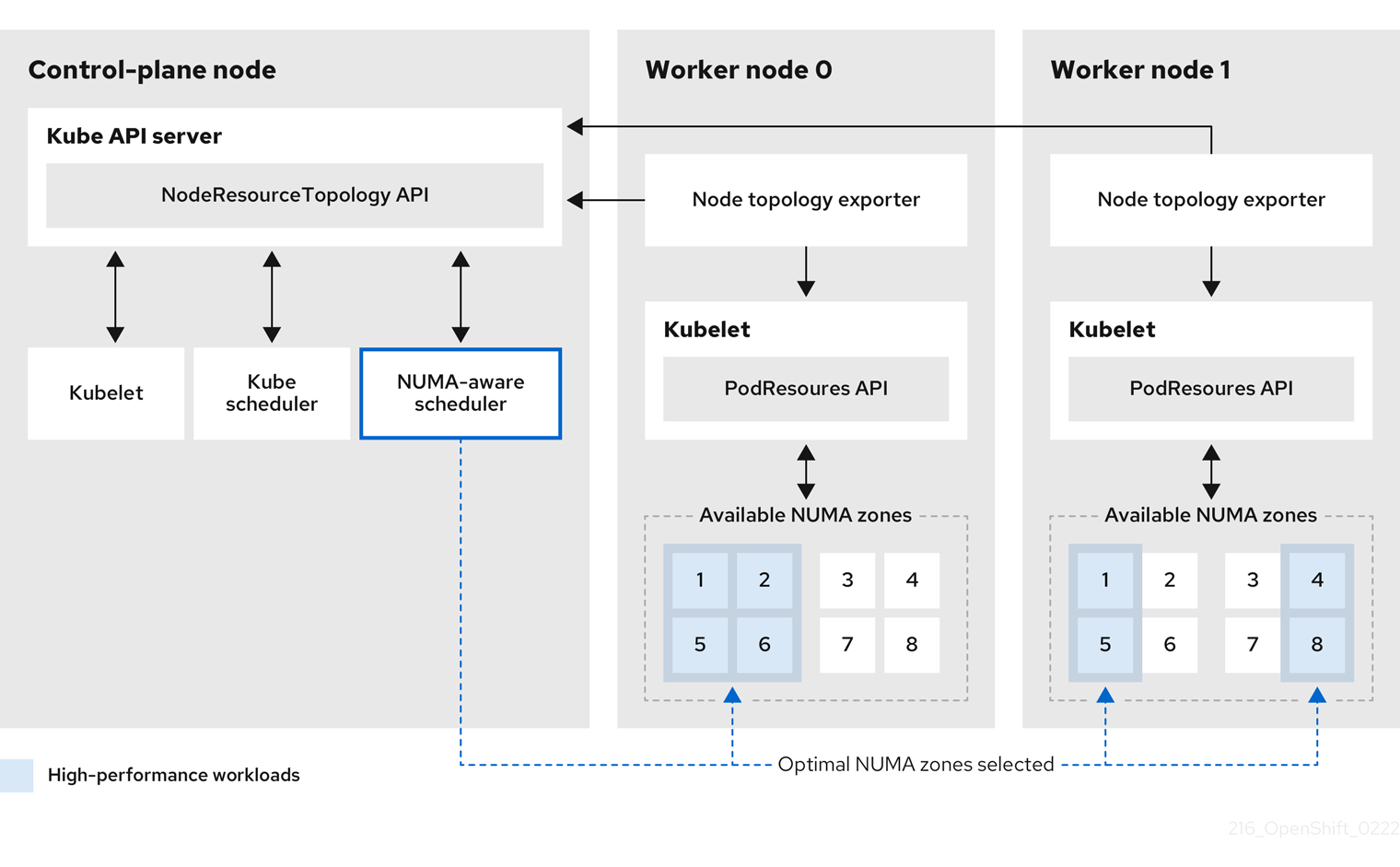
- NodeResourceTopology API
-
NodeResourceTopologyAPI は、各コンピュートノードで使用可能な NUMA ゾーンリソースを記述します。 - NUMA 対応スケジューラー
-
NUMA 対応のセカンダリースケジューラーは、利用可能な NUMA ゾーンに関する情報を
NodeResourceTopologyAPI から受け取り、最適に処理できるノードで高パフォーマンスのワークロードをスケジュールします。 - ノードトポロジーエクスポーター
-
ノードトポロジーエクスポーターは、各コンピュートノードで使用可能な NUMA ゾーンリソースを
NodeResourceTopologyAPI に公開します。ノードトポロジーエクスポーターデーモンは、PodResourcesAPI を使用して、kubelet からのリソース割り当てを追跡します。 - PodResources API
PodResourcesAPI は各ノードに対してローカルであり、リソーストポロジーと利用可能なリソースを kubelet に公開します。注記PodResourcesAPI のListエンドポイントは、特定のコンテナーに割り当てられた排他的な CPU を公開します。API は、共有プールに属する CPU は公開しません。GetAllocatableResourcesエンドポイントは、ノード上で使用できる割り当て可能なリソースを公開します。
9.3. NUMA リソーススケジューリングストラテジー
高パフォーマンスのワークロードをスケジュールする場合、セカンダリースケジューラーは、さまざまなストラテジーを採用して、選択したワーカーノード内のどの NUMA ノードによってワークロードを処理するかを決定できます。OpenShift Container Platform でサポートされているストラテジーには、LeastAllocated、MostAllocated、BalancedAllocation があります。これらのストラテジーを理解することで、パフォーマンスとリソース使用率のためにワークロードの配置を最適化できます。
NUMA 対応クラスターで高パフォーマンスワークロードがスケジュールされるときには、次の手順が実行されます。
- まず、スケジューラーがクラスター全体の基準に基づいて適切なワーカーノードを選択します。たとえば、taint、ラベル、リソースの可用性などの基準です。
- ワーカーノードが選択されると、スケジューラーはその NUMA ノードを評価し、スコアリングストラテジーを適用して、どの NUMA ノードによってワークロードを処理するかを決定します。
- ワークロードがスケジュールされると、選択された NUMA ノードのリソースが更新され、割り当てが反映されます。
適用されるデフォルトのストラテジーは、LeastAllocated ストラテジーです。このストラテジーでは、利用可能なリソースが最も多く、使用率が最も低い NUMA ノードにワークロードが割り当てられます。このストラテジーの目的は、競合を減らし、ホットスポットを回避するために、NUMA ノード全体にワークロードを分散することです。
次の表に、各ストラテジーとその効果の概要を示します。
スコアリングストラテジーの概要
| ストラテジー | 説明 | 効果 |
|---|---|---|
|
| 利用可能なリソースが最も多い NUMA ノードを優先します。 | ワークロードを分散して競合を減らし、優先度の高いタスクのための余裕を確保します。 |
|
| 利用可能なリソースが最も少ない NUMA ノードを優先します。 | ワークロードを少数の NUMA ノードに集約し、他のノードを解放してエネルギー効率を高めます。 |
|
| CPU とメモリーの使用量がバランスのとれた NUMA ノードを優先します。 | 均等なリソース使用を実現し、偏った使用パターンを防ぎます。 |
LeastAllocated ストラテジーの例
LeastAllocated がデフォルトのストラテジーです。このストラテジーでは、利用可能なリソースが最も多い NUMA ノードにワークロードを割り当て、リソースの競合を最小限に抑え、ワークロードを NUMA ノード全体に分散します。これにより、ホットスポットが削減され、優先度の高いタスクに十分な余裕が確保されます。ワーカーノードに 2 つの NUMA ノードがあり、ワークロードに 4 つの仮想 CPU と 8 GB のメモリーが必要であると仮定します。
| NUMA ノード | 合計 CPU 数 | 使用済み CPU 数 | 合計メモリー (GB) | 使用済みメモリー (GB) | 利用可能なリソース |
|---|---|---|---|---|---|
| NUMA 1 | 16 | 12 | 64 | 56 | 4 CPU、8 GB のメモリー |
| NUMA 2 | 16 | 6 | 64 | 24 | 10 CPU、40 GB のメモリー |
NUMA 2 には NUMA 1 と比較して利用可能なリソースが多いため、ワークロードは NUMA 2 に割り当てられます。
MostAllocated ストラテジーの例
MostAllocated ストラテジーは、利用可能なリソースが最も少ない NUMA ノード (最も使用されている NUMA ノード) にワークロードを割り当てることで、ワークロードを集約します。この方法により、エネルギー効率や完全な分離を必要とする重要なワークロードのために、他の NUMA ノードを解放できます。この例では、LeastAllocated セクションにリストされている「NUMA ノード初期状態の例」の値を使用します。
このワークロードには、4 つの仮想 CPU と 8 GB のメモリーが必要です。NUMA 1 は NUMA 2 に比べて利用可能なリソースが少ないため、スケジューラーはワークロードを NUMA 1 に割り当て、そのリソースをさらに活用します。一方、NUMA 2 はアイドル状態にするか、その負荷を最小限に抑えます。
BalancedAllocation ストラテジーの例
BalancedAllocation ストラテジーでは、CPU とメモリーのリソース使用率が最もバランスのとれた NUMA ノードにワークロードを割り当てます。目的は、メモリーが十分に使用されていないのに CPU 使用率が高くなるなど、不均衡な使用を防ぐことです。ワーカーノードの NUMA ノードの状態が次のようなものであると仮定します。
| NUMA ノード | CPU の使用率 | メモリー使用率 | BalancedAllocation のスコア |
|---|---|---|---|
| NUMA 1 | 60% | 55% | 高 (バランスがとれている) |
| NUMA 2 | 80% | 20% | 低 (バランスがとれていない) |
NUMA 1 は、NUMA 2 と比較して CPU とメモリーの使用率がよりバランスがとれています。そのため、BalancedAllocation ストラテジーを適用すると、ワークロードは NUMA 1 に割り当てられます。
9.4. NUMA Resources Operator のインストール
NUMA Resources Operator は、NUMA 対応のワークロードとデプロイメントをスケジュールできるリソースをデプロイします。OpenShift Container Platform CLI または Web コンソールを使用して NUMA Resources Operator をインストールできます。
9.4.1. CLI を使用した NUMA Resources Operator のインストール
クラスター管理者は、CLI を使用して Operator をインストールできます。
前提条件
-
OpenShift CLI (
oc) がインストールされている。 -
cluster-admin権限を持つユーザーとしてログインしている。
手順
NUMA Resources Operator の namespace を作成します。
以下の YAML を
nro-namespace.yamlファイルに保存します。apiVersion: v1 kind: Namespace metadata: name: openshift-numaresources以下のコマンドを実行して
NamespaceCR を作成します。$ oc create -f nro-namespace.yaml
NUMA Resources Operator の Operator グループを作成します。
以下の YAML を
nro-operatorgroup.yamlファイルに保存します。apiVersion: operators.coreos.com/v1 kind: OperatorGroup metadata: name: numaresources-operator namespace: openshift-numaresources spec: targetNamespaces: - openshift-numaresources以下のコマンドを実行して
OperatorGroupCR を作成します。$ oc create -f nro-operatorgroup.yaml
NUMA Resources Operator のサブスクリプションを作成します。
以下の YAML を
nro-sub.yamlファイルに保存します。apiVersion: operators.coreos.com/v1alpha1 kind: Subscription metadata: name: numaresources-operator namespace: openshift-numaresources spec: channel: "4.15" name: numaresources-operator source: redhat-operators sourceNamespace: openshift-marketplace以下のコマンドを実行して
SubscriptionCR を作成します。$ oc create -f nro-sub.yaml
検証
openshift-numaresourcesnamespace の CSV リソースを調べて、インストールが成功したことを確認します。以下のコマンドを実行します。$ oc get csv -n openshift-numaresources出力例
NAME DISPLAY VERSION REPLACES PHASE numaresources-operator.v4.15.2 numaresources-operator 4.15.2 Succeeded
9.4.2. Web コンソールを使用した NUMA Resources Operator のインストール
クラスター管理者は、Web コンソールを使用して NUMA Resources Operator をインストールできます。
手順
NUMA Resources Operator の namespace を作成します。
- OpenShift Container Platform Web コンソールで、Administration → Namespaces をクリックします。
-
Create Namespace をクリックし、Name フィールドに
openshift-numaresourcesと入力して Create をクリックします。
NUMA Resources Operator をインストールします。
- OpenShift Container Platform Web コンソールで、Operators → OperatorHub をクリックします。
- 利用可能な Operator のリストから numaresources-operator を選択し、Install をクリックします。
-
Installed Namespaces フィールドで、
openshift-numaresourcesnamespace を選択し、Install をクリックします。
オプション: NUMA Resources Operator が正常にインストールされたことを確認します。
- Operators → Installed Operators ページに切り替えます。
NUMA Resources Operator が
openshift-numaresourcesnamespace にリストされ、Status が InstallSucceeded であることを確認します。注記インストール時に、Operator は Failed ステータスを表示する可能性があります。インストールが後に InstallSucceeded メッセージを出して正常に実行される場合は、Failed メッセージを無視できます。
Operator がインストール済みとして表示されない場合に、さらにトラブルシューティングを実行します。
- Operators → Installed Operators ページに移動し、Operator Subscriptions および Install Plans タブで Status にエラーがあるかどうかを検査します。
-
Workloads → Pods ページに移動し、
defaultプロジェクトの Pod のログを確認します。
9.5. NUMA 対応ワークロードのスケジューリング
通常、遅延の影響を受けやすいワークロードを実行するクラスターは、ワークロードの遅延を最小限に抑え、パフォーマンスを最適化するのに役立つパフォーマンスプロファイルを備えています。NUMA 対応スケジューラーは、使用可能なノードの NUMA リソースと、ノードに適用されるパフォーマンスプロファイル設定に基づいき、ワークロードをデプロイします。NUMA 対応デプロイメントとワークロードのパフォーマンスプロファイルを組み合わせることで、パフォーマンスを最大化するようにワークロードがスケジュールされます。
NUMA Resources Operator を完全に動作させるには、NUMAResourcesOperator カスタムリソースと NUMA 対応のセカンダリー Pod スケジューラーをデプロイする必要があります。
9.5.1. NUMAResourcesOperator カスタムリソースの作成
NUMA Resources Operator をインストールしたら、NUMAResourcesOperator カスタムリソース (CR) を作成します。この CR は、デーモンセットや API など、NUMA 対応スケジューラーをサポートするために必要なすべてのクラスターインフラストラクチャーをインストールするように NUMA Resources Operator に指示します。
前提条件
-
OpenShift CLI (
oc) がインストールされている。 -
cluster-admin権限を持つユーザーとしてログインしている。 - NUMA Resources Operator をインストールしている。
手順
NUMAResourcesOperatorカスタムリソースを作成します。次の最小限必要な YAML ファイルの例を
nrop.yamlとして保存します。apiVersion: nodetopology.openshift.io/v1 kind: NUMAResourcesOperator metadata: name: numaresourcesoperator spec: nodeGroups: - machineConfigPoolSelector: matchLabels: pools.operator.machineconfiguration.openshift.io/worker: ""1 - 1
- これは、NUMA Resources Operator を設定する
MachineConfigPoolリソースと一致する必要があります。たとえば、通信ワークロードを実行することが予想されるノードのセットを指定するworker-cnfという名前のMachineConfigPoolリソースを作成したとします。各NodeGroupは 1 つのMachineConfigPoolに完全に一致する必要があります。NodeGroupが複数のMachineConfigPoolに一致する設定はサポートされていません。
以下のコマンドを実行して、
NUMAResourcesOperatorCR を作成します。$ oc create -f nrop.yaml注記NUMAResourcesOperatorを作成すると、対応するマシン設定プールと、関連するノードの再起動がトリガーされます。
オプション: 複数のマシン設定プール (MCP) に対して NUMA 対応スケジューリングを有効にするには、プールごとに個別の
NodeGroupを定義します。たとえば、次の例に示すように、NUMAResourcesOperatorCR で、worker-cnf、worker-ht、およびworker-otherの 3 つのNodeGroupsを定義します。複数の
NodeGroupsを含むNUMAResourcesOperatorCR の YAML 定義の例apiVersion: nodetopology.openshift.io/v1 kind: NUMAResourcesOperator metadata: name: numaresourcesoperator spec: logLevel: Normal nodeGroups: - machineConfigPoolSelector: matchLabels: machineconfiguration.openshift.io/role: worker-ht - machineConfigPoolSelector: matchLabels: machineconfiguration.openshift.io/role: worker-cnf - machineConfigPoolSelector: matchLabels: machineconfiguration.openshift.io/role: worker-other
検証
以下のコマンドを実行して、NUMA Resources Operator が正常にデプロイされたことを確認します。
$ oc get numaresourcesoperators.nodetopology.openshift.io出力例
NAME AGE numaresourcesoperator 27s数分後、次のコマンドを実行して、必要なリソースが正常にデプロイされたことを確認します。
$ oc get all -n openshift-numaresources出力例
NAME READY STATUS RESTARTS AGE pod/numaresources-controller-manager-7d9d84c58d-qk2mr 1/1 Running 0 12m pod/numaresourcesoperator-worker-7d96r 2/2 Running 0 97s pod/numaresourcesoperator-worker-crsht 2/2 Running 0 97s pod/numaresourcesoperator-worker-jp9mw 2/2 Running 0 97s
9.5.2. NUMA 対応のセカンダリー Pod スケジューラーのデプロイ
NUMA Resources Operator のインストール後に、NUMA 対応のセカンダリー Pod スケジューラーをデプロイして Pod の配置を最適化し、NUMA ベースのシステムのパフォーマンスを向上させ、レイテンシーを短縮します。
手順
NUMA 対応のカスタム Pod スケジューラーをデプロイする
NUMAResourcesSchedulerカスタムリソースを作成します。次の最小限必要な YAML を
nro-scheduler.yamlファイルに保存します。apiVersion: nodetopology.openshift.io/v1 kind: NUMAResourcesScheduler metadata: name: numaresourcesscheduler spec: imageSpec: "registry.redhat.io/openshift4/noderesourcetopology-scheduler-rhel9:v4.15"1 - 1
- 非接続環境では、次のいずれかのアクションを実行してこのイメージの解決を設定してください。
-
ImageTagMirrorSetカスタムリソース (CR) を作成する。詳細は、「関連情報」セクションの「イメージレジストリーのリポジトリーミラーリングの設定」を参照してください。 - 切断されたレジストリーへの URL を設定する。
-
次のコマンドを実行して、
NUMAResourcesSchedulerCR を作成します。$ oc create -f nro-scheduler.yaml
数秒後、次のコマンドを実行して、必要なリソースのデプロイメントが成功したことを確認します。
$ oc get all -n openshift-numaresources出力例
NAME READY STATUS RESTARTS AGE pod/numaresources-controller-manager-7d9d84c58d-qk2mr 1/1 Running 0 12m pod/numaresourcesoperator-worker-7d96r 2/2 Running 0 97s pod/numaresourcesoperator-worker-crsht 2/2 Running 0 97s pod/numaresourcesoperator-worker-jp9mw 2/2 Running 0 97s pod/secondary-scheduler-847cb74f84-9whlm 1/1 Running 0 10m NAME DESIRED CURRENT READY UP-TO-DATE AVAILABLE NODE SELECTOR AGE daemonset.apps/numaresourcesoperator-worker 3 3 3 3 3 node-role.kubernetes.io/worker= 98s NAME READY UP-TO-DATE AVAILABLE AGE deployment.apps/numaresources-controller-manager 1/1 1 1 12m deployment.apps/secondary-scheduler 1/1 1 1 10m NAME DESIRED CURRENT READY AGE replicaset.apps/numaresources-controller-manager-7d9d84c58d 1 1 1 12m replicaset.apps/secondary-scheduler-847cb74f84 1 1 1 10m
9.5.3. 単一の NUMA ノードポリシーの設定
NUMA Resources Operator では、クラスター上に単一の NUMA ノードポリシーを設定する必要があります。この設定を行うには、パフォーマンスプロファイルを作成して適用するか、KubeletConfig を設定するという 2 つの方法があります。
単一の NUMA ノードポリシーの設定方法としては、パフォーマンスプロファイルを適用する方法が推奨されます。パフォーマンスプロファイルの作成には、Performance Profile Creator (PPC) ツールを使用できます。クラスター上にパフォーマンスプロファイルを作成すると、KubeletConfig や tuned プロファイルなどの他のチューニングコンポーネントが自動的に作成されます。
パフォーマンスプロファイルの作成の詳細は、「関連情報」セクションの「Performance Profile Creator の概要」を参照してください。
9.5.4. パフォーマンスプロファイルの例
この YAML の例は、Performance Profile Creator (PPC) ツールを使用して作成されたパフォーマンスプロファイルを示しています。
apiVersion: performance.openshift.io/v2
kind: PerformanceProfile
metadata:
name: performance
spec:
cpu:
isolated: "3"
reserved: 0-2
machineConfigPoolSelector:
pools.operator.machineconfiguration.openshift.io/worker: ""
nodeSelector:
node-role.kubernetes.io/worker: ""
numa:
topologyPolicy: single-numa-node
realTimeKernel:
enabled: true
workloadHints:
highPowerConsumption: true
perPodPowerManagement: false
realTime: true9.5.5. KubeletConfig CR の作成
単一の NUMA ノードポリシーの設定方法としては、パフォーマンスプロファイルを適用する方法が推奨されます。もう 1 つの方法は、次の手順に示すように、KubeletConfig カスタムリソース (CR) を作成して適用することです。
手順
マシンプロファイルの Pod アドミタンスポリシーを設定する
KubeletConfigカスタムリソース (CR) を作成します。以下の YAML を
nro-kubeletconfig.yamlファイルに保存します。apiVersion: machineconfiguration.openshift.io/v1 kind: KubeletConfig metadata: name: worker-tuning spec: machineConfigPoolSelector: matchLabels: pools.operator.machineconfiguration.openshift.io/worker: ""1 kubeletConfig: cpuManagerPolicy: "static"2 cpuManagerReconcilePeriod: "5s" reservedSystemCPUs: "0,1"3 memoryManagerPolicy: "Static"4 evictionHard: memory.available: "100Mi" kubeReserved: memory: "512Mi" reservedMemory: - numaNode: 0 limits: memory: "1124Mi" systemReserved: memory: "512Mi" topologyManagerPolicy: "single-numa-node"5 以下のコマンドを実行して
KubeletConfigCR を作成します。$ oc create -f nro-kubeletconfig.yaml注記パフォーマンスプロファイルまたは
KubeletConfigを適用すると、ノードの再起動が自動的にトリガーされます。再起動がトリガーされない場合は、ノードグループに対応するKubeletConfigのラベルを確認して、問題のトラブルシューティングを実施できます。
9.5.6. NUMA 対応スケジューラーを使用したワークロードのスケジューリング
topo-aware-scheduler をインストールし、NUMAResourcesOperator および NUMAResourcesScheduler CR を適用し、クラスターが一致するパフォーマンスプロファイルまたは kubeletconfig を含むようになったので、ワークロードを処理する必要最小限のリソースを指定するデプロイメント CR を使用して、NUMA 対応スケジューラーでワークロードをスケジュールできます。
次のデプロイメント例では、サンプルワークロードに NUMA 対応のスケジューリングを使用します。
前提条件
-
OpenShift CLI (
oc) がインストールされている。 -
cluster-admin権限を持つユーザーとしてログインしている。
手順
次のコマンドを実行して、クラスターにデプロイされている NUMA 対応スケジューラーの名前を取得します。
$ oc get numaresourcesschedulers.nodetopology.openshift.io numaresourcesscheduler -o json | jq '.status.schedulerName'出力例
"topo-aware-scheduler"topo-aware-schedulerという名前のスケジューラーを使用するDeploymentCR を作成します。次に例を示します。以下の YAML を
nro-deployment.yamlファイルに保存します。apiVersion: apps/v1 kind: Deployment metadata: name: numa-deployment-1 namespace: openshift-numaresources spec: replicas: 1 selector: matchLabels: app: test template: metadata: labels: app: test spec: schedulerName: topo-aware-scheduler1 containers: - name: ctnr image: quay.io/openshifttest/hello-openshift:openshift imagePullPolicy: IfNotPresent resources: limits: memory: "100Mi" cpu: "10" requests: memory: "100Mi" cpu: "10" - name: ctnr2 image: registry.access.redhat.com/rhel:latest imagePullPolicy: IfNotPresent command: ["/bin/sh", "-c"] args: [ "while true; do sleep 1h; done;" ] resources: limits: memory: "100Mi" cpu: "8" requests: memory: "100Mi" cpu: "8"- 1
schedulerNameは、クラスターにデプロイされている NUMA 対応のスケジューラーの名前 (topo-aware-schedulerなど) と一致する必要があります。
次のコマンドを実行して、
DeploymentCR を作成します。$ oc create -f nro-deployment.yaml
検証
デプロイメントが正常に行われたことを確認します。
$ oc get pods -n openshift-numaresources出力例
NAME READY STATUS RESTARTS AGE numa-deployment-1-6c4f5bdb84-wgn6g 2/2 Running 0 5m2s numaresources-controller-manager-7d9d84c58d-4v65j 1/1 Running 0 18m numaresourcesoperator-worker-7d96r 2/2 Running 4 43m numaresourcesoperator-worker-crsht 2/2 Running 2 43m numaresourcesoperator-worker-jp9mw 2/2 Running 2 43m secondary-scheduler-847cb74f84-fpncj 1/1 Running 0 18m次のコマンドを実行して、
topo-aware-schedulerがデプロイされた Pod をスケジュールしていることを確認します。$ oc describe pod numa-deployment-1-6c4f5bdb84-wgn6g -n openshift-numaresources出力例
Events: Type Reason Age From Message ---- ------ ---- ---- ------- Normal Scheduled 4m45s topo-aware-scheduler Successfully assigned openshift-numaresources/numa-deployment-1-6c4f5bdb84-wgn6g to worker-1注記スケジューリングに使用可能なリソースよりも多くのリソースを要求するデプロイメントは、
MinimumReplicasUnavailableエラーで失敗します。必要なリソースが利用可能になると、デプロイメントは成功します。Pod は、必要なリソースが利用可能になるまでPending状態のままになります。ノードに割り当てられる予定のリソースが一覧表示されていることを確認します。
次のコマンドを実行して、デプロイメント Pod を実行しているノードを特定します。
$ oc get pods -n openshift-numaresources -o wide出力例
NAME READY STATUS RESTARTS AGE IP NODE NOMINATED NODE READINESS GATES numa-deployment-1-6c4f5bdb84-wgn6g 0/2 Running 0 82m 10.128.2.50 worker-1 <none> <none>次のコマンドを実行します。このとき、デプロイメント Pod を実行しているノードの名前を指定します。
$ oc describe noderesourcetopologies.topology.node.k8s.io worker-1出力例
... Zones: Costs: Name: node-0 Value: 10 Name: node-1 Value: 21 Name: node-0 Resources: Allocatable: 39 Available: 211 Capacity: 40 Name: cpu Allocatable: 6442450944 Available: 6442450944 Capacity: 6442450944 Name: hugepages-1Gi Allocatable: 134217728 Available: 134217728 Capacity: 134217728 Name: hugepages-2Mi Allocatable: 262415904768 Available: 262206189568 Capacity: 270146007040 Name: memory Type: Node- 1
- 保証された Pod に割り当てられたリソースが原因で、
Availableな容量が減少しています。
保証された Pod によって消費されるリソースは、
noderesourcetopologies.topology.node.k8s.ioにリスト表示されている使用可能なノードリソースから差し引かれます。
Best-effortまたはBurstableのサービス品質 (qosClass) を持つ Pod のリソース割り当てが、noderesourcetopologies.topology.node.k8s.ioの NUMA ノードリソースに反映されていません。Pod の消費リソースがノードリソースの計算に反映されない場合は、Pod のqosClassがGuaranteedで、CPU 要求が 10 進値ではなく整数値であることを確認してください。次のコマンドを実行すると、Pod のqosClassがGuaranteedであることを確認できます。$ oc get pod numa-deployment-1-6c4f5bdb84-wgn6g -n openshift-numaresources -o jsonpath="{ .status.qosClass }"出力例
Guaranteed
9.6. オプション: NUMA リソース更新のポーリング操作の設定
nodeGroup 内の NUMA Resources Operator によって制御されるデーモンは、リソースをポーリングして、利用可能な NUMA リソースに関する更新を取得します。NUMAResourcesOperator カスタムリソース (CR) で spec.nodeGroups 仕様を設定することで、これらのデーモンのポーリング操作を微調整できます。これにより、ポーリング操作の高度な制御が可能になります。これらの仕様を設定して、スケジューリング動作を改善し、最適ではないスケジューリング決定のトラブルシューティングを行います。
設定オプションは次のとおりです。
-
infoRefreshMode: kubelet をポーリングするためのトリガー条件を決定します。NUMA Resources Operator は、結果として取得した情報を API サーバーに報告します。 -
infoRefreshPeriod: ポーリング更新の間隔を決定します。 podsFingerprinting: ノード上で実行されている現在の Pod セットのポイントインタイム情報がポーリング更新で公開されるかどうかを決定します。注記podsFingerprintingはデフォルトで有効になっています。podsFingerprintingは、NUMAResourcesSchedulerCR のcacheResyncPeriod仕様の要件です。cacheResyncPeriod仕様は、ノード上の保留中のリソースを監視することで、より正確なリソースの可用性を報告するのに役立ちます。
前提条件
-
OpenShift CLI (
oc) がインストールされている。 -
cluster-admin権限を持つユーザーとしてログインしている。 - NUMA Resources Operator をインストールしている。
手順
NUMAResourcesOperatorCR でspec.nodeGroups仕様を設定します。apiVersion: nodetopology.openshift.io/v1 kind: NUMAResourcesOperator metadata: name: numaresourcesoperator spec: nodeGroups: - config: infoRefreshMode: Periodic1 infoRefreshPeriod: 10s2 podsFingerprinting: Enabled3 name: worker- 1
- 有効な値は
Periodic、Events、PeriodicAndEventsです。Periodicを使用して、infoRefreshPeriodで定義した間隔で kubelet をポーリングします。Eventsを使用して、Pod のライフサイクルイベントごとに kubelet をポーリングします。両方のメソッドを有効にするには、PeriodicAndEventsを使用します。 - 2
PeriodicまたはPeriodicAndEventsリフレッシュモードのポーリング間隔を定義します。リフレッシュモードがEventsの場合、このフィールドは無視されます。- 3
- 有効な値は、
Enabled、Disabled、およびEnabledExclusiveResourcesです。NUMAResourcesSchedulerのcacheResyncPeriod仕様では、Enabledへの設定が必須です。
検証
NUMA Resources Operator をデプロイした後、次のコマンドを実行して、ノードグループ設定が適用されたことを検証します。
$ oc get numaresop numaresourcesoperator -o json | jq '.status'出力例
... "config": { "infoRefreshMode": "Periodic", "infoRefreshPeriod": "10s", "podsFingerprinting": "Enabled" }, "name": "worker" ...
9.7. NUMA 対応スケジューリングのトラブルシューティング
NUMA 対応の Pod スケジューリングに関する一般的な問題をトラブルシューティングするには、次の手順を実行します。
前提条件
-
OpenShift Container Platform CLI (
oc) をインストールしている。 - cluster-admin 権限を持つユーザーとしてログインしている。
- NUMA Resources Operator をインストールし、NUMA 対応のセカンダリースケジューラーをデプロイします。
手順
次のコマンドを実行して、
noderesourcetopologiesCRD がクラスターにデプロイされていることを確認します。$ oc get crd | grep noderesourcetopologies出力例
NAME CREATED AT noderesourcetopologies.topology.node.k8s.io 2022-01-18T08:28:06Z次のコマンドを実行して、NUMA 対応スケジューラー名が NUMA 対応ワークロードで指定された名前と一致することを確認します。
$ oc get numaresourcesschedulers.nodetopology.openshift.io numaresourcesscheduler -o json | jq '.status.schedulerName'出力例
topo-aware-schedulerNUMA 対応のスケジュール可能なノードに
noderesourcetopologiesCR が適用されていることを確認します。以下のコマンドを実行します。$ oc get noderesourcetopologies.topology.node.k8s.io出力例
NAME AGE compute-0.example.com 17h compute-1.example.com 17h注記ノードの数は、マシン設定プール (
mcp) ワーカー定義によって設定されているワーカーノードの数と等しくなければなりません。次のコマンドを実行して、スケジュール可能なすべてのノードの NUMA ゾーンの粒度を確認します。
$ oc get noderesourcetopologies.topology.node.k8s.io -o yaml出力例
apiVersion: v1 items: - apiVersion: topology.node.k8s.io/v1 kind: NodeResourceTopology metadata: annotations: k8stopoawareschedwg/rte-update: periodic creationTimestamp: "2022-06-16T08:55:38Z" generation: 63760 name: worker-0 resourceVersion: "8450223" uid: 8b77be46-08c0-4074-927b-d49361471590 topologyPolicies: - SingleNUMANodeContainerLevel zones: - costs: - name: node-0 value: 10 - name: node-1 value: 21 name: node-0 resources: - allocatable: "38" available: "38" capacity: "40" name: cpu - allocatable: "134217728" available: "134217728" capacity: "134217728" name: hugepages-2Mi - allocatable: "262352048128" available: "262352048128" capacity: "270107316224" name: memory - allocatable: "6442450944" available: "6442450944" capacity: "6442450944" name: hugepages-1Gi type: Node - costs: - name: node-0 value: 21 - name: node-1 value: 10 name: node-1 resources: - allocatable: "268435456" available: "268435456" capacity: "268435456" name: hugepages-2Mi - allocatable: "269231067136" available: "269231067136" capacity: "270573244416" name: memory - allocatable: "40" available: "40" capacity: "40" name: cpu - allocatable: "1073741824" available: "1073741824" capacity: "1073741824" name: hugepages-1Gi type: Node - apiVersion: topology.node.k8s.io/v1 kind: NodeResourceTopology metadata: annotations: k8stopoawareschedwg/rte-update: periodic creationTimestamp: "2022-06-16T08:55:37Z" generation: 62061 name: worker-1 resourceVersion: "8450129" uid: e8659390-6f8d-4e67-9a51-1ea34bba1cc3 topologyPolicies: - SingleNUMANodeContainerLevel zones:1 - costs: - name: node-0 value: 10 - name: node-1 value: 21 name: node-0 resources:2 - allocatable: "38" available: "38" capacity: "40" name: cpu - allocatable: "6442450944" available: "6442450944" capacity: "6442450944" name: hugepages-1Gi - allocatable: "134217728" available: "134217728" capacity: "134217728" name: hugepages-2Mi - allocatable: "262391033856" available: "262391033856" capacity: "270146301952" name: memory type: Node - costs: - name: node-0 value: 21 - name: node-1 value: 10 name: node-1 resources: - allocatable: "40" available: "40" capacity: "40" name: cpu - allocatable: "1073741824" available: "1073741824" capacity: "1073741824" name: hugepages-1Gi - allocatable: "268435456" available: "268435456" capacity: "268435456" name: hugepages-2Mi - allocatable: "269192085504" available: "269192085504" capacity: "270534262784" name: memory type: Node kind: List metadata: resourceVersion: "" selfLink: ""
9.7.1. より正確なリソース可用性の報告
cacheResyncPeriod 仕様を有効にすると、NUMA Resources Operator は、ノード上の保留中のリソースを監視し、定義された間隔でスケジューラーキャッシュ内のこの情報を同期することで、より正確なリソース可用性を報告できます。これは、次善のスケジューリング決定が引き起こす Topology Affinity Error エラーを最小限に抑えるのにも役立ちます。間隔が短いほど、ネットワーク負荷が大きくなります。デフォルトでは、cacheResyncPeriod 仕様は無効になっています。
前提条件
-
OpenShift CLI (
oc) がインストールされている。 -
cluster-admin権限を持つユーザーとしてログインしている。
手順
現在実行中の
NUMAResourcesSchedulerリソースを削除します。次のコマンドを実行して、アクティブな
NUMAResourcesSchedulerを取得します。$ oc get NUMAResourcesScheduler出力例
NAME AGE numaresourcesscheduler 92m次のコマンドを実行して、セカンダリースケジューラーリソースを削除します。
$ oc delete NUMAResourcesScheduler numaresourcesscheduler出力例
numaresourcesscheduler.nodetopology.openshift.io "numaresourcesscheduler" deleted
次の YAML を
nro-scheduler-cacheresync.yamlファイルに保存します。この例では、ログレベルをDebugに変更します。apiVersion: nodetopology.openshift.io/v1 kind: NUMAResourcesScheduler metadata: name: numaresourcesscheduler spec: imageSpec: "registry.redhat.io/openshift4/noderesourcetopology-scheduler-container-rhel8:v4.15" cacheResyncPeriod: "5s"1 - 1
- スケジューラーキャッシュの同期間隔を秒単位の値で入力します。ほとんどの実装では、
5sという値が一般的です。
次のコマンドを実行して、更新された
NUMAResourcesSchedulerリソースを作成します。$ oc create -f nro-scheduler-cacheresync.yaml出力例
numaresourcesscheduler.nodetopology.openshift.io/numaresourcesscheduler created
検証手順
NUMA 対応スケジューラーが正常にデプロイされたことを確認します。
次のコマンドを実行して、CRD が正常に作成されたことを確認します。
$ oc get crd | grep numaresourcesschedulers出力例
NAME CREATED AT numaresourcesschedulers.nodetopology.openshift.io 2022-02-25T11:57:03Z次のコマンドを実行して、新しいカスタムスケジューラーが使用可能であることを確認します。
$ oc get numaresourcesschedulers.nodetopology.openshift.io出力例
NAME AGE numaresourcesscheduler 3h26m
スケジューラーのログが増加したログレベルを示していることを確認します。
以下のコマンドを実行して、
openshift-numaresourcesnamespace で実行されている Pod のリストを取得します。$ oc get pods -n openshift-numaresources出力例
NAME READY STATUS RESTARTS AGE numaresources-controller-manager-d87d79587-76mrm 1/1 Running 0 46h numaresourcesoperator-worker-5wm2k 2/2 Running 0 45h numaresourcesoperator-worker-pb75c 2/2 Running 0 45h secondary-scheduler-7976c4d466-qm4sc 1/1 Running 0 21m次のコマンドを実行して、セカンダリースケジューラー Pod のログを取得します。
$ oc logs secondary-scheduler-7976c4d466-qm4sc -n openshift-numaresources出力例
... I0223 11:04:55.614788 1 reflector.go:535] k8s.io/client-go/informers/factory.go:134: Watch close - *v1.Namespace total 11 items received I0223 11:04:56.609114 1 reflector.go:535] k8s.io/client-go/informers/factory.go:134: Watch close - *v1.ReplicationController total 10 items received I0223 11:05:22.626818 1 reflector.go:535] k8s.io/client-go/informers/factory.go:134: Watch close - *v1.StorageClass total 7 items received I0223 11:05:31.610356 1 reflector.go:535] k8s.io/client-go/informers/factory.go:134: Watch close - *v1.PodDisruptionBudget total 7 items received I0223 11:05:31.713032 1 eventhandlers.go:186] "Add event for scheduled pod" pod="openshift-marketplace/certified-operators-thtvq" I0223 11:05:53.461016 1 eventhandlers.go:244] "Delete event for scheduled pod" pod="openshift-marketplace/certified-operators-thtvq"
9.7.2. 高パフォーマンスワークロードの実行場所の変更
NUMA 対応のセカンダリースケジューラーは、ワークロードを最適に処理できるワーカーノード上および NUMA ノード内で、高パフォーマンスワークロードをスケジュールする役割を担います。デフォルトでは、セカンダリースケジューラーは、選択されたワーカーノード内で利用可能なリソースが最も多い NUMA ノードにワークロードを割り当てます。
ワークロードの実行場所を変更する場合は、NUMAResourcesScheduler カスタムリソースに scoringStrategy 設定を追加し、その値を MostAllocated または BalancedAllocation のいずれかに設定します。
前提条件
-
OpenShift CLI (
oc) がインストールされている。 -
cluster-admin権限を持つユーザーとしてログインしている。
手順
次の手順を使用して、現在実行中の
NUMAResourcesSchedulerリソースを削除します。次のコマンドを実行して、アクティブな
NUMAResourcesSchedulerを取得します。$ oc get NUMAResourcesScheduler出力例
NAME AGE numaresourcesscheduler 92m次のコマンドを実行して、セカンダリースケジューラーリソースを削除します。
$ oc delete NUMAResourcesScheduler numaresourcesscheduler出力例
numaresourcesscheduler.nodetopology.openshift.io "numaresourcesscheduler" deleted
次の YAML を
nro-scheduler-mostallocated.yamlファイルに保存します。この例では、scoringStrategyをMostAllocatedに変更します。apiVersion: nodetopology.openshift.io/v1 kind: NUMAResourcesScheduler metadata: name: numaresourcesscheduler spec: imageSpec: "registry.redhat.io/openshift4/noderesourcetopology-scheduler-container-rhel8:v{product-version}" scoringStrategy: type: "MostAllocated"1 - 1
scoringStrategy設定が省略されている場合は、デフォルトのLeastAllocatedが適用されます。
次のコマンドを実行して、更新された
NUMAResourcesSchedulerリソースを作成します。$ oc create -f nro-scheduler-mostallocated.yaml出力例
numaresourcesscheduler.nodetopology.openshift.io/numaresourcesscheduler created
検証
次の手順を使用して、NUMA 対応スケジューラーが正常にデプロイされたことを確認します。
次のコマンドを実行して、カスタムリソース定義 (CRD) が正常に作成されたことを確認します。
$ oc get crd | grep numaresourcesschedulers出力例
NAME CREATED AT numaresourcesschedulers.nodetopology.openshift.io 2022-02-25T11:57:03Z次のコマンドを実行して、新しいカスタムスケジューラーが使用可能であることを確認します。
$ oc get numaresourcesschedulers.nodetopology.openshift.io出力例
NAME AGE numaresourcesscheduler 3h26m
次のコマンドを実行して、スケジューラーの関連する
ConfigMapリソースを確認し、ScoringStrategyが正しく適用されていることを確認します。$ oc get -n openshift-numaresources cm topo-aware-scheduler-config -o yaml | grep scoring -A 1出力例
scoringStrategy: type: MostAllocated
9.7.3. NUMA 対応スケジューラーログの確認
ログを確認して、NUMA 対応スケジューラーの問題をトラブルシューティングします。必要に応じて、NUMAResourcesScheduler リソースの spec.logLevel フィールドを変更して、スケジューラーのログレベルを上げることができます。許容値は Normal、Debug、および Trace で、Trace が最も詳細なオプションとなります。
セカンダリースケジューラーのログレベルを変更するには、実行中のスケジューラーリソースを削除し、ログレベルを変更して再デプロイします。このダウンタイム中、スケジューラーは新しいワークロードのスケジューリングに使用できません。
前提条件
-
OpenShift CLI (
oc) がインストールされている。 -
cluster-admin権限を持つユーザーとしてログインしている。
手順
現在実行中の
NUMAResourcesSchedulerリソースを削除します。次のコマンドを実行して、アクティブな
NUMAResourcesSchedulerを取得します。$ oc get NUMAResourcesScheduler出力例
NAME AGE numaresourcesscheduler 90m次のコマンドを実行して、セカンダリースケジューラーリソースを削除します。
$ oc delete NUMAResourcesScheduler numaresourcesscheduler出力例
numaresourcesscheduler.nodetopology.openshift.io "numaresourcesscheduler" deleted
以下の YAML をファイル
nro-scheduler-debug.yamlに保存します。この例では、ログレベルをDebugに変更します。apiVersion: nodetopology.openshift.io/v1 kind: NUMAResourcesScheduler metadata: name: numaresourcesscheduler spec: imageSpec: "registry.redhat.io/openshift4/noderesourcetopology-scheduler-container-rhel8:v4.15" logLevel: Debug次のコマンドを実行して、更新された
DebugロギングNUMAResourcesSchedulerリソースを作成します。$ oc create -f nro-scheduler-debug.yaml出力例
numaresourcesscheduler.nodetopology.openshift.io/numaresourcesscheduler created
検証手順
NUMA 対応スケジューラーが正常にデプロイされたことを確認します。
次のコマンドを実行して、CRD が正常に作成されたことを確認します。
$ oc get crd | grep numaresourcesschedulers出力例
NAME CREATED AT numaresourcesschedulers.nodetopology.openshift.io 2022-02-25T11:57:03Z次のコマンドを実行して、新しいカスタムスケジューラーが使用可能であることを確認します。
$ oc get numaresourcesschedulers.nodetopology.openshift.io出力例
NAME AGE numaresourcesscheduler 3h26m
スケジューラーのログが増加したログレベルを示していることを確認します。
以下のコマンドを実行して、
openshift-numaresourcesnamespace で実行されている Pod のリストを取得します。$ oc get pods -n openshift-numaresources出力例
NAME READY STATUS RESTARTS AGE numaresources-controller-manager-d87d79587-76mrm 1/1 Running 0 46h numaresourcesoperator-worker-5wm2k 2/2 Running 0 45h numaresourcesoperator-worker-pb75c 2/2 Running 0 45h secondary-scheduler-7976c4d466-qm4sc 1/1 Running 0 21m次のコマンドを実行して、セカンダリースケジューラー Pod のログを取得します。
$ oc logs secondary-scheduler-7976c4d466-qm4sc -n openshift-numaresources出力例
... I0223 11:04:55.614788 1 reflector.go:535] k8s.io/client-go/informers/factory.go:134: Watch close - *v1.Namespace total 11 items received I0223 11:04:56.609114 1 reflector.go:535] k8s.io/client-go/informers/factory.go:134: Watch close - *v1.ReplicationController total 10 items received I0223 11:05:22.626818 1 reflector.go:535] k8s.io/client-go/informers/factory.go:134: Watch close - *v1.StorageClass total 7 items received I0223 11:05:31.610356 1 reflector.go:535] k8s.io/client-go/informers/factory.go:134: Watch close - *v1.PodDisruptionBudget total 7 items received I0223 11:05:31.713032 1 eventhandlers.go:186] "Add event for scheduled pod" pod="openshift-marketplace/certified-operators-thtvq" I0223 11:05:53.461016 1 eventhandlers.go:244] "Delete event for scheduled pod" pod="openshift-marketplace/certified-operators-thtvq"
9.7.4. リソーストポロジーエクスポーターのトラブルシューティング
対応する resource-topology-exporter ログを調べて、予期しない結果が発生している noderesourcetopologies オブジェクトをトラブルシューティングします。
クラスター内の NUMA リソーストポロジーエクスポータインスタンスには、参照するノードの名前を付けることが推奨されます。たとえば、worker という名前のワーカーノードには、worker という対応する noderesourcetopologies オブジェクトがあるはずです。
前提条件
-
OpenShift CLI (
oc) がインストールされている。 -
cluster-admin権限を持つユーザーとしてログインしている。
手順
NUMA Resources Operator によって管理されるデーモンセットを取得します。各 daemonset には、
NUMAResourcesOperatorCR 内に対応するnodeGroupがあります。以下のコマンドを実行します。$ oc get numaresourcesoperators.nodetopology.openshift.io numaresourcesoperator -o jsonpath="{.status.daemonsets[0]}"出力例
{"name":"numaresourcesoperator-worker","namespace":"openshift-numaresources"}前のステップの
nameの値を使用して、対象となる daemonset のラベルを取得します。$ oc get ds -n openshift-numaresources numaresourcesoperator-worker -o jsonpath="{.spec.selector.matchLabels}"出力例
{"name":"resource-topology"}次のコマンドを実行して、
resource-topologyラベルを使用して Pod を取得します。$ oc get pods -n openshift-numaresources -l name=resource-topology -o wide出力例
NAME READY STATUS RESTARTS AGE IP NODE numaresourcesoperator-worker-5wm2k 2/2 Running 0 2d1h 10.135.0.64 compute-0.example.com numaresourcesoperator-worker-pb75c 2/2 Running 0 2d1h 10.132.2.33 compute-1.example.comトラブルシューティングしているノードに対応するワーカー Pod で実行されている
resource-topology-exporterコンテナーのログを調べます。以下のコマンドを実行します。$ oc logs -n openshift-numaresources -c resource-topology-exporter numaresourcesoperator-worker-pb75c出力例
I0221 13:38:18.334140 1 main.go:206] using sysinfo: reservedCpus: 0,1 reservedMemory: "0": 1178599424 I0221 13:38:18.334370 1 main.go:67] === System information === I0221 13:38:18.334381 1 sysinfo.go:231] cpus: reserved "0-1" I0221 13:38:18.334493 1 sysinfo.go:237] cpus: online "0-103" I0221 13:38:18.546750 1 main.go:72] cpus: allocatable "2-103" hugepages-1Gi: numa cell 0 -> 6 numa cell 1 -> 1 hugepages-2Mi: numa cell 0 -> 64 numa cell 1 -> 128 memory: numa cell 0 -> 45758Mi numa cell 1 -> 48372Mi
9.7.5. 欠落しているリソーストポロジーエクスポーター設定マップの修正
クラスター設定が正しく設定されていないクラスターに NUMA Resources Operator をインストールすると、場合によっては、Operator はアクティブとして表示されますが、リソーストポロジーエクスポーター (RTE) デーモンセット Pod のログには、RTE の設定が欠落していると表示されます。以下に例を示します。
Info: couldn't find configuration in "/etc/resource-topology-exporter/config.yaml"
このログメッセージは、必要な設定の kubeletconfig がクラスターに適切に適用されなかったため、RTE configmap が欠落していることを示しています。たとえば、次のクラスターには numaresourcesoperator-worker configmap カスタムリソース (CR) がありません。
$ oc get configmap出力例
NAME DATA AGE
0e2a6bd3.openshift-kni.io 0 6d21h
kube-root-ca.crt 1 6d21h
openshift-service-ca.crt 1 6d21h
topo-aware-scheduler-config 1 6d18h
正しく設定されたクラスターでは、oc get configmap は numaresourcesoperator-worker configmap CR も返します。
前提条件
-
OpenShift Container Platform CLI (
oc) をインストールしている。 - cluster-admin 権限を持つユーザーとしてログインしている。
- NUMA Resources Operator をインストールし、NUMA 対応のセカンダリースケジューラーをデプロイします。
手順
次のコマンドを使用して、
kubeletconfigのspec.machineConfigPoolSelector.matchLabelsとMachineConfigPool(mcp) ワーカー CR のmetadata.labelsの値を比較します。次のコマンドを実行して、
kubeletconfigラベルを確認します。$ oc get kubeletconfig -o yaml出力例
machineConfigPoolSelector: matchLabels: cnf-worker-tuning: enabled次のコマンドを実行して、
mcpラベルを確認します。$ oc get mcp worker -o yaml出力例
labels: machineconfiguration.openshift.io/mco-built-in: "" pools.operator.machineconfiguration.openshift.io/worker: ""cnf-worker-tuning: enabledラベルがMachineConfigPoolオブジェクトに存在しません。
MachineConfigPoolCR を編集して、不足しているラベルを含めます。次に例を示します。$ oc edit mcp worker -o yaml出力例
labels: machineconfiguration.openshift.io/mco-built-in: "" pools.operator.machineconfiguration.openshift.io/worker: "" cnf-worker-tuning: enabled- ラベルの変更を適用し、クラスターが更新された設定を適用するのを待ちます。以下のコマンドを実行します。
検証
不足している
numaresourcesoperator-workerconfigmapCR が適用されていることを確認します。$ oc get configmap出力例
NAME DATA AGE 0e2a6bd3.openshift-kni.io 0 6d21h kube-root-ca.crt 1 6d21h numaresourcesoperator-worker 1 5m openshift-service-ca.crt 1 6d21h topo-aware-scheduler-config 1 6d18h
9.7.6. NUMA Resources Operator データの収集
oc adm must-gather CLI コマンドを使用すると、NUMA Resources Operator に関連付けられた機能やオブジェクトなど、クラスターに関する情報を収集できます。
前提条件
-
cluster-adminロールを持つユーザーとしてクラスターにアクセスできる。 -
OpenShift CLI (
oc) がインストールされている。
手順
must-gatherを使用して NUMA Resources Operator データを収集するには、NUMA Resources Operator のmust-gatherイメージを指定する必要があります。$ oc adm must-gather --image=registry.redhat.io/openshift4/numaresources-must-gather-rhel9:v4.15
第10章 スケーラビリティとパフォーマンスの最適化
10.1. ストレージの最適化
ストレージを最適化すると、すべてのリソースでストレージの使用を最小限に抑えることができます。管理者は、ストレージを最適化することで、既存のストレージリソースが効率的に機能できるようにすることができます。
10.1.1. 利用可能な永続ストレージオプション
永続ストレージオプションを理解し、OpenShift Container Platform 環境を最適化できるようにします。
| ストレージタイプ | 説明 | 例 |
|---|---|---|
| ブロック |
| AWS EBS および VMware vSphere は、OpenShift Container Platform で永続ボリューム (PV) の動的なプロビジョニングをサポートします。 |
| ファイル |
| RHEL NFS、NetApp NFS [1]、および Vendor NFS |
| オブジェクト |
| AWS S3 |
- NetApp NFS は Trident を使用する場合に動的 PV のプロビジョニングをサポートします。
10.1.2. 設定可能な推奨のストレージ技術
以下の表では、特定の OpenShift Container Platform クラスターアプリケーション向けに設定可能な推奨のストレージ技術をまとめています。
| ストレージタイプ | ブロック | ファイル | オブジェクト |
|---|---|---|---|
|
1
2 3 Prometheus はメトリックに使用される基礎となるテクノロジーです。 4 これは、物理ディスク、VM 物理ディスク、VMDK、NFS 経由のループバック、AWS EBS、および Azure Disk には該当しません。
5 メトリックの場合、 6 ログは、ログストアの永続ストレージの設定セクションで推奨されるストレージソリューションを確認してください。NFS ストレージを永続ボリュームとして使用するか、Gluster などの NAS を介して使用すると、データが破損する可能性があります。したがって、NFS は、OpenShift Container Platform Logging の Elasticsearch ストレージおよび LokiStack ログストアではサポートされていません。ログストアごとに 1 つの永続的なボリュームタイプを使用する必要があります。 7 オブジェクトストレージは、OpenShift Container Platform の PV/PVC で消費されません。アプリは、オブジェクトストレージの REST API と統合する必要があります。 | |||
| ROX1 | はい4 | はい4 | はい |
| RWX2 | いいえ | はい | はい |
| レジストリー | 設定可能 | 設定可能 | 推奨 |
| スケーリングされたレジストリー | 設定不可 | 設定可能 | 推奨 |
| メトリクス3 | 推奨 | 設定可能5 | 設定不可 |
| Elasticsearch ロギング | 推奨 | 設定可能6 | サポート対象外6 |
| Loki ロギング | 設定不可 | 設定不可 | 推奨 |
| アプリ | 推奨 | 推奨 | 設定不可7 |
スケーリングされたレジストリーは、2 つ以上の Pod レプリカが実行されている OpenShift イメージレジストリーです。
10.1.2.1. 特定アプリケーションのストレージの推奨事項
テストにより、NFS サーバーを Red Hat Enterprise Linux (RHEL) でコアサービスのストレージバックエンドとして使用することに関する問題が検出されています。これには、OpenShift Container レジストリーおよび Quay、メトリックストレージの Prometheus、およびロギングストレージの Elasticsearch が含まれます。そのため、コアサービスで使用される PV をサポートするために RHEL NFS を使用することは推奨されていません。
他の NFS の実装ではこれらの問題が検出されない可能性があります。OpenShift Container Platform コアコンポーネントに対して実施された可能性のあるテストに関する詳細情報は、個別の NFS 実装ベンダーにお問い合わせください。
10.1.2.1.1. レジストリー
スケーリングされていない/高可用性 (HA) OpenShift イメージレジストリークラスターのデプロイメントでは、次のようになります。
- ストレージ技術は、RWX アクセスモードをサポートする必要はありません。
- ストレージ技術は、リードアフターライト (Read-After-Write) の一貫性を確保する必要があります。
- 推奨されるストレージ技術はオブジェクトストレージであり、次はブロックストレージです。
- ファイルストレージは、実稼働ワークロードを使用した OpenShift イメージレジストリークラスターのデプロイメントには推奨されません。
10.1.2.1.2. スケーリングされたレジストリー
スケーリングされた/HA OpenShift イメージレジストリークラスターのデプロイメントでは、次のようになります。
- ストレージ技術は、RWX アクセスモードをサポートする必要があります。
- ストレージ技術は、リードアフターライト (Read-After-Write) の一貫性を確保する必要があります。
- 推奨されるストレージ技術はオブジェクトストレージです。
- Red Hat OpenShift Data Foundation、Amazon Simple Storage Service (Amazon S3)、Google Cloud Storage (GCS)、Microsoft Azure Blob Storage、OpenStack Swift がサポートされています。
- オブジェクトストレージは S3 または Swift に準拠する必要があります。
- vSphere やベアメタルインストールなどのクラウド以外のプラットフォームの場合、設定可能な技術はファイルストレージのみです。
- ブロックストレージは設定できません。
- OpenShift Container Platform での Network File System (NFS) ストレージの使用がサポートされています。ただし、スケーリングされたレジストリーで NFS ストレージを使用すると、既知の問題が発生する可能性があります。詳細は、Red Hat ナレッジベースソリューション Is NFS supported for OpenShift cluster internal components in Production? を参照してください。
10.1.2.1.3. メトリクス
OpenShift Container Platform がホストするメトリックのクラスターデプロイメント:
- 推奨されるストレージ技術はブロックストレージです。
- オブジェクトストレージは設定できません。
実稼働ワークロードがあるホスト型のメトリッククラスターデプロイメントにファイルストレージを使用することは推奨されません。
10.1.2.1.4. ロギング
OpenShift Container Platform がホストするロギングのクラスターデプロイメント:
Loki Operator:
- 推奨されるストレージテクノロジーは、S3 互換のオブジェクトストレージです。
- ブロックストレージは設定できません。
OpenShift Elasticsearch Operator:
- 推奨されるストレージ技術はブロックストレージです。
- オブジェクトストレージはサポートされていません。
Logging バージョン 5.4.3 の時点で、OpenShift Elasticsearch Operator は非推奨であり、今後のリリースで削除される予定です。Red Hat は、この機能に対して現在のリリースライフサイクル中にバグ修正とサポートを提供しますが、拡張機能の提供はなく、この機能は今後削除される予定です。OpenShift Elasticsearch Operator を使用してデフォルトのログストレージを管理する代わりに、Loki Operator を使用できます。
10.1.2.1.5. アプリケーション
以下の例で説明されているように、アプリケーションのユースケースはアプリケーションごとに異なります。
- 動的な PV プロビジョニングをサポートするストレージ技術は、マウント時のレイテンシーが低く、ノードに関連付けられておらず、正常なクラスターをサポートします。
- アプリケーション開発者はアプリケーションのストレージ要件や、それがどのように提供されているストレージと共に機能するかを理解し、アプリケーションのスケーリング時やストレージレイヤーと対話する際に問題が発生しないようにしておく必要があります。
10.1.2.2. 特定のアプリケーションおよびストレージの他の推奨事項
etcd などの Write 集中型ワークロードで RAID 設定を使用することは推奨しません。RAID 設定で etcd を実行している場合、ワークロードでパフォーマンスの問題が発生するリスクがある可能性があります。
- Red Hat OpenStack Platform (RHOSP) Cinder: RHOSP Cinder は ROX アクセスモードのユースケースで適切に機能する傾向があります。
- データベース: データベース (RDBMS、NoSQL DB など) は、専用のブロックストレージで最適に機能することが予想されます。
- etcd データベースには、大規模なクラスターを有効にするのに十分なストレージと十分なパフォーマンス容量が必要です。十分なストレージと高性能環境を確立するための監視およびベンチマークツールに関する情報は、推奨される etcd プラクティス に記載されています。
10.1.3. データストレージ管理
以下の表は、OpenShift Container Platform コンポーネントがデータを書き込むメインディレクトリーの概要を示しています。
| ディレクトリー | 注記 | サイジング | 予想される拡張 |
|---|---|---|---|
| /var/log | すべてのコンポーネントのログファイルです。 | 10 から 30 GB。 | ログファイルはすぐに拡張する可能性があります。サイズは拡張するディスク別に管理するか、ログローテーションを使用して管理できます。 |
| /var/lib/etcd | データベースを保存する際に etcd ストレージに使用されます。 | 20 GB 未満。 データベースは、最大 8 GB まで拡張できます。 | 環境と共に徐々に拡張します。メタデータのみを格納します。 メモリーに 8 GB が追加されるたびに 20-25 GB を追加します。 |
| /var/lib/containers | これは CRI-O ランタイムのマウントポイントです。アクティブなコンテナーランタイム (Pod を含む) およびローカルイメージのストレージに使用されるストレージです。レジストリーストレージには使用されません。 | 16 GB メモリーの場合、1 ノードにつき 50 GB。このサイジングは、クラスターの最小要件の決定には使用しないでください。 メモリーに 8 GB が追加されるたびに 20-25 GB を追加します。 | 拡張は実行中のコンテナーの容量によって制限されます。 |
| /var/lib/kubelet | Pod の一時ボリュームストレージです。これには、ランタイムにコンテナーにマウントされる外部のすべての内容が含まれます。環境変数、kube シークレット、および永続ボリュームでサポートされていないデータボリュームが含まれます。 | 変動あり。 | ストレージを必要とする Pod が永続ボリュームを使用している場合は最小になります。一時ストレージを使用する場合はすぐに拡張する可能性があります。 |
10.1.4. Microsoft Azure のストレージパフォーマンスの最適化
OpenShift Container Platform と Kubernetes は、ディスクのパフォーマンスの影響を受けるため、特にコントロールプレーンノードの etcd には、より高速なストレージが推奨されます。
実稼働の Azure クラスターとワークロードが集中するクラスターの場合、コントロールプレーンマシンの仮想マシンオペレーティングシステムディスクは、テスト済みの推奨最小スループットである 5000 IOPS/200MBps を維持できなければなりません。このスループットは、P30 (最低 1 TiB Premium SSD) を使用することで実現できます。Azure および Azure Stack Hub の場合、ディスクパフォーマンスは SSD ディスクサイズに直接依存します。Standard_D8s_v3 仮想マシンまたは他の同様のマシンタイプでサポートされるスループットと 5000 IOPS の目標を達成するには、少なくとも P30 ディスクが必要です。
データ読み取り時のレイテンシーを低く抑え、高い IOPS およびスループットを実現するには、ホストのキャッシュを ReadOnly に設定する必要があります。仮想マシンメモリーまたはローカル SSD ディスクに存在するキャッシュからのデータの読み取りは、blob ストレージにあるディスクからの読み取りよりもはるかに高速です。
10.2. ルーティングの最適化
OpenShift Container Platform HAProxy ルーターは、パフォーマンスを最適化するためにスケーリングまたは設定できます。
10.2.1. ベースライン Ingress Controller (ルーター) のパフォーマンス
OpenShift Container Platform Ingress コントローラー (ルーター) は、ルートとイングレスを使用して設定されたアプリケーションとサービスのイングレストラフィックのイングレスポイントです。
1 秒に処理される HTTP 要求について、単一の HAProxy ルーターを評価する場合に、パフォーマンスは多くの要因により左右されます。特に以下が含まれます。
- HTTP keep-alive/close モード
- ルートタイプ
- TLS セッション再開のクライアントサポート
- ターゲットルートごとの同時接続数
- ターゲットルート数
- バックエンドサーバーのページサイズ
- 基礎となるインフラストラクチャー (ネットワーク/SDN ソリューション、CPU など)
特定の環境でのパフォーマンスは異なりますが、Red Hat ラボはサイズが 4 vCPU/16GB RAM のパブリッククラウドインスタンスでテストしています。1kB 静的ページを提供するバックエンドで終端する 100 ルートを処理する単一の HAProxy ルーターは、1 秒あたりに以下の数のトランザクションを処理できます。
HTTP keep-alive モードのシナリオの場合:
| 暗号化 | LoadBalancerService | HostNetwork |
|---|---|---|
| なし | 21515 | 29622 |
| edge | 16743 | 22913 |
| passthrough | 36786 | 53295 |
| re-encrypt | 21583 | 25198 |
HTTP close (keep-alive なし) のシナリオの場合:
| 暗号化 | LoadBalancerService | HostNetwork |
|---|---|---|
| なし | 5719 | 8273 |
| edge | 2729 | 4069 |
| passthrough | 4121 | 5344 |
| re-encrypt | 2320 | 2941 |
デフォルトの Ingress Controller 設定は、spec.tuningOptions.threadCount フィールドを 4 に設定して、使用されました。Load Balancer Service と Host Network という 2 つの異なるエンドポイント公開戦略がテストされました。TLS セッション再開は暗号化ルートに使用されています。HTTP keep-alive では、1 台の HAProxy ルーターで、8 kB という小さなページサイズで 1 Gbit の NIC を飽和させることができます。
最新のプロセッサーが搭載されたベアメタルで実行する場合は、上記のパブリッククラウドインスタンスのパフォーマンスの約 2 倍のパフォーマンスになることを予想できます。このオーバーヘッドは、パブリッククラウドにある仮想化レイヤーにより発生し、プライベートクラウドベースの仮想化にも多くの場合、該当します。以下の表は、ルーターの背後で使用するアプリケーション数に関するガイドです。
| アプリケーション数 | アプリケーションタイプ |
|---|---|
| 5-10 | 静的なファイル/Web サーバーまたはキャッシュプロキシー |
| 100-1000 | 動的なコンテンツを生成するアプリケーション |
通常、HAProxy は、使用しているテクノロジーに応じて、最大 1000 個のアプリケーションのルートをサポートできます。Ingress Controller のパフォーマンスは、言語や静的コンテンツと動的コンテンツの違いを含め、その背後にあるアプリケーションの機能およびパフォーマンスによって制限される可能性があります。
Ingress またはルーターのシャード化は、アプリケーションに対してより多くのルートを提供するために使用され、ルーティング層の水平スケーリングに役立ちます。
Ingress のシャーディングの詳細は、ルートラベルを使用した Ingress Controller のシャーディングの設定 および namespace ラベルを使用した Ingress Controller のシャーディングの設定 を参照してください。
Ingress Controller のデプロイメントを変更するには、スレッドに関しては Ingress Controller のスレッド数の設定、タイムアウトに関しては Ingress Controller 設定パラメーター に記載されている情報を使用してください。それ以外の Ingress Controller 仕様のチューニング設定を使用して変更することもできます。
10.2.2. Ingress Controller の liveness、準備、および起動プローブの設定
クラスター管理者は、OpenShift Container Platform Ingress Controller (ルーター) によって管理されるルーター展開の kubelet の活性、準備、およびスタートアッププローブのタイムアウト値を設定できます。ルーターの liveness および readiness プローブは、デフォルトのタイムアウト値である 1 秒を使用します。これは、ネットワークまたはランタイムのパフォーマンスが著しく低下している場合には短すぎます。プローブのタイムアウトにより、アプリケーション接続を中断する不要なルーターの再起動が発生する可能性があります。より大きなタイムアウト値を設定する機能により、不要で不要な再起動のリスクを減らすことができます。
ルーターコンテナーの livenessProbe、readinessProbe、および startupProbe パラメーターの timeoutSeconds 値を更新できます。
| パラメーター | 説明 |
|---|---|
|
|
|
|
|
|
|
|
|
タイムアウト設定オプションは、問題を回避するために使用できる高度なチューニング手法です。ただし、これらの問題は最終的に診断する必要があり、プローブがタイムアウトする原因となる問題は、サポートケースまたは Jira issue を開く必要があります。
次の例は、デフォルトのルーター展開に直接パッチを適用して、活性プローブと準備プローブに 5 秒のタイムアウトを設定する方法を示しています。
$ oc -n openshift-ingress patch deploy/router-default --type=strategic --patch='{"spec":{"template":{"spec":{"containers":[{"name":"router","livenessProbe":{"timeoutSeconds":5},"readinessProbe":{"timeoutSeconds":5}}]}}}}'検証
$ oc -n openshift-ingress describe deploy/router-default | grep -e Liveness: -e Readiness:
Liveness: http-get http://:1936/healthz delay=0s timeout=5s period=10s #success=1 #failure=3
Readiness: http-get http://:1936/healthz/ready delay=0s timeout=5s period=10s #success=1 #failure=310.2.3. HAProxy リロード間隔の設定
ルートまたはルートに関連付けられたエンドポイントを更新すると、OpenShift Container Platform ルーターは HAProxy の設定を更新します。次に、HAProxy は更新された設定をリロードして、これらの変更を有効にします。HAProxy がリロードすると、更新された設定を使用して新しい接続を処理する新しいプロセスが生成されます。
HAProxy は、それらの接続がすべて閉じられるまで、既存の接続を処理するために古いプロセスを実行し続けます。古いプロセスの接続が長く続くと、これらのプロセスはリソースを蓄積して消費する可能性があります。
デフォルトの最小 HAProxy リロード間隔は 5 秒です。spec.tuningOptions.reloadInterval フィールドを使用して Ingress Controller を設定し、より長い最小リロード間隔を設定できます。
最小 HAProxy リロード間隔に大きな値を設定すると、ルートとそのエンドポイントの更新を監視する際にレイテンシーが発生する可能性があります。リスクを軽減するには、更新の許容レイテンシーよりも大きな値を設定しないようにしてください。HAProxy リロード間隔の最大値は 120 秒です。
手順
次のコマンドを実行して、Ingress Controller のデフォルト最小 HAProxy リロード間隔を 15 秒に変更します。
$ oc -n openshift-ingress-operator patch ingresscontrollers/default --type=merge --patch='{"spec":{"tuningOptions":{"reloadInterval":"15s"}}}'
10.3. ネットワークの最適化
OpenShift SDN は OpenvSwitch、Virtual extensible LAN (VXLAN) トンネル、OpenFlow ルール、iptables を使用します。このネットワークは、ジャンボフレーム、マルチキュー、ethtool 設定を使用して調整できます。
OVN-Kubernetes は、トンネルプロトコルとして VXLAN ではなく Generic Network Virtualization Encapsulation (Geneve) を使用します。このネットワークは、ネットワークインターフェイスコントローラー (NIC) オフロードを使用して調整できます。
OpenShift Container Platform を実行するクラウド環境、仮想環境、ベアメタル環境では、最小限のチューニングで NIC の機能の大部分を使用できます。OVN-Kubernetes と Geneve トンネリングを使用する実稼働クラスターは、特別な設定なしで、高スループットのトラフィックを効率的に処理し、スケールアップ (100 Gbps NIC の利用など) およびスケールアウト (NIC の追加など) を行うことができます。
効率の最大化が重要な一部の高パフォーマンス環境では、ターゲットを絞ったパフォーマンスチューニングによって、CPU 使用率を最適化し、オーバーヘッドを削減し、NIC の機能を最大限に活用できます。
最大スループットと CPU 効率が重要な環境では、次の方法を使用してパフォーマンスをさらに最適化できます。
-
iPerf3やk8s-netperfなどのツールを使用してネットワークのパフォーマンスを検証します。これらのツールを使用すると、Pod およびノードインターフェイス全体のスループット、レイテンシー、および 1 秒あたりのパケット数 (PPS) を評価できます。 - Border Gateway Protocol (BGP) などの OVN-Kubernetes ユーザー定義ネットワーク (UDN) ルーティング手法を評価します。
- Geneve オフロード対応ネットワークアダプターを使用します。Geneve オフロードは、システムの CPU から、パケットのチェックサム計算と関連の CPU オーバーヘッドを、ネットワークアダプター上の専用のハードウェアに移動します。これにより、CPU サイクルが解放され、Pod やアプリケーションで使用できるようになります。また、ネットワークインフラストラクチャーの全帯域幅をユーザーが使用できるようになります。
10.3.1. ネットワークでの MTU の最適化
重要な Maximum Transmission Unit (MTU) が 2 つあります。1 つはネットワークインターフェイスコントローラー (NIC) MTU で、もう 1 つはクラスターネットワーク MTU です。
NIC の MTU は OpenShift Container Platform のインストール時に設定します。また、クラスターの MTU の変更は、インストール後のタスクとして実行できます。詳細は、「クラスターネットワーク MTU の変更」を参照してください。
OVN-Kubernetes プラグインを使用するクラスターの場合、MTU はネットワークの NIC でサポートされている最大値よりも 100 バイト以上小さい必要があります。スループットを最適化する場合は、8900 など、可能な限り大きな値を選択します。レイテンシーを最低限に抑えるために最適化するには、より小さい値を選択します。
クラスターが OVN-Kubernetes プラグインを使用し、ネットワークが NIC を使用してネットワーク経由で断片化されていないジャンボフレームパケットを送受信する場合は、Pod が失敗しないように、NIC の MTU 値として 9000 バイトを指定する必要があります。
OpenShift SDN ネットワークプラグインオーバーレイ MTU は、NIC MTU よりも少なくとも 50 バイト小さくする必要があります。これは、SDN オーバーレイのヘッダーに相当します。したがって、通常のイーサネットネットワークでは、これを 1450 に設定する必要があります。ジャンボフレームイーサネットネットワークでは、これを 8950 に設定する必要があります。これらの値は、NIC に設定された MTU に基づいて、Cluster Network Operator によって自動的に設定される必要があります。したがって、クラスター管理者は通常、これらの値を更新しません。Amazon Web Services (AWS) およびベアメタル環境は、ジャンボフレームイーサネットネットワークをサポートします。この設定は、特に伝送制御プロトコル (TCP) のスループットに役立ちます。
OpenShift SDN CNI は、OpenShift Container Platform 4.14 以降非推奨になりました。OpenShift Container Platform 4.15 以降の新規インストールでは、ネットワークプラグインというオプションはなくなりました。今後のリリースでは、OpenShift SDN ネットワークプラグインは削除され、サポートされなくなる予定です。Red Hat は、この機能が削除されるまでバグ修正とサポートを提供しますが、この機能は拡張されなくなります。OpenShift SDN CNI の代わりに、OVN Kubernetes CNI を使用できます。
OVN および Geneve については、MTU は最低でも NIC MTU より 100 バイト少なくなければなりません。
この 50 バイトのオーバーレイヘッダーは、OpenShift SDN ネットワークプラグインに関連します。他の SDN ソリューションの場合はこの値を若干変動させる必要があります。
10.3.2. 大規模なクラスターのインストールに推奨されるプラクティス
大規模なクラスターをインストールする場合、またはクラスターのノード数を拡張する場合は、クラスターをインストールする前に、install-config.yaml ファイルでクラスターネットワークの cidr を適切に設定します。
多数のノードを持つクラスターのネットワーク設定を含む install-config.yaml ファイルの例
networking:
clusterNetwork:
- cidr: 10.128.0.0/14
hostPrefix: 23
machineNetwork:
- cidr: 10.0.0.0/16
networkType: OVNKubernetes
serviceNetwork:
- 172.30.0.0/16
クラスターのサイズが 500 を超える場合、デフォルトのクラスターネットワーク cidr 10.128.0.0/14 を使用することはできません。500 ノードを超える大きなノード数にするには、cidr を 10.128.0.0/12 または 10.128.0.0/10 に設定する必要があります。
10.3.3. IPsec の影響
ノードホストの暗号化、復号化に CPU 機能が使用されるので、使用する IP セキュリティーシステムにかかわらず、ノードのスループットおよび CPU 使用率の両方でのパフォーマンスに影響があります。
IPSec は、NIC に到達する前に IP ペイロードレベルでトラフィックを暗号化して、NIC オフロードに使用されてしまう可能性のあるフィールドを保護します。つまり、IPSec が有効な場合には、NIC アクセラレーション機能を使用できない場合があり、スループットの減少、CPU 使用率の上昇につながります。
10.4. マウント namespace のカプセル化による CPU 使用率の最適化
マウント namespace のカプセル化を使用して kubelet および CRI-O プロセスにプライベート namespace を提供することで、OpenShift Container Platform クラスターでの CPU 使用率を最適化できます。これにより、機能に違いはなく、systemd が使用するクラスター CPU リソースが削減されます。
マウント namespace のカプセル化は、テクノロジープレビュー機能のみです。テクノロジープレビュー機能は、Red Hat 製品のサービスレベルアグリーメント (SLA) の対象外であり、機能的に完全ではないことがあります。Red Hat は、実稼働環境でこれらを使用することを推奨していません。テクノロジープレビュー機能は、最新の製品機能をいち早く提供して、開発段階で機能のテストを行い、フィードバックを提供していただくことを目的としています。
Red Hat のテクノロジープレビュー機能のサポート範囲に関する詳細は、テクノロジープレビュー機能のサポート範囲 を参照してください。
10.4.1. マウント namespace のカプセル化
マウント namespace は、異なる namespace のプロセスが互いのファイルを表示できないように、マウントポイントを分離するために使用されます。カプセル化は、Kubernetes マウント namespace を、ホストオペレーティングシステムによって常にスキャンされない別の場所に移動するプロセスです。
ホストオペレーティングシステムは systemd を使用して、すべてのマウント namespace (標準の Linux マウントと、Kubernetes が操作に使用する多数のマウントの両方) を常にスキャンします。kubelet と CRI-O の現在の実装はどちらも、すべてのコンテナーランタイムと kubelet マウントポイントに最上位の namespace を使用します。ただし、これらのコンテナー固有のマウントポイントをプライベート namespace にカプセル化すると、systemd のオーバーヘッドが削減され、機能に違いはありません。CRI-O と kubelet の両方に個別のマウント namespace を使用すると、systemd または他のホスト OS の相互作用からコンテナー固有のマウントをカプセル化できます。
CPU の大幅な最適化を潜在的に達成するこの機能は、すべての OpenShift Container Platform 管理者が利用できるようになりました。カプセル化は、Kubernetes 固有のマウントポイントを特権のないユーザーによる検査から安全な場所に保存することで、セキュリティーを向上させることもできます。
次の図は、カプセル化の前後の Kubernetes インストールを示しています。どちらのシナリオも、双方向、ホストからコンテナー、およびなしのマウント伝搬設定を持つコンテナーの例を示しています。
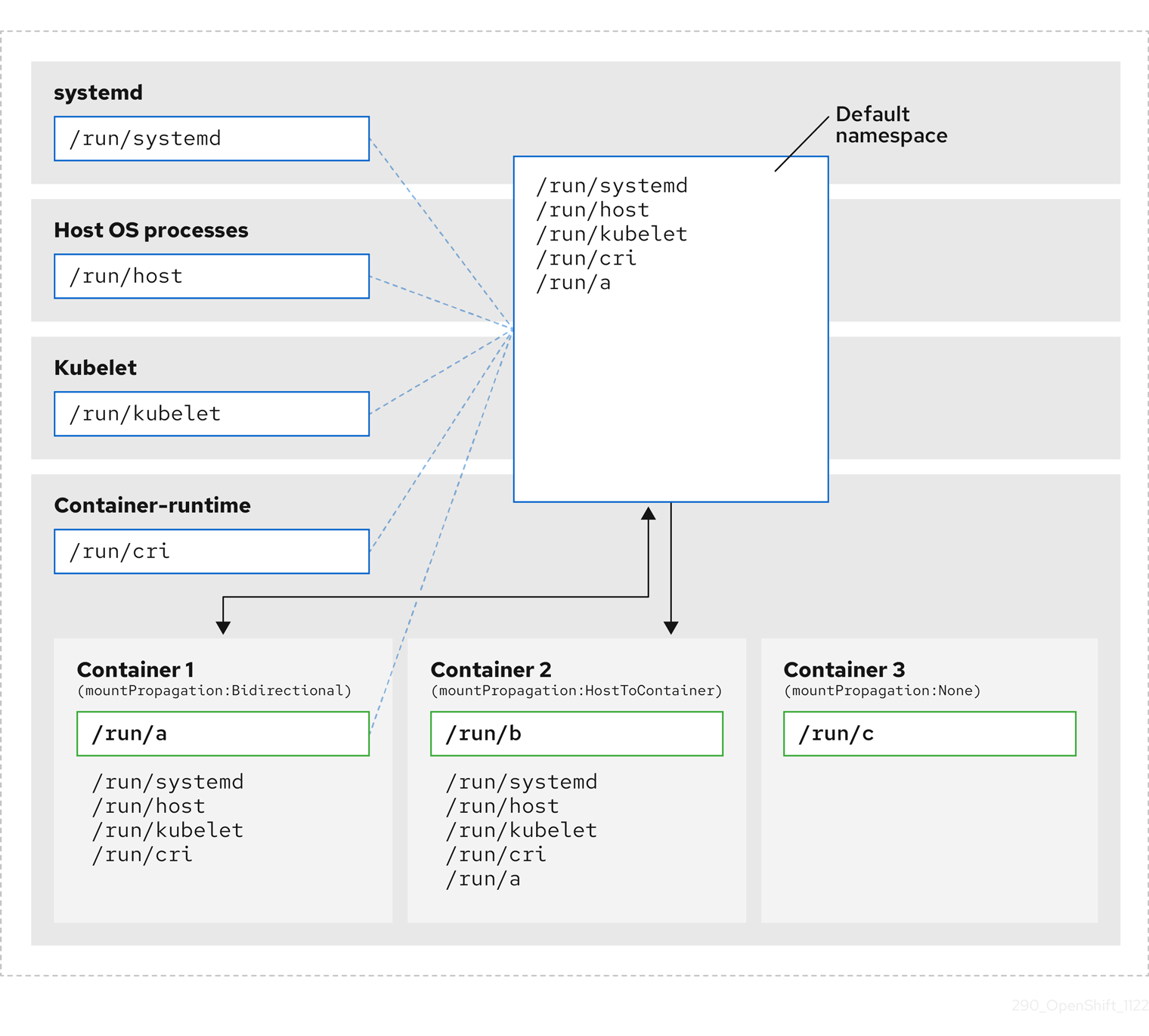
ここでは、systemd、ホストオペレーティングシステムプロセス、kubelet、およびコンテナーランタイムが単一のマウント namespace を共有していることがわかります。
- systemd、ホストオペレーティングシステムプロセス、kubelet、およびコンテナーランタイムはそれぞれ、すべてのマウントポイントにアクセスして可視化できます。
-
コンテナー 1 は、双方向のマウント伝達で設定され、systemd およびホストマウント、kubelet および CRI-O マウントにアクセスできます。
/run/aなどのコンテナー 1 で開始されたマウントは、systemd、ホスト OS プロセス、kubelet、コンテナーランタイム、およびホストからコンテナーへのまたは双方向のマウント伝達が設定されている他のコンテナー (コンテナー 2 のように) に表示されます。 -
ホストからコンテナーへのマウント伝達で設定されたコンテナー 2 は、systemd およびホストマウント、kubelet および CRI-O マウントにアクセスできます。
/run/bなどのコンテナー 2 で発生したマウントは、他のコンテキストからは見えません。 -
マウント伝達なしで設定されたコンテナー 3 には、外部マウントポイントが表示されません。
/run/cなどのコンテナー 3 で開始されたマウントは、他のコンテキストからは見えません。
次の図は、カプセル化後のシステム状態を示しています。

- メインの systemd プロセスは、Kubernetes 固有のマウントポイントの不要なスキャンに専念しなくなりました。systemd 固有のホストマウントポイントのみを監視します。
- ホストオペレーティングシステムプロセスは、systemd およびホストマウントポイントにのみアクセスできます。
- CRI-O と kubelet の両方に個別のマウント namespace を使用すると、すべてのコンテナー固有のマウントが systemd または他のホスト OS の対話から完全に分離されます。
-
コンテナー 1 の動作は変更されていませんが、
/run/aなどのコンテナーが作成するマウントが systemd またはホスト OS プロセスから認識されなくなります。kubelet、CRI-O、およびホストからコンテナーまたは双方向のマウント伝達が設定されている他のコンテナー (コンテナー 2 など) からは引き続き表示されます。 - コンテナー 2 とコンテナー 3 の動作は変更されていません。
10.4.2. マウント namespace のカプセル化の設定
クラスターがより少ないリソースオーバーヘッドで実行されるように、マウント namespace のカプセル化を設定できます。
マウント namespace のカプセル化はテクノロジープレビュー機能であり、デフォルトでは無効になっています。これを使用するには、機能を手動で有効にする必要があります。
前提条件
-
OpenShift CLI (
oc) がインストールされている。 -
cluster-admin権限を持つユーザーとしてログインしている。
手順
次の YAML を使用して、
mount_namespace_config.yamlという名前のファイルを作成します。apiVersion: machineconfiguration.openshift.io/v1 kind: MachineConfig metadata: labels: machineconfiguration.openshift.io/role: master name: 99-kubens-master spec: config: ignition: version: 3.2.0 systemd: units: - enabled: true name: kubens.service --- apiVersion: machineconfiguration.openshift.io/v1 kind: MachineConfig metadata: labels: machineconfiguration.openshift.io/role: worker name: 99-kubens-worker spec: config: ignition: version: 3.2.0 systemd: units: - enabled: true name: kubens.service次のコマンドを実行して、マウント namespace
MachineConfigCR を適用します。$ oc apply -f mount_namespace_config.yaml出力例
machineconfig.machineconfiguration.openshift.io/99-kubens-master created machineconfig.machineconfiguration.openshift.io/99-kubens-worker createdMachineConfigCR がクラスターに適用されるまで、最大 30 分かかる場合があります。次のコマンドを実行して、MachineConfigCR のステータスをチェックできます。$ oc get mcp出力例
NAME CONFIG UPDATED UPDATING DEGRADED MACHINECOUNT READYMACHINECOUNT UPDATEDMACHINECOUNT DEGRADEDMACHINECOUNT AGE master rendered-master-03d4bc4befb0f4ed3566a2c8f7636751 False True False 3 0 0 0 45m worker rendered-worker-10577f6ab0117ed1825f8af2ac687ddf False True False 3 1 1次のコマンドを実行した後、
MachineConfigCR がすべてのコントロールプレーンとワーカーノードに正常に適用されるまで待ちます。$ oc wait --for=condition=Updated mcp --all --timeout=30m出力例
machineconfigpool.machineconfiguration.openshift.io/master condition met machineconfigpool.machineconfiguration.openshift.io/worker condition met
検証
クラスターホストのカプセル化を確認するには、次のコマンドを実行します。
クラスターホストへのデバッグシェルを開きます。
$ oc debug node/<node_name>chrootセッションを開きます。sh-4.4# chroot /hostsystemd マウント namespace を確認します。
sh-4.4# readlink /proc/1/ns/mnt出力例
mnt:[4026531953]kubelet マウント namespace をチェックします。
sh-4.4# readlink /proc/$(pgrep kubelet)/ns/mnt出力例
mnt:[4026531840]CRI-O マウント namespace を確認します。
sh-4.4# readlink /proc/$(pgrep crio)/ns/mnt出力例
mnt:[4026531840]
これらのコマンドは、systemd、kubelet、およびコンテナーランタイムに関連付けられたマウント namespace を返します。OpenShift Container Platform では、コンテナーランタイムは CRI-O です。
上記の例のように、systemd が kubelet および CRI-O とは異なるマウント namespace にある場合、カプセル化が有効になります。3 つのプロセスすべてが同じマウント namespace にある場合、カプセル化は有効ではありません。
10.4.3. カプセル化された namespace の検査
Red Hat Enterprise Linux CoreOS (RHCOS) で利用可能な kubensenter スクリプトを使用して、デバッグまたは監査の目的でクラスターホストオペレーティングシステムの Kubernetes 固有のマウントポイントを検査できます。
クラスターホストへの SSH シェルセッションは、デフォルトの namespace にあります。SSH シェルプロンプトで Kubernetes 固有のマウントポイントを検査するには、ルートとして kubensenter スクリプトを実行する必要があります。kubensenter スクリプトは、マウントカプセル化の状態を認識しており、カプセル化が有効になっていない場合でも安全に実行できます。
oc debug リモートシェルセッションは、デフォルトで Kubernetes namespace 内で開始されます。oc debug を使用する場合、マウントポイントを検査するために kubensenter を実行する必要はありません。
カプセル化機能が有効になっていない場合、kubensenter findmnt コマンドと findmnt コマンドは、oc debug セッションで実行されているか SSH シェルプロンプトで実行されているかに関係なく、同じ出力を返します。
前提条件
-
OpenShift CLI (
oc) がインストールされている。 -
cluster-admin権限を持つユーザーとしてログインしている。 - クラスターホストへの SSH アクセスを設定しました。
手順
クラスターホストへのリモート SSH シェルを開きます。以下に例を示します。
$ ssh core@<node_name>root ユーザーとして、提供された
kubensenterスクリプトを使用してコマンドを実行します。Kubernetes namespace 内で単一のコマンドを実行するには、コマンドと任意の引数をkubensenterスクリプトに提供します。たとえば、Kubernetes namespace 内でfindmntコマンドを実行するには、次のコマンドを実行します。[core@control-plane-1 ~]$ sudo kubensenter findmnt出力例
kubensenter: Autodetect: kubens.service namespace found at /run/kubens/mnt TARGET SOURCE FSTYPE OPTIONS / /dev/sda4[/ostree/deploy/rhcos/deploy/32074f0e8e5ec453e56f5a8a7bc9347eaa4172349ceab9c22b709d9d71a3f4b0.0] | xfs rw,relatime,seclabel,attr2,inode64,logbufs=8,logbsize=32k,prjquota shm tmpfs ...Kubernetes namespace 内で新しいインタラクティブシェルを開始するには、引数を指定せずに
kubensenterスクリプトを実行します。[core@control-plane-1 ~]$ sudo kubensenter出力例
kubensenter: Autodetect: kubens.service namespace found at /run/kubens/mnt
10.4.4. カプセル化された namespace で追加サービスを実行する
ホスト OS で実行する機能に依存し、kubelet、CRI-O、またはコンテナー自体によって作成されたマウントポイントを表示できる監視ツールは、これらのマウントポイントを表示するためにコンテナーマウント namespace に入る必要があります。OpenShift Container Platform に付属する kubensenter スクリプトは、Kubernetes マウントポイント内で別のコマンドを実行し、既存のツールを適応させるために使用できます。
kubensenter スクリプトは、マウントカプセル化機能の状態を認識しており、カプセル化が有効になっていない場合でも安全に実行できます。その場合、スクリプトはデフォルトのマウント namespace で提供されたコマンドを実行します。
たとえば、systemd サービスを新しい Kubernetes マウント namespace 内で実行する必要がある場合は、サービスファイルを編集し、kubensenter で ExecStart= コマンドラインを使用します。
[Unit]
Description=Example service
[Service]
ExecStart=/usr/bin/kubensenter /path/to/original/command arg1 arg2第11章 ベアメタルホストの管理
OpenShift Container Platform をベアメタルクラスターにインストールする場合、クラスターに存在するベアメタルホストの machine および machineset カスタムリソース (CR) を使用して、ベアメタルノードをプロビジョニングし、管理できます。
11.1. ベアメタルホストおよびノードについて
Red Hat Enterprise Linux CoreOS (RHCOS) ベアメタルホストをクラスター内のノードとしてプロビジョニングするには、まずベアメタルホストハードウェアに対応する MachineSet カスタムリソース (CR) オブジェクトを作成します。ベアメタルホストコンピュートマシンセットは、お使いの設定に固有のインフラストラクチャーコンポーネントを記述します。特定の Kubernetes ラベルをこれらのコンピュートマシンセットに適用してから、インフラストラクチャーコンポーネントを更新して、それらのマシンでのみ実行されるようにします。
Machine CR は、metal3.io/autoscale-to-hosts アノテーションを含む関連する MachineSet をスケールアップする際に自動的に作成されます。OpenShift Container Platform は Machine CR を使用して、MachineSet CR で指定されるホストに対応するベアメタルノードをプロビジョニングします。
11.2. ベアメタルホストのメンテナンス
OpenShift Container Platform Web コンソールからクラスター内のベアメタルホストの詳細を維持することができます。Compute → Bare Metal Hosts に移動し、Actions ドロップダウンメニューからタスクを選択します。ここでは、BMC の詳細、ホストの起動 MAC アドレス、電源管理の有効化などの項目を管理できます。また、ホストのネットワークインターフェイスおよびドライブの詳細を確認することもできます。
ベアメタルホストをメンテナンスモードに移行できます。ホストをメンテナンスモードに移行すると、スケジューラーはすべての管理ワークロードを対応するベアメタルノードから移動します。新しいワークロードは、メンテナンスモードの間はスケジュールされません。
Web コンソールでベアメタルホストのプロビジョニングを解除することができます。ホストのプロビジョニング解除により以下のアクションが実行されます。
-
ベアメタルホスト CR に
cluster.k8s.io/delete-machine: trueのアノテーションを付けます。 - 関連するコンピュートマシンセットをスケールダウンします
デーモンセットおよび管理対象外の静的 Pod を別のノードに最初に移動することなく、ホストの電源をオフにすると、サービスの中断やデータの損失が生じる場合があります。
11.2.1. Web コンソールを使用したベアメタルホストのクラスターへの追加
Web コンソールのクラスターにベアメタルホストを追加できます。
前提条件
- RHCOS クラスターのベアメタルへのインストール
-
cluster-admin権限を持つユーザーとしてログインしている。
手順
- Web コンソールで、Compute → Bare Metal Hosts に移動します。
- Add Host → New with Dialog を選択します。
- 新規ベアメタルホストの一意の名前を指定します。
- Boot MAC address を設定します。
- Baseboard Management Console (BMC) Address を設定します。
- ホストのベースボード管理コントローラー (BMC) のユーザー認証情報を入力します。
- 作成後にホストの電源をオンにすることを選択し、Create を選択します。
- 利用可能なベアメタルホストの数に一致するようにレプリカ数をスケールアップします。Compute → MachineSets に移動し、Actions ドロップダウンメニューから Edit Machine count を選択してクラスター内のマシンレプリカ数を増やします。
oc scale コマンドおよび適切なベアメタルコンピュートマシンセットを使用して、ベアメタルノードの数を管理することもできます。
11.2.2. Web コンソールの YAML を使用したベアメタルホストのクラスターへの追加
ベアメタルホストを記述する YAML ファイルを使用して、Web コンソールのクラスターにベアメタルホストを追加できます。
前提条件
- クラスターで使用するために RHCOS コンピュートマシンをベアメタルインフラストラクチャーにインストールします。
-
cluster-admin権限を持つユーザーとしてログインしている。 -
ベアメタルホストの
SecretCR を作成します。
手順
- Web コンソールで、Compute → Bare Metal Hosts に移動します。
- Add Host → New from YAML を選択します。
以下の YAML をコピーして貼り付け、ホストの詳細で関連フィールドを変更します。
apiVersion: metal3.io/v1alpha1 kind: BareMetalHost metadata: name: <bare_metal_host_name> spec: online: true bmc: address: <bmc_address> credentialsName: <secret_credentials_name>1 disableCertificateVerification: True2 bootMACAddress: <host_boot_mac_address>- Create を選択して YAML を保存し、新規ベアメタルホストを作成します。
利用可能なベアメタルホストの数に一致するようにレプリカ数をスケールアップします。Compute → MachineSets に移動し、Actions ドロップダウンメニューから Edit Machine count を選択してクラスター内のマシン数を増やします。
注記oc scaleコマンドおよび適切なベアメタルコンピュートマシンセットを使用して、ベアメタルノードの数を管理することもできます。
11.2.3. 利用可能なベアメタルホストの数へのマシンの自動スケーリング
利用可能な BareMetalHost オブジェクトの数に一致する Machine オブジェクトの数を自動的に作成するには、metal3.io/autoscale-to-hosts アノテーションを MachineSet オブジェクトに追加します。
前提条件
-
クラスターで使用する RHCOS ベアメタルコンピュートマシンをインストールし、対応する
BareMetalHostオブジェクトを作成している。 -
OpenShift Container Platform CLI (
oc) をインストールしている。 -
cluster-admin権限を持つユーザーとしてログインしている。
手順
metal3.io/autoscale-to-hostsアノテーションを追加して、自動スケーリング用に設定するコンピュートマシンセットにアノテーションを付けます。<machineset>をコンピュートマシンセットの名前に置き換えます。$ oc annotate machineset <machineset> -n openshift-machine-api 'metal3.io/autoscale-to-hosts=<any_value>'新しいスケーリングされたマシンが起動するまで待ちます。
BareMetalHost オブジェクトを使用してクラスター内にマシンを作成し、その後ラベルまたはセレクターが BareMetalHost で変更される場合、BareMetalHost オブジェクトは Machine オブジェクトが作成された MachineSet に対して引き続きカウントされます。
11.2.4. プロビジョナーノードからのベアメタルホストの削除
特定の状況では、プロビジョナーノードからベアメタルホストを一時的に削除する場合があります。たとえば、OpenShift Container Platform 管理コンソールを使用して、または Machine Config Pool の更新の結果として、ベアメタルホストの再起動がトリガーされたプロビジョニング中に、OpenShift Container Platform は統合された Dell Remote Access Controller (iDrac) にログインし、ジョブキューの削除を発行します。
利用可能な BareMetalHost オブジェクトの数と一致する数の Machine オブジェクトを管理しないようにするには、baremetalhost.metal3.io/detached アノテーションを MachineSet オブジェクトに追加します。
このアノテーションは、Provisioned、ExternallyProvisioned、または Ready/Available 状態の BareMetalHost オブジェクトに対してのみ効果があります。
前提条件
-
クラスターで使用する RHCOS ベアメタルコンピュートマシンをインストールし、対応する
BareMetalHostオブジェクトを作成している。 -
OpenShift Container Platform CLI (
oc) をインストールしている。 -
cluster-admin権限を持つユーザーとしてログインしている。
手順
プロビジョナーノードから削除するコンピューティングマシンセットに、
baremetalhost.metal3.io/detachedアノテーションを追加してアノテーションを付けます。$ oc annotate machineset <machineset> -n openshift-machine-api 'baremetalhost.metal3.io/detached'新しいマシンが起動するまで待ちます。
注記BareMetalHostオブジェクトを使用してクラスター内にマシンを作成し、その後ラベルまたはセレクターがBareMetalHostで変更される場合、BareMetalHostオブジェクトはMachineオブジェクトが作成されたMachineSetに対して引き続きカウントされます。プロビジョニングのユースケースでは、次のコマンドを使用して、再起動が完了した後にアノテーションを削除します。
$ oc annotate machineset <machineset> -n openshift-machine-api 'baremetalhost.metal3.io/detached-'
11.2.5. ベアメタルホストの電源をオフにする
ベアメタルクラスターホストの電源は、Web コンソールからオフにするか、OpenShift CLI (oc) を使用してクラスター内でパッチを適用することでオフにできます。ホストの電源をオフにする前に、ノードにスケジュール対象外 (unschedulable) のマークを付け、ノードからすべての Pod およびワークロードをドレインする必要があります。
前提条件
- クラスターで使用するために、ベアメタルインフラストラクチャーに RHCOS コンピュートマシンをインストールしている。
-
cluster-admin権限を持つユーザーとしてログインしている。 -
管理対象となるようにホストを設定し、クラスターホストの BMC 認証情報を追加している。BMC 認証情報を追加するには、クラスターで
Secretカスタムリソース (CR) を適用するか、Web コンソールにログインして管理対象となるようにベアメタルホストを設定します。
手順
Web コンソールで、電源をオフにするノードをスケジュール対象外としてマークします。以下の手順を実行します。
- Nodes に移動し、電源をオフにするノードを選択します。Actions メニューを展開し、Mark as unschedulable を選択します。
- Pod デプロイメントを調整するか、またはノードでワークロードをゼロにスケールダウンして、ノード上で実行中の Pod を手動で削除または再配置します。ドレインプロセスが完了するまで待ちます。
- Compute → Bare Metal Hosts に移動します。
- 電源をオフにするベアメタルホストの Options メニュー を展開し、Power Off を選択します。Immediate power off を選択します。
または、
ocを使用して、電源をオフにするホストのBareMetalHostリソースにパッチを適用できます。管理対象ベアメタルホストの名前を取得します。以下のコマンドを実行します。
$ oc get baremetalhosts -n openshift-machine-api -o jsonpath='{range .items[*]}{.metadata.name}{"\t"}{.status.provisioning.state}{"\n"}{end}'出力例
master-0.example.com managed master-1.example.com managed master-2.example.com managed worker-0.example.com managed worker-1.example.com managed worker-2.example.com managedノードをスケジューリング対象外としてマークします。
$ oc adm cordon <bare_metal_host>1 - 1
<bare_metal_host>は、シャットダウンするホストです (例:worker-2.example.com)。
ノード上のすべての Pod の drain (Pod の退避) を実行します。
$ oc adm drain <bare_metal_host> --force=trueレプリケーションコントローラーでサポートされる Pod は、クラスター内の他の利用可能なノードに再スケジュールされます。
ベアメタルホストの電源を安全にオフにします。以下のコマンドを実行します。
$ oc patch <bare_metal_host> --type json -p '[{"op": "replace", "path": "/spec/online", "value": false}]'ホストの電源をオンにしたら、ノードをワークロードに対してスケジュール可能な状態にします。以下のコマンドを実行します。
$ oc adm uncordon <bare_metal_host>
第12章 Bare Metal Event Relay を使用したベアメタルイベントのモニタリング
Bare Metal Event Relay はテクノロジープレビュー機能です。テクノロジープレビュー機能は、Red Hat 製品サポートのサービスレベルアグリーメント (SLA) の対象外であり、機能的に完全ではない場合があります。Red Hat は、実稼働環境でこれらを使用することを推奨していません。テクノロジープレビュー機能は、最新の製品機能をいち早く提供して、開発段階で機能のテストを行い、フィードバックを提供していただくことを目的としています。
Red Hat のテクノロジープレビュー機能のサポート範囲に関する詳細は、テクノロジープレビュー機能のサポート範囲 を参照してください。
12.1. ベアメタルイベント
Bare Metal Event Relay Operator は非推奨になりました。Bare Metal Event Relay Operator を使用してベアメタルホストを監視する機能は、今後の OpenShift Container Platform リリースでは削除される予定です。
Bare Metal Event Relay を使用して、OpenShift Container Platform クラスターで実行されるアプリケーションを、基礎となるベアメタルホストで生成されるイベントにサブスクライブします。Redfish サービスは、ノードでイベントをパブリッシュし、サブスクライブされたアプリケーションに高度なメッセージキューでイベントを送信します。
ベアメタルイベントは、Distributed Management Task Force (DMTF) のガイダンスに基づいて開発されたオープン Redfish 標準に基づいています。Redfish は、REST API を使用してセキュアな業界標準プロトコルを提供します。このプロトコルは、分散された、コンバージドまたはソフトウェア定義のリソースおよびインフラストラクチャーの管理に使用されます。
Redfish から公開されるハードウェア関連のイベントには、以下が含まれます。
- 温度制限の違反
- サーバーステータス
- fan ステータス
Bare Metal Event Relay Operator をデプロイし、アプリケーションをサービスにサブスクライブして、ベアメタルイベントの使用を開始します。Bare Metal Event Relay Operator は Redfish ベアメタルイベントサービスのライフサイクルをインストールし、管理します。
Bare Metal Event Relay は、ベアメタルインフラストラクチャーにプロビジョニングされる単一ノードクラスターの Redfish 対応デバイスでのみ機能します。
12.2. ベアメタルイベントの仕組み
Bare Metal Event Relay により、ベアメタルクラスターで実行されるアプリケーションが Redfish ハードウェアの変更や障害に迅速に対応することができます。たとえば、温度のしきい値の違反、fan の障害、ディスク損失、電源停止、メモリー障害などが挙げられます。これらのハードウェアイベントは、HTTP トランスポートまたは AMQP メカニズムを使用して配信されます。メッセージングサービスのレイテンシーは 10 ミリ秒から 20 ミリ秒です。
Bare Metal Event Relay により、ハードウェアイベントでパブリッシュ - サブスクライブサービスを使用できます。アプリケーションは、REST API を使用してイベントをサブスクライブできます。Bare Metal Event Relay は、Redfish OpenAPI v1.8 以降に準拠するハードウェアをサポートします。
12.2.1. Bare Metal Event Relay データフロー
以下の図は、ベアメタルイベントのデータフローの例を示しています。
図12.1 Bare Metal Event Relay データフロー
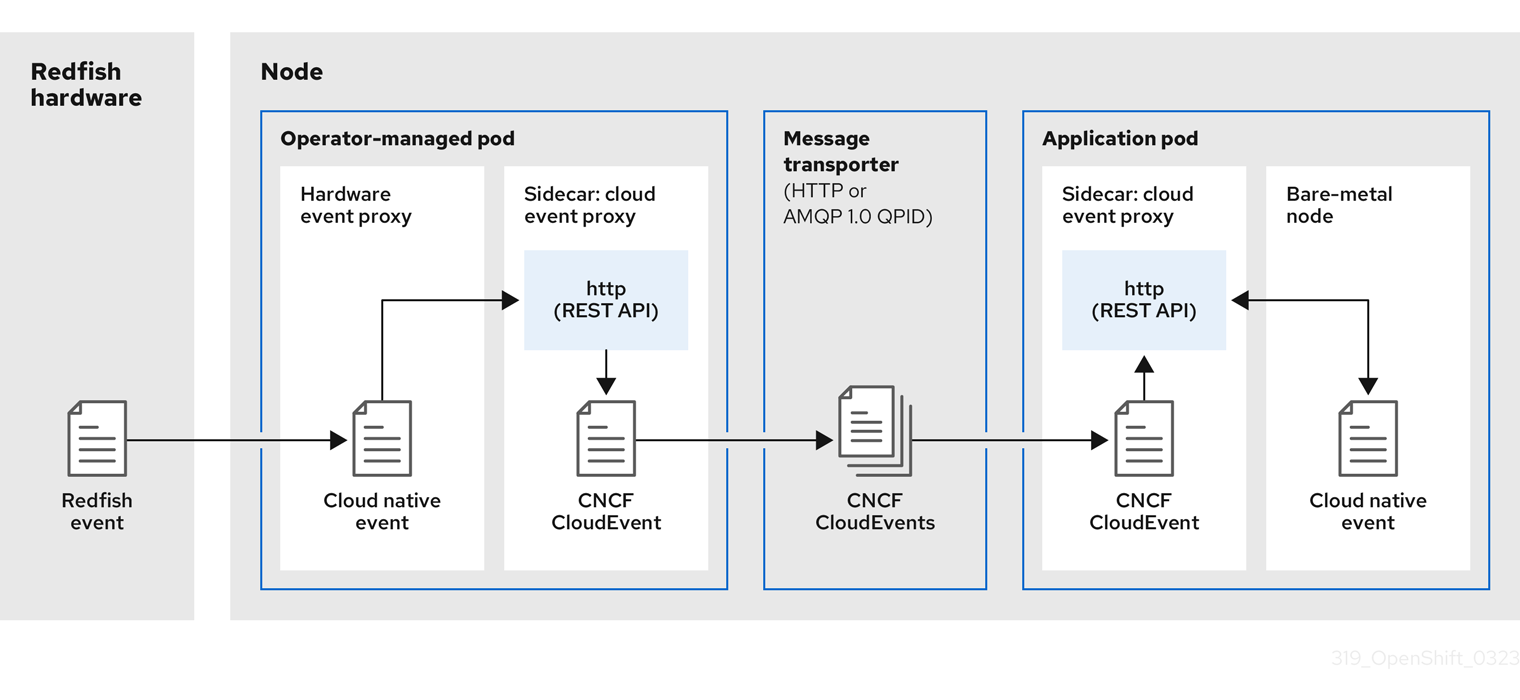
12.2.1.1. Operator 管理の Pod
Operator はカスタムリソースを使用して、HardwareEvent CR を使用して Bare Metal Event Relay およびそのコンポーネントが含まれる Pod を管理します。
12.2.1.2. Bare Metal イベントリレー
起動時に、Bare Metal Event Relay は Redfish API をクエリーし、カスタムレジストリーを含むすべてのメッセージレジストリーをダウンロードします。その後、Bare Metal Event Relay は Redfish ハードウェアからサブスクライブされたイベントを受信し始めます。
Bare Metal Event Relay により、ベアメタルクラスターで実行されるアプリケーションが Redfish ハードウェアの変更や障害に迅速に対応することができます。たとえば、温度のしきい値の違反、fan の障害、ディスク損失、電源停止、メモリー障害などが挙げられます。イベントは HardwareEvent CR を使用してレポートされます。
12.2.1.3. クラウドネイティブイベント
クラウドネイティブイベント (CNE) は、イベントデータの形式を定義する REST API 仕様です。
12.2.1.4. CNCF CloudEvents
CloudEvents は、イベントデータの形式を定義するために Cloud Native Computing Foundation (CNCF) によって開発されたベンダーに依存しない仕様です。
12.2.1.5. HTTP トランスポートまたは AMQP ディスパッチルーター
HTTP トランスポートまたは AMQP ディスパッチルーターは、パブリッシャーとサブスクライバー間のメッセージ配信サービスを行います。
HTTP トランスポートは、PTP およびベアメタルイベントのデフォルトのトランスポートです。可能な場合、PTP およびベアメタルイベントには AMQP ではなく HTTP トランスポートを使用してください。AMQ Interconnect は、2024 年 6 月 30 日で EOL になります。AMQ Interconnect の延長ライフサイクルサポート (ELS) は 2029 年 11 月 29 日に終了します。詳細は、Red Hat AMQ Interconnect のサポートステータス を参照してください。
12.2.1.6. クラウドイベントプロキシーサイドカー
クラウドイベントプロキシーサイドカーコンテナーイメージは O-RAN API 仕様をベースとしており、ハードウェアイベントのパブリッシュ - サブスクライブイベントフレームワークを提供します。
12.2.2. サービスを解析する Redfish メッセージ
Bare Metal Event Relay は Redfish イベントを処理する他に、Message プロパティーなしでイベントのメッセージ解析を提供します。プロキシーは、起動時にハードウェアからベンダー固有のレジストリーを含むすべての Redfish メッセージブローカーをダウンロードします。イベントに Message プロパティーが含まれていない場合、プロキシーは Redfish メッセージレジストリーを使用して Message プロパティーおよび Resolution プロパティーを作成し、イベントをクラウドイベントフレームワークに渡す前にイベントに追加します。このサービスにより、Redfish イベントでメッセージサイズが小さくなり、送信レイテンシーが短縮されます。
12.2.3. CLI を使用した Bare Metal Event リレーのインストール
クラスター管理者は、CLI を使用して Bare Metal Event Relay Operator をインストールできます。
前提条件
- RedFish 対応ベースボード管理コントローラー (BMC) を持つノードでベアメタルハードウェアにインストールされるクラスター。
-
OpenShift CLI (
oc) がインストールされている。 -
cluster-admin権限を持つユーザーとしてログインしている。
手順
Bare Metal Event Relay の namespace を作成します。
以下の YAML を
bare-metal-events-namespace.yamlファイルに保存します。apiVersion: v1 kind: Namespace metadata: name: openshift-bare-metal-events labels: name: openshift-bare-metal-events openshift.io/cluster-monitoring: "true"namespaceCR を作成します。$ oc create -f bare-metal-events-namespace.yaml
Bare Metal Event Relay Operator の Operator グループを作成します。
以下の YAML を
bare-metal-events-operatorgroup.yamlファイルに保存します。apiVersion: operators.coreos.com/v1 kind: OperatorGroup metadata: name: bare-metal-event-relay-group namespace: openshift-bare-metal-events spec: targetNamespaces: - openshift-bare-metal-eventsOperatorGroupCR を作成します。$ oc create -f bare-metal-events-operatorgroup.yaml
Bare Metal Event Relay にサブスクライブします。
以下の YAML を
bare-metal-events-sub.yamlファイルに保存します。apiVersion: operators.coreos.com/v1alpha1 kind: Subscription metadata: name: bare-metal-event-relay-subscription namespace: openshift-bare-metal-events spec: channel: "stable" name: bare-metal-event-relay source: redhat-operators sourceNamespace: openshift-marketplaceSubscriptionCR を作成します。$ oc create -f bare-metal-events-sub.yaml
検証
Bare Metal Event Relay Operator がインストールされていることを確認するには、以下のコマンドを実行します。
$ oc get csv -n openshift-bare-metal-events -o custom-columns=Name:.metadata.name,Phase:.status.phase12.2.4. Web コンソールを使用した Bare Metal Event リレーのインストール
クラスター管理者は、Web コンソールを使用して Bare Metal Event Relay Operator をインストールできます。
前提条件
- RedFish 対応ベースボード管理コントローラー (BMC) を持つノードでベアメタルハードウェアにインストールされるクラスター。
-
cluster-admin権限を持つユーザーとしてログインしている。
手順
OpenShift Container Platform Web コンソールを使用して Bare Metal Event Relay をインストールします。
- OpenShift Container Platform Web コンソールで、Operators → OperatorHub をクリックします。
- 利用可能な Operator のリストから Bare Metal Event Relay を選択し、Install をクリックします。
- Install Operatorページで、Namespace を選択または作成し、openshift-bare-metal-events を選択して、Install をクリックします。
検証
オプション: 以下のチェックを実行して、Operator が正常にインストールされていることを確認できます。
- Operators → Installed Operators ページに切り替えます。
Status が InstallSucceeded の状態で、Bare Metal Event Relay がプロジェクトにリスト表示されていることを確認します。
注記インストール時に、Operator は Failed ステータスを表示する可能性があります。インストールが後に InstallSucceeded メッセージを出して正常に実行される場合は、Failed メッセージを無視できます。
Operator がインストール済みとして表示されない場合に、さらにトラブルシューティングを実行します。
- Operators → Installed Operators ページに移動し、Operator Subscriptions および Install Plans タブで Status にエラーがあるかどうかを検査します。
- Workloads → Pods ページに移動し、プロジェクト namespace で Pod のログを確認します。
12.3. AMQ メッセージングバスのインストール
ノードのパブリッシャーとサブスクライバー間で Redfish ベアメタルイベント通知を渡すには、ノード上でローカルを実行するように AMQ メッセージングバスをインストールし、設定できます。これは、クラスターで使用するために AMQ Interconnect Operator をインストールして行います。
HTTP トランスポートは、PTP およびベアメタルイベントのデフォルトのトランスポートです。可能な場合、PTP およびベアメタルイベントには AMQP ではなく HTTP トランスポートを使用してください。AMQ Interconnect は、2024 年 6 月 30 日で EOL になります。AMQ Interconnect の延長ライフサイクルサポート (ELS) は 2029 年 11 月 29 日に終了します。詳細は、Red Hat AMQ Interconnect のサポートステータス を参照してください。
前提条件
-
OpenShift Container Platform CLI (
oc) をインストールします。 -
cluster-admin権限を持つユーザーとしてログインしている。
手順
-
AMQ Interconnect Operator を独自の
amq-interconnectnamespace にインストールします。AMQ Interconnect Operator のインストール について参照してください。
検証
AMQ Interconnect Operator が利用可能で、必要な Pod が実行されていることを確認します。
$ oc get pods -n amq-interconnect出力例
NAME READY STATUS RESTARTS AGE amq-interconnect-645db76c76-k8ghs 1/1 Running 0 23h interconnect-operator-5cb5fc7cc-4v7qm 1/1 Running 0 23h必要な
bare-metal-event-relayベアメタルイベントプロデューサー Pod がopenshift-bare-metal-eventsnamespace で実行されていることを確認します。$ oc get pods -n openshift-bare-metal-events出力例
NAME READY STATUS RESTARTS AGE hw-event-proxy-operator-controller-manager-74d5649b7c-dzgtl 2/2 Running 0 25s
12.4. クラスターノードの Redfish BMC ベアメタルイベントのサブスクライブ
ノードの BMCEventSubscription カスタムリソース (CR) の作成、イベント用の HardwareEvent CR の作成、BMC の Secret CR の作成を行うことで、クラスター内のノードで生成される Redfish BMC イベントにサブスクライブできます。
12.4.1. ベアメタルイベントのサブスクライブ
ベースボード管理コントローラー (BMC) を設定して、ベアメタルイベントを OpenShift Container Platform クラスターで実行されているサブスクライブされたアプリケーションに送信できます。Redfish ベアメタルイベントの例には、デバイス温度の増加やデバイスの削除が含まれます。REST API を使用して、アプリケーションをベアメタルイベントにサブスクライブします。
BMCEventSubscription カスタムリソース (CR) は、Redfish をサポートし、ベンダーインターフェイスが redfish または idrac-redfish に設定されている物理ハードウェアにのみ作成できます。
BMCEventSubscription CR を使用して事前定義された Redfish イベントにサブスクライブします。Redfish 標準は、特定のアラートおよびしきい値を作成するオプションを提供しません。例えば、エンクロージャーの温度が摂氏 40 度を超えたときにアラートイベントを受け取るには、ベンダーの推奨に従ってイベントを手動で設定する必要があります。
BMCEventSubscription CR を使用してノードのベアメタルイベントをサブスクライブするには、以下の手順を行います。
前提条件
-
OpenShift CLI (
oc) がインストールされている。 -
cluster-admin権限を持つユーザーとしてログインしている。 - BMC のユーザー名およびパスワードを取得します。
クラスターに Redfish が有効な Baseboard Management Controller (BMC) を持つベアメタルノードをデプロイし、BMC で Redfish イベントを有効にします。
注記特定のハードウェアで Redfish イベントを有効にすることは、この情報の対象範囲外です。特定のハードウェアの Redfish イベントを有効にする方法は、BMC の製造元のドキュメントを参照してください。
手順
以下の
curlコマンドを実行して、ノードのハードウェアで RedfishEventServiceが有効になっていることを確認します。$ curl https://<bmc_ip_address>/redfish/v1/EventService --insecure -H 'Content-Type: application/json' -u "<bmc_username>:<password>"ここでは、以下のようになります。
- bmc_ip_address
- Redfish イベントが生成される BMC の IP アドレスです。
出力例
{ "@odata.context": "/redfish/v1/$metadata#EventService.EventService", "@odata.id": "/redfish/v1/EventService", "@odata.type": "#EventService.v1_0_2.EventService", "Actions": { "#EventService.SubmitTestEvent": { "EventType@Redfish.AllowableValues": ["StatusChange", "ResourceUpdated", "ResourceAdded", "ResourceRemoved", "Alert"], "target": "/redfish/v1/EventService/Actions/EventService.SubmitTestEvent" } }, "DeliveryRetryAttempts": 3, "DeliveryRetryIntervalSeconds": 30, "Description": "Event Service represents the properties for the service", "EventTypesForSubscription": ["StatusChange", "ResourceUpdated", "ResourceAdded", "ResourceRemoved", "Alert"], "EventTypesForSubscription@odata.count": 5, "Id": "EventService", "Name": "Event Service", "ServiceEnabled": true, "Status": { "Health": "OK", "HealthRollup": "OK", "State": "Enabled" }, "Subscriptions": { "@odata.id": "/redfish/v1/EventService/Subscriptions" } }以下のコマンドを実行して、クラスターの Bare Metal Event Relay サービスのルートを取得します。
$ oc get route -n openshift-bare-metal-events出力例
NAME HOST/PORT PATH SERVICES PORT TERMINATION WILDCARD hw-event-proxy hw-event-proxy-openshift-bare-metal-events.apps.compute-1.example.com hw-event-proxy-service 9087 edge NoneBMCEventSubscriptionリソースを作成し、Redfish イベントにサブスクライブします。以下の YAML を
bmc_sub.yamlファイルに保存します。apiVersion: metal3.io/v1alpha1 kind: BMCEventSubscription metadata: name: sub-01 namespace: openshift-machine-api spec: hostName: <hostname>1 destination: <proxy_service_url>2 context: ''- 1
- Redfish イベントが生成されるワーカーノードの名前または UUID を指定します。
- 2
- ベアメタルイベントプロキシーサービスを指定します (例:
https://hw-event-proxy-openshift-bare-metal-events.apps.compute-1.example.com/webhook)。
BMCEventSubscriptionCR を作成します。$ oc create -f bmc_sub.yaml
オプション: BMC イベントサブスクリプションを削除するには、以下のコマンドを実行します。
$ oc delete -f bmc_sub.yamlオプション:
BMCEventSubscriptionCR を作成せずに Redfish イベントサブスクリプションを手動で作成するには、BMC のユーザー名およびパスワードを指定して以下のcurlコマンドを実行します。$ curl -i -k -X POST -H "Content-Type: application/json" -d '{"Destination": "https://<proxy_service_url>", "Protocol" : "Redfish", "EventTypes": ["Alert"], "Context": "root"}' -u <bmc_username>:<password> 'https://<bmc_ip_address>/redfish/v1/EventService/Subscriptions' –vここでは、以下のようになります。
- proxy_service_url
-
ベアメタルイベントプロキシーサービスです (例:
https://hw-event-proxy-openshift-bare-metal-events.apps.compute-1.example.com/webhook)。
- bmc_ip_address
- Redfish イベントが生成される BMC の IP アドレスです。
出力例
HTTP/1.1 201 Created Server: AMI MegaRAC Redfish Service Location: /redfish/v1/EventService/Subscriptions/1 Allow: GET, POST Access-Control-Allow-Origin: * Access-Control-Expose-Headers: X-Auth-Token Access-Control-Allow-Headers: X-Auth-Token Access-Control-Allow-Credentials: true Cache-Control: no-cache, must-revalidate Link: <http://redfish.dmtf.org/schemas/v1/EventDestination.v1_6_0.json>; rel=describedby Link: <http://redfish.dmtf.org/schemas/v1/EventDestination.v1_6_0.json> Link: </redfish/v1/EventService/Subscriptions>; path= ETag: "1651135676" Content-Type: application/json; charset=UTF-8 OData-Version: 4.0 Content-Length: 614 Date: Thu, 28 Apr 2022 08:47:57 GMT
12.4.2. curl を使用した Redfish ベアメタルイベントサブスクリプションのクエリー
一部のハードウェアベンダーは Redfish ハードウェアイベントサブスクリプションの量を制限します。curl を使用して Redfish イベントサブスクリプションの数をクエリーできます。
前提条件
- BMC のユーザー名およびパスワードを取得します。
- クラスターに Redfish が有効な Baseboard Management Controller (BMC) を持つベアメタルノードをデプロイし、BMC で Redfish ハードウェアイベントを有効にします。
手順
以下の
curlコマンドを実行して、BMC の現在のサブスクリプションを確認します。$ curl --globoff -H "Content-Type: application/json" -k -X GET --user <bmc_username>:<password> https://<bmc_ip_address>/redfish/v1/EventService/Subscriptionsここでは、以下のようになります。
- bmc_ip_address
- Redfish イベントが生成される BMC の IP アドレスです。
出力例
% Total % Received % Xferd Average Speed Time Time Time Current Dload Upload Total Spent Left Speed 100 435 100 435 0 0 399 0 0:00:01 0:00:01 --:--:-- 399 { "@odata.context": "/redfish/v1/$metadata#EventDestinationCollection.EventDestinationCollection", "@odata.etag": "" 1651137375 "", "@odata.id": "/redfish/v1/EventService/Subscriptions", "@odata.type": "#EventDestinationCollection.EventDestinationCollection", "Description": "Collection for Event Subscriptions", "Members": [ { "@odata.id": "/redfish/v1/EventService/Subscriptions/1" }], "Members@odata.count": 1, "Name": "Event Subscriptions Collection" }この例では、サブスクリプションが 1 つ設定されています (
/redfish/v1/EventService/Subscriptions/1)。オプション:
curlで/redfish/v1/EventService/Subscriptions/1サブスクリプションを削除するには、BMC のユーザー名およびパスワードを指定して以下のコマンドを実行します。$ curl --globoff -L -w "%{http_code} %{url_effective}\n" -k -u <bmc_username>:<password >-H "Content-Type: application/json" -d '{}' -X DELETE https://<bmc_ip_address>/redfish/v1/EventService/Subscriptions/1ここでは、以下のようになります。
- bmc_ip_address
- Redfish イベントが生成される BMC の IP アドレスです。
12.4.3. ベアメタルイベントおよびシークレット CR の作成
ベアメタルイベントの使用を開始するには、Redfish ハードウェアが存在するホストの HardwareEvent カスタムリソース (CR) を作成します。ハードウェアイベントと障害は hw-event-proxy ログに報告されます。
前提条件
-
OpenShift Container Platform CLI (
oc) がインストールされている。 -
cluster-admin権限を持つユーザーとしてログインしている。 - Bare Metal Event Relay をインストールしている。
-
BMC Redfish ハードウェア用の
BMCEventSubscriptionCR を作成している。
手順
HardwareEventカスタムリソース (CR) を作成します。注記複数の
HardwareEventリソースは許可されません。以下の YAML を
hw-event.yamlファイルに保存します。apiVersion: "event.redhat-cne.org/v1alpha1" kind: "HardwareEvent" metadata: name: "hardware-event" spec: nodeSelector: node-role.kubernetes.io/hw-event: ""1 logLevel: "debug"2 msgParserTimeout: "10"3 - 1
- 必須。
nodeSelectorフィールドを使用して、指定されたラベルを持つノードをターゲットにします (例:node-role.kubernetes.io/hw-event: ""。注記OpenShift Container Platform 4.13 以降でベアメタルイベントに HTTP トランスポートを使用する場合、
HardwareEventリソースのspec.transportHostフィールドを設定する必要はありません。ベアメタルイベントに AMQP トランスポートを使用する場合にのみtransportHostを設定します。 - 2
- オプション: デフォルト値は
debugです。hw-event-proxyログでログレベルを設定します。fatal、error、warning、info、debug、traceのログレベルを利用できます。 - 3
- オプション: Message Parser のタイムアウト値をミリ秒単位で設定します。メッセージ解析要求がタイムアウト期間内に応答しない場合には、元のハードウェアイベントメッセージはクラウドネイティブイベントフレームワークに渡されます。デフォルト値は 10 です。
クラスターで
HardwareEventCR を適用します。$ oc create -f hardware-event.yaml
BMC ユーザー名およびパスワード
SecretCR を作成します。これにより、ハードウェアイベントプロキシーがベアメタルホストの Redfish メッセージレジストリーにアクセスできるようになります。以下の YAML を
hw-event-bmc-secret.yamlファイルに保存します。apiVersion: v1 kind: Secret metadata: name: redfish-basic-auth type: Opaque stringData:1 username: <bmc_username> password: <bmc_password> # BMC host DNS or IP address hostaddr: <bmc_host_ip_address>- 1
stringDataの下に、さまざまな項目のプレーンテキスト値を入力します。
SecretCR を作成します。$ oc create -f hw-event-bmc-secret.yaml
12.5. ベアメタルイベント REST API リファレンスへのアプリケーションのサブスクライブ
ベアメタルイベント REST API を使用して、親ノードで生成されるベアメタルイベントにアプリケーションをサブスクライブします。
リソースアドレス /cluster/node/<node_name>/redfish/event を使用して、アプリケーションを Redfish イベントにサブスクライブします。<node_name> は、アプリケーションを実行するクラスターノードに置き換えます。
cloud-event-consumer アプリケーションコンテナーおよび cloud-event-proxy サイドカーコンテナーを別のアプリケーション Pod にデプロイします。cloud-event-consumer アプリケーションは、アプリケーション Pod の cloud-event-proxy コンテナーにサブスクライブします。
次の API エンドポイントを使用して、アプリケーション Pod の http://localhost:8089/api/ocloudNotifications/v1/ にある cloud-event-proxy コンテナーによって投稿された Redfish イベントに cloud-event-consumer アプリケーションをサブスクライブします。
/api/ocloudNotifications/v1/subscriptions-
POST: 新しいサブスクリプションを作成します。 -
GET: サブスクリプションの一覧を取得します。
-
/api/ocloudNotifications/v1/subscriptions/<subscription_id>-
PUT: 指定されたサブスクリプション ID に新しいステータス ping 要求を作成します。
-
/api/ocloudNotifications/v1/health-
GET:ocloudNotificationsAPI の正常性ステータスを返します
-
9089 は、アプリケーション Pod にデプロイされた cloud-event-consumer コンテナーのデフォルトポートです。必要に応じて、アプリケーションに異なるポートを設定できます。
api/ocloudNotifications/v1/subscriptions
HTTP メソッド
GET api/ocloudNotifications/v1/subscriptions
説明
サブスクリプションのリストを返します。サブスクリプションが存在する場合は、サブスクリプションの一覧とともに 200 OK のステータスコードが返されます。
API 応答の例
[
{
"id": "ca11ab76-86f9-428c-8d3a-666c24e34d32",
"endpointUri": "http://localhost:9089/api/ocloudNotifications/v1/dummy",
"uriLocation": "http://localhost:8089/api/ocloudNotifications/v1/subscriptions/ca11ab76-86f9-428c-8d3a-666c24e34d32",
"resource": "/cluster/node/openshift-worker-0.openshift.example.com/redfish/event"
}
]HTTP メソッド
POST api/ocloudNotifications/v1/subscriptions
説明
新しいサブスクリプションを作成します。サブスクリプションが正常に作成されるか、すでに存在する場合は、201 Created ステータスコードが返されます。
| パラメーター | 型 |
|---|---|
| subscription | data |
ペイロードの例
{
"uriLocation": "http://localhost:8089/api/ocloudNotifications/v1/subscriptions",
"resource": "/cluster/node/openshift-worker-0.openshift.example.com/redfish/event"
}api/ocloudNotifications/v1/subscriptions/<subscription_id>
HTTP メソッド
GET api/ocloudNotifications/v1/subscriptions/<subscription_id>
説明
ID が <subscription_id>のサブスクリプションの詳細を返します。
| パラメーター | 型 |
|---|---|
|
| string |
API 応答の例
{
"id":"ca11ab76-86f9-428c-8d3a-666c24e34d32",
"endpointUri":"http://localhost:9089/api/ocloudNotifications/v1/dummy",
"uriLocation":"http://localhost:8089/api/ocloudNotifications/v1/subscriptions/ca11ab76-86f9-428c-8d3a-666c24e34d32",
"resource":"/cluster/node/openshift-worker-0.openshift.example.com/redfish/event"
}api/ocloudNotifications/v1/health/
HTTP メソッド
GET api/ocloudNotifications/v1/health/
説明
ocloudNotifications REST API の正常性ステータスを返します。
API 応答の例
OK12.6. PTP またはベアメタルイベントに HTTP トランスポートを使用するためのコンシューマーアプリケーションの移行
以前に PTP またはベアメタルイベントのコンシューマーアプリケーションをデプロイしている場合は、HTTP メッセージトランスポートを使用するようにアプリケーションを更新する必要があります。
前提条件
-
OpenShift CLI (
oc) がインストールされている。 -
cluster-admin権限を持つユーザーとしてログインしている。 - PTP Operator または Bare Metal Event Relay を、デフォルトで HTTP トランスポートを使用するバージョン 4.13 以降に更新している。
手順
HTTP トランスポートを使用するようにイベントコンシューマーアプリケーションを更新します。クラウドイベントサイドカーデプロイメントの
http-event-publishers変数を設定します。たとえば、PTP イベントが設定されているクラスターでは、以下の YAML スニペットはクラウドイベントサイドカーデプロイメントを示しています。
containers: - name: cloud-event-sidecar image: cloud-event-sidecar args: - "--metrics-addr=127.0.0.1:9091" - "--store-path=/store" - "--transport-host=consumer-events-subscription-service.cloud-events.svc.cluster.local:9043" - "--http-event-publishers=ptp-event-publisher-service-NODE_NAME.openshift-ptp.svc.cluster.local:9043"1 - "--api-port=8089"- 1
- PTP Operator は、PTP イベントを生成するホストに対して
NODE_NAMEを自動的に解決します。compute-1.example.comはその例です。
ベアメタルイベントが設定されているクラスターでは、クラウドイベントサイドカーデプロイメント CR で
http-event-publishersフィールドをhw-event-publisher-service.openshift-bare-metal-events.svc.cluster.local:9043に設定します。consumer-events-subscription-serviceサービスをイベントコンシューマーアプリケーションと併せてデプロイします。以下に例を示します。apiVersion: v1 kind: Service metadata: annotations: prometheus.io/scrape: "true" service.alpha.openshift.io/serving-cert-secret-name: sidecar-consumer-secret name: consumer-events-subscription-service namespace: cloud-events labels: app: consumer-service spec: ports: - name: sub-port port: 9043 selector: app: consumer clusterIP: None sessionAffinity: None type: ClusterIP
第13章 Huge Page の機能およびそれらがアプリケーションによって消費される仕組み
13.1. Huge Page の機能
メモリーは Page と呼ばれるブロックで管理されます。多くのシステムでは、1 ページは 4Ki です。メモリー 1Mi は 256 ページに、メモリー 1Gi は 256,000 ページに相当します。CPU には、内蔵のメモリー管理ユニットがあり、ハードウェアでこのようなページリストを管理します。トランスレーションルックアサイドバッファー (TLB: Translation Lookaside Buffer) は、仮想から物理へのページマッピングの小規模なハードウェアキャッシュのことです。ハードウェアの指示で渡された仮想アドレスが TLB にあれば、マッピングをすばやく決定できます。そうでない場合には、TLB ミスが発生し、システムは速度が遅く、ソフトウェアベースのアドレス変換にフォールバックされ、パフォーマンスの問題が発生します。TLB のサイズは固定されているので、TLB ミスの発生率を減らすには Page サイズを大きくする必要があります。
Huge Page とは、4Ki より大きいメモリーページのことです。x86_64 アーキテクチャーでは、2Mi と 1Gi の 2 つが一般的な Huge Page サイズです。別のアーキテクチャーではサイズは異なります。Huge Page を使用するには、アプリケーションが認識できるようにコードを書き込む必要があります。Transparent Huge Page (THP) は、アプリケーションによる認識なしに、Huge Page の管理を自動化しようとしますが、制約があります。特に、ページサイズは 2Mi に制限されます。THP では、THP のデフラグが原因で、メモリー使用率が高くなり、断片化が起こり、パフォーマンスの低下につながり、メモリーページがロックされてしまう可能性があります。このような理由から、アプリケーションは THP ではなく、事前割り当て済みの Huge Page を使用するように設計 (また推奨) される場合があります。
OpenShift Container Platform では、Pod のアプリケーションが事前に割り当てられた Huge Page を割り当て、消費することができます。
13.2. Huge Page がアプリケーションによって消費される仕組み
ノードは、Huge Page の容量をレポートできるように Huge Page を事前に割り当てる必要があります。ノードは、単一サイズの Huge Page のみを事前に割り当てることができます。
Huge Page は、リソース名の hugepages-<size> を使用してコンテナーレベルのリソース要件で消費可能です。この場合、サイズは特定のノードでサポートされる整数値を使用した最もコンパクトなバイナリー表記です。たとえば、ノードが 2048KiB ページサイズをサポートする場合、これはスケジュール可能なリソース hugepages-2Mi を公開します。CPU やメモリーとは異なり、Huge Page はオーバーコミットをサポートしません。
apiVersion: v1
kind: Pod
metadata:
generateName: hugepages-volume-
spec:
containers:
- securityContext:
privileged: true
image: rhel7:latest
command:
- sleep
- inf
name: example
volumeMounts:
- mountPath: /dev/hugepages
name: hugepage
resources:
limits:
hugepages-2Mi: 100Mi
memory: "1Gi"
cpu: "1"
volumes:
- name: hugepage
emptyDir:
medium: HugePages- 1
hugepagesのメモリー量は、実際に割り当てる量に指定します。この値は、ページサイズで乗算したhugepagesのメモリー量に指定しないでください。たとえば、Huge Page サイズが 2MB と仮定し、アプリケーションに Huge Page でバックアップする RAM 100 MB を使用する場合には、Huge Page は 50 に指定します。OpenShift Container Platform により、計算処理が実行されます。上記の例にあるように、100MBを直接指定できます。
指定されたサイズの Huge Page の割り当て
プラットフォームによっては、複数の Huge Page サイズをサポートするものもあります。特定のサイズの Huge Page を割り当てるには、Huge Page の起動コマンドパラメーターの前に、Huge Page サイズの選択パラメーター hugepagesz=<size> を指定してください。<size> の値は、バイトで指定する必要があります。その際、オプションでスケール接尾辞 [kKmMgG] を指定できます。デフォルトの Huge Page サイズは、default_hugepagesz=<size> の起動パラメーターで定義できます。
Huge page の要件
- Huge Page 要求は制限と同じでなければなりません。制限が指定されているにもかかわらず、要求が指定されていない場合には、これがデフォルトになります。
- Huge Page は、Pod のスコープで分割されます。コンテナーの分割は、今後のバージョンで予定されています。
-
Huge Page がサポートする
EmptyDirボリュームは、Pod 要求よりも多くの Huge Page メモリーを消費することはできません。 -
shmget()でSHM_HUGETLBを使用して Huge Page を消費するアプリケーションは、proc/sys/vm/hugetlb_shm_group に一致する補助グループで実行する必要があります。
13.3. Downward API を使用した Huge Page リソースの使用
Downward API を使用して、コンテナーで使用する Huge Page リソースに関する情報を挿入できます。
リソースの割り当ては、環境変数、ボリュームプラグイン、またはその両方として挿入できます。コンテナーで開発および実行するアプリケーションは、指定されたボリューム内の環境変数またはファイルを読み取ることで、利用可能なリソースを判別できます。
手順
以下の例のような
hugepages-volume-pod.yamlファイルを作成します。apiVersion: v1 kind: Pod metadata: generateName: hugepages-volume- labels: app: hugepages-example spec: containers: - securityContext: capabilities: add: [ "IPC_LOCK" ] image: rhel7:latest command: - sleep - inf name: example volumeMounts: - mountPath: /dev/hugepages name: hugepage - mountPath: /etc/podinfo name: podinfo resources: limits: hugepages-1Gi: 2Gi memory: "1Gi" cpu: "1" requests: hugepages-1Gi: 2Gi env: - name: REQUESTS_HUGEPAGES_1GI <.> valueFrom: resourceFieldRef: containerName: example resource: requests.hugepages-1Gi volumes: - name: hugepage emptyDir: medium: HugePages - name: podinfo downwardAPI: items: - path: "hugepages_1G_request" <.> resourceFieldRef: containerName: example resource: requests.hugepages-1Gi divisor: 1Gi<.> では、
requests.hugepages-1Giからリソースの使用を読み取り、REQUESTS_HUGEPAGES_1GI環境変数としてその値を公開するように指定し、2 つ目の <.> は、requests.hugepages-1Giからのリソースの使用を読み取り、/etc/podinfo/hugepages_1G_requestファイルとして値を公開するように指定します。hugepages-volume-pod.yamlファイルから Pod を作成します。$ oc create -f hugepages-volume-pod.yaml
検証
REQUESTS_HUGEPAGES_1GI環境変数の値を確認します。$ oc exec -it $(oc get pods -l app=hugepages-example -o jsonpath='{.items[0].metadata.name}') \ -- env | grep REQUESTS_HUGEPAGES_1GI出力例
REQUESTS_HUGEPAGES_1GI=2147483648/etc/podinfo/hugepages_1G_requestファイルの値を確認します。$ oc exec -it $(oc get pods -l app=hugepages-example -o jsonpath='{.items[0].metadata.name}') \ -- cat /etc/podinfo/hugepages_1G_request出力例
2
13.4. 起動時の Huge Page 設定
ノードは、OpenShift Container Platform クラスターで使用される Huge Page を事前に割り当てる必要があります。Huge Page を予約する方法は、ブート時とランタイム時に実行する 2 つの方法があります。ブート時の予約は、メモリーが大幅に断片化されていないために成功する可能性が高くなります。Node Tuning Operator は、現時点で特定のノードでの Huge Page のブート時の割り当てをサポートします。
手順
ノードの再起動を最小限にするには、以下の手順の順序に従う必要があります。
ラベルを使用して同じ Huge Page 設定を必要とするすべてのノードにラベルを付けます。
$ oc label node <node_using_hugepages> node-role.kubernetes.io/worker-hp=以下の内容でファイルを作成し、これに
hugepages-tuned-boottime.yamlという名前を付けます。apiVersion: tuned.openshift.io/v1 kind: Tuned metadata: name: hugepages1 namespace: openshift-cluster-node-tuning-operator spec: profile:2 - data: | [main] summary=Boot time configuration for hugepages include=openshift-node [bootloader] cmdline_openshift_node_hugepages=hugepagesz=2M hugepages=503 name: openshift-node-hugepages recommend: - machineConfigLabels:4 machineconfiguration.openshift.io/role: "worker-hp" priority: 30 profile: openshift-node-hugepagesチューニングされた
hugepagesオブジェクトの作成$ oc create -f hugepages-tuned-boottime.yaml以下の内容でファイルを作成し、これに
hugepages-mcp.yamlという名前を付けます。apiVersion: machineconfiguration.openshift.io/v1 kind: MachineConfigPool metadata: name: worker-hp labels: worker-hp: "" spec: machineConfigSelector: matchExpressions: - {key: machineconfiguration.openshift.io/role, operator: In, values: [worker,worker-hp]} nodeSelector: matchLabels: node-role.kubernetes.io/worker-hp: ""マシン設定プールを作成します。
$ oc create -f hugepages-mcp.yaml
断片化されていないメモリーが十分にある場合、worker-hp マシン設定プールのすべてのノードには 50 2Mi の Huge Page が割り当てられているはずです。
$ oc get node <node_using_hugepages> -o jsonpath="{.status.allocatable.hugepages-2Mi}"
100MiTuneD ブートローダープラグインは、Red Hat Enterprise Linux CoreOS (RHCOS) ワーカーノードのみサポートします。
13.5. Transparent Huge Page (THP) の無効化
Transparent Huge Page (THP) は、Huge Page を作成し、管理し、使用するためのほとんどの要素を自動化しようとします。THP は Huge Page を自動的に管理するため、すべてのタイプのワークロードに対して常に最適に処理される訳ではありません。THP は、多くのアプリケーションが独自の Huge Page を処理するため、パフォーマンス低下につながる可能性があります。したがって、THP を無効にすることを検討してください。以下の手順では、Node Tuning Operator (NTO) を使用して THP を無効にする方法を説明します。
手順
以下の内容でファイルを作成し、
thp-disable-tuned.yamlという名前を付けます。apiVersion: tuned.openshift.io/v1 kind: Tuned metadata: name: thp-workers-profile namespace: openshift-cluster-node-tuning-operator spec: profile: - data: | [main] summary=Custom tuned profile for OpenShift to turn off THP on worker nodes include=openshift-node [vm] transparent_hugepages=never name: openshift-thp-never-worker recommend: - match: - label: node-role.kubernetes.io/worker priority: 25 profile: openshift-thp-never-workerTuned オブジェクトを作成します。
$ oc create -f thp-disable-tuned.yamlアクティブなプロファイルのリストを確認します。
$ oc get profile -n openshift-cluster-node-tuning-operator
検証
ノードのいずれかにログインし、通常の THP チェックを実行して、ノードがプロファイルを正常に適用したかどうかを確認します。
$ cat /sys/kernel/mm/transparent_hugepage/enabled出力例
always madvise [never]
第14章 クラスターノードの低レイテンシーチューニングについて
エッジコンピューティングは、レイテンシーと輻輳の問題を軽減し、通信事業者アプリケーションおよび 5G ネットワークアプリケーションのパフォーマンスを向上させる上で重要な役割を果たします。可能な限りレイテンシーを抑えたネットワークアーキテクチャーを維持することが、5G のネットワークパフォーマンス要件を満たすための鍵となります。平均レイテンシーが 50 ms の 4G テクノロジーと比較して、5G ではレイテンシーを 1 ms 以下に抑えることを目指しています。このレイテンシーの削減により、ワイヤレススループットが 10 倍向上します。
14.1. 低レイテンシーについて
通信分野でデプロイされるアプリケーションの多くは、パケットロスが一切許されない低レイテンシー環境を必要とします。パケットロスをゼロに調整すると、ネットワークのパフォーマンス低下させる固有の問題を軽減することができます。詳細は、Tuning for Zero Packet Loss in Red Hat OpenStack Platform (RHOSP) を参照してください。
エッジコンピューティングの取り組みは、レイテンシーの削減にも役立ちます。クラウドの端にあり、ユーザーに近いと考えてください。これにより、ユーザーと離れた場所にあるデータセンター間の距離が大幅に削減されるため、アプリケーションの応答時間とパフォーマンスのレイテンシーが短縮されます。
管理者は、すべてのデプロイメントを可能な限り低い管理コストで実行できるように、多数のエッジサイトおよびローカルサービスを一元管理できるようにする必要があります。また、リアルタイムの低レイテンシーおよび高パフォーマンスを実現するために、クラスターの特定のノードをデプロイし、設定するための簡単な方法も必要になります。低レイテンシーノードは、Cloud-native Network Functions (CNF) や Data Plane Development Kit (DPDK) などのアプリケーションに役立ちます。
現時点で、OpenShift Container Platform はリアルタイムの実行および低レイテンシーを実現するために OpenShift Container Platform クラスターでソフトウェアを調整するメカニズムを提供します (約 20 マイクロ秒未満の応答時間)。これには、カーネルおよび OpenShift Container Platform の設定値のチューニング、カーネルのインストール、およびマシンの再設定が含まれます。ただし、この方法では 4 つの異なる Operator を設定し、手動で実行する場合に複雑であり、間違いが生じる可能性がある多くの設定を行う必要があります。
OpenShift Container Platform は、ノードチューニング Operator を使用して自動チューニングを実装し、OpenShift Container Platform アプリケーションの低レイテンシーパフォーマンスを実現します。クラスター管理者は、このパフォーマンスプロファイル設定を使用することにより、より信頼性の高い方法でこれらの変更をより容易に実行することができます。管理者は、カーネルを kernel-rt に更新するかどうかを指定し、Pod の infra コンテナーなどのクラスターおよびオペレーティングシステムのハウスキーピング向けに CPU を予約して、アプリケーションコンテナーがワークロードを実行するように CPU を分離することができます。
OpenShift Container Platform 4.15 では、クラスターにパフォーマンスプロファイルを適用すると、クラスター内のすべてのノードが再起動します。この再起動には、パフォーマンスプロファイルの対象になっていないコントロールプレーンノードとワーカーノードが含まれます。このリリースでは、RHEL 9 と連携した Linux コントロールグループバージョン 2 (cgroup v2) が使用されているため、これは OpenShift Container Platform 4.15 の既知の問題です。パフォーマンスプロファイルに関連付けられた低遅延チューニング機能は cgroup v2 をサポートしていないため、ノードは再起動して cgroup v1 設定に戻ります。
クラスター内のすべてのノードを cgroups v2 設定に戻すには、Node リソースを編集する必要があります。(OCPBUGS-16976)
Telco では、cgroups v2 サポートがないため、低レイテンシー、リアルタイム、および Data Plane Development Kit (DPDK)ワークロードに PerformanceProfile を使用するクラスターは自動的に cgroups v1 に戻ります。PerformanceProfile を使用している場合は、cgroup v2 を有効にすることはできません。
OpenShift Container Platform は、さまざまな業界環境の要求を満たすように PerformanceProfile を調整できる Node Tuning Operator のワークロードヒントもサポートします。ワークロードのヒントは、highPowerConsumption (消費電力が増加する代わりにレイテンシーを非常に低く抑える) と realTime (最適なレイテンシーを優先) で利用できます。これらのヒントの true/false 設定の組み合わせを使用して、アプリケーション固有のワークロードプロファイルと要件を処理できます。
ワークロードのヒントは、業界セクターの設定に対するパフォーマンスの微調整を簡素化します。“1 つのサイズですべてに対応する” アプローチの代わりに、ワークロードのヒントは、以下を優先するなどの使用パターンに対応できます。
- 低レイテンシー
- リアルタイム機能
- 電力の効率的な使用
理想は、上記のすべての項目を優先することです。しかし、これらの項目の一部は、他の項目を犠牲にして実現されます。Node Tuning Operator は、ワークロードの期待を認識し、ワークロードの要求をより適切に満たすことができるようになりました。クラスター管理者は、ワークロードがどのユースケースに分類されるかを指定できるようになりました。Node Tuning Operator は、PerformanceProfile を使用して、ワークロードのパフォーマンス設定を微調整します。
アプリケーションが動作している環境は、その動作に影響を与えます。厳密なレイテンシー要件のない一般的なデータセンターの場合、一部の高性能ワークロード Pod の CPU パーティショニングを可能にする最小限のデフォルトチューニングのみが必要です。レイテンシーが優先されるデータセンターやワークロードの場合でも、消費電力を最適化するための対策が講じられています。最も複雑なケースは、製造機械やソフトウェア無線などのレイテンシーの影響を受けやすい機器に近いクラスターです。この最後のクラスのデプロイメントは、多くの場合、ファーエッジと呼ばれます。ファーエッジデプロイメントの場合、超低レイテンシーが最優先事項であり、電力管理を犠牲にして実現されます。
14.2. 低レイテンシーおよびリアルタイムアプリケーションを実現するハイパースレッディングについて
ハイパースレッディングは、物理 CPU プロセッサーコアを 2 つの論理コアとして機能させ、2 つの独立したスレッドを同時に実行できるようにする Intel プロセッサーテクノロジーです。ハイパースレッディングにより、並列処理が有効な特定のワークロードタイプでシステムスループットが向上します。デフォルトの OpenShift Container Platform 設定では、ハイパースレッディングが有効になっていることが想定されています。
通信事業者アプリケーションの場合、レイテンシーを可能な限り最小限に抑えるようにアプリケーションインフラストラクチャーを設計することが重要です。ハイパースレッディングは、パフォーマンス時間を低下させ、低レイテンシーを必要とする計算集約型ワークロードのスループットに悪影響を及ぼす可能性があります。ハイパースレッディングを無効にすると、予測可能なパフォーマンスが確保され、これらのワークロードの処理時間が短縮されます。
ハイパースレッディングの実装と設定は、OpenShift Container Platform を実行しているハードウェアによって異なります。当該ハードウェアに固有のハイパースレッディング実装の詳細は、関連するホストハードウェアチューニング情報を参照してください。ハイパースレッディングを無効にすると、クラスターのコアあたりのコストが増加する可能性があります。
第15章 パフォーマンスプロファイルを使用した低レイテンシーを実現するためのノードのチューニング
ノードをチューニングして低レイテンシーを実現するには、クラスターパフォーマンスプロファイルを使用します。インフラストラクチャーおよびアプリケーションコンテナーの CPU を制限したり、huge page やハイパースレッディングを設定したり、レイテンシーの影響を受けやすいプロセスの CPU パーティションを設定したりすることができます。
15.1. パフォーマンスプロファイルの作成
Performance Profile Creator (PPC) ツールを使用して、クラスターパフォーマンスプロファイルを作成できます。PPC は Node Tuning Operator の機能です。
PPC は、クラスターに関する情報とユーザー指定の設定を組み合わせて、ハードウェア、トポロジー、ユースケースに適したパフォーマンスプロファイルを生成します。
パフォーマンスプロファイルは、クラスターが基盤となるハードウェアリソースに直接アクセスできるベアメタル環境にのみ適用されます。シングルノード OpenShift とマルチノードクラスターの両方に対してパフォーマンスプロファイルを設定できます。
以下は、クラスターでパフォーマンスプロファイルを作成して適用するための大まかなワークフローです。
-
パフォーマンス設定の対象となるノードのマシン設定プール (MCP) を作成します。シングルノード OpenShift クラスターでは、クラスター内にノードが 1 つしかないため、
masterMCP を使用する必要があります。 -
must-gatherコマンドを使用してクラスターに関する情報を収集します。 次のいずれかの方法で PPC ツールを使用してパフォーマンスプロファイルを作成します。
- Podman を使用して PPC ツールを実行します。
- ラッパースクリプトを使用して PPC ツールを実行します。
- ユースケースに合わせてパフォーマンスプロファイルを設定し、そのパフォーマンスプロファイルをクラスターに適用します。
Telco では、cgroups v2 サポートがないため、低レイテンシー、リアルタイム、および Data Plane Development Kit (DPDK)ワークロードに PerformanceProfile を使用するクラスターは自動的に cgroups v1 に戻ります。PerformanceProfile を使用している場合は、cgroup v2 を有効にすることはできません。
15.1.1. Performance Profile Creator の概要
Performance Profile Creator (PPC) は、Node Tuning Operator とともに提供されるコマンドラインツールで、クラスターのパフォーマンスプロファイルを作成するのに役立ちます。
最初に、PPC ツールを使用して must-gather データを処理し、次の情報を含むクラスターの主要なパフォーマンス設定を表示できます。
- 割り当てられた CPU ID でパーティショニングされた NUMA セル
- ハイパースレッディングノード設定
この情報を使用して、パフォーマンスプロファイルを設定することができます。
PPC の実行
PPC ツールにパフォーマンス設定引数を指定して、ハードウェア、トポロジー、およびユースケースに適した提案されたパフォーマンスプロファイルを生成します。
次のいずれかの方法で PPC を実行できます。
- Podman を使用して PPC を実行する
- ラッパースクリプトを使用して PPC を実行する
ラッパースクリプトを使用すると、より細かい Podman タスクの一部が実行可能なスクリプトに抽象化されます。たとえば、ラッパースクリプトは、必要なコンテナーイメージをプルして実行したり、コンテナーにディレクトリーをマウントしたり、Podman を介してコンテナーに直接パラメーターを提供したりといったタスクを処理します。どちらの方法でも同じ結果が得られます。
15.1.2. パフォーマンスチューニングの対象となるノードにマシン設定プールを作成する
マルチノードクラスターの場合、マシン設定プール (MCP) を定義して、パフォーマンスプロファイルで設定するターゲットノードを識別できます。
シングルノード OpenShift クラスターでは、クラスター内にノードが 1 つしかないため、master MCP を使用する必要があります。シングルノード OpenShift クラスター用に個別の MCP を作成する必要はありません。
前提条件
-
cluster-adminロールへのアクセス権がある。 -
OpenShift CLI (
oc) がインストールされている。
手順
次のコマンドを実行して、設定用のターゲットノードにラベルを付けます。
$ oc label node <node_name> node-role.kubernetes.io/worker-cnf=""1 - 1
<node_name>をノードの名前に置き換えます。この例では、worker-cnfラベルを適用します。
ターゲットノードを含む
MachineConfigPoolリソースを作成します。MachineConfigPoolリソースを定義する YAML ファイルを作成します。mcp-worker-cnf.yamlファイルの例apiVersion: machineconfiguration.openshift.io/v1 kind: MachineConfigPool metadata: name: worker-cnf1 labels: machineconfiguration.openshift.io/role: worker-cnf2 spec: machineConfigSelector: matchExpressions: - { key: machineconfiguration.openshift.io/role, operator: In, values: [worker, worker-cnf], } paused: false nodeSelector: matchLabels: node-role.kubernetes.io/worker-cnf: ""3 次のコマンドを実行して、
MachineConfigPoolリソースを適用します。$ oc apply -f mcp-worker-cnf.yaml出力例
machineconfigpool.machineconfiguration.openshift.io/worker-cnf created
検証
次のコマンドを実行して、クラスター内のマシン設定プールを確認します。
$ oc get mcp出力例
NAME CONFIG UPDATED UPDATING DEGRADED MACHINECOUNT READYMACHINECOUNT UPDATEDMACHINECOUNT DEGRADEDMACHINECOUNT AGE master rendered-master-58433c7c3c1b4ed5ffef95234d451490 True False False 3 3 3 0 6h46m worker rendered-worker-168f52b168f151e4f853259729b6azc4 True False False 2 2 2 0 6h46m worker-cnf rendered-worker-cnf-168f52b168f151e4f853259729b6azc4 True False False 1 1 1 0 73s
15.1.3. PPC 用のクラスターに関するデータを収集する
Performance Profile Creator (PPC) ツールには must-gather データが必要です。クラスター管理者は、must-gather コマンドを実行し、クラスターに関する情報を取得します。
前提条件
-
cluster-adminロールを持つユーザーとしてクラスターにアクセスできる。 -
OpenShift CLI (
oc) がインストールされている。 - パフォーマンスプロファイルを使用して設定するターゲット MCP を特定している。
手順
-
must-gatherデータを保存するディレクトリーに移動します。 次のコマンドを実行してクラスター情報を収集します。
$ oc adm must-gatherこのコマンドは、
must-gather.local.1971646453781853027のような命名形式で、ローカルディレクトリーにmust-gatherデータを含むフォルダーを作成します。オプション:
must-gatherディレクトリーから圧縮ファイルを作成します。$ tar cvaf must-gather.tar.gz <must_gather_folder>1 - 1
must-gatherデータフォルダーの名前に置き換えます。
注記Performance Profile Creator ラッパースクリプトを実行している場合は、出力を圧縮する必要があります。
15.1.4. Podman を使用した Performance Profile Creator の実行
クラスター管理者は、Podman と Performance Profile Creator (PPC) を使用してパフォーマンスプロファイルを作成できます。
PPC 引数の詳細は、Performance Profile Creator の引数 のセクションを参照してください。
PPC は、クラスターからの must-gather データを使用して、パフォーマンスプロファイルを作成します。パフォーマンス設定の対象となるノードのラベルを変更するなど、クラスターに変更を加えた場合は、PPC を再度実行する前に、must-gather データを再作成する必要があります。
前提条件
-
cluster-adminロールを持つユーザーとしてクラスターにアクセスできる。 - ベアメタルハードウェアにクラスターがインストールされている。
-
podmanと OpenShift CLI (oc) がインストールされている。 - Node Tuning Operator イメージにアクセスできる。
- 設定のターゲットノードを含むマシン設定プールが特定されている。
-
クラスターの
must-gatherデータにアクセスできる。
手順
次のコマンドを実行して、マシン設定プールを確認します。
$ oc get mcp出力例
NAME CONFIG UPDATED UPDATING DEGRADED MACHINECOUNT READYMACHINECOUNT UPDATEDMACHINECOUNT DEGRADEDMACHINECOUNT AGE master rendered-master-58433c8c3c0b4ed5feef95434d455490 True False False 3 3 3 0 8h worker rendered-worker-668f56a164f151e4a853229729b6adc4 True False False 2 2 2 0 8h worker-cnf rendered-worker-cnf-668f56a164f151e4a853229729b6adc4 True False False 1 1 1 0 79m次のコマンドを実行して、Podman を使用して
registry.redhat.ioに認証します。$ podman login registry.redhat.ioUsername: <user_name> Password: <password>オプション: 次のコマンドを実行して、PPC ツールのヘルプを表示します。
$ podman run --rm --entrypoint performance-profile-creator registry.redhat.io/openshift4/ose-cluster-node-tuning-rhel9-operator:v4.15 -h出力例
A tool that automates creation of Performance Profiles Usage: performance-profile-creator [flags] Flags: --disable-ht Disable Hyperthreading -h, --help help for performance-profile-creator --info string Show cluster information; requires --must-gather-dir-path, ignore the other arguments. [Valid values: log, json] (default "log") --mcp-name string MCP name corresponding to the target machines (required) --must-gather-dir-path string Must gather directory path (default "must-gather") --offlined-cpu-count int Number of offlined CPUs --per-pod-power-management Enable Per Pod Power Management --power-consumption-mode string The power consumption mode. [Valid values: default, low-latency, ultra-low-latency] (default "default") --profile-name string Name of the performance profile to be created (default "performance") --reserved-cpu-count int Number of reserved CPUs (required) --rt-kernel Enable Real Time Kernel (required) --split-reserved-cpus-across-numa Split the Reserved CPUs across NUMA nodes --topology-manager-policy string Kubelet Topology Manager Policy of the performance profile to be created. [Valid values: single-numa-node, best-effort, restricted] (default "restricted") --user-level-networking Run with User level Networking(DPDK) enabledクラスターに関する情報を表示するには、次のコマンドを実行して、
log引数を指定した PPC ツールを実行します。$ podman run --entrypoint performance-profile-creator -v <path_to_must_gather>:/must-gather:z registry.redhat.io/openshift4/ose-cluster-node-tuning-rhel9-operator:v4.15 --info log --must-gather-dir-path /must-gather-
--entrypoint performance-profile-creatorは、podmanへの新しいエントリーポイントとして、パフォーマンスプロファイルクリエーターを定義します。 -v <path_to_must_gather>は、次のいずれかのコンポーネントへのパスを指定します。-
must-gatherデータが含まれるディレクトリー。 -
must-gatherの展開された .tar ファイルを含む既存のディレクトリー
-
--info logは、出力形式の値を指定します。出力例
level=info msg="Cluster info:" level=info msg="MCP 'master' nodes:" level=info msg=--- level=info msg="MCP 'worker' nodes:" level=info msg="Node: host.example.com (NUMA cells: 1, HT: true)" level=info msg="NUMA cell 0 : [0 1 2 3]" level=info msg="CPU(s): 4" level=info msg="Node: host1.example.com (NUMA cells: 1, HT: true)" level=info msg="NUMA cell 0 : [0 1 2 3]" level=info msg="CPU(s): 4" level=info msg=--- level=info msg="MCP 'worker-cnf' nodes:" level=info msg="Node: host2.example.com (NUMA cells: 1, HT: true)" level=info msg="NUMA cell 0 : [0 1 2 3]" level=info msg="CPU(s): 4" level=info msg=---
-
次のコマンドを実行して、パフォーマンスプロファイルを作成します。この例では、サンプルの PPC 引数と値を使用します。
$ podman run --entrypoint performance-profile-creator -v <path_to_must_gather>:/must-gather:z registry.redhat.io/openshift4/ose-cluster-node-tuning-rhel9-operator:v4.15 --mcp-name=worker-cnf --reserved-cpu-count=1 --rt-kernel=true --split-reserved-cpus-across-numa=false --must-gather-dir-path /must-gather --power-consumption-mode=ultra-low-latency --offlined-cpu-count=1 > my-performance-profile.yaml-v <path_to_must_gather>は、次のいずれかのコンポーネントへのパスを指定します。-
must-gatherデータが含まれるディレクトリー。 -
must-gatherの展開された .tar ファイルを含むディレクトリー。
-
-
--mcp-name=worker-cnfは、worker-cnfマシン設定プールを指定します。 -
--reserved-cpu-count=1は、予約済みの CPU を 1 つ指定します。 -
--rt-kernel=trueは、リアルタイムカーネルを有効にします。 -
--split-reserved-cpus-across-numa=falseは、NUMA ノード間での予約済み CPU の分割を無効にします。 -
--power-consumption-mode=ultra-low-latencyは、消費電力の増加を代償にして、レイテンシーを最小限に抑えることを指定します。 --offlined-cpu-count=1は、1 つの CPU をオフライン化することを指定します。注記この例の
mcp-name引数は、コマンドoc get mcpの出力に基づいてworker-cnfに設定されます。シングルノード OpenShift の場合は、--mcp-name=masterを使用します。出力例
level=info msg="Nodes targeted by worker-cnf MCP are: [worker-2]" level=info msg="NUMA cell(s): 1" level=info msg="NUMA cell 0 : [0 1 2 3]" level=info msg="CPU(s): 4" level=info msg="1 reserved CPUs allocated: 0 " level=info msg="2 isolated CPUs allocated: 2-3" level=info msg="Additional Kernel Args based on configuration: []"
次のコマンドを実行して、作成された YAML ファイルを確認します。
$ cat my-performance-profile.yaml出力例
--- apiVersion: performance.openshift.io/v2 kind: PerformanceProfile metadata: name: performance spec: cpu: isolated: 2-3 offlined: "1" reserved: "0" machineConfigPoolSelector: machineconfiguration.openshift.io/role: worker-cnf nodeSelector: node-role.kubernetes.io/worker-cnf: "" numa: topologyPolicy: restricted realTimeKernel: enabled: true workloadHints: highPowerConsumption: true perPodPowerManagement: false realTime: true生成されたプロファイルを適用します。
$ oc apply -f my-performance-profile.yaml出力例
performanceprofile.performance.openshift.io/performance created
15.1.5. Performance Profile Creator ラッパースクリプトの実行
ラッパースクリプトは、Performance Profile Creator (PPC) ツールを使用してパフォーマンスプロファイルを作成するプロセスを簡素化します。このスクリプトは、必要なコンテナーイメージのプルと実行、コンテナーへのディレクトリーのマウント、Podman を介してコンテナーに直接パラメーターを提供するなどのタスクを処理します。
Performance Profile Creator の引数の詳細は、Performance Profile Creator の引数 のセクションを参照してください。
PPC は、クラスターからの must-gather データを使用して、パフォーマンスプロファイルを作成します。パフォーマンス設定の対象となるノードのラベルを変更するなど、クラスターに変更を加えた場合は、PPC を再度実行する前に、must-gather データを再作成する必要があります。
前提条件
-
cluster-adminロールを持つユーザーとしてクラスターにアクセスできる。 - ベアメタルハードウェアにクラスターがインストールされている。
-
podmanと OpenShift CLI (oc) がインストールされている。 - Node Tuning Operator イメージにアクセスできる。
- 設定のターゲットノードを含むマシン設定プールが特定されている。
-
must-gathertarball にアクセスできる。
手順
ローカルマシンにファイル (例:
run-perf-profile-creator.sh) を作成します。$ vi run-perf-profile-creator.shファイルに以下のコードを貼り付けます。
#!/bin/bash readonly CONTAINER_RUNTIME=${CONTAINER_RUNTIME:-podman} readonly CURRENT_SCRIPT=$(basename "$0") readonly CMD="${CONTAINER_RUNTIME} run --entrypoint performance-profile-creator" readonly IMG_EXISTS_CMD="${CONTAINER_RUNTIME} image exists" readonly IMG_PULL_CMD="${CONTAINER_RUNTIME} image pull" readonly MUST_GATHER_VOL="/must-gather" NTO_IMG="registry.redhat.io/openshift4/ose-cluster-node-tuning-rhel9-operator:v4.15" MG_TARBALL="" DATA_DIR="" usage() { print "Wrapper usage:" print " ${CURRENT_SCRIPT} [-h] [-p image][-t path] -- [performance-profile-creator flags]" print "" print "Options:" print " -h help for ${CURRENT_SCRIPT}" print " -p Node Tuning Operator image" print " -t path to a must-gather tarball" ${IMG_EXISTS_CMD} "${NTO_IMG}" && ${CMD} "${NTO_IMG}" -h } function cleanup { [ -d "${DATA_DIR}" ] && rm -rf "${DATA_DIR}" } trap cleanup EXIT exit_error() { print "error: $*" usage exit 1 } print() { echo "$*" >&2 } check_requirements() { ${IMG_EXISTS_CMD} "${NTO_IMG}" || ${IMG_PULL_CMD} "${NTO_IMG}" || \ exit_error "Node Tuning Operator image not found" [ -n "${MG_TARBALL}" ] || exit_error "Must-gather tarball file path is mandatory" [ -f "${MG_TARBALL}" ] || exit_error "Must-gather tarball file not found" DATA_DIR=$(mktemp -d -t "${CURRENT_SCRIPT}XXXX") || exit_error "Cannot create the data directory" tar -zxf "${MG_TARBALL}" --directory "${DATA_DIR}" || exit_error "Cannot decompress the must-gather tarball" chmod a+rx "${DATA_DIR}" return 0 } main() { while getopts ':hp:t:' OPT; do case "${OPT}" in h) usage exit 0 ;; p) NTO_IMG="${OPTARG}" ;; t) MG_TARBALL="${OPTARG}" ;; ?) exit_error "invalid argument: ${OPTARG}" ;; esac done shift $((OPTIND - 1)) check_requirements || exit 1 ${CMD} -v "${DATA_DIR}:${MUST_GATHER_VOL}:z" "${NTO_IMG}" "$@" --must-gather-dir-path "${MUST_GATHER_VOL}" echo "" 1>&2 } main "$@"このスクリプトの実行権限を全員に追加します。
$ chmod a+x run-perf-profile-creator.sh次のコマンドを実行して、Podman を使用して
registry.redhat.ioに認証します。$ podman login registry.redhat.ioUsername: <user_name> Password: <password>オプション: 次のコマンドを実行して、PPC ツールのヘルプを表示します。
$ ./run-perf-profile-creator.sh -h出力例
Wrapper usage: run-perf-profile-creator.sh [-h] [-p image][-t path] -- [performance-profile-creator flags] Options: -h help for run-perf-profile-creator.sh -p Node Tuning Operator image -t path to a must-gather tarball A tool that automates creation of Performance Profiles Usage: performance-profile-creator [flags] Flags: --disable-ht Disable Hyperthreading -h, --help help for performance-profile-creator --info string Show cluster information; requires --must-gather-dir-path, ignore the other arguments. [Valid values: log, json] (default "log") --mcp-name string MCP name corresponding to the target machines (required) --must-gather-dir-path string Must gather directory path (default "must-gather") --offlined-cpu-count int Number of offlined CPUs --per-pod-power-management Enable Per Pod Power Management --power-consumption-mode string The power consumption mode. [Valid values: default, low-latency, ultra-low-latency] (default "default") --profile-name string Name of the performance profile to be created (default "performance") --reserved-cpu-count int Number of reserved CPUs (required) --rt-kernel Enable Real Time Kernel (required) --split-reserved-cpus-across-numa Split the Reserved CPUs across NUMA nodes --topology-manager-policy string Kubelet Topology Manager Policy of the performance profile to be created. [Valid values: single-numa-node, best-effort, restricted] (default "restricted") --user-level-networking Run with User level Networking(DPDK) enabled注記オプションで、
-pオプションを使用して Node Tuning Operator イメージのパスを設定できます。パスを設定しない場合、このラッパースクリプトはデフォルトのイメージ (registry.redhat.io/openshift4/ose-cluster-node-tuning-rhel9-operator:v4.20) を使用します。クラスターに関する情報を表示するには、次のコマンドを実行して、
log引数を指定した PPC ツールを実行します。$ ./run-perf-profile-creator.sh -t /<path_to_must_gather_dir>/must-gather.tar.gz -- --info=log-t /<path_to_must_gather_dir>/must-gather.tar.gzは、must-gather tarball を含むディレクトリーへのパスを指定します。これはラッパースクリプトに必要な引数です。出力例
level=info msg="Cluster info:" level=info msg="MCP 'master' nodes:" level=info msg=--- level=info msg="MCP 'worker' nodes:" level=info msg="Node: host.example.com (NUMA cells: 1, HT: true)" level=info msg="NUMA cell 0 : [0 1 2 3]" level=info msg="CPU(s): 4" level=info msg="Node: host1.example.com (NUMA cells: 1, HT: true)" level=info msg="NUMA cell 0 : [0 1 2 3]" level=info msg="CPU(s): 4" level=info msg=--- level=info msg="MCP 'worker-cnf' nodes:" level=info msg="Node: host2.example.com (NUMA cells: 1, HT: true)" level=info msg="NUMA cell 0 : [0 1 2 3]" level=info msg="CPU(s): 4" level=info msg=---
次のコマンドを実行して、パフォーマンスプロファイルを作成します。
$ ./run-perf-profile-creator.sh -t /path-to-must-gather/must-gather.tar.gz -- --mcp-name=worker-cnf --reserved-cpu-count=1 --rt-kernel=true --split-reserved-cpus-across-numa=false --power-consumption-mode=ultra-low-latency --offlined-cpu-count=1 > my-performance-profile.yamlこの例では、サンプルの PPC 引数と値を使用します。
-
--mcp-name=worker-cnfは、worker-cnfマシン設定プールを指定します。 -
--reserved-cpu-count=1は、予約済みの CPU を 1 つ指定します。 -
--rt-kernel=trueは、リアルタイムカーネルを有効にします。 -
--split-reserved-cpus-across-numa=falseは、NUMA ノード間での予約済み CPU の分割を無効にします。 -
--power-consumption-mode=ultra-low-latencyは、消費電力の増加を代償にして、レイテンシーを最小限に抑えることを指定します。 --offlined-cpu-count=1は、1 つの CPU をオフライン化することを指定します。注記この例の
mcp-name引数は、コマンドoc get mcpの出力に基づいてworker-cnfに設定されます。シングルノード OpenShift の場合は、--mcp-name=masterを使用します。
-
次のコマンドを実行して、作成された YAML ファイルを確認します。
$ cat my-performance-profile.yaml出力例
--- apiVersion: performance.openshift.io/v2 kind: PerformanceProfile metadata: name: performance spec: cpu: isolated: 2-3 offlined: "1" reserved: "0" machineConfigPoolSelector: machineconfiguration.openshift.io/role: worker-cnf nodeSelector: node-role.kubernetes.io/worker-cnf: "" numa: topologyPolicy: restricted realTimeKernel: enabled: true workloadHints: highPowerConsumption: true perPodPowerManagement: false realTime: true生成されたプロファイルを適用します。
$ oc apply -f my-performance-profile.yaml出力例
performanceprofile.performance.openshift.io/performance created
15.1.6. Performance Profile Creator の引数
| 引数 | 説明 |
|---|---|
|
|
ターゲットマシンに対応する |
|
| must gather ディレクトリーのパス。
この引数は、Podman を使用して PPC ツールを実行する場合にのみ必要です。ラッパースクリプトで PPC を使用する場合は、この引数を使用しないでください。代わりに、ラッパースクリプトの |
|
| 予約された CPU の数。ゼロより大きい自然数を使用してください。 |
|
| リアルタイムカーネルを有効にします。
使用できる値は |
| 引数 | 説明 |
|---|---|
|
| ハイパースレッディングを無効にします。
使用できる値は
デフォルト: 警告
この引数が |
|
|
クラスター情報を取得します。この引数には、 以下の値を使用できます。
デフォルト: |
|
| オフライン化する CPU の数。 注記 ゼロより大きい自然数を使用してください。十分な数の論理プロセッサーがオフラインになっていない場合、エラーメッセージがログに記録されます。メッセージは次のとおりです。 |
|
| 電力消費モード。 以下の値を使用できます。
デフォルト: |
|
|
Pod ごとの電源管理を有効にします。電力消費モードとして
使用できる値は
デフォルト: |
|
| 作成するパフォーマンスプロファイルの名前。
デフォルト: |
|
| NUMA ノード全体で予約された CPU を分割します。
使用できる値は
デフォルト: |
|
| 作成するパフォーマンスプロファイルの kubelet Topology Manager ポリシー。 以下の値を使用できます。
デフォルト: |
|
| ユーザーレベルのネットワーク (DPDK) を有効にして実行します。
使用できる値は
デフォルト: |
15.1.7. リファレンスパフォーマンスプロファイル
次のリファレンスパフォーマンスプロファイルをベースに、独自のカスタムプロファイルを作成してください。
15.1.7.1. OpenStack で OVS-DPDK を使用するクラスター用のパフォーマンスプロファイルテンプレート
Red Hat OpenStack Platform (RHOSP) で Open vSwitch と Data Plane Development Kit (OVS-DPDK) を使用するクラスターでマシンのパフォーマンスを最大化するには、パフォーマンスプロファイルを使用できます。
次のパフォーマンスプロファイルテンプレートを使用して、デプロイメント用のプロファイルを作成できます。
OVS-DPDK を使用するクラスター用のパフォーマンスプロファイルテンプレート
apiVersion: performance.openshift.io/v2
kind: PerformanceProfile
metadata:
name: cnf-performanceprofile
spec:
additionalKernelArgs:
- nmi_watchdog=0
- audit=0
- mce=off
- processor.max_cstate=1
- idle=poll
- intel_idle.max_cstate=0
- default_hugepagesz=1GB
- hugepagesz=1G
- intel_iommu=on
cpu:
isolated: <CPU_ISOLATED>
reserved: <CPU_RESERVED>
hugepages:
defaultHugepagesSize: 1G
pages:
- count: <HUGEPAGES_COUNT>
node: 0
size: 1G
nodeSelector:
node-role.kubernetes.io/worker: ''
globallyDisableIrqLoadBalancing: true
realTimeKernel:
enabled: false
CPU_ISOLATED キー、CPU_RESERVED キー、および HUGEPAGES_COUNT キーの設定に適した値を入力します。
15.1.7.2. 通信事業者 RAN DU リファレンス設計のパフォーマンスプロファイル
次のパフォーマンスプロファイルは、通信事業者の RAN DU ワークロードをホストするコモディティーハードウェア上の OpenShift Container Platform クラスターのパフォーマンス設定を指定するものです。
通信事業者 RAN DU リファレンス設計のパフォーマンスプロファイル
apiVersion: performance.openshift.io/v2
kind: PerformanceProfile
metadata:
# if you change this name make sure the 'include' line in TunedPerformancePatch.yaml
# matches this name: include=openshift-node-performance-${PerformanceProfile.metadata.name}
# Also in file 'validatorCRs/informDuValidator.yaml':
# name: 50-performance-${PerformanceProfile.metadata.name}
name: openshift-node-performance-profile
annotations:
ran.openshift.io/reference-configuration: "ran-du.redhat.com"
spec:
additionalKernelArgs:
- "rcupdate.rcu_normal_after_boot=0"
- "efi=runtime"
- "vfio_pci.enable_sriov=1"
- "vfio_pci.disable_idle_d3=1"
- "module_blacklist=irdma"
cpu:
isolated: $isolated
reserved: $reserved
hugepages:
defaultHugepagesSize: $defaultHugepagesSize
pages:
- size: $size
count: $count
node: $node
machineConfigPoolSelector:
pools.operator.machineconfiguration.openshift.io/$mcp: ""
nodeSelector:
node-role.kubernetes.io/$mcp: ''
numa:
topologyPolicy: "restricted"
# To use the standard (non-realtime) kernel, set enabled to false
realTimeKernel:
enabled: true
workloadHints:
# WorkloadHints defines the set of upper level flags for different type of workloads.
# See https://github.com/openshift/cluster-node-tuning-operator/blob/master/docs/performanceprofile/performance_profile.md#workloadhints
# for detailed descriptions of each item.
# The configuration below is set for a low latency, performance mode.
realTime: true
highPowerConsumption: false
perPodPowerManagement: false15.1.7.3. 通信事業者コアリファレンス設計パフォーマンスプロファイル
次のパフォーマンスプロファイルは、通信事業者コアワークロードをホストするコモディティーハードウェア上の OpenShift Container Platform クラスターのパフォーマンス設定をノードレベルで指定します。
通信事業者コアリファレンス設計パフォーマンスプロファイル
apiVersion: performance.openshift.io/v2
kind: PerformanceProfile
metadata:
# if you change this name make sure the 'include' line in TunedPerformancePatch.yaml
# matches this name: include=openshift-node-performance-${PerformanceProfile.metadata.name}
# Also in file 'validatorCRs/informDuValidator.yaml':
# name: 50-performance-${PerformanceProfile.metadata.name}
name: openshift-node-performance-profile
annotations:
ran.openshift.io/reference-configuration: "ran-du.redhat.com"
spec:
additionalKernelArgs:
- "rcupdate.rcu_normal_after_boot=0"
- "efi=runtime"
- "vfio_pci.enable_sriov=1"
- "vfio_pci.disable_idle_d3=1"
- "module_blacklist=irdma"
cpu:
isolated: $isolated
reserved: $reserved
hugepages:
defaultHugepagesSize: $defaultHugepagesSize
pages:
- size: $size
count: $count
node: $node
machineConfigPoolSelector:
pools.operator.machineconfiguration.openshift.io/$mcp: ""
nodeSelector:
node-role.kubernetes.io/$mcp: ''
numa:
topologyPolicy: "restricted"
# To use the standard (non-realtime) kernel, set enabled to false
realTimeKernel:
enabled: true
workloadHints:
# WorkloadHints defines the set of upper level flags for different type of workloads.
# See https://github.com/openshift/cluster-node-tuning-operator/blob/master/docs/performanceprofile/performance_profile.md#workloadhints
# for detailed descriptions of each item.
# The configuration below is set for a low latency, performance mode.
realTime: true
highPowerConsumption: false
perPodPowerManagement: false15.2. サポートされているパフォーマンスプロファイルの API バージョン
Node Tuning Operator は、パフォーマンスプロファイル apiVersion フィールドの v2、v1、および v1alpha1 をサポートします。v1 および v1alpha1 API は同一です。v2 API には、デフォルト値の false が設定されたオプションのブール値フィールド globallyDisableIrqLoadBalancing が含まれます。
デバイス割り込み処理を使用するためのパフォーマンスプロファイルのアップグレード
Node Tuning Operator パフォーマンスプロファイルのカスタムリソース定義 (CRD) を v1 または v1alpha1 から v2 にアップグレードする場合、globallyDisableIrqLoadBalancing は true に設定されます。
globallyDisableIrqLoadBalancing は、IRQ ロードバランシングを分離 CPU セットに対して無効にするかどうかを切り替えます。このオプションを true に設定すると、分離 CPU セットの IRQ ロードバランシングが無効になります。オプションを false に設定すると、IRQ をすべての CPU 間でバランスさせることができます。
Node Tuning Operator API の v1alpha1 から v1 へのアップグレード
Node Tuning Operator API バージョンを v1alpha1 から v1 にアップグレードする場合、v1alpha1 パフォーマンスプロファイルは "None" 変換ストラテジーを使用してオンザフライで変換され、API バージョン v1 の Node Tuning Operator に提供されます。
Node Tuning Operator API の v1alpha1 または v1 から v2 へのアップグレード
古い Node Tuning Operator API バージョンからアップグレードする場合、既存の v1 および v1alpha1 パフォーマンスプロファイルは、globallyDisableIrqLoadBalancing フィールドに true の値を挿入する変換 Webhook を使用して変換されます。
15.3. ワークロードヒントを使用したノードの電力消費とリアルタイム処理の設定
手順
-
Performance Profile Creator (PPC) ツールを使用して、環境のハードウェアとトポロジーに適した
PerformanceProfileを作成します。次の表は、PPC ツールに関連付けられたpower-consumption-modeフラグに設定可能な値と、適用されるワークロードヒントを示しています。
| Performance Profile Creator の設定 | ヒント | 環境 | 説明 |
|---|---|---|---|
| デフォルト |
| レイテンシー要件のない高スループットクラスター | CPU パーティショニングのみで達成されるパフォーマンス。 |
| Low-latency |
| 地域のデータセンター | エネルギー節約と低レイテンシーの両方が望ましい: 電力管理、レイテンシー、スループットの間の妥協。 |
| Ultra-low-latency |
| ファーエッジクラスター、レイテンシークリティカルなワークロード | 消費電力の増加を代償にして、レイテンシーを極限まで最小限に抑え、最大限の決定性を確保するように最適化されています。 |
| Pod ごとの電源管理 |
| 重要なワークロードと重要でないワークロード | Pod ごとの電源管理が可能です。 |
例
次の設定は、通信事業者 RAN DU デプロイメントで一般的に使用されます。
apiVersion: performance.openshift.io/v2
kind: PerformanceProfile
metadata:
name: workload-hints
spec:
...
workloadHints:
realTime: true
highPowerConsumption: false
perPodPowerManagement: false - 1
- システムの待ち時間に影響を与える可能性のある一部のデバッグおよび監視機能を無効にします。
パフォーマンスプロファイルで realTime ワークロードヒントフラグが true に設定されている場合、ピニングされた CPU を持つすべての Guaranteed Pod に、cpu-quota.crio.io: disable アノテーションを追加してください。このアノテーションは、Pod 内のプロセスのパフォーマンスの低下を防ぐために必要です。realTime ワークロードヒントが明示的に設定されていない場合は、デフォルトで true になります。
電力消費とリアルタイム設定の組み合わせがレイテンシーにどのような影響を与えるかの詳細は、Understanding workload hints を参照してください。
15.4. 高優先度のワークロードと低優先度のワークロードを同じ場所で実行するノードの省電力設定
優先度の高いワークロードのレイテンシーやスループットに影響を与えることなく、優先度の高いワークロードと同じ場所にある優先度の低いワークロードを持つノードの省電力を有効にすることができます。ワークロード自体を変更することなく、省電力が可能です。
この機能は、Intel Ice Lake 以降の世代の Intel CPU でサポートされています。プロセッサーの機能は、優先度の高いワークロードのレイテンシーとスループットに影響を与える可能性があります。
前提条件
- BIOS の C ステートとオペレーティングシステム制御の P ステートを有効にした。
手順
per-pod-power-management引数をtrueに設定してPerformanceProfileを生成します。$ podman run --entrypoint performance-profile-creator -v \ /must-gather:/must-gather:z registry.redhat.io/openshift4/ose-cluster-node-tuning-rhel9-operator:v4.15 \ --mcp-name=worker-cnf --reserved-cpu-count=20 --rt-kernel=true \ --split-reserved-cpus-across-numa=false --topology-manager-policy=single-numa-node \ --must-gather-dir-path /must-gather --power-consumption-mode=low-latency \1 --per-pod-power-management=true > my-performance-profile.yaml- 1
per-pod-power-management引数がtrueに設定されている場合、power-consumption-mode引数はdefaultまたはlow-latencyにする必要があります。
perPodPowerManagementを使用したPerformanceProfileの例apiVersion: performance.openshift.io/v2 kind: PerformanceProfile metadata: name: performance spec: [.....] workloadHints: realTime: true highPowerConsumption: false perPodPowerManagement: trueデフォルトの
cpufreqガバナーを、PerformanceProfileカスタムリソース (CR) で追加のカーネル引数として設定します。apiVersion: performance.openshift.io/v2 kind: PerformanceProfile metadata: name: performance spec: ... additionalKernelArgs: - cpufreq.default_governor=schedutil1 - 1
schedutilガバナーの使用が推奨されますが、ondemandガバナーやpowersaveガバナーなどの他のガバナーを使用することもできます。
TunedPerformancePatchCR で最大 CPU 周波数を設定します。spec: profile: - data: | [sysfs] /sys/devices/system/cpu/intel_pstate/max_perf_pct = <x>1 - 1
max_perf_pctは、cpufreqドライバーが設定できる最大周波数を、サポートされている最大 CPU 周波数のパーセンテージの形で制御します。この値はすべての CPU に適用されます。サポートされている最大周波数は/sys/devices/system/cpu/cpu0/cpufreq/cpuinfo_max_freqで確認できます。開始点として、All Cores Turbo周波数ですべての CPU を制限する割合を使用できます。All Cores Turbo周波数は、すべてのコアがすべて使用されているときに全コアが実行される周波数です。
15.5. インフラストラクチャーおよびアプリケーションコンテナーの CPU の制限
一般的なハウスキーピングおよびワークロードタスクは、レイテンシーの影響を受けやすいプロセスに影響を与える可能性のある方法で CPU を使用します。デフォルトでは、コンテナーランタイムはすべてのオンライン CPU を使用して、すべてのコンテナーを一緒に実行します。これが原因で、コンテキストスイッチおよびレイテンシーが急増する可能性があります。CPU をパーティショニングすることで、ノイズの多いプロセスとレイテンシーの影響を受けやすいプロセスを分離し、干渉を防ぐことができます。以下の表は、Node Tuning Operator を使用してノードを調整した後、CPU でプロセスがどのように実行されるかを示しています。
| プロセスタイプ | Details |
|---|---|
|
| 低レイテンシーのワークロードが実行されている場合を除き、任意の CPU で実行されます。 |
| インフラストラクチャー Pod | 低レイテンシーのワークロードが実行されている場合を除き、任意の CPU で実行されます。 |
| 割り込み | 予約済み CPU にリダイレクトします (OpenShift Container Platform 4.7 以降ではオプション) |
| カーネルプロセス | 予約済み CPU へのピン |
| レイテンシーの影響を受けやすいワークロード Pod | 分離されたプールからの排他的 CPU の特定のセットへのピン |
| OS プロセス/systemd サービス | 予約済み CPU へのピン |
すべての QoS プロセスタイプ (Burstable、BestEffort、または Guaranteed) の Pod に割り当て可能なノード上のコアの容量は、分離されたプールの容量と同じです。予約済みプールの容量は、クラスターおよびオペレーティングシステムのハウスキーピング業務で使用するためにノードの合計コア容量から削除されます。
例 1
ノードは 100 コアの容量を備えています。クラスター管理者は、パフォーマンスプロファイルを使用して、50 コアを分離プールに割り当て、50 コアを予約プールに割り当てます。クラスター管理者は、25 コアを QoS Guaranteed Pod に割り当て、25 コアを BestEffort または Burstable Pod に割り当てます。これは、分離されたプールの容量と一致します。
例 2
ノードは 100 コアの容量を備えています。クラスター管理者は、パフォーマンスプロファイルを使用して、50 コアを分離プールに割り当て、50 コアを予約プールに割り当てます。クラスター管理者は、50 個のコアを QoS Guaranteed Pod に割り当て、1 個のコアを BestEffort または Burstable Pod に割り当てます。これは、分離されたプールの容量を 1 コア超えています。CPU 容量が不十分なため、Pod のスケジューリングが失敗します。
使用する正確なパーティショニングパターンは、ハードウェア、ワークロードの特性、予想されるシステム負荷などの多くの要因によって異なります。いくつかのサンプルユースケースは次のとおりです。
- レイテンシーの影響を受けやすいワークロードがネットワークインターフェイスコントローラー (NIC) などの特定のハードウェアを使用する場合は、分離されたプール内の CPU が、このハードウェアにできるだけ近いことを確認してください。少なくとも、ワークロードを同じ Non-Uniform Memory Access (NUMA) ノードに配置する必要があります。
- 予約済みプールは、すべての割り込みを処理するために使用されます。システムネットワークに依存する場合は、すべての着信パケット割り込みを処理するために、十分なサイズの予約プールを割り当てます。4.15 以降のバージョンでは、ワークロードはオプションで機密としてラベル付けできます。
予約済みパーティションと分離パーティションにどの特定の CPU を使用するかを決定するには、詳細な分析と測定が必要です。デバイスやメモリーの NUMA アフィニティーなどの要因が作用しています。選択は、ワークロードアーキテクチャーと特定のユースケースにも依存します。
予約済みの CPU プールと分離された CPU プールは重複してはならず、これらは共に、ワーカーノードの利用可能なすべてのコアに広がる必要があります。
ハウスキーピングタスクとワークロードが相互に干渉しないようにするには、パフォーマンスプロファイルの spec セクションで CPU の 2 つのグループを指定します。
-
isolated- アプリケーションコンテナーワークロードの CPU を指定します。これらの CPU のレイテンシーが一番低くなります。このグループのプロセスには割り込みがないため、DPDK ゼロパケットロスの帯域幅がより高くなります。 -
reserved- クラスターおよびオペレーティングシステムのハウスキーピング業務用の CPU を指定します。reservedグループのスレッドは、ビジーであることが多いです。reservedグループでレイテンシーの影響を受けやすいアプリケーションを実行しないでください。レイテンシーの影響を受けやすいアプリケーションは、isolatedグループで実行されます。
手順
- 環境のハードウェアとトポロジーに適したパフォーマンスプロファイルを作成します。
infra およびアプリケーションコンテナー用に予約して分離する CPU で、
reservedおよびisolatedパラメーターを追加します。apiVersion: performance.openshift.io/v2 kind: PerformanceProfile metadata: name: infra-cpus spec: cpu: reserved: "0-4,9"1 isolated: "5-8"2 nodeSelector:3 node-role.kubernetes.io/worker: ""
15.6. クラスターのハイパースレッディングの設定
OpenShift Container Platform クラスターのハイパースレッディングを設定するには、パフォーマンスプロファイル内の CPU スレッド数を、予約済みまたは分離された CPU プールに設定されているのと同じコア数に設定します。
パフォーマンスプロファイルを設定してからホストのハイパースレッディング設定を変更する場合は、PerformanceProfile YAML の CPU isolated フィールドと reserved フィールドを新しい設定に合わせて更新してください。
以前に有効にしたホストのハイパースレッディング設定を無効にすると、PerformanceProfile YAML にリストされている CPU コアの ID が正しくなくなる可能性があります。この設定が間違っていると、リスト表示される CPU が見つからなくなるため、ノードが利用できなくなる可能性があります。
前提条件
-
cluster-adminロールを持つユーザーとしてクラスターにアクセスできる。 - OpenShift CLI (oc) のインストール。
手順
設定する必要のあるホストのどの CPU でどのスレッドが実行されているかを確認します。
クラスターにログインして以下のコマンドを実行し、ホスト CPU で実行されているスレッドを表示できます。
$ lscpu --all --extended出力例
CPU NODE SOCKET CORE L1d:L1i:L2:L3 ONLINE MAXMHZ MINMHZ 0 0 0 0 0:0:0:0 yes 4800.0000 400.0000 1 0 0 1 1:1:1:0 yes 4800.0000 400.0000 2 0 0 2 2:2:2:0 yes 4800.0000 400.0000 3 0 0 3 3:3:3:0 yes 4800.0000 400.0000 4 0 0 0 0:0:0:0 yes 4800.0000 400.0000 5 0 0 1 1:1:1:0 yes 4800.0000 400.0000 6 0 0 2 2:2:2:0 yes 4800.0000 400.0000 7 0 0 3 3:3:3:0 yes 4800.0000 400.0000この例では、4 つの物理 CPU コアで 8 つの論理 CPU コアが実行されています。CPU0 および CPU4 は物理コアの Core0 で実行されており、CPU1 および CPU5 は物理コア 1 で実行されています。
または、特定の物理 CPU コア (以下の例では
cpu0) に設定されているスレッドを表示するには、シェルプロンプトを開いて次のコマンドを実行します。$ cat /sys/devices/system/cpu/cpu0/topology/thread_siblings_list出力例
0-4PerformanceProfileYAML で分離された CPU および予約された CPU を適用します。たとえば、論理コア CPU0 と CPU4 をisolatedとして設定し、論理コア CPU1 から CPU3 および CPU5 から CPU7 をreservedとして設定できます。予約および分離された CPU を設定する場合に、Pod 内の infra コンテナーは予約された CPU を使用し、アプリケーションコンテナーは分離された CPU を使用します。... cpu: isolated: 0,4 reserved: 1-3,5-7 ...注記予約済みの CPU プールと分離された CPU プールは重複してはならず、これらは共に、ワーカーノードの利用可能なすべてのコアに広がる必要があります。
ハイパースレッディングは、ほとんどの Intel プロセッサーでデフォルトで有効になっています。ハイパースレッディングが有効な場合、特定のコアで処理されるすべてのスレッドを分離するか、同じコアで処理する必要があります。
ハイパースレッディングが有効な場合、保証されたすべての Pod が、Pod の障害を引き起こす可能性がある "ノイジーネイバー" 状況を回避するために、同時マルチスレッディング (SMT) レベルの倍数を使用する必要があります。詳細は、Static policy options を参照してください。
15.6.1. 低レイテンシーアプリケーション用のハイパースレッディングの無効化
低レイテンシー処理用にクラスターを設定する場合は、クラスターをデプロイする前に、ハイパースレッディングを無効にするかどうかを検討してください。ハイパースレッディングを無効にするには、次の手順を実行します。
- ハードウェアとトポロジーに適したパフォーマンスプロファイルを作成します。
nosmtを追加のカーネル引数として設定します。以下のパフォーマンスプロファイルの例は、この設定を示しています。apiVersion: performance.openshift.io/v2 kind: PerformanceProfile metadata: name: example-performanceprofile spec: additionalKernelArgs: - nmi_watchdog=0 - audit=0 - mce=off - processor.max_cstate=1 - idle=poll - intel_idle.max_cstate=0 - nosmt cpu: isolated: 2-3 reserved: 0-1 hugepages: defaultHugepagesSize: 1G pages: - count: 2 node: 0 size: 1G nodeSelector: node-role.kubernetes.io/performance: '' realTimeKernel: enabled: true注記予約および分離された CPU を設定する場合に、Pod 内の infra コンテナーは予約された CPU を使用し、アプリケーションコンテナーは分離された CPU を使用します。
15.7. Guaranteed Pod の分離された CPU のデバイス割り込み処理の管理
Node Tuning Operator は、ホスト CPU を、Pod Infra コンテナーを含むクラスターとオペレーティングシステムのハウスキーピング業務用の予約 CPU と、ワークロードを実行するアプリケーションコンテナー用の分離 CPU に分割して管理することができます。これにより、低レイテンシーのワークロード用の CPU を isolated (分離された CPU) として設定できます。
デバイスの割り込みは、Guaranteed Pod が実行されている CPU を除き、CPU のオーバーロードを防ぐためにすべての分離された CPU および予約された CPU 間で負荷が分散されます。Guaranteed Pod の CPU は、関連するアノテーションが Pod に設定されている場合にデバイス割り込みを処理できなくなります。
パフォーマンスプロファイルで、globallyDisableIrqLoadBalancing は、デバイス割り込みが処理されるかどうかを管理するために使用されます。特定のワークロードでは、予約された CPU は、デバイスの割り込みを処理するのに常に十分な訳ではないため、デバイスの割り込みは分離された CPU でグローバルに無効化されていません。デフォルトでは、Node Tuning Operator は分離された CPU でのデバイス割り込みを無効にしません。
15.7.1. ノードの有効な IRQ アフィニティー設定の確認
一部の IRQ コントローラーでは IRQ アフィニティー設定がサポートされていないため、常にすべてのオンライン CPU が IRQ マスクとして公開されます。これらの IRQ コントローラーは CPU 0 で正常に実行されます。
以下は、IRQ アフィニティー設定がサポートされていないことを Red Hat が認識しているドライバーとハードウェアの例です。このリストはすべてを網羅しているわけではありません。
-
megaraid_sasなどの一部の RAID コントローラードライバー - 多くの不揮発性メモリーエクスプレス (NVMe) ドライバー
- 一部の LAN on Motherboard (LOM) ネットワークコントローラー
-
managed_irqsを使用するドライバー
IRQ アフィニティー設定をサポートしない理由は、プロセッサーの種類、IRQ コントローラー、マザーボードの回路接続などに関連している可能性があります。
分離された CPU に有効な IRQ アフィニティーが設定されている場合は、一部のハードウェアまたはドライバーで IRQ アフィニティー設定がサポートされていないことを示唆している可能性があります。有効なアフィニティーを見つけるには、ホストにログインし、次のコマンドを実行します。
$ find /proc/irq -name effective_affinity -printf "%p: " -exec cat {} \;出力例
/proc/irq/0/effective_affinity: 1
/proc/irq/1/effective_affinity: 8
/proc/irq/2/effective_affinity: 0
/proc/irq/3/effective_affinity: 1
/proc/irq/4/effective_affinity: 2
/proc/irq/5/effective_affinity: 1
/proc/irq/6/effective_affinity: 1
/proc/irq/7/effective_affinity: 1
/proc/irq/8/effective_affinity: 1
/proc/irq/9/effective_affinity: 2
/proc/irq/10/effective_affinity: 1
/proc/irq/11/effective_affinity: 1
/proc/irq/12/effective_affinity: 4
/proc/irq/13/effective_affinity: 1
/proc/irq/14/effective_affinity: 1
/proc/irq/15/effective_affinity: 1
/proc/irq/24/effective_affinity: 2
/proc/irq/25/effective_affinity: 4
/proc/irq/26/effective_affinity: 2
/proc/irq/27/effective_affinity: 1
/proc/irq/28/effective_affinity: 8
/proc/irq/29/effective_affinity: 4
/proc/irq/30/effective_affinity: 4
/proc/irq/31/effective_affinity: 8
/proc/irq/32/effective_affinity: 8
/proc/irq/33/effective_affinity: 1
/proc/irq/34/effective_affinity: 2
一部のドライバーは、managed_irqs を使用します。そのアフィニティーはカーネルによって内部的に管理され、ユーザー空間はアフィニティーを変更できません。場合によっては、これらの IRQ が分離された CPU に割り当てられることもあります。managed_irqs の詳細は、Affinity of managed interrupts cannot be changed even if they target isolated CPU を参照してください。
15.7.2. ノード割り込みアフィニティーの設定
どのコアがデバイス割り込み要求 (IRQ) を受信できるかを制御するために、IRQ 動的負荷分散用にクラスターノードを設定します。
前提条件
- コアを分離するには、すべてのサーバーハードウェアコンポーネントが IRQ アフィニティーをサポートしている必要があります。サーバーのハードウェアコンポーネントが IRQ アフィニティーをサポートしているかどうかを確認するには、サーバーのハードウェア仕様を参照するか、ハードウェアプロバイダーに問い合わせてください。
手順
- cluster-admin 権限を持つユーザーとして OpenShift Container Platform クラスターにログインします。
-
パフォーマンスプロファイルの
apiVersionをperformance.openshift.io/v2を使用するように設定します。 -
globallyDisableIrqLoadBalancingフィールドを削除するか、これをfalseに設定します。 適切な分離された CPU と予約された CPU を設定します。以下のスニペットは、2 つの CPU を確保するプロファイルを示しています。IRQ 負荷分散は、
isolatedCPU セットで実行されている Pod に対して有効になります。apiVersion: performance.openshift.io/v2 kind: PerformanceProfile metadata: name: dynamic-irq-profile spec: cpu: isolated: 2-5 reserved: 0-1 ...注記予約 CPU と分離 CPU を設定すると、オペレーティングシステムプロセス、カーネルプロセス、および systemd サービスが予約 CPU 上で実行されます。インフラストラクチャー Pod は、低レイテンシーのワークロードが実行されている場所を除いて、任意の CPU で実行されます。低レイテンシーのワークロード Pod は、分離されたプールの専用 CPU で実行されます。詳細は、「インフラストラクチャーおよびアプリケーションコンテナーの CPU の制限」を参照してください。
15.8. huge page の設定
ノードは、OpenShift Container Platform クラスターで使用される Huge Page を事前に割り当てる必要があります。Node Tuning Operator を使用し、特定のノードで Huge Page を割り当てます。
OpenShift Container Platform は、Huge Page を作成し、割り当てる方法を提供します。Node Tuning Operator は、パフォーマンスプロファイルを使用して、これをより簡単に行う方法を提供します。
たとえば、パフォーマンスプロファイルの hugepages pages セクションで、size、count、およびオプションで node の複数のブロックを指定できます。
hugepages:
defaultHugepagesSize: "1G"
pages:
- size: "1G"
count: 4
node: 0 - 1
nodeは、Huge Page が割り当てられる NUMA ノードです。nodeを省略すると、ページはすべての NUMA ノード間で均等に分散されます。
更新が完了したことを示す関連するマシン設定プールのステータスを待機します。
これらは、Huge Page を割り当てるのに必要な唯一の設定手順です。
検証
設定を確認するには、ノード上の
/proc/meminfoファイルを参照します。$ oc debug node/ip-10-0-141-105.ec2.internal# grep -i huge /proc/meminfo出力例
AnonHugePages: ###### ## ShmemHugePages: 0 kB HugePages_Total: 2 HugePages_Free: 2 HugePages_Rsvd: 0 HugePages_Surp: 0 Hugepagesize: #### ## Hugetlb: #### ##新規サイズを報告するには、
oc describeを使用します。$ oc describe node worker-0.ocp4poc.example.com | grep -i huge出力例
hugepages-1g=true hugepages-###: ### hugepages-###: ###
15.8.1. 複数の Huge Page サイズの割り当て
同じコンテナーで異なるサイズの Huge Page を要求できます。これにより、Huge Page サイズのニーズの異なる複数のコンテナーで構成されるより複雑な Pod を定義できます。
たとえば、サイズ 1G と 2M を定義でき、Node Tuning Operator は以下に示すようにノード上に両方のサイズを設定します。
spec:
hugepages:
defaultHugepagesSize: 1G
pages:
- count: 1024
node: 0
size: 2M
- count: 4
node: 1
size: 1G15.9. Node Tuning Operator を使用した NIC キューの削減
Node Tuning Operator は、NIC キューを削減してパフォーマンスを向上させるのに役立ちます。パフォーマンスプロファイルを使用して調整を行い、さまざまなネットワークデバイスのキューをカスタマイズできます。
15.9.1. パフォーマンスプロファイルによる NIC キューの調整
パフォーマンスプロファイルを使用すると、各ネットワークデバイスのキュー数を調整できます。
サポート対象のネットワークデバイスは以下のとおりです。
- 非仮想ネットワークデバイス
- 複数のキュー (チャネル) をサポートするネットワークデバイス
サポート対象外のネットワークデバイスは以下の通りです。
- Pure Software ネットワークインターフェイス
- ブロックデバイス
- Intel DPDK Virtual Function
前提条件
-
cluster-adminロールを持つユーザーとしてクラスターにアクセスできる。 -
OpenShift CLI (
oc) がインストールされている。
手順
-
cluster-admin権限を持つユーザーとして、Node Tuning Operator を実行する OpenShift Container Platform クラスターにログインします。 - お使いのハードウェアとトポロジーに適したパフォーマンスプロファイルを作成して適用します。プロファイルの作成に関するガイダンスは、「パフォーマンスプロファイルの作成」セクションを参照してください。
この作成したパフォーマンスプロファイルを編集します。
$ oc edit -f <your_profile_name>.yamlspecフィールドにnetオブジェクトを設定します。オブジェクトリストには、以下の 2 つのフィールドを含めることができます。-
userLevelNetworkingは、ブール値フラグとして指定される必須フィールドです。userLevelNetworkingがtrueの場合、サポートされているすべてのデバイスのキュー数は、予約された CPU 数に設定されます。デフォルトはfalseです。 devicesは、キューを予約 CPU 数に設定するデバイスのリストを指定する任意のフィールドです。デバイスリストに何も指定しないと、設定がすべてのネットワークデバイスに適用されます。設定は以下のとおりです。interfaceName: このフィールドはインターフェイス名を指定し、正または負のシェルスタイルのワイルドカードをサポートします。-
ワイルドカード構文の例:
<string> .* -
負のルールには、感嘆符のプリフィックスが付きます。除外リスト以外のすべてのデバイスにネットキューの変更を適用するには、
!<device>を使用します (例:!eno1)。
-
ワイルドカード構文の例:
-
vendorID: 16 ビット (16 進数) として表されるネットワークデバイスベンダー ID。接頭辞は0xです。 deviceID: 16 ビット (16 進数) として表されるネットワークデバイス ID (モデル)。接頭辞は0xです。注記deviceIDが指定されている場合は、vendorIDも定義する必要があります。デバイスエントリーinterfaceName、vendorID、またはvendorIDとdeviceIDのペアで指定されているすべてのデバイス識別子に一致するデバイスは、ネットワークデバイスとしての資格があります。その後、このネットワークデバイスは net キュー数が予約 CPU 数に設定されます。2 つ以上のデバイスを指定すると、net キュー数は、それらのいずれかに一致する net デバイスに設定されます。
-
このパフォーマンスプロファイルの例を使用して、キュー数をすべてのデバイスの予約 CPU 数に設定します。
apiVersion: performance.openshift.io/v2 kind: PerformanceProfile metadata: name: manual spec: cpu: isolated: 3-51,55-103 reserved: 0-2,52-54 net: userLevelNetworking: true nodeSelector: node-role.kubernetes.io/worker-cnf: ""このパフォーマンスプロファイルの例を使用して、定義されたデバイス識別子に一致するすべてのデバイスの予約 CPU 数にキュー数を設定します。
apiVersion: performance.openshift.io/v2 kind: PerformanceProfile metadata: name: manual spec: cpu: isolated: 3-51,55-103 reserved: 0-2,52-54 net: userLevelNetworking: true devices: - interfaceName: "eth0" - interfaceName: "eth1" - vendorID: "0x1af4" deviceID: "0x1000" nodeSelector: node-role.kubernetes.io/worker-cnf: ""このパフォーマンスプロファイルの例を使用して、インターフェイス名
ethで始まるすべてのデバイスの予約 CPU 数にキュー数を設定します。apiVersion: performance.openshift.io/v2 kind: PerformanceProfile metadata: name: manual spec: cpu: isolated: 3-51,55-103 reserved: 0-2,52-54 net: userLevelNetworking: true devices: - interfaceName: "eth*" nodeSelector: node-role.kubernetes.io/worker-cnf: ""このパフォーマンスプロファイルの例を使用して、
eno1以外の名前のインターフェイスを持つすべてのデバイスの予約 CPU 数にキュー数を設定します。apiVersion: performance.openshift.io/v2 kind: PerformanceProfile metadata: name: manual spec: cpu: isolated: 3-51,55-103 reserved: 0-2,52-54 net: userLevelNetworking: true devices: - interfaceName: "!eno1" nodeSelector: node-role.kubernetes.io/worker-cnf: ""このパフォーマンスプロファイルの例を使用して、インターフェイス名
eth0、0x1af4のvendorID、および0x1000のdeviceIDを持つすべてのデバイスの予約 CPU 数にキュー数を設定します。apiVersion: performance.openshift.io/v2 kind: PerformanceProfile metadata: name: manual spec: cpu: isolated: 3-51,55-103 reserved: 0-2,52-54 net: userLevelNetworking: true devices: - interfaceName: "eth0" - vendorID: "0x1af4" deviceID: "0x1000" nodeSelector: node-role.kubernetes.io/worker-cnf: ""更新されたパフォーマンスプロファイルを適用します。
$ oc apply -f <your_profile_name>.yaml
15.9.2. キューステータスの確認
このセクションでは、さまざまなパフォーマンスプロファイルについて、変更の適用を検証する方法を複数例示しています。
例 1
この例では、サポートされている すべて のデバイスの net キュー数は、予約された CPU 数 (2) に設定されます。
パフォーマンスプロファイルの関連セクションは次のとおりです。
apiVersion: performance.openshift.io/v2
metadata:
name: performance
spec:
kind: PerformanceProfile
spec:
cpu:
reserved: 0-1 #total = 2
isolated: 2-8
net:
userLevelNetworking: true
# ...以下のコマンドを使用して、デバイスに関連付けられたキューのステータスを表示します。
注記パフォーマンスプロファイルが適用されたノードで、以下のコマンドを実行します。
$ ethtool -l <device>プロファイルの適用前にキューのステータスを確認します。
$ ethtool -l ens4出力例
Channel parameters for ens4: Pre-set maximums: RX: 0 TX: 0 Other: 0 Combined: 4 Current hardware settings: RX: 0 TX: 0 Other: 0 Combined: 4プロファイルの適用後にキューのステータスを確認します。
$ ethtool -l ens4出力例
Channel parameters for ens4: Pre-set maximums: RX: 0 TX: 0 Other: 0 Combined: 4 Current hardware settings: RX: 0 TX: 0 Other: 0 Combined: 21
- 1
- チャネルを組み合わせると、すべて のサポート対象のデバイスの予約 CPU の合計数は 2 になります。これは、パフォーマンスプロファイルでの設定内容と一致します。
例 2
この例では、サポートされている すべて のネットワークデバイスの net キュー数は、予約された CPU 数 (2) に特定の vendorID を指定して、設定されます。
パフォーマンスプロファイルの関連セクションは次のとおりです。
apiVersion: performance.openshift.io/v2
metadata:
name: performance
spec:
kind: PerformanceProfile
spec:
cpu:
reserved: 0-1 #total = 2
isolated: 2-8
net:
userLevelNetworking: true
devices:
- vendorID = 0x1af4
# ...以下のコマンドを使用して、デバイスに関連付けられたキューのステータスを表示します。
注記パフォーマンスプロファイルが適用されたノードで、以下のコマンドを実行します。
$ ethtool -l <device>プロファイルの適用後にキューのステータスを確認します。
$ ethtool -l ens4出力例
Channel parameters for ens4: Pre-set maximums: RX: 0 TX: 0 Other: 0 Combined: 4 Current hardware settings: RX: 0 TX: 0 Other: 0 Combined: 21
- 1
vendorID=0x1af4であるサポート対象の全デバイスの合計予約 CPU 数は 2 となります。たとえば、vendorID=0x1af4のネットワークデバイスens2が別に存在する場合に、このデバイスも合計で 2 つの net キューを持ちます。これは、パフォーマンスプロファイルでの設定内容と一致します。
例 3
この例では、サポートされている すべて のネットワークデバイスが定義したデバイス ID のいずれかに一致する場合に、そのネットワークデバイスの net キュー数は、予約された CPU 数 (2) に設定されます。
udevadm info コマンドで、デバイスの詳細なレポートを確認できます。以下の例では、デバイスは以下のようになります。
# udevadm info -p /sys/class/net/ens4
...
E: ID_MODEL_ID=0x1000
E: ID_VENDOR_ID=0x1af4
E: INTERFACE=ens4
...# udevadm info -p /sys/class/net/eth0
...
E: ID_MODEL_ID=0x1002
E: ID_VENDOR_ID=0x1001
E: INTERFACE=eth0
...interfaceNameがeth0のデバイスの場合に net キューを 2 に、vendorID=0x1af4を持つデバイスには、以下のパフォーマンスプロファイルを設定します。apiVersion: performance.openshift.io/v2 metadata: name: performance spec: kind: PerformanceProfile spec: cpu: reserved: 0-1 #total = 2 isolated: 2-8 net: userLevelNetworking: true devices: - interfaceName = eth0 - vendorID = 0x1af4 ...プロファイルの適用後にキューのステータスを確認します。
$ ethtool -l ens4出力例
Channel parameters for ens4: Pre-set maximums: RX: 0 TX: 0 Other: 0 Combined: 4 Current hardware settings: RX: 0 TX: 0 Other: 0 Combined: 21 - 1
vendorID=0x1af4であるサポート対象の全デバイスの合計予約 CPU 数は 2 に設定されます。たとえば、vendorID=0x1af4のネットワークデバイスens2が別に存在する場合に、このデバイスも合計で 2 つの net キューを持ちます。同様に、interfaceNameがeth0のデバイスには、合計 net キューが 2 に設定されます。
15.9.3. NIC キューの調整に関するロギング
割り当てられたデバイスの詳細を示すログメッセージは、それぞれの Tuned デーモンログに記録されます。以下のメッセージは、/var/log/tuned/tuned.log ファイルに記録される場合があります。
正常に割り当てられたデバイスの詳細を示す
INFOメッセージが記録されます。INFO tuned.plugins.base: instance net_test (net): assigning devices ens1, ens2, ens3割り当てることのできるデバイスがない場合は、
WARNINGメッセージが記録されます。WARNING tuned.plugins.base: instance net_test: no matching devices available
第16章 リアルタイムおよび低レイテンシーワークロードのプロビジョニング
多くの組織、特に金融業界や通信業界では、ハイパフォーマンスコンピューティングと予測可能な低レイテンシーが求められます。
OpenShift Container Platform は、OpenShift Container Platform アプリケーションの低レイテンシーパフォーマンスと一貫した応答時間を実現するための自動チューニングを実装する Node Tuning Operator を提供します。このような変更を行うには、パフォーマンスプロファイル設定を使用します。kernel-rt へのカーネルの更新、Pod インフラコンテナーを含むクラスターおよびオペレーティングシステムのハウスキーピング作業用 CPU の予約、アプリケーションコンテナーがワークロードを実行するための CPU の分離、未使用の CPU の無効化による電力消費削減を行うことができます。
アプリケーションを作成するときは、RHEL for Real Time プロセスおよびスレッド に記載されている一般的な推奨事項に従ってください。
16.1. リアルタイム機能を備えたワーカーに低レイテンシーのワークロードをスケジュールする
リアルタイム機能を設定するパフォーマンスプロファイルを適用したワーカーノードに、低レイテンシーのワークロードをスケジュールできます。
特定のノードでワークロードをスケジュールするには、Pod カスタムリソース (CR) でラベルセレクターを使用します。ラベルセレクターは、Node Tuning Operator によって低レイテンシー用に設定されたマシン設定プールに割り当てられているノードと一致している必要があります。
前提条件
-
OpenShift CLI (
oc) がインストールされている。 -
cluster-admin権限を持つユーザーとしてログインしている。 - 低レイテンシーのワークロード向けにワーカーノードをチューニングするパフォーマンスプロファイルをクラスターに適用した。
手順
低レイテンシーのワークロード用の
PodCR を作成し、クラスターに適用します。次に例を示します。リアルタイム処理を使用するように設定した
Pod仕様の例apiVersion: v1 kind: Pod metadata: name: dynamic-low-latency-pod annotations: cpu-quota.crio.io: "disable"1 cpu-load-balancing.crio.io: "disable"2 irq-load-balancing.crio.io: "disable"3 spec: securityContext: runAsNonRoot: true seccompProfile: type: RuntimeDefault containers: - name: dynamic-low-latency-pod image: "registry.redhat.io/openshift4/cnf-tests-rhel8:v4.15" command: ["sleep", "10h"] resources: requests: cpu: 2 memory: "200M" limits: cpu: 2 memory: "200M" securityContext: allowPrivilegeEscalation: false capabilities: drop: [ALL] nodeSelector: node-role.kubernetes.io/worker-cnf: ""4 runtimeClassName: performance-dynamic-low-latency-profile5 # ...-
Pod の
runtimeClassNameを performance-<profile_name> の形式で入力します。<profile_name> はPerformanceProfileYAML のnameです。上記の例では、nameはperformance-dynamic-low-latency-profileです。 Pod が正常に実行されていることを確認します。ステータスが
runningであり、正しい cnf-worker ノードが設定されている必要があります。$ oc get pod -o wide予想される出力
NAME READY STATUS RESTARTS AGE IP NODE dynamic-low-latency-pod 1/1 Running 0 5h33m 10.131.0.10 cnf-worker.example.comIRQ の動的負荷分散向けに設定された Pod が実行される CPU を取得します。
$ oc exec -it dynamic-low-latency-pod -- /bin/bash -c "grep Cpus_allowed_list /proc/self/status | awk '{print $2}'"予想される出力
Cpus_allowed_list: 2-3
検証
ノードの設定が正しく適用されていることを確認します。
ノードにログインして設定を確認します。
$ oc debug node/<node-name>ノードのファイルシステムを使用できることを確認します。
sh-4.4# chroot /host予想される出力
sh-4.4#デフォルトのシステム CPU アフィニティーマスクに、CPU 2 や 3 などの
dynamic-low-latency-podCPU が含まれていないことを確認します。sh-4.4# cat /proc/irq/default_smp_affinity出力例
33システムの IRQ が
dynamic-low-latency-podCPU で実行されるように設定されていないことを確認します。sh-4.4# find /proc/irq/ -name smp_affinity_list -exec sh -c 'i="$1"; mask=$(cat $i); file=$(echo $i); echo $file: $mask' _ {} \;出力例
/proc/irq/0/smp_affinity_list: 0-5 /proc/irq/1/smp_affinity_list: 5 /proc/irq/2/smp_affinity_list: 0-5 /proc/irq/3/smp_affinity_list: 0-5 /proc/irq/4/smp_affinity_list: 0 /proc/irq/5/smp_affinity_list: 0-5 /proc/irq/6/smp_affinity_list: 0-5 /proc/irq/7/smp_affinity_list: 0-5 /proc/irq/8/smp_affinity_list: 4 /proc/irq/9/smp_affinity_list: 4 /proc/irq/10/smp_affinity_list: 0-5 /proc/irq/11/smp_affinity_list: 0 /proc/irq/12/smp_affinity_list: 1 /proc/irq/13/smp_affinity_list: 0-5 /proc/irq/14/smp_affinity_list: 1 /proc/irq/15/smp_affinity_list: 0 /proc/irq/24/smp_affinity_list: 1 /proc/irq/25/smp_affinity_list: 1 /proc/irq/26/smp_affinity_list: 1 /proc/irq/27/smp_affinity_list: 5 /proc/irq/28/smp_affinity_list: 1 /proc/irq/29/smp_affinity_list: 0 /proc/irq/30/smp_affinity_list: 0-5
低レイテンシー用にノードをチューニングするときに、保証された CPU を必要とするアプリケーションと組み合わせて実行プローブを使用すると、レイテンシーが急上昇する可能性があります。代わりに、適切に設定されたネットワークプローブのセットなど、他のプローブを使用してください。
16.2. Guaranteed QoS クラスを持つ Pod の作成
高パフォーマンスのワークロード向けに、quality of service (QoS) クラスが Guaranteed の Pod を作成できます。QoS クラスが Guaranteed の Pod を設定すると、その Pod は指定された CPU とメモリーリソースに優先的にアクセスできます。
QoS クラスが Guaranteed の Pod を作成するには、次の仕様を適用する必要があります。
- Pod 内の各コンテナーのメモリー制限フィールドとメモリー要求フィールドに同じ値を設定します。
- Pod 内の各コンテナーの CPU 制限フィールドと CPU 要求フィールドに同じ値を設定します。
一般的に、QoS クラスが Guaranteed の Pod はノードから削除されません。唯一の例外は、予約済みリソースを超えたシステムデーモンによってリソース競合が発生した場合です。このシナリオでは、kubelet は、ノードの安定性を維持するために最も優先度の低い Pod から順番に Pod を削除する可能性があります。
前提条件
-
cluster-adminロールを持つユーザーとしてクラスターにアクセスできる。 -
OpenShift CLI (
oc)
手順
次のコマンドを実行して、Pod の namespace を作成します。
$ oc create namespace qos-example1 - 1
- この例では
qos-examplenamespace を使用します。
出力例
namespace/qos-example createdPodリソースを作成します。Podリソースを定義する YAML ファイルを作成します。qos-example.yamlファイルの例apiVersion: v1 kind: Pod metadata: name: qos-demo namespace: qos-example spec: securityContext: runAsNonRoot: true seccompProfile: type: RuntimeDefault containers: - name: qos-demo-ctr image: quay.io/openshifttest/hello-openshift:openshift1 resources: limits: memory: "200Mi"2 cpu: "1"3 requests: memory: "200Mi"4 cpu: "1"5 securityContext: allowPrivilegeEscalation: false capabilities: drop: [ALL]- 1
- この例では、パブリック
hello-openshiftイメージを使用します。 - 2
- メモリー制限を 200 MB に設定します。
- 3
- CPU 制限を 1 CPU に設定します。
- 4
- メモリー要求を 200 MB に設定します。
- 5
- CPU 要求を 1 CPU に設定します。注記
コンテナーのメモリー制限を指定しても、メモリー要求を指定しなかった場合、OpenShift Container Platform によって制限に合わせてメモリー要求が自動的に割り当てられます。同様に、コンテナーの CPU 制限を指定しても、CPU 要求を指定しなかった場合、OpenShift Container Platform によって制限に合わせて CPU 要求が自動的に割り当てられます。
次のコマンドを実行して、
Podリソースを作成します。$ oc apply -f qos-example.yaml --namespace=qos-example出力例
pod/qos-demo created
検証
次のコマンドを実行して、Pod の
qosClass値を表示します。$ oc get pod qos-demo --namespace=qos-example --output=yaml | grep qosClass出力例
qosClass: Guaranteed
16.3. Pod の CPU 負荷分散の無効化
CPU 負荷分散を無効または有効にする機能は CRI-O レベルで実装されます。CRI-O のコードは、以下の要件を満たす場合にのみ CPU の負荷分散を無効または有効にします。
Pod は
performance-<profile-name>ランタイムクラスを使用する必要があります。以下に示すように、パフォーマンスプロファイルのステータスを確認して、適切な名前を取得できます。apiVersion: performance.openshift.io/v2 kind: PerformanceProfile ... status: ... runtimeClass: performance-manual
現在、cgroup v2 では CPU 負荷分散の無効化はサポートされていません。
Node Tuning Operator は、関連ノード下での高性能ランタイムハンドラー config snippet の作成と、クラスター下での高性能ランタイムクラスの作成を担当します。このスニペットには、CPU 負荷分散の設定機能を有効にする点を除いて、デフォルトのランタイムハンドラーと同じ内容が含まれています。
Pod の CPU 負荷分散を無効にするには、Pod 仕様に以下のフィールドが含まれる必要があります。
apiVersion: v1
kind: Pod
metadata:
#...
annotations:
#...
cpu-load-balancing.crio.io: "disable"
#...
#...
spec:
#...
runtimeClassName: performance-<profile_name>
#...CPU マネージャーの静的ポリシーが有効にされている場合に、CPU 全体を使用する Guaranteed QoS を持つ Pod について CPU 負荷分散を無効にします。これ以外の場合に CPU 負荷分散を無効にすると、クラスター内の他のコンテナーのパフォーマンスに影響する可能性があります。
16.4. 優先度の高い Pod の省電力モードの無効化
ワークロードが実行されるノードの省電力を設定するときに、優先度の高いワークロードが影響を受けないように Pod を設定できます。
省電力設定でノードを設定するときは、優先度の高いワークロードを Pod レベルのパフォーマンス設定で設定する必要があります。つまり、Pod で使用されるすべてのコアにその設定が適用されます。
Pod レベルで P ステートと C ステートを無効にすることで、優先度の高いワークロードを設定して、最高のパフォーマンスと最小の待機時間を実現できます。
| アノテーション | 設定可能な値 | 説明 |
|---|---|---|
|
|
|
このアノテーションを使用すると、各 CPU の C ステートを有効または無効にすることができます。あるいは、C ステートの最大レイテンシーをマイクロ秒単位で指定することもできます。たとえば、 |
|
|
サポートされている |
各 CPU の |
前提条件
- 優先度の高いワークロード Pod がスケジュールされているノードのパフォーマンスプロファイルで省電力を設定した。
手順
優先度の高いワークロード Pod に必要なアノテーションを追加します。このアノテーションは
default設定をオーバーライドします。優先度の高いワークロードアノテーションの例
apiVersion: v1 kind: Pod metadata: #... annotations: #... cpu-c-states.crio.io: "disable" cpu-freq-governor.crio.io: "performance" #... #... spec: #... runtimeClassName: performance-<profile_name> #...- Pod を再起動してアノテーションを適用します。
16.5. CPU CFS クォータの無効化
ピニングされた Pod の CPU スロットリングを除外するには、cpu-quota.crio.io: "disable" アノテーションを使用して Pod を作成します。このアノテーションは、Pod の実行時に CPU Completely Fair Scheduler (CFS) のクォータを無効にします。
cpu-quota.crio.io を無効にした Pod 仕様の例
apiVersion: v1
kind: Pod
metadata:
annotations:
cpu-quota.crio.io: "disable"
spec:
runtimeClassName: performance-<profile_name>
#...CPU CFS のクォータは、CPU マネージャーの静的ポリシーが有効になっている場合、および CPU 全体を使用する Guaranteed QoS を持つ Pod の場合にのみ無効にしてください。たとえば、CPU ピニングされたコンテナーを含む Pod などです。これ以外の場合に CPU CFS クォータを無効にすると、クラスター内の他のコンテナーのパフォーマンスに影響を与える可能性があります。
16.6. ピニングされたコンテナーが実行されている CPU の割り込み処理の無効化
ワークロードの低レイテンシーを実現するために、一部のコンテナーでは、コンテナーのピニング先の CPU がデバイス割り込みを処理しないようにする必要があります。Pod アノテーション irq-load-balancing.crio.io を使用して、ピニングされたコンテナーが実行されている CPU でデバイス割り込みを処理するかどうかを定義します。設定すると、CRI-O により、Pod コンテナーが実行されているデバイスの割り込みが無効にされます。
個々の Pod に属するコンテナーがピニングされている CPU の割り込み処理を無効にするには、パフォーマンスプロファイルで globallyDisableIrqLoadBalancing が false に設定されていることを確認します。次に、Pod 仕様で、irq-load-balancing.crio.io Pod アノテーションを disable に設定します。
次の Pod 仕様には、このアノテーションが含まれています。
apiVersion: performance.openshift.io/v2
kind: Pod
metadata:
annotations:
irq-load-balancing.crio.io: "disable"
spec:
runtimeClassName: performance-<profile_name>
...第17章 低レイテンシーノードのチューニングステータスのデバッグ
チューニングステータスのレポートし、クラスターノードのレイテンシーの問題をデバッグするには、PerformanceProfile カスタムリソース (CR) ステータスフィールドを使用します。
17.1. 低レイテンシー CNF チューニングステータスのデバッグ
PerformanceProfile カスタムリソース (CR) には、チューニングのステータスを報告し、レイテンシーのパフォーマンスの低下の問題をデバッグするためのステータスフィールドが含まれます。これらのフィールドは、Operator の調整機能の状態を記述する状態を報告します。
パフォーマンスプロファイルに割り当てられるマシン設定プールのステータスが degraded 状態になると典型的な問題が発生する可能性があり、これにより PerformanceProfile のステータスが低下します。この場合、マシン設定プールは失敗メッセージを発行します。
Node Tuning Operator には performanceProfile.spec.status.Conditions ステータスフィールドが含まれています。
Status:
Conditions:
Last Heartbeat Time: 2020-06-02T10:01:24Z
Last Transition Time: 2020-06-02T10:01:24Z
Status: True
Type: Available
Last Heartbeat Time: 2020-06-02T10:01:24Z
Last Transition Time: 2020-06-02T10:01:24Z
Status: True
Type: Upgradeable
Last Heartbeat Time: 2020-06-02T10:01:24Z
Last Transition Time: 2020-06-02T10:01:24Z
Status: False
Type: Progressing
Last Heartbeat Time: 2020-06-02T10:01:24Z
Last Transition Time: 2020-06-02T10:01:24Z
Status: False
Type: Degraded
Status フィールドには、パフォーマンスプロファイルのステータスを示す Type 値を指定する Conditions が含まれます。
Available- すべてのマシン設定および Tuned プロファイルが正常に作成され、クラスターコンポーネントで利用可能になり、それら (NTO、MCO、Kubelet) を処理します。
Upgradeable- Operator によって維持されるリソースは、アップグレードを実行する際に安全な状態にあるかどうかを示します。
Progressing- パフォーマンスプロファイルからのデプロイメントプロセスが開始されたことを示します。
Degraded以下の場合にエラーを示します。
- パーマンスプロファイルの検証に失敗しました。
- すべての関連するコンポーネントの作成が完了しませんでした。
これらのタイプには、それぞれ以下のフィールドが含まれます。
Status-
特定のタイプの状態 (
trueまたはfalse)。 Timestamp- トランザクションのタイムスタンプ。
Reason string- マシンの読み取り可能な理由。
Message string- 状態とエラーの詳細を説明する人が判読できる理由 (ある場合)。
17.1.1. マシン設定プール
パフォーマンスプロファイルとその作成される製品は、関連付けられたマシン設定プール (MCP) に従ってノードに適用されます。MCP は、カーネル引数、kube 設定、Huge Page の割り当て、および rt-kernel のデプロイメントを含むパフォーマンスプロファイルが作成するマシン設定の適用に関する進捗に関する貴重な情報を保持します。Performance Profile コントローラーは MCP の変更を監視し、それに応じてパフォーマンスプロファイルのステータスを更新します。
MCP は、Degraded の場合に限りパフォーマンスプロファイルステータスに返し、performanceProfile.status.condition.Degraded = true になります。
例
以下の例は、これに作成された関連付けられたマシン設定プール (worker-cnf) を持つパフォーマンスプロファイルのサンプルです。
関連付けられたマシン設定プールの状態は degraded (低下) になります。
# oc get mcp出力例
NAME CONFIG UPDATED UPDATING DEGRADED MACHINECOUNT READYMACHINECOUNT UPDATEDMACHINECOUNT DEGRADEDMACHINECOUNT AGE master rendered-master-2ee57a93fa6c9181b546ca46e1571d2d True False False 3 3 3 0 2d21h worker rendered-worker-d6b2bdc07d9f5a59a6b68950acf25e5f True False False 2 2 2 0 2d21h worker-cnf rendered-worker-cnf-6c838641b8a08fff08dbd8b02fb63f7c False True True 2 1 1 1 2d20hMCP の
describeセクションには理由が示されます。# oc describe mcp worker-cnf出力例
Message: Node node-worker-cnf is reporting: "prepping update: machineconfig.machineconfiguration.openshift.io \"rendered-worker-cnf-40b9996919c08e335f3ff230ce1d170\" not found" Reason: 1 nodes are reporting degraded status on syncdegraded (低下) の状態は、
degraded = trueとマークされたパフォーマンスプロファイルのstatusフィールドにも表示されるはずです。# oc describe performanceprofiles performance出力例
Message: Machine config pool worker-cnf Degraded Reason: 1 nodes are reporting degraded status on sync. Machine config pool worker-cnf Degraded Message: Node yquinn-q8s5v-w-b-z5lqn.c.openshift-gce-devel.internal is reporting: "prepping update: machineconfig.machineconfiguration.openshift.io \"rendered-worker-cnf-40b9996919c08e335f3ff230ce1d170\" not found". Reason: MCPDegraded Status: True Type: Degraded
17.2. Red Hat サポート向けの低レイテンシーのチューニングデバッグデータの収集
サポートケースを作成する際、ご使用のクラスターに関するデバッグ情報を Red Hat サポートに提供していただくと Red Hat のサポートに役立ちます。
must-gather ツールを使用すると、ノードのチューニング、NUMA トポロジー、および低レイテンシーの設定に関する問題のデバッグに必要な OpenShift Container Platform クラスターに関する診断情報を収集できます。
迅速なサポートを得るには、OpenShift Container Platform と低レイテンシーチューニングの両方の診断情報を提供してください。
17.2.1. must-gather ツールについて
oc adm must-gather CLI コマンドは、以下のような問題のデバッグに必要となる可能性のあるクラスターからの情報を収集します。
- リソース定義
- 監査ログ
- サービスログ
--image 引数を指定してコマンドを実行する際にイメージを指定できます。イメージを指定する際、ツールはその機能または製品に関連するデータを収集します。oc adm must-gather を実行すると、新しい Pod がクラスターに作成されます。データは Pod で収集され、must-gather.local で始まる新規ディレクトリーに保存されます。このディレクトリーは、現行の作業ディレクトリーに作成されます。
17.2.2. 低遅延チューニングデータの収集
oc adm must-gather CLI コマンドを使用してクラスターに関する情報を収集できます。これには、以下を始めとする低レイテンシーチューニングに関連する機能およびオブジェクトが含まれます。
- Node Tuning Operator namespace と子オブジェクト
-
MachineConfigPoolおよび関連付けられたMachineConfigオブジェクト - Node Tuning Operator および関連付けられた Tuned オブジェクト
- Linux カーネルコマンドラインオプション
- CPU および NUMA トポロジー
- 基本的な PCI デバイス情報と NUMA 局所性
前提条件
-
cluster-adminロールを持つユーザーとしてクラスターにアクセスできる。 - OpenShift Container Platform CLI (oc) がインストールされている。
手順
-
must-gatherデータを保存するディレクトリーに移動します。 次のコマンドを実行してデバッグ情報を収集します。
$ oc adm must-gather出力例
[must-gather ] OUT Using must-gather plug-in image: quay.io/openshift-release When opening a support case, bugzilla, or issue please include the following summary data along with any other requested information: ClusterID: 829er0fa-1ad8-4e59-a46e-2644921b7eb6 ClusterVersion: Stable at "<cluster_version>" ClusterOperators: All healthy and stable [must-gather ] OUT namespace/openshift-must-gather-8fh4x created [must-gather ] OUT clusterrolebinding.rbac.authorization.k8s.io/must-gather-rhlgc created [must-gather-5564g] POD 2023-07-17T10:17:37.610340849Z Gathering data for ns/openshift-cluster-version... [must-gather-5564g] POD 2023-07-17T10:17:38.786591298Z Gathering data for ns/default... [must-gather-5564g] POD 2023-07-17T10:17:39.117418660Z Gathering data for ns/openshift... [must-gather-5564g] POD 2023-07-17T10:17:39.447592859Z Gathering data for ns/kube-system... [must-gather-5564g] POD 2023-07-17T10:17:39.803381143Z Gathering data for ns/openshift-etcd... ... Reprinting Cluster State: When opening a support case, bugzilla, or issue please include the following summary data along with any other requested information: ClusterID: 829er0fa-1ad8-4e59-a46e-2644921b7eb6 ClusterVersion: Stable at "<cluster_version>" ClusterOperators: All healthy and stable作業ディレクトリーに作成された
must-gatherディレクトリーから圧縮ファイルを作成します。たとえば、Linux オペレーティングシステムを使用するコンピューターで以下のコマンドを実行します。$ tar cvaf must-gather.tar.gz must-gather-local.54213423446277122891 - 1
must-gather-local.5421342344627712289//を、must-gatherツールによって作成されたディレクトリー名に置き換えます。
注記圧縮ファイルを作成して、サポートケースにデータを添付したり、パフォーマンスプロファイルの作成時に Performance Profile Creator ラッパースクリプトで使用したりできます。
- 圧縮ファイルを Red Hat カスタマーポータル で作成したサポートケースに添付します。
第18章 プラットフォーム検証のためのレイテンシーテストの実行
Cloud-native Network Functions (CNF) テストイメージを使用して、CNF ワークロードの実行に必要なすべてのコンポーネントがインストールされている CNF 対応の OpenShift Container Platform クラスターでレイテンシーテストを実行できます。レイテンシーテストを実行して、ワークロードのノードチューニングを検証します。
cnf-tests コンテナーイメージは、registry.redhat.io/openshift4/cnf-tests-rhel8:v4.15 で入手できます。
18.1. レイテンシーテストを実行するための前提条件
レイテンシーテストを実行するには、クラスターが次の要件を満たしている必要があります。
-
必要な CNF 設定をすべて適用した。これには、リファレンス設計仕様 (RDS) またはお客様固有の要件に基づく
PerformanceProfileクラスターおよびその他の設定が含まれます。 -
podman loginコマンドを使用して、カスタマーポータルの認証情報でregistry.redhat.ioにログインした。
18.2. レイテンシーの測定
cnf-tests イメージは、3 つのツールを使用してシステムのレイテンシーを測定します。
-
hwlatdetect -
cyclictest -
oslat
各ツールには特定の用途があります。信頼できるテスト結果を得るために、ツールを順番に使用します。
- hwlatdetect
-
ベアメタルハードウェアが達成できるベースラインを測定します。次のレイテンシーテストに進む前に、
hwlatdetectによって報告されるレイテンシーが必要なしきい値を満たしていることを確認してください。これは、オペレーティングシステムのチューニングによってハードウェアレイテンシーのスパイクを修正することはできないためです。 - cyclictest
-
hwlatdetectが検証に合格した後、リアルタイムのカーネルスケジューラーのレイテンシーを検証します。cyclictestツールは繰り返しタイマーをスケジュールし、希望のトリガー時間と実際のトリガーの時間の違いを測定します。この違いは、割り込みまたはプロセスの優先度によって生じるチューニングで、基本的な問題を発見できます。ツールはリアルタイムカーネルで実行する必要があります。 - oslat
- CPU 集約型 DPDK アプリケーションと同様に動作し、CPU の高いデータ処理をシミュレーションするビジーループにすべての中断と中断を測定します。
テストでは、次の環境変数が導入されます。
| 環境変数 | 説明 |
|---|---|
|
| テストの実行を開始するまでの時間を秒単位で指定します。この変数を使用すると、CPU マネージャーの調整ループでデフォルトの CPU プールを更新できるようになります。デフォルト値は 0 です。 |
|
| レイテンシーテストを実行する Pod が使用する CPU の数を指定します。変数を設定しない場合、デフォルト設定にはすべての分離された CPU が含まれます。 |
|
| レイテンシーテストを実行する必要がある時間を秒単位で指定します。デフォルト値は 300 秒です。 注記
レイテンシーテストが完了する前に Ginkgo 2.0 テストスイートがタイムアウトしないようにするには、 |
|
|
ワークロードとオペレーティングシステムの最大許容ハードウェアレイテンシーをマイクロ秒単位で指定します。 |
|
|
|
|
|
|
|
| 最大許容レイテンシーをマイクロ秒単位で指定する統合変数。利用可能なすべてのレイテンシーツールに適用できます。 |
レイテンシーツールに固有の変数は、統合された変数よりも優先されます。たとえば、OSLAT_MAXIMUM_LATENCY が 30 マイクロ秒に設定され、MAXIMUM_LATENCY が 10 マイクロ秒に設定されている場合、oslat テストは 30 マイクロ秒の最大許容遅延で実行されます。
18.3. レイテンシーテストの実行
クラスターレイテンシーテストを実行して、Cloud-native Network Functions (CNF) ワークロードのノードチューニングを検証します。
非 root または非特権ユーザーとして podman コマンドを実行すると、パスのマウントが permission denied エラーで失敗する場合があります。ローカルのオペレーティングシステムと SELinux 設定によっては、ホームディレクトリーから podman コマンドを実行すると、問題が発生することがあります。podman コマンドを機能させるには、home/<username> ディレクトリー以外のフォルダーからコマンドを実行し、ボリュームの作成に :Z を追加します。たとえば、-v $(pwd)/:/kubeconfig:Z です。これにより、podman は適切な SELinux の再ラベル付けを行うことができます。
この手順では、hwlatdetect、cyclictest、および oslat という 3 つの個別のテストを実行します。各テストの詳細は、それぞれのセクションを参照してください。
手順
kubeconfigファイルを含むディレクトリーでシェルプロンプトを開きます。現在のディレクトリーにある
kubeconfigファイルとそれに関連する$KUBECONFIG環境変数を含むテストイメージを提供し、ボリュームを介してマウントします。これにより、実行中のコンテナーがコンテナー内からkubeconfigファイルを使用できるようになります。注記次のコマンドにより、ローカルの
kubeconfigが cnf-tests コンテナー内の kubeconfig/kubeconfig にマウントされ、クラスターにアクセスできるようになります。レイテンシーテストを実行するために、次のコマンドを実行します。必要に応じて変数値を置き換えます。
$ podman run -v $(pwd)/:/kubeconfig:Z -e KUBECONFIG=/kubeconfig/kubeconfig \ -e LATENCY_TEST_RUNTIME=600\ -e MAXIMUM_LATENCY=20 \ registry.redhat.io/openshift4/cnf-tests-rhel8:v4.15 /usr/bin/test-run.sh \ --ginkgo.v --ginkgo.timeout="24h"LATENCY_TEST_RUNTIME は秒単位で表示されます。この場合は 600 秒 (10 分) です。観測された最大レイテンシーが MAXIMUM_LATENCY (20 μs) より低い場合、テストは正常に実行されます。
結果がレイテンシーのしきい値を超えると、テストは失敗します。
-
オプション:
--ginkgo.dry-runフラグを追加して、レイテンシーテストをドライランモードで実行します。これは、テストでどのようなコマンドが実行されるかを確認するのに役立ちます。 -
オプション:
--ginkgo.vフラグを追加して、詳細度を上げてテストを実行します。 オプション:
--ginkgo.timeout="24h"フラグを追加して、レイテンシーテストが完了する前に Ginkgo 2.0 テストスイートがタイムアウトしないようにします。重要テストの際には、上記のように、より短い期間を使用してテストを実行できます。ただし、最終的な検証と有効な結果を得るには、テストを少なくとも 12 時間 (43200 秒) 実行する必要があります。
18.3.1. hwlatdetect の実行
hwlatdetect ツールは、Red Hat Enterprise Linux (RHEL) 9.x の通常のサブスクリプションを含む rt-kernel パッケージで利用できます。
非 root または非特権ユーザーとして podman コマンドを実行すると、パスのマウントが permission denied エラーで失敗する場合があります。ローカルのオペレーティングシステムと SELinux 設定によっては、ホームディレクトリーから podman コマンドを実行すると、問題が発生することがあります。podman コマンドを機能させるには、home/<username> ディレクトリー以外のフォルダーからコマンドを実行し、ボリュームの作成に :Z を追加します。たとえば、-v $(pwd)/:/kubeconfig:Z です。これにより、podman は適切な SELinux の再ラベル付けを行うことができます。
前提条件
- レイテンシーテストを実行するための前提条件を確認した。
手順
hwlatdetectテストを実行するには、変数値を適切に置き換えて、次のコマンドを実行します。$ podman run -v $(pwd)/:/kubeconfig:Z -e KUBECONFIG=/kubeconfig/kubeconfig \ -e LATENCY_TEST_RUNTIME=600 -e MAXIMUM_LATENCY=20 \ registry.redhat.io/openshift4/cnf-tests-rhel8:v4.15 \ /usr/bin/test-run.sh --ginkgo.focus="hwlatdetect" --ginkgo.v --ginkgo.timeout="24h"hwlatdetectテストは 10 分間 (600 秒) 実行されます。観測された最大レイテンシーがMAXIMUM_LATENCY(20 μs) よりも低い場合、テストは正常に実行されます。結果がレイテンシーのしきい値を超えると、テストは失敗します。
重要テストの際には、上記のように、より短い期間を使用してテストを実行できます。ただし、最終的な検証と有効な結果を得るには、テストを少なくとも 12 時間 (43200 秒) 実行する必要があります。
障害出力の例
running /usr/bin/cnftests -ginkgo.v -ginkgo.focus=hwlatdetect I0908 15:25:20.023712 27 request.go:601] Waited for 1.046586367s due to client-side throttling, not priority and fairness, request: GET:https://api.hlxcl6.lab.eng.tlv2.redhat.com:6443/apis/imageregistry.operator.openshift.io/v1?timeout=32s Running Suite: CNF Features e2e integration tests ================================================= Random Seed: 1662650718 Will run 1 of 3 specs [...] • Failure [283.574 seconds] [performance] Latency Test /remote-source/app/vendor/github.com/openshift/cluster-node-tuning-operator/test/e2e/performanceprofile/functests/4_latency/latency.go:62 with the hwlatdetect image /remote-source/app/vendor/github.com/openshift/cluster-node-tuning-operator/test/e2e/performanceprofile/functests/4_latency/latency.go:228 should succeed [It] /remote-source/app/vendor/github.com/openshift/cluster-node-tuning-operator/test/e2e/performanceprofile/functests/4_latency/latency.go:236 Log file created at: 2022/09/08 15:25:27 Running on machine: hwlatdetect-b6n4n Binary: Built with gc go1.17.12 for linux/amd64 Log line format: [IWEF]mmdd hh:mm:ss.uuuuuu threadid file:line] msg I0908 15:25:27.160620 1 node.go:39] Environment information: /proc/cmdline: BOOT_IMAGE=(hd1,gpt3)/ostree/rhcos-c6491e1eedf6c1f12ef7b95e14ee720bf48359750ac900b7863c625769ef5fb9/vmlinuz-4.18.0-372.19.1.el8_6.x86_64 random.trust_cpu=on console=tty0 console=ttyS0,115200n8 ignition.platform.id=metal ostree=/ostree/boot.1/rhcos/c6491e1eedf6c1f12ef7b95e14ee720bf48359750ac900b7863c625769ef5fb9/0 ip=dhcp root=UUID=5f80c283-f6e6-4a27-9b47-a287157483b2 rw rootflags=prjquota boot=UUID=773bf59a-bafd-48fc-9a87-f62252d739d3 skew_tick=1 nohz=on rcu_nocbs=0-3 tuned.non_isolcpus=0000ffff,ffffffff,fffffff0 systemd.cpu_affinity=4,5,6,7,8,9,10,11,12,13,14,15,16,17,18,19,20,21,22,23,24,25,26,27,28,29,30,31,32,33,34,35,36,37,38,39,40,41,42,43,44,45,46,47,48,49,50,51,52,53,54,55,56,57,58,59,60,61,62,63,64,65,66,67,68,69,70,71,72,73,74,75,76,77,78,79 intel_iommu=on iommu=pt isolcpus=managed_irq,0-3 nohz_full=0-3 tsc=nowatchdog nosoftlockup nmi_watchdog=0 mce=off skew_tick=1 rcutree.kthread_prio=11 + + I0908 15:25:27.160830 1 node.go:46] Environment information: kernel version 4.18.0-372.19.1.el8_6.x86_64 I0908 15:25:27.160857 1 main.go:50] running the hwlatdetect command with arguments [/usr/bin/hwlatdetect --threshold 1 --hardlimit 1 --duration 100 --window 10000000us --width 950000us] F0908 15:27:10.603523 1 main.go:53] failed to run hwlatdetect command; out: hwlatdetect: test duration 100 seconds detector: tracer parameters: Latency threshold: 1us1 Sample window: 10000000us Sample width: 950000us Non-sampling period: 9050000us Output File: None Starting test test finished Max Latency: 326us2 Samples recorded: 5 Samples exceeding threshold: 5 ts: 1662650739.017274507, inner:6, outer:6 ts: 1662650749.257272414, inner:14, outer:326 ts: 1662650779.977272835, inner:314, outer:12 ts: 1662650800.457272384, inner:3, outer:9 ts: 1662650810.697273520, inner:3, outer:2 [...] JUnit report was created: /junit.xml/cnftests-junit.xml Summarizing 1 Failure: [Fail] [performance] Latency Test with the hwlatdetect image [It] should succeed /remote-source/app/vendor/github.com/openshift/cluster-node-tuning-operator/test/e2e/performanceprofile/functests/4_latency/latency.go:476 Ran 1 of 194 Specs in 365.797 seconds FAIL! -- 0 Passed | 1 Failed | 0 Pending | 2 Skipped --- FAIL: TestTest (366.08s) FAIL
hwlatdetect テスト結果の例
以下のタイプの結果をキャプチャーできます。
- テスト中に行われた変更への影響の履歴を作成するために、各実行後に収集される大まかな結果
- 最良の結果と設定を備えたラフテストの組み合わせセット
良い結果の例
hwlatdetect: test duration 3600 seconds
detector: tracer
parameters:
Latency threshold: 10us
Sample window: 1000000us
Sample width: 950000us
Non-sampling period: 50000us
Output File: None
Starting test
test finished
Max Latency: Below threshold
Samples recorded: 0
hwlatdetect ツールは、サンプルが指定されたしきい値を超えた場合にのみ出力を提供します。
悪い結果の例
hwlatdetect: test duration 3600 seconds
detector: tracer
parameters:Latency threshold: 10usSample window: 1000000us
Sample width: 950000usNon-sampling period: 50000usOutput File: None
Starting tests:1610542421.275784439, inner:78, outer:81
ts: 1610542444.330561619, inner:27, outer:28
ts: 1610542445.332549975, inner:39, outer:38
ts: 1610542541.568546097, inner:47, outer:32
ts: 1610542590.681548531, inner:13, outer:17
ts: 1610543033.818801482, inner:29, outer:30
ts: 1610543080.938801990, inner:90, outer:76
ts: 1610543129.065549639, inner:28, outer:39
ts: 1610543474.859552115, inner:28, outer:35
ts: 1610543523.973856571, inner:52, outer:49
ts: 1610543572.089799738, inner:27, outer:30
ts: 1610543573.091550771, inner:34, outer:28
ts: 1610543574.093555202, inner:116, outer:63
hwlatdetect の出力は、複数のサンプルがしきい値を超えていることを示しています。ただし、同じ出力は、次の要因に基づいて異なる結果を示す可能性があります。
- テストの期間
- CPU コアの数
- ホストファームウェアの設定
次のレイテンシーテストに進む前に、hwlatdetect によって報告されたレイテンシーが必要なしきい値を満たしていることを確認してください。ハードウェアによって生じるレイテンシーを修正するには、システムベンダーのサポートに連絡しないといけない場合があります。
すべての遅延スパイクがハードウェアに関連しているわけではありません。ワークロードの要件を満たすようにホストファームウェアを調整してください。詳細は、システムチューニング用のファームウェアパラメーターの設定 を参照してください。
18.3.2. cyclictest の実行
cyclictest ツールは、指定された CPU でのリアルタイムカーネルスケジューラーのレイテンシーを測定します。
非 root または非特権ユーザーとして podman コマンドを実行すると、パスのマウントが permission denied エラーで失敗する場合があります。ローカルのオペレーティングシステムと SELinux 設定によっては、ホームディレクトリーから podman コマンドを実行すると、問題が発生することがあります。podman コマンドを機能させるには、home/<username> ディレクトリー以外のフォルダーからコマンドを実行し、ボリュームの作成に :Z を追加します。たとえば、-v $(pwd)/:/kubeconfig:Z です。これにより、podman は適切な SELinux の再ラベル付けを行うことができます。
前提条件
- レイテンシーテストを実行するための前提条件を確認した。
手順
cyclictestを実行するには、次のコマンドを実行し、必要に応じて変数の値を置き換えます。$ podman run -v $(pwd)/:/kubeconfig:Z -e KUBECONFIG=/kubeconfig/kubeconfig \ -e LATENCY_TEST_CPUS=10 -e LATENCY_TEST_RUNTIME=600 -e MAXIMUM_LATENCY=20 \ registry.redhat.io/openshift4/cnf-tests-rhel8:v4.15 \ /usr/bin/test-run.sh --ginkgo.focus="cyclictest" --ginkgo.v --ginkgo.timeout="24h"このコマンドは、
cyclictestツールを 10 分 (600 秒) 実行します。観測された最大レイテンシーがMAXIMUM_LATENCY(この例では 20 μs) よりも低い場合、テストは正常に実行されます。通常、20 μs 以上のレイテンシースパイクは、通信事業者の RAN ワークロードでは許容されません。結果がレイテンシーのしきい値を超えると、テストは失敗します。
重要テストの際には、上記のように、より短い期間を使用してテストを実行できます。ただし、最終的な検証と有効な結果を得るには、テストを少なくとも 12 時間 (43200 秒) 実行する必要があります。
障害出力の例
running /usr/bin/cnftests -ginkgo.v -ginkgo.focus=cyclictest I0908 13:01:59.193776 27 request.go:601] Waited for 1.046228824s due to client-side throttling, not priority and fairness, request: GET:https://api.compute-1.example.com:6443/apis/packages.operators.coreos.com/v1?timeout=32s Running Suite: CNF Features e2e integration tests ================================================= Random Seed: 1662642118 Will run 1 of 3 specs [...] Summarizing 1 Failure: [Fail] [performance] Latency Test with the cyclictest image [It] should succeed /remote-source/app/vendor/github.com/openshift/cluster-node-tuning-operator/test/e2e/performanceprofile/functests/4_latency/latency.go:220 Ran 1 of 194 Specs in 161.151 seconds FAIL! -- 0 Passed | 1 Failed | 0 Pending | 2 Skipped --- FAIL: TestTest (161.48s) FAIL
サイクルテスト結果の例
同じ出力は、ワークロードごとに異なる結果を示す可能性があります。たとえば、18μs までのスパイクは 4G DU ワークロードでは許容されますが、5G DU ワークロードでは許容されません。
良い結果の例
running cmd: cyclictest -q -D 10m -p 1 -t 16 -a 2,4,6,8,10,12,14,16,54,56,58,60,62,64,66,68 -h 30 -i 1000 -m
# Histogram
000000 000000 000000 000000 000000 000000 000000 000000 000000 000000 000000 000000 000000 000000 000000 000000 000000
000001 000000 000000 000000 000000 000000 000000 000000 000000 000000 000000 000000 000000 000000 000000 000000 000000
000002 579506 535967 418614 573648 532870 529897 489306 558076 582350 585188 583793 223781 532480 569130 472250 576043
More histogram entries ...
# Total: 000600000 000600000 000600000 000599999 000599999 000599999 000599998 000599998 000599998 000599997 000599997 000599996 000599996 000599995 000599995 000599995
# Min Latencies: 00002 00002 00002 00002 00002 00002 00002 00002 00002 00002 00002 00002 00002 00002 00002 00002
# Avg Latencies: 00002 00002 00002 00002 00002 00002 00002 00002 00002 00002 00002 00002 00002 00002 00002 00002
# Max Latencies: 00005 00005 00004 00005 00004 00004 00005 00005 00006 00005 00004 00005 00004 00004 00005 00004
# Histogram Overflows: 00000 00000 00000 00000 00000 00000 00000 00000 00000 00000 00000 00000 00000 00000 00000 00000
# Histogram Overflow at cycle number:
# Thread 0:
# Thread 1:
# Thread 2:
# Thread 3:
# Thread 4:
# Thread 5:
# Thread 6:
# Thread 7:
# Thread 8:
# Thread 9:
# Thread 10:
# Thread 11:
# Thread 12:
# Thread 13:
# Thread 14:
# Thread 15:悪い結果の例
running cmd: cyclictest -q -D 10m -p 1 -t 16 -a 2,4,6,8,10,12,14,16,54,56,58,60,62,64,66,68 -h 30 -i 1000 -m
# Histogram
000000 000000 000000 000000 000000 000000 000000 000000 000000 000000 000000 000000 000000 000000 000000 000000 000000
000001 000000 000000 000000 000000 000000 000000 000000 000000 000000 000000 000000 000000 000000 000000 000000 000000
000002 564632 579686 354911 563036 492543 521983 515884 378266 592621 463547 482764 591976 590409 588145 589556 353518
More histogram entries ...
# Total: 000599999 000599999 000599999 000599997 000599997 000599998 000599998 000599997 000599997 000599996 000599995 000599996 000599995 000599995 000599995 000599993
# Min Latencies: 00002 00002 00002 00002 00002 00002 00002 00002 00002 00002 00002 00002 00002 00002 00002 00002
# Avg Latencies: 00002 00002 00002 00002 00002 00002 00002 00002 00002 00002 00002 00002 00002 00002 00002 00002
# Max Latencies: 00493 00387 00271 00619 00541 00513 00009 00389 00252 00215 00539 00498 00363 00204 00068 00520
# Histogram Overflows: 00001 00001 00001 00002 00002 00001 00000 00001 00001 00001 00002 00001 00001 00001 00001 00002
# Histogram Overflow at cycle number:
# Thread 0: 155922
# Thread 1: 110064
# Thread 2: 110064
# Thread 3: 110063 155921
# Thread 4: 110063 155921
# Thread 5: 155920
# Thread 6:
# Thread 7: 110062
# Thread 8: 110062
# Thread 9: 155919
# Thread 10: 110061 155919
# Thread 11: 155918
# Thread 12: 155918
# Thread 13: 110060
# Thread 14: 110060
# Thread 15: 110059 15591718.3.3. oslat の実行
oslat テストは、CPU を集中的に使用する DPDK アプリケーションをシミュレートし、すべての中断と中断を測定して、クラスターが CPU の負荷の高いデータ処理をどのように処理するかをテストします。
非 root または非特権ユーザーとして podman コマンドを実行すると、パスのマウントが permission denied エラーで失敗する場合があります。ローカルのオペレーティングシステムと SELinux 設定によっては、ホームディレクトリーから podman コマンドを実行すると、問題が発生することがあります。podman コマンドを機能させるには、home/<username> ディレクトリー以外のフォルダーからコマンドを実行し、ボリュームの作成に :Z を追加します。たとえば、-v $(pwd)/:/kubeconfig:Z です。これにより、podman は適切な SELinux の再ラベル付けを行うことができます。
前提条件
- レイテンシーテストを実行するための前提条件を確認した。
手順
oslatテストを実行するには、変数値を適切に置き換えて、次のコマンドを実行します。$ podman run -v $(pwd)/:/kubeconfig:Z -e KUBECONFIG=/kubeconfig/kubeconfig \ -e LATENCY_TEST_CPUS=10 -e LATENCY_TEST_RUNTIME=600 -e MAXIMUM_LATENCY=20 \ registry.redhat.io/openshift4/cnf-tests-rhel8:v4.15 \ /usr/bin/test-run.sh --ginkgo.focus="oslat" --ginkgo.v --ginkgo.timeout="24h"LATENCY_TEST_CPUSは、oslatコマンドでテストする CPU の数を指定します。このコマンドは、
oslatツールを 10 分 (600 秒) 実行します。観測された最大レイテンシーがMAXIMUM_LATENCY(20 μs) よりも低い場合、テストは正常に実行されます。結果がレイテンシーのしきい値を超えると、テストは失敗します。
重要テストの際には、上記のように、より短い期間を使用してテストを実行できます。ただし、最終的な検証と有効な結果を得るには、テストを少なくとも 12 時間 (43200 秒) 実行する必要があります。
障害出力の例
running /usr/bin/cnftests -ginkgo.v -ginkgo.focus=oslat I0908 12:51:55.999393 27 request.go:601] Waited for 1.044848101s due to client-side throttling, not priority and fairness, request: GET:https://compute-1.example.com:6443/apis/machineconfiguration.openshift.io/v1?timeout=32s Running Suite: CNF Features e2e integration tests ================================================= Random Seed: 1662641514 Will run 1 of 3 specs [...] • Failure [77.833 seconds] [performance] Latency Test /remote-source/app/vendor/github.com/openshift/cluster-node-tuning-operator/test/e2e/performanceprofile/functests/4_latency/latency.go:62 with the oslat image /remote-source/app/vendor/github.com/openshift/cluster-node-tuning-operator/test/e2e/performanceprofile/functests/4_latency/latency.go:128 should succeed [It] /remote-source/app/vendor/github.com/openshift/cluster-node-tuning-operator/test/e2e/performanceprofile/functests/4_latency/latency.go:153 The current latency 304 is bigger than the expected one 1 :1 [...] Summarizing 1 Failure: [Fail] [performance] Latency Test with the oslat image [It] should succeed /remote-source/app/vendor/github.com/openshift/cluster-node-tuning-operator/test/e2e/performanceprofile/functests/4_latency/latency.go:177 Ran 1 of 194 Specs in 161.091 seconds FAIL! -- 0 Passed | 1 Failed | 0 Pending | 2 Skipped --- FAIL: TestTest (161.42s) FAIL- 1
- この例では、測定されたレイテンシーが最大許容値を超えています。
18.4. レイテンシーテストの失敗レポートの生成
次の手順を使用して、JUnit レイテンシーテストの出力とテストの失敗レポートを生成します。
前提条件
-
OpenShift CLI (
oc) がインストールされている。 -
cluster-admin権限を持つユーザーとしてログインしている。
手順
レポートがダンプされる場所へのパスを
--reportパラメーターを渡すことで、クラスターの状態とトラブルシューティング用のリソースに関する情報を含むテスト失敗レポートを作成します。$ podman run -v $(pwd)/:/kubeconfig:Z -v $(pwd)/reportdest:<report_folder_path> \ -e KUBECONFIG=/kubeconfig/kubeconfig registry.redhat.io/openshift4/cnf-tests-rhel8:v4.15 \ /usr/bin/test-run.sh --report <report_folder_path> --ginkgo.vここでは、以下のようになります。
- <report_folder_path>
- レポートが生成されるフォルダーへのパスです。
18.5. JUnit レイテンシーテストレポートの生成
次の手順を使用して、JUnit レイテンシーテストの出力とテストの失敗レポートを生成します。
前提条件
-
OpenShift CLI (
oc) がインストールされている。 -
cluster-admin権限を持つユーザーとしてログインしている。
手順
レポートがダンプされる場所へのパスとともに
--junitパラメーターを渡すことにより、JUnit 準拠の XML レポートを作成します。注記このコマンドを実行する前に、
junitフォルダーを作成する必要があります。$ podman run -v $(pwd)/:/kubeconfig:Z -v $(pwd)/junit:/junit \ -e KUBECONFIG=/kubeconfig/kubeconfig registry.redhat.io/openshift4/cnf-tests-rhel8:v4.15 \ /usr/bin/test-run.sh --ginkgo.junit-report junit/<file-name>.xml --ginkgo.vここでは、以下のようになります。
junit- junit レポートを保存するフォルダーです。
18.6. 単一ノードの OpenShift クラスターでレイテンシーテストを実行する
単一ノードの OpenShift クラスターでレイテンシーテストを実行できます。
非 root または非特権ユーザーとして podman コマンドを実行すると、パスのマウントが permission denied エラーで失敗する場合があります。podman コマンドを機能させるには、作成したボリュームに :Z を追加します。たとえば、-v $(pwd)/:/kubeconfig:Z です。これにより、podman は適切な SELinux の再ラベル付けを行うことができます。
前提条件
-
OpenShift CLI (
oc) がインストールされている。 -
cluster-admin権限を持つユーザーとしてログインしている。 - Node Tuning Operator を使用してクラスターパフォーマンスプロファイルを適用しました。
手順
単一ノードの OpenShift クラスターでレイテンシーテストを実行するには、次のコマンドを実行します。
$ podman run -v $(pwd)/:/kubeconfig:Z -e KUBECONFIG=/kubeconfig/kubeconfig \ -e LATENCY_TEST_RUNTIME=<time_in_seconds> registry.redhat.io/openshift4/cnf-tests-rhel8:v4.15 \ /usr/bin/test-run.sh --ginkgo.v --ginkgo.timeout="24h"注記各テストのデフォルトの実行時間は 300 秒です。有効なレイテンシーテスト結果を得るには、
LATENCY_TEST_RUNTIME変数を更新してテストを少なくとも 12 時間実行してください。バケットのレイテンシー検証ステップを実行するには、最大レイテンシーを指定する必要があります。最大レイテンシー変数の詳細は、「レイテンシーの測定」セクションの表を参照してください。テストスイートの実行後に、未解決のリソースすべてがクリーンアップされます。
18.7. 切断されたクラスターでのレイテンシーテストの実行
CNF テストイメージは、外部レジストリーに到達できない切断されたクラスターでテストを実行できます。これには、次の 2 つの手順が必要です。
-
cnf-testsイメージをカスタム切断レジストリーにミラーリングします。 - カスタムの切断されたレジストリーからイメージを使用するようにテストに指示します。
クラスターからアクセスできるカスタムレジストリーへのイメージのミラーリング
mirror 実行ファイルがイメージに同梱されており、テストイメージをローカルレジストリーにミラーリングするために oc が必要とする入力を提供します。
クラスターおよび registry.redhat.io にアクセスできる中間マシンから次のコマンドを実行します。
$ podman run -v $(pwd)/:/kubeconfig:Z -e KUBECONFIG=/kubeconfig/kubeconfig \ registry.redhat.io/openshift4/cnf-tests-rhel8:v4.15 \ /usr/bin/mirror -registry <disconnected_registry> | oc image mirror -f -ここでは、以下のようになります。
- <disconnected_registry>
-
my.local.registry:5000/など、設定した切断されたミラーレジストリーです。
cnf-testsイメージを切断されたレジストリーにミラーリングした場合は、テストの実行時にイメージの取得に使用された元のレジストリーをオーバーライドする必要があります。次に例を示します。podman run -v $(pwd)/:/kubeconfig:Z -e KUBECONFIG=/kubeconfig/kubeconfig \ -e IMAGE_REGISTRY="<disconnected_registry>" \ -e CNF_TESTS_IMAGE="cnf-tests-rhel8:v4.15" \ -e LATENCY_TEST_RUNTIME=<time_in_seconds> \ <disconnected_registry>/cnf-tests-rhel8:v4.15 /usr/bin/test-run.sh --ginkgo.v --ginkgo.timeout="24h"
カスタムレジストリーからのイメージを使用するためのテストの設定
CNF_TESTS_IMAGE 変数と IMAGE_REGISTRY 変数を使用して、カスタムテストイメージとイメージレジストリーを使用してレイテンシーテストを実行できます。
カスタムテストイメージとイメージレジストリーを使用するようにレイテンシーテストを設定するには、次のコマンドを実行します。
$ podman run -v $(pwd)/:/kubeconfig:Z -e KUBECONFIG=/kubeconfig/kubeconfig \ -e IMAGE_REGISTRY="<custom_image_registry>" \ -e CNF_TESTS_IMAGE="<custom_cnf-tests_image>" \ -e LATENCY_TEST_RUNTIME=<time_in_seconds> \ registry.redhat.io/openshift4/cnf-tests-rhel8:v4.15 /usr/bin/test-run.sh --ginkgo.v --ginkgo.timeout="24h"ここでは、以下のようになります。
- <custom_image_registry>
-
custom.registry:5000/などのカスタムイメージレジストリーです。 - <custom_cnf-tests_image>
-
custom-cnf-tests-image:latestなどのカスタム cnf-tests イメージです。
クラスター OpenShift イメージレジストリーへのイメージのミラーリング
OpenShift Container Platform は、クラスター上の標準ワークロードとして実行される組み込まれたコンテナーイメージレジストリーを提供します。
手順
レジストリーをルートを使用して公開し、レジストリーへの外部アクセスを取得します。
$ oc patch configs.imageregistry.operator.openshift.io/cluster --patch '{"spec":{"defaultRoute":true}}' --type=merge次のコマンドを実行して、レジストリーエンドポイントを取得します。
$ REGISTRY=$(oc get route default-route -n openshift-image-registry --template='{{ .spec.host }}')イメージを公開する namespace を作成します。
$ oc create ns cnftestsイメージストリームを、テストに使用されるすべての namespace で利用可能にします。これは、テスト namespace が
cnf-testsイメージストリームからイメージを取得できるようにするために必要です。以下のコマンドを実行します。$ oc policy add-role-to-user system:image-puller system:serviceaccount:cnf-features-testing:default --namespace=cnftests$ oc policy add-role-to-user system:image-puller system:serviceaccount:performance-addon-operators-testing:default --namespace=cnftests次のコマンドを実行して、docker シークレット名と認証トークンを取得します。
$ SECRET=$(oc -n cnftests get secret | grep builder-docker | awk {'print $1'}$ TOKEN=$(oc -n cnftests get secret $SECRET -o jsonpath="{.data['\.dockercfg']}" | base64 --decode | jq '.["image-registry.openshift-image-registry.svc:5000"].auth')dockerauth.jsonファイルを作成します。次に例を示します。$ echo "{\"auths\": { \"$REGISTRY\": { \"auth\": $TOKEN } }}" > dockerauth.jsonイメージミラーリングを実行します。
$ podman run -v $(pwd)/:/kubeconfig:Z -e KUBECONFIG=/kubeconfig/kubeconfig \ registry.redhat.io/openshift4/cnf-tests-rhel8:4.15 \ /usr/bin/mirror -registry $REGISTRY/cnftests | oc image mirror --insecure=true \ -a=$(pwd)/dockerauth.json -f -テストを実行します。
$ podman run -v $(pwd)/:/kubeconfig:Z -e KUBECONFIG=/kubeconfig/kubeconfig \ -e LATENCY_TEST_RUNTIME=<time_in_seconds> \ -e IMAGE_REGISTRY=image-registry.openshift-image-registry.svc:5000/cnftests cnf-tests-local:latest /usr/bin/test-run.sh --ginkgo.v --ginkgo.timeout="24h"
異なるテストイメージセットのミラーリング
オプションで、レイテンシーテスト用にミラーリングされるデフォルトのアップストリームイメージを変更できます。
手順
mirrorコマンドは、デフォルトでアップストリームイメージをミラーリングしようとします。これは、以下の形式のファイルをイメージに渡すことで上書きできます。[ { "registry": "public.registry.io:5000", "image": "imageforcnftests:4.15" } ]ファイルを
mirrorコマンドに渡します。たとえば、images.jsonとしてローカルに保存します。以下のコマンドでは、ローカルパスはコンテナー内の/kubeconfigにマウントされ、これを mirror コマンドに渡すことができます。$ podman run -v $(pwd)/:/kubeconfig:Z -e KUBECONFIG=/kubeconfig/kubeconfig \ registry.redhat.io/openshift4/cnf-tests-rhel8:v4.15 /usr/bin/mirror \ --registry "my.local.registry:5000/" --images "/kubeconfig/images.json" \ | oc image mirror -f -
18.8. cnf-tests コンテナーでのエラーのトラブルシューティング
レイテンシーテストを実行するには、cnf-tests コンテナー内からクラスターにアクセスできる必要があります。
前提条件
-
OpenShift CLI (
oc) がインストールされている。 -
cluster-admin権限を持つユーザーとしてログインしている。
手順
次のコマンドを実行して、
cnf-testsコンテナー内からクラスターにアクセスできることを確認します。$ podman run -v $(pwd)/:/kubeconfig:Z -e KUBECONFIG=/kubeconfig/kubeconfig \ registry.redhat.io/openshift4/cnf-tests-rhel8:v4.15 \ oc get nodesこのコマンドが機能しない場合は、DNS 間のスパン、MTU サイズ、またはファイアウォールアクセスに関連するエラーが発生している可能性があります。
第19章 ワーカーレイテンシープロファイルを使用したレイテンシーの高い環境でのクラスターの安定性の向上
クラスター管理者が遅延テストを実行してプラットフォームを検証した際に、遅延が大きい場合でも安定性を確保するために、クラスターの動作を調整する必要性が判明することがあります。クラスター管理者が変更する必要があるのは、ファイルに記録されている 1 つのパラメーターだけです。このパラメーターは、監視プロセスがステータスを読み取り、クラスターの健全性を解釈する方法に影響を与える 4 つのパラメーターを制御するものです。1 つのパラメーターのみを変更し、サポートしやすく簡単な方法でクラスターをチューニングできます。
Kubelet プロセスは、クラスターの健全性を監視する上での出発点です。Kubelet は、OpenShift Container Platform クラスター内のすべてのノードのステータス値を設定します。Kubernetes コントローラーマネージャー (kube controller) は、デフォルトで 10 秒ごとにステータス値を読み取ります。ノードのステータス値を読み取ることができない場合、設定期間が経過すると、kube controller とそのノードとの接続が失われます。デフォルトの動作は次のとおりです。
-
コントロールプレーン上のノードコントローラーが、ノードの健全性を
Unhealthyに更新し、ノードのReady状態を `Unknown` とマークします。 - この操作に応じて、スケジューラーはそのノードへの Pod のスケジューリングを停止します。
-
ノードライフサイクルコントローラーが、
NoExecuteeffect を持つnode.kubernetes.io/unreachabletaint をノードに追加し、デフォルトでノード上のすべての Pod を 5 分後に退避するようにスケジュールします。
この動作は、ネットワークが遅延の問題を起こしやすい場合、特にネットワークエッジにノードがある場合に問題が発生する可能性があります。場合によっては、ネットワークの遅延が原因で、Kubernetes コントローラーマネージャーが正常なノードから更新を受信できないことがあります。Kubelet は、ノードが正常であっても、ノードから Pod を削除します。
この問題を回避するには、ワーカーレイテンシープロファイル を使用して、Kubelet と Kubernetes コントローラーマネージャーがアクションを実行する前にステータスの更新を待機する頻度を調整できます。これらの調整により、コントロールプレーンとワーカーノード間のネットワーク遅延が最適でない場合に、クラスターが適切に動作するようになります。
これらのワーカーレイテンシープロファイルには、3 つのパラメーターセットが含まれています。パラメーターは、遅延の増加に対するクラスターの反応を制御するように、慎重に調整された値で事前定義されています。試験により手作業で最良の値を見つける必要はありません。
クラスターのインストール時、またはクラスターネットワークのレイテンシーの増加に気付いたときはいつでも、ワーカーレイテンシープロファイルを設定できます。
19.1. ワーカーレイテンシープロファイルについて
ワーカーレイテンシープロファイルは、4 つの異なるカテゴリーからなる慎重に調整されたパラメーターです。これらの値を実装する 4 つのパラメーターは、node-status-update-frequency、node-monitor-grace-period、default-not-ready-toleration-seconds、および default-unreachable-toleration-seconds です。これらのパラメーターにより、遅延の問題に対するクラスターの反応を制御できる値を使用できます。手作業で最適な値を決定する必要はありません。
これらのパラメーターの手動設定はサポートされていません。パラメーター設定が正しくないと、クラスターの安定性に悪影響が及びます。
すべてのワーカーレイテンシープロファイルは、次のパラメーターを設定します。
- node-status-update-frequency
- kubelet がノードのステータスを API サーバーにポストする頻度を指定します。
- node-monitor-grace-period
-
Kubernetes コントローラーマネージャーが、ノードを異常とマークし、
node.kubernetes.io/not-readyまたはnode.kubernetes.io/unreachabletaint をノードに追加する前に、kubelet からの更新を待機する時間を秒単位で指定します。 - default-not-ready-toleration-seconds
- ノードを異常とマークした後、Kube API Server Operator がそのノードから Pod を削除するまでに待機する時間を秒単位で指定します。
- default-unreachable-toleration-seconds
- ノードを到達不能とマークした後、Kube API Server Operator がそのノードから Pod を削除するまでに待機する時間を秒単位で指定します。
次の Operator は、ワーカーレイテンシープロファイルの変更を監視し、それに応じて対応します。
-
Machine Config Operator (MCO) は、ワーカーノードの
node-status-update-frequencyパラメーターを更新します。 -
Kubernetes コントローラーマネージャーは、コントロールプレーンノードの
node-monitor-grace-periodパラメーターを更新します。 -
Kubernetes API Server Operator は、コントロールプレーンノードの
default-not-ready-toleration-secondsおよびdefault-unreachable-toleration-secondsパラメーターを更新します。
ほとんどの場合はデフォルト設定が機能しますが、OpenShift Container Platform は、ネットワークで通常よりも高いレイテンシーが発生している状況に対して、他に 2 つのワーカーレイテンシープロファイルを提供します。次のセクションでは、3 つのワーカーレイテンシープロファイルを説明します。
- デフォルトのワーカーレイテンシープロファイル
Defaultプロファイルを使用すると、各Kubeletが 10 秒ごとにステータスを更新します (node-status-update-frequency)。Kube Controller Managerは、Kubeletのステータスを 5 秒ごとにチェックします (node-monitor-grace-period)。Kubernetes Controller Manager は、
Kubeletからのステータス更新を 40 秒 (node-monitor-grace-period) 待機した後、Kubeletが正常ではないと判断します。ステータスが提供されない場合、Kubernetes コントローラーマネージャーは、ノードにnode.kubernetes.io/not-readyまたはnode.kubernetes.io/unreachabletaint のマークを付け、そのノードの Pod を削除します。Pod が
NoExecutetaint を持つノード上にある場合、Pod はtolerationSecondsに従って実行されます。ノードに taint がない場合、そのノードは 300 秒以内に削除されます (Kube API Serverのdefault-not-ready-toleration-secondsおよびdefault-unreachable-toleration-seconds設定)。Expand プロファイル コンポーネント パラメーター 値 デフォルト
kubelet
node-status-update-frequency10s
Kubelet コントローラーマネージャー
node-monitor-grace-period40s
Kubernetes API Server Operator
default-not-ready-toleration-seconds300s
Kubernetes API Server Operator
default-unreachable-toleration-seconds300s
- 中規模のワーカーレイテンシープロファイル
ネットワークレイテンシーが通常よりもわずかに高い場合は、
MediumUpdateAverageReactionプロファイルを使用します。MediumUpdateAverageReactionプロファイルは、kubelet の更新の頻度を 20 秒に減らし、Kubernetes コントローラーマネージャーがそれらの更新を待機する期間を 2 分に変更します。そのノード上の Pod の Pod 排除期間は 60 秒に短縮されます。Pod にtolerationSecondsパラメーターがある場合、エビクションはそのパラメーターで指定された期間待機します。Kubernetes コントローラーマネージャーは、ノードが異常であると判断するまでに 2 分間待機します。別の 1 分間でエビクションプロセスが開始されます。
Expand プロファイル コンポーネント パラメーター 値 MediumUpdateAverageReaction
kubelet
node-status-update-frequency20s
Kubelet コントローラーマネージャー
node-monitor-grace-period2m
Kubernetes API Server Operator
default-not-ready-toleration-seconds60s
Kubernetes API Server Operator
default-unreachable-toleration-seconds60s
- ワーカーの低レイテンシープロファイル
ネットワーク遅延が非常に高い場合は、
LowUpdateSlowReactionプロファイルを使用します。LowUpdateSlowReactionプロファイルは、kubelet の更新頻度を 1 分に減らし、Kubernetes コントローラーマネージャーがそれらの更新を待機する時間を 5 分に変更します。そのノード上の Pod の Pod 排除期間は 60 秒に短縮されます。Pod にtolerationSecondsパラメーターがある場合、エビクションはそのパラメーターで指定された期間待機します。Kubernetes コントローラーマネージャーは、ノードが異常であると判断するまでに 5 分間待機します。別の 1 分間でエビクションプロセスが開始されます。
Expand プロファイル コンポーネント パラメーター 値 LowUpdateSlowReaction
kubelet
node-status-update-frequency1m
Kubelet コントローラーマネージャー
node-monitor-grace-period5m
Kubernetes API Server Operator
default-not-ready-toleration-seconds60s
Kubernetes API Server Operator
default-unreachable-toleration-seconds60s
レイテンシープロファイルは、カスタムのマシン設定プールをサポートしていません。デフォルトのワーカーマシン設定プールのみをサポートしていします。
19.2. クラスター作成時にワーカー遅延プロファイルを実装する
インストールプログラムの設定を編集するには、まず openshift-install create manifests コマンドを使用して、デフォルトのノードマニフェストとその他のマニフェスト YAML ファイルを作成します。このファイル構造がなければ、workerLatencyProfile は追加できません。インストール先のプラットフォームにはさまざまな要件があります。該当するプラットフォームのドキュメントで、インストールセクションを参照してください。
workerLatencyProfile は、次の順序でマニフェストに追加する必要があります。
- インストールに適したフォルダー名を使用して、クラスターの構築に必要なマニフェストを作成します。
-
config.nodeを定義する YAML ファイルを作成します。ファイルはmanifestsディレクトリーに置く必要があります。 -
初めてマニフェストで
workerLatencyProfileを定義する際には、クラスターの作成時にDefault、MediumUpdateAverageReaction、またはLowUpdateSlowReactionマニフェストのいずれかを指定します。
検証
以下は、マニフェストファイル内の
spec.workerLatencyProfileDefault値を示すマニフェストを作成する例です。$ openshift-install create manifests --dir=<cluster-install-dir>マニフェストを編集して値を追加します。この例では、
viを使用して、"Default" のworkerLatencyProfile値が追加されたマニフェストファイルの例を示します。$ vi <cluster-install-dir>/manifests/config-node-default-profile.yaml出力例
apiVersion: config.openshift.io/v1 kind: Node metadata: name: cluster spec: workerLatencyProfile: "Default"
19.3. ワーカーレイテンシープロファイルの使用と変更
ネットワークの遅延に対処するためにワーカー遅延プロファイルを変更するには、node.config オブジェクトを編集してプロファイルの名前を追加します。遅延が増加または減少したときに、いつでもプロファイルを変更できます。
ワーカーレイテンシープロファイルは、一度に 1 つずつ移行する必要があります。たとえば、Default プロファイルから LowUpdateSlowReaction ワーカーレイテンシープロファイルに直接移行することはできません。まず Default ワーカーレイテンシープロファイルから MediumUpdateAverageReaction プロファイルに移行し、次に LowUpdateSlowReaction プロファイルに移行する必要があります。同様に、Default プロファイルに戻る場合は、まずロープロファイルからミディアムプロファイルに移行し、次に Default に移行する必要があります。
OpenShift Container Platform クラスターのインストール時にワーカーレイテンシープロファイルを設定することもできます。
手順
デフォルトのワーカーレイテンシープロファイルから移動するには、以下を実行します。
中規模のワーカーのレイテンシープロファイルに移動します。
node.configオブジェクトを編集します。$ oc edit nodes.config/clusterspec.workerLatencyProfile: MediumUpdateAverageReactionを追加します。node.configオブジェクトの例apiVersion: config.openshift.io/v1 kind: Node metadata: annotations: include.release.openshift.io/ibm-cloud-managed: "true" include.release.openshift.io/self-managed-high-availability: "true" include.release.openshift.io/single-node-developer: "true" release.openshift.io/create-only: "true" creationTimestamp: "2022-07-08T16:02:51Z" generation: 1 name: cluster ownerReferences: - apiVersion: config.openshift.io/v1 kind: ClusterVersion name: version uid: 36282574-bf9f-409e-a6cd-3032939293eb resourceVersion: "1865" uid: 0c0f7a4c-4307-4187-b591-6155695ac85b spec: workerLatencyProfile: MediumUpdateAverageReaction1 # ...- 1
- 中規模のワーカーレイテンシーポリシーを指定します。
変更が適用されると、各ワーカーノードでのスケジューリングは無効になります。
必要に応じて、ワーカーのレイテンシーが低いプロファイルに移動します。
node.configオブジェクトを編集します。$ oc edit nodes.config/clusterspec.workerLatencyProfileの値をLowUpdateSlowReactionに変更します。node.configオブジェクトの例apiVersion: config.openshift.io/v1 kind: Node metadata: annotations: include.release.openshift.io/ibm-cloud-managed: "true" include.release.openshift.io/self-managed-high-availability: "true" include.release.openshift.io/single-node-developer: "true" release.openshift.io/create-only: "true" creationTimestamp: "2022-07-08T16:02:51Z" generation: 1 name: cluster ownerReferences: - apiVersion: config.openshift.io/v1 kind: ClusterVersion name: version uid: 36282574-bf9f-409e-a6cd-3032939293eb resourceVersion: "1865" uid: 0c0f7a4c-4307-4187-b591-6155695ac85b spec: workerLatencyProfile: LowUpdateSlowReaction1 # ...- 1
- 低ワーカーレイテンシーポリシーの使用を指定します。
変更が適用されると、各ワーカーノードでのスケジューリングは無効になります。
検証
全ノードが
Ready状態に戻ると、以下のコマンドを使用して Kubernetes Controller Manager を確認し、これが適用されていることを確認できます。$ oc get KubeControllerManager -o yaml | grep -i workerlatency -A 5 -B 5出力例
# ... - lastTransitionTime: "2022-07-11T19:47:10Z" reason: ProfileUpdated status: "False" type: WorkerLatencyProfileProgressing - lastTransitionTime: "2022-07-11T19:47:10Z"1 message: all static pod revision(s) have updated latency profile reason: ProfileUpdated status: "True" type: WorkerLatencyProfileComplete - lastTransitionTime: "2022-07-11T19:20:11Z" reason: AsExpected status: "False" type: WorkerLatencyProfileDegraded - lastTransitionTime: "2022-07-11T19:20:36Z" status: "False" # ...- 1
- プロファイルが適用され、アクティブであることを指定します。
ミディアムプロファイルからデフォルト、またはデフォルトからミディアムに変更する場合、node.config オブジェクトを編集し、spec.workerLatencyProfile パラメーターを適切な値に設定します。
19.4. workerLatencyProfile の結果の値を表示する手順の例
次のコマンドを使用して、workerLatencyProfile の値を表示できます。
検証
Kube API サーバーによる
default-not-ready-toleration-secondsおよびdefault-unreachable-toleration-secondsフィールドの出力を確認します。$ oc get KubeAPIServer -o yaml | grep -A 1 default-出力例
default-not-ready-toleration-seconds: - "300" default-unreachable-toleration-seconds: - "300"Kube Controller Manager からの
node-monitor-grace-periodフィールドの値を確認します。$ oc get KubeControllerManager -o yaml | grep -A 1 node-monitor出力例
node-monitor-grace-period: - 40sKubelet からの
nodeStatusUpdateFrequency値を確認します。デバッグシェル内のルートディレクトリーとしてディレクトリー/hostを設定します。root ディレクトリーを/hostに変更すると、ホストの実行パスに含まれるバイナリーを実行できます。$ oc debug node/<worker-node-name>$ chroot /host# cat /etc/kubernetes/kubelet.conf|grep nodeStatusUpdateFrequency出力例
“nodeStatusUpdateFrequency”: “10s”
これらの出力は、Worker Latency Profile のタイミング変数のセットを検証します。
第20章 ワークロードパーティショニング
リソースに制約のある環境では、ワークロードの分割を使用して、OpenShift Container Platform サービス、クラスター管理ワークロード、インフラストラクチャー Pod を分離し、予約済みの CPU セットで実行できます。
クラスター管理に必要な予約済み CPU の最小数は、4 つの CPU ハイパースレッド (HT) です。ワークロード分割では、クラスター管理ワークロードパーティションに含めるために、一連のクラスター管理 Pod と一連の一般的なアドオン Operator に注釈を付けます。これらの Pod は、最低限のサイズの CPU 設定内で正常に動作します。最小クラスター管理 Pod のセット外の追加の Operator またはワークロードでは、追加の CPU をワークロードパーティションに追加する必要があります。
ワークロード分割は、標準の Kubernetes スケジューリング機能を使用して、ユーザーワークロードをプラットフォームワークロードから分離します。
ワークロードの分割には次の変更が必要です。
install-config.yamlファイルに、cpuPartitioningModeを追加フィールドとして追加します。apiVersion: v1 baseDomain: devcluster.openshift.com cpuPartitioningMode: AllNodes1 compute: - architecture: amd64 hyperthreading: Enabled name: worker platform: {} replicas: 3 controlPlane: architecture: amd64 hyperthreading: Enabled name: master platform: {} replicas: 3- 1
- インストール時に CPU のパーティション設定用クラスターをセットアップします。デフォルト値は
Noneです。
注記ワークロードの分割は、クラスターのインストール中にのみ有効にできます。インストール後にワークロードパーティショニングを無効にすることはできません。
パフォーマンスプロファイルで、
isolatedおよびreservedCPU を指定します。推奨されるパフォーマンスプロファイル設定
apiVersion: performance.openshift.io/v2 kind: PerformanceProfile metadata: # if you change this name make sure the 'include' line in TunedPerformancePatch.yaml # matches this name: include=openshift-node-performance-${PerformanceProfile.metadata.name} # Also in file 'validatorCRs/informDuValidator.yaml': # name: 50-performance-${PerformanceProfile.metadata.name} name: openshift-node-performance-profile annotations: ran.openshift.io/reference-configuration: "ran-du.redhat.com" spec: additionalKernelArgs: - "rcupdate.rcu_normal_after_boot=0" - "efi=runtime" - "vfio_pci.enable_sriov=1" - "vfio_pci.disable_idle_d3=1" - "module_blacklist=irdma" cpu: isolated: $isolated reserved: $reserved hugepages: defaultHugepagesSize: $defaultHugepagesSize pages: - size: $size count: $count node: $node machineConfigPoolSelector: pools.operator.machineconfiguration.openshift.io/$mcp: "" nodeSelector: node-role.kubernetes.io/$mcp: '' numa: topologyPolicy: "restricted" # To use the standard (non-realtime) kernel, set enabled to false realTimeKernel: enabled: true workloadHints: # WorkloadHints defines the set of upper level flags for different type of workloads. # See https://github.com/openshift/cluster-node-tuning-operator/blob/master/docs/performanceprofile/performance_profile.md#workloadhints # for detailed descriptions of each item. # The configuration below is set for a low latency, performance mode. realTime: true highPowerConsumption: false perPodPowerManagement: falseExpand 表20.1 シングルノード OpenShift クラスターの PerformanceProfile CR オプション PerformanceProfile CR フィールド 説明 metadata.namenameが、関連する GitOps ZTP カスタムリソース (CR) に設定されている次のフィールドと一致していることを確認してください。-
TunedPerformancePatch.yamlのinclude=openshift-node-performance-${PerformanceProfile.metadata.name} -
validatorCRs/informDuValidator.yamlのname: 50-performance-${PerformanceProfile.metadata.name}
spec.additionalKernelArgs"efi=runtime"は、クラスターホストの UEFI セキュアブートを設定します。spec.cpu.isolated分離された CPU を設定します。すべてのハイパースレッディングペアが一致していることを確認します。
重要予約済みおよび分離された CPU プールは重複してはならず、いずれも使用可能なすべてのコア全体にわたる必要があります。考慮されていない CPU コアは、システムで未定義の動作を引き起こします。
spec.cpu.reserved予約済みの CPU を設定します。ワークロードの分割が有効になっている場合、システムプロセス、カーネルスレッド、およびシステムコンテナースレッドは、これらの CPU に制限されます。分離されていないすべての CPU を予約する必要があります。
spec.hugepages.pages-
huge page の数 (
count) を設定します。 -
huge page のサイズ (
size) を設定します。 -
nodeをhugepagesが割り当てられた NUMA ノード (node) に設定します。
spec.realTimeKernelリアルタイムカーネルを使用するには、
enabledをtrueに設定します。spec.workloadHintsworkloadHintsを使用して、各種ワークロードの最上位フラグのセットを定義します。この例では、クラスターが低レイテンシーかつ高パフォーマンスになるように設定されています。-
ワークロードパーティショニングにより、プラットフォーム Pod に拡張された Management.workload.openshift.io/cores リソースタイプが導入されます。kubelet は、対応するリソース内のプールに割り当てられた Pod でリソースと CPU リクエストをアドバタイズします。ワークロードの分割が有効になっている場合、スケジューラーは management.workload.openshift.io/cores リソースにより、デフォルトの cpuset だけでなく、ホストの cpushares 容量に基づいて Pod を適切に割り当てることができます。
第21章 Node Observability Operator の使用
Node Observability Operator は、コンピュートノードのスクリプトから CRI-O および Kubelet プロファイリングまたはメトリクスを収集して保存します。
Node Observability Operator を使用すると、プロファイリングデータをクエリーして、CRI-O および Kubelet のパフォーマンス傾向を分析できるようになります。カスタムリソース定義の run フィールドを使用して、パフォーマンス関連の問題のデバッグと、ネットワークメトリクスの埋め込みスクリプトの実行をサポートします。CRI-O および Kubelet のプロファイリングまたはスクリプトを有効にするには、カスタムリソース定義で type フィールドを設定します。
Node Observability Operator は、テクノロジープレビュー機能のみです。テクノロジープレビュー機能は、Red Hat 製品のサービスレベルアグリーメント (SLA) の対象外であり、機能的に完全ではないことがあります。Red Hat は、実稼働環境でこれらを使用することを推奨していません。テクノロジープレビュー機能は、最新の製品機能をいち早く提供して、開発段階で機能のテストを行い、フィードバックを提供していただくことを目的としています。
Red Hat のテクノロジープレビュー機能のサポート範囲に関する詳細は、テクノロジープレビュー機能のサポート範囲 を参照してください。
21.1. Node Observability Operator のワークフロー
次のワークフローは、Node Observability Operator を使用してプロファイリングデータをクエリーする方法の概要を示しています。
- Node Observability Operator を OpenShift Container Platform クラスターにインストールします。
- NodeObservability カスタムリソースを作成して、選択したワーカーノードで CRI-O プロファイリングを有効にします。
- プロファイリングクエリーを実行して、プロファイリングデータを生成します。
21.2. Node Observability Operator のインストール
Node Observability Operator は、デフォルトでは OpenShift Container Platform にインストールされていません。OpenShift Container Platform CLI または Web コンソールを使用して、Node Observability Operator をインストールできます。
21.2.1. CLI を使用した Node Observability Operator のインストール
OpenShift CLI(oc) を使用して、Node Observability Operator をインストールできます。
前提条件
- OpenShift CLI (oc) がインストールされている。
-
cluster-admin権限でクラスターにアクセスできる。
手順
次のコマンドを実行して、Node Observability Operator が使用可能であることを確認します。
$ oc get packagemanifests -n openshift-marketplace node-observability-operator出力例
NAME CATALOG AGE node-observability-operator Red Hat Operators 9h次のコマンドを実行して、
node-observability-operatornamespace を作成します。$ oc new-project node-observability-operatorOperatorGroupオブジェクト YAML ファイルを作成します。cat <<EOF | oc apply -f - apiVersion: operators.coreos.com/v1 kind: OperatorGroup metadata: name: node-observability-operator namespace: node-observability-operator spec: targetNamespaces: [] EOFSubscriptionオブジェクトの YAML ファイルを作成して、namespace を Operator にサブスクライブします。cat <<EOF | oc apply -f - apiVersion: operators.coreos.com/v1alpha1 kind: Subscription metadata: name: node-observability-operator namespace: node-observability-operator spec: channel: alpha name: node-observability-operator source: redhat-operators sourceNamespace: openshift-marketplace EOF
検証
次のコマンドを実行して、インストールプラン名を表示します。
$ oc -n node-observability-operator get sub node-observability-operator -o yaml | yq '.status.installplan.name'出力例
install-dt54w次のコマンドを実行して、インストールプランのステータスを確認します。
$ oc -n node-observability-operator get ip <install_plan_name> -o yaml | yq '.status.phase'<install_plan_name>は、前のコマンドの出力から取得したインストール計画名です。出力例
COMPLETENode Observability Operator が稼働していることを確認します。
$ oc get deploy -n node-observability-operator出力例
NAME READY UP-TO-DATE AVAILABLE AGE node-observability-operator-controller-manager 1/1 1 1 40h
21.2.2. Web コンソールを使用した Node Observability Operator のインストール
Node Observability Operator は、OpenShift Container Platform コンソールからインストールできます。
前提条件
-
cluster-admin権限でクラスターにアクセスできる。 - OpenShift Container Platform Web コンソールにアクセスできる。
手順
- OpenShift Container Platform Web コンソールにログインします。
- 管理者のナビゲーションパネルで、Operators → OperatorHub をデプロイメントします。
- All items フィールドに Node Observability Operator と入力し、Node Observability Operator タイルを選択します。
- Install をクリックします。
Install Operator ページで、次の設定を指定します。
- Update channel 領域で、alpha をクリックします。
- Installation mode 領域で、A specific namespace on the cluster をクリックします。
- Installed Namespace リストから、リストから node-observability-operator を選択します。
- Update approval 領域で、Automatic を選択します。
- Install をクリックします。
検証
- 管理者のナビゲーションパネルで、Operators → Installed Operators をデプロイメントします。
- Node Observability Operator が Operators リストにリストされていることを確認します。
21.3. Node Observability Operator を使用して CRI-O および Kubelet プロファイリングデータをリクエストする
CRI-O および Kubelet プロファイリングデータの収集に使用する、Node Observability カスタムリソースを作成します。
21.3.1. Node Observability カスタムリソースの作成
プロファイリングクエリーを実行する前に、NodeObservability カスタムリソース (CR) を作成して実行する必要があります。一致する NodeObservability CR を実行すると、必要なマシン設定およびマシン設定プール CR が作成され、nodeSelector に一致するワーカーノードで CRI-O プロファイリングを有効にします。
ワーカーノードで CRI-O プロファイリングが有効になっていない場合、NodeObservabilityMachineConfig リソースが作成されます。NodeObservability CR で指定された nodeSelector に一致するワーカーノードが再起動します。完了するまでに 10 分以上かかる場合があります。
Kubelet プロファイリングはデフォルトで有効になっています。
ノードの CRI-O unix ソケットは、エージェント Pod にマウントされます。これにより、エージェントは CRI-O と通信して pprof 要求を実行できます。同様に、kubelet-serving-ca 証明書チェーンはエージェント Pod にマウントされ、エージェントとノードの kubelet エンドポイント間の安全な通信を可能にします。
前提条件
- Node Observability Operator をインストールしました。
- OpenShift CLI (oc) がインストールされている。
-
cluster-admin権限でクラスターにアクセスできる。
手順
以下のコマンドを実行して、OpenShift Container Platform CLI にログインします。
$ oc login -u kubeadmin https://<HOSTNAME>:6443次のコマンドを実行して、
node-observability-operatornamespace に切り替えます。$ oc project node-observability-operator次のテキストを含む
nodeobservability.yamlという名前の CR ファイルを作成します。apiVersion: nodeobservability.olm.openshift.io/v1alpha2 kind: NodeObservability metadata: name: cluster1 spec: nodeSelector: kubernetes.io/hostname: <node_hostname>2 type: crio-kubeletNodeObservabilityCR を実行します。oc apply -f nodeobservability.yaml出力例
nodeobservability.olm.openshift.io/cluster created次のコマンドを実行して、
NodeObservabilityCR のステータスを確認します。$ oc get nob/cluster -o yaml | yq '.status.conditions'出力例
conditions: conditions: - lastTransitionTime: "2022-07-05T07:33:54Z" message: 'DaemonSet node-observability-ds ready: true NodeObservabilityMachineConfig ready: true' reason: Ready status: "True" type: ReadyNodeObservabilityCR の実行は、理由がReadyで、ステータスがTrueのときに完了します。
21.3.2. プロファイリングクエリーの実行
プロファイリングクエリーを実行するには、NodeObservabilityRun リソースを作成する必要があります。プロファイリングクエリーは、CRI-O および Kubelet プロファイリングデータを 30 秒間フェッチするブロッキング操作です。プロファイリングクエリーが完了したら、コンテナーファイルシステムの /run/node-observability ディレクトリー内のプロファイリングデータを取得する必要があります。データの有効期間は、emptyDir ボリュームを介してエージェント Pod にバインドされるため、エージェント Pod が running の状態にある間にプロファイリングデータにアクセスできます。
一度にリクエストできるプロファイリングクエリーは 1 つだけです。
前提条件
- Node Observability Operator をインストールしました。
-
NodeObservabilityカスタムリソース (CR) を作成しました。 -
cluster-admin権限でクラスターにアクセスできる。
手順
次のテキストを含む
nodeobservabilityrun.yamlという名前のNodeObservabilityRunリソースファイルを作成します。apiVersion: nodeobservability.olm.openshift.io/v1alpha2 kind: NodeObservabilityRun metadata: name: nodeobservabilityrun spec: nodeObservabilityRef: name: clusterNodeObservabilityRunリソースを実行して、プロファイリングクエリーをトリガーします。$ oc apply -f nodeobservabilityrun.yaml次のコマンドを実行して、
NodeObservabilityRunのステータスを確認します。$ oc get nodeobservabilityrun nodeobservabilityrun -o yaml | yq '.status.conditions'出力例
conditions: - lastTransitionTime: "2022-07-07T14:57:34Z" message: Ready to start profiling reason: Ready status: "True" type: Ready - lastTransitionTime: "2022-07-07T14:58:10Z" message: Profiling query done reason: Finished status: "True" type: Finishedステータスが
Trueになり、タイプがFinishedになると、プロファイリングクエリーは完了です。次の bash スクリプトを実行して、コンテナーの
/run/node-observabilityパスからプロファイリングデータを取得します。for a in $(oc get nodeobservabilityrun nodeobservabilityrun -o yaml | yq .status.agents[].name); do echo "agent ${a}" mkdir -p "/tmp/${a}" for p in $(oc exec "${a}" -c node-observability-agent -- bash -c "ls /run/node-observability/*.pprof"); do f="$(basename ${p})" echo "copying ${f} to /tmp/${a}/${f}" oc exec "${a}" -c node-observability-agent -- cat "${p}" > "/tmp/${a}/${f}" done done
21.4. Node Observability Operator スクリプト
スクリプトを作成すると、現在の Node Observability Operator および Node Observability Agent を使用して、事前設定された bash スクリプトを実行できます。
これらのスクリプトは、CPU 負荷、メモリーの逼迫、ワーカーノードの問題などの主要なメトリクスを監視します。sar レポートとカスタムパフォーマンスメトリクスも収集します。
21.4.1. スクリプト用のノード監視カスタムリソースを作成する
スクリプトを実行する前に、NodeObservability カスタムリソース (CR) を作成して実行する必要があります。NodeObservability CR を実行すると、nodeSelector ラベルに一致するコンピュートノード上でエージェントがスクリプトモードで有効になります。
前提条件
- Node Observability Operator をインストールしました。
-
OpenShift CLI (
oc) がインストールされている。 -
cluster-admin権限でクラスターにアクセスできる。
手順
以下のコマンドを実行して、OpenShift Container Platform クラスターにログインします。
$ oc login -u kubeadmin https://<host_name>:6443次のコマンドを実行して、
node-observability-operatornamespace に切り替えます。$ oc project node-observability-operator次の内容を含む
nodeobservability.yamlという名前のファイルを作成します。apiVersion: nodeobservability.olm.openshift.io/v1alpha2 kind: NodeObservability metadata: name: cluster1 spec: nodeSelector: kubernetes.io/hostname: <node_hostname>2 type: scripting3 次のコマンドを実行して、
NodeObservabilityCR を作成します。$ oc apply -f nodeobservability.yaml出力例
nodeobservability.olm.openshift.io/cluster created次のコマンドを実行して、
NodeObservabilityCR のステータスを確認します。$ oc get nob/cluster -o yaml | yq '.status.conditions'出力例
conditions: conditions: - lastTransitionTime: "2022-07-05T07:33:54Z" message: 'DaemonSet node-observability-ds ready: true NodeObservabilityScripting ready: true' reason: Ready status: "True" type: ReadyNodeObservabilityCR の実行は、reasonがReady、statusが"True". の場合に完了します。
21.4.2. Node Observability Operator スクリプトの設定
前提条件
- Node Observability Operator をインストールしました。
-
NodeObservabilityカスタムリソース (CR) を作成しました。 -
cluster-admin権限でクラスターにアクセスできる。
手順
次の内容を含む、
nodeobservabilityrun-script.yamlという名前のファイルを作成します。apiVersion: nodeobservability.olm.openshift.io/v1alpha2 kind: NodeObservabilityRun metadata: name: nodeobservabilityrun-script namespace: node-observability-operator spec: nodeObservabilityRef: name: cluster type: scripting重要次のスクリプトのみをリクエストできます。
-
metrics.sh -
network-metrics.sh(monitor.shを使用)
-
次のコマンドを使用して
NodeObservabilityRunリソースを作成することで、スクリプトをトリガーします。$ oc apply -f nodeobservabilityrun-script.yaml次のコマンドを実行して、
NodeObservabilityRunスクリプトのステータスを確認します。$ oc get nodeobservabilityrun nodeobservabilityrun-script -o yaml | yq '.status.conditions'出力例
Status: Agents: Ip: 10.128.2.252 Name: node-observability-agent-n2fpm Port: 8443 Ip: 10.131.0.186 Name: node-observability-agent-wcc8p Port: 8443 Conditions: Conditions: Last Transition Time: 2023-12-19T15:10:51Z Message: Ready to start profiling Reason: Ready Status: True Type: Ready Last Transition Time: 2023-12-19T15:11:01Z Message: Profiling query done Reason: Finished Status: True Type: Finished Finished Timestamp: 2023-12-19T15:11:01Z Start Timestamp: 2023-12-19T15:10:51ZStatusがTrue、TypeがFinishedになると、スクリプトの作成は完了です。次の bash スクリプトを実行して、コンテナーのルートパスからスクリプトデータを取得します。
#!/bin/bash RUN=$(oc get nodeobservabilityrun --no-headers | awk '{print $1}') for a in $(oc get nodeobservabilityruns.nodeobservability.olm.openshift.io/${RUN} -o json | jq .status.agents[].name); do echo "agent ${a}" agent=$(echo ${a} | tr -d "\"\'\`") base_dir=$(oc exec "${agent}" -c node-observability-agent -- bash -c "ls -t | grep node-observability-agent" | head -1) echo "${base_dir}" mkdir -p "/tmp/${agent}" for p in $(oc exec "${agent}" -c node-observability-agent -- bash -c "ls ${base_dir}"); do f="/${base_dir}/${p}" echo "copying ${f} to /tmp/${agent}/${p}" oc exec "${agent}" -c node-observability-agent -- cat ${f} > "/tmp/${agent}/${p}" done done
Legal Notice
Copyright © Red Hat
OpenShift documentation is licensed under the Apache License 2.0 (https://www.apache.org/licenses/LICENSE-2.0).
Modified versions must remove all Red Hat trademarks.
Portions adapted from https://github.com/kubernetes-incubator/service-catalog/ with modifications by Red Hat.
Red Hat, Red Hat Enterprise Linux, the Red Hat logo, the Shadowman logo, JBoss, OpenShift, Fedora, the Infinity logo, and RHCE are trademarks of Red Hat, Inc., registered in the United States and other countries.
Linux® is the registered trademark of Linus Torvalds in the United States and other countries.
Java® is a registered trademark of Oracle and/or its affiliates.
XFS® is a trademark of Silicon Graphics International Corp. or its subsidiaries in the United States and/or other countries.
MySQL® is a registered trademark of MySQL AB in the United States, the European Union and other countries.
Node.js® is an official trademark of the OpenJS Foundation.
The OpenStack® Word Mark and OpenStack logo are either registered trademarks/service marks or trademarks/service marks of the OpenStack Foundation, in the United States and other countries and are used with the OpenStack Foundation’s permission. We are not affiliated with, endorsed or sponsored by the OpenStack Foundation, or the OpenStack community.
All other trademarks are the property of their respective owners.

'%20d='M201.5%20305.5c-13.8%200-24.9-11.1-24.9-24.6%200-13.8%2011.1-24.9%2024.9-24.9%2013.6%200%2024.6%2011.1%2024.6%2024.9%200%2013.6-11.1%2024.6-24.6%2024.6zM504%20256c0%20137-111%20248-248%20248S8%20393%208%20256%20119%208%20256%208s248%20111%20248%20248zm-132.3-41.2c-9.4%200-17.7%203.9-23.8%2010-22.4-15.5-52.6-25.5-86.1-26.6l17.4-78.3%2055.4%2012.5c0%2013.6%2011.1%2024.6%2024.6%2024.6%2013.8%200%2024.9-11.3%2024.9-24.9s-11.1-24.9-24.9-24.9c-9.7%200-18%205.8-22.1%2013.8l-61.2-13.6c-3-.8-6.1%201.4-6.9%204.4l-19.1%2086.4c-33.2%201.4-63.1%2011.3-85.5%2026.8-6.1-6.4-14.7-10.2-24.1-10.2-34.9%200-46.3%2046.9-14.4%2062.8-1.1%205-1.7%2010.2-1.7%2015.5%200%2052.6%2059.2%2095.2%20132%2095.2%2073.1%200%20132.3-42.6%20132.3-95.2%200-5.3-.6-10.8-1.9-15.8%2031.3-16%2019.8-62.5-14.9-62.5zM302.8%20331c-18.2%2018.2-76.1%2017.9-93.6%200-2.2-2.2-6.1-2.2-8.3%200-2.5%202.5-2.5%206.4%200%208.6%2022.8%2022.8%2087.3%2022.8%20110.2%200%202.5-2.2%202.5-6.1%200-8.6-2.2-2.2-6.1-2.2-8.3%200zm7.7-75c-13.6%200-24.6%2011.1-24.6%2024.9%200%2013.6%2011.1%2024.6%2024.6%2024.6%2013.8%200%2024.9-11.1%2024.9-24.6%200-13.8-11-24.9-24.9-24.9z'/%3e%3c/svg%3e)