 Red Hat Summit
Access preconfigured development tools with Ansible development workspaces
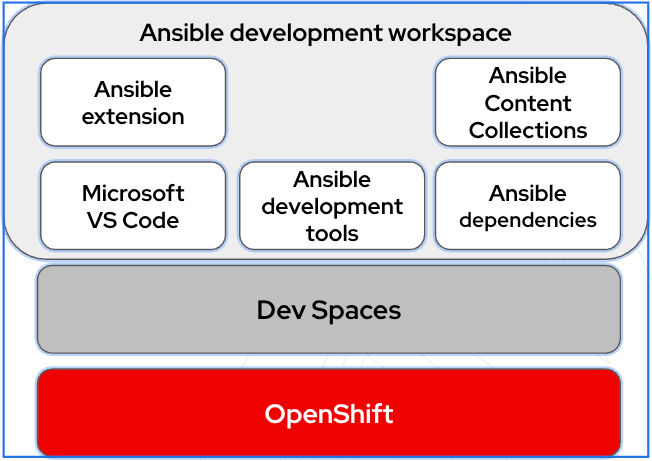
Ansible development workspaces provide a fully supported browser-based development environment that includes Ansible development tools for creating and testing Ansible playbooks, roles, and collections. The workspaces run as containers within Red Hat OpenShift Dev Spaces.
Introduction to Ansible development workspaces
Ansible development workspaces offer centralized management and policy enforcement, giving administrators better control and governance over secure, consistent automation development environments. Developers benefit by avoiding local application installs, especially in locked-down settings.
Ansible development tools and runtimes are pre-configured in Ansible development workspaces. Developers can start creating projects for automation content quickly by logging in to Ansible development workspaces in a browser.
The development tools in Ansible development workspaces are based on Ansible recommended practices, which improves the quality and reliability of your automation content. As a component of your Red Hat Ansible Automation Platform subscription, Ansible development workspaces are fully supported.
To ensure that your automation content files persist when you quit Ansible development workspaces, you push your projects to a Git repository that is linked to your workspace.
Ansible development workspaces components
Each Ansible development workspace is a project-agnostic full development environment. Dependencies are satisfied for all the tools in the environment.
The following applications are pre-installed.
- Microsoft VS Code with the Ansible VS Code extension
- Python
ansible-corepodmanfor container-in-container operations, including building and running execution environments- Ansible development tools (ADT) package, which includes:
ansible-builderfor building Ansible execution environmentsansible-creatorfor scaffolding directory structure for your automation contentansible-lintfor identifying stylistic errors and anti-patternsansible-navigatorfor developing and troubleshooting Ansible content with execution environmentsansible-signfor signing and verifying Ansible contentmoleculefor running functional tests on your automation contentpytest-ansiblefor testing Ansible module and plugin Python codetox-ansiblefor multi-version testing of Ansible module and plugin codeansible-dev-environmentfor building and managing isolated virtual workspaces
About the Ansible dev spaces image
Red Hat OpenShift Dev Spaces is a containerized cloud development environment (CDE) that provides pre-configured, consistent workspaces running on OpenShift Container Platform. It provisions ready-to-code workspaces on demand.
The Ansible dev spaces image is the container image for Ansible development workspaces. It is fully supported by Red Hat as part of your Ansible Automation Platform subscription.
The following diagram illustrates the relationship between OpenShift Container Platform, OpenShift Dev Spaces, and Ansible development workspaces.

'%20d='M201.5%20305.5c-13.8%200-24.9-11.1-24.9-24.6%200-13.8%2011.1-24.9%2024.9-24.9%2013.6%200%2024.6%2011.1%2024.6%2024.9%200%2013.6-11.1%2024.6-24.6%2024.6zM504%20256c0%20137-111%20248-248%20248S8%20393%208%20256%20119%208%20256%208s248%20111%20248%20248zm-132.3-41.2c-9.4%200-17.7%203.9-23.8%2010-22.4-15.5-52.6-25.5-86.1-26.6l17.4-78.3%2055.4%2012.5c0%2013.6%2011.1%2024.6%2024.6%2024.6%2013.8%200%2024.9-11.3%2024.9-24.9s-11.1-24.9-24.9-24.9c-9.7%200-18%205.8-22.1%2013.8l-61.2-13.6c-3-.8-6.1%201.4-6.9%204.4l-19.1%2086.4c-33.2%201.4-63.1%2011.3-85.5%2026.8-6.1-6.4-14.7-10.2-24.1-10.2-34.9%200-46.3%2046.9-14.4%2062.8-1.1%205-1.7%2010.2-1.7%2015.5%200%2052.6%2059.2%2095.2%20132%2095.2%2073.1%200%20132.3-42.6%20132.3-95.2%200-5.3-.6-10.8-1.9-15.8%2031.3-16%2019.8-62.5-14.9-62.5zM302.8%20331c-18.2%2018.2-76.1%2017.9-93.6%200-2.2-2.2-6.1-2.2-8.3%200-2.5%202.5-2.5%206.4%200%208.6%2022.8%2022.8%2087.3%2022.8%20110.2%200%202.5-2.2%202.5-6.1%200-8.6-2.2-2.2-6.1-2.2-8.3%200zm7.7-75c-13.6%200-24.6%2011.1-24.6%2024.9%200%2013.6%2011.1%2024.6%2024.6%2024.6%2013.8%200%2024.9-11.1%2024.9-24.6%200-13.8-11-24.9-24.9-24.9z'/%3e%3c/svg%3e)