 Red Hat Summit
Este contenido no está disponible en el idioma seleccionado.
Storage
Configuring and managing storage in OpenShift Container Platform
Abstract
Chapter 1. OpenShift Container Platform storage overview
OpenShift Container Platform supports multiple types of storage, both for on-premise and cloud providers. You can manage container storage for persistent and non-persistent data in an OpenShift Container Platform cluster.
1.1. modules/openshift-storage-common-terms.adoc
This glossary defines common terms that are used in the storage content. These terms help you understand OpenShift Container Platform architecture effectively.
- Access modes
Volume access modes describe volume capabilities. You can use access modes to match persistent volume claim (PVC) and persistent volume (PV). The following are the examples of access modes:
- ReadWriteOnce (RWO)
- ReadOnlyMany (ROX)
- ReadWriteMany (RWX)
- ReadWriteOncePod (RWOP)
- Cinder
- The Block Storage service for Red Hat OpenStack Platform (RHOSP) which manages the administration, security, and scheduling of all volumes.
- Config map
-
A config map provides a way to inject configuration data into pods. You can reference the data stored in a config map in a volume of type
ConfigMap. Applications running in a pod can use this data. - Container Storage Interface (CSI)
- An API specification for the management of container storage across different container orchestration (CO) systems.
- Dynamic Provisioning
- The framework allows you to create storage volumes on-demand, eliminating the need for cluster administrators to pre-provision persistent storage.
- Ephemeral storage
- Pods and containers can require temporary or transient local storage for their operation. The lifetime of this ephemeral storage does not extend beyond the life of the individual pod, and this ephemeral storage cannot be shared across pods.
- Fiber channel
- A networking technology that is used to transfer data among data centers, computer servers, switches and storage.
- FlexVolume
- FlexVolume is an out-of-tree plugin interface that uses an exec-based model to interface with storage drivers. You must install the FlexVolume driver binaries in a pre-defined volume plugin path on each node and in some cases the control plane nodes.
- fsGroup
- The fsGroup defines a file system group ID of a pod.
- iSCSI
- Internet Small Computer Systems Interface (iSCSI) is an Internet Protocol-based storage networking standard for linking data storage facilities. An iSCSI volume allows an existing iSCSI (SCSI over IP) volume to be mounted into your Pod.
- hostPath
- A hostPath volume in an OpenShift Container Platform cluster mounts a file or directory from the host node’s filesystem into your pod.
- KMS key
- The Key Management Service (KMS) helps you achieve the required level of encryption of your data across different services. you can use the KMS key to encrypt, decrypt, and re-encrypt data.
- Local volumes
- A local volume represents a mounted local storage device such as a disk, partition or directory.
- NFS
- A Network File System (NFS) that allows remote hosts to mount file systems over a network and interact with those file systems as though they are mounted locally. This enables system administrators to consolidate resources onto centralized servers on the network.
- OpenShift Data Foundation
- A provider of agnostic persistent storage for OpenShift Container Platform supporting file, block, and object storage, either in-house or in hybrid clouds
- Persistent storage
- Pods and containers can require permanent storage for their operation. OpenShift Container Platform uses the Kubernetes persistent volume (PV) framework to allow cluster administrators to provision persistent storage for a cluster. Developers can use PVC to request PV resources without having specific knowledge of the underlying storage infrastructure.
- Persistent volumes (PV)
- OpenShift Container Platform uses the Kubernetes persistent volume (PV) framework to allow cluster administrators to provision persistent storage for a cluster. Developers can use PVC to request PV resources without having specific knowledge of the underlying storage infrastructure.
- Persistent volume claims (PVCs)
- You can use a PVC to mount a PersistentVolume into a Pod. You can access the storage without knowing the details of the cloud environment.
- Pod
- One or more containers with shared resources, such as volume and IP addresses, running in your OpenShift Container Platform cluster. A pod is the smallest compute unit defined, deployed, and managed.
- Reclaim policy
-
A policy that tells the cluster what to do with the volume after it is released. A volume’s reclaim policy can be
Retain,Recycle, orDelete. - Role-based access control (RBAC)
- Role-based access control (RBAC) is a method of regulating access to computer or network resources based on the roles of individual users within your organization.
- Stateless applications
- A stateless application is an application program that does not save client data generated in one session for use in the next session with that client.
- Stateful applications
-
A stateful application is an application program that saves data to persistent disk storage. A server, client, and applications can use a persistent disk storage. You can use the
Statefulsetobject in OpenShift Container Platform to manage the deployment and scaling of a set of Pods, and provides guarantee about the ordering and uniqueness of these Pods. - Static provisioning
- A cluster administrator creates a number of PVs. PVs contain the details of storage. PVs exist in the Kubernetes API and are available for consumption.
- Storage
- OpenShift Container Platform supports many types of storage, both for on-premise and cloud providers. You can manage container storage for persistent and non-persistent data in an OpenShift Container Platform cluster.
- Storage class
- A storage class provides a way for administrators to describe the classes of storage they offer. Different classes might map to quality of service levels, backup policies, arbitrary policies determined by the cluster administrators.
- VMware vSphere’s Virtual Machine Disk (VMDK) volumes
- Virtual Machine Disk (VMDK) is a file format that describes containers for virtual hard disk drives that is used in virtual machines.
1.2. Storage Types
OpenShift Container Platform storage is broadly classified into two categories, namely ephemeral storage and persistent storage.
1.2.1. Ephemeral storage
Pods and containers are ephemeral or transient in nature and designed for stateless applications. Ephemeral storage allows administrators and developers to better manage the local storage for some of their operations. For more information about ephemeral storage overview, types, and management, see Understanding ephemeral storage.
1.2.2. Persistent storage
Stateful applications deployed in containers require persistent storage. OpenShift Container Platform uses a pre-provisioned storage framework called persistent volumes (PV) to allow cluster administrators to provision persistent storage. The data inside these volumes can exist beyond the lifecycle of an individual pod. Developers can use persistent volume claims (PVCs) to request storage requirements. For more information about persistent storage overview, configuration, and lifecycle, see Understanding persistent storage.
1.3. Container Storage Interface (CSI)
CSI is an API specification for the management of container storage across different container orchestration (CO) systems. You can manage the storage volumes within the container native environments, without having specific knowledge of the underlying storage infrastructure. With the CSI, storage works uniformly across different container orchestration systems, regardless of the storage vendors you are using. For more information about CSI, see Using Container Storage Interface (CSI).
1.4. Dynamic Provisioning
Dynamic Provisioning allows you to create storage volumes on-demand, eliminating the need for cluster administrators to pre-provision storage. For more information about dynamic provisioning, see Dynamic provisioning.
Chapter 2. Understanding ephemeral storage
2.1. Overview
In addition to persistent storage, pods and containers can require ephemeral or transient local storage for their operation. The lifetime of this ephemeral storage does not extend beyond the life of the individual pod, and this ephemeral storage cannot be shared across pods.
Pods use ephemeral local storage for scratch space, caching, and logs. Issues related to the lack of local storage accounting and isolation include the following:
- Pods do not know how much local storage is available to them.
- Pods cannot request guaranteed local storage.
- Local storage is a best effort resource.
- Pods can be evicted due to other pods filling the local storage, after which new pods are not admitted until sufficient storage has been reclaimed.
Unlike persistent volumes, ephemeral storage is unstructured and the space is shared between all pods running on a node, in addition to other uses by the system, the container runtime, and OpenShift Container Platform. The ephemeral storage framework allows pods to specify their transient local storage needs. It also allows OpenShift Container Platform to schedule pods where appropriate, and to protect the node against excessive use of local storage.
While the ephemeral storage framework allows administrators and developers to better manage this local storage, it does not provide any promises related to I/O throughput and latency.
2.2. Types of ephemeral storage
Ephemeral local storage is always made available in the primary partition. There are two basic ways of creating the primary partition: root and runtime.
Root
This partition holds the kubelet root directory, /var/lib/kubelet/ by default, and /var/log/ directory. This partition can be shared between user pods, the OS, and Kubernetes system daemons. This partition can be consumed by pods through EmptyDir volumes, container logs, image layers, and container-writable layers. Kubelet manages shared access and isolation of this partition. This partition is ephemeral, and applications cannot expect any performance SLAs, such as disk IOPS, from this partition.
Runtime
This is an optional partition that runtimes can use for overlay file systems. OpenShift Container Platform attempts to identify and provide shared access along with isolation to this partition. Container image layers and writable layers are stored here. If the runtime partition exists, the root partition does not hold any image layer or other writable storage.
2.3. Ephemeral storage management
Cluster administrators can manage ephemeral storage within a project by setting quotas that define the limit ranges and number of requests for ephemeral storage across all pods in a non-terminal state. Developers can also set requests and limits on this compute resource at the pod and container level.
2.4. Monitoring ephemeral storage
You can use /bin/df as a tool to monitor ephemeral storage usage on the volume where ephemeral container data is located, which is /var/lib/kubelet and /var/lib/containers. The available space for only /var/lib/kubelet is shown when you use the df command if /var/lib/containers is placed on a separate disk by the cluster administrator.
To show the human-readable values of used and available space in /var/lib, enter the following command:
$ df -h /var/lib
The output shows the ephemeral storage usage in /var/lib:
Example output
Filesystem  Size  Used Avail Use% Mounted on
/dev/sda1    69G   32G   34G  49% /
Chapter 3. Understanding persistent storage
3.1. Persistent storage overview
Managing storage is a distinct problem from managing compute resources. OpenShift Container Platform uses the Kubernetes persistent volume (PV) framework to allow cluster administrators to provision persistent storage for a cluster. Developers can use persistent volume claims (PVCs) to request PV resources without having specific knowledge of the underlying storage infrastructure.
PVCs are specific to a project, and are created and used by developers as a means to use a PV. PV resources on their own are not scoped to any single project; they can be shared across the entire OpenShift Container Platform cluster and claimed from any project. After a PV is bound to a PVC, that PV can not then be bound to additional PVCs. This has the effect of scoping a bound PV to a single namespace, that of the binding project.
PVs are defined by a PersistentVolume API object, which represents a piece of existing storage in the cluster that was either statically provisioned by the cluster administrator or dynamically provisioned using a StorageClass object. It is a resource in the cluster just like a node is a cluster resource.
PVs are volume plugins like Volumes but have a lifecycle that is independent of any individual pod that uses the PV. PV objects capture the details of the implementation of the storage, be that NFS, iSCSI, or a cloud-provider-specific storage system.
High availability of storage in the infrastructure is left to the underlying storage provider.
PVCs are defined by a PersistentVolumeClaim API object, which represents a request for storage by a developer. It is similar to a pod in that pods consume node resources and PVCs consume PV resources. For example, pods can request specific levels of resources, such as CPU and memory, while PVCs can request specific storage capacity and access modes. For example, they can be mounted once read-write or many times read-only.
3.2. Lifecycle of a volume and claim
PVs are resources in the cluster. PVCs are requests for those resources and also act as claim checks to the resource. The interaction between PVs and PVCs have the following lifecycle.
3.2.1. Provision storage
In response to requests from a developer defined in a PVC, a cluster administrator configures one or more dynamic provisioners that provision storage and a matching PV.
Alternatively, a cluster administrator can create a number of PVs in advance that carry the details of the real storage that is available for use. PVs exist in the API and are available for use.
3.2.2. Bind claims
When you create a PVC, you request a specific amount of storage, specify the required access mode, and create a storage class to describe and classify the storage. The control loop in the master watches for new PVCs and binds the new PVC to an appropriate PV. If an appropriate PV does not exist, a provisioner for the storage class creates one.
The size of all PVs might exceed your PVC size. This is especially true with manually provisioned PVs. To minimize the excess, OpenShift Container Platform binds to the smallest PV that matches all other criteria.
Claims remain unbound indefinitely if a matching volume does not exist or can not be created with any available provisioner servicing a storage class. Claims are bound as matching volumes become available. For example, a cluster with many manually provisioned 50Gi volumes would not match a PVC requesting 100Gi. The PVC can be bound when a 100Gi PV is added to the cluster.
3.2.3. Use pods and claimed PVs
Pods use claims as volumes. The cluster inspects the claim to find the bound volume and mounts that volume for a pod. For those volumes that support multiple access modes, you must specify which mode applies when you use the claim as a volume in a pod.
Once you have a claim and that claim is bound, the bound PV belongs to you for as long as you need it. You can schedule pods and access claimed PVs by including persistentVolumeClaim in the pod’s volumes block.
If you attach persistent volumes that have high file counts to pods, those pods can fail or can take a long time to start. For more information, see When using Persistent Volumes with high file counts in OpenShift, why do pods fail to start or take an excessive amount of time to achieve "Ready" state?.
3.2.4. Storage Object in Use Protection
The Storage Object in Use Protection feature ensures that PVCs in active use by a pod and PVs that are bound to PVCs are not removed from the system, as this can result in data loss.
Storage Object in Use Protection is enabled by default.
A PVC is in active use by a pod when a Pod object exists that uses the PVC.
If a user deletes a PVC that is in active use by a pod, the PVC is not removed immediately. PVC removal is postponed until the PVC is no longer actively used by any pods. Also, if a cluster admin deletes a PV that is bound to a PVC, the PV is not removed immediately. PV removal is postponed until the PV is no longer bound to a PVC.
3.2.5. Release a persistent volume
When you are finished with a volume, you can delete the PVC object from the API, which allows reclamation of the resource. The volume is considered released when the claim is deleted, but it is not yet available for another claim. The previous claimant’s data remains on the volume and must be handled according to policy.
3.2.6. Reclaim policy for persistent volumes
The reclaim policy of a persistent volume tells the cluster what to do with the volume after it is released. A volume’s reclaim policy can be Retain, Recycle, or Delete.
-
Retainreclaim policy allows manual reclamation of the resource for those volume plugins that support it. -
Recyclereclaim policy recycles the volume back into the pool of unbound persistent volumes once it is released from its claim.
The Recycle reclaim policy is deprecated in OpenShift Container Platform 4. Dynamic provisioning is recommended for equivalent and better functionality.
-
Deletereclaim policy deletes both thePersistentVolumeobject from OpenShift Container Platform and the associated storage asset in external infrastructure, such as AWS EBS or VMware vSphere.
Dynamically provisioned volumes are always deleted.
3.2.7. Reclaiming a persistent volume manually
When a persistent volume claim (PVC) is deleted, the persistent volume (PV) still exists and is considered "released". However, the PV is not yet available for another claim because the data of the previous claimant remains on the volume.
Procedure
To manually reclaim the PV as a cluster administrator:
Delete the PV.
$ oc delete pv <pv-name>The associated storage asset in the external infrastructure, such as an AWS EBS, GCE PD, Azure Disk, or Cinder volume, still exists after the PV is deleted.
- Clean up the data on the associated storage asset.
- Delete the associated storage asset. Alternately, to reuse the same storage asset, create a new PV with the storage asset definition.
The reclaimed PV is now available for use by another PVC.
3.2.8. Changing the reclaim policy of a persistent volume
To change the reclaim policy of a persistent volume:
List the persistent volumes in your cluster:
$ oc get pvExample output
NAME                                       CAPACITY   ACCESSMODES   RECLAIMPOLICY   STATUS    CLAIM             STORAGECLASS     REASON    AGE
 pvc-b6efd8da-b7b5-11e6-9d58-0ed433a7dd94   4Gi        RWO           Delete          Bound     default/claim1    manual                     10s
 pvc-b95650f8-b7b5-11e6-9d58-0ed433a7dd94   4Gi        RWO           Delete          Bound     default/claim2    manual                     6s
 pvc-bb3ca71d-b7b5-11e6-9d58-0ed433a7dd94   4Gi        RWO           Delete          Bound     default/claim3    manual                     3s
Choose one of your persistent volumes and change its reclaim policy:
$ oc patch pv <your-pv-name> -p '{"spec":{"persistentVolumeReclaimPolicy":"Retain"}}'Verify that your chosen persistent volume has the right policy:
$ oc get pvExample output
NAME                                       CAPACITY   ACCESSMODES   RECLAIMPOLICY   STATUS    CLAIM             STORAGECLASS     REASON    AGE
 pvc-b6efd8da-b7b5-11e6-9d58-0ed433a7dd94   4Gi        RWO           Delete          Bound     default/claim1    manual                     10s
 pvc-b95650f8-b7b5-11e6-9d58-0ed433a7dd94   4Gi        RWO           Delete          Bound     default/claim2    manual                     6s
 pvc-bb3ca71d-b7b5-11e6-9d58-0ed433a7dd94   4Gi        RWO           Retain          Bound     default/claim3    manual                     3s
In the preceding output, the volume bound to claim
default/claim3now has aRetainreclaim policy. The volume will not be automatically deleted when a user deletes claimdefault/claim3.
3.3. Persistent volumes
Each PV contains a spec and status, which is the specification and status of the volume, for example:
PersistentVolume object definition example
apiVersion: v1
kind: PersistentVolume
metadata:
  name: pv0001
spec:
  capacity:
    storage: 5Gi
  accessModes:
    - ReadWriteOnce
persistentVolumeReclaimPolicy: Retain
  ...
status:
...3.3.1. Types of PVs
OpenShift Container Platform supports the following persistent volume plugins:
- AWS Elastic Block Store (EBS)
- Azure Disk
- Azure File
- Cinder
- Fibre Channel
- GCE Persistent Disk
- HostPath
- iSCSI
- Local volume
- NFS
- OpenStack Manila
- Red Hat OpenShift Container Storage
- VMware vSphere
3.3.2. Capacity
Generally, a persistent volume (PV) has a specific storage capacity. This is set by using the capacity attribute of the PV.
Currently, storage capacity is the only resource that can be set or requested. Future attributes may include IOPS, throughput, and so on.
3.3.3. Access modes
A persistent volume can be mounted on a host in any way supported by the resource provider. Providers have different capabilities and each PV’s access modes are set to the specific modes supported by that particular volume. For example, NFS can support multiple read-write clients, but a specific NFS PV might be exported on the server as read-only. Each PV gets its own set of access modes describing that specific PV’s capabilities.
Claims are matched to volumes with similar access modes. The only two matching criteria are access modes and size. A claim’s access modes represent a request. Therefore, you might be granted more, but never less. For example, if a claim requests RWO, but the only volume available is an NFS PV (RWO+ROX+RWX), the claim would then match NFS because it supports RWO.
Direct matches are always attempted first. The volume’s modes must match or contain more modes than you requested. The size must be greater than or equal to what is expected. If two types of volumes, such as NFS and iSCSI, have the same set of access modes, either of them can match a claim with those modes. There is no ordering between types of volumes and no way to choose one type over another.
All volumes with the same modes are grouped, and then sorted by size, smallest to largest. The binder gets the group with matching modes and iterates over each, in size order, until one size matches.
The following table lists the access modes:
| Access Mode | CLI abbreviation | Description |
|---|---|---|
| ReadWriteOnce |
| The volume can be mounted as read-write by a single node. |
| ReadOnlyMany |
| The volume can be mounted as read-only by many nodes. |
| ReadWriteMany |
| The volume can be mounted as read-write by many nodes. |
Volume access modes are descriptors of volume capabilities. They are not enforced constraints. The storage provider is responsible for runtime errors resulting from invalid use of the resource.
For example, NFS offers ReadWriteOnce access mode. You must mark the claims as read-only if you want to use the volume’s ROX capability. Errors in the provider show up at runtime as mount errors.
iSCSI and Fibre Channel volumes do not currently have any fencing mechanisms. You must ensure the volumes are only used by one node at a time. In certain situations, such as draining a node, the volumes can be used simultaneously by two nodes. Before draining the node, first ensure the pods that use these volumes are deleted.
| Volume plugin | ReadWriteOnce [1] | ReadOnlyMany | ReadWriteMany |
|---|---|---|---|
| AWS EBS [2] |
✅ |
- |
- |
| Azure File |
✅ |
✅ |
✅ |
| Azure Disk |
✅ |
- |
- |
| Cinder |
✅ |
- |
- |
| Fibre Channel |
✅ |
✅ |
- |
| GCE Persistent Disk |
✅ |
- |
- |
| HostPath |
✅ |
- |
- |
| iSCSI |
✅ |
✅ |
- |
| Local volume |
✅ |
- |
- |
| NFS |
✅ |
✅ |
✅ |
| OpenStack Manila |
- |
- |
✅ |
| Red Hat OpenShift Container Storage |
✅ |
- |
✅ |
| VMware vSphere |
✅ |
- |
- |
- ReadWriteOnce (RWO) volumes cannot be mounted on multiple nodes. If a node fails, the system does not allow the attached RWO volume to be mounted on a new node because it is already assigned to the failed node. If you encounter a multi-attach error message as a result, force delete the pod on a shutdown or crashed node to avoid data loss in critical workloads, such as when dynamic persistent volumes are attached.
- Use a recreate deployment strategy for pods that rely on AWS EBS.
3.3.4. Phase
Volumes can be found in one of the following phases:
| Phase | Description |
|---|---|
| Available | A free resource not yet bound to a claim. |
| Bound | The volume is bound to a claim. |
| Released | The claim was deleted, but the resource is not yet reclaimed by the cluster. |
| Failed | The volume has failed its automatic reclamation. |
You can view the name of the PVC bound to the PV by running:
$ oc get pv <pv-claim>3.3.4.1. Mount options
You can specify mount options while mounting a PV by using the attribute mountOptions.
For example:
Mount options example
apiVersion: v1
kind: PersistentVolume
metadata:
  name: pv0001
spec:
  capacity:
    storage: 1Gi
  accessModes:
    - ReadWriteOnce
  mountOptions:
    - nfsvers=4.1
  nfs:
    path: /tmp
    server: 172.17.0.2
  persistentVolumeReclaimPolicy: Retain
  claimRef:
    name: claim1
namespace: default- 1
- Specified mount options are used while mounting the PV to the disk.
The following PV types support mount options:
- AWS Elastic Block Store (EBS)
- Azure Disk
- Azure File
- Cinder
- GCE Persistent Disk
- iSCSI
- Local volume
- NFS
- Red Hat OpenShift Container Storage (Ceph RBD only)
- VMware vSphere
Fibre Channel and HostPath PVs do not support mount options.
3.4. Persistent volume claims
Each PersistentVolumeClaim object contains a spec and status, which is the specification and status of the persistent volume claim (PVC), for example:
PersistentVolumeClaim object definition example
kind: PersistentVolumeClaim
apiVersion: v1
metadata:
  name: myclaim
spec:
  accessModes:
    - ReadWriteOnce
  resources:
    requests:
      storage: 8Gi
storageClassName: gold
status:
...3.4.1. Storage classes
Claims can optionally request a specific storage class by specifying the storage class’s name in the storageClassName attribute. Only PVs of the requested class, ones with the same storageClassName as the PVC, can be bound to the PVC. The cluster administrator can configure dynamic provisioners to service one or more storage classes. The cluster administrator can create a PV on demand that matches the specifications in the PVC.
The Cluster Storage Operator might install a default storage class depending on the platform in use. This storage class is owned and controlled by the operator. It cannot be deleted or modified beyond defining annotations and labels. If different behavior is desired, you must define a custom storage class.
The cluster administrator can also set a default storage class for all PVCs. When a default storage class is configured, the PVC must explicitly ask for StorageClass or storageClassName annotations set to "" to be bound to a PV without a storage class.
If more than one storage class is marked as default, a PVC can only be created if the storageClassName is explicitly specified. Therefore, only one storage class should be set as the default.
3.4.2. Access modes
Claims use the same conventions as volumes when requesting storage with specific access modes.
3.4.3. Resources
Claims, such as pods, can request specific quantities of a resource. In this case, the request is for storage. The same resource model applies to volumes and claims.
3.4.4. Claims as volumes
Pods access storage by using the claim as a volume. Claims must exist in the same namespace as the pod using the claim. The cluster finds the claim in the pod’s namespace and uses it to get the PersistentVolume backing the claim. The volume is mounted to the host and into the pod, for example:
Mount volume to the host and into the pod example
kind: Pod
apiVersion: v1
metadata:
  name: mypod
spec:
  containers:
    - name: myfrontend
      image: dockerfile/nginx
      volumeMounts:
      - mountPath: "/var/www/html"
name: mypd
  volumes:
    - name: mypd
      persistentVolumeClaim:
claimName: myclaim - 1
- Path to mount the volume inside the pod.
- 2
- Name of the volume to mount. Do not mount to the container root,
/, or any path that is the same in the host and the container. This can corrupt your host system if the container is sufficiently privileged, such as the host/dev/ptsfiles. It is safe to mount the host by using/host. - 3
- Name of the PVC, that exists in the same namespace, to use.
3.5. Block volume support
OpenShift Container Platform can statically provision raw block volumes. These volumes do not have a file system, and can provide performance benefits for applications that either write to the disk directly or implement their own storage service.
Raw block volumes are provisioned by specifying volumeMode: Block in the PV and PVC specification.
Pods using raw block volumes must be configured to allow privileged containers.
The following table displays which volume plugins support block volumes.
| Volume Plugin | Manually provisioned | Dynamically provisioned | Fully supported |
|---|---|---|---|
| AWS EBS | ✅ | ✅ | ✅ |
| Azure Disk | ✅ | ✅ | ✅ |
| Azure File | |||
| Cinder | ✅ | ✅ | ✅ |
| Fibre Channel | ✅ | ✅ | |
| GCP | ✅ | ✅ | ✅ |
| HostPath | |||
| iSCSI | ✅ | ✅ | |
| Local volume | ✅ | ✅ | |
| NFS | |||
| Red Hat OpenShift Container Storage | ✅ | ✅ | ✅ |
| VMware vSphere | ✅ | ✅ | ✅ |
Any of the block volumes that can be provisioned manually, but are not provided as fully supported, are included as a Technology Preview feature only. Technology Preview features are not supported with Red Hat production service level agreements (SLAs) and might not be functionally complete. Red Hat does not recommend using them in production. These features provide early access to upcoming product features, enabling customers to test functionality and provide feedback during the development process. For more information about the support scope of Red Hat Technology Preview features, see https://access.redhat.com/support/offerings/techpreview/.
3.5.1. Block volume examples
PV example
apiVersion: v1
kind: PersistentVolume
metadata:
  name: block-pv
spec:
  capacity:
    storage: 10Gi
  accessModes:
    - ReadWriteOnce
  volumeMode: Block
  persistentVolumeReclaimPolicy: Retain
  fc:
    targetWWNs: ["50060e801049cfd1"]
    lun: 0
readOnly: false- 1
volumeModemust be set toBlockto indicate that this PV is a raw block volume.
PVC example
apiVersion: v1
kind: PersistentVolumeClaim
metadata:
  name: block-pvc
spec:
  accessModes:
    - ReadWriteOnce
  volumeMode: Block
  resources:
    requests:
storage: 10Gi- 1
volumeModemust be set toBlockto indicate that a raw block PVC is requested.
Pod specification example
apiVersion: v1
kind: Pod
metadata:
  name: pod-with-block-volume
spec:
  containers:
    - name: fc-container
      image: fedora:26
      command: ["/bin/sh", "-c"]
      args: [ "tail -f /dev/null" ]
      volumeDevices:
        - name: data
          devicePath: /dev/xvda
  volumes:
    - name: data
      persistentVolumeClaim:
claimName: block-pvc - 1
volumeDevices, instead ofvolumeMounts, is used for block devices. OnlyPersistentVolumeClaimsources can be used with raw block volumes.- 2
devicePath, instead ofmountPath, represents the path to the physical device where the raw block is mapped to the system.- 3
- The volume source must be of type
persistentVolumeClaimand must match the name of the PVC as expected.
| Value | Default |
|---|---|
| Filesystem | Yes |
| Block | No |
PV volumeMode | PVC volumeMode | Binding result |
|---|---|---|
| Filesystem | Filesystem | Bind |
| Unspecified | Unspecified | Bind |
| Filesystem | Unspecified | Bind |
| Unspecified | Filesystem | Bind |
| Block | Block | Bind |
| Unspecified | Block | No Bind |
| Block | Unspecified | No Bind |
| Filesystem | Block | No Bind |
| Block | Filesystem | No Bind |
Unspecified values result in the default value of Filesystem.
Chapter 4. Configuring persistent storage
4.1. Persistent storage using AWS Elastic Block Store
OpenShift Container Platform supports AWS Elastic Block Store volumes (EBS). You can provision your OpenShift Container Platform cluster with persistent storage by using Amazon EC2. Some familiarity with Kubernetes and AWS is assumed.
The Kubernetes persistent volume framework allows administrators to provision a cluster with persistent storage and gives users a way to request those resources without having any knowledge of the underlying infrastructure. AWS Elastic Block Store volumes can be provisioned dynamically. Persistent volumes are not bound to a single project or namespace; they can be shared across the OpenShift Container Platform cluster. Persistent volume claims are specific to a project or namespace and can be requested by users.
OpenShift Container Platform defaults to using an in-tree (non-CSI) plugin to provision AWS EBS storage.
In future OpenShift Container Platform versions, volumes provisioned using existing in-tree plugins are planned for migration to their equivalent CSI driver. CSI automatic migration should be seamless. Migration does not change how you use all existing API objects, such as persistent volumes, persistent volume claims, and storage classes. For more information about migration, see CSI automatic migration.
After full migration, in-tree plugins will eventually be removed in future versions of OpenShift Container Platform.
High-availability of storage in the infrastructure is left to the underlying storage provider.
For OpenShift Container Platform, automatic migration from AWS EBS in-tree to the Container Storage Interface (CSI) driver is available as a Technology Preview (TP) feature. With migration enabled, volumes provisioned using the existing in-tree driver are automatically migrated to use the AWS EBS CSI driver. For more information, see CSI automatic migration feature.
4.1.1. Creating the EBS storage class
Storage classes are used to differentiate and delineate storage levels and usages. By defining a storage class, users can obtain dynamically provisioned persistent volumes.
Procedure
- In the OpenShift Container Platform console, click Storage → Storage Classes.
- In the storage class overview, click Create Storage Class.
Define the desired options on the page that appears.
- Enter a name to reference the storage class.
- Enter an optional description.
- Select the reclaim policy.
Select
kubernetes.io/aws-ebsfrom the drop-down list.NoteTo create the storage class with the equivalent CSI driver, select
ebs.csi.aws.comfrom the drop-down list. For more details, see AWS Elastic Block Store CSI Driver Operator.- Enter additional parameters for the storage class as desired.
- Click Create to create the storage class.
4.1.2. Creating the persistent volume claim
Prerequisites
Storage must exist in the underlying infrastructure before it can be mounted as a volume in OpenShift Container Platform.
Procedure
- In the OpenShift Container Platform console, click Storage → Persistent Volume Claims.
- In the persistent volume claims overview, click Create Persistent Volume Claim.
Define the desired options on the page that appears.
- Select the storage class created previously from the drop-down menu.
- Enter a unique name for the storage claim.
- Select the access mode. This determines the read and write access for the created storage claim.
- Define the size of the storage claim.
- Click Create to create the persistent volume claim and generate a persistent volume.
4.1.3. Volume format
Before OpenShift Container Platform mounts the volume and passes it to a container, it checks that it contains a file system as specified by the fsType parameter in the persistent volume definition. If the device is not formatted with the file system, all data from the device is erased and the device is automatically formatted with the given file system.
This allows using unformatted AWS volumes as persistent volumes, because OpenShift Container Platform formats them before the first use.
4.1.4. Maximum number of EBS volumes on a node
By default, OpenShift Container Platform supports a maximum of 39 EBS volumes attached to one node. This limit is consistent with the AWS volume limits. The volume limit depends on the instance type.
As a cluster administrator, you must use either in-tree or Container Storage Interface (CSI) volumes and their respective storage classes, but never both volume types at the same time. The maximum attached EBS volume number is counted separately for in-tree and CSI volumes.
4.2. Persistent storage using Azure
OpenShift Container Platform supports Microsoft Azure Disk volumes. You can provision your OpenShift Container Platform cluster with persistent storage using Azure. Some familiarity with Kubernetes and Azure is assumed. The Kubernetes persistent volume framework allows administrators to provision a cluster with persistent storage and gives users a way to request those resources without having any knowledge of the underlying infrastructure. Azure Disk volumes can be provisioned dynamically. Persistent volumes are not bound to a single project or namespace; they can be shared across the OpenShift Container Platform cluster. Persistent volume claims are specific to a project or namespace and can be requested by users.
OpenShift Container Platform defaults to using an in-tree (non-CSI) plugin to provision Azure Disk storage.
In future OpenShift Container Platform versions, volumes provisioned using existing in-tree plugins are planned for migration to their equivalent CSI driver. CSI automatic migration should be seamless. Migration does not change how you use all existing API objects, such as persistent volumes, persistent volume claims, and storage classes. For more information about migration, see CSI automatic migration.
After full migration, in-tree plugins will eventually be removed in future versions of OpenShift Container Platform.
High availability of storage in the infrastructure is left to the underlying storage provider.
4.2.1. Creating the Azure storage class
Storage classes are used to differentiate and delineate storage levels and usages. By defining a storage class, users can obtain dynamically provisioned persistent volumes.
Procedure
- In the OpenShift Container Platform console, click Storage → Storage Classes.
- In the storage class overview, click Create Storage Class.
Define the desired options on the page that appears.
- Enter a name to reference the storage class.
- Enter an optional description.
- Select the reclaim policy.
Select
kubernetes.io/azure-diskfrom the drop down list.-
Enter the storage account type. This corresponds to your Azure storage account SKU tier. Valid options are
Premium_LRS,Standard_LRS,StandardSSD_LRS, andUltraSSD_LRS. Enter the kind of account. Valid options are
shared,dedicated,andmanaged.ImportantRed Hat only supports the use of
kind: Managedin the storage class.With
SharedandDedicated, Azure creates unmanaged disks, while OpenShift Container Platform creates a managed disk for machine OS (root) disks. But because Azure Disk does not allow the use of both managed and unmanaged disks on a node, unmanaged disks created withSharedorDedicatedcannot be attached to OpenShift Container Platform nodes.
-
Enter the storage account type. This corresponds to your Azure storage account SKU tier. Valid options are
- Enter additional parameters for the storage class as desired.
- Click Create to create the storage class.
4.2.2. Creating the persistent volume claim
Prerequisites
Storage must exist in the underlying infrastructure before it can be mounted as a volume in OpenShift Container Platform.
Procedure
- In the OpenShift Container Platform console, click Storage → Persistent Volume Claims.
- In the persistent volume claims overview, click Create Persistent Volume Claim.
Define the desired options on the page that appears.
- Select the storage class created previously from the drop-down menu.
- Enter a unique name for the storage claim.
- Select the access mode. This determines the read and write access for the created storage claim.
- Define the size of the storage claim.
- Click Create to create the persistent volume claim and generate a persistent volume.
4.2.3. Volume format
Before OpenShift Container Platform mounts the volume and passes it to a container, it checks that it contains a file system as specified by the fsType parameter in the persistent volume definition. If the device is not formatted with the file system, all data from the device is erased and the device is automatically formatted with the given file system.
This allows using unformatted Azure volumes as persistent volumes, because OpenShift Container Platform formats them before the first use.
4.3. Persistent storage using Azure File
OpenShift Container Platform supports Microsoft Azure File volumes. You can provision your OpenShift Container Platform cluster with persistent storage using Azure. Some familiarity with Kubernetes and Azure is assumed.
The Kubernetes persistent volume framework allows administrators to provision a cluster with persistent storage and gives users a way to request those resources without having any knowledge of the underlying infrastructure. You can provision Azure File volumes dynamically.
Persistent volumes are not bound to a single project or namespace, and you can share them across the OpenShift Container Platform cluster. Persistent volume claims are specific to a project or namespace, and can be requested by users for use in applications.
High availability of storage in the infrastructure is left to the underlying storage provider.
Azure File volumes use Server Message Block.
4.3.1. Create the Azure File share persistent volume claim
To create the persistent volume claim, you must first define a Secret object that contains the Azure account and key. This secret is used in the PersistentVolume definition, and will be referenced by the persistent volume claim for use in applications.
Prerequisites
- An Azure File share exists.
- The credentials to access this share, specifically the storage account and key, are available.
Procedure
Create a
Secretobject that contains the Azure File credentials:$ oc create secret generic <secret-name> --from-literal=azurestorageaccountname=<storage-account> \1 --from-literal=azurestorageaccountkey=<storage-account-key>2 Create a
PersistentVolumeobject that references theSecretobject you created:apiVersion: "v1" kind: "PersistentVolume" metadata: name: "pv0001"1 spec: capacity: storage: "5Gi"2 accessModes: - "ReadWriteOnce" storageClassName: azure-file-sc azureFile: secretName: <secret-name>3 shareName: share-14 readOnly: falseCreate a
PersistentVolumeClaimobject that maps to the persistent volume you created:apiVersion: "v1" kind: "PersistentVolumeClaim" metadata: name: "claim1"1 spec: accessModes: - "ReadWriteOnce" resources: requests: storage: "5Gi"2 storageClassName: azure-file-sc3 volumeName: "pv0001"4 - 1
- The name of the persistent volume claim.
- 2
- The size of this persistent volume claim.
- 3
- The name of the storage class that is used to provision the persistent volume. Specify the storage class used in the
PersistentVolumedefinition. - 4
- The name of the existing
PersistentVolumeobject that references the Azure File share.
4.3.2. Mount the Azure File share in a pod
After the persistent volume claim has been created, it can be used inside by an application. The following example demonstrates mounting this share inside of a pod.
Prerequisites
- A persistent volume claim exists that is mapped to the underlying Azure File share.
Procedure
Create a pod that mounts the existing persistent volume claim:
apiVersion: v1 kind: Pod metadata: name: pod-name1 spec: containers: ... volumeMounts: - mountPath: "/data"2 name: azure-file-share volumes: - name: azure-file-share persistentVolumeClaim: claimName: claim13 - 1
- The name of the pod.
- 2
- The path to mount the Azure File share inside the pod. Do not mount to the container root,
/, or any path that is the same in the host and the container. This can corrupt your host system if the container is sufficiently privileged, such as the host/dev/ptsfiles. It is safe to mount the host by using/host. - 3
- The name of the
PersistentVolumeClaimobject that has been previously created.
4.4. Persistent storage using Cinder
OpenShift Container Platform supports OpenStack Cinder. Some familiarity with Kubernetes and OpenStack is assumed.
Cinder volumes can be provisioned dynamically. Persistent volumes are not bound to a single project or namespace; they can be shared across the OpenShift Container Platform cluster. Persistent volume claims are specific to a project or namespace and can be requested by users.
OpenShift Container Platform defaults to using an in-tree (non-CSI) plugin to provision Cinder storage.
In future OpenShift Container Platform versions, volumes provisioned using existing in-tree plugins are planned for migration to their equivalent CSI driver. CSI automatic migration should be seamless. Migration does not change how you use all existing API objects, such as persistent volumes, persistent volume claims, and storage classes. For more information about migration, see CSI automatic migration.
After full migration, in-tree plugins will eventually be removed in future versions of OpenShift Container Platform.
4.4.1. Manual provisioning with Cinder
Storage must exist in the underlying infrastructure before it can be mounted as a volume in OpenShift Container Platform.
Prerequisites
- OpenShift Container Platform configured for Red Hat OpenStack Platform (RHOSP)
- Cinder volume ID
4.4.1.1. Creating the persistent volume
You must define your persistent volume (PV) in an object definition before creating it in OpenShift Container Platform:
Procedure
Save your object definition to a file.
cinder-persistentvolume.yaml
apiVersion: "v1"
kind: "PersistentVolume"
metadata:
  name: "pv0001"
1 spec: capacity: storage: "5Gi"2 accessModes: - "ReadWriteOnce" cinder:3 fsType: "ext3"4 volumeID: "f37a03aa-6212-4c62-a805-9ce139fab180"5 - 1
- The name of the volume that is used by persistent volume claims or pods.
- 2
- The amount of storage allocated to this volume.
- 3
- Indicates
cinderfor Red Hat OpenStack Platform (RHOSP) Cinder volumes. - 4
- The file system that is created when the volume is mounted for the first time.
- 5
- The Cinder volume to use.
ImportantDo not change the
fstypeparameter value after the volume is formatted and provisioned. Changing this value can result in data loss and pod failure.Create the object definition file you saved in the previous step.
$ oc create -f cinder-persistentvolume.yaml
4.4.1.2. Persistent volume formatting
You can use unformatted Cinder volumes as PVs because OpenShift Container Platform formats them before the first use.
Before OpenShift Container Platform mounts the volume and passes it to a container, the system checks that it contains a file system as specified by the fsType parameter in the PV definition. If the device is not formatted with the file system, all data from the device is erased and the device is automatically formatted with the given file system.
4.4.1.3. Cinder volume security
If you use Cinder PVs in your application, configure security for their deployment configurations.
Prerequisites
-
An SCC must be created that uses the appropriate
fsGroupstrategy.
Procedure
Create a service account and add it to the SCC:
$ oc create serviceaccount <service_account>$ oc adm policy add-scc-to-user <new_scc> -z <service_account> -n <project>In your application’s deployment configuration, provide the service account name and
securityContext:apiVersion: v1 kind: ReplicationController metadata: name: frontend-1 spec: replicas: 11 selector:2 name: frontend template:3 metadata: labels:4 name: frontend5 spec: containers: - image: openshift/hello-openshift name: helloworld ports: - containerPort: 8080 protocol: TCP restartPolicy: Always serviceAccountName: <service_account>6 securityContext: fsGroup: 77777 - 1
- The number of copies of the pod to run.
- 2
- The label selector of the pod to run.
- 3
- A template for the pod that the controller creates.
- 4
- The labels on the pod. They must include labels from the label selector.
- 5
- The maximum name length after expanding any parameters is 63 characters.
- 6
- Specifies the service account you created.
- 7
- Specifies an
fsGroupfor the pods.
4.4.1.4. Maximum number of Cinder volumes on a node
By default, OpenShift Container Platform supports a maximum of 256 Cinder volumes attached to one node, and the Cinder predicate that limits attachable volumes is disabled. To enable the predicate, add MaxCinderVolumeCount string to the predicates field in the scheduler policy.
4.5. Persistent storage using Fibre Channel
OpenShift Container Platform supports Fibre Channel, allowing you to provision your OpenShift Container Platform cluster with persistent storage using Fibre channel volumes. Some familiarity with Kubernetes and Fibre Channel is assumed.
The Kubernetes persistent volume framework allows administrators to provision a cluster with persistent storage and gives users a way to request those resources without having any knowledge of the underlying infrastructure. Persistent volumes are not bound to a single project or namespace; they can be shared across the OpenShift Container Platform cluster. Persistent volume claims are specific to a project or namespace and can be requested by users.
High availability of storage in the infrastructure is left to the underlying storage provider.
4.5.1. Provisioning
To provision Fibre Channel volumes using the PersistentVolume API the following must be available:
-
The
targetWWNs(array of Fibre Channel target’s World Wide Names). - A valid LUN number.
- The filesystem type.
A persistent volume and a LUN have a one-to-one mapping between them.
Prerequisites
- Fibre Channel LUNs must exist in the underlying infrastructure.
PersistentVolume object definition
apiVersion: v1
kind: PersistentVolume
metadata:
name: pv0001
spec:
capacity:
storage: 1Gi
accessModes:
- ReadWriteOnce
fc:
wwids: [scsi-3600508b400105e210000900000490000]
targetWWNs: ['500a0981891b8dc5', '500a0981991b8dc5']
lun: 2
fsType: ext4- 1
- World wide identifiers (WWIDs). Either FC
wwidsor a combination of FCtargetWWNsandlunmust be set, but not both simultaneously. The FC WWID identifier is recommended over the WWNs target because it is guaranteed to be unique for every storage device, and independent of the path that is used to access the device. The WWID identifier can be obtained by issuing a SCSI Inquiry to retrieve the Device Identification Vital Product Data (page 0x83) or Unit Serial Number (page 0x80). FC WWIDs are identified as/dev/disk/by-id/to reference the data on the disk, even if the path to the device changes and even when accessing the device from different systems. - 2 3
- Fibre Channel WWNs are identified as
/dev/disk/by-path/pci-<IDENTIFIER>-fc-0x<WWN>-lun-<LUN#>, but you do not need to provide any part of the path leading up to theWWN, including the0x, and anything after, including the-(hyphen).
Changing the value of the fstype parameter after the volume has been formatted and provisioned can result in data loss and pod failure.
4.5.1.1. Enforcing disk quotas
Use LUN partitions to enforce disk quotas and size constraints. Each LUN is mapped to a single persistent volume, and unique names must be used for persistent volumes.
Enforcing quotas in this way allows the end user to request persistent storage by a specific amount, such as 10Gi, and be matched with a corresponding volume of equal or greater capacity.
4.5.1.2. Fibre Channel volume security
Users request storage with a persistent volume claim. This claim only lives in the user’s namespace, and can only be referenced by a pod within that same namespace. Any attempt to access a persistent volume across a namespace causes the pod to fail.
Each Fibre Channel LUN must be accessible by all nodes in the cluster.
4.6. Persistent storage using FlexVolume
OpenShift Container Platform supports FlexVolume, an out-of-tree plugin that uses an executable model to interface with drivers.
To use storage from a back-end that does not have a built-in plugin, you can extend OpenShift Container Platform through FlexVolume drivers and provide persistent storage to applications.
Pods interact with FlexVolume drivers through the flexvolume in-tree plugin.
4.6.1. About FlexVolume drivers
A FlexVolume driver is an executable file that resides in a well-defined directory on all nodes in the cluster. OpenShift Container Platform calls the FlexVolume driver whenever it needs to mount or unmount a volume represented by a PersistentVolume object with flexVolume as the source.
Attach and detach operations are not supported in OpenShift Container Platform for FlexVolume.
4.6.2. FlexVolume driver example
The first command-line argument of the FlexVolume driver is always an operation name. Other parameters are specific to each operation. Most of the operations take a JavaScript Object Notation (JSON) string as a parameter. This parameter is a complete JSON string, and not the name of a file with the JSON data.
The FlexVolume driver contains:
-
All
flexVolume.options. -
Some options from
flexVolumeprefixed bykubernetes.io/, such asfsTypeandreadwrite. -
The content of the referenced secret, if specified, prefixed by
kubernetes.io/secret/.
FlexVolume driver JSON input example
{
"fooServer": "192.168.0.1:1234",
"fooVolumeName": "bar",
"kubernetes.io/fsType": "ext4",
"kubernetes.io/readwrite": "ro",
"kubernetes.io/secret/<key name>": "<key value>",
"kubernetes.io/secret/<another key name>": "<another key value>",
}OpenShift Container Platform expects JSON data on standard output of the driver. When not specified, the output describes the result of the operation.
FlexVolume driver default output example
{
"status": "<Success/Failure/Not supported>",
"message": "<Reason for success/failure>"
}
Exit code of the driver should be 0 for success and 1 for error.
Operations should be idempotent, which means that the mounting of an already mounted volume should result in a successful operation.
4.6.3. Installing FlexVolume drivers
FlexVolume drivers that are used to extend OpenShift Container Platform are executed only on the node. To implement FlexVolumes, a list of operations to call and the installation path are all that is required.
Prerequisites
FlexVolume drivers must implement these operations:
initInitializes the driver. It is called during initialization of all nodes.
- Arguments: none
- Executed on: node
- Expected output: default JSON
mountMounts a volume to directory. This can include anything that is necessary to mount the volume, including finding the device and then mounting the device.
-
Arguments:
<mount-dir><json> - Executed on: node
- Expected output: default JSON
-
Arguments:
unmountUnmounts a volume from a directory. This can include anything that is necessary to clean up the volume after unmounting.
-
Arguments:
<mount-dir> - Executed on: node
- Expected output: default JSON
-
Arguments:
mountdevice- Mounts a volume’s device to a directory where individual pods can then bind mount.
This call-out does not pass "secrets" specified in the FlexVolume spec. If your driver requires secrets, do not implement this call-out.
-
Arguments:
<mount-dir><json> - Executed on: node
Expected output: default JSON
unmountdevice- Unmounts a volume’s device from a directory.
-
Arguments:
<mount-dir> - Executed on: node
Expected output: default JSON
-
All other operations should return JSON with
{"status": "Not supported"}and exit code1.
-
All other operations should return JSON with
Procedure
To install the FlexVolume driver:
- Ensure that the executable file exists on all nodes in the cluster.
-
Place the executable file at the volume plugin path:
/etc/kubernetes/kubelet-plugins/volume/exec/<vendor>~<driver>/<driver>.
For example, to install the FlexVolume driver for the storage foo, place the executable file at: /etc/kubernetes/kubelet-plugins/volume/exec/openshift.com~foo/foo.
4.6.4. Consuming storage using FlexVolume drivers
Each PersistentVolume object in OpenShift Container Platform represents one storage asset in the storage back-end, such as a volume.
Procedure
-
Use the
PersistentVolumeobject to reference the installed storage.
Persistent volume object definition using FlexVolume drivers example
apiVersion: v1
kind: PersistentVolume
metadata:
name: pv0001
spec:
capacity:
storage: 1Gi
accessModes:
- ReadWriteOnce
flexVolume:
driver: openshift.com/foo
fsType: "ext4"
secretRef: foo-secret
readOnly: true
options:
fooServer: 192.168.0.1:1234
fooVolumeName: bar- 1
- The name of the volume. This is how it is identified through persistent volume claims or from pods. This name can be different from the name of the volume on back-end storage.
- 2
- The amount of storage allocated to this volume.
- 3
- The name of the driver. This field is mandatory.
- 4
- The file system that is present on the volume. This field is optional.
- 5
- The reference to a secret. Keys and values from this secret are provided to the FlexVolume driver on invocation. This field is optional.
- 6
- The read-only flag. This field is optional.
- 7
- The additional options for the FlexVolume driver. In addition to the flags specified by the user in the
optionsfield, the following flags are also passed to the executable:"fsType":"<FS type>", "readwrite":"<rw>", "secret/key1":"<secret1>" ... "secret/keyN":"<secretN>"
Secrets are passed only to mount or unmount call-outs.
4.7. Persistent storage using GCE Persistent Disk
OpenShift Container Platform supports GCE Persistent Disk volumes (gcePD). You can provision your OpenShift Container Platform cluster with persistent storage using GCE. Some familiarity with Kubernetes and GCE is assumed.
The Kubernetes persistent volume framework allows administrators to provision a cluster with persistent storage and gives users a way to request those resources without having any knowledge of the underlying infrastructure.
GCE Persistent Disk volumes can be provisioned dynamically.
Persistent volumes are not bound to a single project or namespace; they can be shared across the OpenShift Container Platform cluster. Persistent volume claims are specific to a project or namespace and can be requested by users.
OpenShift Container Platform defaults to using an in-tree (non-CSI) plugin to provision gcePD storage.
In future OpenShift Container Platform versions, volumes provisioned using existing in-tree plugins are planned for migration to their equivalent CSI driver. CSI automatic migration should be seamless. Migration does not change how you use all existing API objects, such as persistent volumes, persistent volume claims, and storage classes. For more information about migration, see CSI automatic migration.
After full migration, in-tree plugins will eventually be removed in future versions of OpenShift Container Platform.
High availability of storage in the infrastructure is left to the underlying storage provider.
4.7.1. Creating the GCE storage class
Storage classes are used to differentiate and delineate storage levels and usages. By defining a storage class, users can obtain dynamically provisioned persistent volumes.
Procedure
- In the OpenShift Container Platform console, click Storage → Storage Classes.
- In the storage class overview, click Create Storage Class.
Define the desired options on the page that appears.
- Enter a name to reference the storage class.
- Enter an optional description.
- Select the reclaim policy.
-
Select
kubernetes.io/gce-pdfrom the drop-down list. - Enter additional parameters for the storage class as desired.
- Click Create to create the storage class.
4.7.2. Creating the persistent volume claim
Prerequisites
Storage must exist in the underlying infrastructure before it can be mounted as a volume in OpenShift Container Platform.
Procedure
- In the OpenShift Container Platform console, click Storage → Persistent Volume Claims.
- In the persistent volume claims overview, click Create Persistent Volume Claim.
Define the desired options on the page that appears.
- Select the storage class created previously from the drop-down menu.
- Enter a unique name for the storage claim.
- Select the access mode. This determines the read and write access for the created storage claim.
- Define the size of the storage claim.
- Click Create to create the persistent volume claim and generate a persistent volume.
4.7.3. Volume format
Before OpenShift Container Platform mounts the volume and passes it to a container, it checks that it contains a file system as specified by the fsType parameter in the persistent volume definition. If the device is not formatted with the file system, all data from the device is erased and the device is automatically formatted with the given file system.
This allows using unformatted GCE volumes as persistent volumes, because OpenShift Container Platform formats them before the first use.
4.8. Persistent storage using hostPath
A hostPath volume in an OpenShift Container Platform cluster mounts a file or directory from the host node’s filesystem into your pod. Most pods will not need a hostPath volume, but it does offer a quick option for testing should an application require it.
The cluster administrator must configure pods to run as privileged. This grants access to pods in the same node.
4.8.1. Overview
OpenShift Container Platform supports hostPath mounting for development and testing on a single-node cluster.
In a production cluster, you would not use hostPath. Instead, a cluster administrator would provision a network resource, such as a GCE Persistent Disk volume, an NFS share, or an Amazon EBS volume. Network resources support the use of storage classes to set up dynamic provisioning.
A hostPath volume must be provisioned statically.
Do not mount to the container root, /, or any path that is the same in the host and the container. This can corrupt your host system if the container is sufficiently privileged. It is safe to mount the host by using /host. The following example shows the / directory from the host being mounted into the container at /host.
apiVersion: v1
kind: Pod
metadata:
name: test-host-mount
spec:
containers:
- image: registry.access.redhat.com/ubi8/ubi
name: test-container
command: ['sh', '-c', 'sleep 3600']
volumeMounts:
- mountPath: /host
name: host-slash
volumes:
- name: host-slash
hostPath:
path: /
type: ''4.8.2. Statically provisioning hostPath volumes
A pod that uses a hostPath volume must be referenced by manual (static) provisioning.
Procedure
Define the persistent volume (PV). Create a file,
pv.yaml, with thePersistentVolumeobject definition:apiVersion: v1 kind: PersistentVolume metadata: name: task-pv-volume1 labels: type: local spec: storageClassName: manual2 capacity: storage: 5Gi accessModes: - ReadWriteOnce3 persistentVolumeReclaimPolicy: Retain hostPath: path: "/mnt/data"4 - 1
- The name of the volume. This name is how it is identified by persistent volume claims or pods.
- 2
- Used to bind persistent volume claim requests to this persistent volume.
- 3
- The volume can be mounted as
read-writeby a single node. - 4
- The configuration file specifies that the volume is at
/mnt/dataon the cluster’s node. Do not mount to the container root,/, or any path that is the same in the host and the container. This can corrupt your host system. It is safe to mount the host by using/host.
Create the PV from the file:
$ oc create -f pv.yamlDefine the persistent volume claim (PVC). Create a file,
pvc.yaml, with thePersistentVolumeClaimobject definition:apiVersion: v1 kind: PersistentVolumeClaim metadata: name: task-pvc-volume spec: accessModes: - ReadWriteOnce resources: requests: storage: 1Gi storageClassName: manualCreate the PVC from the file:
$ oc create -f pvc.yaml
4.8.3. Mounting the hostPath share in a privileged pod
After the persistent volume claim has been created, it can be used inside by an application. The following example demonstrates mounting this share inside of a pod.
Prerequisites
- A persistent volume claim exists that is mapped to the underlying hostPath share.
Procedure
Create a privileged pod that mounts the existing persistent volume claim:
apiVersion: v1
kind: Pod
metadata:
  name: pod-name
1 spec: containers: ... securityContext: privileged: true2 volumeMounts: - mountPath: /data3 name: hostpath-privileged ... securityContext: {} volumes: - name: hostpath-privileged persistentVolumeClaim: claimName: task-pvc-volume4 - 1
- The name of the pod.
- 2
- The pod must run as privileged to access the node’s storage.
- 3
- The path to mount the host path share inside the privileged pod. Do not mount to the container root,
/, or any path that is the same in the host and the container. This can corrupt your host system if the container is sufficiently privileged, such as the host/dev/ptsfiles. It is safe to mount the host by using/host. - 4
- The name of the
PersistentVolumeClaimobject that has been previously created.
4.9. Persistent storage using iSCSI
You can provision your OpenShift Container Platform cluster with persistent storage using iSCSI. Some familiarity with Kubernetes and iSCSI is assumed.
The Kubernetes persistent volume framework allows administrators to provision a cluster with persistent storage and gives users a way to request those resources without having any knowledge of the underlying infrastructure.
High-availability of storage in the infrastructure is left to the underlying storage provider.
When you use iSCSI on Amazon Web Services, you must update the default security policy to include TCP traffic between nodes on the iSCSI ports. By default, they are ports 860 and 3260.
Users must ensure that the iSCSI initiator is already configured on all OpenShift Container Platform nodes by installing the iscsi-initiator-utils package and configuring their initiator name in /etc/iscsi/initiatorname.iscsi. The iscsi-initiator-utils package is already installed on deployments that use Red Hat Enterprise Linux CoreOS (RHCOS).
For more information, see Managing Storage Devices.
4.9.1. Provisioning
Verify that the storage exists in the underlying infrastructure before mounting it as a volume in OpenShift Container Platform. All that is required for the iSCSI is the iSCSI target portal, a valid iSCSI Qualified Name (IQN), a valid LUN number, the filesystem type, and the PersistentVolume API.
PersistentVolume object definition
apiVersion: v1
kind: PersistentVolume
metadata:
name: iscsi-pv
spec:
capacity:
storage: 1Gi
accessModes:
- ReadWriteOnce
iscsi:
targetPortal: 10.16.154.81:3260
iqn: iqn.2014-12.example.server:storage.target00
lun: 0
fsType: 'ext4'4.9.2. Enforcing disk quotas
Use LUN partitions to enforce disk quotas and size constraints. Each LUN is one persistent volume. Kubernetes enforces unique names for persistent volumes.
Enforcing quotas in this way allows the end user to request persistent storage by a specific amount (for example, 10Gi) and be matched with a corresponding volume of equal or greater capacity.
4.9.3. iSCSI volume security
Users request storage with a PersistentVolumeClaim object. This claim only lives in the user’s namespace and can only be referenced by a pod within that same namespace. Any attempt to access a persistent volume claim across a namespace causes the pod to fail.
Each iSCSI LUN must be accessible by all nodes in the cluster.
4.9.3.1. Challenge Handshake Authentication Protocol (CHAP) configuration
Optionally, OpenShift Container Platform can use CHAP to authenticate itself to iSCSI targets:
apiVersion: v1
kind: PersistentVolume
metadata:
name: iscsi-pv
spec:
capacity:
storage: 1Gi
accessModes:
- ReadWriteOnce
iscsi:
targetPortal: 10.0.0.1:3260
iqn: iqn.2016-04.test.com:storage.target00
lun: 0
fsType: ext4
chapAuthDiscovery: true
chapAuthSession: true
secretRef:
name: chap-secret 4.9.4. iSCSI multipathing
For iSCSI-based storage, you can configure multiple paths by using the same IQN for more than one target portal IP address. Multipathing ensures access to the persistent volume when one or more of the components in a path fail.
To specify multi-paths in the pod specification, use the portals field. For example:
apiVersion: v1
kind: PersistentVolume
metadata:
name: iscsi-pv
spec:
capacity:
storage: 1Gi
accessModes:
- ReadWriteOnce
iscsi:
targetPortal: 10.0.0.1:3260
portals: ['10.0.2.16:3260', '10.0.2.17:3260', '10.0.2.18:3260']
iqn: iqn.2016-04.test.com:storage.target00
lun: 0
fsType: ext4
readOnly: false- 1
- Add additional target portals using the
portalsfield.
4.9.5. iSCSI custom initiator IQN
Configure the custom initiator iSCSI Qualified Name (IQN) if the iSCSI targets are restricted to certain IQNs, but the nodes that the iSCSI PVs are attached to are not guaranteed to have these IQNs.
To specify a custom initiator IQN, use initiatorName field.
apiVersion: v1
kind: PersistentVolume
metadata:
name: iscsi-pv
spec:
capacity:
storage: 1Gi
accessModes:
- ReadWriteOnce
iscsi:
targetPortal: 10.0.0.1:3260
portals: ['10.0.2.16:3260', '10.0.2.17:3260', '10.0.2.18:3260']
iqn: iqn.2016-04.test.com:storage.target00
lun: 0
initiatorName: iqn.2016-04.test.com:custom.iqn
fsType: ext4
readOnly: false- 1
- Specify the name of the initiator.
4.10. Persistent storage using local volumes
OpenShift Container Platform can be provisioned with persistent storage by using local volumes. Local persistent volumes allow you to access local storage devices, such as a disk or partition, by using the standard persistent volume claim interface.
Local volumes can be used without manually scheduling pods to nodes because the system is aware of the volume node constraints. However, local volumes are still subject to the availability of the underlying node and are not suitable for all applications.
Local volumes can only be used as a statically created persistent volume.
4.10.1. Installing the Local Storage Operator
The Local Storage Operator is not installed in OpenShift Container Platform by default. Use the following procedure to install and configure this Operator to enable local volumes in your cluster.
Prerequisites
- Access to the OpenShift Container Platform web console or command-line interface (CLI).
Procedure
Create the
openshift-local-storageproject:$ oc adm new-project openshift-local-storageOptional: Allow local storage creation on infrastructure nodes.
You might want to use the Local Storage Operator to create volumes on infrastructure nodes in support of components such as logging and monitoring.
You must adjust the default node selector so that the Local Storage Operator includes the infrastructure nodes, and not just worker nodes.
To block the Local Storage Operator from inheriting the cluster-wide default selector, enter the following command:
$ oc annotate project openshift-local-storage openshift.io/node-selector=''
From the UI
To install the Local Storage Operator from the web console, follow these steps:
- Log in to the OpenShift Container Platform web console.
- Navigate to Operators → OperatorHub.
- Type Local Storage into the filter box to locate the Local Storage Operator.
- Click Install.
- On the Install Operator page, select A specific namespace on the cluster. Select openshift-local-storage from the drop-down menu.
- Adjust the values for Update Channel and Approval Strategy to the values that you want.
- Click Install.
Once finished, the Local Storage Operator will be listed in the Installed Operators section of the web console.
From the CLI
Install the Local Storage Operator from the CLI.
Run the following command to get the OpenShift Container Platform major and minor version. It is required for the
channelvalue in the next step.$ OC_VERSION=$(oc version -o yaml | grep openshiftVersion | \ grep -o '[0-9]*[.][0-9]*' | head -1)Create an object YAML file to define an Operator group and subscription for the Local Storage Operator, such as
openshift-local-storage.yaml:Example openshift-local-storage.yaml
apiVersion: operators.coreos.com/v1 kind: OperatorGroup metadata: name: local-operator-group namespace: openshift-local-storage spec: targetNamespaces: - openshift-local-storage --- apiVersion: operators.coreos.com/v1alpha1 kind: Subscription metadata: name: local-storage-operator namespace: openshift-local-storage spec: channel: "${OC_VERSION}" installPlanApproval: Automatic1 name: local-storage-operator source: redhat-operators sourceNamespace: openshift-marketplace- 1
- The user approval policy for an install plan.
Create the Local Storage Operator object by entering the following command:
$ oc apply -f openshift-local-storage.yamlAt this point, the Operator Lifecycle Manager (OLM) is now aware of the Local Storage Operator. A ClusterServiceVersion (CSV) for the Operator should appear in the target namespace, and APIs provided by the Operator should be available for creation.
Verify local storage installation by checking that all pods and the Local Storage Operator have been created:
Check that all the required pods have been created:
$ oc -n openshift-local-storage get podsExample output
NAME READY STATUS RESTARTS AGE local-storage-operator-746bf599c9-vlt5t 1/1 Running 0 19mCheck the ClusterServiceVersion (CSV) YAML manifest to see that the Local Storage Operator is available in the
openshift-local-storageproject:$ oc get csvs -n openshift-local-storageExample output
NAME DISPLAY VERSION REPLACES PHASE local-storage-operator.4.2.26-202003230335 Local Storage 4.2.26-202003230335 Succeeded
After all checks have passed, the Local Storage Operator is installed successfully.
4.10.2. Provisioning local volumes by using the Local Storage Operator
Local volumes cannot be created by dynamic provisioning. Instead, persistent volumes can be created by the Local Storage Operator. The local volume provisioner looks for any file system or block volume devices at the paths specified in the defined resource.
Prerequisites
- The Local Storage Operator is installed.
You have a local disk that meets the following conditions:
- It is attached to a node.
- It is not mounted.
- It does not contain partitions.
Procedure
Create the local volume resource. This resource must define the nodes and paths to the local volumes.
NoteDo not use different storage class names for the same device. Doing so will create multiple persistent volumes (PVs).
Example: Filesystem
apiVersion: "local.storage.openshift.io/v1" kind: "LocalVolume" metadata: name: "local-disks" namespace: "openshift-local-storage"1 spec: nodeSelector:2 nodeSelectorTerms: - matchExpressions: - key: kubernetes.io/hostname operator: In values: - ip-10-0-140-183 - ip-10-0-158-139 - ip-10-0-164-33 storageClassDevices: - storageClassName: "local-sc"3 volumeMode: Filesystem4 fsType: xfs5 devicePaths:6 - /path/to/device7 - 1
- The namespace where the Local Storage Operator is installed.
- 2
- Optional: A node selector containing a list of nodes where the local storage volumes are attached. This example uses the node hostnames, obtained from
oc get node. If a value is not defined, then the Local Storage Operator will attempt to find matching disks on all available nodes. - 3
- The name of the storage class to use when creating persistent volume objects. The Local Storage Operator automatically creates the storage class if it does not exist. Be sure to use a storage class that uniquely identifies this set of local volumes.
- 4
- The volume mode, either
FilesystemorBlock, that defines the type of local volumes. - 5
- The file system that is created when the local volume is mounted for the first time.
- 6
- The path containing a list of local storage devices to choose from.
- 7
- Replace this value with your actual local disks filepath to the
LocalVolumeresourceby-id, such as/dev/disk/by-id/wwn. PVs are created for these local disks when the provisioner is deployed successfully.
NoteA raw block volume (
volumeMode: block) is not formatted with a file system. You should use this mode only if any application running on the pod can use raw block devices.Example: Block
apiVersion: "local.storage.openshift.io/v1" kind: "LocalVolume" metadata: name: "local-disks" namespace: "openshift-local-storage"1 spec: nodeSelector:2 nodeSelectorTerms: - matchExpressions: - key: kubernetes.io/hostname operator: In values: - ip-10-0-136-143 - ip-10-0-140-255 - ip-10-0-144-180 storageClassDevices: - storageClassName: "localblock-sc"3 volumeMode: Block4 devicePaths:5 - /path/to/device6 - 1
- The namespace where the Local Storage Operator is installed.
- 2
- Optional: A node selector containing a list of nodes where the local storage volumes are attached. This example uses the node hostnames, obtained from
oc get node. If a value is not defined, then the Local Storage Operator will attempt to find matching disks on all available nodes. - 3
- The name of the storage class to use when creating persistent volume objects.
- 4
- The volume mode, either
FilesystemorBlock, that defines the type of local volumes. - 5
- The path containing a list of local storage devices to choose from.
- 6
- Replace this value with your actual local disks filepath to the
LocalVolumeresourceby-id, such asdev/disk/by-id/wwn. PVs are created for these local disks when the provisioner is deployed successfully.
Create the local volume resource in your OpenShift Container Platform cluster. Specify the file you just created:
$ oc create -f <local-volume>.yamlVerify that the provisioner was created and that the corresponding daemon sets were created:
$ oc get all -n openshift-local-storageExample output
NAME READY STATUS RESTARTS AGE pod/diskmaker-manager-9wzms 1/1 Running 0 5m43s pod/diskmaker-manager-jgvjp 1/1 Running 0 5m43s pod/diskmaker-manager-tbdsj 1/1 Running 0 5m43s pod/local-storage-operator-7db4bd9f79-t6k87 1/1 Running 0 14m NAME TYPE CLUSTER-IP EXTERNAL-IP PORT(S) AGE service/local-storage-operator-metrics ClusterIP 172.30.135.36 <none> 8383/TCP,8686/TCP 14m NAME DESIRED CURRENT READY UP-TO-DATE AVAILABLE NODE SELECTOR AGE daemonset.apps/diskmaker-manager 3 3 3 3 3 <none> 5m43s NAME READY UP-TO-DATE AVAILABLE AGE deployment.apps/local-storage-operator 1/1 1 1 14m NAME DESIRED CURRENT READY AGE replicaset.apps/local-storage-operator-7db4bd9f79 1 1 1 14mNote the desired and current number of daemon set processes. A desired count of
0indicates that the label selectors were invalid.Verify that the persistent volumes were created:
$ oc get pvExample output
NAME CAPACITY ACCESS MODES RECLAIM POLICY STATUS CLAIM STORAGECLASS REASON AGE local-pv-1cec77cf 100Gi RWO Delete Available local-sc 88m local-pv-2ef7cd2a 100Gi RWO Delete Available local-sc 82m local-pv-3fa1c73 100Gi RWO Delete Available local-sc 48m
Editing the LocalVolume object does not change the fsType or volumeMode of existing persistent volumes because doing so might result in a destructive operation.
4.10.3. Provisioning local volumes without the Local Storage Operator
Local volumes cannot be created by dynamic provisioning. Instead, persistent volumes can be created by defining the persistent volume (PV) in an object definition. The local volume provisioner looks for any file system or block volume devices at the paths specified in the defined resource.
Manual provisioning of PVs includes the risk of potential data leaks across PV reuse when PVCs are deleted. The Local Storage Operator is recommended for automating the life cycle of devices when provisioning local PVs.
Prerequisites
- Local disks are attached to the OpenShift Container Platform nodes.
Procedure
Define the PV. Create a file, such as
example-pv-filesystem.yamlorexample-pv-block.yaml, with thePersistentVolumeobject definition. This resource must define the nodes and paths to the local volumes.NoteDo not use different storage class names for the same device. Doing so will create multiple PVs.
example-pv-filesystem.yaml
apiVersion: v1 kind: PersistentVolume metadata: name: example-pv-filesystem spec: capacity: storage: 100Gi volumeMode: Filesystem1 accessModes: - ReadWriteOnce persistentVolumeReclaimPolicy: Delete storageClassName: local-storage2 local: path: /dev/xvdf3 nodeAffinity: required: nodeSelectorTerms: - matchExpressions: - key: kubernetes.io/hostname operator: In values: - example-node- 1
- The volume mode, either
FilesystemorBlock, that defines the type of PVs. - 2
- The name of the storage class to use when creating PV resources. Use a storage class that uniquely identifies this set of PVs.
- 3
- The path containing a list of local storage devices to choose from, or a directory. You can only specify a directory with
FilesystemvolumeMode.
NoteA raw block volume (
volumeMode: block) is not formatted with a file system. Use this mode only if any application running on the pod can use raw block devices.example-pv-block.yaml
apiVersion: v1 kind: PersistentVolume metadata: name: example-pv-block spec: capacity: storage: 100Gi volumeMode: Block1 accessModes: - ReadWriteOnce persistentVolumeReclaimPolicy: Delete storageClassName: local-storage2 local: path: /dev/xvdf3 nodeAffinity: required: nodeSelectorTerms: - matchExpressions: - key: kubernetes.io/hostname operator: In values: - example-nodeCreate the PV resource in your OpenShift Container Platform cluster. Specify the file you just created:
$ oc create -f <example-pv>.yamlVerify that the local PV was created:
$ oc get pvExample output
NAME CAPACITY ACCESS MODES RECLAIM POLICY STATUS CLAIM STORAGECLASS REASON AGE example-pv-filesystem 100Gi RWO Delete Available local-storage 3m47s example-pv1 1Gi RWO Delete Bound local-storage/pvc1 local-storage 12h example-pv2 1Gi RWO Delete Bound local-storage/pvc2 local-storage 12h example-pv3 1Gi RWO Delete Bound local-storage/pvc3 local-storage 12h
4.10.4. Creating the local volume persistent volume claim
Local volumes must be statically created as a persistent volume claim (PVC) to be accessed by the pod.
Prerequisites
- Persistent volumes have been created using the local volume provisioner.
Procedure
Create the PVC using the corresponding storage class:
kind: PersistentVolumeClaim apiVersion: v1 metadata: name: local-pvc-name1 spec: accessModes: - ReadWriteOnce volumeMode: Filesystem2 resources: requests: storage: 100Gi3 storageClassName: local-sc4 Create the PVC in the OpenShift Container Platform cluster, specifying the file you just created:
$ oc create -f <local-pvc>.yaml
4.10.5. Attach the local claim
After a local volume has been mapped to a persistent volume claim it can be specified inside of a resource.
Prerequisites
- A persistent volume claim exists in the same namespace.
Procedure
Include the defined claim in the resource spec. The following example declares the persistent volume claim inside a pod:
apiVersion: v1 kind: Pod spec: ... containers: volumeMounts: - name: local-disks1 mountPath: /data2 volumes: - name: localpvc persistentVolumeClaim: claimName: local-pvc-name3 - 1
- The name of the volume to mount.
- 2
- The path inside the pod where the volume is mounted. Do not mount to the container root,
/, or any path that is the same in the host and the container. This can corrupt your host system if the container is sufficiently privileged, such as the host/dev/ptsfiles. It is safe to mount the host by using/host. - 3
- The name of the existing persistent volume claim to use.
Create the resource in the OpenShift Container Platform cluster, specifying the file you just created:
$ oc create -f <local-pod>.yaml
4.10.6. Automating discovery and provisioning for local storage devices
The Local Storage Operator automates local storage discovery and provisioning. With this feature, you can simplify installation when dynamic provisioning is not available during deployment, such as with bare metal, VMware, or AWS store instances with attached devices.
Automatic discovery and provisioning is a Technology Preview feature only. Technology Preview features are not supported with Red Hat production service level agreements (SLAs) and might not be functionally complete. Red Hat does not recommend using them in production. These features provide early access to upcoming product features, enabling customers to test functionality and provide feedback during the development process.
For more information about the support scope of Red Hat Technology Preview features, see https://access.redhat.com/support/offerings/techpreview/.
Use the following procedure to automatically discover local devices, and to automatically provision local volumes for selected devices.
Use the LocalVolumeSet object with caution. When you automatically provision persistent volumes (PVs) from local disks, the local PVs might claim all devices that match. If you are using a LocalVolumeSet object, make sure the Local Storage Operator is the only entity managing local devices on the node.
Prerequisites
- You have cluster administrator permissions.
- You have installed the Local Storage Operator.
- You have attached local disks to OpenShift Container Platform nodes.
-
You have access to the OpenShift Container Platform web console and the
occommand-line interface (CLI).
Procedure
To enable automatic discovery of local devices from the web console:
- In the Administrator perspective, navigate to Operators → Installed Operators and click on the Local Volume Discovery tab.
- Click Create Local Volume Discovery.
Select either All nodes or Select nodes, depending on whether you want to discover available disks on all or specific nodes.
NoteOnly worker nodes are available, regardless of whether you filter using All nodes or Select nodes.
- Click Create.
A local volume discovery instance named auto-discover-devices is displayed.
To display a continuous list of available devices on a node:
- Log in to the OpenShift Container Platform web console.
- Navigate to Compute → Nodes.
- Click the node name that you want to open. The "Node Details" page is displayed.
Select the Disks tab to display the list of the selected devices.
The device list updates continuously as local disks are added or removed. You can filter the devices by name, status, type, model, capacity, and mode.
To automatically provision local volumes for the discovered devices from the web console:
- Navigate to Operators → Installed Operators and select Local Storage from the list of Operators.
- Select Local Volume Set → Create Local Volume Set.
- Enter a volume set name and a storage class name.
Choose All nodes or Select nodes to apply filters accordingly.
NoteOnly worker nodes are available, regardless of whether you filter using All nodes or Select nodes.
Select the disk type, mode, size, and limit you want to apply to the local volume set, and click Create.
A message displays after several minutes, indicating that the "Operator reconciled successfully."
Alternatively, to provision local volumes for the discovered devices from the CLI:
Create an object YAML file to define the local volume set, such as
local-volume-set.yaml, as shown in the following example:apiVersion: local.storage.openshift.io/v1alpha1 kind: LocalVolumeSet metadata: name: example-autodetect spec: nodeSelector: nodeSelectorTerms: - matchExpressions: - key: kubernetes.io/hostname operator: In values: - worker-0 - worker-1 storageClassName: example-storageclass1 volumeMode: Filesystem fsType: ext4 maxDeviceCount: 10 deviceInclusionSpec: deviceTypes:2 - disk - part deviceMechanicalProperties: - NonRotational minSize: 10G maxSize: 100G models: - SAMSUNG - Crucial_CT525MX3 vendors: - ATA - ST2000LM- 1
- Determines the storage class that is created for persistent volumes that are provisioned from discovered devices. The Local Storage Operator automatically creates the storage class if it does not exist. Be sure to use a storage class that uniquely identifies this set of local volumes.
- 2
- When using the local volume set feature, the Local Storage Operator does not support the use of logical volume management (LVM) devices.
Create the local volume set object:
$ oc apply -f local-volume-set.yamlVerify that the local persistent volumes were dynamically provisioned based on the storage class:
$ oc get pvExample output
NAME CAPACITY ACCESS MODES RECLAIM POLICY STATUS CLAIM STORAGECLASS REASON AGE local-pv-1cec77cf 100Gi RWO Delete Available example-storageclass 88m local-pv-2ef7cd2a 100Gi RWO Delete Available example-storageclass 82m local-pv-3fa1c73 100Gi RWO Delete Available example-storageclass 48m
Results are deleted after they are removed from the node. Symlinks must be manually removed.
4.10.7. Using tolerations with Local Storage Operator pods
Taints can be applied to nodes to prevent them from running general workloads. To allow the Local Storage Operator to use tainted nodes, you must add tolerations to the Pod or DaemonSet definition. This allows the created resources to run on these tainted nodes.
You apply tolerations to the Local Storage Operator pod through the LocalVolume resource and apply taints to a node through the node specification. A taint on a node instructs the node to repel all pods that do not tolerate the taint. Using a specific taint that is not on other pods ensures that the Local Storage Operator pod can also run on that node.
Taints and tolerations consist of a key, value, and effect. As an argument, it is expressed as key=value:effect. An operator allows you to leave one of these parameters empty.
Prerequisites
- The Local Storage Operator is installed.
- Local disks are attached to OpenShift Container Platform nodes with a taint.
- Tainted nodes are expected to provision local storage.
Procedure
To configure local volumes for scheduling on tainted nodes:
Modify the YAML file that defines the
Podand add theLocalVolumespec, as shown in the following example:apiVersion: "local.storage.openshift.io/v1" kind: "LocalVolume" metadata: name: "local-disks" namespace: "openshift-local-storage" spec: tolerations: - key: localstorage1 operator: Equal2 value: "localstorage"3 storageClassDevices: - storageClassName: "localblock-sc" volumeMode: Block4 devicePaths:5 - /dev/xvdg- 1
- Specify the key that you added to the node.
- 2
- Specify the
Equaloperator to require thekey/valueparameters to match. If operator isExists, the system checks that the key exists and ignores the value. If operator isEqual, then the key and value must match. - 3
- Specify the value
localof the tainted node. - 4
- The volume mode, either
FilesystemorBlock, defining the type of the local volumes. - 5
- The path containing a list of local storage devices to choose from.
Optional: To create local persistent volumes on only tainted nodes, modify the YAML file and add the
LocalVolumespec, as shown in the following example:spec: tolerations: - key: node-role.kubernetes.io/master operator: Exists
The defined tolerations will be passed to the resulting daemon sets, allowing the diskmaker and provisioner pods to be created for nodes that contain the specified taints.
4.10.8. Deleting the Local Storage Operator resources
4.10.8.1. Removing a local volume or local volume set
Occasionally, local volumes and local volume sets must be deleted. While removing the entry in the resource and deleting the persistent volume is typically enough, if you want to reuse the same device path or have it managed by a different storage class, then additional steps are needed.
The following procedure outlines an example for removing a local volume. The same procedure can also be used to remove symlinks for a local volume set custom resource.
Prerequisites
The persistent volume must be in a
ReleasedorAvailablestate.WarningDeleting a persistent volume that is still in use can result in data loss or corruption.
Procedure
Edit the previously created local volume to remove any unwanted disks.
Edit the cluster resource:
$ oc edit localvolume <name> -n openshift-local-storage-
Navigate to the lines under
devicePaths, and delete any representing unwanted disks.
Delete any persistent volumes created.
$ oc delete pv <pv-name>Delete any symlinks on the node.
WarningThe following step involves accessing a node as the root user. Modifying the state of the node beyond the steps in this procedure could result in cluster instability.
Create a debug pod on the node:
$ oc debug node/<node-name>Change your root directory to
/host:$ chroot /hostNavigate to the directory containing the local volume symlinks.
$ cd /mnt/openshift-local-storage/<sc-name>1 - 1
- The name of the storage class used to create the local volumes.
Delete the symlink belonging to the removed device.
$ rm <symlink>
4.10.8.2. Uninstalling the Local Storage Operator
To uninstall the Local Storage Operator, you must remove the Operator and all created resources in the openshift-local-storage project.
Uninstalling the Local Storage Operator while local storage PVs are still in use is not recommended. While the PVs will remain after the Operator’s removal, there might be indeterminate behavior if the Operator is uninstalled and reinstalled without removing the PVs and local storage resources.
Prerequisites
- Access to the OpenShift Container Platform web console.
Procedure
Delete any local volume resources installed in the project, such as
localvolume,localvolumeset, andlocalvolumediscovery:$ oc delete localvolume --all --all-namespaces $ oc delete localvolumeset --all --all-namespaces $ oc delete localvolumediscovery --all --all-namespacesUninstall the Local Storage Operator from the web console.
- Log in to the OpenShift Container Platform web console.
- Navigate to Operators → Installed Operators.
- Type Local Storage into the filter box to locate the Local Storage Operator.
-
Click the Options menu
 at the end of the Local Storage Operator.
- Click Uninstall Operator.
- Click Remove in the window that appears.
The PVs created by the Local Storage Operator will remain in the cluster until deleted. After these volumes are no longer in use, delete them by running the following command:
$ oc delete pv <pv-name>Delete the
openshift-local-storageproject:$ oc delete project openshift-local-storage
4.11. Persistent storage using NFS
OpenShift Container Platform clusters can be provisioned with persistent storage using NFS. Persistent volumes (PVs) and persistent volume claims (PVCs) provide a convenient method for sharing a volume across a project. While the NFS-specific information contained in a PV definition could also be defined directly in a Pod definition, doing so does not create the volume as a distinct cluster resource, making the volume more susceptible to conflicts.
4.11.1. Provisioning
Storage must exist in the underlying infrastructure before it can be mounted as a volume in OpenShift Container Platform. To provision NFS volumes, a list of NFS servers and export paths are all that is required.
Procedure
Create an object definition for the PV:
apiVersion: v1
kind: PersistentVolume
metadata:
  name: pv0001
1 spec: capacity: storage: 5Gi2 accessModes: - ReadWriteOnce3 nfs:4 path: /tmp5 server: 172.17.0.26 persistentVolumeReclaimPolicy: Retain7 - 1
- The name of the volume. This is the PV identity in various
oc <command> podcommands. - 2
- The amount of storage allocated to this volume.
- 3
- Though this appears to be related to controlling access to the volume, it is actually used similarly to labels and used to match a PVC to a PV. Currently, no access rules are enforced based on the
accessModes. - 4
- The volume type being used, in this case the
nfsplugin. - 5
- The path that is exported by the NFS server.
- 6
- The hostname or IP address of the NFS server.
- 7
- The reclaim policy for the PV. This defines what happens to a volume when released.
NoteEach NFS volume must be mountable by all schedulable nodes in the cluster.
Verify that the PV was created:
$ oc get pvExample output
NAME     LABELS    CAPACITY     ACCESSMODES   STATUS      CLAIM  REASON    AGE
pv0001   <none>    5Gi          RWO           Available                    31s
Create a persistent volume claim that binds to the new PV:
apiVersion: v1
kind: PersistentVolumeClaim
metadata:
  name: nfs-claim1
spec:
  accessModes:
    - ReadWriteOnce
1 resources: requests: storage: 5Gi2 volumeName: pv0001 storageClassName: ""Verify that the persistent volume claim was created:
$ oc get pvcExample output
NAME         STATUS   VOLUME   CAPACITY   ACCESS MODES   STORAGECLASS   AGE
nfs-claim1   Bound    pv0001   5Gi        RWO                           2m
4.11.2. Enforcing disk quotas
You can use disk partitions to enforce disk quotas and size constraints. Each partition can be its own export. Each export is one PV. OpenShift Container Platform enforces unique names for PVs, but the uniqueness of the NFS volume’s server and path is up to the administrator.
Enforcing quotas in this way allows the developer to request persistent storage by a specific amount, such as 10Gi, and be matched with a corresponding volume of equal or greater capacity.
4.11.3. NFS volume security
This section covers NFS volume security, including matching permissions and SELinux considerations. The user is expected to understand the basics of POSIX permissions, process UIDs, supplemental groups, and SELinux.
Developers request NFS storage by referencing either a PVC by name or the NFS volume plugin directly in the volumes section of their Pod definition.
The /etc/exports file on the NFS server contains the accessible NFS directories. The target NFS directory has POSIX owner and group IDs. The OpenShift Container Platform NFS plugin mounts the container’s NFS directory with the same POSIX ownership and permissions found on the exported NFS directory. However, the container is not run with its effective UID equal to the owner of the NFS mount, which is the desired behavior.
As an example, if the target NFS directory appears on the NFS server as:
$ ls -lZ /opt/nfs -dExample output
drwxrws---. nfsnobody 5555 unconfined_u:object_r:usr_t:s0 /opt/nfs$ id nfsnobodyExample output
uid=65534(nfsnobody) gid=65534(nfsnobody) groups=65534(nfsnobody)
Then the container must match SELinux labels, and either run with a UID of 65534, the nfsnobody owner, or with 5555 in its supplemental groups to access the directory.
The owner ID of 65534 is used as an example. Even though NFS’s root_squash maps root, uid 0, to nfsnobody, uid 65534, NFS exports can have arbitrary owner IDs. Owner 65534 is not required for NFS exports.
4.11.3.1. Group IDs
The recommended way to handle NFS access, assuming it is not an option to change permissions on the NFS export, is to use supplemental groups. Supplemental groups in OpenShift Container Platform are used for shared storage, of which NFS is an example. In contrast, block storage such as iSCSI uses the fsGroup SCC strategy and the fsGroup value in the securityContext of the pod.
To gain access to persistent storage, it is generally preferable to use supplemental group IDs versus user IDs.
Because the group ID on the example target NFS directory is 5555, the pod can define that group ID using supplementalGroups under the securityContext definition of the pod. For example:
spec:
  containers:
    - name:
    ...
  securityContext:
supplementalGroups: [5555]
Assuming there are no custom SCCs that might satisfy the pod requirements, the pod likely matches the restricted SCC. This SCC has the supplementalGroups strategy set to RunAsAny, meaning that any supplied group ID is accepted without range checking.
As a result, the above pod passes admissions and is launched. However, if group ID range checking is desired, a custom SCC is the preferred solution. A custom SCC can be created such that minimum and maximum group IDs are defined, group ID range checking is enforced, and a group ID of 5555 is allowed.
To use a custom SCC, you must first add it to the appropriate service account. For example, use the default service account in the given project unless another has been specified on the Pod specification.
4.11.3.2. User IDs
User IDs can be defined in the container image or in the Pod definition.
It is generally preferable to use supplemental group IDs to gain access to persistent storage versus using user IDs.
In the example target NFS directory shown above, the container needs its UID set to 65534, ignoring group IDs for the moment, so the following can be added to the Pod definition:
spec:
  containers:
  - name:
  ...
    securityContext:
      runAsUser: 65534
Assuming that the project is default and the SCC is restricted, the user ID of 65534 as requested by the pod is not allowed. Therefore, the pod fails for the following reasons:
-
It requests
65534as its user ID. -
All SCCs available to the pod are examined to see which SCC allows a user ID of
65534. While all policies of the SCCs are checked, the focus here is on user ID. -
Because all available SCCs use
MustRunAsRangefor theirrunAsUserstrategy, UID range checking is required. -
65534is not included in the SCC or project’s user ID range.
It is generally considered a good practice not to modify the predefined SCCs. The preferred way to fix this situation is to create a custom SCC A custom SCC can be created such that minimum and maximum user IDs are defined, UID range checking is still enforced, and the UID of 65534 is allowed.
To use a custom SCC, you must first add it to the appropriate service account. For example, use the default service account in the given project unless another has been specified on the Pod specification.
4.11.3.3. SELinux
Red Hat Enterprise Linux (RHEL) and Red Hat Enterprise Linux CoreOS (RHCOS) systems are configured to use SELinux on remote NFS servers by default.
For non-RHEL and non-RHCOS systems, SELinux does not allow writing from a pod to a remote NFS server. The NFS volume mounts correctly but it is read-only. You will need to enable the correct SELinux permissions by using the following procedure.
Prerequisites
-
The
container-selinuxpackage must be installed. This package provides thevirt_use_nfsSELinux boolean.
Procedure
Enable the
virt_use_nfsboolean using the following command. The-Poption makes this boolean persistent across reboots.# setsebool -P virt_use_nfs 1
4.11.3.4. Export settings
To enable arbitrary container users to read and write the volume, each exported volume on the NFS server should conform to the following conditions:
Every export must be exported using the following format:
/<example_fs> *(rw,root_squash)The firewall must be configured to allow traffic to the mount point.
For NFSv4, configure the default port
2049(nfs).NFSv4
# iptables -I INPUT 1 -p tcp --dport 2049 -j ACCEPTFor NFSv3, there are three ports to configure:
2049(nfs),20048(mountd), and111(portmapper).NFSv3
# iptables -I INPUT 1 -p tcp --dport 2049 -j ACCEPT# iptables -I INPUT 1 -p tcp --dport 20048 -j ACCEPT# iptables -I INPUT 1 -p tcp --dport 111 -j ACCEPT
-
The NFS export and directory must be set up so that they are accessible by the target pods. Either set the export to be owned by the container’s primary UID, or supply the pod group access using
supplementalGroups, as shown in the group IDs above.
4.11.4. Reclaiming resources
NFS implements the OpenShift Container Platform Recyclable plugin interface. Automatic processes handle reclamation tasks based on policies set on each persistent volume.
By default, PVs are set to Retain.
Once claim to a PVC is deleted, and the PV is released, the PV object should not be reused. Instead, a new PV should be created with the same basic volume details as the original.
For example, the administrator creates a PV named nfs1:
apiVersion: v1
kind: PersistentVolume
metadata:
  name: nfs1
spec:
  capacity:
    storage: 1Mi
  accessModes:
    - ReadWriteMany
  nfs:
    server: 192.168.1.1
    path: "/"
The user creates PVC1, which binds to nfs1. The user then deletes PVC1, releasing claim to nfs1. This results in nfs1 being Released. If the administrator wants to make the same NFS share available, they should create a new PV with the same NFS server details, but a different PV name:
apiVersion: v1
kind: PersistentVolume
metadata:
  name: nfs2
spec:
  capacity:
    storage: 1Mi
  accessModes:
    - ReadWriteMany
  nfs:
    server: 192.168.1.1
    path: "/"
Deleting the original PV and re-creating it with the same name is discouraged. Attempting to manually change the status of a PV from Released to Available causes errors and potential data loss.
4.11.5. Additional configuration and troubleshooting
Depending on what version of NFS is being used and how it is configured, there may be additional configuration steps needed for proper export and security mapping. The following are some that may apply:
|
NFSv4 mount incorrectly shows all files with ownership of |
|
| Disabling ID mapping on NFSv4 |
|
4.12. Red Hat OpenShift Container Storage
Red Hat OpenShift Container Storage is a provider of agnostic persistent storage for OpenShift Container Platform supporting file, block, and object storage, either in-house or in hybrid clouds. As a Red Hat storage solution, Red Hat OpenShift Container Storage is completely integrated with OpenShift Container Platform for deployment, management, and monitoring.
Red Hat OpenShift Container Storage provides its own documentation library. The complete set of Red Hat OpenShift Container Storage documentation identified below is available at https://access.redhat.com/documentation/en-us/red_hat_openshift_container_storage/4.8/
OpenShift Container Storage on top of Red Hat Hyperconverged Infrastructure (RHHI) for Virtualization, which uses hyperconverged nodes that host virtual machines installed with OpenShift Container Platform, is not a supported configuration. For more information about supported platforms, see the Red Hat OpenShift Container Storage Supportability and Interoperability Guide.
| If you are looking for Red Hat OpenShift Container Storage information about… | See the following Red Hat OpenShift Container Storage documentation: |
|---|---|
| Planning | |
| What’s new, known issues, notable bug fixes, and Technology Previews | |
| Supported workloads, layouts, hardware and software requirements, sizing and scaling recommendations | Planning your Red Hat OpenShift Container Storage 4.8 deployment |
| Deploying | |
| Deploying Red Hat OpenShift Container Storage using Amazon Web Services for local or cloud storage | Deploying OpenShift Container Storage 4.8 using Amazon Web Services |
| Deploying Red Hat OpenShift Container Storage to local storage on bare metal infrastructure | Deploying OpenShift Container Storage 4.8 using bare metal infrastructure |
| Deploying Red Hat OpenShift Container Storage to use an external Red Hat Ceph Storage cluster | |
| Deploying and managing Red Hat OpenShift Container Storage on existing Google Cloud clusters | Deploying and managing OpenShift Container Storage 4.8 using Google Cloud |
| Deploying Red Hat OpenShift Container Storage to use local storage on IBM Z infrastructure | |
| Deploying Red Hat OpenShift Container Storage on IBM Power Systems | Deploying OpenShift Container Storage using IBM Power Systems |
| Deploying Red Hat OpenShift Container Storage on IBM Cloud | |
| Deploying and managing Red Hat OpenShift Container Storage on Red Hat OpenStack Platform (RHOSP) | Deploying and managing OpenShift Container Storage 4.8 using Red Hat OpenStack Platform |
| Deploying and managing Red Hat OpenShift Container Storage on Red Hat Virtualization (RHV) | Deploying and managing OpenShift Container Storage 4.8 using Red Hat Virtualization Platform |
| Deploying Red Hat OpenShift Container Storage on VMware vSphere clusters | |
| Updating Red Hat OpenShift Container Storage to the latest version | |
| Managing | |
| Allocating storage to core services and hosted applications in Red Hat OpenShift Container Storage, including snapshot and clone | |
| Managing storage resources across a hybrid cloud or multicloud environment using the Multicloud Object Gateway (NooBaa) | |
| Safely replacing storage devices for Red Hat OpenShift Container Storage | |
| Safely replacing a node in a Red Hat OpenShift Container Storage cluster | |
| Scaling operations in Red Hat OpenShift Container Storage | |
| Monitoring a Red Hat OpenShift Container Storage 4.8 cluster | |
| Troubleshooting errors and issues | |
| Migrating your OpenShift Container Platform cluster from version 3 to version 4 | |
4.13. Persistent storage using VMware vSphere volumes
OpenShift Container Platform allows use of VMware vSphere’s Virtual Machine Disk (VMDK) volumes. You can provision your OpenShift Container Platform cluster with persistent storage using VMware vSphere. Some familiarity with Kubernetes and VMware vSphere is assumed.
VMware vSphere volumes can be provisioned dynamically. OpenShift Container Platform creates the disk in vSphere and attaches this disk to the correct image.
OpenShift Container Platform provisions new volumes as independent persistent disks that can freely attach and detach the volume on any node in the cluster. Consequently, you cannot back up volumes that use snapshots, or restore volumes from snapshots. See Snapshot Limitations for more information.
The Kubernetes persistent volume framework allows administrators to provision a cluster with persistent storage and gives users a way to request those resources without having any knowledge of the underlying infrastructure.
Persistent volumes are not bound to a single project or namespace; they can be shared across the OpenShift Container Platform cluster. Persistent volume claims are specific to a project or namespace and can be requested by users.
OpenShift Container Platform defaults to using an in-tree (non-CSI) plugin to provision vSphere storage.
In future OpenShift Container Platform versions, volumes provisioned using existing in-tree plugins are planned for migration to their equivalent CSI driver. CSI automatic migration should be seamless. Migration does not change how you use all existing API objects, such as persistent volumes, persistent volume claims, and storage classes. For more information about migration, see CSI automatic migration.
After full migration, in-tree plugins will eventually be removed in future versions of OpenShift Container Platform.
4.13.1. Dynamically provisioning VMware vSphere volumes
Dynamically provisioning VMware vSphere volumes is the recommended method.
4.13.2. Prerequisites
- An OpenShift Container Platform cluster installed on a VMware vSphere version that meets the requirements for the components that you use. See Installing a cluster on vSphere for information about vSphere version support.
You can use either of the following procedures to dynamically provision these volumes using the default storage class.
4.13.2.1. Dynamically provisioning VMware vSphere volumes using the UI
OpenShift Container Platform installs a default storage class, named thin, that uses the thin disk format for provisioning volumes.
Prerequisites
- Storage must exist in the underlying infrastructure before it can be mounted as a volume in OpenShift Container Platform.
Procedure
- In the OpenShift Container Platform console, click Storage → Persistent Volume Claims.
- In the persistent volume claims overview, click Create Persistent Volume Claim.
Define the required options on the resulting page.
-
Select the
thinstorage class. - Enter a unique name for the storage claim.
- Select the access mode to determine the read and write access for the created storage claim.
- Define the size of the storage claim.
-
Select the
- Click Create to create the persistent volume claim and generate a persistent volume.
4.13.2.2. Dynamically provisioning VMware vSphere volumes using the CLI
OpenShift Container Platform installs a default StorageClass, named thin, that uses the thin disk format for provisioning volumes.
Prerequisites
- Storage must exist in the underlying infrastructure before it can be mounted as a volume in OpenShift Container Platform.
Procedure (CLI)
You can define a VMware vSphere PersistentVolumeClaim by creating a file,
pvc.yaml, with the following contents:kind: PersistentVolumeClaim apiVersion: v1 metadata: name: pvc1 spec: accessModes: - ReadWriteOnce2 resources: requests: storage: 1Gi3 Create the
PersistentVolumeClaimobject from the file:$ oc create -f pvc.yaml
4.13.3. Statically provisioning VMware vSphere volumes
To statically provision VMware vSphere volumes you must create the virtual machine disks for reference by the persistent volume framework.
Prerequisites
- Storage must exist in the underlying infrastructure before it can be mounted as a volume in OpenShift Container Platform.
Procedure
Create the virtual machine disks. Virtual machine disks (VMDKs) must be created manually before statically provisioning VMware vSphere volumes. Use either of the following methods:
Create using
vmkfstools. Access ESX through Secure Shell (SSH) and then use following command to create a VMDK volume:$ vmkfstools -c <size> /vmfs/volumes/<datastore-name>/volumes/<disk-name>.vmdkCreate using
vmware-diskmanager:$ shell vmware-vdiskmanager -c -t 0 -s <size> -a lsilogic <disk-name>.vmdk
Create a persistent volume that references the VMDKs. Create a file,
pv1.yaml, with thePersistentVolumeobject definition:apiVersion: v1 kind: PersistentVolume metadata: name: pv11 spec: capacity: storage: 1Gi2 accessModes: - ReadWriteOnce persistentVolumeReclaimPolicy: Retain vsphereVolume:3 volumePath: "[datastore1] volumes/myDisk"4 fsType: ext45 - 1
- The name of the volume. This name is how it is identified by persistent volume claims or pods.
- 2
- The amount of storage allocated to this volume.
- 3
- The volume type used, with
vsphereVolumefor vSphere volumes. The label is used to mount a vSphere VMDK volume into pods. The contents of a volume are preserved when it is unmounted. The volume type supports VMFS and VSAN datastore. - 4
- The existing VMDK volume to use. If you used
vmkfstools, you must enclose the datastore name in square brackets,[], in the volume definition, as shown previously. - 5
- The file system type to mount. For example, ext4, xfs, or other file systems.
ImportantChanging the value of the fsType parameter after the volume is formatted and provisioned can result in data loss and pod failure.
Create the
PersistentVolumeobject from the file:$ oc create -f pv1.yamlCreate a persistent volume claim that maps to the persistent volume you created in the previous step. Create a file,
pvc1.yaml, with thePersistentVolumeClaimobject definition:apiVersion: v1 kind: PersistentVolumeClaim metadata: name: pvc11 spec: accessModes: - ReadWriteOnce2 resources: requests: storage: "1Gi"3 volumeName: pv14 Create the
PersistentVolumeClaimobject from the file:$ oc create -f pvc1.yaml
4.13.3.1. Formatting VMware vSphere volumes
Before OpenShift Container Platform mounts the volume and passes it to a container, it checks that the volume contains a file system that is specified by the fsType parameter value in the PersistentVolume (PV) definition. If the device is not formatted with the file system, all data from the device is erased, and the device is automatically formatted with the specified file system.
Because OpenShift Container Platform formats them before the first use, you can use unformatted vSphere volumes as PVs.
Chapter 5. Using Container Storage Interface (CSI)
5.1. Configuring CSI volumes
The Container Storage Interface (CSI) allows OpenShift Container Platform to consume storage from storage back ends that implement the CSI interface as persistent storage.
OpenShift Container Platform 4.8 supports version 1.3.0 of the CSI specification.
5.1.1. CSI Architecture
CSI drivers are typically shipped as container images. These containers are not aware of OpenShift Container Platform where they run. To use CSI-compatible storage back end in OpenShift Container Platform, the cluster administrator must deploy several components that serve as a bridge between OpenShift Container Platform and the storage driver.
The following diagram provides a high-level overview about the components running in pods in the OpenShift Container Platform cluster.
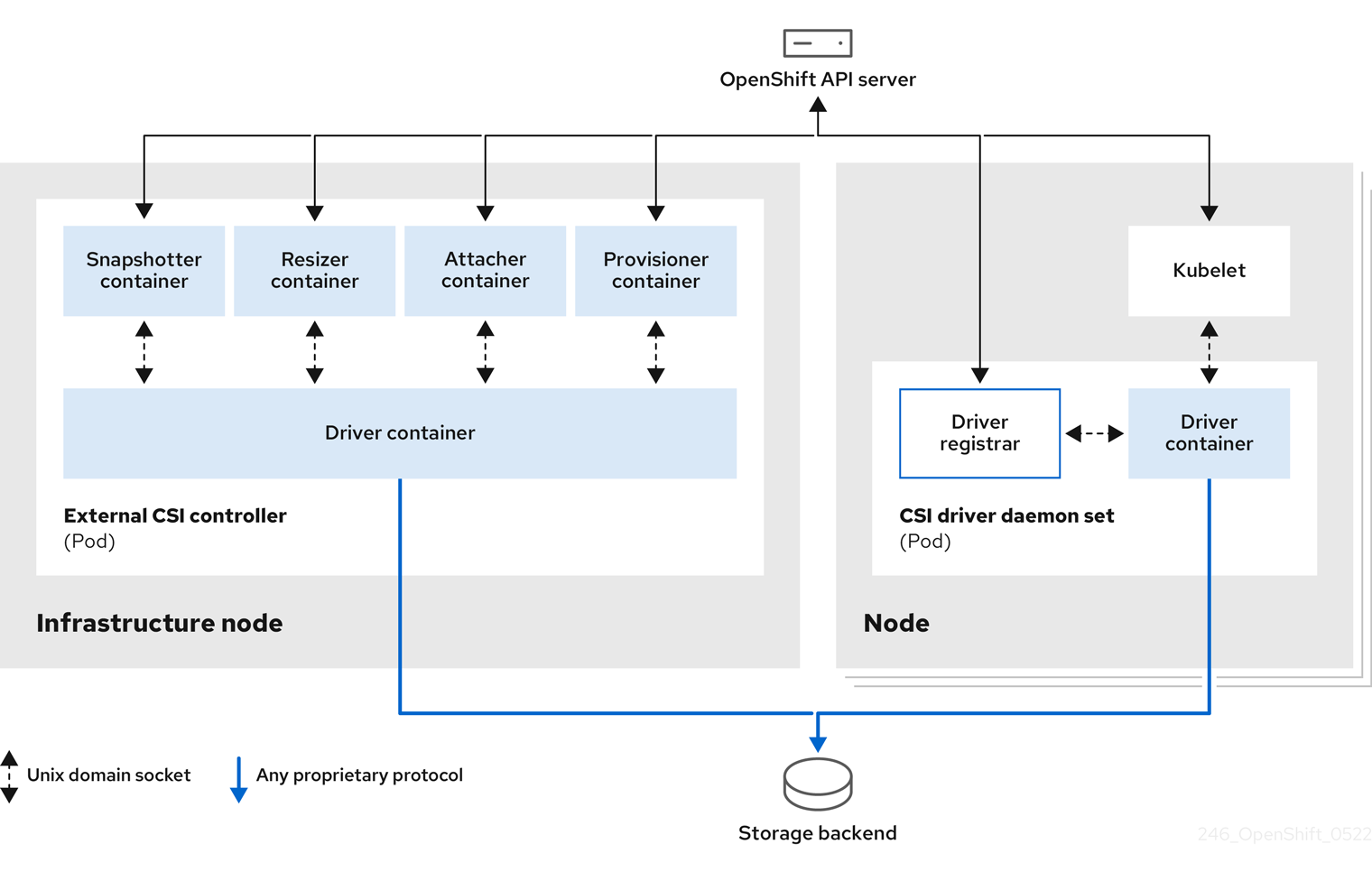
It is possible to run multiple CSI drivers for different storage back ends. Each driver needs its own external controllers deployment and daemon set with the driver and CSI registrar.
5.1.1.1. External CSI controllers
External CSI Controllers is a deployment that deploys one or more pods with five containers:
-
The snapshotter container watches
VolumeSnapshotandVolumeSnapshotContentobjects and is responsible for the creation and deletion ofVolumeSnapshotContentobject. -
The resizer container is a sidecar container that watches for
PersistentVolumeClaimupdates and triggersControllerExpandVolumeoperations against a CSI endpoint if you request more storage onPersistentVolumeClaimobject. -
An external CSI attacher container translates
attachanddetachcalls from OpenShift Container Platform to respectiveControllerPublishandControllerUnpublishcalls to the CSI driver. -
An external CSI provisioner container that translates
provisionanddeletecalls from OpenShift Container Platform to respectiveCreateVolumeandDeleteVolumecalls to the CSI driver. - A CSI driver container
The CSI attacher and CSI provisioner containers communicate with the CSI driver container using UNIX Domain Sockets, ensuring that no CSI communication leaves the pod. The CSI driver is not accessible from outside of the pod.
attach, detach, provision, and delete operations typically require the CSI driver to use credentials to the storage backend. Run the CSI controller pods on infrastructure nodes so the credentials are never leaked to user processes, even in the event of a catastrophic security breach on a compute node.
The external attacher must also run for CSI drivers that do not support third-party attach or detach operations. The external attacher will not issue any ControllerPublish or ControllerUnpublish operations to the CSI driver. However, it still must run to implement the necessary OpenShift Container Platform attachment API.
5.1.1.2. CSI driver daemon set
The CSI driver daemon set runs a pod on every node that allows OpenShift Container Platform to mount storage provided by the CSI driver to the node and use it in user workloads (pods) as persistent volumes (PVs). The pod with the CSI driver installed contains the following containers:
-
A CSI driver registrar, which registers the CSI driver into the
openshift-nodeservice running on the node. Theopenshift-nodeprocess running on the node then directly connects with the CSI driver using the UNIX Domain Socket available on the node. - A CSI driver.
The CSI driver deployed on the node should have as few credentials to the storage back end as possible. OpenShift Container Platform will only use the node plugin set of CSI calls such as NodePublish/NodeUnpublish and NodeStage/NodeUnstage, if these calls are implemented.
5.1.2. CSI drivers supported by OpenShift Container Platform
OpenShift Container Platform installs certain CSI drivers by default, giving users storage options that are not possible with in-tree volume plugins.
To create CSI-provisioned persistent volumes that mount to these supported storage assets, OpenShift Container Platform installs the necessary CSI driver Operator, the CSI driver, and the required storage class by default. For more details about the default namespace of the Operator and driver, see the documentation for the specific CSI Driver Operator.
The following table describes the CSI drivers that are installed with OpenShift Container Platform and which CSI features they support, such as volume snapshots, cloning, and resize.
| CSI driver | CSI volume snapshots | CSI cloning | CSI resize |
|---|---|---|---|
| AWS EBS (Tech Preview) |
✅ |
- |
✅ |
| Google Cloud Platform (GCP) persistent disk (PD) |
✅ |
- |
✅ |
| Microsoft Azure Disk (Tech Preview) |
✅ |
✅ |
✅ |
| OpenStack Cinder |
✅ |
✅ |
✅ |
| OpenShift Container Storage |
✅ |
✅ |
✅ |
| OpenStack Manila |
✅ |
- |
- |
| Red Hat Virtualization (oVirt) |
- |
- |
- |
| VMware vSphere (Tech Preview) |
- |
- |
- |
If your CSI driver is not listed in the preceding table, you must follow the installation instructions provided by your CSI storage vendor to use their supported CSI features.
5.1.3. Dynamic provisioning
Dynamic provisioning of persistent storage depends on the capabilities of the CSI driver and underlying storage back end. The provider of the CSI driver should document how to create a storage class in OpenShift Container Platform and the parameters available for configuration.
The created storage class can be configured to enable dynamic provisioning.
Procedure
Create a default storage class that ensures all PVCs that do not require any special storage class are provisioned by the installed CSI driver.
# oc create -f - << EOF
apiVersion: storage.k8s.io/v1
kind: StorageClass
metadata:
  name: <storage-class>
1 annotations: storageclass.kubernetes.io/is-default-class: "true" provisioner: <provisioner-name>2 parameters: EOF
5.1.4. Example using the CSI driver
The following example installs a default MySQL template without any changes to the template.
Prerequisites
- The CSI driver has been deployed.
- A storage class has been created for dynamic provisioning.
Procedure
Create the MySQL template:
# oc new-app mysql-persistentExample output
--> Deploying template "openshift/mysql-persistent" to project default
...
# oc get pvcExample output
NAME              STATUS    VOLUME                                   CAPACITY
ACCESS MODES   STORAGECLASS   AGE
mysql             Bound     kubernetes-dynamic-pv-3271ffcb4e1811e8   1Gi
RWO            cinder         3s
5.2. CSI inline ephemeral volumes
Container Storage Interface (CSI) inline ephemeral volumes allow you to define a Pod spec that creates inline ephemeral volumes when a pod is deployed and delete them when a pod is destroyed.
This feature is only available with supported Container Storage Interface (CSI) drivers.
CSI inline ephemeral volumes is a Technology Preview feature only. Technology Preview features are not supported with Red Hat production service level agreements (SLAs) and might not be functionally complete. Red Hat does not recommend using them in production. These features provide early access to upcoming product features, enabling customers to test functionality and provide feedback during the development process.
For more information about the support scope of Red Hat Technology Preview features, see https://access.redhat.com/support/offerings/techpreview/.
5.2.1. Overview of CSI inline ephemeral volumes
Traditionally, volumes that are backed by Container Storage Interface (CSI) drivers can only be used with a PersistentVolume and PersistentVolumeClaim object combination.
This feature allows you to specify CSI volumes directly in the Pod specification, rather than in a PersistentVolume object. Inline volumes are ephemeral and do not persist across pod restarts.
5.2.1.1. Support limitations
By default, OpenShift Container Platform supports CSI inline ephemeral volumes with these limitations:
- Support is only available for CSI drivers. In-tree and FlexVolumes are not supported.
- OpenShift Container Platform does not include any CSI drivers. Use the CSI drivers provided by community or storage vendors. Follow the installation instructions provided by the CSI driver.
-
CSI drivers might not have implemented the inline volume functionality, including
Ephemeralcapacity. For details, see the CSI driver documentation.
5.2.2. Embedding a CSI inline ephemeral volume in the pod specification
You can embed a CSI inline ephemeral volume in the Pod specification in OpenShift Container Platform. At runtime, nested inline volumes follow the ephemeral lifecycle of their associated pods so that the CSI driver handles all phases of volume operations as pods are created and destroyed.
Procedure
-
Create the
Podobject definition and save it to a file. Embed the CSI inline ephemeral volume in the file.
my-csi-app.yaml
kind: Pod
apiVersion: v1
metadata:
  name: my-csi-app
spec:
  containers:
    - name: my-frontend
      image: busybox
      volumeMounts:
      - mountPath: "/data"
        name: my-csi-inline-vol
      command: [ "sleep", "1000000" ]
  volumes:
1 - name: my-csi-inline-vol csi: driver: inline.storage.kubernetes.io volumeAttributes: foo: bar- 1
- The name of the volume that is used by pods.
Create the object definition file that you saved in the previous step.
$ oc create -f my-csi-app.yaml
5.3. CSI volume snapshots
This document describes how to use volume snapshots with supported Container Storage Interface (CSI) drivers to help protect against data loss in OpenShift Container Platform. Familiarity with persistent volumes is suggested.
5.3.1. Overview of CSI volume snapshots
A snapshot represents the state of the storage volume in a cluster at a particular point in time. Volume snapshots can be used to provision a new volume.
OpenShift Container Platform supports CSI volume snapshots by default. However, a specific CSI driver is required.
With CSI volume snapshots, a cluster administrator can:
- Deploy a third-party CSI driver that supports snapshots.
- Create a new persistent volume claim (PVC) from an existing volume snapshot.
- Take a snapshot of an existing PVC.
- Restore a snapshot as a different PVC.
- Delete an existing volume snapshot.
With CSI volume snapshots, an app developer can:
- Use volume snapshots as building blocks for developing application- or cluster-level storage backup solutions.
- Rapidly rollback to a previous development version.
- Use storage more efficiently by not having to make a full copy each time.
Be aware of the following when using volume snapshots:
- Support is only available for CSI drivers. In-tree and FlexVolumes are not supported.
- OpenShift Container Platform only ships with select CSI drivers. For CSI drivers that are not provided by an OpenShift Container Platform Driver Operator, it is recommended to use the CSI drivers provided by community or storage vendors. Follow the installation instructions provided by the CSI driver.
-
CSI drivers may or may not have implemented the volume snapshot functionality. CSI drivers that have provided support for volume snapshots will likely use the
csi-external-snapshottersidecar. See documentation provided by the CSI driver for details.
5.3.2. CSI snapshot controller and sidecar
OpenShift Container Platform provides a snapshot controller that is deployed into the control plane. In addition, your CSI driver vendor provides the CSI snapshot sidecar as a helper container that is installed during the CSI driver installation.
The CSI snapshot controller and sidecar provide volume snapshotting through the OpenShift Container Platform API. These external components run in the cluster.
The external controller is deployed by the CSI Snapshot Controller Operator.
5.3.2.1. External controller
The CSI snapshot controller binds VolumeSnapshot and VolumeSnapshotContent objects. The controller manages dynamic provisioning by creating and deleting VolumeSnapshotContent objects.
5.3.2.2. External sidecar
Your CSI driver vendor provides the csi-external-snapshotter sidecar. This is a separate helper container that is deployed with the CSI driver. The sidecar manages snapshots by triggering CreateSnapshot and DeleteSnapshot operations. Follow the installation instructions provided by your vendor.
5.3.3. About the CSI Snapshot Controller Operator
The CSI Snapshot Controller Operator runs in the openshift-cluster-storage-operator namespace. It is installed by the Cluster Version Operator (CVO) in all clusters by default.
The CSI Snapshot Controller Operator installs the CSI snapshot controller, which runs in the openshift-cluster-storage-operator namespace.
5.3.3.1. Volume snapshot CRDs
During OpenShift Container Platform installation, the CSI Snapshot Controller Operator creates the following snapshot custom resource definitions (CRDs) in the snapshot.storage.k8s.io/v1 API group:
VolumeSnapshotContentA snapshot taken of a volume in the cluster that has been provisioned by a cluster administrator.
Similar to the
PersistentVolumeobject, theVolumeSnapshotContentCRD is a cluster resource that points to a real snapshot in the storage back end.For manually pre-provisioned snapshots, a cluster administrator creates a number of
VolumeSnapshotContentCRDs. These carry the details of the real volume snapshot in the storage system.The
VolumeSnapshotContentCRD is not namespaced and is for use by a cluster administrator.VolumeSnapshotSimilar to the
PersistentVolumeClaimobject, theVolumeSnapshotCRD defines a developer request for a snapshot. The CSI Snapshot Controller Operator runs the CSI snapshot controller, which handles the binding of aVolumeSnapshotCRD with an appropriateVolumeSnapshotContentCRD. The binding is a one-to-one mapping.The
VolumeSnapshotCRD is namespaced. A developer uses the CRD as a distinct request for a snapshot.VolumeSnapshotClassAllows a cluster administrator to specify different attributes belonging to a
VolumeSnapshotobject. These attributes may differ among snapshots taken of the same volume on the storage system, in which case they would not be expressed by using the same storage class of a persistent volume claim.The
VolumeSnapshotClassCRD defines the parameters for thecsi-external-snapshottersidecar to use when creating a snapshot. This allows the storage back end to know what kind of snapshot to dynamically create if multiple options are supported.Dynamically provisioned snapshots use the
VolumeSnapshotClassCRD to specify storage-provider-specific parameters to use when creating a snapshot.The
VolumeSnapshotContentClassCRD is not namespaced and is for use by a cluster administrator to enable global configuration options for their storage back end.
5.3.4. Volume snapshot provisioning
There are two ways to provision snapshots: dynamically and manually.
5.3.4.1. Dynamic provisioning
Instead of using a preexisting snapshot, you can request that a snapshot be taken dynamically from a persistent volume claim. Parameters are specified using a VolumeSnapshotClass CRD.
5.3.4.2. Manual provisioning
As a cluster administrator, you can manually pre-provision a number of VolumeSnapshotContent objects. These carry the real volume snapshot details available to cluster users.
5.3.5. Creating a volume snapshot
When you create a VolumeSnapshot object, OpenShift Container Platform creates a volume snapshot.
Prerequisites
- Logged in to a running OpenShift Container Platform cluster.
-
A PVC created using a CSI driver that supports
VolumeSnapshotobjects. - A storage class to provision the storage back end.
No pods are using the persistent volume claim (PVC) that you want to take a snapshot of.
NoteDo not create a volume snapshot of a PVC if a pod is using it. Doing so might cause data corruption because the PVC is not quiesced (paused). Be sure to first tear down a running pod to ensure consistent snapshots.
Procedure
To dynamically create a volume snapshot:
Create a file with the
VolumeSnapshotClassobject described by the following YAML:volumesnapshotclass.yaml
apiVersion: snapshot.storage.k8s.io/v1
kind: VolumeSnapshotClass
metadata:
  name: csi-hostpath-snap
driver: hostpath.csi.k8s.io
1 deletionPolicy: Delete- 1
- The name of the CSI driver that is used to create snapshots of this
VolumeSnapshotClassobject. The name must be the same as theProvisionerfield of the storage class that is responsible for the PVC that is being snapshotted.
Create the object you saved in the previous step by entering the following command:
$ oc create -f volumesnapshotclass.yamlCreate a
VolumeSnapshotobject:volumesnapshot-dynamic.yaml
apiVersion: snapshot.storage.k8s.io/v1
kind: VolumeSnapshot
metadata:
  name: mysnap
spec:
  volumeSnapshotClassName: csi-hostpath-snap
1 source: persistentVolumeClaimName: myclaim2 - 1
- The request for a particular class by the volume snapshot. If the
volumeSnapshotClassNamesetting is absent and there is a default volume snapshot class, a snapshot is created with the default volume snapshot class name. But if the field is absent and no default volume snapshot class exists, then no snapshot is created. - 2
- The name of the
PersistentVolumeClaimobject bound to a persistent volume. This defines what you want to create a snapshot of. Required for dynamically provisioning a snapshot.
Create the object you saved in the previous step by entering the following command:
$ oc create -f volumesnapshot-dynamic.yaml
To manually provision a snapshot:
Provide a value for the
volumeSnapshotContentNameparameter as the source for the snapshot, in addition to defining volume snapshot class as shown above.volumesnapshot-manual.yaml
apiVersion: snapshot.storage.k8s.io/v1
kind: VolumeSnapshot
metadata:
  name: snapshot-demo
spec:
  source:
    volumeSnapshotContentName: mycontent
1 - 1
- The
volumeSnapshotContentNameparameter is required for pre-provisioned snapshots.
Create the object you saved in the previous step by entering the following command:
$ oc create -f volumesnapshot-manual.yaml
Verification
After the snapshot has been created in the cluster, additional details about the snapshot are available.
To display details about the volume snapshot that was created, enter the following command:
$ oc describe volumesnapshot mysnapThe following example displays details about the
mysnapvolume snapshot:volumesnapshot.yaml
apiVersion: snapshot.storage.k8s.io/v1
kind: VolumeSnapshot
metadata:
  name: mysnap
spec:
  source:
    persistentVolumeClaimName: myclaim
  volumeSnapshotClassName: csi-hostpath-snap
status:
  boundVolumeSnapshotContentName: snapcontent-1af4989e-a365-4286-96f8-d5dcd65d78d6
1 creationTime: "2020-01-29T12:24:30Z"2 readyToUse: true3 restoreSize: 500Mi- 1
- The pointer to the actual storage content that was created by the controller.
- 2
- The time when the snapshot was created. The snapshot contains the volume content that was available at this indicated time.
- 3
- If the value is set to
true, the snapshot can be used to restore as a new PVC.
If the value is set tofalse, the snapshot was created. However, the storage back end needs to perform additional tasks to make the snapshot usable so that it can be restored as a new volume. For example, Amazon Elastic Block Store data might be moved to a different, less expensive location, which can take several minutes.
To verify that the volume snapshot was created, enter the following command:
$ oc get volumesnapshotcontentThe pointer to the actual content is displayed. If the
boundVolumeSnapshotContentNamefield is populated, aVolumeSnapshotContentobject exists and the snapshot was created.-
To verify that the snapshot is ready, confirm that the
VolumeSnapshotobject hasreadyToUse: true.
5.3.6. Deleting a volume snapshot
You can configure how OpenShift Container Platform deletes volume snapshots.
Procedure
Specify the deletion policy that you require in the
VolumeSnapshotClassobject, as shown in the following example:volumesnapshotclass.yaml
apiVersion: snapshot.storage.k8s.io/v1
kind: VolumeSnapshotClass
metadata:
  name: csi-hostpath-snap
driver: hostpath.csi.k8s.io
deletionPolicy: Delete
1 - 1
- When deleting the volume snapshot, if the
Deletevalue is set, the underlying snapshot is deleted along with theVolumeSnapshotContentobject. If theRetainvalue is set, both the underlying snapshot andVolumeSnapshotContentobject remain.
If theRetainvalue is set and theVolumeSnapshotobject is deleted without deleting the correspondingVolumeSnapshotContentobject, the content remains. The snapshot itself is also retained in the storage back end.
Delete the volume snapshot by entering the following command:
$ oc delete volumesnapshot <volumesnapshot_name>Example output
volumesnapshot.snapshot.storage.k8s.io "mysnapshot" deletedIf the deletion policy is set to
Retain, delete the volume snapshot content by entering the following command:$ oc delete volumesnapshotcontent <volumesnapshotcontent_name>Optional: If the
VolumeSnapshotobject is not successfully deleted, enter the following command to remove any finalizers for the leftover resource so that the delete operation can continue:ImportantOnly remove the finalizers if you are confident that there are no existing references from either persistent volume claims or volume snapshot contents to the
VolumeSnapshotobject. Even with the--forceoption, the delete operation does not delete snapshot objects until all finalizers are removed.$ oc patch -n $PROJECT volumesnapshot/$NAME --type=merge -p '{"metadata": {"finalizers":null}}'Example output
volumesnapshotclass.snapshot.storage.k8s.io "csi-ocs-rbd-snapclass" deletedThe finalizers are removed and the volume snapshot is deleted.
5.3.7. Restoring a volume snapshot
The VolumeSnapshot CRD content can be used to restore the existing volume to a previous state.
After your VolumeSnapshot CRD is bound and the readyToUse value is set to true, you can use that resource to provision a new volume that is pre-populated with data from the snapshot. .Prerequisites * Logged in to a running OpenShift Container Platform cluster. * A persistent volume claim (PVC) created using a Container Storage Interface (CSI) driver that supports volume snapshots. * A storage class to provision the storage back end. * A volume snapshot has been created and is ready to use.
Procedure
Specify a
VolumeSnapshotdata source on a PVC as shown in the following:pvc-restore.yaml
apiVersion: v1
kind: PersistentVolumeClaim
metadata:
  name: myclaim-restore
spec:
  storageClassName: csi-hostpath-sc
  dataSource:
    name: mysnap
1 kind: VolumeSnapshot2 apiGroup: snapshot.storage.k8s.io3 accessModes: - ReadWriteOnce resources: requests: storage: 1GiCreate a PVC by entering the following command:
$ oc create -f pvc-restore.yamlVerify that the restored PVC has been created by entering the following command:
$ oc get pvcA new PVC such as
myclaim-restoreis displayed.
5.4. CSI volume cloning
Volume cloning duplicates an existing persistent volume to help protect against data loss in OpenShift Container Platform. This feature is only available with supported Container Storage Interface (CSI) drivers. You should be familiar with persistent volumes before you provision a CSI volume clone.
5.4.1. Overview of CSI volume cloning
A Container Storage Interface (CSI) volume clone is a duplicate of an existing persistent volume at a particular point in time.
Volume cloning is similar to volume snapshots, although it is more efficient. For example, a cluster administrator can duplicate a cluster volume by creating another instance of the existing cluster volume.
Cloning creates an exact duplicate of the specified volume on the back-end device, rather than creating a new empty volume. After dynamic provisioning, you can use a volume clone just as you would use any standard volume.
No new API objects are required for cloning. The existing dataSource field in the PersistentVolumeClaim object is expanded so that it can accept the name of an existing PersistentVolumeClaim in the same namespace.
5.4.1.1. Support limitations
By default, OpenShift Container Platform supports CSI volume cloning with these limitations:
- The destination persistent volume claim (PVC) must exist in the same namespace as the source PVC.
- The source and destination storage class must be the same.
- Support is only available for CSI drivers. In-tree and FlexVolumes are not supported.
- CSI drivers might not have implemented the volume cloning functionality. For details, see the CSI driver documentation.
5.4.2. Provisioning a CSI volume clone
When you create a cloned persistent volume claim (PVC) API object, you trigger the provisioning of a CSI volume clone. The clone pre-populates with the contents of another PVC, adhering to the same rules as any other persistent volume. The one exception is that you must add a dataSource that references an existing PVC in the same namespace.
Prerequisites
- You are logged in to a running OpenShift Container Platform cluster.
- Your PVC is created using a CSI driver that supports volume cloning.
- Your storage back end is configured for dynamic provisioning. Cloning support is not available for static provisioners.
Procedure
To clone a PVC from an existing PVC:
Create and save a file with the
PersistentVolumeClaimobject described by the following YAML:pvc-clone.yaml
apiVersion: v1
kind: PersistentVolumeClaim
metadata:
  name: pvc-1-clone
  namespace: mynamespace
spec:
  storageClassName: csi-cloning
1 accessModes: - ReadWriteOnce resources: requests: storage: 5Gi dataSource: kind: PersistentVolumeClaim name: pvc-1- 1
- The name of the storage class that provisions the storage back end. The default storage class can be used and
storageClassNamecan be omitted in the spec.
Create the object you saved in the previous step by running the following command:
$ oc create -f pvc-clone.yamlA new PVC
pvc-1-cloneis created.Verify that the volume clone was created and is ready by running the following command:
$ oc get pvc pvc-1-cloneThe
pvc-1-cloneshows that it isBound.You are now ready to use the newly cloned PVC to configure a pod.
Create and save a file with the
Podobject described by the YAML. For example:kind: Pod apiVersion: v1 metadata: name: mypod spec: containers: - name: myfrontend image: dockerfile/nginx volumeMounts: - mountPath: "/var/www/html" name: mypd volumes: - name: mypd persistentVolumeClaim: claimName: pvc-1-clone1 - 1
- The cloned PVC created during the CSI volume cloning operation.
The created
Podobject is now ready to consume, clone, snapshot, or delete your cloned PVC independently of its originaldataSourcePVC.
5.5. CSI automatic migration
OpenShift Container Platform provides automatic migration for supported in-tree volume plugins to their equivalent Container Storage Interface (CSI) drivers.
CSI automatic migration is a Technology Preview feature only. Technology Preview features are not supported with Red Hat production service level agreements (SLAs) and might not be functionally complete. Red Hat does not recommend using them in production. These features provide early access to upcoming product features, enabling customers to test functionality and provide feedback during the development process.
For more information about the support scope of Red Hat Technology Preview features, see https://access.redhat.com/support/offerings/techpreview/.
5.5.1. Overview
With the automatic migration feature enabled, volumes provisioned using in-tree storage plugins supported by this feature are migrated to their counterpart CSI drivers.
The following drivers are supported:
- Amazon Web Services (AWS) Elastic Block Storage (EBS)
- OpenStack Cinder
CSI automatic migration should be seamless. Enabling this feature does not change how you use all existing API objects (for example, PersistentVolumes, PersistentVolumeClaims, and StorageClasses).
By default, automatic migration is disabled.
CSI automatic migration will be enabled by default in a future OpenShift Container Platform release, so it is highly recommended that you test it now and report any issues.
5.5.2. Enabling CSI automatic migration
Enabling CSI automatic migration drains, and then restarts, all nodes in the cluster in sequence. This might take some time.
Procedure
Enable feature gates (see Nodes → Working with clusters → Enabling features using feature gates).
ImportantAfter turning on Technology Preview features using feature gates, they cannot be turned off. As a result, cluster upgrades are prevented.
The following configuration example enables CSI automatic migration to both CSI drivers (AWS EBS and Cinder):
apiVersion: config.openshift.io/v1
kind: FeatureGate
metadata:
  name: cluster
spec:
  featureSet: TechPreviewNoUpgrade
1 ...- 1
- Enables automatic migration for AWS EBS and Cinder.
You can specify CSI automatic migration for a selected CSI driver by setting
CustomNoUpgradefeatureSetand forfeaturegateseither:- CSIMigrationAWS
- CSIMigrationOpenStack
The following configuration example enables automatic migration to the AWS EBS CSI driver only:
apiVersion: config.openshift.io/v1
kind: FeatureGate
metadata:
  name: cluster
spec:
  featureSet: CustomNoUpgrade
  customNoUpgrade:
    enabled:
      - CSIMigrationAWS
1 ...- 1
- Enables automatic migration for AWS EBS only.
5.6. AWS Elastic Block Store CSI Driver Operator
5.6.1. Overview
OpenShift Container Platform is capable of provisioning persistent volumes (PVs) using the Container Storage Interface (CSI) driver for AWS Elastic Block Store (EBS).
AWS EBS CSI Driver Operator is a Technology Preview feature only. Technology Preview features are not supported with Red Hat production service level agreements (SLAs) and might not be functionally complete. Red Hat does not recommend using them in production. These features provide early access to upcoming product features, enabling customers to test functionality and provide feedback during the development process.
For more information about the support scope of Red Hat Technology Preview features, see https://access.redhat.com/support/offerings/techpreview/.
Familiarity with persistent storage and configuring CSI volumes is recommended when working with a Container Storage Interface (CSI) Operator and driver.
To create CSI-provisioned PVs that mount to AWS EBS storage assets, OpenShift Container Platform installs the AWS EBS CSI Driver Operator and the AWS EBS CSI driver by default in the openshift-cluster-csi-drivers namespace.
- The AWS EBS CSI Driver Operator provides a StorageClass by default that you can use to create PVCs. You also have the option to create the AWS EBS StorageClass as described in Persistent storage using AWS Elastic Block Store.
- The AWS EBS CSI driver enables you to create and mount AWS EBS PVs.
If you installed the AWS EBS CSI Operator and driver on a OpenShift Container Platform 4.5 cluster, you must uninstall the 4.5 Operator and driver before you update to OpenShift Container Platform 4.8.
5.6.2. About CSI
Storage vendors have traditionally provided storage drivers as part of Kubernetes. With the implementation of the Container Storage Interface (CSI), third-party providers can instead deliver storage plugins using a standard interface without ever having to change the core Kubernetes code.
CSI Operators give OpenShift Container Platform users storage options, such as volume snapshots, that are not possible with in-tree volume plugins.
OpenShift Container Platform defaults to using an in-tree (non-CSI) plugin to provision AWS EBS storage.
In future OpenShift Container Platform versions, volumes provisioned using existing in-tree plugins are planned for migration to their equivalent CSI driver. CSI automatic migration should be seamless. Migration does not change how you use all existing API objects, such as persistent volumes, persistent volume claims, and storage classes. For more information about migration, see CSI automatic migration.
After full migration, in-tree plugins will eventually be removed in future versions of OpenShift Container Platform.
For information about dynamically provisioning AWS EBS persistent volumes in OpenShift Container Platform, see Persistent storage using AWS Elastic Block Store.
5.7. Azure Disk CSI Driver Operator
5.7.1. Overview
OpenShift Container Platform is capable of provisioning persistent volumes (PVs) using the Container Storage Interface (CSI) driver for Microsoft Azure Disk Storage.
Azure Disk CSI Driver Operator is a Technology Preview feature only. Technology Preview features are not supported with Red Hat production service level agreements (SLAs) and might not be functionally complete. Red Hat does not recommend using them in production. These features provide early access to upcoming product features, enabling customers to test functionality and provide feedback during the development process.
For more information about the support scope of Red Hat Technology Preview features, see https://access.redhat.com/support/offerings/techpreview/.
Familiarity with persistent storage and configuring CSI volumes is recommended when working with a CSI Operator and driver.
To create CSI-provisioned PVs that mount to Azure Disk storage assets with this feature is enabled, OpenShift Container Platform installs the Azure Disk CSI Driver Operator and the Azure Disk CSI driver by default in the openshift-cluster-csi-drivers namespace.
-
The Azure Disk CSI Driver Operator, after being enabled, provides a storage class named
managed-csithat you can use to create persistent volume claims (PVCs). The Azure Disk CSI Driver Operator supports dynamic volume provisioning by allowing storage volumes to be created on-demand, eliminating the need for cluster administrators to pre-provision storage. - The Azure Disk CSI driver enables you to create and mount Azure Disk PVs.
5.7.2. About CSI
Storage vendors have traditionally provided storage drivers as part of Kubernetes. With the implementation of the Container Storage Interface (CSI), third-party providers can instead deliver storage plugins using a standard interface without ever having to change the core Kubernetes code.
CSI Operators give OpenShift Container Platform users storage options, such as volume snapshots, that are not possible with in-tree volume plugins.
OpenShift Container Platform defaults to using an in-tree (non-CSI) plugin to provision Azure Disk storage.
In future OpenShift Container Platform versions, volumes provisioned using existing in-tree plugins are planned for migration to their equivalent CSI driver. CSI automatic migration should be seamless. Migration does not change how you use all existing API objects, such as persistent volumes, persistent volume claims, and storage classes. For more information about migration, see CSI automatic migration.
After full migration, in-tree plugins will eventually be removed in later versions of OpenShift Container Platform.
5.7.3. Enabling the Azure CSI Driver Operator
To enable the Azure Container Storage Interface (CSI) Driver Operator, you must enable feature gates with the TechPreviewNoUpgrade feature set.
Procedure
Enable feature gates with the
TechPreviewNoUpgradefeature set (see Nodes → Enabling features using feature gates).ImportantAfter turning Technology Preview features on by using feature gates, they cannot be turned off and cluster upgrades are prevented.
Verify the cluster operator storage:
$ oc get co storageNAME VERSION AVAILABLE PROGRESSING DEGRADED SINCE storage 4.8.0-0.nightly-2021-04-30-201824 True False False 4h26m-
AVAILABLEshould be "True". -
PROGRESSINGshould be "False". -
DEGRADEDshould be "False".
-
Verify the status of the pods in the
openshift-cluster-csi-driversnamespace to ensure that they are running:$ oc get pod -n openshift-cluster-csi-driversNAME READY STATUS RESTARTS AGE azure-disk-csi-driver-controller-5949bf45fd-pm4qb 11/11 Running 0 39m azure-disk-csi-driver-node-2tcxr 3/3 Running 0 53m azure-disk-csi-driver-node-2xjzm 3/3 Running 0 53m azure-disk-csi-driver-node-6wrgk 3/3 Running 0 53m azure-disk-csi-driver-node-frvx2 3/3 Running 0 53m azure-disk-csi-driver-node-lf5kb 3/3 Running 0 53m azure-disk-csi-driver-node-mqdhh 3/3 Running 0 53m azure-disk-csi-driver-operator-7d966fc6c5-x74x5 1/1 Running 0 44mVerify that the storage class is installed:
$ oc get storageclassNAME PROVISIONER RECLAIMPOLICY VOLUMEBINDINGMODE ALLOWVOLUMEEXPANSION AGE managed-premium (default) kubernetes.io/azure-disk Delete WaitForFirstConsumer true 76m managed-csi disk.csi.azure.com Delete WaitForFirstConsumer true 51m1 - 1
- Azure storage class
5.8. GCP PD CSI Driver Operator
5.8.1. Overview
OpenShift Container Platform can provision persistent volumes (PVs) using the Container Storage Interface (CSI) driver for Google Cloud Platform (GCP) persistent disk (PD) storage.
Familiarity with persistent storage and configuring CSI volumes is recommended when working with a Container Storage Interface (CSI) Operator and driver.
To create CSI-provisioned persistent volumes (PVs) that mount to GCP PD storage assets, OpenShift Container Platform installs the GCP PD CSI Driver Operator and the GCP PD CSI driver by default in the openshift-cluster-csi-drivers namespace.
- GCP PD CSI Driver Operator: By default, the Operator provides a storage class that you can use to create PVCs. You also have the option to create the GCP PD storage class as described in Persistent storage using GCE Persistent Disk.
- GCP PD driver: The driver enables you to create and mount GCP PD PVs.
OpenShift Container Platform defaults to using an in-tree (non-CSI) plugin to provision GCP PD storage.
In future OpenShift Container Platform versions, volumes provisioned using existing in-tree plugins are planned for migration to their equivalent CSI driver. CSI automatic migration should be seamless. Migration does not change how you use all existing API objects, such as persistent volumes, persistent volume claims, and storage classes. For more information about migration, see CSI automatic migration.
After full migration, in-tree plugins will eventually be removed in future versions of OpenShift Container Platform.
5.8.2. About CSI
Storage vendors have traditionally provided storage drivers as part of Kubernetes. With the implementation of the Container Storage Interface (CSI), third-party providers can instead deliver storage plugins using a standard interface without ever having to change the core Kubernetes code.
CSI Operators give OpenShift Container Platform users storage options, such as volume snapshots, that are not possible with in-tree volume plugins.
5.8.3. GCP PD CSI driver storage class parameters
The Google Cloud Platform (GCP) persistent disk (PD) Container Storage Interface (CSI) driver uses the CSI external-provisioner sidecar as a controller. This is a separate helper container that is deployed with the CSI driver. The sidecar manages persistent volumes (PVs) by triggering the CreateVolume operation.
The GCP PD CSI driver uses the csi.storage.k8s.io/fstype parameter key to support dynamic provisioning. The following table describes all the GCP PD CSI storage class parameters that are supported by OpenShift Container Platform.
| Parameter | Values | Default | Description |
|---|---|---|---|
|
|
|
| Allows you to choose between standard PVs or solid-state-drive PVs. |
|
|
|
| Allows you to choose between zonal or regional PVs. |
|
| Fully qualified resource identifier for the key to use to encrypt new disks. | Empty string | Uses customer-managed encryption keys (CMEK) to encrypt new disks. |
5.8.4. Creating a custom-encrypted persistent volume
When you create a PersistentVolumeClaim object, OpenShift Container Platform provisions a new persistent volume (PV) and creates a PersistentVolume object. You can add a custom encryption key in Google Cloud Platform (GCP) to protect a PV in your cluster by encrypting the newly created PV.
For encryption, the newly attached PV that you create uses customer-managed encryption keys (CMEK) on a cluster by using a new or existing Google Cloud Key Management Service (KMS) key.
Prerequisites
- You are logged in to a running OpenShift Container Platform cluster.
- You have created a Cloud KMS key ring and key version.
For more information about CMEK and Cloud KMS resources, see Using customer-managed encryption keys (CMEK).
Procedure
To create a custom-encrypted PV, complete the following steps:
Create a storage class with the Cloud KMS key. The following example enables dynamic provisioning of encrypted volumes:
apiVersion: storage.k8s.io/v1 kind: StorageClass metadata: name: csi-gce-pd-cmek provisioner: pd.csi.storage.gke.io volumeBindingMode: "WaitForFirstConsumer" allowVolumeExpansion: true parameters: type: pd-standard disk-encryption-kms-key: projects/<key-project-id>/locations/<location>/keyRings/<key-ring>/cryptoKeys/<key>1 - 1
- This field must be the resource identifier for the key that will be used to encrypt new disks. Values are case-sensitive. For more information about providing key ID values, see Retrieving a resource’s ID and Getting a Cloud KMS resource ID.
NoteYou cannot add the
disk-encryption-kms-keyparameter to an existing storage class. However, you can delete the storage class and recreate it with the same name and a different set of parameters. If you do this, the provisioner of the existing class must bepd.csi.storage.gke.io.Deploy the storage class on your OpenShift Container Platform cluster using the
occommand:$ oc describe storageclass csi-gce-pd-cmekExample output
Name: csi-gce-pd-cmek IsDefaultClass: No Annotations: None Provisioner: pd.csi.storage.gke.io Parameters: disk-encryption-kms-key=projects/key-project-id/locations/location/keyRings/ring-name/cryptoKeys/key-name,type=pd-standard AllowVolumeExpansion: true MountOptions: none ReclaimPolicy: Delete VolumeBindingMode: WaitForFirstConsumer Events: noneCreate a file named
pvc.yamlthat matches the name of your storage class object that you created in the previous step:kind: PersistentVolumeClaim apiVersion: v1 metadata: name: podpvc spec: accessModes: - ReadWriteOnce storageClassName: csi-gce-pd-cmek resources: requests: storage: 6GiNoteIf you marked the new storage class as default, you can omit the
storageClassNamefield.Apply the PVC on your cluster:
$ oc apply -f pvc.yamlGet the status of your PVC and verify that it is created and bound to a newly provisioned PV:
$ oc get pvcExample output
NAME STATUS VOLUME CAPACITY ACCESS MODES STORAGECLASS AGE podpvc Bound pvc-e36abf50-84f3-11e8-8538-42010a800002 10Gi RWO csi-gce-pd-cmek 9sNoteIf your storage class has the
volumeBindingModefield set toWaitForFirstConsumer, you must create a pod to use the PVC before you can verify it.
Your CMEK-protected PV is now ready to use with your OpenShift Container Platform cluster.
5.9. OpenStack Cinder CSI Driver Operator
5.9.1. Overview
OpenShift Container Platform is capable of provisioning persistent volumes (PVs) using the Container Storage Interface (CSI) driver for OpenStack Cinder.
Familiarity with persistent storage and configuring CSI volumes is recommended when working with a Container Storage Interface (CSI) Operator and driver.
To create CSI-provisioned PVs that mount to OpenStack Cinder storage assets, OpenShift Container Platform installs the OpenStack Cinder CSI Driver Operator and the OpenStack Cinder CSI driver in the openshift-cluster-csi-drivers namespace.
- The OpenStack Cinder CSI Driver Operator provides a CSI storage class that you can use to create PVCs.
- The OpenStack Cinder CSI driver enables you to create and mount OpenStack Cinder PVs.
For OpenShift Container Platform, automatic migration from OpenStack Cinder in-tree to the CSI driver is available as a Technology Preview (TP) feature. With migration enabled, volumes provisioned using the existing in-tree plugin are automatically migrated to use the OpenStack Cinder CSI driver. For more information, see CSI automatic migration feature.
5.9.2. About CSI
Storage vendors have traditionally provided storage drivers as part of Kubernetes. With the implementation of the Container Storage Interface (CSI), third-party providers can instead deliver storage plugins using a standard interface without ever having to change the core Kubernetes code.
CSI Operators give OpenShift Container Platform users storage options, such as volume snapshots, that are not possible with in-tree volume plugins.
OpenShift Container Platform defaults to using an in-tree (non-CSI) plugin to provision Cinder storage.
In future OpenShift Container Platform versions, volumes provisioned using existing in-tree plugins are planned for migration to their equivalent CSI driver. CSI automatic migration should be seamless. Migration does not change how you use all existing API objects, such as persistent volumes, persistent volume claims, and storage classes. For more information about migration, see CSI automatic migration.
After full migration, in-tree plugins will eventually be removed in future versions of OpenShift Container Platform.
5.9.3. Making OpenStack Cinder CSI the default storage class
The OpenStack Cinder CSI driver uses the cinder.csi.openstack.org parameter key to support dynamic provisioning.
To enable OpenStack Cinder CSI provisioning in OpenShift Container Platform, it is recommended that you overwrite the default in-tree storage class with standard-csi. Alternatively, you can create the persistent volume claim (PVC) and specify the storage class as "standard-csi".
In OpenShift Container Platform, the default storage class references the in-tree Cinder driver. However, with CSI automatic migration enabled, volumes created using the default storage class actually use the CSI driver.
Procedure
Use the following steps to apply the standard-csi storage class by overwriting the default in-tree storage class.
List the storage class:
$ oc get storageclassExample output
NAME PROVISIONER RECLAIMPOLICY VOLUMEBINDINGMODE ALLOWVOLUMEEXPANSION AGE standard(default) cinder.csi.openstack.org Delete WaitForFirstConsumer true 46h standard-csi kubernetes.io/cinder Delete WaitForFirstConsumer true 46hChange the value of the annotation
storageclass.kubernetes.io/is-default-classtofalsefor the default storage class, as shown in the following example:$ oc patch storageclass standard -p '{"metadata": {"annotations": {"storageclass.kubernetes.io/is-default-class": "false"}}}'Make another storage class the default by adding or modifying the annotation as
storageclass.kubernetes.io/is-default-class=true.$ oc patch storageclass standard-csi -p '{"metadata": {"annotations": {"storageclass.kubernetes.io/is-default-class": "true"}}}'Verify that the PVC is now referencing the CSI storage class by default:
$ oc get storageclassExample output
NAME PROVISIONER RECLAIMPOLICY VOLUMEBINDINGMODE ALLOWVOLUMEEXPANSION AGE standard kubernetes.io/cinder Delete WaitForFirstConsumer true 46h standard-csi(default) cinder.csi.openstack.org Delete WaitForFirstConsumer true 46hOptional: You can define a new PVC without having to specify the storage class:
apiVersion: v1 kind: PersistentVolumeClaim metadata: name: cinder-claim spec: accessModes: - ReadWriteOnce resources: requests: storage: 1GiA PVC that does not specify a specific storage class is automatically provisioned by using the default storage class.
Optional: After the new file has been configured, create it in your cluster:
$ oc create -f cinder-claim.yaml
5.10. OpenStack Manila CSI Driver Operator
5.10.1. Overview
OpenShift Container Platform is capable of provisioning persistent volumes (PVs) using the Container Storage Interface (CSI) driver for the OpenStack Manila shared file system service.
Familiarity with persistent storage and configuring CSI volumes is recommended when working with a Container Storage Interface (CSI) Operator and driver.
To create CSI-provisioned PVs that mount to Manila storage assets, OpenShift Container Platform installs the Manila CSI Driver Operator and the Manila CSI driver by default on any OpenStack cluster that has the Manila service enabled.
-
The Manila CSI Driver Operator creates the required storage class that is needed to create PVCs for all available Manila share types. The Operator is installed in the
openshift-cluster-csi-driversnamespace. -
The Manila CSI driver enables you to create and mount Manila PVs. The driver is installed in the
openshift-manila-csi-drivernamespace.
5.10.2. About CSI
Storage vendors have traditionally provided storage drivers as part of Kubernetes. With the implementation of the Container Storage Interface (CSI), third-party providers can instead deliver storage plugins using a standard interface without ever having to change the core Kubernetes code.
CSI Operators give OpenShift Container Platform users storage options, such as volume snapshots, that are not possible with in-tree volume plugins.
5.10.3. Manila CSI Driver Operator limitations
The following limitations apply to the Manila Container Storage Interface (CSI) Driver Operator:
- Only NFS is supported
- OpenStack Manila supports many network-attached storage protocols, such as NFS, CIFS, and CEPHFS, and these can be selectively enabled in the OpenStack cloud. The Manila CSI Driver Operator in OpenShift Container Platform only supports using the NFS protocol. If NFS is not available and enabled in the underlying OpenStack cloud, you cannot use the Manila CSI Driver Operator to provision storage for OpenShift Container Platform.
- Snapshots are not supported if the back end is CephFS-NFS
-
To take snapshots of persistent volumes (PVs) and revert volumes to snapshots, you must ensure that the Manila share type that you are using supports these features. A Red Hat OpenStack administrator must enable support for snapshots (
share type extra-spec snapshot_support) and for creating shares from snapshots (share type extra-spec create_share_from_snapshot_support) in the share type associated with the storage class you intend to use. - FSGroups are not supported
-
Since Manila CSI provides shared file systems for access by multiple readers and multiple writers, it does not support the use of FSGroups. This is true even for persistent volumes created with the ReadWriteOnce access mode. It is therefore important not to specify the
fsTypeattribute in any storage class that you manually create for use with Manila CSI Driver.
In Red Hat OpenStack Platform 16.x and 17.x, the Shared File Systems service (Manila) with CephFS through NFS fully supports serving shares to OpenShift Container Platform through the Manila CSI. However, this solution is not intended for massive scale. Be sure to review important recommendations in CephFS NFS Manila-CSI Workload Recommendations for Red Hat OpenStack Platform.
5.10.4. Dynamically provisioning Manila CSI volumes
OpenShift Container Platform installs a storage class for each available Manila share type.
The YAML files that are created are completely decoupled from Manila and from its Container Storage Interface (CSI) plugin. As an application developer, you can dynamically provision ReadWriteMany (RWX) storage and deploy pods with applications that safely consume the storage using YAML manifests.
You can use the same pod and persistent volume claim (PVC) definitions on-premise that you use with OpenShift Container Platform on AWS, GCP, Azure, and other platforms, with the exception of the storage class reference in the PVC definition.
Manila service is optional. If the service is not enabled in Red Hat OpenStack Platform (RHOSP), the Manila CSI driver is not installed and the storage classes for Manila are not created.
Prerequisites
- RHOSP is deployed with appropriate Manila share infrastructure so that it can be used to dynamically provision and mount volumes in OpenShift Container Platform.
Procedure (UI)
To dynamically create a Manila CSI volume using the web console:
- In the OpenShift Container Platform console, click Storage → Persistent Volume Claims.
- In the persistent volume claims overview, click Create Persistent Volume Claim.
Define the required options on the resulting page.
- Select the appropriate storage class.
- Enter a unique name for the storage claim.
Select the access mode to specify read and write access for the PVC you are creating.
ImportantUse RWX if you want the persistent volume (PV) that fulfills this PVC to be mounted to multiple pods on multiple nodes in the cluster.
- Define the size of the storage claim.
- Click Create to create the persistent volume claim and generate a persistent volume.
Procedure (CLI)
To dynamically create a Manila CSI volume using the command-line interface (CLI):
Create and save a file with the
PersistentVolumeClaimobject described by the following YAML:pvc-manila.yaml
apiVersion: v1 kind: PersistentVolumeClaim metadata: name: pvc-manila spec: accessModes:1 - ReadWriteMany resources: requests: storage: 10Gi storageClassName: csi-manila-gold2 Create the object you saved in the previous step by running the following command:
$ oc create -f pvc-manila.yamlA new PVC is created.
To verify that the volume was created and is ready, run the following command:
$ oc get pvc pvc-manilaThe
pvc-manilashows that it isBound.
You can now use the new PVC to configure a pod.
5.11. Red Hat Virtualization CSI Driver Operator
5.11.1. Overview
OpenShift Container Platform is capable of provisioning persistent volumes (PVs) using the Container Storage Interface (CSI) driver for Red Hat Virtualization (RHV).
Familiarity with persistent storage and configuring CSI volumes is recommended when working with a Container Storage Interface (CSI) Operator and driver.
To create CSI-provisioned PVs that mount to RHV storage assets, OpenShift Container Platform installs the oVirt CSI Driver Operator and the oVirt CSI driver by default in the openshift-cluster-csi-drivers namespace.
-
The oVirt CSI Driver Operator provides a default
StorageClassobject that you can use to create Persistent Volume Claims (PVCs). - The oVirt CSI driver enables you to create and mount oVirt PVs.
5.11.2. About CSI
Storage vendors have traditionally provided storage drivers as part of Kubernetes. With the implementation of the Container Storage Interface (CSI), third-party providers can instead deliver storage plugins using a standard interface without ever having to change the core Kubernetes code.
CSI Operators give OpenShift Container Platform users storage options, such as volume snapshots, that are not possible with in-tree volume plugins.
The oVirt CSI driver does not support snapshots.
5.11.3. oVirt CSI driver storage class
OpenShift Container Platform creates a default object of type StorageClass named ovirt-csi-sc which is used for creating dynamically provisioned persistent volumes.
To create additional storage classes for different configurations, create and save a file with the StorageClass object described by the following sample YAML:
apiVersion: storage.k8s.io/v1
kind: StorageClass
metadata:
name: <storage-class-name>
annotations:
storageclass.kubernetes.io/is-default-class: "false"
provisioner: csi.ovirt.org
parameters:
storageDomainName: <rhv-storage-domain-name>
thinProvisioning: "true"
csi.storage.k8s.io/fstype: ext4 5.11.4. Creating a persistent volume on RHV
When you create a PersistentVolumeClaim (PVC) object, OpenShift Container Platform provisions a new persistent volume (PV) and creates a PersistentVolume object.
Prerequisites
- You are logged in to a running OpenShift Container Platform cluster.
-
You provided the correct RHV credentials in
ovirt-credentialssecret. - You have installed the oVirt CSI driver.
- You have defined at least one storage class.
Procedure
If you are using the we console to dynamically create a persistent volume on RHV:
- In the OpenShift Container Platform console, click Storage → Persistent Volume Claims.
- In the persistent volume claims overview, click Create Persistent Volume Claim.
- Define the required options on the resulting page.
-
Select the appropriate
StorageClassobject, which isovirt-csi-scby default. - Enter a unique name for the storage claim.
- Select the access mode. Currently, RWO (ReadWriteOnce) is the only supported access mode.
- Define the size of the storage claim.
Select the Volume Mode:
Filesystem: Mounted into pods as a directory. This mode is the default.Block: Block device, without any file system on it-
Click Create to create the
PersistentVolumeClaimobject and generate aPersistentVolumeobject.
If you are using the command-line interface (CLI) to dynamically create a RHV CSI volume:
Create and save a file with the
PersistentVolumeClaimobject described by the following sample YAML:pvc-ovirt.yaml
apiVersion: v1 kind: PersistentVolumeClaim metadata: name: pvc-ovirt spec: storageClassName: ovirt-csi-sc1 accessModes: - ReadWriteOnce resources: requests: storage: <volume size>2 volumeMode: <volume mode>3 Create the object you saved in the previous step by running the following command:
$ oc create -f pvc-ovirt.yamlTo verify that the volume was created and is ready, run the following command:
$ oc get pvc pvc-ovirtThe
pvc-ovirtshows that it is Bound.
5.12. VMware vSphere CSI Driver Operator
5.12.1. Overview
OpenShift Container Platform can provision persistent volumes (PVs) using the Container Storage Interface (CSI) VMware vSphere driver for Virtual Machine Disk (VMDK) volumes.
vSphere CSI Driver Operator is a Technology Preview feature only. Technology Preview features are not supported with Red Hat production service level agreements (SLAs) and might not be functionally complete. Red Hat does not recommend using them in production. These features provide early access to upcoming product features, enabling customers to test functionality and provide feedback during the development process.
For more information about the support scope of Red Hat Technology Preview features, see https://access.redhat.com/support/offerings/techpreview/.
Familiarity with persistent storage and configuring CSI volumes is recommended when working with a CSI Operator and driver.
To create CSI-provisioned persistent volumes (PVs) that mount to vSphere storage assets, OpenShift Container Platform, after this feature is enabled, installs the vSphere CSI Driver Operator and the vSphere CSI driver by default in the openshift-cluster-csi-drivers namespace.
-
vSphere CSI Driver Operator: After being enabled, the Operator provides a storage class, called
thin-csi, that you can use to create persistent volumes claims (PVCs). The vSphere CSI Driver Operator supports dynamic volume provisioning by allowing storage volumes to be created on-demand, eliminating the need for cluster administrators to pre-provision storage. - vSphere CSI driver: The driver enables you to create and mount vSphere PVs.
OpenShift Container Platform defaults to using an in-tree (non-CSI) plugin to provision vSphere storage.
In future OpenShift Container Platform versions, volumes provisioned using existing in-tree plugins are planned for migration to their equivalent CSI driver. CSI automatic migration should be seamless. Migration does not change how you use all existing API objects, such as persistent volumes, persistent volume claims, and storage classes. For more information about migration, see CSI automatic migration.
After full migration, in-tree plugins will eventually be removed in future versions of OpenShift Container Platform.
5.12.2. About CSI
Storage vendors have traditionally provided storage drivers as part of Kubernetes. With the implementation of the Container Storage Interface (CSI), third-party providers can instead deliver storage plugins using a standard interface without ever having to change the core Kubernetes code.
CSI Operators give OpenShift Container Platform users storage options, such as volume snapshots, that are not possible with in-tree volume plugins.
Additional resources
5.12.3. Enabling the vSphere CSI Driver Operator
To enable the vSphere Container Storage Interface (CSI) Driver Operator, you must enable feature gates with the TechPreviewNoUpgrade feature set.
Procedure
Enable feature gates with the
TechPreviewNoUpgradefeature set (see Nodes → Enabling features using feature gates).ImportantAfter turning Technology Preview features on by using feature gates, they cannot be turned off and cluster upgrades are prevented.
Verify the cluster operator storage:
$ oc get co storageNAME VERSION AVAILABLE PROGRESSING DEGRADED SINCE storage 4.8.0-0.nightly-2021-04-30-201824 True False False 4h26m-
AVAILABLEshould be "True". -
PROGRESSINGshould be "False". -
DEGRADEDshould be "False".
-
Verify the status of the pods in the
openshift-cluster-csi-driversnamespace to ensure that they are running:$ oc get pod -n openshift-cluster-csi-driversNAME READY STATUS RESTARTS AGE vmware-vsphere-csi-driver-controller-5646dbbf54-cnsx7 9/9 Running 0 4h29m vmware-vsphere-csi-driver-node-ch22q 3/3 Running 0 4h37m vmware-vsphere-csi-driver-node-gfjrb 3/3 Running 0 4h37m vmware-vsphere-csi-driver-node-ktlmp 3/3 Running 0 4h37m vmware-vsphere-csi-driver-node-lgksl 3/3 Running 0 4h37m vmware-vsphere-csi-driver-node-vb4gv 3/3 Running 0 4h37m vmware-vsphere-csi-driver-operator-7c7fc474c-p544t 1/1 Running 0 4h29m
NAME                                                    READY   STATUS  RESTARTS    AGE
azure-disk-csi-driver-controller-5949bf45fd-pm4qb       11/11   Running 0           39m
azure-disk-csi-driver-node-2tcxr                        3/3     Running 0           53m
azure-disk-csi-driver-node-2xjzm                        3/3     Running 0           53m
azure-disk-csi-driver-node-6wrgk                        3/3     Running 0           53m
azure-disk-csi-driver-node-frvx2                        3/3     Running 0           53m
azure-disk-csi-driver-node-lf5kb                        3/3     Running 0           53m
azure-disk-csi-driver-node-mqdhh                        3/3     Running 0           53m
azure-disk-csi-driver-operator-7d966fc6c5-x74x5         1/1     Running 0           44m
Verify that the storage class is installed:
$ oc get storageclassNAME PROVISIONER RECLAIMPOLICY VOLUMEBINDINGMODE ALLOWVOLUMEEXPANSION AGE thin (default) kubernetes.io/vsphere-volume Delete Immediate false 5h43m thin-csi csi.vsphere.vmware.com Delete WaitForFirstConsumer false 4h38m1 - 1
- vSphere storage class
NAME                        PROVISIONER                     RECLAIMPOLICY   VOLUMEBINDINGMODE       ALLOWVOLUMEEXPANSION    AGE
managed-premium (default)   kubernetes.io/azure-disk        Delete          WaitForFirstConsumer    true                    76m
managed-csi disk.csi.azure.com Delete WaitForFirstConsumer true 51m - 1
- Azure storage class
Chapter 6. Expanding persistent volumes
6.1. Enabling volume expansion support
Before you can expand persistent volumes, the StorageClass object must have the allowVolumeExpansion field set to true.
Procedure
Edit the
StorageClassobject and add theallowVolumeExpansionattribute by running the following command:$ oc edit storageclass <storage_class_name>1 - 1
- Specifies the name of the storage class.
The following example demonstrates adding this line at the bottom of the storage class configuration.
apiVersion: storage.k8s.io/v1
kind: StorageClass
...
parameters:
  type: gp2
reclaimPolicy: Delete
allowVolumeExpansion: true
1 - 1
- Setting this attribute to
trueallows PVCs to be expanded after creation.
6.2. Expanding CSI volumes
You can use the Container Storage Interface (CSI) to expand storage volumes after they have already been created.
OpenShift Container Platform supports CSI volume expansion by default. However, a specific CSI driver is required.
OpenShift Container Platform 4.8 supports version 1.1.0 of the CSI specification.
Expanding CSI volumes is a Technology Preview feature only. Technology Preview features are not supported with Red Hat production service level agreements (SLAs) and might not be functionally complete. Red Hat does not recommend using them in production. These features provide early access to upcoming product features, enabling customers to test functionality and provide feedback during the development process.
For more information about the support scope of Red Hat Technology Preview features, see https://access.redhat.com/support/offerings/techpreview/.
6.3. Expanding FlexVolume with a supported driver
When using FlexVolume to connect to your back-end storage system, you can expand persistent storage volumes after they have already been created. This is done by manually updating the persistent volume claim (PVC) in OpenShift Container Platform.
FlexVolume allows expansion if the driver is set with RequiresFSResize to true. The FlexVolume can be expanded on pod restart.
Similar to other volume types, FlexVolume volumes can also be expanded when in use by a pod.
Prerequisites
- The underlying volume driver supports resize.
-
The driver is set with the
RequiresFSResizecapability totrue. - Dynamic provisioning is used.
-
The controlling
StorageClassobject hasallowVolumeExpansionset totrue.
Procedure
To use resizing in the FlexVolume plugin, you must implement the
ExpandableVolumePlugininterface using these methods:RequiresFSResize-
If
true, updates the capacity directly. Iffalse, calls theExpandFSmethod to finish the filesystem resize. ExpandFS-
If
true, callsExpandFSto resize filesystem after physical volume expansion is done. The volume driver can also perform physical volume resize together with filesystem resize.
Because OpenShift Container Platform does not support installation of FlexVolume plugins on control plane nodes (also known as the master nodes), it does not support control-plane expansion of FlexVolume.
6.4. Expanding persistent volume claims (PVCs) with a file system
Expanding PVCs based on volume types that need file system resizing, such as GCE PD, EBS, and Cinder, is a two-step process. This process involves expanding volume objects in the cloud provider, and then expanding the file system on the actual node.
Expanding the file system on the node only happens when a new pod is started with the volume.
Prerequisites
-
The controlling
StorageClassobject must haveallowVolumeExpansionset totrue.
Procedure
Edit the PVC and request a new size by editing
spec.resources.requests. For example, the following expands theebsPVC to 8 Gi.kind: PersistentVolumeClaim apiVersion: v1 metadata: name: ebs spec: storageClass: "storageClassWithFlagSet" accessModes: - ReadWriteOnce resources: requests: storage: 8Gi1 - 1
- Updating
spec.resources.requeststo a larger amount will expand the PVC.
After the cloud provider object has finished resizing, the PVC is set to
FileSystemResizePending. Check the condition by entering the following command:$ oc describe pvc <pvc_name>-
When the cloud provider object has finished resizing, the
PersistentVolumeobject reflects the newly requested size inPersistentVolume.Spec.Capacity. At this point, you can create or recreate a new pod from the PVC to finish the file system resizing. Once the pod is running, the newly requested size is available and theFileSystemResizePendingcondition is removed from the PVC.
6.5. Recovering from failure when expanding volumes
If expanding underlying storage fails, the OpenShift Container Platform administrator can manually recover the persistent volume claim (PVC) state and cancel the resize requests. Otherwise, the resize requests are continuously retried by the controller without administrator intervention.
Procedure
-
Mark the persistent volume (PV) that is bound to the PVC with the
Retainreclaim policy. This can be done by editing the PV and changingpersistentVolumeReclaimPolicytoRetain. - Delete the PVC. This will be recreated later.
-
To ensure that the newly created PVC can bind to the PV marked
Retain, manually edit the PV and delete theclaimRefentry from the PV specs. This marks the PV asAvailable. - Re-create the PVC in a smaller size, or a size that can be allocated by the underlying storage provider.
-
Set the
volumeNamefield of the PVC to the name of the PV. This binds the PVC to the provisioned PV only. - Restore the reclaim policy on the PV.
Chapter 7. Dynamic provisioning
7.1. About dynamic provisioning
The StorageClass resource object describes and classifies storage that can be requested, as well as provides a means for passing parameters for dynamically provisioned storage on demand. StorageClass objects can also serve as a management mechanism for controlling different levels of storage and access to the storage. Cluster Administrators (cluster-admin) or Storage Administrators (storage-admin) define and create the StorageClass objects that users can request without needing any detailed knowledge about the underlying storage volume sources.
The OpenShift Container Platform persistent volume framework enables this functionality and allows administrators to provision a cluster with persistent storage. The framework also gives users a way to request those resources without having any knowledge of the underlying infrastructure.
Many storage types are available for use as persistent volumes in OpenShift Container Platform. While all of them can be statically provisioned by an administrator, some types of storage are created dynamically using the built-in provider and plugin APIs.
7.2. Available dynamic provisioning plugins
OpenShift Container Platform provides the following provisioner plugins, which have generic implementations for dynamic provisioning that use the cluster’s configured provider’s API to create new storage resources:
| Storage type | Provisioner plugin name | Notes |
|---|---|---|
| Red Hat OpenStack Platform (RHOSP) Cinder |
| |
| RHOSP Manila Container Storage Interface (CSI) |
| Once installed, the OpenStack Manila CSI Driver Operator and ManilaDriver automatically create the required storage classes for all available Manila share types needed for dynamic provisioning. |
| AWS Elastic Block Store (EBS) |
|
For dynamic provisioning when using multiple clusters in different zones, tag each node with |
| Azure Disk |
| |
| Azure File |
|
The |
| GCE Persistent Disk (gcePD) |
| In multi-zone configurations, it is advisable to run one OpenShift Container Platform cluster per GCE project to avoid PVs from being created in zones where no node in the current cluster exists. |
|
|
Any chosen provisioner plugin also requires configuration for the relevant cloud, host, or third-party provider as per the relevant documentation.
7.3. Defining a storage class
StorageClass objects are currently a globally scoped object and must be created by cluster-admin or storage-admin users.
The Cluster Storage Operator might install a default storage class depending on the platform in use. This storage class is owned and controlled by the operator. It cannot be deleted or modified beyond defining annotations and labels. If different behavior is desired, you must define a custom storage class.
The following sections describe the basic definition for a StorageClass object and specific examples for each of the supported plugin types.
7.3.1. Basic StorageClass object definition
The following resource shows the parameters and default values that you use to configure a storage class. This example uses the AWS ElasticBlockStore (EBS) object definition.
Sample StorageClass definition
kind: StorageClass
apiVersion: storage.k8s.io/v1
metadata:
  name: gp2
annotations:
    storageclass.kubernetes.io/is-default-class: 'true'
    ...
provisioner: kubernetes.io/aws-ebs
parameters:
  type: gp2
...- 1
- (required) The API object type.
- 2
- (required) The current apiVersion.
- 3
- (required) The name of the storage class.
- 4
- (optional) Annotations for the storage class.
- 5
- (required) The type of provisioner associated with this storage class.
- 6
- (optional) The parameters required for the specific provisioner, this will change from plugin to plugin.
7.3.2. Storage class annotations
To set a storage class as the cluster-wide default, add the following annotation to your storage class metadata:
storageclass.kubernetes.io/is-default-class: "true"For example:
apiVersion: storage.k8s.io/v1
kind: StorageClass
metadata:
  annotations:
    storageclass.kubernetes.io/is-default-class: "true"
...
This enables any persistent volume claim (PVC) that does not specify a specific storage class to automatically be provisioned through the default storage class. However, your cluster can have more than one storage class, but only one of them can be the default storage class.
The beta annotation storageclass.beta.kubernetes.io/is-default-class is still working; however, it will be removed in a future release.
To set a storage class description, add the following annotation to your storage class metadata:
kubernetes.io/description: My Storage Class DescriptionFor example:
apiVersion: storage.k8s.io/v1
kind: StorageClass
metadata:
  annotations:
    kubernetes.io/description: My Storage Class Description
...
7.3.3. RHOSP Cinder object definition
cinder-storageclass.yaml
kind: StorageClass
apiVersion: storage.k8s.io/v1
metadata:
  name: gold
provisioner: kubernetes.io/cinder
parameters:
  type: fast
availability: nova
fsType: ext4 - 1
- Volume type created in Cinder. Default is empty.
- 2
- Availability Zone. If not specified, volumes are generally round-robined across all active zones where the OpenShift Container Platform cluster has a node.
- 3
- File system that is created on dynamically provisioned volumes. This value is copied to the
fsTypefield of dynamically provisioned persistent volumes and the file system is created when the volume is mounted for the first time. The default value isext4.
7.3.4. RHOSP Manila Container Storage Interface (CSI) object definition
Once installed, the OpenStack Manila CSI Driver Operator and ManilaDriver automatically create the required storage classes for all available Manila share types needed for dynamic provisioning.
7.3.5. AWS Elastic Block Store (EBS) object definition
aws-ebs-storageclass.yaml
kind: StorageClass
apiVersion: storage.k8s.io/v1
metadata:
  name: slow
provisioner: kubernetes.io/aws-ebs
parameters:
  type: io1
iopsPerGB: "10"
encrypted: "true"
kmsKeyId: keyvalue
fsType: ext4 - 1
- (required) Select from
io1,gp2,sc1,st1. The default isgp2. See the AWS documentation for valid Amazon Resource Name (ARN) values. - 2
- (optional) Only for io1 volumes. I/O operations per second per GiB. The AWS volume plugin multiplies this with the size of the requested volume to compute IOPS of the volume. The value cap is 20,000 IOPS, which is the maximum supported by AWS. See the AWS documentation for further details.
- 3
- (optional) Denotes whether to encrypt the EBS volume. Valid values are
trueorfalse. - 4
- (optional) The full ARN of the key to use when encrypting the volume. If none is supplied, but
encyptedis set totrue, then AWS generates a key. See the AWS documentation for a valid ARN value. - 5
- (optional) File system that is created on dynamically provisioned volumes. This value is copied to the
fsTypefield of dynamically provisioned persistent volumes and the file system is created when the volume is mounted for the first time. The default value isext4.
7.3.6. Azure Disk object definition
azure-advanced-disk-storageclass.yaml
apiVersion: storage.k8s.io/v1
kind: StorageClass
metadata:
  name: managed-premium
provisioner: kubernetes.io/azure-disk
volumeBindingMode: WaitForFirstConsumer
allowVolumeExpansion: true
parameters:
  kind: Managed
storageaccounttype: Premium_LRS
reclaimPolicy: Delete- 1
- Using
WaitForFirstConsumeris strongly recommended. This provisions the volume while allowing enough storage to schedule the pod on a free worker node from an available zone. - 2
- Possible values are
Shared(default),Managed, andDedicated.ImportantRed Hat only supports the use of
kind: Managedin the storage class.With
SharedandDedicated, Azure creates unmanaged disks, while OpenShift Container Platform creates a managed disk for machine OS (root) disks. But because Azure Disk does not allow the use of both managed and unmanaged disks on a node, unmanaged disks created withSharedorDedicatedcannot be attached to OpenShift Container Platform nodes. - 3
- Azure storage account SKU tier. Default is empty. Note that Premium VMs can attach both
Standard_LRSandPremium_LRSdisks, Standard VMs can only attachStandard_LRSdisks, Managed VMs can only attach managed disks, and unmanaged VMs can only attach unmanaged disks.-
If
kindis set toShared, Azure creates all unmanaged disks in a few shared storage accounts in the same resource group as the cluster. -
If
kindis set toManaged, Azure creates new managed disks. If
kindis set toDedicatedand astorageAccountis specified, Azure uses the specified storage account for the new unmanaged disk in the same resource group as the cluster. For this to work:- The specified storage account must be in the same region.
- Azure Cloud Provider must have write access to the storage account.
-
If
kindis set toDedicatedand astorageAccountis not specified, Azure creates a new dedicated storage account for the new unmanaged disk in the same resource group as the cluster.
-
If
7.3.7. Azure File object definition
The Azure File storage class uses secrets to store the Azure storage account name and the storage account key that are required to create an Azure Files share. These permissions are created as part of the following procedure.
Procedure
Define a
ClusterRoleobject that allows access to create and view secrets:apiVersion: rbac.authorization.k8s.io/v1 kind: ClusterRole metadata: # name: system:azure-cloud-provider name: <persistent-volume-binder-role>1 rules: - apiGroups: [''] resources: ['secrets'] verbs: ['get','create']- 1
- The name of the cluster role to view and create secrets.
Add the cluster role to the service account:
$ oc adm policy add-cluster-role-to-user <persistent-volume-binder-role>Example output
system:serviceaccount:kube-system:persistent-volume-binderCreate the Azure File
StorageClassobject:kind: StorageClass apiVersion: storage.k8s.io/v1 metadata: name: <azure-file>1 provisioner: kubernetes.io/azure-file parameters: location: eastus2 skuName: Standard_LRS3 storageAccount: <storage-account>4 reclaimPolicy: Delete volumeBindingMode: Immediate- 1
- Name of the storage class. The persistent volume claim uses this storage class for provisioning the associated persistent volumes.
- 2
- Location of the Azure storage account, such as
eastus. Default is empty, meaning that a new Azure storage account will be created in the OpenShift Container Platform cluster’s location. - 3
- SKU tier of the Azure storage account, such as
Standard_LRS. Default is empty, meaning that a new Azure storage account will be created with theStandard_LRSSKU. - 4
- Name of the Azure storage account. If a storage account is provided, then
skuNameandlocationare ignored. If no storage account is provided, then the storage class searches for any storage account that is associated with the resource group for any accounts that match the definedskuNameandlocation.
7.3.7.1. Considerations when using Azure File
The following file system features are not supported by the default Azure File storage class:
- Symlinks
- Hard links
- Extended attributes
- Sparse files
- Named pipes
Additionally, the owner user identifier (UID) of the Azure File mounted directory is different from the process UID of the container. The uid mount option can be specified in the StorageClass object to define a specific user identifier to use for the mounted directory.
The following StorageClass object demonstrates modifying the user and group identifier, along with enabling symlinks for the mounted directory.
kind: StorageClass
apiVersion: storage.k8s.io/v1
metadata:
name: azure-file
mountOptions:
- uid=1500
- gid=1500
- mfsymlinks
provisioner: kubernetes.io/azure-file
parameters:
  location: eastus
skuName: Standard_LRS
reclaimPolicy: Delete
volumeBindingMode: Immediate7.3.8. GCE PersistentDisk (gcePD) object definition
gce-pd-storageclass.yaml
apiVersion: storage.k8s.io/v1
kind: StorageClass
metadata:
  name: standard
provisioner: kubernetes.io/gce-pd
parameters:
  type: pd-standard
  replication-type: none
volumeBindingMode: WaitForFirstConsumer
allowVolumeExpansion: true
reclaimPolicy: Delete- 1
- Select either
pd-standardorpd-ssd. The default ispd-standard.
7.3.9. VMware vSphere object definition
vsphere-storageclass.yaml
kind: StorageClass
apiVersion: storage.k8s.io/v1
metadata:
  name: slow
provisioner: kubernetes.io/vsphere-volume
parameters:
diskformat: thin - 1
- For more information about using VMware vSphere with OpenShift Container Platform, see the VMware vSphere documentation.
- 2
diskformat:thin,zeroedthickandeagerzeroedthickare all valid disk formats. See vSphere docs for additional details regarding the disk format types. The default value isthin.
7.4. Changing the default storage class
Use the following process to change the default storage class. For example you have two defined storage classes, gp2 and standard, and you want to change the default storage class from gp2 to standard.
List the storage class:
$ oc get storageclassExample output
NAME                 TYPE
gp2 (default)        kubernetes.io/aws-ebs
1 standard kubernetes.io/aws-ebs- 1
(default)denotes the default storage class.
Change the value of the
storageclass.kubernetes.io/is-default-classannotation tofalsefor the default storage class:$ oc patch storageclass gp2 -p '{"metadata": {"annotations": {"storageclass.kubernetes.io/is-default-class": "false"}}}'Make another storage class the default by setting the
storageclass.kubernetes.io/is-default-classannotation totrue:$ oc patch storageclass standard -p '{"metadata": {"annotations": {"storageclass.kubernetes.io/is-default-class": "true"}}}'Verify the changes:
$ oc get storageclassExample output
NAME                 TYPE
gp2                  kubernetes.io/aws-ebs
standard (default)   kubernetes.io/aws-ebs
Legal Notice
Copyright © Red Hat
OpenShift documentation is licensed under the Apache License 2.0 (https://www.apache.org/licenses/LICENSE-2.0).
Modified versions must remove all Red Hat trademarks.
Portions adapted from https://github.com/kubernetes-incubator/service-catalog/ with modifications by Red Hat.
Red Hat, Red Hat Enterprise Linux, the Red Hat logo, the Shadowman logo, JBoss, OpenShift, Fedora, the Infinity logo, and RHCE are trademarks of Red Hat, Inc., registered in the United States and other countries.
Linux® is the registered trademark of Linus Torvalds in the United States and other countries.
Java® is a registered trademark of Oracle and/or its affiliates.
XFS® is a trademark of Silicon Graphics International Corp. or its subsidiaries in the United States and/or other countries.
MySQL® is a registered trademark of MySQL AB in the United States, the European Union and other countries.
Node.js® is an official trademark of the OpenJS Foundation.
The OpenStack® Word Mark and OpenStack logo are either registered trademarks/service marks or trademarks/service marks of the OpenStack Foundation, in the United States and other countries and are used with the OpenStack Foundation’s permission. We are not affiliated with, endorsed or sponsored by the OpenStack Foundation, or the OpenStack community.
All other trademarks are the property of their respective owners.

'%20d='M201.5%20305.5c-13.8%200-24.9-11.1-24.9-24.6%200-13.8%2011.1-24.9%2024.9-24.9%2013.6%200%2024.6%2011.1%2024.6%2024.9%200%2013.6-11.1%2024.6-24.6%2024.6zM504%20256c0%20137-111%20248-248%20248S8%20393%208%20256%20119%208%20256%208s248%20111%20248%20248zm-132.3-41.2c-9.4%200-17.7%203.9-23.8%2010-22.4-15.5-52.6-25.5-86.1-26.6l17.4-78.3%2055.4%2012.5c0%2013.6%2011.1%2024.6%2024.6%2024.6%2013.8%200%2024.9-11.3%2024.9-24.9s-11.1-24.9-24.9-24.9c-9.7%200-18%205.8-22.1%2013.8l-61.2-13.6c-3-.8-6.1%201.4-6.9%204.4l-19.1%2086.4c-33.2%201.4-63.1%2011.3-85.5%2026.8-6.1-6.4-14.7-10.2-24.1-10.2-34.9%200-46.3%2046.9-14.4%2062.8-1.1%205-1.7%2010.2-1.7%2015.5%200%2052.6%2059.2%2095.2%20132%2095.2%2073.1%200%20132.3-42.6%20132.3-95.2%200-5.3-.6-10.8-1.9-15.8%2031.3-16%2019.8-62.5-14.9-62.5zM302.8%20331c-18.2%2018.2-76.1%2017.9-93.6%200-2.2-2.2-6.1-2.2-8.3%200-2.5%202.5-2.5%206.4%200%208.6%2022.8%2022.8%2087.3%2022.8%20110.2%200%202.5-2.2%202.5-6.1%200-8.6-2.2-2.2-6.1-2.2-8.3%200zm7.7-75c-13.6%200-24.6%2011.1-24.6%2024.9%200%2013.6%2011.1%2024.6%2024.6%2024.6%2013.8%200%2024.9-11.1%2024.9-24.6%200-13.8-11-24.9-24.9-24.9z'/%3e%3c/svg%3e)