 Red Hat Summit
Este contenido no está disponible en el idioma seleccionado.
6.5. Changing Port Numbers
6.5.1. Changing Socket Binding Ports
Copiar enlaceEnlace copiado en el portapapeles!
The socket binding resources defines both what ports are available (such as HTTP, AJP, and HTTPS) and what those port numbers are. The socket binding configuration can also configure multicast port numbers for the sockets.
- Click the Inventory tab in the top menu.
- Select Servers - Top Level Imports in the Resources menu table on the left. Select the JBoss EAP 6 server.
- In the inventory tree, select the SocketBindingsGroup compatible group, and then select the socket binding to edit.
- Open the Configuration tab.
- Click the green pencil icon to edit an existing socket definition or click the green plus sign (+) to create a new one.
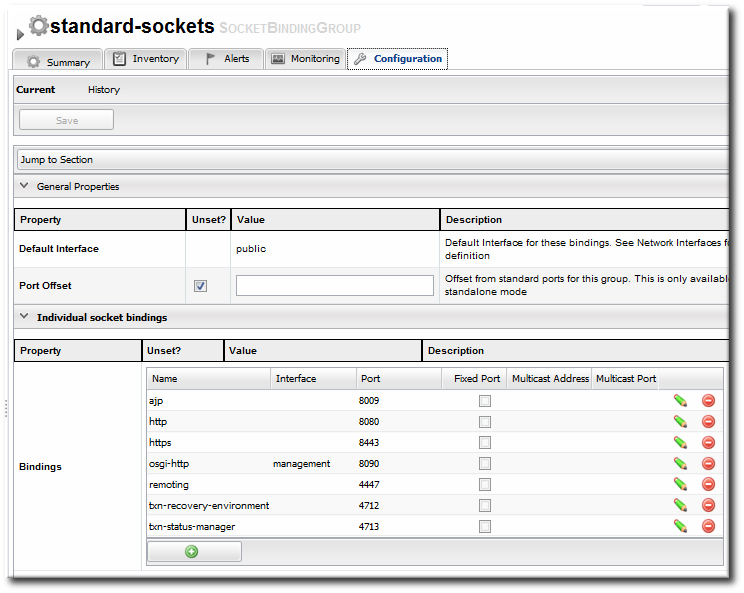
- Change the Port number to any available port between 1025 and 65535. On Linux, available port numbers can be determined using
iptables. Optionally, configure multicast settings for the socket. If there are multiple instances of JBoss servers on the same system or in the same cluster, then multicast may be configured for cluster communication.
 - Click the Save button at the top of the page.
6.5.2. Changing Port Offsets for Server Groups in a Domain
Copiar enlaceEnlace copiado en el portapapeles!
The port offset is a number added to each port number in a socket binding group to create the actual port numbers used by a server instance. This allows managed servers to have unique port numbers across the domain or for standalone servers within a cluster to have unique ports while using the same socket binding configuration.
For example, if the socket binding HTTP port is 8080, and a managed server has an offset of 110, the actual port used by the managed server is 8190 (8080 + 110). Server groups can also define offsets, and the offsets are additive. So, if a server group has an offset of 15 and the managed server has an offset of 110, the port number used by the server is 8205 (8080 + 15 + 110).
Note
The offset for a managed server is defined in its entry in the
host.xml file. This can be set when the managed server is created in JBoss ON, but it cannot be edited afterward.
It is possible to edit the port offset used by a server group:
- Click the Inventory tab in the top menu.
- Select Servers - Top Level Imports in the Resources menu table on the left. Select the JBoss EAP 6 server.
- In the inventory tree, expand the Server Groups node, and select the server group.
- Open the Configuration tab for the server group.
- In the Port Offset field, enter the new value for the offset.

- Click at the top of the page.
To change the offset for a standalone server, edit its connection settings, as in Section 6.9.1, “Changing the General Properties for an EAP 6 Server”.

'%20d='M201.5%20305.5c-13.8%200-24.9-11.1-24.9-24.6%200-13.8%2011.1-24.9%2024.9-24.9%2013.6%200%2024.6%2011.1%2024.6%2024.9%200%2013.6-11.1%2024.6-24.6%2024.6zM504%20256c0%20137-111%20248-248%20248S8%20393%208%20256%20119%208%20256%208s248%20111%20248%20248zm-132.3-41.2c-9.4%200-17.7%203.9-23.8%2010-22.4-15.5-52.6-25.5-86.1-26.6l17.4-78.3%2055.4%2012.5c0%2013.6%2011.1%2024.6%2024.6%2024.6%2013.8%200%2024.9-11.3%2024.9-24.9s-11.1-24.9-24.9-24.9c-9.7%200-18%205.8-22.1%2013.8l-61.2-13.6c-3-.8-6.1%201.4-6.9%204.4l-19.1%2086.4c-33.2%201.4-63.1%2011.3-85.5%2026.8-6.1-6.4-14.7-10.2-24.1-10.2-34.9%200-46.3%2046.9-14.4%2062.8-1.1%205-1.7%2010.2-1.7%2015.5%200%2052.6%2059.2%2095.2%20132%2095.2%2073.1%200%20132.3-42.6%20132.3-95.2%200-5.3-.6-10.8-1.9-15.8%2031.3-16%2019.8-62.5-14.9-62.5zM302.8%20331c-18.2%2018.2-76.1%2017.9-93.6%200-2.2-2.2-6.1-2.2-8.3%200-2.5%202.5-2.5%206.4%200%208.6%2022.8%2022.8%2087.3%2022.8%20110.2%200%202.5-2.2%202.5-6.1%200-8.6-2.2-2.2-6.1-2.2-8.3%200zm7.7-75c-13.6%200-24.6%2011.1-24.6%2024.9%200%2013.6%2011.1%2024.6%2024.6%2024.6%2013.8%200%2024.9-11.1%2024.9-24.6%200-13.8-11-24.9-24.9-24.9z'/%3e%3c/svg%3e)