 Red Hat Summit
Este contenido no está disponible en el idioma seleccionado.
13.3. Updating Applications
After the EAR or WAR resource is created, changes are treated like updated content packages. Updating the EAR/WAR resource is the same as uploading and applying new packages to that EAR/WAR resource entry.
- Browse to the EAR or WAR resource in the JBoss ON UI.
- In the EAR or WAR resource details page, open the Content tab, and click the New subtab.

- Click the button.
- Click the button.

- In the pop-up window, click the Add button, and browse the local filesystem to the updated WAR or EAR file to be uploaded.

- Click the UPLOAD button to load the file and dismiss the window.
- In the main form, select the repository where the WAR or EAR file package should be stored. If one exists, select an existing repository or a subscribed repository for the resource. Otherwise, create a new repository.
- Optionally, set the version number for the EAR/WAR package.If this is set, then this value is displayed in the UI. If not, then a version number is calculated, based on the spec version and implementation version in
MANIFEST.MF, if any are given, or the calculated SHA-256 value for the package itself. Internally, the package is identified by the SHA value.SPEC(IMPLEMENTATION)[sha256=abcd1234]For more information on package versioning, see "Deploying Applications and Content". - Confirm the details for the new package, then click .

When the package is successfully uploaded, the UI redirects to the history page on the Content tab.
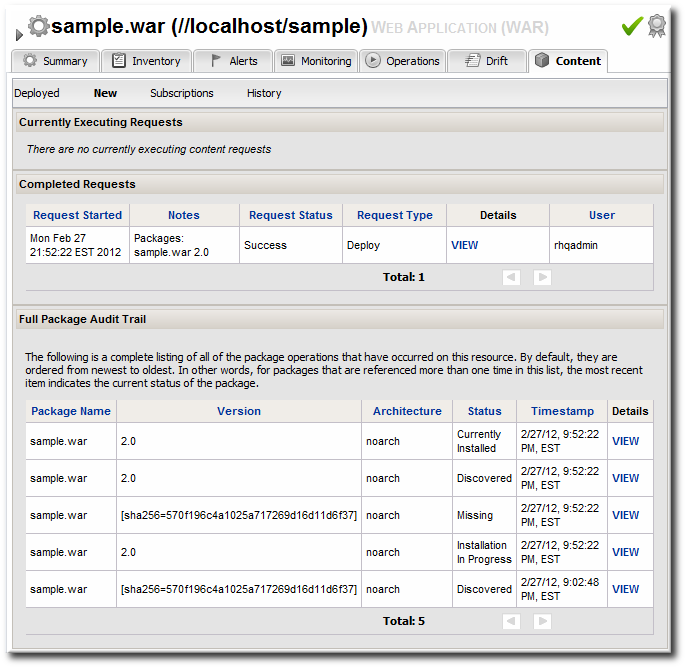
Figure 13.2. Deployment History for a Resource

'%20d='M201.5%20305.5c-13.8%200-24.9-11.1-24.9-24.6%200-13.8%2011.1-24.9%2024.9-24.9%2013.6%200%2024.6%2011.1%2024.6%2024.9%200%2013.6-11.1%2024.6-24.6%2024.6zM504%20256c0%20137-111%20248-248%20248S8%20393%208%20256%20119%208%20256%208s248%20111%20248%20248zm-132.3-41.2c-9.4%200-17.7%203.9-23.8%2010-22.4-15.5-52.6-25.5-86.1-26.6l17.4-78.3%2055.4%2012.5c0%2013.6%2011.1%2024.6%2024.6%2024.6%2013.8%200%2024.9-11.3%2024.9-24.9s-11.1-24.9-24.9-24.9c-9.7%200-18%205.8-22.1%2013.8l-61.2-13.6c-3-.8-6.1%201.4-6.9%204.4l-19.1%2086.4c-33.2%201.4-63.1%2011.3-85.5%2026.8-6.1-6.4-14.7-10.2-24.1-10.2-34.9%200-46.3%2046.9-14.4%2062.8-1.1%205-1.7%2010.2-1.7%2015.5%200%2052.6%2059.2%2095.2%20132%2095.2%2073.1%200%20132.3-42.6%20132.3-95.2%200-5.3-.6-10.8-1.9-15.8%2031.3-16%2019.8-62.5-14.9-62.5zM302.8%20331c-18.2%2018.2-76.1%2017.9-93.6%200-2.2-2.2-6.1-2.2-8.3%200-2.5%202.5-2.5%206.4%200%208.6%2022.8%2022.8%2087.3%2022.8%20110.2%200%202.5-2.2%202.5-6.1%200-8.6-2.2-2.2-6.1-2.2-8.3%200zm7.7-75c-13.6%200-24.6%2011.1-24.6%2024.9%200%2013.6%2011.1%2024.6%2024.6%2024.6%2013.8%200%2024.9-11.1%2024.9-24.6%200-13.8-11-24.9-24.9-24.9z'/%3e%3c/svg%3e)