 Red Hat Summit
Este contenido no está disponible en el idioma seleccionado.
8.2. Deploying Web Applications to a Domain
Note
As with creating other child resources, it can take several minutes for the new deployment to be added and visible in the JBoss ON inventory because the new resource has to be created on the local system and then discovered by the agent. If the discovery scan is running when the resource is created, then it may take until the next discovery scan to be detected, as long as 15 minutes.
- Click the Inventory tab in the top menu.
- Select Servers - Top Level Imports in the Resources menu table on the left. Select the JBoss EAP 6 domain controller.
- Right-click the domain controller entry.

- In the Create New menu, select the item for .
- Enter the version number.

- Upload the EAR, WAR, or JAR file.

- Optionally, enter a runtime name for the deployment.
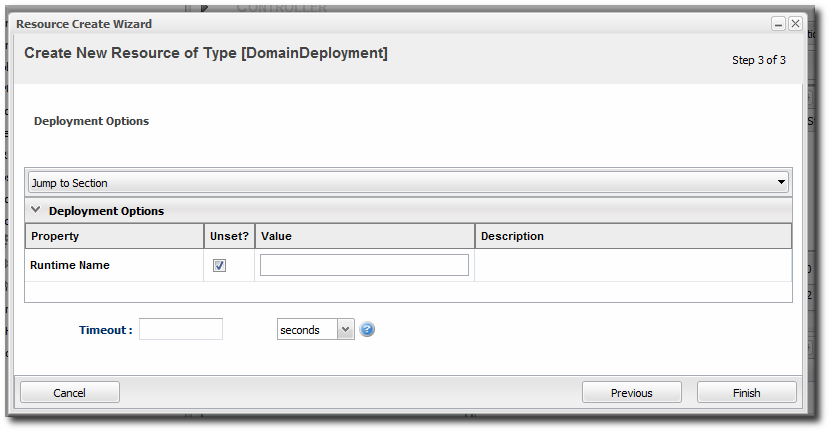
- At the bottom of the wizard, set an optional timeout period. This is how long the JBoss ON server will wait during the deployment process before determining that the deployment has failed.
Note
The timeout period only applies to the server's reporting a result. If the operation continues running, it can still complete successfully, and the web application is deployed.Particularly for large application files, do not set a low timeout period, or the server will mark the deployment as having failed. If the deployment completes later, the web application must be imported into the inventory manually; it will not be discovered by the agent. - Click .
Once the package is uploaded, a new resource entry is added to the DomainDeployments directory for the domain.
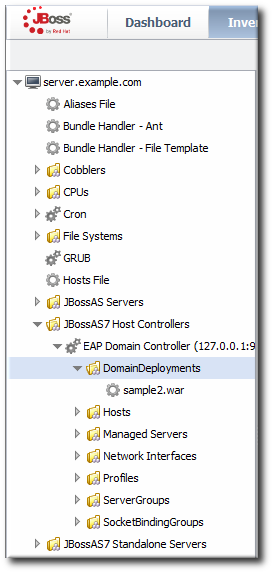
Figure 8.3. Domain Deployments Directory

'%20d='M201.5%20305.5c-13.8%200-24.9-11.1-24.9-24.6%200-13.8%2011.1-24.9%2024.9-24.9%2013.6%200%2024.6%2011.1%2024.6%2024.9%200%2013.6-11.1%2024.6-24.6%2024.6zM504%20256c0%20137-111%20248-248%20248S8%20393%208%20256%20119%208%20256%208s248%20111%20248%20248zm-132.3-41.2c-9.4%200-17.7%203.9-23.8%2010-22.4-15.5-52.6-25.5-86.1-26.6l17.4-78.3%2055.4%2012.5c0%2013.6%2011.1%2024.6%2024.6%2024.6%2013.8%200%2024.9-11.3%2024.9-24.9s-11.1-24.9-24.9-24.9c-9.7%200-18%205.8-22.1%2013.8l-61.2-13.6c-3-.8-6.1%201.4-6.9%204.4l-19.1%2086.4c-33.2%201.4-63.1%2011.3-85.5%2026.8-6.1-6.4-14.7-10.2-24.1-10.2-34.9%200-46.3%2046.9-14.4%2062.8-1.1%205-1.7%2010.2-1.7%2015.5%200%2052.6%2059.2%2095.2%20132%2095.2%2073.1%200%20132.3-42.6%20132.3-95.2%200-5.3-.6-10.8-1.9-15.8%2031.3-16%2019.8-62.5-14.9-62.5zM302.8%20331c-18.2%2018.2-76.1%2017.9-93.6%200-2.2-2.2-6.1-2.2-8.3%200-2.5%202.5-2.5%206.4%200%208.6%2022.8%2022.8%2087.3%2022.8%20110.2%200%202.5-2.2%202.5-6.1%200-8.6-2.2-2.2-6.1-2.2-8.3%200zm7.7-75c-13.6%200-24.6%2011.1-24.6%2024.9%200%2013.6%2011.1%2024.6%2024.6%2024.6%2013.8%200%2024.9-11.1%2024.9-24.6%200-13.8-11-24.9-24.9-24.9z'/%3e%3c/svg%3e)