 Red Hat Summit
Questo contenuto non è disponibile nella lingua selezionata.
Chapter 2. Managing kernel modules
Learn about kernel modules, how to display their information, and how to perform basic administrative tasks with kernel modules.
2.1. Introduction to kernel modules
Extend the Red Hat Enterprise Linux kernel functionality without rebooting by using kernel modules. These compressed object files add support for hardware drivers, file systems, and system calls. Manage them dynamically to load or unload features as required.
The most common functionality enabled by kernel modules are:
- Device driver which adds support for new hardware
- Support for a file system such as GFS2 or NFS
- System calls
On modern systems, kernel modules are automatically loaded when needed. However, in some cases it is necessary to load or unload modules manually.
Similarly to the kernel, modules accept parameters that customize their behavior.
You can use the kernel tools to perform the following actions on modules:
- Inspect modules that are currently running.
- Inspect modules that are available to load into the kernel.
- Inspect parameters that a module accepts.
- Enable a mechanism to load and unload kernel modules into the running kernel.
2.2. Kernel module dependencies
Certain kernel modules sometimes depend on one or more other kernel modules. The /lib/modules/<KERNEL_VERSION>/modules.dep file contains a complete list of kernel module dependencies for the corresponding kernel version.
depmod
The dependency file is generated by the depmod program, included in the kmod package. Many utilities provided by kmod consider module dependencies when performing operations. Therefore, manual dependency-tracking is rarely necessary.
The code of kernel modules executes in kernel-space in the unrestricted mode. Be mindful of what modules you are loading.
weak-modules
In addition to depmod, Red Hat Enterprise Linux provides the weak-modules script, which is a part of the kmod package. weak-modules determines the modules that are kABI-compatible with installed kernels. While checking modules kernel compatibility, weak-modules processes modules symbol dependencies from higher to lower release of kernel for which they were built. It processes each module independently of the kernel release.
2.3. Listing installed kernel modules
The grubby --info=ALL command displays an indexed list of installed kernels on !BLS and BLS installs.
Procedure
List the installed kernels using the following command:
# grubby --info=ALL | grep titleThe list of all installed kernels is displayed as follows:
title=Red Hat Enterprise Linux (4.18.0-20.el8.x86_64) 8.0 (Ootpa)
title=Red Hat Enterprise Linux (4.18.0-19.el8.x86_64) 8.0 (Ootpa)
title=Red Hat Enterprise Linux (4.18.0-12.el8.x86_64) 8.0 (Ootpa)
title=Red Hat Enterprise Linux (4.18.0) 8.0 (Ootpa)
title=Red Hat Enterprise Linux (0-rescue-2fb13ddde2e24fde9e6a246a942caed1) 8.0 (Ootpa)
This is the list of installed kernels of grubby-8.40-17 from the GRUB menu.
2.4. Listing currently loaded kernel modules
View the currently loaded kernel modules.
Prerequisites
-
The
kmodpackage is installed.
Procedure
To list all currently loaded kernel modules, enter:
$ lsmod Module Size Used by fuse 126976 3 uinput 20480 1 xt_CHECKSUM 16384 1 ipt_MASQUERADE 16384 1 xt_conntrack 16384 1 ipt_REJECT 16384 1 nft_counter 16384 16 nf_nat_tftp 16384 0 nf_conntrack_tftp 16384 1 nf_nat_tftp tun 49152 1 bridge 192512 0 stp 16384 1 bridge llc 16384 2 bridge,stp nf_tables_set 32768 5 nft_fib_inet 16384 1 …In the example above:
-
The
Modulecolumn provides the names of currently loaded modules. -
The
Sizecolumn displays the amount of memory per module in kilobytes. -
The
Used bycolumn shows the number, and optionally the names of modules that are dependent on a particular module.
-
The
2.5. Listing all installed kernels
Use the grubby utility to list all installed kernels on your system.
Prerequisites
- You have root permissions.
Procedure
To list all installed kernels, enter:
# grubby --info=ALL | grep ^kernel

kernel="/boot/vmlinuz-4.18.0-305.10.2.el8_4.x86_64"
kernel="/boot/vmlinuz-4.18.0-240.el8.x86_64"
kernel="/boot/vmlinuz-0-rescue-41eb2e172d7244698abda79a51778f1b"
The output shows the path and versions of all the kernels installed.
2.6. Displaying information about kernel modules
Use the modinfo command to display some detailed information about the specified kernel module.
Prerequisites
-
The
kmodpackage is installed.
Procedure
To display information about any kernel module, enter:
$ modinfo <KERNEL_MODULE_NAME>For example:
$ modinfo virtio_net filename: /lib/modules/4.18.0-94.el8.x86_64/kernel/drivers/net/virtio_net.ko.xz license: GPL description: Virtio network driver rhelversion: 8.1 srcversion: 2E9345B281A898A91319773 alias: virtio:d00000001v* depends: net_failover intree: Y name: virtio_net vermagic: 4.18.0-94.el8.x86_64 SMP mod_unload modversions … parm: napi_weight:int parm: csum:bool parm: gso:bool parm: napi_tx:boolYou can query information about all available modules, regardless of whether they are loaded. The
parmentries show parameters the user is able to set for the module, and what type of value they expect.NoteWhen entering the name of a kernel module, do not append the
.ko.xzextension to the end of the name. Kernel module names do not have extensions; their corresponding files do.
2.7. Loading kernel modules at system runtime
The optimal way to expand the functionality of the Linux kernel is by loading kernel modules. Use the modprobe command to find and load a kernel module into the currently running kernel.
The changes described in this procedure will not persist after rebooting the system. For information about how to load kernel modules to persist across system reboots, see Loading kernel modules automatically at system boot time.
Prerequisites
- Root permissions
-
The
kmodpackage is installed. - The kernel module is not loaded. To ensure this is the case, list the Listing currently loaded kernel modules.
Procedure
Select a kernel module you want to load.
The modules are located in the
/lib/modules/$(uname -r)/kernel/<SUBSYSTEM>/directory.Load the relevant kernel module:
# modprobe <MODULE_NAME>NoteWhen entering the name of a kernel module, do not append the
.ko.xzextension to the end of the name. Kernel module names do not have extensions; their corresponding files do.
Verification
Optionally, verify the relevant module was loaded:
$ lsmod | grep <MODULE_NAME>If the module was loaded correctly, this command displays the relevant kernel module. For example:
$ lsmod | grep serio_raw
serio_raw              16384  0
2.8. Unloading kernel modules at system runtime
To unload certain kernel modules from the running kernel, use the modprobe command to find and unload a kernel module at system runtime from the currently loaded kernel.
You must not unload the kernel modules that are used by the running system because it can lead to an unstable or non-operational system.
After finishing the unloading of inactive kernel modules, the modules that are defined to be automatically loaded on boot, will not remain unloaded after rebooting the system. For information about how to prevent this outcome, see Preventing kernel modules from being automatically loaded at system boot time.
Prerequisites
- You have root permissions.
-
The
kmodpackage is installed.
Procedure
List all the loaded kernel modules:
# lsmodSelect the kernel module you want to unload.
If a kernel module has dependencies, unload those prior to unloading the kernel module. For details on identifying modules with dependencies, see Listing currently loaded kernel modules and Kernel module dependencies.
Unload the relevant kernel module:
# modprobe -r <MODULE_NAME>When entering the name of a kernel module, do not append the
.ko.xzextension to the end of the name. Kernel module names do not have extensions; their corresponding files do.
Verification
Optionally, verify the relevant module was unloaded:
$ lsmod | grep <MODULE_NAME>If the module is unloaded successfully, this command does not display any output.
2.9. Unloading kernel modules at early stages of the boot process
Unload a kernel module early in the boot process if it causes system unresponsiveness preventing normal access. Use the boot loader to temporarily block specific modules, allowing you to reach a state where permanent changes can be made.
The changes described in this procedure will not persist after the next reboot. For information about how to add a kernel module to a denylist so that it will not be automatically loaded during the boot process, see Preventing kernel modules from being automatically loaded at system boot time.
Prerequisites
- You have a loadable kernel module that you want to prevent from loading for some reason.
Procedure
- Boot the system into the boot loader.
- Use the cursor keys to highlight the relevant boot loader entry.
Press the e key to edit the entry.
Figure 2.1. Kernel boot menu

- Use the cursor keys to navigate to the line that starts with linux.
Append
modprobe.blacklist=module_nameto the end of the line.Figure 2.2. Kernel boot entry
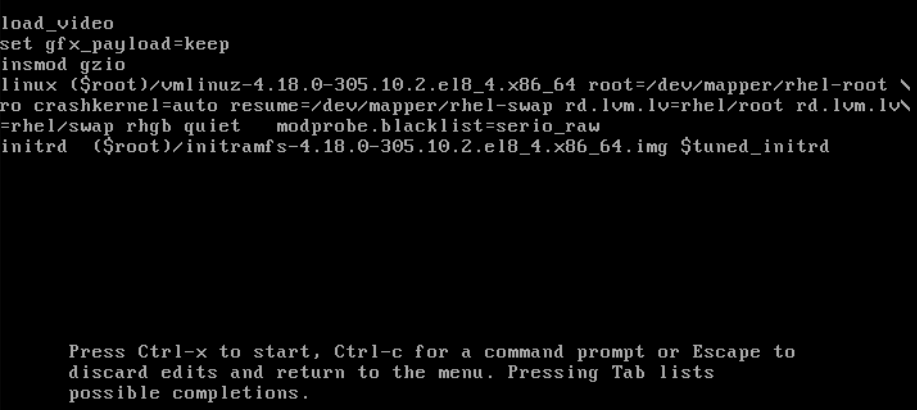
The
serio_rawkernel module illustrates a rogue module to be unloaded early in the boot process.- Press Ctrl+X to boot using the modified configuration.
Verification
After the system boots, verify that the relevant kernel module is not loaded:
# lsmod | grep serio_raw
2.10. Loading kernel modules automatically at system boot time
Configure a kernel module to load it automatically during the boot process.
Prerequisites
- Root permissions
-
The
kmodpackage is installed.
Procedure
Select a kernel module you want to load during the boot process.
The modules are located in the
/lib/modules/$(uname -r)/kernel/<SUBSYSTEM>/directory.Create a configuration file for the module:
# echo <MODULE_NAME> > /etc/modules-load.d/<MODULE_NAME>.confNoteWhen entering the name of a kernel module, do not append the
.ko.xzextension to the end of the name. Kernel module names do not have extensions; their corresponding files do.
Verification
After reboot, verify the relevant module is loaded:
$ lsmod | grep <MODULE_NAME>
The changes described in this procedure will persist after rebooting the system.
2.11. Preventing kernel modules from being automatically loaded at system boot time
Prevent the system from loading a kernel module automatically during boot by listing the module in the modprobe configuration file with a corresponding command.
Prerequisites
-
The commands in this procedure require root privileges. Either use
su -to switch to the root user or preface the commands withsudo. -
The
kmodpackage is installed. - Ensure that your current system configuration does not require a kernel module you plan to deny.
Procedure
List modules loaded to the currently running kernel by using the
lsmodcommand:$ lsmodModule Size Used by tls 131072 0 uinput 20480 1 snd_seq_dummy 16384 0 snd_hrtimer 16384 1 …In the output, identify the module you want to prevent from getting loaded.
Alternatively, identify an unloaded kernel module you want to prevent from potentially loading in the
/lib/modules/<KERNEL-VERSION>/kernel/<SUBSYSTEM>/directory, for example:$ ls /lib/modules/4.18.0-477.20.1.el8_8.x86_64/kernel/crypto/ansi_cprng.ko.xz chacha20poly1305.ko.xz md4.ko.xz serpent_generic.ko.xz anubis.ko.xz cmac.ko.xz…
Create a configuration file serving as a denylist:
# touch /etc/modprobe.d/denylist.confIn a text editor of your choice, combine the names of modules you want to exclude from automatic loading to the kernel with the
blacklistconfiguration command, for example:# Prevents <KERNEL-MODULE-1> from being loaded blacklist <MODULE-NAME-1> install <MODULE-NAME-1> /bin/false # Prevents <KERNEL-MODULE-2> from being loaded blacklist <MODULE-NAME-2> install <MODULE-NAME-2> /bin/false …Because the
blacklistcommand does not prevent the module from getting loaded as a dependency for another kernel module that is not in a denylist, you must also define theinstallline. In this case, the system runs/bin/falseinstead of installing the module. The lines starting with a hash sign are comments you can use to make the file more readable.NoteWhen entering the name of a kernel module, do not append the
.ko.xzextension to the end of the name. Kernel module names do not have extensions; their corresponding files do.Create a backup copy of the current initial RAM disk image before rebuilding:
# cp /boot/initramfs-$(uname -r).img /boot/initramfs-$(uname -r).bak.$(date +%m-%d-%H%M%S).imgAlternatively, create a backup copy of an initial RAM disk image which corresponds to the kernel version for which you want to prevent kernel modules from automatic loading:
# cp /boot/initramfs-<VERSION>.img /boot/initramfs-<VERSION>.img.bak.$(date +%m-%d-%H%M%S)
Generate a new initial RAM disk image to apply the changes:
# dracut -f -vIf you build an initial RAM disk image for a different kernel version than your system currently uses, specify both target
initramfsand kernel version:# dracut -f -v /boot/initramfs-<TARGET-VERSION>.img <CORRESPONDING-TARGET-KERNEL-VERSION>
Restart the system:
$ reboot
The changes described in this procedure will take effect and persist after rebooting the system. If you incorrectly list a key kernel module in the denylist, you can switch the system to an unstable or non-operational state.
2.12. Compiling custom kernel modules
You can build a sampling kernel module as requested by various configurations at hardware and software level.
Prerequisites
You installed the
kernel-devel,gcc, andelfutils-libelf-develpackages.# dnf install kernel-devel-$(uname -r) gcc elfutils-libelf-devel- You have root permissions.
-
You created the
/root/testmodule/directory where you compile the custom kernel module.
Procedure
Create the
/root/testmodule/test.cfile with the following content.#include <linux/module.h> #include <linux/kernel.h> int init_module(void) { printk("Hello World\n This is a test\n"); return 0; } void cleanup_module(void) { printk("Good Bye World"); }The
test.cfile is a source file that provides the main functionality to the kernel module. The file has been created in a dedicated/root/testmodule/directory for organizational purposes. After the module compilation, the/root/testmodule/directory will contain multiple files.The
test.cfile includes from the system libraries:-
The
linux/kernel.hheader file is necessary for theprintk()function in the example code. -
The
linux/module.hheader file contains function declarations and macro definitions that are shared across multiple C source files.
-
The
-
Follow the
init_module()andcleanup_module()functions to start and end the kernel logging functionprintk(), which prints text. Create the
/root/testmodule/Makefilefile with the following content.obj-m := test.oThe Makefile contains instructions for the compiler to produce an object file named
test.o. Theobj-mdirective specifies that the resultingtest.kofile is going to be compiled as a loadable kernel module. Alternatively, theobj-ydirective can instruct to buildtest.koas a built-in kernel module.Compile the kernel module.
# make -C /lib/modules/$(uname -r)/build M=/root/testmodule modules
make: Entering directory '/usr/src/kernels/4.18.0-305.el8.x86_64'
  CC [M]  /root/testmodule/test.o
  Building modules, stage 2.
  MODPOST 1 modules
WARNING: modpost: missing MODULE_LICENSE() in /root/testmodule/test.o
see include/linux/module.h for more information
  CC      /root/testmodule/test.mod.o
  LD [M]  /root/testmodule/test.ko
make: Leaving directory '/usr/src/kernels/4.18.0-305.el8.x86_64'
The compiler creates an object file (
test.o) for each source file (test.c) as an intermediate step before linking them together into the final kernel module (test.ko).After a successful compilation,
/root/testmodule/contains additional files that relate to the compiled custom kernel module. The compiled module itself is represented by thetest.kofile.
Verification
Optional: check the contents of the
/root/testmodule/directory:# ls -l /root/testmodule/ total 152 -rw-r—r--. 1 root root 16 Jul 26 08:19 Makefile -rw-r—r--. 1 root root 25 Jul 26 08:20 modules.order -rw-r—r--. 1 root root 0 Jul 26 08:20 Module.symvers -rw-r—r--. 1 root root 224 Jul 26 08:18 test.c -rw-r—r--. 1 root root 62176 Jul 26 08:20 test.ko -rw-r—r--. 1 root root 25 Jul 26 08:20 test.mod -rw-r—r--. 1 root root 849 Jul 26 08:20 test.mod.c -rw-r—r--. 1 root root 50936 Jul 26 08:20 test.mod.o -rw-r—r--. 1 root root 12912 Jul 26 08:20 test.oCopy the kernel module to the
/lib/modules/$(uname -r)/directory:# cp /root/testmodule/test.ko /lib/modules/$(uname -r)/Update the modular dependency list:
# depmod -aLoad the kernel module:
# modprobe -v test
insmod /lib/modules/4.18.0-305.el8.x86_64/test.ko
Verify that the kernel module was successfully loaded:
# lsmod | grep test
test                   16384  0
Read the latest messages from the kernel ring buffer:
# dmesg
[74422.545004] Hello World
                This is a test

'%20d='M201.5%20305.5c-13.8%200-24.9-11.1-24.9-24.6%200-13.8%2011.1-24.9%2024.9-24.9%2013.6%200%2024.6%2011.1%2024.6%2024.9%200%2013.6-11.1%2024.6-24.6%2024.6zM504%20256c0%20137-111%20248-248%20248S8%20393%208%20256%20119%208%20256%208s248%20111%20248%20248zm-132.3-41.2c-9.4%200-17.7%203.9-23.8%2010-22.4-15.5-52.6-25.5-86.1-26.6l17.4-78.3%2055.4%2012.5c0%2013.6%2011.1%2024.6%2024.6%2024.6%2013.8%200%2024.9-11.3%2024.9-24.9s-11.1-24.9-24.9-24.9c-9.7%200-18%205.8-22.1%2013.8l-61.2-13.6c-3-.8-6.1%201.4-6.9%204.4l-19.1%2086.4c-33.2%201.4-63.1%2011.3-85.5%2026.8-6.1-6.4-14.7-10.2-24.1-10.2-34.9%200-46.3%2046.9-14.4%2062.8-1.1%205-1.7%2010.2-1.7%2015.5%200%2052.6%2059.2%2095.2%20132%2095.2%2073.1%200%20132.3-42.6%20132.3-95.2%200-5.3-.6-10.8-1.9-15.8%2031.3-16%2019.8-62.5-14.9-62.5zM302.8%20331c-18.2%2018.2-76.1%2017.9-93.6%200-2.2-2.2-6.1-2.2-8.3%200-2.5%202.5-2.5%206.4%200%208.6%2022.8%2022.8%2087.3%2022.8%20110.2%200%202.5-2.2%202.5-6.1%200-8.6-2.2-2.2-6.1-2.2-8.3%200zm7.7-75c-13.6%200-24.6%2011.1-24.6%2024.9%200%2013.6%2011.1%2024.6%2024.6%2024.6%2013.8%200%2024.9-11.1%2024.9-24.6%200-13.8-11-24.9-24.9-24.9z'/%3e%3c/svg%3e)