 Red Hat Summit
このコンテンツは選択した言語では利用できません。
11.2. Modeling your functions
Teiid Designer provides a new object wizard to assist you in modeling your User Defined Functions. Right-click the existing model and click
If you create a function using alternative methods, you must select the procedure and edit the different properties for the procedure in the Properties view.
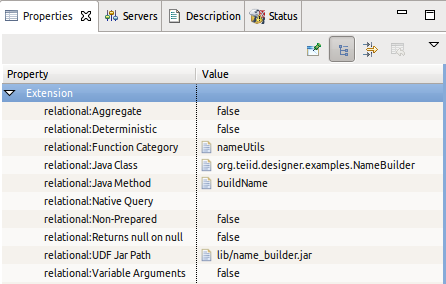
Figure 11.1. VDB UDF Jar Files
A User Defined Function represents a defined method in a java class. In order for the Teiid runtime to register the function and allow its use in the transformations, you must specify the following as properties:
- Function Category - unique name for a grouping of user defined functions. This category is displayed in the Expression Builder wizard so you can locate and select your function.
- Java Class - fully qualified name of the java class containing your function method.
- Java Method - the name of the function method in your java class.
- UDF Jar Path - the relative path in your project for the jar containing your UDF which will be in a lib folder in your project. If you are defining your jar for the first time and there is no jars in your lib folder, the property editor will allow you to select a jar from your file system. If one or more jars already exist in a lib folder, the editor will allow you to choose between selecting from your workspace or your file system.

'%20d='M201.5%20305.5c-13.8%200-24.9-11.1-24.9-24.6%200-13.8%2011.1-24.9%2024.9-24.9%2013.6%200%2024.6%2011.1%2024.6%2024.9%200%2013.6-11.1%2024.6-24.6%2024.6zM504%20256c0%20137-111%20248-248%20248S8%20393%208%20256%20119%208%20256%208s248%20111%20248%20248zm-132.3-41.2c-9.4%200-17.7%203.9-23.8%2010-22.4-15.5-52.6-25.5-86.1-26.6l17.4-78.3%2055.4%2012.5c0%2013.6%2011.1%2024.6%2024.6%2024.6%2013.8%200%2024.9-11.3%2024.9-24.9s-11.1-24.9-24.9-24.9c-9.7%200-18%205.8-22.1%2013.8l-61.2-13.6c-3-.8-6.1%201.4-6.9%204.4l-19.1%2086.4c-33.2%201.4-63.1%2011.3-85.5%2026.8-6.1-6.4-14.7-10.2-24.1-10.2-34.9%200-46.3%2046.9-14.4%2062.8-1.1%205-1.7%2010.2-1.7%2015.5%200%2052.6%2059.2%2095.2%20132%2095.2%2073.1%200%20132.3-42.6%20132.3-95.2%200-5.3-.6-10.8-1.9-15.8%2031.3-16%2019.8-62.5-14.9-62.5zM302.8%20331c-18.2%2018.2-76.1%2017.9-93.6%200-2.2-2.2-6.1-2.2-8.3%200-2.5%202.5-2.5%206.4%200%208.6%2022.8%2022.8%2087.3%2022.8%20110.2%200%202.5-2.2%202.5-6.1%200-8.6-2.2-2.2-6.1-2.2-8.3%200zm7.7-75c-13.6%200-24.6%2011.1-24.6%2024.9%200%2013.6%2011.1%2024.6%2024.6%2024.6%2013.8%200%2024.9-11.1%2024.9-24.6%200-13.8-11-24.9-24.9-24.9z'/%3e%3c/svg%3e)