Enable the localization framework
Red Hat Developer Hub supports multiple languages through its localization framework. You can enable language selection, override default translations, and implement localization support in custom plugins.
Enable the localization framework in Developer Hub
Enabling localization enhances accessibility, improves the user experience for a global audience, and assists organizations in meeting language requirements in specific regions.
About this task
As an administrator, you enable the localization framework and select which languages users can choose. Red Hat Developer Hub 2.1 uses the new front-end system, so you configure language selection with the api:app/app-language extension in the app.extensions section of your configuration file.
The following languages are supported:
- English (en)
- French (fr)
- German (de)
- Italian (it)
- Japanese (ja)
- Spanish (es)
The default language for RHDH is English.
Procedure
api:app/app-language extension to the app.extensions section of your custom Developer Hub app-config.yaml configuration file to define the languages that users can select:
app-config.yaml fragment with language selection configuration
app:
  extensions:
    - api:app/app-language:
        config:
          availableLanguages: # List of languages that users can select. Must include en, otherwise the translation framework fails to load.
            - en
            - fr
            - de
            - it
            - ja
            - es
          defaultLanguage: en # Optional. Defaults to en if not specified.
Override default translations using JSON maps
You can override plugin translation strings without modifying the plugin source code.
Before you begin
- You have enabled localization in your RHDH application.
- For an Operator-installed RHDH instance, you have installed the OpenShift CLI (
oc). For more information about installingoc, see Installing the OpenShift CLI.
Procedure
Implement localization in custom plugins
You can implement localization support in your custom RHDH plugins so that your plugins are accessible to a diverse, international user base and follow recommended best practices.
Procedure
Results
To verify your translations, create a test mock file. For example:
Create the following test mock file src/test-utils/mockTranslations.ts :
import { myPluginMessages } from "../translations/ref";
  function flattenMessages(obj: any, prefix = ""): Record<string, string> {
    const flattened: Record<string, string> = {};
    for (const key in obj) {
      if (obj.hasOwnProperty(key)) {
        const value = obj[key];
        const newKey = prefix ? `${prefix}.${key}` : key;
        if (typeof value === "object" && value !== null) {
          Object.assign(flattened, flattenMessages(value, newKey));
        } else {
          flattened[newKey] = value;
        }
      }
    }
    return flattened;
  }

  const flattenedMessages = flattenMessages(myPluginMessages);

  export const mockT = (key: string, params?: any) => {
  export const mockT = (key: string, params?: any) => {
    let message = flattenedMessages[key] || key;
    if (params) {
      for (const [paramKey, paramValue] of Object.entries(params)) {
        message = message.replace(
          new RegExp(`{{${paramKey}}}`, "g"),
          String(paramValue),
        );
      }
    }
    return message;
  };

  export const mockUseTranslation = () => ({ t: mockT });
Update your tests as follows:
import { mockUseTranslation } from "../test-utils/mockTranslations";

  jest.mock("../hooks/useTranslation", () => ({
    useTranslation: mockUseTranslation,
  }));

  // Your test code...
Select a language
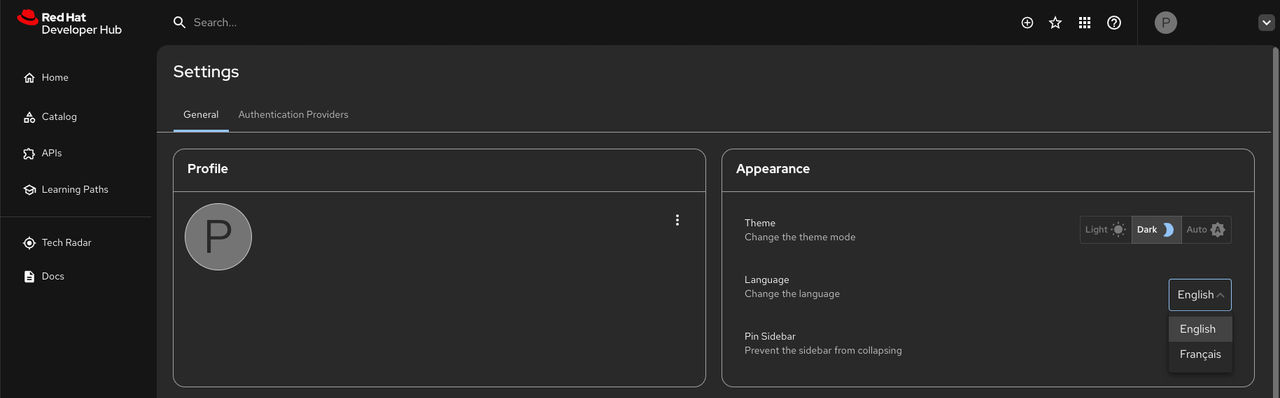
Use the Appearance panel to select a language for RHDH. Supported languages include English (default), French, German, Italian, Japanese and Spanish.
Before you begin
- You are logged in to the Developer Hub web console.
- You have enabled the localization framework in your RHDH instance.
Procedure
- From the Developer Hub web console, click the down arrow next to your profile name, then click Settings.
-
From the Appearance panel, click the language dropdown to select your language of choice.