 Red Hat Summit
이 콘텐츠는 선택한 언어로 제공되지 않습니다.
1.3. Creating a Project
It is possible to create a project either in the Project Authoring perspective of Business Central or using the REST API calls.
Creating a Project in Business Central
Note that only users with the admin role in Business Central can create projects.
Procedure: Using Business Central to Create a Project
-
In Business Central, go to Authoring
Project Authoring. - In the Project Explorer, select the organizational unit and the repository in which you want to create the project.
On the perspective menu, click New Item
Project. The New Project dialog window opens.
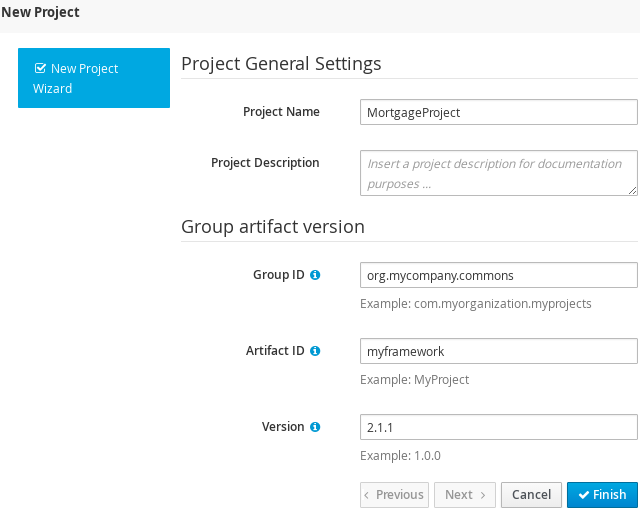
Define the Project General Settings and Group artifact version details of the new project. These parameters are stored in the
pom.xmlMaven configuration file.See the detailed description of the parameters:
-
Project Name: name of the project (for example
MortgageProject). - Project Description: description of the project, which may be useful for the project documentation purposes.
-
Group ID: group ID of the project (for example
org.mycompany.commons). -
Artifact ID: artifact ID unique in the group (for example
myframework). Avoid using a space or any other special character that might lead to an invalid name. -
Version: version of the project (for example
2.1.1).
-
Project Name: name of the project (for example
Click Finish.
The project screen view is updated with the new project details as defined in the
pom.xmlfile. You can switch between project descriptor files and edit their content by clicking the Project Settings: Project General Settings button at the top of the project screen view.
Creating a Project Using the REST API
Note that only users with the rest-all or rest-project role can create projects.
To create a project in the repository, issue the POST REST API call. Details of the project are defined by the corresponding JSON entity.
Input parameter of the call is an Entity instance. The call returns a CreateProjectRequest instance.
Example 1.1. Creating a Project Using the Curl Utility
Example JSON entity containing details of a project to be created:
{
  "name"        : "MortgageProject",
  "description" :  null,
  "groupId"     : "org.mycompany.commons",
  "version"     : "2.1.1"
}
Execute the following command:
curl -X POST 'localhost:8080/business-central/rest/repositories/REPOSITORY_NAME/projects/' -u USERNAME:PASSWORD -H 'Accept: application/json' -H 'Content-Type: application/json' -d '{"name":"MortgageProject","description":null,"groupId":"org.mycompany.commons","version":"2.1.1"}'For further information, refer to chapter Knowledge Store REST API, section Repository Calls of the Red Hat JBoss BPM Suite Development Guide.

'%20d='M201.5%20305.5c-13.8%200-24.9-11.1-24.9-24.6%200-13.8%2011.1-24.9%2024.9-24.9%2013.6%200%2024.6%2011.1%2024.6%2024.9%200%2013.6-11.1%2024.6-24.6%2024.6zM504%20256c0%20137-111%20248-248%20248S8%20393%208%20256%20119%208%20256%208s248%20111%20248%20248zm-132.3-41.2c-9.4%200-17.7%203.9-23.8%2010-22.4-15.5-52.6-25.5-86.1-26.6l17.4-78.3%2055.4%2012.5c0%2013.6%2011.1%2024.6%2024.6%2024.6%2013.8%200%2024.9-11.3%2024.9-24.9s-11.1-24.9-24.9-24.9c-9.7%200-18%205.8-22.1%2013.8l-61.2-13.6c-3-.8-6.1%201.4-6.9%204.4l-19.1%2086.4c-33.2%201.4-63.1%2011.3-85.5%2026.8-6.1-6.4-14.7-10.2-24.1-10.2-34.9%200-46.3%2046.9-14.4%2062.8-1.1%205-1.7%2010.2-1.7%2015.5%200%2052.6%2059.2%2095.2%20132%2095.2%2073.1%200%20132.3-42.6%20132.3-95.2%200-5.3-.6-10.8-1.9-15.8%2031.3-16%2019.8-62.5-14.9-62.5zM302.8%20331c-18.2%2018.2-76.1%2017.9-93.6%200-2.2-2.2-6.1-2.2-8.3%200-2.5%202.5-2.5%206.4%200%208.6%2022.8%2022.8%2087.3%2022.8%20110.2%200%202.5-2.2%202.5-6.1%200-8.6-2.2-2.2-6.1-2.2-8.3%200zm7.7-75c-13.6%200-24.6%2011.1-24.6%2024.9%200%2013.6%2011.1%2024.6%2024.6%2024.6%2013.8%200%2024.9-11.1%2024.9-24.6%200-13.8-11-24.9-24.9-24.9z'/%3e%3c/svg%3e)