 Red Hat Summit
이 콘텐츠는 선택한 언어로 제공되지 않습니다.
21.3. Workspace permissions
Procedure: Accessing Workspace Permissions
- Log into Business Dashboards from Business Central (as described in the Accessing Red Hat JBoss BPM Suite Dashbuilder topic).
Select the appropriate Dashboard from the Wokspace drop-down:
Figure 21.1. Dashbuilder Workspace

-
Click the
 button to access the Workspace Dashboard.
Click the Permissions label to view the permission management screen.
Figure 21.2. Permissions Screen
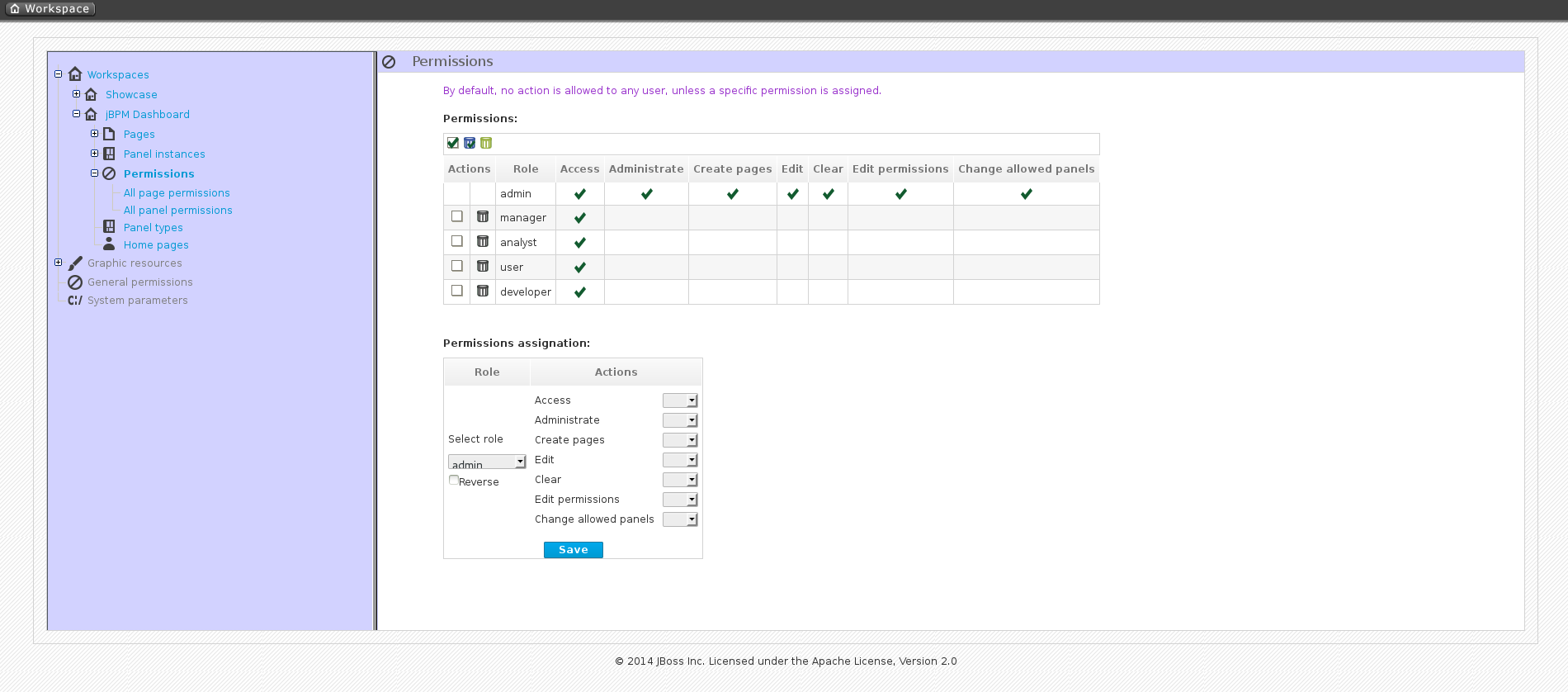
Under the Permissions section is a list of allowed actions that are applied to the selected role:
- Access: Permission to login into the application.
- Administrate: Permission to access the toolbar and system configuration features.
- Create pages: Ability to create new project pages.
- Edit: Permission to change the workspace properties.
- Clear: Ability to delete the workspace.
- Edit permissions: Ability to grant/deny permissions.
- Change allowed panels: Permission to restrict the type of panels that can be used in this workspace.
To assign a permission, you must select the target role and the list of actions allowed over the selected resource:
Figure 21.3. Permissions assignment
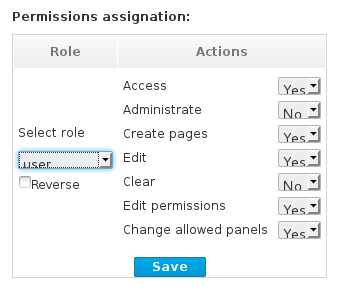
- Target roles (who): What user will be granted/denied with the permissions defined.
- Allowed actions: Depending on the type of the resource we can enable/disable what the user can do on this resource.
- Reverse (optional): When we have a set of roles and we want to grant/deny a permission to all the roles but one.
Note
By default, the full set of permissions go to the role admin. This makes it easy to create a user that can do everything as long as the role admin is assigned.

'%20d='M201.5%20305.5c-13.8%200-24.9-11.1-24.9-24.6%200-13.8%2011.1-24.9%2024.9-24.9%2013.6%200%2024.6%2011.1%2024.6%2024.9%200%2013.6-11.1%2024.6-24.6%2024.6zM504%20256c0%20137-111%20248-248%20248S8%20393%208%20256%20119%208%20256%208s248%20111%20248%20248zm-132.3-41.2c-9.4%200-17.7%203.9-23.8%2010-22.4-15.5-52.6-25.5-86.1-26.6l17.4-78.3%2055.4%2012.5c0%2013.6%2011.1%2024.6%2024.6%2024.6%2013.8%200%2024.9-11.3%2024.9-24.9s-11.1-24.9-24.9-24.9c-9.7%200-18%205.8-22.1%2013.8l-61.2-13.6c-3-.8-6.1%201.4-6.9%204.4l-19.1%2086.4c-33.2%201.4-63.1%2011.3-85.5%2026.8-6.1-6.4-14.7-10.2-24.1-10.2-34.9%200-46.3%2046.9-14.4%2062.8-1.1%205-1.7%2010.2-1.7%2015.5%200%2052.6%2059.2%2095.2%20132%2095.2%2073.1%200%20132.3-42.6%20132.3-95.2%200-5.3-.6-10.8-1.9-15.8%2031.3-16%2019.8-62.5-14.9-62.5zM302.8%20331c-18.2%2018.2-76.1%2017.9-93.6%200-2.2-2.2-6.1-2.2-8.3%200-2.5%202.5-2.5%206.4%200%208.6%2022.8%2022.8%2087.3%2022.8%20110.2%200%202.5-2.2%202.5-6.1%200-8.6-2.2-2.2-6.1-2.2-8.3%200zm7.7-75c-13.6%200-24.6%2011.1-24.6%2024.9%200%2013.6%2011.1%2024.6%2024.6%2024.6%2013.8%200%2024.9-11.1%2024.9-24.6%200-13.8-11-24.9-24.9-24.9z'/%3e%3c/svg%3e)