 Red Hat Summit
이 콘텐츠는 선택한 언어로 제공되지 않습니다.
6.9. Creating Distributed Dispersed Volumes
Distributed dispersed volumes support the same configurations of erasure coding as dispersed volumes. The number of bricks in a distributed dispersed volume must be a multiple of (K+M). With this release, the following configurations are supported:
- Multiple disperse sets containing 6 bricks with redundancy level 2
- Multiple disperse sets containing 11 bricks with redundancy level 3
- Multiple disperse sets containing 12 bricks with redundancy level 4
Use
gluster volume create to create different types of volumes, and gluster volume info to verify successful volume creation.
Prerequisites
- A trusted storage pool has been created, as described in Section 5.1, “Adding Servers to the Trusted Storage Pool”.
- Understand how to start and stop volumes, as described in Section 6.10, “Starting Volumes”.
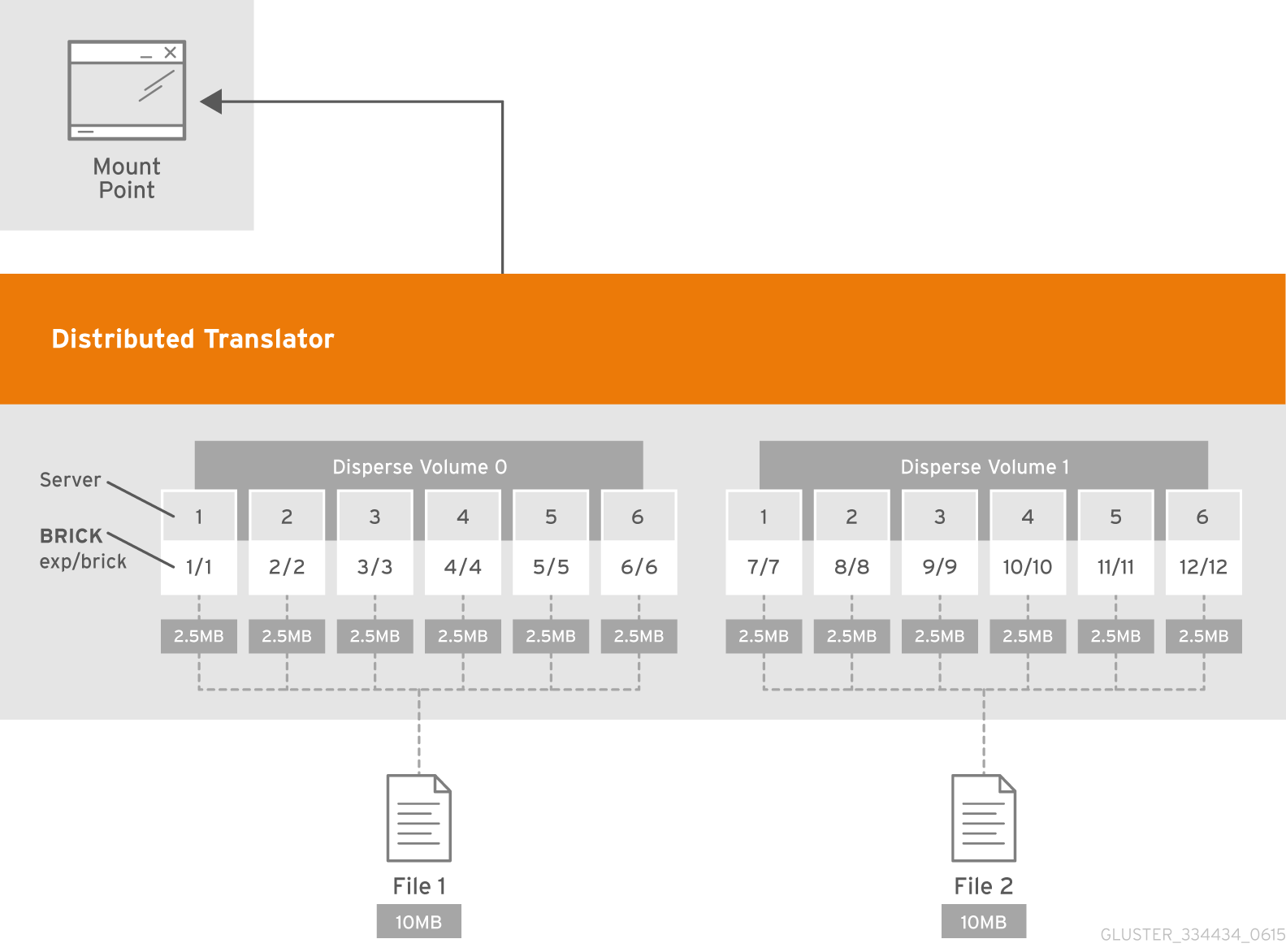
Figure 6.8. Illustration of a Distributed Dispersed Volume
Creating distributed dispersed volumes
Important
Red Hat recommends you to review the Distributed Dispersed Volume configuration recommendations explained in Chapter 28, Recommended Configurations - Dispersed Volume before creating the Distributed Dispersed volume.
- Run the
gluster volume createcommand to create the dispersed volume.The syntax is# gluster volume create NEW-VOLNAME disperse-data COUNT [redundancy COUNT] [transport tcp | rdma | tcp,rdma] NEW-BRICK...The default value for transport istcp. Other options can be passed such asauth.alloworauth.reject. See Section 10.1, “Configuring Volume Options” for a full list of parameters.Example 6.9. Distributed Dispersed Volume with Six Storage Servers
# gluster volume create test-volume disperse-data 4 redundancy 2 transport tcp server1:/exp1/brick1 server2:/exp2/brick2 server3:/exp3/brick3 server4:/exp4/brick4 server5:/exp5/brick5 server6:/exp6/brick6 server1:/exp7/brick7 server2:/exp8/brick8 server3:/exp9/brick9 server4:/exp10/brick10 server5:/exp11/brick11 server6:/exp12/brick12
Creation of test-volume has been successful
Please start the volume to access data.
The above example is illustrated in the figureIllustration of a Distributed Dispersed Volume. In the illustration and example, you are creating 12 bricks from 6 servers. - Run
# gluster volume start VOLNAMEto start the volume.# gluster volume start test-volume Starting test-volume has been successful - Run
gluster volume infocommand to optionally display the volume information.

'%20d='M201.5%20305.5c-13.8%200-24.9-11.1-24.9-24.6%200-13.8%2011.1-24.9%2024.9-24.9%2013.6%200%2024.6%2011.1%2024.6%2024.9%200%2013.6-11.1%2024.6-24.6%2024.6zM504%20256c0%20137-111%20248-248%20248S8%20393%208%20256%20119%208%20256%208s248%20111%20248%20248zm-132.3-41.2c-9.4%200-17.7%203.9-23.8%2010-22.4-15.5-52.6-25.5-86.1-26.6l17.4-78.3%2055.4%2012.5c0%2013.6%2011.1%2024.6%2024.6%2024.6%2013.8%200%2024.9-11.3%2024.9-24.9s-11.1-24.9-24.9-24.9c-9.7%200-18%205.8-22.1%2013.8l-61.2-13.6c-3-.8-6.1%201.4-6.9%204.4l-19.1%2086.4c-33.2%201.4-63.1%2011.3-85.5%2026.8-6.1-6.4-14.7-10.2-24.1-10.2-34.9%200-46.3%2046.9-14.4%2062.8-1.1%205-1.7%2010.2-1.7%2015.5%200%2052.6%2059.2%2095.2%20132%2095.2%2073.1%200%20132.3-42.6%20132.3-95.2%200-5.3-.6-10.8-1.9-15.8%2031.3-16%2019.8-62.5-14.9-62.5zM302.8%20331c-18.2%2018.2-76.1%2017.9-93.6%200-2.2-2.2-6.1-2.2-8.3%200-2.5%202.5-2.5%206.4%200%208.6%2022.8%2022.8%2087.3%2022.8%20110.2%200%202.5-2.2%202.5-6.1%200-8.6-2.2-2.2-6.1-2.2-8.3%200zm7.7-75c-13.6%200-24.6%2011.1-24.6%2024.9%200%2013.6%2011.1%2024.6%2024.6%2024.6%2013.8%200%2024.9-11.1%2024.9-24.6%200-13.8-11-24.9-24.9-24.9z'/%3e%3c/svg%3e)