 Red Hat Summit
이 콘텐츠는 선택한 언어로 제공되지 않습니다.
23.2. Verifying that Red Hat Gluster Storage Instance is Running
You can verify that Red Hat Gluster Storage instance is running by performing a remote login to the Red Hat Gluster Storage instance and issuing a command.
To verify that Red Hat Gluster Storage instance is running
- On the Amazon Web Services home page, click the Amazon EC2 tab. The Amazon EC2 Console Dashboard is displayed.
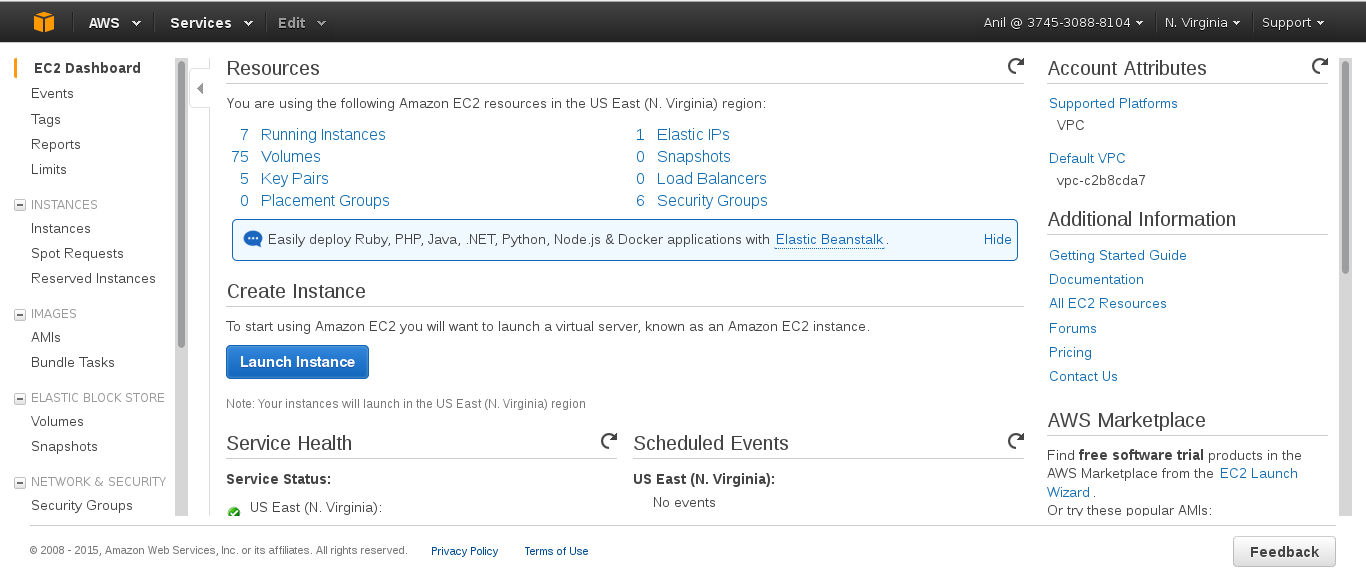
- Click the Instances link from the Instances section on the left. The screen displays your current instances.
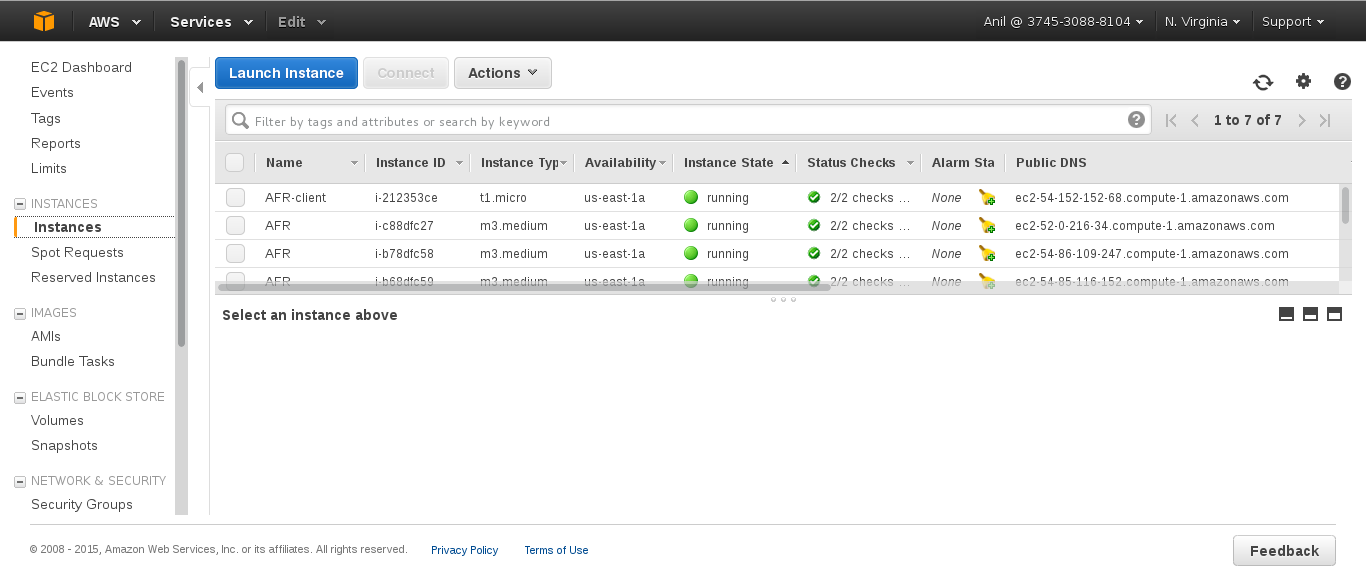
- Check the Status column and verify that the instance is running. A yellow circle indicates a status of pending while a green circle indicates that the instance is running.Click the instance and verify the details displayed in the Description tab.
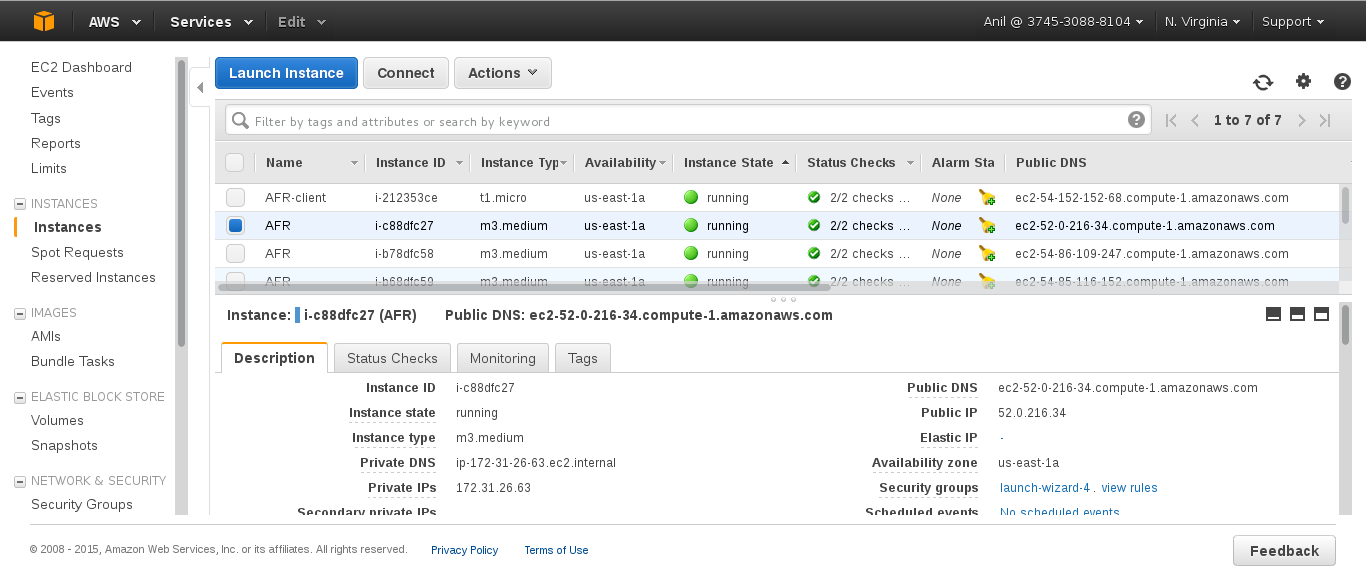
- Note the domain name in the Public DNS field. You can use this domain to perform a remote login to the instance.
- Using SSH and the domain from the previous step, login to the Red Hat Amazon Machine Image instance. You must use the key pair that was selected or created when launching the instance.Example:Enter the following in command line:
# ssh -i rhs-aws.pem ec2-user@ec2-23-20-52-123.compute-1.amazonaws.com # sudo su - At the command line, enter the following command:
# service glusterd statusVerify that the command indicates that theglusterddaemon is running on the instance.Note
Samba and NFS-Ganesha channels are disabled by default. To use standalone Samba and NFS-Ganesha, perform the following steps to enable the repos and install the relevant packages.- For enabling the Red Hat Gluster Storage Samba repo, run the following command:
yum-config-manager --enable rhui-REGION-rh-gluster-3-samba-for-rhel-6-server-rpms - For enabling the Red Hat Gluster Storage NFS-Ganesha repo, run the following command:
yum-config-manager --enable rhui-REGION-rh-gluster-3-nfs-for-rhel-6-server-rpms
Important
Before using
yum update to update the Amazon EC2 Red Hat Gluster Storage AMI, follow the steps listed in https://access.redhat.com/solutions/1556793 Knowledgebase article.

'%20d='M201.5%20305.5c-13.8%200-24.9-11.1-24.9-24.6%200-13.8%2011.1-24.9%2024.9-24.9%2013.6%200%2024.6%2011.1%2024.6%2024.9%200%2013.6-11.1%2024.6-24.6%2024.6zM504%20256c0%20137-111%20248-248%20248S8%20393%208%20256%20119%208%20256%208s248%20111%20248%20248zm-132.3-41.2c-9.4%200-17.7%203.9-23.8%2010-22.4-15.5-52.6-25.5-86.1-26.6l17.4-78.3%2055.4%2012.5c0%2013.6%2011.1%2024.6%2024.6%2024.6%2013.8%200%2024.9-11.3%2024.9-24.9s-11.1-24.9-24.9-24.9c-9.7%200-18%205.8-22.1%2013.8l-61.2-13.6c-3-.8-6.1%201.4-6.9%204.4l-19.1%2086.4c-33.2%201.4-63.1%2011.3-85.5%2026.8-6.1-6.4-14.7-10.2-24.1-10.2-34.9%200-46.3%2046.9-14.4%2062.8-1.1%205-1.7%2010.2-1.7%2015.5%200%2052.6%2059.2%2095.2%20132%2095.2%2073.1%200%20132.3-42.6%20132.3-95.2%200-5.3-.6-10.8-1.9-15.8%2031.3-16%2019.8-62.5-14.9-62.5zM302.8%20331c-18.2%2018.2-76.1%2017.9-93.6%200-2.2-2.2-6.1-2.2-8.3%200-2.5%202.5-2.5%206.4%200%208.6%2022.8%2022.8%2087.3%2022.8%20110.2%200%202.5-2.2%202.5-6.1%200-8.6-2.2-2.2-6.1-2.2-8.3%200zm7.7-75c-13.6%200-24.6%2011.1-24.6%2024.9%200%2013.6%2011.1%2024.6%2024.6%2024.6%2013.8%200%2024.9-11.1%2024.9-24.6%200-13.8-11-24.9-24.9-24.9z'/%3e%3c/svg%3e)