 Red Hat Summit
Este conteúdo não está disponível no idioma selecionado.
11.4. Enabling and Disabling User Accounts
The administrator can disable and enable active user accounts. Disabling a user account deactivates the account. Disabled user accounts cannot be used to authenticate. A user whose account has been disabled cannot log into IdM and cannot use IdM services, such as Kerberos, or perform any tasks.
Disabled user accounts still exist within IdM and all of the associated information remains unchanged. Unlike preserved user accounts, disabled user accounts remain in the
active state. Therefore, they are displayed in the output of the ipa user-find command. For example:
$ ipa user-find
...
  User login: user
  First name: User
  Last name: User
  Home directory: /home/user
  Login shell: /bin/sh
  UID: 1453200009
  GID: 1453200009
  Account disabled: True
  Password: False
  Kerberos keys available: False
...
Any disabled user account can be enabled again.
Note
After disabling a user account, existing connections remain valid until the user's Kerberos TGT and other tickets expire. After the ticket expires, the user will not be able renew it.
Enabling and Disabling User Accounts in the Web UI
- Select the
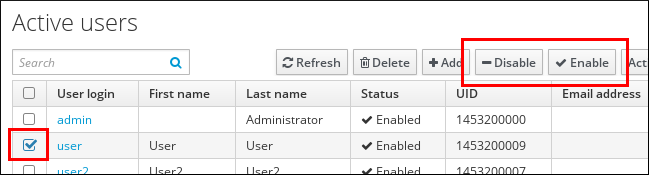
tab. - From the Active users list, select the required user or users, and then click or .
Figure 11.12. Disabling or Enabling a User Account
Disabling and Enabling User Accounts from the Command Line
To disable a user account, use the ipa user-disable command.
$ ipa user-disable user_login
----------------------------
Disabled user account "user_login"
----------------------------
To enable a user account, use the ipa user-enable command.
$ ipa user-enable user_login
----------------------------
Enabled user account "user_login"
----------------------------

'%20d='M201.5%20305.5c-13.8%200-24.9-11.1-24.9-24.6%200-13.8%2011.1-24.9%2024.9-24.9%2013.6%200%2024.6%2011.1%2024.6%2024.9%200%2013.6-11.1%2024.6-24.6%2024.6zM504%20256c0%20137-111%20248-248%20248S8%20393%208%20256%20119%208%20256%208s248%20111%20248%20248zm-132.3-41.2c-9.4%200-17.7%203.9-23.8%2010-22.4-15.5-52.6-25.5-86.1-26.6l17.4-78.3%2055.4%2012.5c0%2013.6%2011.1%2024.6%2024.6%2024.6%2013.8%200%2024.9-11.3%2024.9-24.9s-11.1-24.9-24.9-24.9c-9.7%200-18%205.8-22.1%2013.8l-61.2-13.6c-3-.8-6.1%201.4-6.9%204.4l-19.1%2086.4c-33.2%201.4-63.1%2011.3-85.5%2026.8-6.1-6.4-14.7-10.2-24.1-10.2-34.9%200-46.3%2046.9-14.4%2062.8-1.1%205-1.7%2010.2-1.7%2015.5%200%2052.6%2059.2%2095.2%20132%2095.2%2073.1%200%20132.3-42.6%20132.3-95.2%200-5.3-.6-10.8-1.9-15.8%2031.3-16%2019.8-62.5-14.9-62.5zM302.8%20331c-18.2%2018.2-76.1%2017.9-93.6%200-2.2-2.2-6.1-2.2-8.3%200-2.5%202.5-2.5%206.4%200%208.6%2022.8%2022.8%2087.3%2022.8%20110.2%200%202.5-2.2%202.5-6.1%200-8.6-2.2-2.2-6.1-2.2-8.3%200zm7.7-75c-13.6%200-24.6%2011.1-24.6%2024.9%200%2013.6%2011.1%2024.6%2024.6%2024.6%2013.8%200%2024.9-11.1%2024.9-24.6%200-13.8-11-24.9-24.9-24.9z'/%3e%3c/svg%3e)