 Red Hat Summit
Este conteúdo não está disponível no idioma selecionado.
Chapter 2. Installing the Virtualization Packages
To use virtualization, Red Hat virtualization packages must be installed on your computer. Virtualization packages can be installed when installing Red Hat Enterprise Linux or after installation using the
yum command and the Subscription Manager application.
The KVM hypervisor uses the default Red Hat Enterprise Linux kernel with the
kvm kernel module.
2.1. Installing Virtualization Packages During a Red Hat Enterprise Linux Installation
Copiar o linkLink copiado para a área de transferência!
This section provides information about installing virtualization packages while installing Red Hat Enterprise Linux.
Note
For detailed information about installing Red Hat Enterprise Linux, see the Red Hat Enterprise Linux 7 Installation Guide.
Important
The Anaconda interface only offers the option to install Red Hat virtualization packages during the installation of Red Hat Enterprise Linux Server.
When installing a Red Hat Enterprise Linux Workstation, the Red Hat virtualization packages can only be installed after the workstation installation is complete. See Section 2.2, “Installing Virtualization Packages on an Existing Red Hat Enterprise Linux System”
Procedure 2.1. Installing virtualization packages
Select software
Follow the installation procedure until the Installation Summary screen.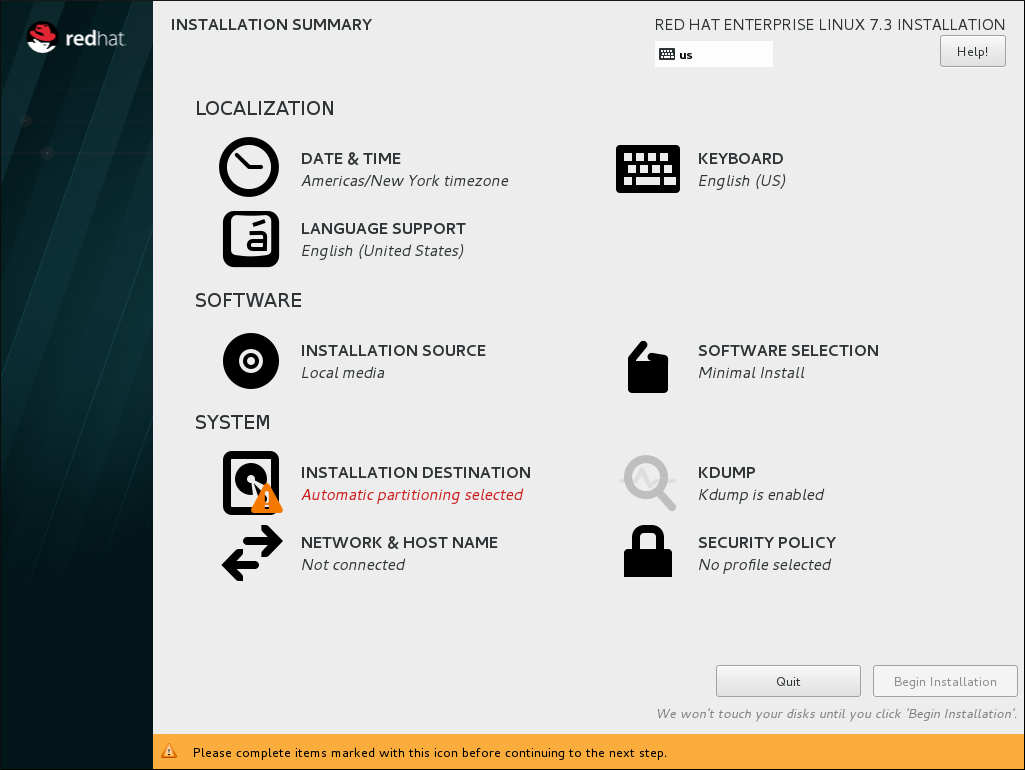
Figure 2.1. The Installation Summary screen
In the Installation Summary screen, click Software Selection. The Software Selection screen opens.Select the server type and package groups
You can install Red Hat Enterprise Linux 7 with only the basic virtualization packages or with packages that allow management of guests through a graphical user interface. Do one of the following:- Install a minimal virtualization hostSelect the Virtualization Host radio button in the Base Environment pane and the Virtualization Platform check box in the Add-Ons for Selected Environment pane. This installs a basic virtualization environment which can be run with
virshor remotely over the network.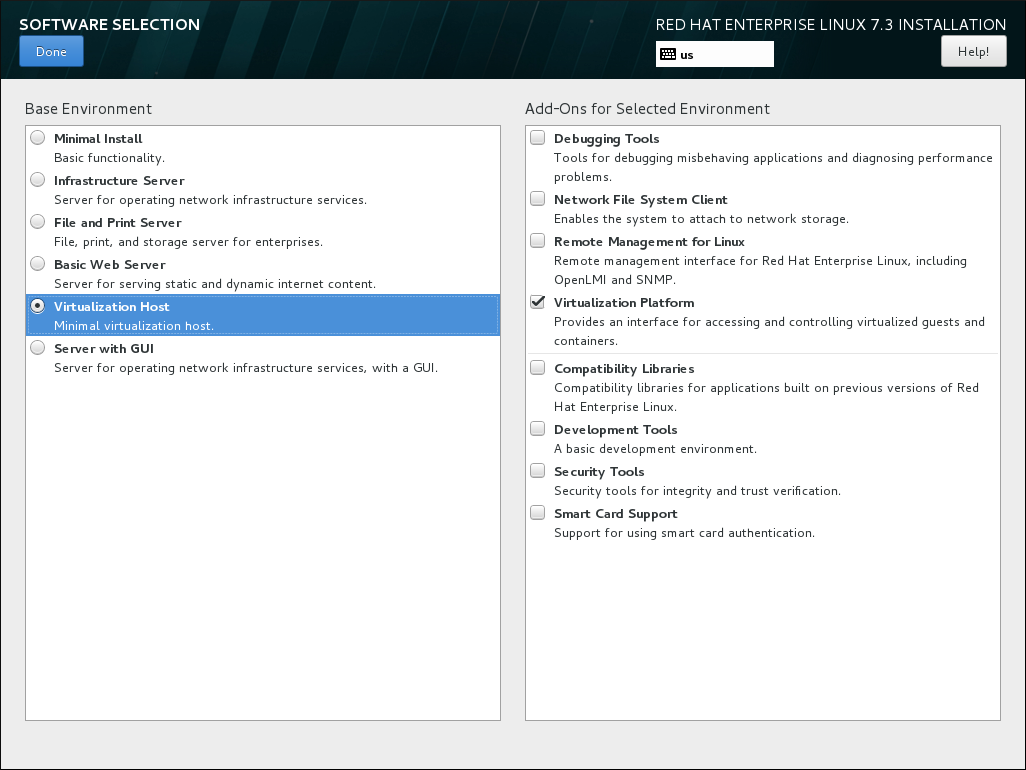
Figure 2.2. Virtualization Host selected in the Software Selection screen
- Install a virtualization host with a graphical user interfaceSelect the Server with GUI radio button in the Base Environment pane and the Virtualization Client, Virtualization Hypervisor, and Virtualization Tools check boxes in the Add-Ons for Selected Environment pane. This installs a virtualization environment along with graphical tools for installing and managing guest virtual machines.
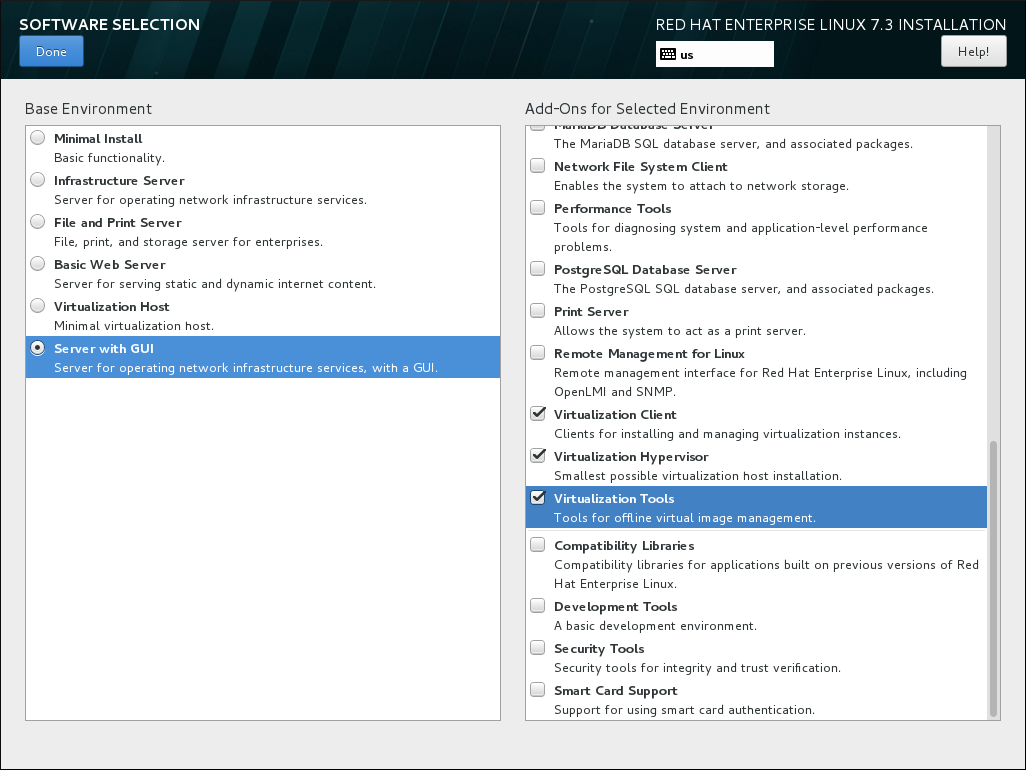
Figure 2.3. Server with GUI selected in the software selection screen
Finalize installation
Click and continue with the installation.
Important
You need a valid Red Hat Enterprise Linux subscription to receive updates for the virtualization packages.
2.1.1. Installing KVM Packages with Kickstart Files
Copiar o linkLink copiado para a área de transferência!
To use a Kickstart file to install Red Hat Enterprise Linux with the virtualization packages, append the following package groups in the
%packages section of your Kickstart file:
@virtualization-hypervisor
@virtualization-client
@virtualization-platform
@virtualization-tools
For more information about installing with Kickstart files, see the Red Hat Enterprise Linux 7 Installation Guide.

'%20d='M201.5%20305.5c-13.8%200-24.9-11.1-24.9-24.6%200-13.8%2011.1-24.9%2024.9-24.9%2013.6%200%2024.6%2011.1%2024.6%2024.9%200%2013.6-11.1%2024.6-24.6%2024.6zM504%20256c0%20137-111%20248-248%20248S8%20393%208%20256%20119%208%20256%208s248%20111%20248%20248zm-132.3-41.2c-9.4%200-17.7%203.9-23.8%2010-22.4-15.5-52.6-25.5-86.1-26.6l17.4-78.3%2055.4%2012.5c0%2013.6%2011.1%2024.6%2024.6%2024.6%2013.8%200%2024.9-11.3%2024.9-24.9s-11.1-24.9-24.9-24.9c-9.7%200-18%205.8-22.1%2013.8l-61.2-13.6c-3-.8-6.1%201.4-6.9%204.4l-19.1%2086.4c-33.2%201.4-63.1%2011.3-85.5%2026.8-6.1-6.4-14.7-10.2-24.1-10.2-34.9%200-46.3%2046.9-14.4%2062.8-1.1%205-1.7%2010.2-1.7%2015.5%200%2052.6%2059.2%2095.2%20132%2095.2%2073.1%200%20132.3-42.6%20132.3-95.2%200-5.3-.6-10.8-1.9-15.8%2031.3-16%2019.8-62.5-14.9-62.5zM302.8%20331c-18.2%2018.2-76.1%2017.9-93.6%200-2.2-2.2-6.1-2.2-8.3%200-2.5%202.5-2.5%206.4%200%208.6%2022.8%2022.8%2087.3%2022.8%20110.2%200%202.5-2.2%202.5-6.1%200-8.6-2.2-2.2-6.1-2.2-8.3%200zm7.7-75c-13.6%200-24.6%2011.1-24.6%2024.9%200%2013.6%2011.1%2024.6%2024.6%2024.6%2013.8%200%2024.9-11.1%2024.9-24.6%200-13.8-11-24.9-24.9-24.9z'/%3e%3c/svg%3e)