 Red Hat Summit
Este conteúdo não está disponível no idioma selecionado.
11.3. SPICE Agent
11.3.1. Setting up Communication between the SPICE Agent and Host
virsh or virt-manager can be used to configure communication between the guest and the SPICE agent. The following instructions describe how to configure the SPICE agent on a Linux guest.
Procedure 11.4. Setting up communication between guest agent and host with virsh on a Linux guest
Shut down the virtual machine
Ensure the virtual machine (named rhel7 in this example) is shut down before configuring the SPICE agent:# virsh shutdown rhel7Add the SPICE agent channel to the guest XML configuration
Edit the guest's XML file to add the SPICE agent details:# virsh edit rhel7Add the following to the guest's XML file and save the changes:<channel type='spicevmc'> <target type='virtio' name='com.redhat.spice.0'/> </channel>Start the virtual machine
# virsh start rhel7Install the SPICE agent on the guest
Install the SPICE agent if not yet installed in the guest virtual machine:# yum install spice-vdagentStart the SPICE agent in the guest
Start the SPICE agent service in the guest:# systemctl start spice-vdagent
Procedure 11.5. Setting up communication between SPICE agent and host on a running Linux guest
Create an XML file for the SPICE agent
# cat agent.xml
<channel type='spicevmc'>
   <target type='virtio' name='com.redhat.spice.0'/>
</channel>
Attach the SPICE agent to the virtual machine
Attach the SPICE agent to the running virtual machine (named rhel7 in this example) with this command:# virsh attach-device rhel7 agent.xmlInstall the SPICE agent on the guest
Install the SPICE agent if not yet installed in the guest virtual machine:# yum install spice-vdagentStart the SPICE agent in the guest
Start the SPICE agent service in the guest:# systemctl start spice-vdagent
Procedure 11.6. Setting up communication between the SPICE agent and host with virt-manager
Shut down the virtual machine
Ensure the virtual machine is shut down before configuring the SPICE agent.To shut down the virtual machine, select it from the list of virtual machines in Virtual Machine Manager, then click the light switch icon from the menu bar.Add the SPICE agent channel to the guest
Open the virtual machine's hardware details by clicking the lightbulb icon at the top of the guest window.Click the button to open the Add New Virtual Hardware window, and select Channel.Select the SPICE agent from the Name drop-down list, edit the channel address, and click :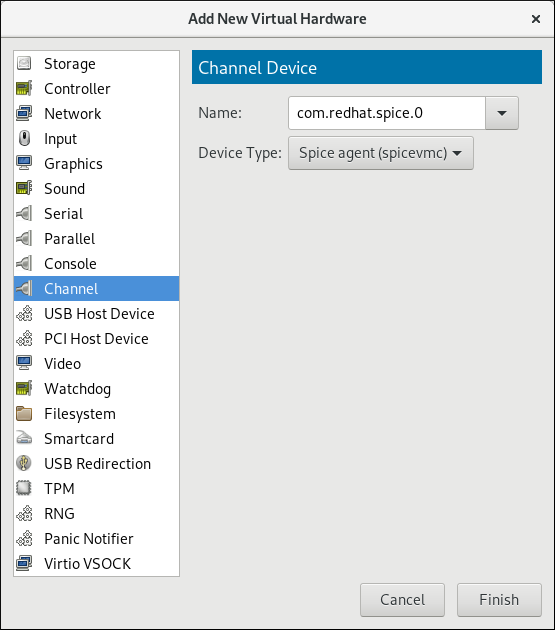
Figure 11.2. Selecting the SPICE agent channel device
Start the virtual machine
To start the virtual machine, select it from the list of virtual machines in Virtual Machine Manager, then click on the menu bar.
Install the SPICE agent on the guest
Open the guest with virt-manager and install the SPICE agent if not yet installed in the guest virtual machine:# yum install spice-vdagentStart the SPICE agent in the guest
Start the SPICE agent service in the guest:# systemctl start spice-vdagent

'%20d='M201.5%20305.5c-13.8%200-24.9-11.1-24.9-24.6%200-13.8%2011.1-24.9%2024.9-24.9%2013.6%200%2024.6%2011.1%2024.6%2024.9%200%2013.6-11.1%2024.6-24.6%2024.6zM504%20256c0%20137-111%20248-248%20248S8%20393%208%20256%20119%208%20256%208s248%20111%20248%20248zm-132.3-41.2c-9.4%200-17.7%203.9-23.8%2010-22.4-15.5-52.6-25.5-86.1-26.6l17.4-78.3%2055.4%2012.5c0%2013.6%2011.1%2024.6%2024.6%2024.6%2013.8%200%2024.9-11.3%2024.9-24.9s-11.1-24.9-24.9-24.9c-9.7%200-18%205.8-22.1%2013.8l-61.2-13.6c-3-.8-6.1%201.4-6.9%204.4l-19.1%2086.4c-33.2%201.4-63.1%2011.3-85.5%2026.8-6.1-6.4-14.7-10.2-24.1-10.2-34.9%200-46.3%2046.9-14.4%2062.8-1.1%205-1.7%2010.2-1.7%2015.5%200%2052.6%2059.2%2095.2%20132%2095.2%2073.1%200%20132.3-42.6%20132.3-95.2%200-5.3-.6-10.8-1.9-15.8%2031.3-16%2019.8-62.5-14.9-62.5zM302.8%20331c-18.2%2018.2-76.1%2017.9-93.6%200-2.2-2.2-6.1-2.2-8.3%200-2.5%202.5-2.5%206.4%200%208.6%2022.8%2022.8%2087.3%2022.8%20110.2%200%202.5-2.2%202.5-6.1%200-8.6-2.2-2.2-6.1-2.2-8.3%200zm7.7-75c-13.6%200-24.6%2011.1-24.6%2024.9%200%2013.6%2011.1%2024.6%2024.6%2024.6%2013.8%200%2024.9-11.1%2024.9-24.6%200-13.8-11-24.9-24.9-24.9z'/%3e%3c/svg%3e)