 红帽全球峰会
17.2. 了解部署集合
部署集合仅适用于使用 PostgreSQL 数据库的 RHACS 客户。默认情况下,RHACS 云服务使用 PostgreSQL 数据库,在安装 RHACS 版本 4.0 及更新的版本时也会默认使用它。使用早期版本的 3.74 的 RHACS 客户可以通过红帽提供的帮助迁移到 PostgreSQL 数据库。
RHACS 集合是一个用户定义的名称引用。它通过使用选择规则来定义逻辑分组。这些规则可以匹配部署、命名空间或集群名称或标签。您可以使用完全匹配或正则表达式来指定规则。集合在运行时被解析,并可以引用集合定义时不存在的对象。集合可以通过使用其他集合进行构建以描述复杂的层次结构。
集合为您提供描述如何组织动态基础架构的语言,消除了对 RHACS 属性(如包含和排除范围)的克隆和重复编辑的需要。
您可以使用集合来识别系统中的任何部署组,例如:
- 属于特定开发团队的基础架构区域
- 在开发或生产环境中运行时需要不同策略异常的应用程序
- 跨多个命名空间的分布式应用程序,使用通用部署标签定义
- 整个生产环境或测试环境
可以使用 RHACS 门户创建和管理集合。集合编辑器可帮助您在部署、命名空间和集群级别应用选择规则。您可以使用简单和复杂的规则,包括正则表达式。对于正则表达式,RE2 语法 受支持。不支持 Perl 语法。
您可以通过选择一个或多个部署、命名空间或集群来定义集合,如下图所示。此镜像显示包含名称 报告或 名称中包含 db 的部署的集合。集合包括与命名空间中这些名称匹配的部署,带有特定标签 kubernetes.io/metadata.name=medical,并在名为 production 的集群中。

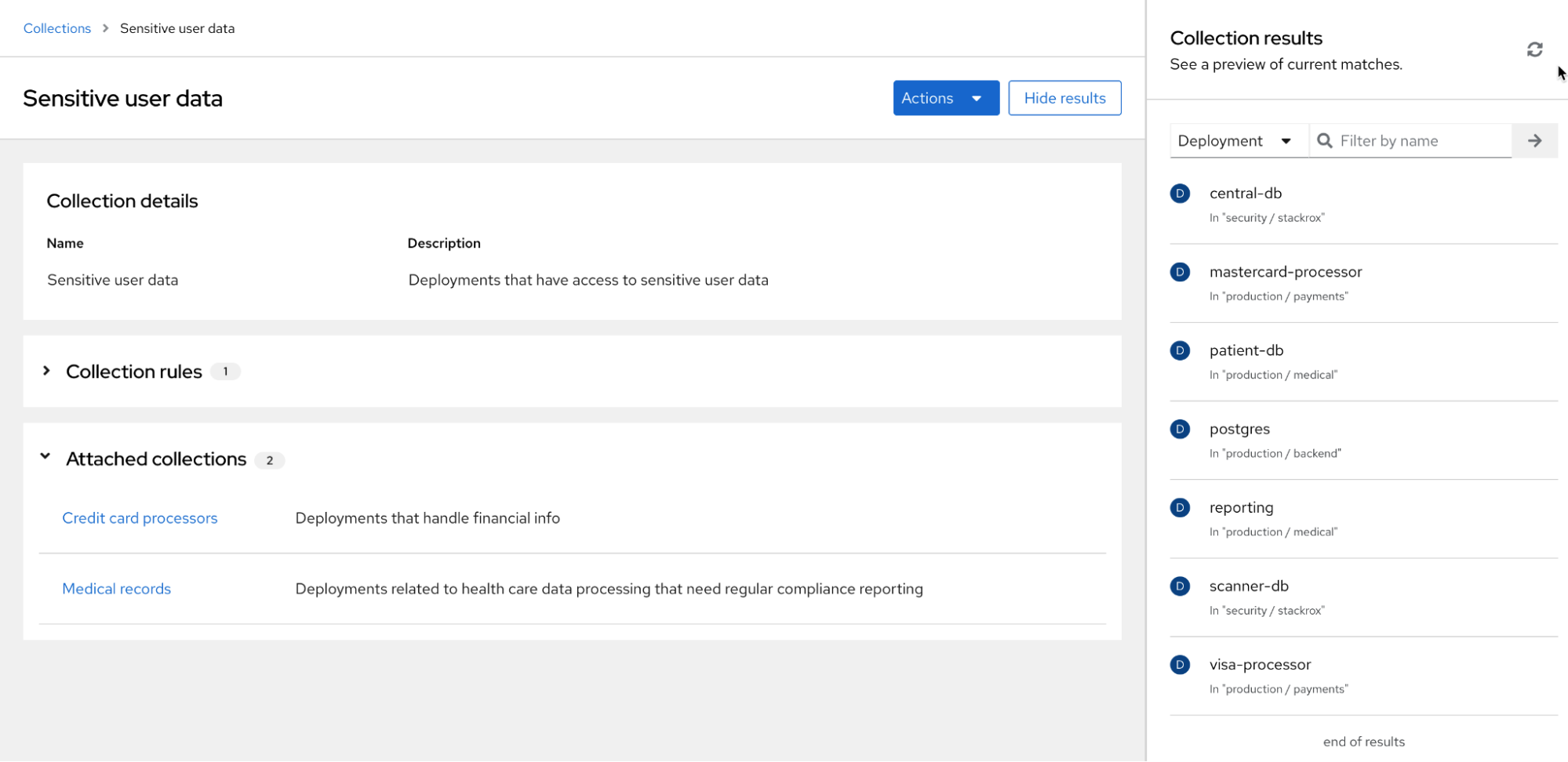
集合编辑器还可帮助您通过附加或嵌套其他集合来描述复杂的层次结构。编辑器提供了一个实时预览面板,可帮助您了解通过显示结果与您配置的规则匹配的规则。下图提供了名为"敏感用户数据"的集合的结果示例,以及一组集合规则(未显示)。"敏感用户数据"集合有两个附加的集合,"Credit 卡处理器"和"Medical 记录",每个集合都有自己的集合规则。侧面面板中显示的结果包括与为所有三个集合配置的规则匹配的项目。

'%20d='M201.5%20305.5c-13.8%200-24.9-11.1-24.9-24.6%200-13.8%2011.1-24.9%2024.9-24.9%2013.6%200%2024.6%2011.1%2024.6%2024.9%200%2013.6-11.1%2024.6-24.6%2024.6zM504%20256c0%20137-111%20248-248%20248S8%20393%208%20256%20119%208%20256%208s248%20111%20248%20248zm-132.3-41.2c-9.4%200-17.7%203.9-23.8%2010-22.4-15.5-52.6-25.5-86.1-26.6l17.4-78.3%2055.4%2012.5c0%2013.6%2011.1%2024.6%2024.6%2024.6%2013.8%200%2024.9-11.3%2024.9-24.9s-11.1-24.9-24.9-24.9c-9.7%200-18%205.8-22.1%2013.8l-61.2-13.6c-3-.8-6.1%201.4-6.9%204.4l-19.1%2086.4c-33.2%201.4-63.1%2011.3-85.5%2026.8-6.1-6.4-14.7-10.2-24.1-10.2-34.9%200-46.3%2046.9-14.4%2062.8-1.1%205-1.7%2010.2-1.7%2015.5%200%2052.6%2059.2%2095.2%20132%2095.2%2073.1%200%20132.3-42.6%20132.3-95.2%200-5.3-.6-10.8-1.9-15.8%2031.3-16%2019.8-62.5-14.9-62.5zM302.8%20331c-18.2%2018.2-76.1%2017.9-93.6%200-2.2-2.2-6.1-2.2-8.3%200-2.5%202.5-2.5%206.4%200%208.6%2022.8%2022.8%2087.3%2022.8%20110.2%200%202.5-2.2%202.5-6.1%200-8.6-2.2-2.2-6.1-2.2-8.3%200zm7.7-75c-13.6%200-24.6%2011.1-24.6%2024.9%200%2013.6%2011.1%2024.6%2024.6%2024.6%2013.8%200%2024.9-11.1%2024.9-24.6%200-13.8-11-24.9-24.9-24.9z'/%3e%3c/svg%3e)