 红帽全球峰会
附录 A. 设备映射器(Device Mapper)
设备映射器是一个为卷管理提供通用构架的内核驱动程序。它提供可用来创建用作逻辑卷设备的映射设备的通用方法。它不一定要特别了解卷组或者元数据格式。
设备映射器为一组高级技术提供了基础。除 LVM 之外,设备映射器多路径和
dmraid 命令也使用设备映射器。设备映射器的应用程序界面是ioctl 系统调用。用户界面是 dmsetup 命令。
LVM logical volumes are activated using the Device Mapper. Each logical volume is translated into a mapped device. Each segment translates into a line in the mapping table that describes the device. The Device Mapper supports a variety of mapping targets, including linear mapping, striped mapping, and error mapping. So, for example, two disks may be concatenated into one logical volume with a pair of linear mappings, one for each disk. When LVM creates a volume, it creates an underlying device-mapper device that can be queried with the
dmsetup command. For information about the format of devices in a mapping table, see 第 A.1 节 “设备列表映射”. For information about using the dmsetup command to query a device, see 第 A.2 节 “dmsetup 命令”.
A.1. 设备列表映射
复制链接链接已复制到粘贴板!
映射的设备是由一个列表定义的,该列表指定如何使用支持的设备列表映射将设备的每个逻辑分段行进行匹配。映射设备的列表由以下格式行组成:
start length mapping [mapping_parameters...]
在设备映射列表的第一行中,
start 参数必须等于 0。某行中的 start + length 参数必须与下一行的 start 相等。在映射列表中指定哪个映射参数取决于在该行中指定的 mapping 类型。
设备映射器中的大小总是以扇区(512 字节)为单位指定。
当将某个设备指定为设备映射器中的映射参数,它就被该文件系统(比如
/dev/hda)中的设备名称或者主号码和副号码以 major:minor 的格式进行参考。首选 major:minor 格式因为这样可避免查找路径名称。
以下显示了某设备的映像列表示例。在这个列表中有四个线性对象:
0 35258368 linear 8:48 65920
35258368 35258368 linear 8:32 65920
70516736 17694720 linear 8:16 17694976
88211456 17694720 linear 8:16 256
每行的前两个参数是片段起始块以及该片段的长度。下一个关键字是映射对象,在此示例中全部是
linear。该行的其余部分包括用于线性对象的参数。
The following subsections describe these mapping formats:
- 线性
- 条状
- 镜像
- 快照以及 snapshot-origin
- 错误
- 零
- 多路径
- 加密
- device-mapper RAID
- thin
- thin-pool
A.1.1. 线性映射对象
复制链接链接已复制到粘贴板!
线性映射对象将块的连续行映射到另一个块设备中。线性对象的格式如下:
start length linear device offsetstart- 虚拟设备中的起始块
length- 这个片段的长度
device- 块设备,被该文件系统中的设备名称或者主号码和副号码以
major:minor的格式参考 offset- 该设备中映射的起始误差
以下示例显示了起始块位于虚拟设备 0,片段长度为 1638400,major:minor 号码对为 8:2,起始误差为 41146992 的线性对象。
0 16384000 linear 8:2 41156992
以下示例是含有在设备
/dev/hda 中指定的设备参数的线性对象。
0 20971520 linear /dev/hda 384
A.1.2. 条状映射对象
复制链接链接已复制到粘贴板!
条状映射对象支持所有跨物理设备的条块。它使用条块数目和成条的组集大小以及设备名称和扇区对作为参数。条状对象的格式如下:
start length striped #stripes chunk_size device1 offset1 ... deviceN offsetN
每个条块都有一组
device 和 offset 参数。
start- 虚拟设备中的起始块
length- 这个片段的长度
#stripes- 虚拟设备的条数
chunk_size- 切换到下一个条之前写入每个条的扇区数,必须至少是内核页面大小的两倍
device- 块设备,可被该文件系统中的设备名称或者主号码和副号码以格式
major:minor参考。 offset- 该设备中映射的起始误差
以下示例显示了一个有三个条,且组集大小为 128 的条状对象:
0 73728 striped 3 128 8:9 384 8:8 384 8:7 9789824
- 0
- 虚拟设备中的起始块
- 73728
- 这个片段的长度
- striped 3 128
- 三个设备中组集大小为 128 块的条
- 8:9
- 第一个设备的 major:minor 号码
- 384
- 第一个设备中映射的起始误差
- 8:8
- 第二个设备的 major:minor 号码
- 384
- 第二个设备中映射的起始误差
- 8:7
- major:minor numbers of third device
- 9789824
- 第三个设备中映射的起始误差
以下示例显示了含有两个 256KiB 条,使用文件系统中的设备名称而不是主号码和副号码指定设备参数的条状对象。
0 65536 striped 2 512 /dev/hda 0 /dev/hdb 0
A.1.3. 镜像映射对象
复制链接链接已复制到粘贴板!
镜像映射对象支持镜像的逻辑设备。镜像对象格式如下:
start length mirror log_type #logargs logarg1 ... logargN #devs device1 offset1 ... deviceN offsetNstart- 虚拟设备中的起始块
length- 这个片段的长度
log_type- 可能的日志类型及其参数如下:
core- 镜像是本地的,镜像日志保存在核内存中。这个日志类型有 1-3 个参数:regionsize [[
no]sync] [block_on_error] disk- 镜像是本地的,镜像日志保存在磁盘中。这个日志类型有 2-4 个参数:logdevice regionsize [[
no]sync] [block_on_error] clustered_core- 镜像是群集的,镜像日志保存在核内存中。这个日志类型有 2-4 个参数:regionsize UUID [[
no]sync] [block_on_error] clustered_disk- 镜像是群集的,镜像日志保存在磁盘中。这个日志类型有 3-5 个参数:logdevice regionsize UUID [[
no]sync] [block_on_error]
LVM 保存一个小日志用来跟踪与该镜像或者多个镜像同步的区域。regionsize 参数指定这些区域的大小。在群集环境中,UUID 参数是与镜像日志设备关联的特定识别符,以便可通过该群集维护日志状态。The optional[no]syncargument can be used to specify the mirror as "in-sync" or "out-of-sync". Theblock_on_errorargument is used to tell the mirror to respond to errors rather than ignoring them. #log_args- 将在映射中指定的日志参数数目
logargs- 镜像的日志参数;提供的日志参数数目是由
#log-args参数指定的,且有效日志参数由log_type参数决定。 #devs- the number of legs in the mirror; a device and an offset is specified for each leg
device- 每个镜像分支的块设备,使用该文件系统中的设备名称或者主号码和副号码以
major:minor的格式参考。每个镜像分支都有一个块设备和误差,如#devs参数中所示。 offset- 设备中映射的起始误差。每个镜像分支都有一个块设备和误差,如
#devs参数中所示。
以下示例显示了某个镜像日志保存在磁盘中的群集镜像的镜像映射对象。
0 52428800 mirror clustered_disk 4 253:2 1024 UUID block_on_error 3 253:3 0 253:4 0 253:5 0
- 0
- 虚拟设备中的起始块
- 52428800
- 这个片段的长度
- mirror clustered_disk
- 日志类型指定其为群集镜像且镜像日志保存在磁盘中的镜像对象
- 4
- 附带 4 个镜像日志参数
- 253:2
- 日志设备的 major:minor 号码
- 1024
- 镜像日志用来跟踪哪些进行同步的区域大小
UUID- 镜像日志的 UUID,用来通过群集维护日志信息
block_on_error- 镜像应该响应错误
- 3
- 镜像中的分支
- 253:3 0 253:4 0 253:5 0
- 构成镜像的每个分支的设备的 major:minor 号码和误差
A.1.4. 快照以及 snapshot-origin 映射对象
复制链接链接已复制到粘贴板!
当您生成某个卷的第一个 LVM 快照时,要使用四个设备映射器设备:
- 包含源卷原始映射列表
线性映射的设备。 - 作为源卷即写即拷(copy-on-write,COW)设备使用的有
线性映射的设备;每次写入时,会将原始数据保存在每个快照的 COW 设备中以便保持不更改可见内容(直到 COW 设备写满为止)。 - A device with a
snapshotmapping combining #1 and #2, which is the visible snapshot volume. - The "original" volume (which uses the device number used by the original source volume), whose table is replaced by a "snapshot-origin" mapping from device #1.
用来创建这些设备的固定命名方案,例如:您可以使用以下命令生成名为
base 的 LVM 卷以及基于该卷的名为 snap 快照卷。
# lvcreate -L 1G -n base volumeGroup
# lvcreate -L 100M --snapshot -n snap volumeGroup/base
这产生四个设备,您可以使用以下命令浏览:
# dmsetup table|grep volumeGroup
volumeGroup-base-real: 0 2097152 linear 8:19 384
volumeGroup-snap-cow: 0 204800 linear 8:19 2097536
volumeGroup-snap: 0 2097152 snapshot 254:11 254:12 P 16
volumeGroup-base: 0 2097152 snapshot-origin 254:11

# ls -lL /dev/mapper/volumeGroup-*
brw-------  1 root root 254, 11 29 ago 18:15 /dev/mapper/volumeGroup-base-real
brw-------  1 root root 254, 12 29 ago 18:15 /dev/mapper/volumeGroup-snap-cow
brw-------  1 root root 254, 13 29 ago 18:15 /dev/mapper/volumeGroup-snap
brw-------  1 root root 254, 10 29 ago 18:14 /dev/mapper/volumeGroup-base
snapshot-origin 对象的格式如下:
start length snapshot-origin originstart- 虚拟设备中的起始块
length- 这个片段的长度
origin- 快照基础卷
snapshot-origin 一般有一个或者多个基于它的快照。会将读取操作直接与后备设备映射。每次写入时,会将原始数据保存在每个快照的 COW 设备中以便保持其不更改的可见内容(直到 COW 设备写满为止)。
快照对象的格式如下:
start length snapshot origin COW-device P|N chunksizestart- 虚拟设备中的起始块
length- 这个片段的长度
origin- 快照基础卷
COW-device- 保存更改组集的设备
- P|N
- P(持久)或者N(不持久);指示快照是否可在重启后保留。对于瞬时快照(N)必须将 less metadata 保存在磁盘中;内核可将其保存在内存中。
chunksize- 将保存到 COW 设备中的有数据更改的组集的扇区的大小
以下示例显示了起始设备为 254:11 的
snapshot-origin 对象。
0 2097152 snapshot-origin 254:11
以下示例显示了起始设备为 254:11、COW 设备为 254:12 的
snapshot-origin 对象。这个快照设备在重启后仍然保留,且保存在 COW 设备中的数据组集大小为 16 个扇区。
0 2097152 snapshot 254:11 254:12 P 16
A.1.5. 错误映射对象
复制链接链接已复制到粘贴板!
如果有错误映射对象,任何对映射的扇区的 I/O 操作会失败。
错误映射可用来进行测试。要测试某个设备在失败后如何动作,您可以创建一个设备映射,且在该设备中部有一个坏扇区,或者您可以换出一个镜像分支并用错误对象替换之。
An error target can be used in place of a failing device, as a way of avoiding timeouts and retries on the actual device. It can serve as an intermediate target while you rearrange LVM metadata during failures.
错误映射对象除 start 和 length 参数外不使用其它参数。
以下示例显示的是
错误对象。
0 65536 error
A.1.6. 零映射对象
复制链接链接已复制到粘贴板!
零映射对象是与 /dev/zero 等同的块设备。对这个映射的读取操作会返回零块。写入这个映射的数据会被丢弃,但写入操作会成功。零映射对象除 start 和 length 参数外没有其它参数。
以下示例显示了一个 16Tb 设备的
零对象。
0 65536 zero
A.1.7. 多路径映射对象
复制链接链接已复制到粘贴板!
多路径映射对象支持多路径的设备的映射。
多路径对象的格式如下:
start length multipath #features [feature1 ... featureN] #handlerargs [handlerarg1 ... handlerargN] #pathgroups pathgroup pathgroupargs1 ... pathgroupargsN
每个路径组群都有一组
pathgroupargs 参数。
start- 虚拟设备中的起始块
length- 这个片段的长度
#features- The number of multipath features, followed by those features. If this parameter is zero, then there is no
featureparameter and the next device mapping parameter is#handlerargs. Currently there is one supported feature that can be set with thefeaturesattribute in themultipath.conffile,queue_if_no_path. This indicates that this multipathed device is currently set to queue I/O operations if there is no path available.In the following example, theno_path_retryattribute in themultipath.conffile has been set to queue I/O operations only until all paths have been marked as failed after a set number of attempts have been made to use the paths. In this case, the mapping appears as follows until all the path checkers have failed the specified number of checks.0 71014400 multipath 1 queue_if_no_path 0 2 1 round-robin 0 2 1 66:128 \ 1000 65:64 1000 round-robin 0 2 1 8:0 1000 67:192 1000在所有路径检查程序完成指定数目的检查并失败后,会出现如下映射。0 71014400 multipath 0 0 2 1 round-robin 0 2 1 66:128 1000 65:64 1000 \ round-robin 0 2 1 8:0 1000 67:192 1000 #handlerargs- 那些参数后是硬件处理器参数的数目。硬件处理器指定在切换路径组或者处理 I/O 错误时用来执行硬件特定的动作。如果将其设定为 0,那么下一个参数则为
#pathgroups。 #pathgroups- 路径组的数目。一个路径组是一组多路径的设备进行负载平衡的路径。每个路径组都有一组
pathgroupargs参数。 pathgroup- 下一个要尝试的路径组。
pathgroupsargs- 每个路径组包括以下参数:
pathselector #selectorargs #paths #pathargs device1 ioreqs1 ... deviceN ioreqsN路径组中的每个路径都有一组路径参数。pathselector- 指定用来决定使用这个路径组中的哪个路径进行下一个 I/O 操作的算法。
#selectorargs- 在多路径映射中这个参数后的路径选择程序参数的数目。目前,这个参数的值总是 0。
#paths- 这个路径组中的路径数目。
#pathargs- 在这个组群中为每个路径指定的路径参数数目。目前,这个数值总是 1,即
ioreqs参数。 device- 该路径的块设备,使用主号码和副号码以
major:minor格式参考 ioreqs- 切换到当前组群的下一个路径前路由到这个路径的 I/O 请求数目。
图 A.1 “多路径映射对象” shows the format of a multipath target with two path groups.
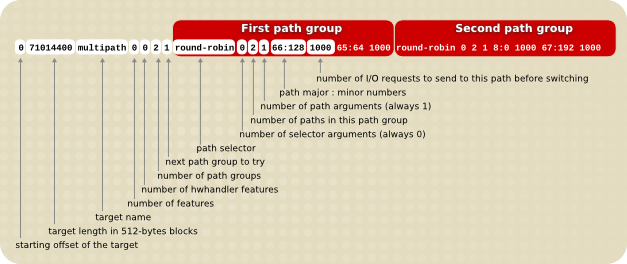
图 A.1. 多路径映射对象
以下示例显示对同一个多路径设备的一个纯故障排除对象定义。在这个对象中有四个路径组,其中每个路径组只有一个路径,以便多路径的设备每次只能使用一个路径。
0 71014400 multipath 0 0 4 1 round-robin 0 1 1 66:112 1000 \
round-robin 0 1 1 67:176 1000 round-robin 0 1 1 68:240 1000 \
round-robin 0 1 1 65:48 1000
以下示例显示为同一个多路径设备完全展开(多总线)对象定义。在这个对象中只有一个路径组,其中包含所有路径。在这个设定中,多路径将所有负载平均分配到所有路径中。
0 71014400 multipath 0 0 1 1 round-robin 0 4 1 66:112 1000 \
 67:176 1000 68:240 1000 65:48 1000
有关多路径的详情请参考《使用设备映射器多路径》文档。
A.1.8. 加密映射对象
复制链接链接已复制到粘贴板!
加密对象会加密通过指定设备的所有数据。它使用内核 Crypto API。
加密对象的格式如下:
start length crypt cipher key IV-offset device offsetstart- 虚拟设备中的起始块
length- 这个片段的长度
cipher- Cipher 包含
cipher[-chainmode]-ivmode[:iv options]。cipher- 可用密码位于
/proc/crypto(例如:aes)。 chainmode- 总是使用
cbc。不要使用ebc,它不使用初始向量(IV)。 ivmode[:iv options]- IV is an initial vector used to vary the encryption. The IV mode is
plainoressiv:hash. Anivmodeof-plainuses the sector number (plus IV offset) as the IV. Anivmodeof-essivis an enhancement avoiding a watermark weakness.
key- 加密密钥,在 hex 中提供
IV-offset- 初始向量(IV)误差
device- 块设备,被该文件系统中的设备名称或者主号码和副号码以
major:minor的格式参考 offset- 该设备中映射的起始误差
以下是
加密对象示例。
0 2097152 crypt aes-plain 0123456789abcdef0123456789abcdef 0 /dev/hda 0
A.1.9. The device-mapper RAID Mapping Target
复制链接链接已复制到粘贴板!
The device-mapper RAID (dm-raid) target provides a bridge from DM to MD. It allows the MD RAID drivers to be accessed using a device-mapper interface. The format of the dm-raid target is as follows
start length raid raid_type #raid_params raid_params #raid_devs metadata_dev0 dev0 [.. metadata_devN devN]
start- 虚拟设备中的起始块
length- 这个片段的长度
raid_type- The RAID type can be one of the following
- raid1
- RAID1 mirroring
- raid4
- RAID4 dedicated parity disk
- raid5_la
- RAID5 left asymmetric— rotating parity 0 with data continuation
- raid5_ra
- RAID5 right asymmetric— rotating parity N with data continuation
- raid5_ls
- RAID5 left symmetric— rotating parity 0 with data restart
- raid5_rs
- RAID5 right symmetric— rotating parity N with data restart
- raid6_zr
- RAID6 zero restart— rotating parity 0 (left to right) with data restart
- raid6_nr
- RAID6 N restart— rotating parity N (right to left) with data restart
- raid6_nc
- RAID6 N continue— rotating parity N (right to left) with data continuation
- raid10
- Various RAID10-inspired algorithms selected by further optional arguments— RAID 10: Striped mirrors (striping on top of mirrors)— RAID 1E: Integrated adjacent striped mirroring— RAID 1E: Integrated offset striped mirroring— Other similar RAID10 variants
#raid_params- The number of parameters that follow
raid_params- Mandatory parameters:
chunk_size- Chunk size in sectors. This parameter is often known as "stripe size". It is the only mandatory parameter and is placed first.
Followed by optional parameters (in any order):- [sync|nosync]
- Force or prevent RAID initialization.
- rebuild
idx - Rebuild drive number
idx(first drive is 0). - daemon_sleep
ms - Interval between runs of the bitmap daemon that clear bits. A longer interval means less bitmap I/O but resyncing after a failure is likely to take longer.
- min_recovery_rate
KB/sec/disk - Throttle RAID initialization
- max_recovery_rate
KB/sec/disk - Throttle RAID initialization
- write_mostly
idx - Mark drive index
idxwrite-mostly. - max_write_behind
sectors - See the description of
--write-behindin themdadmman page. - stripe_cache
sectors - Stripe cache size (RAID 4/5/6 only)
- region_size
sectors - The
region_sizemultiplied by the number of regions is the logical size of the array. The bitmap records the device synchronization state for each region. - raid10_copies
#copies - The number of RAID10 copies. This parameter is used in conjunction with the
raid10_formatparameter to alter the default layout of a RAID10 configuration. The default value is 2. - raid10_format near|far|offset
- This parameter is used in conjunction with the
raid10_copiesparameter to alter the default layout of a RAID10 configuration. The default value isnear, which specifies a standard mirroring layout.If theraid10_copiesandraid10_formatare left unspecified, orraid10_copies 2and/orraid10_format nearis specified, then the layouts for 2, 3 and 4 devices are as follows:2 drives 3 drives 4 drives -------- ---------- -------------- A1 A1 A1 A1 A2 A1 A1 A2 A2 A2 A2 A2 A3 A3 A3 A3 A4 A4 A3 A3 A4 A4 A5 A5 A5 A6 A6 A4 A4 A5 A6 A6 A7 A7 A8 A8 .. .. .. .. .. .. .. .. ..The 2-device layout is equivalent to 2-way RAID1. The 4-device layout is what a traditional RAID10 would look like. The 3-device layout is what might be called a 'RAID1E - Integrated Adjacent Stripe Mirroring'.Ifraid10_copies 2andraid10_format farare specified, then the layouts for 2, 3 and 4 devices are as follows:2 drives 3 drives 4 drives -------- ----------- ------------------ A1 A2 A1 A2 A3 A1 A2 A3 A4 A3 A4 A4 A5 A6 A5 A6 A7 A8 A5 A6 A7 A8 A9 A9 A10 A11 A12 .. .. .. .. .. .. .. .. .. A2 A1 A3 A1 A2 A2 A1 A4 A3 A4 A3 A6 A4 A5 A6 A5 A8 A7 A6 A5 A9 A7 A8 A10 A9 A12 A11 .. .. .. .. .. .. .. .. ..Ifraid10_copies 2andraid10_format offsetare specified, then the layouts for 2, 3 and 4 devices are as follows:2 drives 3 drives 4 drives -------- -------- ------------------ A1 A2 A1 A2 A3 A1 A2 A3 A4 A2 A1 A3 A1 A2 A2 A1 A4 A3 A3 A4 A4 A5 A6 A5 A6 A7 A8 A4 A3 A6 A4 A5 A6 A5 A8 A7 A5 A6 A7 A8 A9 A9 A10 A11 A12 A6 A5 A9 A7 A8 A10 A9 A12 A11 .. .. .. .. .. .. .. .. ..These layouts closely resemble the layouts fo RAID1E - Integrated Offset Stripe Mirroring'
#raid_devs- The number of devices composing the arrayEach device consists of two entries. The first is the device containing the metadata (if any); the second is the one containing the data.If a drive has failed or is missing at creation time, a '-' can be given for both the metadata and data drives for a given position.
The following example shows a RAID4 target with a starting block of 0 and a segment length of 1960893648. There are 4 data drives, 1 parity, with no metadata devices specified to hold superblock/bitmap info and a chunk size of 1MiB
0 1960893648 raid raid4 1 2048 5 - 8:17 - 8:33 - 8:49 - 8:65 - 8:81
The following example shows a RAID4 target with a starting block of 0 and a segment length of 1960893648. there are 4 data drives, 1 parity, with metadata devices, a chunk size of 1MiB, force RAID initialization, and a
min_recovery rate of 20 kiB/sec/disks.
0 1960893648 raid raid4 4 2048 sync min_recovery_rate 20 5 8:17 8:18 8:33 8:34 8:49 8:50 8:65 8:66 8:81 8:82
A.1.10. The thin and thin-pool Mapping Targets
复制链接链接已复制到粘贴板!
The format of a thin-pool target is as follows:
start length thin-pool metadata_dev data_dev data_block_size low_water_mark [#feature_args [arg*] ]
start- 虚拟设备中的起始块
length- 这个片段的长度
metadata_dev- The metadata device
data_dev- The data device
data_block_size- The data block size (in sectors). The data block size gives the smallest unit of disk space that can be allocated at a time expressed in units of 512-byte sectors. Data block size must be between 64KB (128 sectors) and 1GB (2097152 sectors) inclusive and it must be a mutlipole of 128 (64KB).
low_water_mark- The low water mark, expressed in blocks of size
data_block_size. If free space on the data device drops below this level then a device-mapper event will be triggered which a user-space daemon should catch allowing it to extend the pool device. Only one such event will be sent. Resuming a device with a new table itself triggers an event so the user-space daemon can use this to detect a situation where a new table already exceeds the threshold.A low water mark for the metadata device is maintained in the kernel and will trigger a device-mapper event if free space on the metadata device drops below it. #feature_args- The number of feature arguments
arg- The thin pool feature argument are as follows:
- skip_block_zeroing
- Skip the zeroing of newly-provisioned blocks.
- ignore_discard
- Disable discard support.
- no_discard_passdown
- Do not pass discards down to the underlying data device, but just remove the mapping.
- read_only
- Do not allow any changes to be made to the pool metadata.
- error_if_no_space
- Error IOs, instead of queuing, if no space.
The following example shows a thin-pool target with a starting block in the virtual device of 0, a segment length of 1638400.
/dev/sdc1 is a small metadata device and /dev/sdc2 is a larger data device. The chunksize is 64k, the low_water_mark is 0, and there are no features.
0 16384000 thin-pool /dev/sdc1 /dev/sdc2 128 0 0
The format of a thin target is as follows:
start length thin pool_dev dev_id [external_origin_dev]
start- 虚拟设备中的起始块
length- 这个片段的长度
pool_dev- The thin-pool device, for example
/dev/mapper/my_poolor 253:0 dev_id- The internal device identifier of the device to be activated.
external_origin_dev- An optional block device outside the pool to be treated as a read-only snapshot origin. Reads to unprovisioned areas of the thin target will be mapped to this device.
The following example shows a 1 GiB thinLV that uses
/dev/mapper/pool as its backing store (thin-pool). The target has a starting block in the virtual device of 0 and a segment length of 2097152.
0 2097152 thin /dev/mapper/pool 1

'%20d='M201.5%20305.5c-13.8%200-24.9-11.1-24.9-24.6%200-13.8%2011.1-24.9%2024.9-24.9%2013.6%200%2024.6%2011.1%2024.6%2024.9%200%2013.6-11.1%2024.6-24.6%2024.6zM504%20256c0%20137-111%20248-248%20248S8%20393%208%20256%20119%208%20256%208s248%20111%20248%20248zm-132.3-41.2c-9.4%200-17.7%203.9-23.8%2010-22.4-15.5-52.6-25.5-86.1-26.6l17.4-78.3%2055.4%2012.5c0%2013.6%2011.1%2024.6%2024.6%2024.6%2013.8%200%2024.9-11.3%2024.9-24.9s-11.1-24.9-24.9-24.9c-9.7%200-18%205.8-22.1%2013.8l-61.2-13.6c-3-.8-6.1%201.4-6.9%204.4l-19.1%2086.4c-33.2%201.4-63.1%2011.3-85.5%2026.8-6.1-6.4-14.7-10.2-24.1-10.2-34.9%200-46.3%2046.9-14.4%2062.8-1.1%205-1.7%2010.2-1.7%2015.5%200%2052.6%2059.2%2095.2%20132%2095.2%2073.1%200%20132.3-42.6%20132.3-95.2%200-5.3-.6-10.8-1.9-15.8%2031.3-16%2019.8-62.5-14.9-62.5zM302.8%20331c-18.2%2018.2-76.1%2017.9-93.6%200-2.2-2.2-6.1-2.2-8.3%200-2.5%202.5-2.5%206.4%200%208.6%2022.8%2022.8%2087.3%2022.8%20110.2%200%202.5-2.2%202.5-6.1%200-8.6-2.2-2.2-6.1-2.2-8.3%200zm7.7-75c-13.6%200-24.6%2011.1-24.6%2024.9%200%2013.6%2011.1%2024.6%2024.6%2024.6%2013.8%200%2024.9-11.1%2024.9-24.6%200-13.8-11-24.9-24.9-24.9z'/%3e%3c/svg%3e)