 红帽全球峰会
此内容没有您所选择的语言版本。
9.2.4. Installing Additional Nodes
When creating a new storage node, two components are always installed: the storage node and a companion agent. The only required information to set up the node is the IP address of the JBoss ON server. The agent registers with the server and then sends the storage node hostname or IP address. The server then distributes that information among the other agents and it gets propagated into the cluster.
If the cluster is using custom client and gossip ports, then edit the
rhq-storage.properties file with the correct ports before running the installation script.
Run the installation script with the
--agent-preference option to supply the server bind address. For example:
[root@server ~]# serverRoot/jon-server-3.2.GA/bin/rhqctl install --storage --agent-preference="rhq.agent.server.bind-address=0.0.0.0"Note
When installing on Linux, the
rhqctl command must be run as root. On Windows, the command prompt must be opened with the option Run as Administrator.
The deployment operation can take several minutes to complete, as the new node information is propagated among the existing nodes. Until the deploy operation is complete, the node shows a status of Joining.
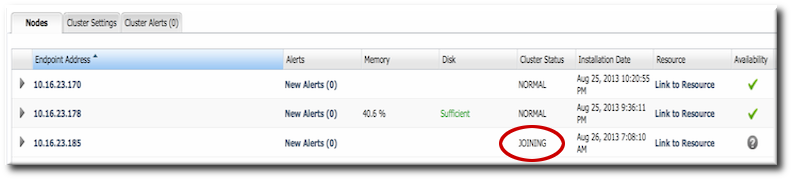
Figure 11. Joining the Cluster
Warning
Deploying a node lists that node's host in the cluster configuration and any allowed host can gain access to the data in the storage cluster.
Restrict access to the
rhq-storage-auth.conf file so that the allowed hosts list cannot be altered to allow an attacker to gain access to the cluster and the stored data.

'%20d='M201.5%20305.5c-13.8%200-24.9-11.1-24.9-24.6%200-13.8%2011.1-24.9%2024.9-24.9%2013.6%200%2024.6%2011.1%2024.6%2024.9%200%2013.6-11.1%2024.6-24.6%2024.6zM504%20256c0%20137-111%20248-248%20248S8%20393%208%20256%20119%208%20256%208s248%20111%20248%20248zm-132.3-41.2c-9.4%200-17.7%203.9-23.8%2010-22.4-15.5-52.6-25.5-86.1-26.6l17.4-78.3%2055.4%2012.5c0%2013.6%2011.1%2024.6%2024.6%2024.6%2013.8%200%2024.9-11.3%2024.9-24.9s-11.1-24.9-24.9-24.9c-9.7%200-18%205.8-22.1%2013.8l-61.2-13.6c-3-.8-6.1%201.4-6.9%204.4l-19.1%2086.4c-33.2%201.4-63.1%2011.3-85.5%2026.8-6.1-6.4-14.7-10.2-24.1-10.2-34.9%200-46.3%2046.9-14.4%2062.8-1.1%205-1.7%2010.2-1.7%2015.5%200%2052.6%2059.2%2095.2%20132%2095.2%2073.1%200%20132.3-42.6%20132.3-95.2%200-5.3-.6-10.8-1.9-15.8%2031.3-16%2019.8-62.5-14.9-62.5zM302.8%20331c-18.2%2018.2-76.1%2017.9-93.6%200-2.2-2.2-6.1-2.2-8.3%200-2.5%202.5-2.5%206.4%200%208.6%2022.8%2022.8%2087.3%2022.8%20110.2%200%202.5-2.2%202.5-6.1%200-8.6-2.2-2.2-6.1-2.2-8.3%200zm7.7-75c-13.6%200-24.6%2011.1-24.6%2024.9%200%2013.6%2011.1%2024.6%2024.6%2024.6%2013.8%200%2024.9-11.1%2024.9-24.6%200-13.8-11-24.9-24.9-24.9z'/%3e%3c/svg%3e)