 Red Hat Summit
3.4. OIDC SAML アイデンティティーブローカー
アイデンティティープロバイダーが OpenID Connect を実装しておらず、従来の XML ベースの SAML2.0 SSO プロトコルのみを実装している場合は、quarkus-oidc が OIDC アダプターとして使用されるのと同様に、Quarkus を SAML 2.0 アダプターとして使用することはできません。
ただし、Keycloak、Okta、Auth0、Microsoft ADFS などの多くの OIDC プロバイダーは、OIDC から SAML 2.0 へのブリッジを提供しています。OIDC プロバイダーで SAML 2.0 プロバイダーへのアイデンティティーブローカー接続を作成し、quarkus-oidc を使用してこの SAML 2.0 プロバイダーに対してユーザーを認証し、OIDC プロバイダーが OIDC と SAML 2.0 の通信を調整することができます。Quarkus エンドポイントに関しては、同じ Quarkus Security、OIDC API、@Authenticated、SecurityIdentity などのアノテーションなどを引き続き使用できます。
たとえば、Okta が SAML 2.0 プロバイダーであり、Keycloak が OIDC プロバイダーであるとします。ここでは、Keycloak を Okta SAML 2.0 プロバイダーと仲介するように設定する方法を説明する一般的なシーケンスを示します。
まず、Okta Dashboard/Applications に新しい SAML2 インテグレーションを作成します。
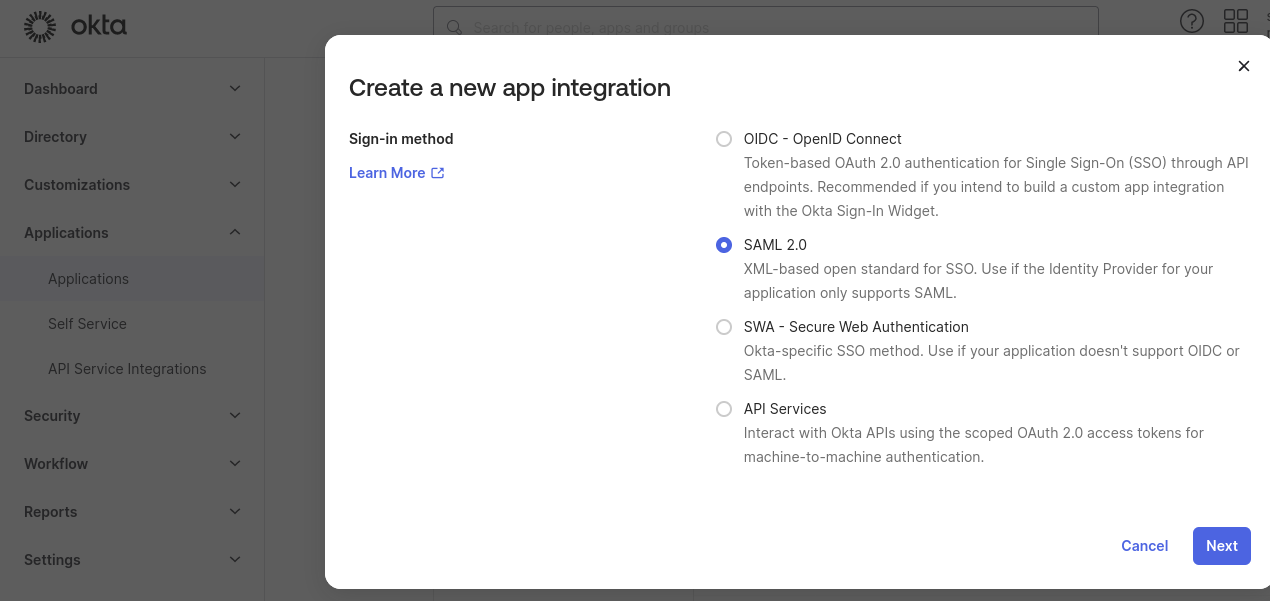
たとえば、OktaSaml という名前を付けます。

次に、Keycloak SAML ブローカーエンドポイントを指すように設定します。この時点で、Keycloak レルムの名前 (例: quarkus) を知っておく必要があります。Keycloak SAML ブローカーのエイリアスが saml であると仮定すると、エンドポイントアドレスを http://localhost:8081/realms/quarkus/broker/saml/endpoint として入力します。サービスプロバイダー (SP) エンティティー ID を http://localhost:8081/realms/quarkus として入力します。http://localhost:8081 は Keycloak ベースアドレス、saml はブローカーエイリアスです。
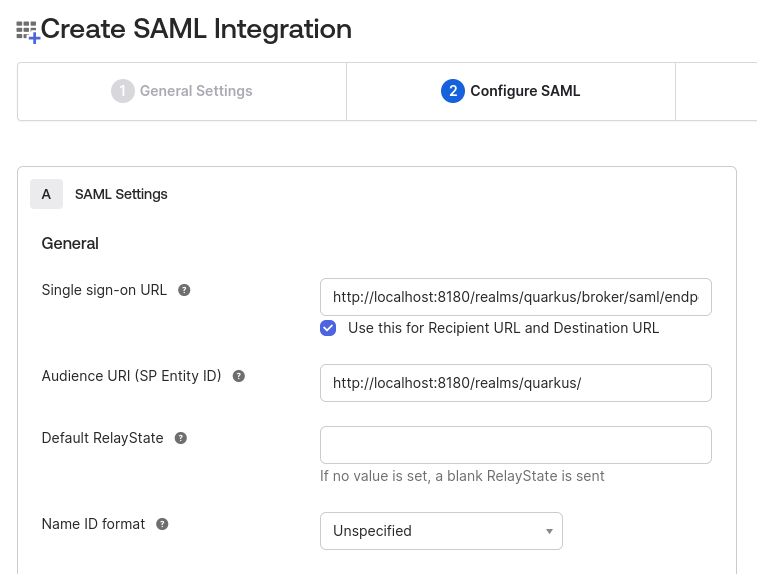
次に、この SAML インテグレーションを保存し、そのメタデータ URL をメモします。
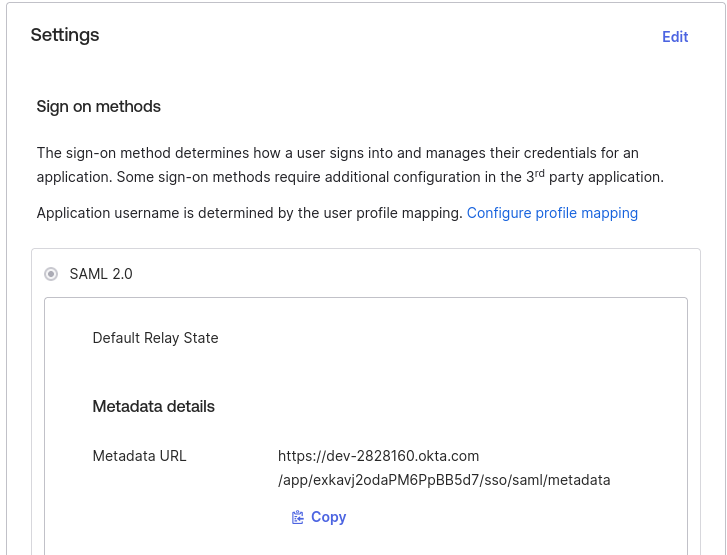
次に、Keycloak に SAML プロバイダーを追加します。
まず、通常どおりに、新しいレルムを作成するか、既存のレルムを Keycloak にインポートします。この場合、レルム名は quarkus にする必要があります。
次に、quarkus レルムのプロパティーで、Identity Providers に移動し、新しい SAML プロバイダーを追加します。
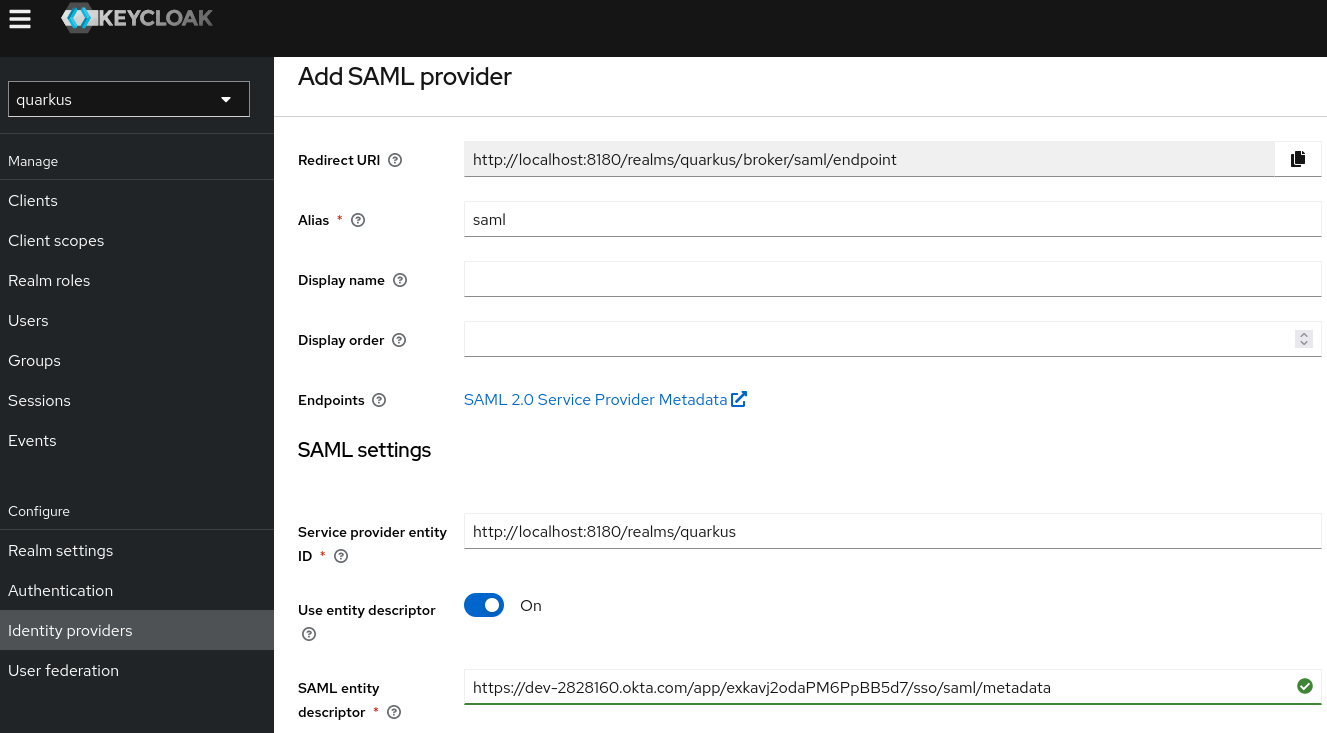
エイリアスは saml に設定され、Redirect URI は http://localhost:8081/realms/quarkus/broker/saml/endpoint、Service provider entity ID は http://localhost:8081/realms/quarkus であることに注意してください。これらは、前のステップで Okta SAML 統合を作成するときに入力した値と同じです。
最後に、前の手順の最後に書き留めた Okta SAML 統合メタデータ URL を指すように Service entity descriptor を設定します。
次に、必要に応じて、Authentication/browser/Identity Provider Redirector config に移動し、Alias と Default Identity Provider の両方のプロパティーを saml に設定して、この Keycloak SAML プロバイダーをデフォルトプロバイダーとして登録できます。デフォルトのプロバイダーとして設定しない場合は、認証時に Keycloak は次の 2 つのオプションを提供します。
- SAML プロバイダーで認証する
- 名前とパスワードで Keycloak に直接認証する
ここで、Quarkus OIDC web-app アプリケーションを、Keycloak quarkus レルム quarkus.oidc.auth-server-url=http://localhost:8180/realms/quarkus を指すように設定します。次に、Keycloak OIDC および Okta SAML 2.0 プロバイダーによって提供される OIDC から SAML へのブリッジを使用して、Quarkus ユーザーを Okta SAML 2.0 プロバイダーに認証する準備が整います。
Keycloak の場合と同様に、他の OIDC プロバイダーを設定して SAML ブリッジを提供することもできます。

'%20d='M201.5%20305.5c-13.8%200-24.9-11.1-24.9-24.6%200-13.8%2011.1-24.9%2024.9-24.9%2013.6%200%2024.6%2011.1%2024.6%2024.9%200%2013.6-11.1%2024.6-24.6%2024.6zM504%20256c0%20137-111%20248-248%20248S8%20393%208%20256%20119%208%20256%208s248%20111%20248%20248zm-132.3-41.2c-9.4%200-17.7%203.9-23.8%2010-22.4-15.5-52.6-25.5-86.1-26.6l17.4-78.3%2055.4%2012.5c0%2013.6%2011.1%2024.6%2024.6%2024.6%2013.8%200%2024.9-11.3%2024.9-24.9s-11.1-24.9-24.9-24.9c-9.7%200-18%205.8-22.1%2013.8l-61.2-13.6c-3-.8-6.1%201.4-6.9%204.4l-19.1%2086.4c-33.2%201.4-63.1%2011.3-85.5%2026.8-6.1-6.4-14.7-10.2-24.1-10.2-34.9%200-46.3%2046.9-14.4%2062.8-1.1%205-1.7%2010.2-1.7%2015.5%200%2052.6%2059.2%2095.2%20132%2095.2%2073.1%200%20132.3-42.6%20132.3-95.2%200-5.3-.6-10.8-1.9-15.8%2031.3-16%2019.8-62.5-14.9-62.5zM302.8%20331c-18.2%2018.2-76.1%2017.9-93.6%200-2.2-2.2-6.1-2.2-8.3%200-2.5%202.5-2.5%206.4%200%208.6%2022.8%2022.8%2087.3%2022.8%20110.2%200%202.5-2.2%202.5-6.1%200-8.6-2.2-2.2-6.1-2.2-8.3%200zm7.7-75c-13.6%200-24.6%2011.1-24.6%2024.9%200%2013.6%2011.1%2024.6%2024.6%2024.6%2013.8%200%2024.9-11.1%2024.9-24.6%200-13.8-11-24.9-24.9-24.9z'/%3e%3c/svg%3e)