 Red Hat Summit
14.4. Adding a certificate to an AD user’s ID override in the IdM web UI
-
Navigate to
IdentityID ViewsDefault Trust View. Click
Add.그림 14.3. Adding a new user ID override in the IdM web UI

-
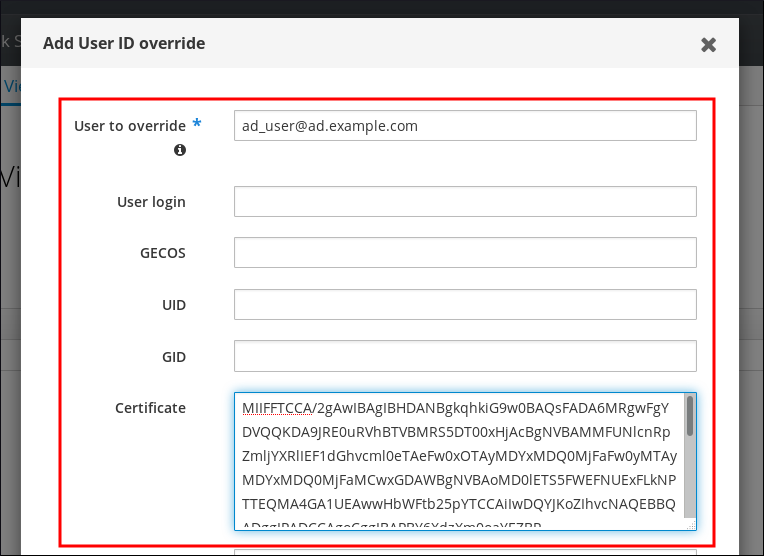
In the
User to overridefield, enterad_user@ad.example.com. Copy and paste the certificate of
ad_userinto theCertificatefield.그림 14.4. Configuring the User ID override for an AD user
-
Click
Add.
Verification
Verify that the user and certificate are linked:
Use the
sss_cacheutility to invalidate the record ofad_user@ad.example.comin the SSSD cache and force a reload of thead_user@ad.example.cominformation:# sss_cache -u ad_user@ad.example.comRun the
ipa certmap-matchcommand with the name of the file containing the certificate of the AD user:# ipa certmap-match ad_user_cert.pem -------------- 1 user matched -------------- Domain: AD.EXAMPLE.COM User logins: ad_user@ad.example.com ---------------------------- Number of entries returned 1 ----------------------------
The output confirms that you have certificate mapping data added to ad_user@ad.example.com and that a corresponding mapping rule defined in Adding a certificate mapping rule if the AD user entry contains no certificate or mapping data exists. This means that you can use any certificate that matches the defined certificate mapping data to authenticate as ad_user@ad.example.com.

'%20d='M201.5%20305.5c-13.8%200-24.9-11.1-24.9-24.6%200-13.8%2011.1-24.9%2024.9-24.9%2013.6%200%2024.6%2011.1%2024.6%2024.9%200%2013.6-11.1%2024.6-24.6%2024.6zM504%20256c0%20137-111%20248-248%20248S8%20393%208%20256%20119%208%20256%208s248%20111%20248%20248zm-132.3-41.2c-9.4%200-17.7%203.9-23.8%2010-22.4-15.5-52.6-25.5-86.1-26.6l17.4-78.3%2055.4%2012.5c0%2013.6%2011.1%2024.6%2024.6%2024.6%2013.8%200%2024.9-11.3%2024.9-24.9s-11.1-24.9-24.9-24.9c-9.7%200-18%205.8-22.1%2013.8l-61.2-13.6c-3-.8-6.1%201.4-6.9%204.4l-19.1%2086.4c-33.2%201.4-63.1%2011.3-85.5%2026.8-6.1-6.4-14.7-10.2-24.1-10.2-34.9%200-46.3%2046.9-14.4%2062.8-1.1%205-1.7%2010.2-1.7%2015.5%200%2052.6%2059.2%2095.2%20132%2095.2%2073.1%200%20132.3-42.6%20132.3-95.2%200-5.3-.6-10.8-1.9-15.8%2031.3-16%2019.8-62.5-14.9-62.5zM302.8%20331c-18.2%2018.2-76.1%2017.9-93.6%200-2.2-2.2-6.1-2.2-8.3%200-2.5%202.5-2.5%206.4%200%208.6%2022.8%2022.8%2087.3%2022.8%20110.2%200%202.5-2.2%202.5-6.1%200-8.6-2.2-2.2-6.1-2.2-8.3%200zm7.7-75c-13.6%200-24.6%2011.1-24.6%2024.9%200%2013.6%2011.1%2024.6%2024.6%2024.6%2013.8%200%2024.9-11.1%2024.9-24.6%200-13.8-11-24.9-24.9-24.9z'/%3e%3c/svg%3e)