 红帽全球峰会
此内容没有您所选择的语言版本。
7.2. Adding the Business Rule Task
A Business Rule Task is a task which fires rules that belong to a certain ruleflow group.
To add a Business Rule Task to your process, do the following:
- Open your Business Process in Process Designer: in Project Explorer, select the
HelloWorldproject, the org.bpms package, click on BUSINESS PROCESSES and click theHelloWorldprocess.Note
Make sure to select the org.bpms package. Selection of an incorrect package causes the deployment to fail. - In the displayed Business Process designer with the helloworld process, expand the Object Library palette with Process Elements: click the double-arrow button (
 ) in the upper left hand corner of the Business Process designer tab.
- Expand the Tasks menu and drag-and-drop the Business Rule task to the canvas on the right.Adjust flow connections so as to integrate the task into the workflow.
- Select the Business Rule Task and define its properties in the Properties panel:
- Name:
BusinessRule - Ruleflow Group:
helloworldgroupThe Ruleflow Group property defines the group of rules that should be fired when the Task is being executed. In this example, only one rule, thehelloworldrulerule defined in thehelloworldrule.drlfile, is present in thehelloworldgroupgroup.
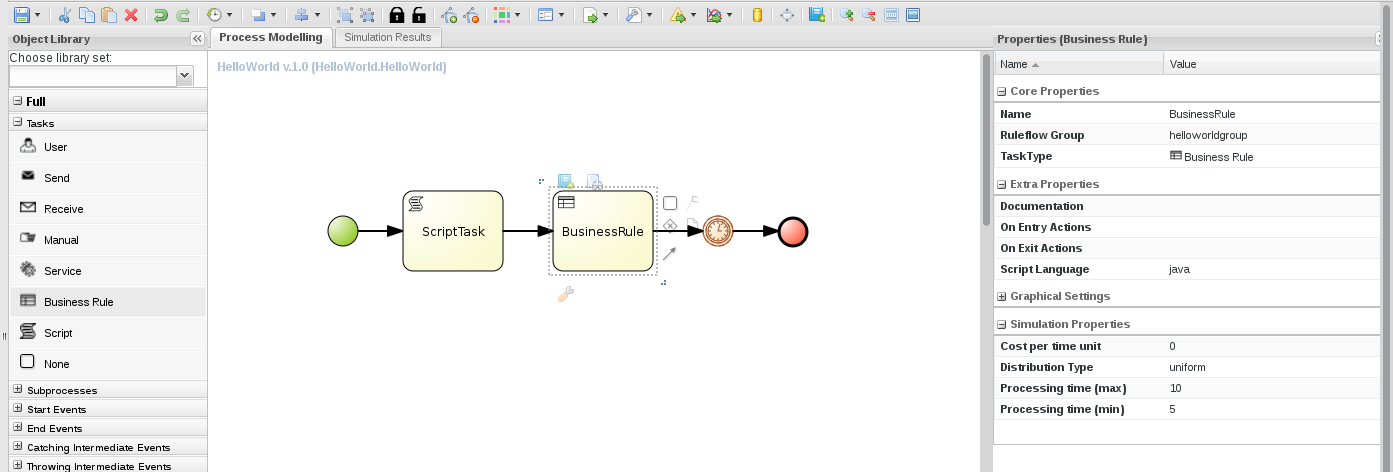
Figure 7.1. The helloworld process with the Business Rule Task and its properties
- Click the save button to save the changes.

'%20d='M201.5%20305.5c-13.8%200-24.9-11.1-24.9-24.6%200-13.8%2011.1-24.9%2024.9-24.9%2013.6%200%2024.6%2011.1%2024.6%2024.9%200%2013.6-11.1%2024.6-24.6%2024.6zM504%20256c0%20137-111%20248-248%20248S8%20393%208%20256%20119%208%20256%208s248%20111%20248%20248zm-132.3-41.2c-9.4%200-17.7%203.9-23.8%2010-22.4-15.5-52.6-25.5-86.1-26.6l17.4-78.3%2055.4%2012.5c0%2013.6%2011.1%2024.6%2024.6%2024.6%2013.8%200%2024.9-11.3%2024.9-24.9s-11.1-24.9-24.9-24.9c-9.7%200-18%205.8-22.1%2013.8l-61.2-13.6c-3-.8-6.1%201.4-6.9%204.4l-19.1%2086.4c-33.2%201.4-63.1%2011.3-85.5%2026.8-6.1-6.4-14.7-10.2-24.1-10.2-34.9%200-46.3%2046.9-14.4%2062.8-1.1%205-1.7%2010.2-1.7%2015.5%200%2052.6%2059.2%2095.2%20132%2095.2%2073.1%200%20132.3-42.6%20132.3-95.2%200-5.3-.6-10.8-1.9-15.8%2031.3-16%2019.8-62.5-14.9-62.5zM302.8%20331c-18.2%2018.2-76.1%2017.9-93.6%200-2.2-2.2-6.1-2.2-8.3%200-2.5%202.5-2.5%206.4%200%208.6%2022.8%2022.8%2087.3%2022.8%20110.2%200%202.5-2.2%202.5-6.1%200-8.6-2.2-2.2-6.1-2.2-8.3%200zm7.7-75c-13.6%200-24.6%2011.1-24.6%2024.9%200%2013.6%2011.1%2024.6%2024.6%2024.6%2013.8%200%2024.9-11.1%2024.9-24.6%200-13.8-11-24.9-24.9-24.9z'/%3e%3c/svg%3e)