 红帽全球峰会
此内容没有您所选择的语言版本。
Chapter 5. Hello World project
To demonstrate basic features of Red Hat JBoss BPM Suite, this chapter will instruct you on how to set up the
Hello World project with a Hello World business process. All that this business process will do, is display the Hello World! message and finish execution.
You will be instructed to do the following:
- Create a Hello World repository in the Artifact repository.
- Create the Hello World Project with the
HelloWorldbusiness process definition. - Model the Hello World process logic in the business process using the graphical Process Designer tool.
- Build and deploy the project on the locally running Execution Engine.
- Run the Hello World process.
- Monitor the Process execution.
5.1. Creating repository structure
复制链接链接已复制到粘贴板!
All business assets live in repositories that live in Organizational Units, which are directories in the Artifact repository. By default, the Artifact repository does not contain any organizational units. Therefore to be able to create your own business assets, such as a business process, you need to create an organizational unit in the Artifact repository and a (Git) repository in it. The repository can then contain your Project. A project can contain an arbitrary package structure, which allows you to structure its content into logical "directory" structure. Any package can contain your business assets (for more information on the Artifact repository, refer to the Red Hat JBoss BPMS User Guide).
To create the repository structure, do the following:
- Open Business Central in your web browser (if running locally http://localhost:8080/business-central) and log in as a user with the
adminrole (helloworlduser). - Create an organizational unit in the Artifact repository:
- Go to
. - On the perspective menu, click
. - In the displayed Organizational Unit Manager view, click .In the displayed Add New Organizational Unit dialog box, define the unit properties and click :
- Name:
helloworld - Owner:
helloworlduser
- Create a new repository in the helloworld organizational unit:
- Go to
. - On the perspective menu, click
. - In the displayed Create Repository dialog box, define the repository properties:
- Repository Name:
helloworldrepo - Organizational Unit:
helloworld
- Go to
. - In the Project Explorer in the organizational unit drop-down box, select
helloworld, and in the repository drop-down box selecthelloworldrepo.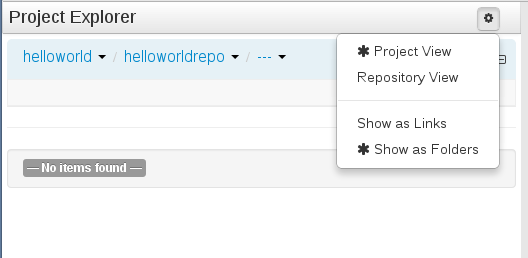
Figure 5.1. Selecting the
helloworldreporepository in thehelloworldorganizational group in Project Explorer - Create a project in the
helloworldrepository:- On the perspective menu, go to
- In the displayed Create new dialog box, define your Project properties:
- Resource Name (project name):
HelloWorld - Path:
default://master@helloworldrepo/
- In the New Project Wizard dialog, define the maven properties of the Project. Press Enter after making each entry:
- Group ID:
org.bpms - Artifact ID:
HelloWorld - Version ID:
1.0
- Click .

'%20d='M201.5%20305.5c-13.8%200-24.9-11.1-24.9-24.6%200-13.8%2011.1-24.9%2024.9-24.9%2013.6%200%2024.6%2011.1%2024.6%2024.9%200%2013.6-11.1%2024.6-24.6%2024.6zM504%20256c0%20137-111%20248-248%20248S8%20393%208%20256%20119%208%20256%208s248%20111%20248%20248zm-132.3-41.2c-9.4%200-17.7%203.9-23.8%2010-22.4-15.5-52.6-25.5-86.1-26.6l17.4-78.3%2055.4%2012.5c0%2013.6%2011.1%2024.6%2024.6%2024.6%2013.8%200%2024.9-11.3%2024.9-24.9s-11.1-24.9-24.9-24.9c-9.7%200-18%205.8-22.1%2013.8l-61.2-13.6c-3-.8-6.1%201.4-6.9%204.4l-19.1%2086.4c-33.2%201.4-63.1%2011.3-85.5%2026.8-6.1-6.4-14.7-10.2-24.1-10.2-34.9%200-46.3%2046.9-14.4%2062.8-1.1%205-1.7%2010.2-1.7%2015.5%200%2052.6%2059.2%2095.2%20132%2095.2%2073.1%200%20132.3-42.6%20132.3-95.2%200-5.3-.6-10.8-1.9-15.8%2031.3-16%2019.8-62.5-14.9-62.5zM302.8%20331c-18.2%2018.2-76.1%2017.9-93.6%200-2.2-2.2-6.1-2.2-8.3%200-2.5%202.5-2.5%206.4%200%208.6%2022.8%2022.8%2087.3%2022.8%20110.2%200%202.5-2.2%202.5-6.1%200-8.6-2.2-2.2-6.1-2.2-8.3%200zm7.7-75c-13.6%200-24.6%2011.1-24.6%2024.9%200%2013.6%2011.1%2024.6%2024.6%2024.6%2013.8%200%2024.9-11.1%2024.9-24.6%200-13.8-11-24.9-24.9-24.9z'/%3e%3c/svg%3e)