 红帽全球峰会
此内容没有您所选择的语言版本。
7.4. Instantiating business process
To create an instance of the
Hello World process, that is, to run the business process, do the following:
- Click
on the main menu. - On the displayed Process Definitions tab, locate the
Hello World. You might need to click to have the deployment displayed on the list. - Click the (
 ) button next to the Process definition entry and in the Form dialog box, click the play (
 ) button to confirm that you want to instantiate the process.
The Process is instantiated with the currently logged-in user as the process owner and the process form is displayed (the form can serve to request input from a user on Process instantiation if defined; refer to the Red Hat JBoss BPMS User Guide).
) button to confirm that you want to instantiate the process.
The Process is instantiated with the currently logged-in user as the process owner and the process form is displayed (the form can serve to request input from a user on Process instantiation if defined; refer to the Red Hat JBoss BPMS User Guide).
The Process Instance Details view is displayed with details about the started Process instance. The
Hello World! message appears in standard output twice, typically the terminal emulator in which the server was started. Then the Process instance waits on the Timer Event. Click on the to see the current execution status.
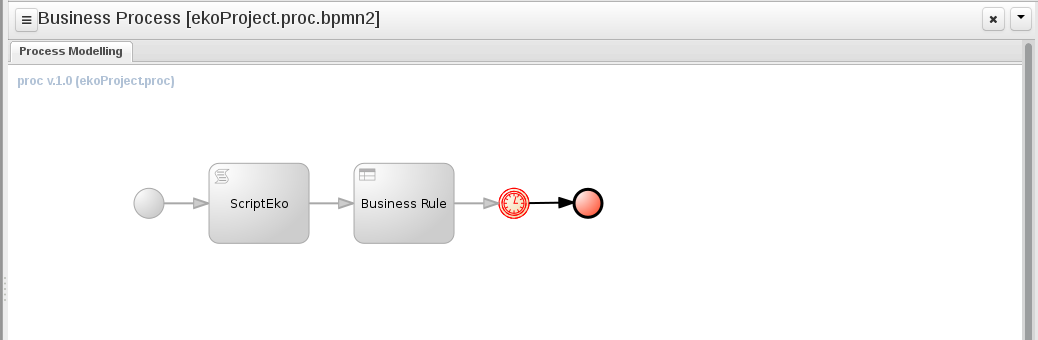
Figure 7.3. HelloWorld realtime execution diagram: the Timer Event being executed

'%20d='M201.5%20305.5c-13.8%200-24.9-11.1-24.9-24.6%200-13.8%2011.1-24.9%2024.9-24.9%2013.6%200%2024.6%2011.1%2024.6%2024.9%200%2013.6-11.1%2024.6-24.6%2024.6zM504%20256c0%20137-111%20248-248%20248S8%20393%208%20256%20119%208%20256%208s248%20111%20248%20248zm-132.3-41.2c-9.4%200-17.7%203.9-23.8%2010-22.4-15.5-52.6-25.5-86.1-26.6l17.4-78.3%2055.4%2012.5c0%2013.6%2011.1%2024.6%2024.6%2024.6%2013.8%200%2024.9-11.3%2024.9-24.9s-11.1-24.9-24.9-24.9c-9.7%200-18%205.8-22.1%2013.8l-61.2-13.6c-3-.8-6.1%201.4-6.9%204.4l-19.1%2086.4c-33.2%201.4-63.1%2011.3-85.5%2026.8-6.1-6.4-14.7-10.2-24.1-10.2-34.9%200-46.3%2046.9-14.4%2062.8-1.1%205-1.7%2010.2-1.7%2015.5%200%2052.6%2059.2%2095.2%20132%2095.2%2073.1%200%20132.3-42.6%20132.3-95.2%200-5.3-.6-10.8-1.9-15.8%2031.3-16%2019.8-62.5-14.9-62.5zM302.8%20331c-18.2%2018.2-76.1%2017.9-93.6%200-2.2-2.2-6.1-2.2-8.3%200-2.5%202.5-2.5%206.4%200%208.6%2022.8%2022.8%2087.3%2022.8%20110.2%200%202.5-2.2%202.5-6.1%200-8.6-2.2-2.2-6.1-2.2-8.3%200zm7.7-75c-13.6%200-24.6%2011.1-24.6%2024.9%200%2013.6%2011.1%2024.6%2024.6%2024.6%2013.8%200%2024.9-11.1%2024.9-24.6%200-13.8-11-24.9-24.9-24.9z'/%3e%3c/svg%3e)